Home Blog Page 5

Instrument Power Supply Load Calculator: 7 Critical Steps for Accurate 24VDC Power Supply Sizing

0
Instrument Power Supply Load Calculator: 7 Critical Steps for Accurate 24VDC Power Supply Sizing
Table of Contents

The Instrument Power Supply Load Calculator is essential for accurate 24VDC power supply sizing in industrial automation systems. In plant environments, even a small error in instrument load calculation can create unstable loop voltage, nuisance trips, communication loss, or complete shutdown of a control panel. For instrumentation engineers, control engineers, EPC teams, and plant maintenance professionals, power supply sizing is not a routine task. It is a reliability decision that affects uptime, safety, and operating cost.

When a power supply is undersized, the failure may not appear immediately. A transmitter may reset during peak demand, a relay may chatter, a solenoid valve may fail to actuate, or a PLC rack may drop communication under load. These issues often begin as intermittent faults and later become production losses. That is why the Instrument Power Supply Load Calculator should be used at the design stage, before panel fabrication and before field commissioning.

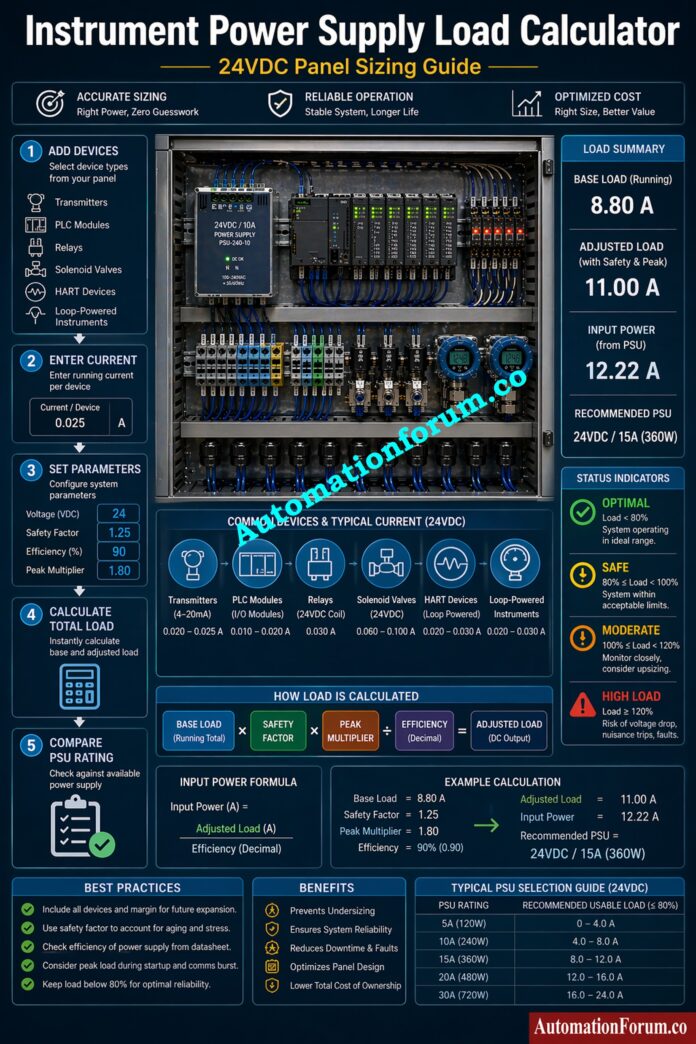
This calculator helps engineers estimate total current, total power, adjusted operating load, and safe power supply rating with practical engineering margins. It supports reliable panel design power calculation, field instrument current consumption review, and industrial automation power calculation for both new projects and retrofit systems.

⚡ Instrument Power Supply Load Calculator

AutomationForum.co · Free Automation Engineering Calculator

⚙️ Global System Parameters

🔌 Connected Field Devices

Device V mA Qty

PLC Panel FAT Checklist for Success: Factory Acceptance Test (FAT) of a PLC Panel: A Step-by-Step Basic Guide

Why Instrument Power Supply Load Calculator is Important - Instrument Power Supply Load Calculator:

A control panel is only as reliable as its weakest power source. In practical engineering, a 24VDC bus rarely serves a single device. It usually feeds transmitters, PLC input modules, output cards, relays, loop powered devices, indicator lamps, and solenoids. Each device has a distinct current profile, and the total load is rarely equal to the sum shown on a nameplate.

A supply that is too small generates a number of problems. First, when the current goes up, the voltage drop goes up too, especially when there are a lot of cables and panels. Second, the supply may be in constant overload, which makes things hotter and shortens the life of the parts. Third, PLC and DCS systems become unstable when the supply can’t keep up with demand during startup or peak times. Fourth, efficiency losses increase when a power supply operates near its limit for long periods. These issues are especially critical in process plants, utility skids, machine panels, and distributed I O systems where uptime matters.

The instrument load calculation process helps prevent these failures by translating device currents into a realistic power demand. It also supports better control panel power supply sizing during detailed engineering, procurement, and testing.

How Power Supply Load Calculation Works -  - Instrument Power Supply Load Calculator:
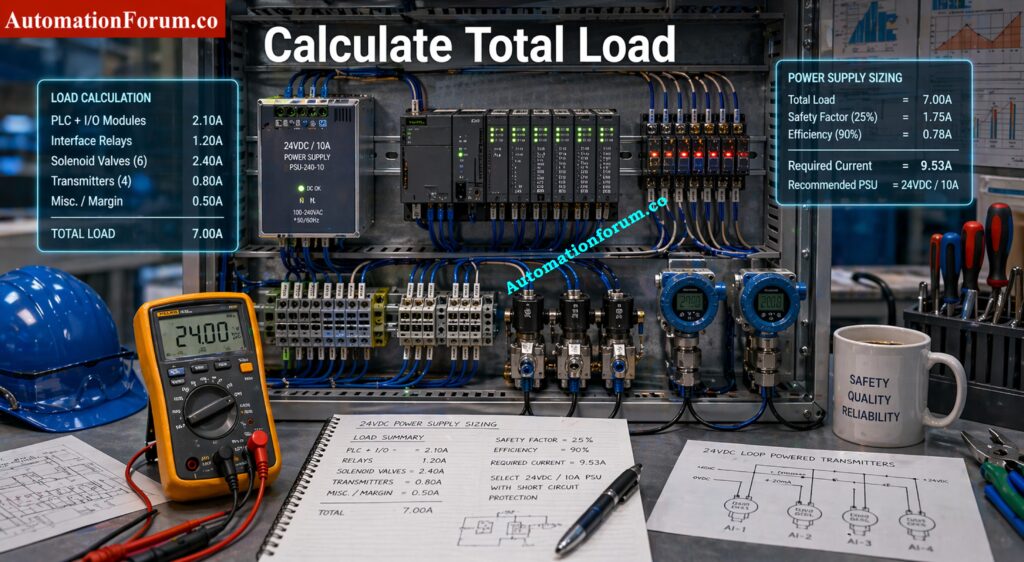
The core idea behind power supply sizing is simple, but the engineering detail matters.

Total current is the sum of the current drawn by all connected devices under normal operating conditions. In an instrumentation panel, this may include multiple transmitters, a PLC rack, I O modules, relays, indicators, communication devices, and solenoids. The calculator combines these values to produce base load current.

IS Barrier Earth Fault Current Calculator: IS Barrier Earth Fault Current Calculator | Intrinsic Safety Loop Design Tool

Total power is calculated by multiplying current by voltage. In a 24VDC system, even moderate current can create a significant power demand. A control panel design should always convert current based load into total watts so the engineer can compare it with the power supply rating and thermal limits.

A safety factor is not waste. It is engineering margin. It protects the system against device tolerance variation, future additions, ambient temperature changes, and short term load spikes. For most power supply sizing for transmitters and PLC power supply calculation tasks, a realistic safety factor improves reliability without oversizing the panel unnecessarily.
Peak Current Handling -  - Instrument Power Supply Load Calculator:

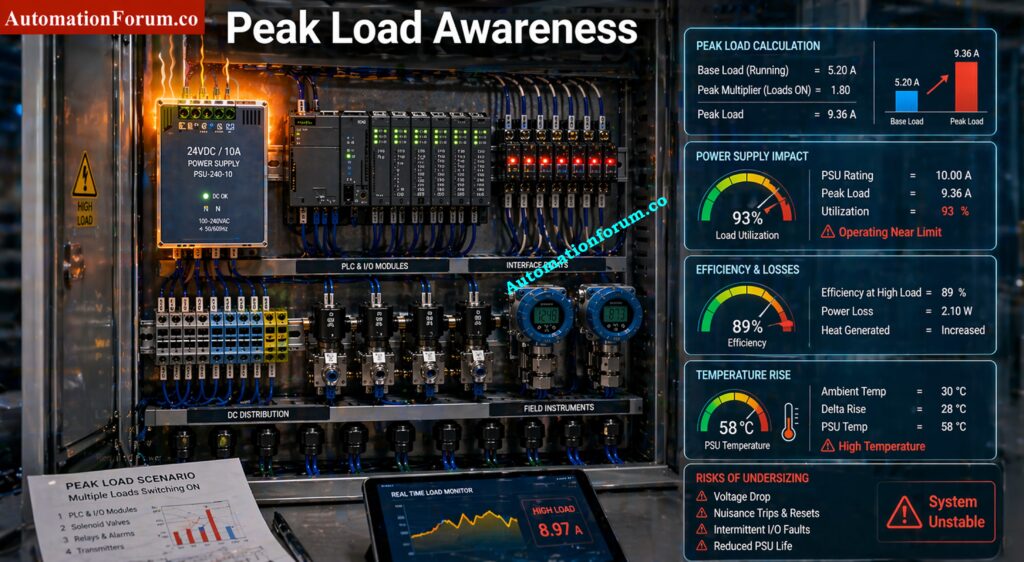
Some devices draw more current during startup than during steady state operation. Solenoid valves, relays, and communication modules can create short duration demand peaks. The peak multiplier accounts for this condition so the supply can handle dynamic loading.

No power supply is perfectly efficient. Some input energy is lost as heat. That heat must be considered in panel design power calculation because it affects temperature rise, ventilation needs, and long term reliability.

Why Redundant Power Supplies Prevent Failures: What is a redundant power supply?

Instrument Power Supply Calculator Inputs Explained -  - Instrument Power Supply Load Calculator:
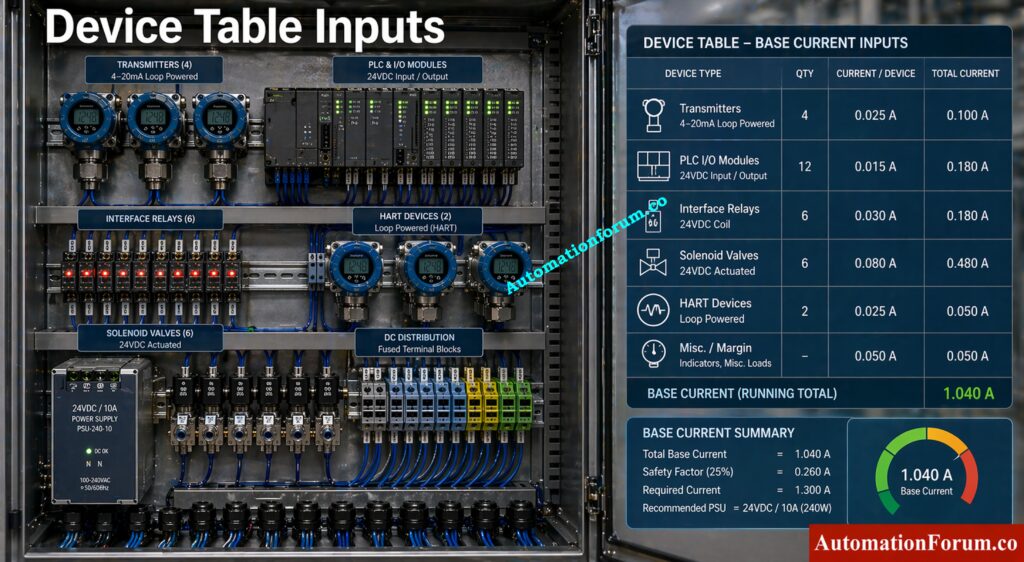
The safety factor allows the engineer to add design margin to the total connected load. In industrial automation systems, this margin helps cover spare capacity, future expansion, and field variation. A common design practice is to choose a value that is high enough to protect the system but not so high that it creates unnecessary cost or footprint. For instrument power supply load calculator use, the safety factor is one of the most important engineering inputs.

Panel Door Earth Bonding for Safety: Panel Door Earth Bonding Procedure: Ensuring Safety and Reliability

Nominal voltage is the design voltage of the DC system, often 24VDC in control panels. This value is used to convert current into power and to estimate whether the supply can maintain stable output under actual load conditions.

Efficiency represents how much of the input power becomes usable output power. A higher efficiency means lower heat generation and better energy performance. In practical control panel power supply sizing, this affects cabinet temperature and reduces derating stress.

Peak multiplier allows the engineer to model short term load spikes. This is especially important when solenoids, relays, or multiple transmitters energize at the same time. In real installations, peak demand can be the difference between stable operation and a nuisance fault.

Check Instrument Loop mA Safely Today: How to Safely Check the mA Current of an Instrument Loop Using a Multimeter

The device table is where you enter individual load values.

  • A transmitter typically has a low continuous current but may be critical because it supports process measurement and control. 
  • A PLC IO module may consume more current than expected when multiple channels are active. 
  • A relay draws coil current and may introduce switching peaks. 
  • A solenoid valve can have a relatively higher energizing demand and should always be counted carefully. 
  • A HART device may seem little on paper, but it nevertheless helps with loop-powered device calculations and the overall bus burden.

When you can, always utilize real datasheet figures instead of making assumptions when you want to know how much current field instruments require.

Fire Alarm Battery Calculator for Backup Sizing: Fire Alarm Battery Size Calculator – Professional Tool for Accurate Backup Power Sizing

Step-by-Step Guide to Using the Power Supply Load Calculator -  - Instrument Power Supply Load Calculator:
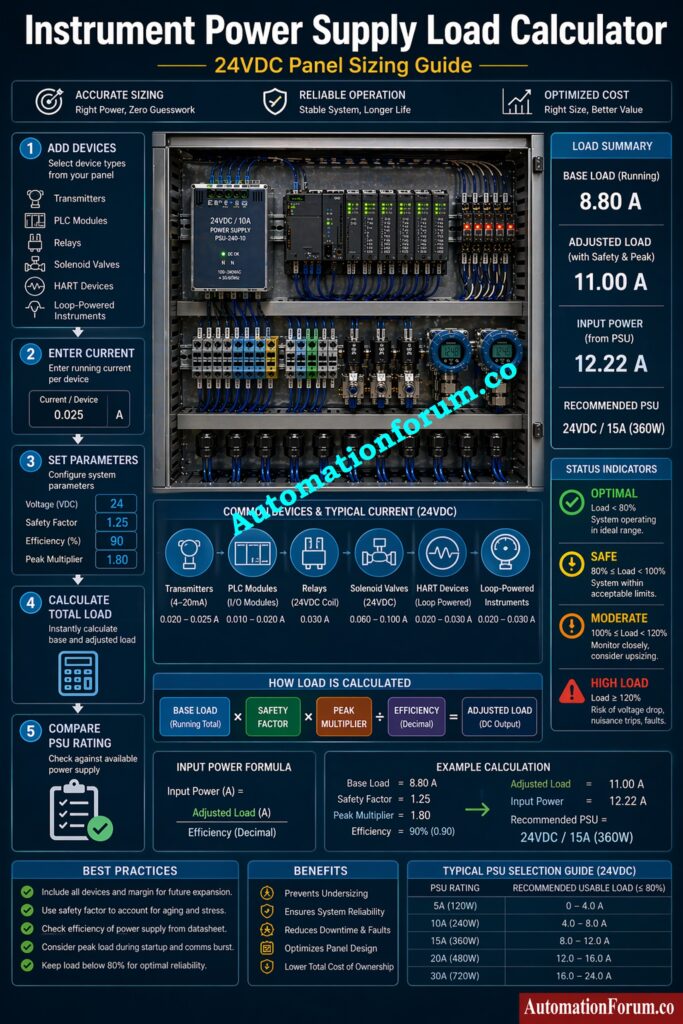
First, add all the devices that will get power from the same DC supply. Include any other 24VDC loads, such as transmitters, PLC modules, relays, and solenoids.

Second, enter the current value for each device. Use the real operating current wherever possible. For engineering estimate work, use vendor data sheets or proven project standards.

Third, make that the nominal voltage, safety factor, efficiency, and peak multiplier are all configured to meet the design requirements for the panel.

Fourth, click “Calculate” and go over the results. The tool will add up the base load, add an engineering margin, guess the ultimate power supply rating, and let you know if the chosen supply is safe.

Fifth, if necessary, compare the result to the actual catalog rating and choose the next size that fits. In panel design, it is always better to choose a supply with proper margin than to run a unit at the edge of its limit.

This workflow is practical for panel design engineers, instrument engineers, and EPC reviewers who need fast and repeatable calculations.

This section confirms the engineering assumptions used in the calculation. It usually includes nominal voltage, safety factor, efficiency, and peak multiplier. These values should be reviewed first because they define the whole sizing basis.

Wellhead Control Panel Explained for Operators: Wellhead Control Panel

Base load is the sum of all connected device currents before any margin is added. It shows the actual demand of the system in normal conditions.

Adjusted load includes the selected safety factor and peak demand consideration. This is the value that better represents real operating stress on the supply.

PSU Rating -  - Instrument Power Supply Load Calculator:

PLC Remote I O Card Failure Causes: Root Cause Analysis of PLC Remote I/O Panel (Point I/O Panel) Cards Failure Issues

Input power reflects what the supply must draw from the source to deliver the required DC output. This is useful for heat management, feeder sizing, and cabinet thermal study.

Status Indicators

The status indicator may show categories such as Optimal, Safe, Moderate, or High Load.

Optimal usually means the supply is operating with comfortable spare capacity.

Safe indicates the design is acceptable and within normal limits.

Moderate means the margin is lower and the engineer should review expansion plans.

High Load means the power supply is close to its limit and should be upsized or the circuit load should be reduced.

Understanding these categories helps prevent control panel overload and improves long term reliability.

Consider a 24VDC instrumentation panel serving one process skid.

The panel includes 10 transmitters at 25 mA each, 5 solenoid valves at 250 mA each during energization, and 1 PLC rack with I O modules drawing 800 mA. The base current becomes 10 times 25 mA plus 5 times 250 mA plus 800 mA, which gives a practical total load for the calculator.

Now add a safety factor of 25 percent because the skid may later include more field devices. Use 85 percent efficiency because no supply is perfect, and apply a peak multiplier of 1.2 because multiple outputs may energize together.

The engineering decision here is not just to pick a supply that barely matches the current. The correct action is to choose a PSU size that keeps the system stable during startup, high ambient temperature, and future loop additions. In many plant projects, this means selecting the next higher standard rating instead of the absolute minimum.

This kind of industrial automation power calculation prevents nuisance faults, supports better commissioning, and reduces maintenance callouts.

Why Cable Shields Ground at One End: Why the Cable Shield is Grounded Only at the PLC or Control Panel Side

Best Practices for Control Panel Power Supply Design -  - Instrument Power Supply Load Calculator:

  • Always keep spare capacity in the power supply design. Control panels often grow after the first commissioning cycle.
  • Consider temperature derating. A supply that works well at 25 degree Celsius may deliver less usable output inside a hot enclosure.
  • Think on how to grow in the future. The first calculation should take into account spare I O, extra transmitters, and further retrofits.
  • Use redundancy where uptime is critical. In some process units, dual supplies or redundant feed arrangements are worth the additional cost.
  • Check panel ventilation. Heat is one of the most overlooked causes of poor power supply performance.

These practices are especially important in power supply sizing for transmitters, PLC panels, and field mounted automation skids.

PLC Control Panel Inspection Checklist Complete: Running Inspection Checklist of PLC Components in Control Panels

  • During the early design phase of industrial automation projects to ensure the correct sizing of 24VDC power supplies
  • Before making the control panel to check the instrument load calculation
  • During thorough engineering to finish sizing the power supply for the control panel
  • Before commissioning to avoid problems with overload and voltage drop
  • When adding more field sensors or making PLC systems bigger
  • When adding to or changing existing panels
  • To make sure that industrial automation power computation is safe and accurate.

Instrumentation Panel Heat Load Calculator Guide: Instrumentation Panel Heat Load Calculator – Complete Engineering Guide for Panel Cooling Design

  • Instrumentation engineers for analyzing how much current field instruments use
  • Control system engineers figure out how much electricity a PLC needs
  • Electrical design professionals who figure out how much electricity a panel needs
  • EPC engineers work on the design and validation stages of a project.
  • Panel builders and system integrators for sizing the power supply for control panels
  • Engineers who fix problems with power and other systems
  • Plant technicians who fix problems and make changes in the field
  • Consultants and project reviewers make sure that the design is correct and follows the rules.
  • In control panel design offices throughout the engineering phase
  • In EPC engineering centers to check the design of a project
  • In factories that use automated production systems
  • In industries that use processes, such as chemical, oil and gas, and power plants
  • In PLC panels and DCS marshalling cabinets
  • In junction boxes in the field and remote IO panels
  • In packaged units and skid-mounted automation systems
  • During retrofit projects to check the capability of the current power supply
  • Wherever you need to calculate the load of a loop-powered device or an instrument

Instrument Cable Voltage Drop Calculation Guide: How to do the voltage drop calculation of instrument cable?

  • When thinking about how PLC inputs work, the boundaries of electrical interfaces, and how reliable control systems are, IEC 61131 2 is important.
  • UL 508 matters for industrial control panel equipment selection, marking, and safe application in North American style panels.
  • NEC guidance is important for wiring, feeder protection, conductor sizing, and general installation safety.

These standards do not replace engineering judgment. They support it. For practical control panel power supply sizing, compliance should always be matched with real load calculation.

Bently Nevada GAP Voltage Explained Clearly: GAP voltage of Bently Nevada Vibration Probe

  • One common mistake is ignoring peak current. 
  • Another is assuming efficiency is higher than the actual catalog value. 
  • A third mistake is failing to reserve spare capacity for future field devices. 
  • A fourth mistake is selecting a power supply only by output current and not by thermal behavior, cabinet arrangement, and duty cycle. 
  • Many panel problems begin because the engineer used a rough estimate instead of a true instrument load calculation.

Accurate LVDT Voltage Calculator Online: Linear Variable Differential Transformer (LVDT) Output Voltage Calculator

Add all device currents, apply a safety factor, account for efficiency losses, and choose a PSU with enough headroom for peak demand and future expansion.

Safety factor is the engineering margin added to the calculated load to improve reliability and reduce overload risk.

A normal transmitter may use a minimal amount of current, but the exact amount depends on the type of device, the loop arrangement, and the manufacturer’s specifications.

One kilowatt (kW) is equal to 1000 watts of electrical load, which means that devices that use 1000 watts together make up a 1 kW load.

It shows how much power all the electrical devices that are linked to a circuit use.

The formula for figuring out how much power a power supply has is: Power (W) = Voltage (V) x Current (A).

For AC systems, add the power factor: P = V × I × PF to get the right answer.

You may figure out the electrical load by using this formula: Load (W) = Voltage × Current × Power Factor.

The total load is the sum of all the loads from the devices that are connected to the system.

When the load factor is 50%, it signifies that the average load is half of the maximum load for a certain time.

It shows that the electrical system’s capacity is being used moderately.

Total load (kW) = Σ (V × I × PF) ÷ 1000 for all connected devices.
This converts total power consumption from watts into kilowatts for system sizing.

Add the current of the CPU, input modules, output modules, communication modules, and any accessories that share the same supply.

PLC Panel Installation Checklist You Need: Comprehensive PLC Panel Installation and Commissioning Checklist (Downloadable)

The supply may overheat, lose regulation, shut down, or cause connected instruments and PLCs to fail or reset.

Efficiency affects heat, energy loss, and usable output capacity inside the cabinet.

Yes, but only if the total load, peak demand, and noise sensitivity are properly evaluated.

Use actual loop current data, add all loops on the same supply, and include margin for future devices.

Reduce PLC Wiring Voltage Drop Fast: How to Calculate and Minimize Voltage Drop in PLC Wiring?

The Instrument Power Supply Load Calculator gives engineers a practical way to perform control panel power supply sizing with real industrial discipline. It supports 24VDC power supply sizing, PLC power supply calculation, panel design power calculation, and field instrument current consumption analysis in one place. Use it during design review, procurement, and commissioning to reduce risk and improve uptime. Bookmark this page, use the calculator for every new panel, and check our other PLC calculators and explore instrumentation design tools on AutomationForum.co.


Advanced Quiz on Impulse Line Installation in Process Industries

0
Advanced Quiz on Impulse Line Installation in Process Industries

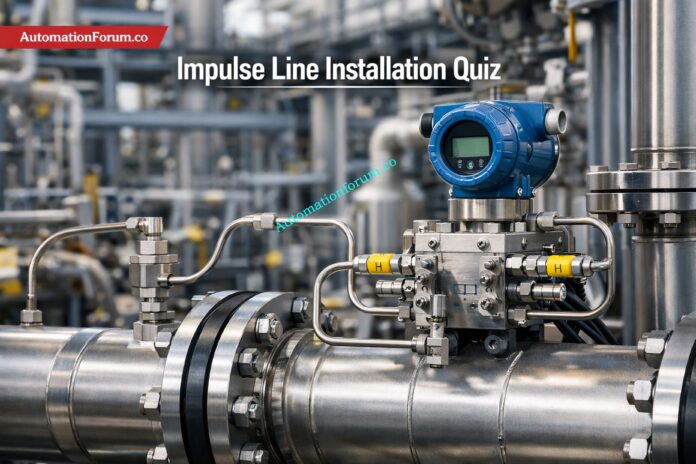
Impulse lines are the small-bore tubing systems that transmit process pressure from a tapping point to a pressure instrument, such as a DP transmitter, gauge, switch, or analyzer. In pressure, flow, and level measurement, their layout directly affects response, stability, and accuracy. Poor slope, long runs, trapped condensate, gas pockets, vibration, or leakage can distort readings and create false alarms or control errors. Correct material selection, routing, support, isolation, and drainage practices are therefore essential for reliable field performance in process industries. EPC teams must verify elevation, accessibility, and maintainability before startup, because installation mistakes are costly to correct later.

Advanced Quiz on Impulse Line Installation in Process Industries

Start of the Advanced Impulse Line Installation Quiz

This advanced quiz is designed for instrumentation engineers, technicians, EPC professionals, and commissioning teams who work with process pressure systems. It tests real-world knowledge of impulse line design, routing, slope, supports, materials, manifolds, vents, drains, and troubleshooting. Use each scenario to evaluate how field decisions affect measurement integrity, safety, and long-term maintainability in pressure, flow, level, and analyzer service applications.

1 / 25

Reverse reading after maintenance
After maintenance, a DP transmitter reads reverse differential pressure and the loop behaves opposite to expectation. What is the most likely cause?

2 / 25

Analyzer pressure tubing with an unavoidable low point
A sample line for an online analyzer must cross structural steel, and a low point cannot be fully eliminated. What is the best design alternative?

3 / 25

Pre-commissioning field verification
Which pre-commissioning check catches most impulse line installation errors before startup?

4 / 25

Fast control loop with long tubing run
A pressure loop is used in a fast-acting control system, but the impulse tubing is long and heavily fitted. What should the EPC engineer recommend?

5 / 25

Purging a blocked impulse line
A gas impulse line is suspected to be blocked by dust or condensate. Which purge practice is safest and most effective?

6 / 25

Analyzer tubing crossing a cold outdoor area
A gas analyzer sample line crosses a cold outdoor rack and forms condensate before entering the analyzer shelter. What is the best fix?

7 / 25

Safe maintenance in sour gas service
An EPC package includes impulse lines on a sour gas header. What arrangement best supports safe isolation and maintenance?

8 / 25

Wet leg in closed-vessel level measurement
A closed tank uses a wet leg on the reference side of the DP transmitter. Why is the wet leg important?

9 / 25

Steam line with unequal condensate pot placement
A steam differential pressure loop has condensate pots, but one pot is mounted farther from the tap than the other. What is the main risk?

10 / 25

Hidden high point in a liquid impulse line
A liquid impulse line has a concealed high point near a cable tray crossing. The transmitter output occasionally spikes during startup. What is the most likely issue?

11 / 25

Sluggish response after “improvement”
A loop becomes slower after commissioning because the field team added a snubber and extra tubing to “stabilize” it. What happened?

12 / 25

Hazardous service and leak minimization
An EPC team is designing impulse tubing for a toxic process line in hazardous area service. What practice most reduces leak points?

13 / 25

Closed tank level transmitter mounted too high
A closed vessel level DP transmitter is mounted above both tapping points, and the loop zero is drifting positive. What is the most likely cause?

14 / 25

Safe isolation before transmitter removal
A technician must remove a DP transmitter from a live process manifold. What is the correct high-level sequence for safe isolation?

15 / 25

Slurry service causing frequent impulse line blockage
A polymer slurry line repeatedly blocks standard impulse tubing within days of startup. What is the best process-instrument solution?

16 / 25

Liquid service with suspended solids

A slurry-like liquid is flowing in a horizontal line and the project requires pressure tapping for monitoring. What tap location best reduces plugging risk?

17 / 25

Tap location for dry gas on a horizontal line
A DP transmitter is being installed on a horizontal dry gas line. Which tap location is preferred to reduce liquid carryover risk?

18 / 25

Vibration near a reciprocating compressor
Impulse tubing near a reciprocating compressor begins cracking at compression fittings after several months. What is the best design improvement?

19 / 25

Outdoor impulse line freezing in winter
A water service impulse line freezes every winter and the transmitter output drifts after thawing. What is the most robust permanent fix?

20 / 25

Corrosive chloride service and tubing selection
A chemical plant wants to use 316SS impulse tubing for a chloride-bearing, humid service. The maintenance team has already seen pitting on similar lines. What is the best engineering response?

21 / 25

Analyzer sample tubing in wet hydrocarbon service
A wet hydrocarbon vapor sample is being routed to an analyzer shelter. The tubing condenses in an unheated section during night operation. What is the best EPC solution?

22 / 25

DP level measurement with unequal impulse lengths
A closed tank level transmitter has equal tap elevations, but the high-side impulse line is 5 m long and the low-side line is 3 m long, with the same fluid in both lines. What is the likely effect?

23 / 25

Clean liquid service with transmitter below taps
A liquid header is being instrumented for pressure indication. The transmitter is mounted below the pipe tap. Which impulse line arrangement is preferred?

24 / 25

Dry gas line on an elevated pipe rack
A natural gas line feeds a pressure transmitter installed at grade. The impulse line must cross a rack and the process fluid is dry gas with possible trace condensate. What is the best routing philosophy?

25 / 25

Steam service with unstable flow reading
A steam flow meter using a DP transmitter shows unstable readings after startup. Inspection finds one impulse leg rising and falling before reaching the transmitter, creating a local high point. What is the best corrective action?

Your score is

The average score is 82%

0%

Access 1000+ MCQs tailored for instrumentation engineers: Instrumentation and Process Control Quiz Hub – 1000+ MCQs for Engineers

#ImpulseLineInstallation #InstrumentationQuiz #DPTransmitter #ProcessInstrumentation #PressureMeasurement #IndustrialAutomation #ImpulseLineTroubleshooting #EngineeringQuiz #InstrumentationEngineering #ProcessIndustries #ControlSystems #EPCProjects #InstrumentationTraining #TechnicalQuiz #PlantMaintenance

Step-by-Step Troubleshooting Checklist for Closed Tank DP Type Level Transmitter

0
Step-by-Step Troubleshooting Checklist for Closed Tank DP Type Level Transmitter

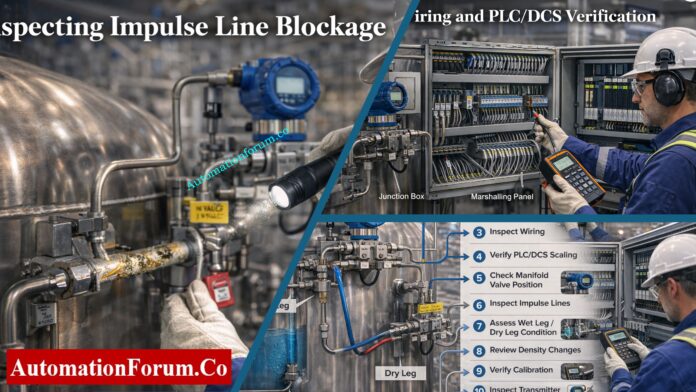
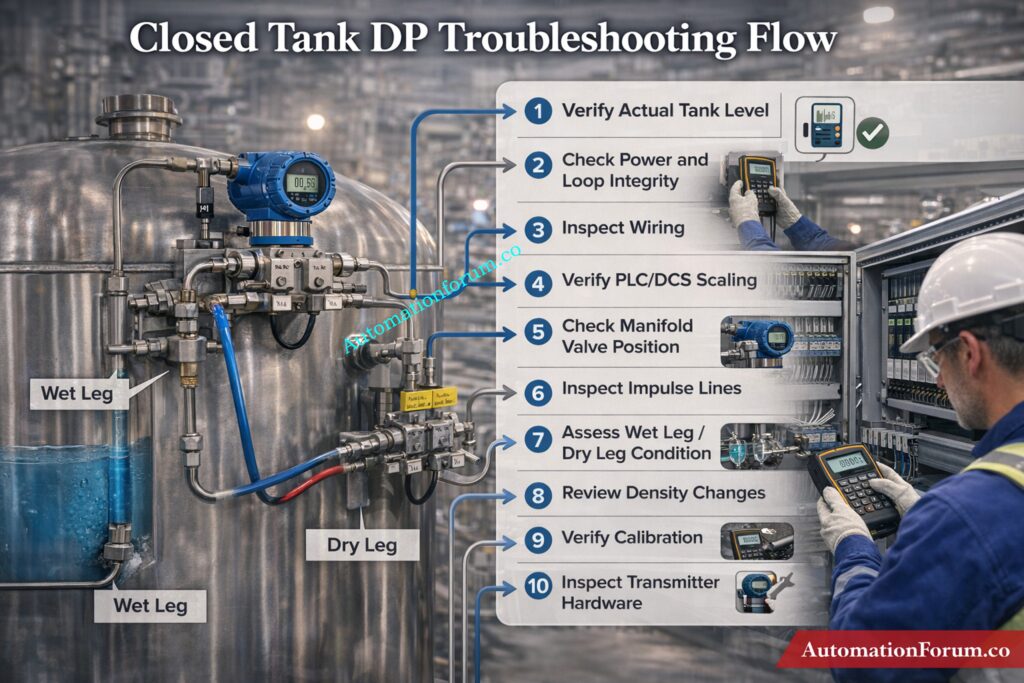
A closed tank DP level transmitter can show wrong, unstable, or fixed readings due to wet leg issues, dry leg problems, impulse line blockage, manifold valve errors, wiring faults, or PLC/DCS scaling mistakes. This step-by-step guide explains how to troubleshoot the problem in the correct order, starting from the process side and moving toward the transmitter and control system.

Troubleshoot Radar Level Issues Quickly: Step-by-Step Guide for Troubleshooting Radar Level Transmitters

When a closed tank DP level transmitter gives a wrong reading, the problem is usually not “the transmitter” alone. In field practice, the fault can sit in the impulse lines, wet leg, dry leg, manifold valves, wiring, PLC/DCS scaling, analog input card, or transmitter configuration. That is why troubleshooting must follow a fixed sequence. A random approach often wastes time and creates new errors.

The safest and fastest method is to start from the process side, then move to the electrical side, then to the control system, and only after that suspect the transmitter hardware.

Master DP Calibration Like a Pro: Field Calibration Procedure for DP Level Transmitter

Safety First Before Troubleshooting a DP Level Transmitter

Before any inspection, isolate the loop and make the area safe.

  • Apply LOTO.
  • Confirm whether the tank is under pressure or vacuum.
  • Depressurize impulse lines slowly.
  • Open vent and drain points only after confirming safe conditions.
  • Wear PPE suitable for the service fluid.
  • Check whether the process contains hot, toxic, corrosive, or flammable material.

This step is important because many impulse line systems retain pressure even when the transmitter appears inactive. A wrong opening sequence can cause spray, exposure, or a sudden pressure release.

Fix DP Level Errors Fast: Troubleshooting of DP Type Level Transmitter

Verify the Actual Tank Level  -Troubleshooting Checklist for Closed Tank DP Type Level Transmitter

Do not trust the transmitter until you confirm the real process condition.

Check the tank level using:

  • sight glass
  • local gauge
  • dip measurement
  • independent backup transmitter
  • operator observation if available

Then compare the actual level with the DCS indication and the transmitter local display.

Look at the nature of the error:

  • always high
  • always low
  • fluctuating
  • frozen
  • slowly drifting
  • reversing direction

This first comparison tells you where the fault is likely sitting.

  • Local display correct, DCS wrong → likely PLC/DCS, wiring, or analog input issue.
  • Both local and DCS wrong → likely process side, manifold, impulse line, or transmitter issue.
  • Reading changes only after maintenance → likely valve lineup, calibration, or wet leg problem.

Decode Boiler Drum Level Measurement: Understanding Boiler Drum Level Transmitters: Accurate DP Measurement Explained

A DP transmitter cannot work correctly without a stable loop.

Inspect the following:

  • 24 V DC supply
  • loop continuity
  • fuse or breaker status
  • terminal tightness
  • reverse polarity
  • cable damage
  • shield grounding
  • moisture inside the junction box
  • corrosion on terminals
  • loose ferrules or broken conductors

Typical symptoms help narrow it down:

  • 0 mA output: Usually power loss, open loop, broken wire, reversed wiring, or transmitter electronics failure.
  • 4 mA fixed output: May indicate no actual DP, equalizing valve open, or output held by configuration.
  • 20 mA fixed output: This can mean saturation, the improper range, or a high DP condition.
  • Unstable output: This is usually caused by weak wiring, a short circuit that happens sometimes, noise, or bad grounding.

Field tip: Check the loop current at the transmitter and see how it compares to the value in the control room. If the values don’t match, the problem is in the path that connects them.

Calibrate Level Devices With Confidence: Calibration Procedures for Level Measurement Devices

 Verify Wiring from Field to PLC/DCS - Troubleshooting Checklist for Closed Tank DP Type Level Transmitter

A large number of “instrument faults” are actually wiring or control system problems.

Trace the full signal chain:

  • transmitter terminals
  • junction box
  • cable run
  • marshalling cabinet
  • barrier or isolator
  • analog input module
  • PLC or DCS tag
  • SCADA or historian display

Check for these common issues:

  • wrong terminal connection
  • swapped polarity
  • open circuit in cable
  • short circuit between cores
  • shield grounded at both ends incorrectly
  • wrong cable pair used
  • corroded terminal block
  • damaged gland or water ingress
  • wrong barrier wiring
  • loose connection at marshalling
  • analog input channel wired to the wrong transmitter
  • Field transmitter reading is correct, PLC value is wrong
    This usually means scaling, input card setup, or tag mapping error.
  • The output of the transmitter varies, but the PLC value stays the same.
  • There could be a problem with the AI module, a broken loop, or the improper channel assignment.
    Likely input module issue, grounding problem, or electrical noise entering the signal path.
  • No response in PLC even though transmitter is active
    Check if the channel is mapped correctly and whether the I/O is healthy.

Stop Failures with PM Procedures: Collection of Preventive Maintenance (PM) Procedures for Instrumentation and Control Systems

If the wiring is healthy, the next suspect is the control system configuration.

Confirm the following:

  • correct analog input channel
  • correct tag name
  • correct transmitter range
  • correct LRV and URV
  • correct engineering units
  • proper 4–20 mA scaling
  • no accidental reverse action
  • no square root function enabled by mistake
  • no simulation mode active
  • no manual override or forced value
  • AI card status is healthy
  • no bad quality flag from the module
  • 4–20 mA transmitter configured as 0–10 V input
  • mA input scaled as pressure instead of level
  • wrong decimal placement
  • wrong tank range entered
  • tag linked to another transmitter
  • output forced in the logic
  • historian or SCADA showing old data
  • filtering or damping too high
  • bad raw count conversion

Look at both raw counts and engineering value.

  • If raw counts change but the engineering value does not, the scaling logic is wrong.
  • If raw counts do not change, the issue is probably wiring, input card, or transmitter output.

Unlock 15+ Level Calculators Now: 15+ Collection of Level Measurement Calculators for Industrial Instrumentation

The manifold must be in the correct operating position.

Normal arrangement:

  • HP valve open
  • LP valve open
  • equalizing valve closed

Also inspect for:

  • partially closed root valve
  • equalizing valve left open after maintenance
  • leaking drain valve
  • vent valve not closed properly
  • internal valve passing
  • constant reading
  • no response to actual level change
  • offset reading
  • low reading in a full tank
  • high reading in an empty tank

Field tip: A transmitter with the equalizing valve left open often behaves like both sides are seeing the same pressure. That produces a very misleading reading and is one of the first checks to perform after maintenance.

Test Your Closed Tank Troubleshooting Skills: Can You Solve Closed Tank Level Measurement Failures? Advanced Instrumentation Troubleshooting Quiz

Inspect the Impulse Lines - Troubleshooting Checklist for Closed Tank DP Type Level Transmitter

Impulse line blockage is one of the most common causes of bad DP level behavior in closed tanks.

Check both HP and LP lines for:

  • sludge
  • rust
  • scale
  • wax
  • slurry buildup
  • polymer deposits
  • crystals
  • trapped liquid
  • trapped gas
  • kinks
  • vibration damage
  • cracked tubing
  • leakage
  • wrong slope
  • Slow response → partial blockage
  • Frozen reading → complete blockage or valve issue
  • Drifting output → leak, temperature effect, or reference problem
  • Fluctuating output → air pockets, vapor, or unstable process pressure

In liquid service, air pockets in the impulse line can distort the pressure seen by the transmitter. In gas service, liquid accumulation can create a false head.

Field tip: If tapping the impulse line causes the reading to change, suspect a partial blockage or sticky deposit inside the line.

Dry Calibrate Displacer Transmitters Easily: Displacer Level Transmitter Calibration Calculator for Dry Calibration Step by Step Guide

This is critical in closed tank level measurement.

  • confirm the leg is actually filled
  • inspect for leakage
  • check evaporation loss
  • verify stable condensate level
  • check whether the reference liquid density changed
  • inspect for plugging at the connection point

A wet leg problem often shows up as a false high reading, especially when the tank is empty or nearly empty.

  • ensure the leg remains dry
  • check for condensation
  • inspect for liquid build-up
  • confirm there is no blockage in the vapor line

A dry leg problem often causes a false low reading or unstable output.


Wet leg empty = high reading error.
Dry leg filled = low reading error.

Choose Hybrid Level Methods Smarter: Hybrid Level Measurement Selection Procedure for EPC Instrumentation Engineers

A DP transmitter does not measure level in isolation. It measures pressure caused by liquid head. If the fluid density changes, the level indication changes too.

Check for:

  • temperature variation
  • product composition change
  • mixing or layering
  • concentration changes
  • slurry variation
  • SG mismatch in the calculation
  • reading drifts with temperature
  • transmitter looks fine, but indicated level is wrong
  • readings differ between batches
  • same level gives different output in different operating conditions

This is common in tanks where the product is not constant or where the process temperature changes significantly.

Challenge Your Drum Level Control Knowledge: Three Element Drum Level Control System – Advanced Quiz for Instrumentation Engineers

Verify Calibration, Zero and Span - Troubleshooting Checklist for Closed Tank DP Type Level Transmitter

Once the process and wiring checks are complete, inspect calibration.

Check:

  • zero trim
  • span trim
  • LRV
  • URV
  • output linearity
  • correct unit conversion
  • correct level-to-pressure relationship
  • zero shifted during maintenance
  • wrong span entered
  • transmitter ranged for the wrong tank height
  • incorrect engineering units
  • bad conversion from pressure to level
  • transmitter not re-trimmed after reinstalling impulse lines

Isolate the transmitter properly, apply known pressure values, and compare the current output to the expected result. Do not assume a replacement transmitter is calibrated correctly just because it is new.

Maximize Radar Level System Performance: Checklist for Best Radar Level Measurement & Control System Performance

If all external checks are fine, then inspect the transmitter itself.

Look for:

  • damaged sensor diaphragm
  • blocked process port
  • moisture ingress
  • corroded terminals
  • failed electronics
  • unstable output after known calibration
  • display failure
  • internal diagnostic alarms
  • no output change with applied DP
  • output stuck at one value
  • erratic signal despite stable process and wiring
  • impossible zero or span correction
  • communication failure in a smart device

Hardware should be the last suspect after process, piping, electrical, and system checks are cleared.

Calculate Wet Leg Levels Accurately: Wet-Leg Level Calculation for DP Transmitters: Complete Guide for Instrumentation Design Engineers

For HART, Fieldbus, or other smart transmitters, the digital side can reveal problems that analog current alone will not show.

Check:

  • device tag
  • process variable status
  • diagnostics
  • damping
  • simulation mode
  • fail mode
  • write protection
  • communication quality
  • whether digital value matches analog output
  • analog output correct, digital value wrong
  • digital value correct, DCS still showing old data
  • transmitter in simulation mode
  • bad device status ignored in DCS
  • communication fault mistaken for measurement fault

Get Open Tank Calculations Right: Open Tank Level Transmitter Calculator – Complete Guide for EPC Instrumentation Engineers

Diagnose DP Level Transmitter Problems by Symptom - Troubleshooting Checklist for Closed Tank DP Type Level Transmitter
SymptomLikely Cause
Transmitter shows high level when the tank is emptyWet leg emptyLP reference lostManifold issueZero shift
Transmitter shows low level when the tank is fullHP impulse blockageDry leg condensationScaling errorWrong span
Reading fluctuatesAir or gas in impulse lineLoose wiringProcess pulsationPoor groundingUnstable pressure in the tank
Reading is constantEqualizing valve openBlocked impulse lineTransmitter frozenPLC overrideInput card issue
There is no outputPower lossBroken loopWiring faultTransmitter electronics failure
 Troubleshooting Checklist for Closed Tank DP Level Transmitter

A practical, field-ready checklist designed to quickly diagnose wrong, fluctuating, or fixed level readings in closed tank DP transmitters.

This step-by-step guide helps engineers identify root causes from process issues to wiring, scaling, and transmitter faults using a structured troubleshooting approach.

This usually happens due to a wet leg empty condition, loss of LP reference pressure, manifold misalignment, or zero shift causing false differential pressure.

If the wet leg is empty, the transmitter sees reduced LP pressure, which makes it look like the tank is full even when it is empty.

A fixed reading is usually caused by an open equalizing valve, a blocked impulse line, a frozen transmitter, a PLC override, or a problem with the input card.

When an impulse line is blocked, it might produce slow response, drifting, or readings that are entirely stuck and don’t change with real level changes.

Yes, because DP transmitters sense the pressure of liquid heads, any change in density will alter how accurately the level measurement is.

Troubleshooting a closed tank DP level transmitter is a structured job, not a guesswork job. The most common causes are not transmitter failure alone but installation, reference leg, wiring, scaling, or process-condition problems. A disciplined step-by-step approach reduces downtime, improves signal reliability, and prevents false level alarms from affecting plant operation.


Siemens LOGO! 9 Explained: Features, Benefits and Comparison with Older Siemens Controllers

0
Siemens LOGO! 9 Explained: Features, Benefits and Comparison with Older Siemens Controllers

The automation landscape is rapidly evolving, and compact controllers are no longer limited to simple logic operations. Addressing this transformation, Siemens has introduced the LOGO! 9 next-generation logic controller, marking a major technological leap in small-scale automation.

In earlier compact automation systems, engineers often relied on basic logic modules or STEP 7-based Siemens controllers for straightforward switching and control tasks. While these systems were reliable, they were limited in visualization, connectivity, and advanced diagnostics. LOGO! 9 addresses these gaps by combining compact controller simplicity with features that are closer to a modern PLC platform.

After more than a decade since the previous major update, LOGO! 9 brings significant advancements in processing power, usability, visualization, connectivity, and cybersecurity. Designed for applications such as building automation, small machine control, and process skids, this new controller combines the simplicity of a logic module with capabilities traditionally associated with full-scale PLC systems.

ControlLogix 5590 Secrets Every Engineer Must Know: ControlLogix 5590 Explained: Next-Gen PLC for Smart Manufacturing

Evolution of Compact Logic Controllers - Siemens LOGO! 9

The introduction of LOGO! 9 reflects the changing requirements of modern automation systems. In the past, tiny controllers were mostly employed for simple control and switching tasks. But today’s apps need:

  • Real-time data processing
  • Advanced control algorithms
  • Interfaces that are easy for operators to use
  • Communicating safely
  • Architecture for a system that can grow

Siemens has redesigned the LOGO! since it sees this change. platform to provide more computing power while yet being easy to use. The release is the first big upgrade in almost 11 years, and it sets new standards for small automation devices.

PLC Alarm and Trip Documentation Done Right: PLC Alarm and Trip Documentation Procedure – EPC PLC Automation Engineer Guide

Compared with older Siemens compact controllers and STEP 7-based systems, LOGO! 9 offers a more modern approach to small automation projects. Earlier models were suitable for basic control tasks, but they often lacked built-in visualization, advanced communication options, and flexible engineering tools.

LOGO! 9 improves on these older systems in several important ways:

  • More logic capacity for complex control sequences
  • Better analog processing for measurement-based applications
  • Built-in color touchscreen for easier operation and monitoring
  • Expanded I/O for larger applications
  • Cross-platform engineering with LOGO! Soft Comfort V9
  • Improved security features for connected environments

This makes LOGO! 9 a better fit for projects where simple relay logic is no longer enough, but a full-scale PLC may be more than what is required.

PLC Resolution Demystified for Better Control: Resolution in PLCs – The Complete Guide for Automation & Instrumentation Engineers

Key Features of LOGO! 9 Logic Controllers - Siemens LOGO! 9

LOGO! 9 adds a number of improvements that greatly increase its usefulness and variety of uses. These changes make it a flexible option for both simple and fairly complicated automation systems.

One of the most notable upgrades in LOGO! 9 is the doubling of logic processing capability.

  • Supports up to 800 function blocks
  • Enables more complex logic within a single controller
  • Reduces the need for multiple devices

This increase allows engineers to design sophisticated control strategies without expanding system hardware. As a result, projects become more cost-effective and easier to manage.

LOGO! 9 makes systems much more scalable by increasing the number of inputs and outputs they can handle:

  • Up to 64 digital inputs (DI)
  • Up to 60 digital outputs (DO)
  • Up to 16 analog inputs (AI)
  • Up to 16 analog outputs (AO)

This bigger I/O structure lets the controller work with bigger automation systems, thus it can be used for tasks that used to need more than one controller. 

PLC Data Types That Prevent Costly Errors: PLC Data Types Every Automation Engineer Must Know to Avoid Costly Programming Errors

Advanced Analog Processing and Calculations - Siemens LOGO! 9

Many modern automation systems depend on accurate analog measurements and complicated math. LOGO! 9 meets this demand by:

  • New AM4 analog expansion module
  • Different applications can choose their resolution
  • Help with floating-point arithmetic
  • More complicated math functions

These features make processing sensor data more accurate and allow for more precise control in applications like:

  • Environmental monitoring
  • Process industries
  • HVAC systems
  • Water and wastewater treatment

LOGO! 9 improves system efficiency by putting complex calculations right into the controller, which means fewer external devices are needed.

PLC Permissive Logic Troubleshooting That Works: PLC Permissive Logic Troubleshooting Procedure for Instrumentation Engineers

A major usability improvement in LOGO! 9 is the introduction of a built-in color touchscreen display.

Modern Visualization and Touchscreen Interface - Siemens LOGO! 9
  • Resolution: 320 × 240 pixels
  • Seeing the state of the system in real time
  • Better diagnostics and finding faults
  • An easy-to-use operator interface

For applications that need better visualization, Siemens additionally offers an option:

  • 4.3-inch external display
  • Resolution: 480 × 272 pixels
  • Dual Ethernet connectivity

This mix of built-in and external visualization tools makes it much easier for operators to interact, keep an eye on things, and fix problems. 

PLC Panel Inspection Checklist to Stop Failures: Running Inspection Checklist of PLC Components in Control Panels

Engineering flexibility is another strong point of LOGO! 9. The controller is programmed using LOGO! Soft Comfort V9, which introduces several enhancements:

LOGO! Soft Comfort V9 Programming and Engineering - Siemens LOGO! 9
  • Plug-and-play installation via USB
  • Compatibility with previous LOGO! versions
  • Integrated simulation and web editor
  • Support for: Windows. macOS. Linux

This portability across platforms makes it easy for engineers to create, test, and deploy apps on different operating systems.

LOGO! 9 also introduces a User Management Access Control (UMAC) system with four roles:

  • Administrator
  • Engineer
  • Operator
  • User

This allows organizations to define access levels and improve project security while maintaining operational flexibility.

Why 24 Volts Dominates Industrial PLCs: Why is 24 Volts Mostly used in Industrial PLC Systems?

Built-In Security for Modern Automation - Siemens LOGO! 9

Cybersecurity is now a must-have as industrial systems become more and more connected. LOGO! 9 has a number of security features to keep automation systems safe:

  • Secure Boot stops unauthorized firmware from running.
  • Protocols for secure communication
  • Keep people from changing things and getting into things they shouldn’t.

These characteristics make sure that the controller may work safely in linked contexts, such as IIoT (industrial IoT) applications.

RTO vs TON: The Smarter PLC Choice: Why is RTO Used in Place of TON Timer in PLC Program?

LOGO! 9 is built to be easy to maintain and administer over its lifetime, as well as to perform well.

Maintenance Features:

  • LOGO! lets you update your firmware. Soft Comfort
  • Resetting the factory while keeping the IP address
  • Easier to replace and set up

These features cut down on downtime and maintenance work, making the controller perfect for industrial settings where reliability is very important.

In current industrial design, sustainability is a big deal. LOGO! 9 helps with this purpose by including:

  • Energy-efficient design
  • Reduced hardware requirements
  • Optimized lifecycle performance

The controller is linked to the Siemens EcoTech logo, which shows how it helps make automation solutions that are better for the environment.

PLC I/O Maintenance Tactics That Slash Downtime: Proactive Maintenance Strategies for PLC I/O Modules: Reduce Downtime & Improve Reliability

For engineers, the main value of LOGO! 9 is not only the added features, but also the reduction in overall system complexity. In many small automation projects, it can replace multiple devices, reduce wiring, simplify panel layout, and make troubleshooting faster. This is especially useful in machine skids, utility systems, and building automation projects where space, cost, and commissioning time are important.

Thanks to its enhanced capabilities, LOGO! 9 can be deployed across a wide range of applications:

  • Lighting control
  • HVAC systems
  • Energy management
  • Packaging machines
  • Conveyor systems
  • Motor control applications
  • Irrigation systems
  • Smart agriculture
  • Utility monitoring

LOGO! 9 is a flexible solution for both discrete and process automation since it can handle complicated logic and analog processing.

PLC Redundancy Explained Before Failure Hits: Understanding PLC Redundancy: Cold, Warm & Hot Redundancy

Advantages of LOGO! 9 Over Previous Versions - Siemens LOGO! 9

Compared to earlier generations, LOGO! 9 offers several advantages:
Compared with older Siemens compact controllers and STEP 7-based systems, LOGO! 9 offers a number of useful improvements:

  • More advanced applications need more logic capacity.
  • A built-in touchscreen makes it easier to see things.
  • Easier engineering with LOGO! Soft Comfort V9
  • Improved analog handling and calculation capability
  • Stronger cybersecurity for connected installations
  • More flexible expansion for future growth

These improvements make LOGO! 9 a more complete solution for modern small-scale automation.

FeaturePrevious LOGO! VersionsLOGO! 9
Function Blocks~400Up to 800
DisplayBasic / OptionalBuilt-in color touchscreen
I/O CapacityLimitedExpanded significantly
CalculationsBasicFloating-point & advanced math
EngineeringWindows-onlyCross-platform
SecurityLimitedSecure Boot & encryption

These improvements demonstrate a clear shift toward higher performance, flexibility, and security.

Sinking vs Sourcing: Pick the Right Connection: Sinking and Sourcing: Which Connection is Best for Your PLC?

Compared with earlier compact controllers and STEP 7-based Siemens systems, LOGO! 9 offers a more modern experience in terms of usability, visualization, and connectivity. Older models were often more limited in display options, logic capacity, and communication flexibility. LOGO! 9 improves this by adding a color touchscreen, expanded I/O, more function blocks, better analog handling, and stronger cybersecurity features. For small automation tasks, this means less hardware, easier commissioning, and more efficient troubleshooting.

FeatureOlder Siemens Controllers / Legacy SystemsLOGO! 9
ProgrammingMore traditional workflow, less flexibleLOGO! Soft Comfort V9, easier engineering
DisplayBasic or external onlyBuilt-in color touchscreen
I/O ExpansionLimitedExpanded scalability
Analog ProcessingBasicImproved analog handling and calculations
ConnectivityMore limitedBetter communication and web-based options
SecurityMinimalSecure boot and encrypted communication
MaintenanceMore manualEasier commissioning and firmware handling

Scale PLC Analog Values Without Hidden Errors: Scaling Analog Values in Industrial Automation (PLC)

LOGO! 9 has a number of useful features for instrumentation and control engineers:

  • Less space on the panel since there are fewer controllers
  • Made wiring and system architecture easier
  • Better diagnostic tools
  • More accurate data and better control precision
  • Engineering and commissioning go faster

In EPC and process sector projects, this means reduced costs, faster deployment, and more reliable systems.

PLC Hardware Explained for Faster Selection: PLC Hardware: Modules,Types, Functions, and Applications

The release of LOGO! 9 is part of a larger trend in industrial automation: the merging of small controllers and complex PLC features.

Modern automation systems demand:

  • Edge-level intelligence
  • Secure connectivity
  • User-friendly interfaces
  • Scalable architectures

LOGO! 9 does a great job of combining these needs into a small platform, making it an excellent candidate for future automation initiatives.

Increase PLC Speed With Proven Optimization Tips: How to Increase PLC Speed: 7 Optimization Tips + Advanced Programming Guide

It works well for HVAC systems, controlling pumps, small equipment, lights, and keeping an eye on utilities. A full PLC platform may still be the best choice for bigger factories with complicated networking, fast control, or a lot of process integration. For larger industrial plants with complex networking, high-speed control, or extensive process integration, a full PLC platform may still be the better option.

PLC Backup Checklist to Avoid Disaster: Programmable Logic Controller (PLC) Program Backup Checklist

Siemens LOGO! 8 is the previous-generation compact logic module for small automation tasks such as switching, timing, counting, and monitoring. It is the older platform before LOGO! 9, which adds more features and a modern display.

Siemens LOGO! is a small logic module that can be used for ordinary automation tasks including controlling machines, automating buildings, and running programs on their own. It combines control, display, communication, and expansion in one small PLC-style device.

The Siemens symbol is the Siemens brand wordmark used across the company’s official identity and products. It represents Siemens as a global industrial technology brand.

The main software is LOGO! Soft Comfort V9, which Siemens provides for configuring, simulating, and deploying LOGO! projects. It works on Windows, macOS, and Linux.

Siemens LOGO! PLC systems are programmed with LOGO! Soft Comfort V9, the official engineering software for the platform. It supports programming, simulation, and web visualization in one tool.

Yes. SIMATIC PCS 7 is Siemens’ distributed control system (DCS) for process industries. It is designed for scalable, flexible, and robust plant control. 

Hot Standby PLC Architecture That Prevents Shutdowns: Hot Standby in PLC Systems: Architecture, Working, and Benefits

LOGO! 9 is not just an incremental upgrade it represents a complete transformation of compact logic controllers. Siemens has changed what a small controller can do by adding more processing power, better analog capabilities, current visualization, and strong cybersecurity.

LOGO! 9 is a strong, adaptable, and future-ready solution for engineers who work in building automation, machine control, or process industries. It does a great job of connecting small relay logic modules to full-scale PLC systems, making it a great choice for automation applications of the future.

Cable Tray Sizing Calculator: Complete Engineering Guide for IEC 61537 and NEC 392 Compliance

0
Cable Tray Sizing Calculator: Complete Engineering Guide for IEC 61537 and NEC 392 Compliance

Cable tray sizing looks simple on paper, but in real projects it affects cable safety, thermal performance, maintainability, future expansion, and inspection approval. In EPC and industrial automation projects, a tray that is undersized forces last-minute redesigns, cable overcrowding, poor heat dissipation, and messy site rework. A tray that is oversized wastes material, rack space, and installation cost. The right cable tray sizing calculator helps engineers turn cable schedules into a verified tray width and fill check before material ordering and site installation. IEC 61537 covers cable tray and cable ladder systems for the support and accommodation of cables, while NEC Article 392 governs cable tray installations in the National Electrical Code.

The most common engineering mistake is treating tray sizing as a rough guess instead of a calculated design input. In practice, tray fill, tray type, cable group, load capacity, segregation, and expansion margin must all be checked together. That is exactly where a calculator becomes critical: it standardizes the method, improves design consistency, and reduces site surprises. IEC also notes that tray systems may be used to arrange cables into groups, which is especially useful in instrumentation and control layouts.

Cable Tray Sizing Calculator Tool

Proper cable tray sizing ensures safe cable installation, adequate heat dissipation, future expansion capacity, and compliance with IEC 61537 and NEC 392 requirements. An undersized tray can cause cable overcrowding, overheating, difficult maintenance, and costly rework, while an oversized tray increases project costs unnecessarily.

Cable Tray Sizing Calculator – AUTOMATIONFORUM.CO
ENGINEERING TOOL  ·  EPC GRADE  ·  PROCESS INDUSTRIES
Cable Tray Sizing Calculator
Instrumentation & Control | Oil & Gas | Chemical | Power Plants
IEC 61537
NEC Art. 392
FEED Ready
EPC Grade
⚡ Quick Calculator
🔬 Advanced EPC Mode
Cable Parameters
📐 Tray Configuration
🪜Ladder
Perforated
Solid Bottom
50 · 75 · 100 · 150 · 200 · 300 · 400 · 450 · 600 · 750 · 900
📊 Results & Recommendations
Total Cable Area
mm²
Required Tray Area
mm²
Calculated Width
mm
Total Load
kg/m
Cable fill percentage 0%
Expansion Reserve Area
mm² spare capacity
RECOMMENDED STANDARD TRAY
— mm
Width × Depth
CALCULATION STEPS
Acable = N × π × (D/2)²
Areq = Acable × (1 + exp%) / fill%
Width = Areq / Depth
Fill% = Acable / Atray × 100
📌 Engineering Notes & Standards Reference
  • Cable tray fill shall not exceed 40% for solid-bottom trays or 50% for ladder/ventilated trays per IEC 61537 & NEC 392.22
  • Always maintain ≥20% spare capacity for future cable additions during revamp or expansion projects
  • Segregate instrumentation/signal cables from power cables on separate trays (IS segregation requirement)
  • NEC 392.22 requires single-layer cable placement when calculating fill for power cables
  • Apply derating factors for >3 current-carrying conductors per NEC 310.15(C)
  • Minimum tray depth of 75 mm recommended; 100 mm+ preferred for power circuits
  • Total load (cables + self-weight) must be verified against tray manufacturer’s span/deflection tables
  • For hazardous areas (Zone 1/2, Div 1/2): follow IEC 60079-14 for IS cable routing segregation
AUTOMATIONFORUM.CO  ·  Cable Tray Sizing Calculator  ·  IEC 61537 / NEC Article 392  ·  EPC Grade Engineering Tool

Stop Costly Cable Tray Installation Errors Now: Avoiding Mistakes in Instrumentation Cable Tray Installation: A Guide for EPC Projects

Cable tray sizing in real EPC projects is not limited to simple area calculation. Additional engineering factors must be considered to ensure safety, reliability, and compliance.

  • The temperature around you and the heat that builds up
  • Where the installation will take place (inside, outside, or in a small space)
  • Arrangements of trays with multiple layers
  • Grouping and spacing cables
  • Safety factors and lowering the rating

These things have a direct effect on how well the cable works, how well it cools down, and how much it can hold. Advanced calculators apply correction factors to avoid overheating and ensure long-term system reliability.

A cable tray calculator is a design tool that helps you figure out the right tray width and make sure that the planned number of cables fits within the allowable fill limitations. It is used in EPC projects for basic engineering, detailed engineering, making the bill of quantities (BOQ), and planning the installation. It helps answer a basic but critical question: Is it safe and neat to put these cables in this tray, with room for heat to escape and future additions?  NEC Article 392 provides the code framework for cable tray use, and IEC 61537 defines requirements and tests for tray and ladder systems themselves.

A good calculator also prevents failure scenarios such as tray overfilling, cable overheating, difficult pulling, poor bend management, and inspection rejection. According to manufacturer instructions and technical guides, the amount of fill that is allowed depends on the type of cable, the way the tray is built, and whether the cables are in one layer or in grouped zones. For instance, Eaton’s cable tray manual says that the permitted fill areas depend on the cross-sectional area of the installed cables compared to the tray’s allowable fill area. It also says that some mixed cable combinations need their own zones.

Enter the cable outer diameter, quantity, cable type, and service grouping. Use the actual outer diameter from the cable datasheet for each cable group, not a guess. That matters because the tray calculation is based on cross-sectional area and actual cable geometry, not just the number of cables.

Choose ladder tray, perforated tray, solid bottom tray, or wire mesh. The tray type changes ventilation, loading behavior, and fill allowance. For power and mixed installations, ladder and vented trays are usually better for cooling. For lighter instrumentation runs, wire mesh and tiny channel systems are more prevalent. According to ABB’s technical guide, the type of tray and the space between the rungs impact how well it works for small control cables and large power conductors.

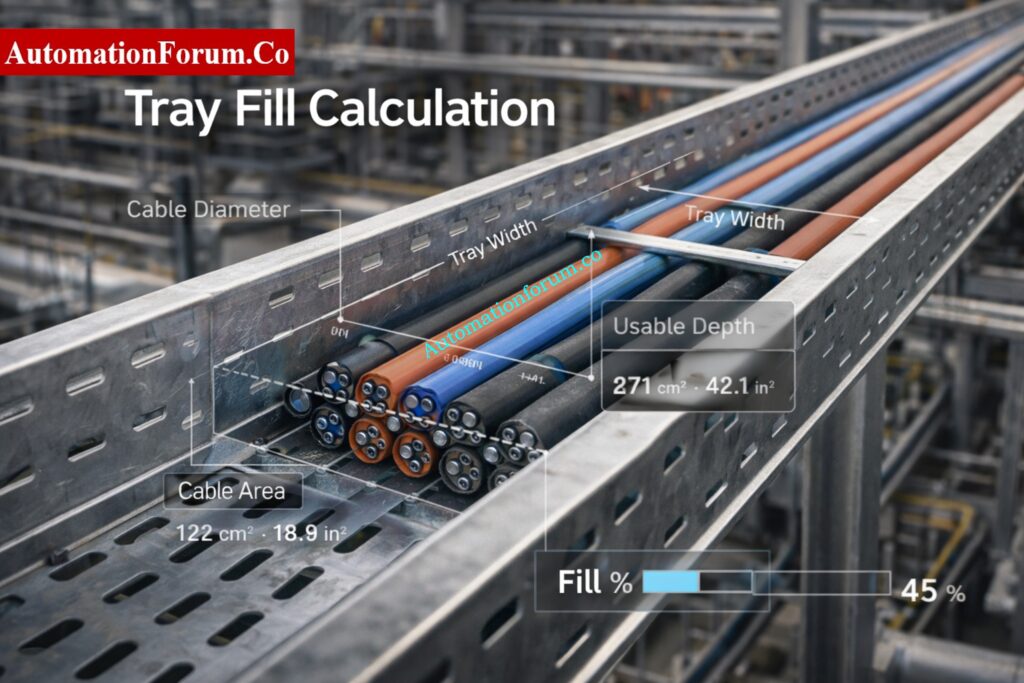
Enter the width and depth of the tray that can be used. Usable depth is the space inside the tray that is available for cables to fit after taking into account the tray profile and installation clearances. The calculator then estimates tray area.

Before finalizing, confirm:

  • tray load capacity,
  • cable bending space,
  • segregation by service,
  • hot/cold environment impact,
  • and growth allowance for future cables.

Instantly Check Tray Fill Limits with Calculator: Cable Tray Fill Percentage Calculator

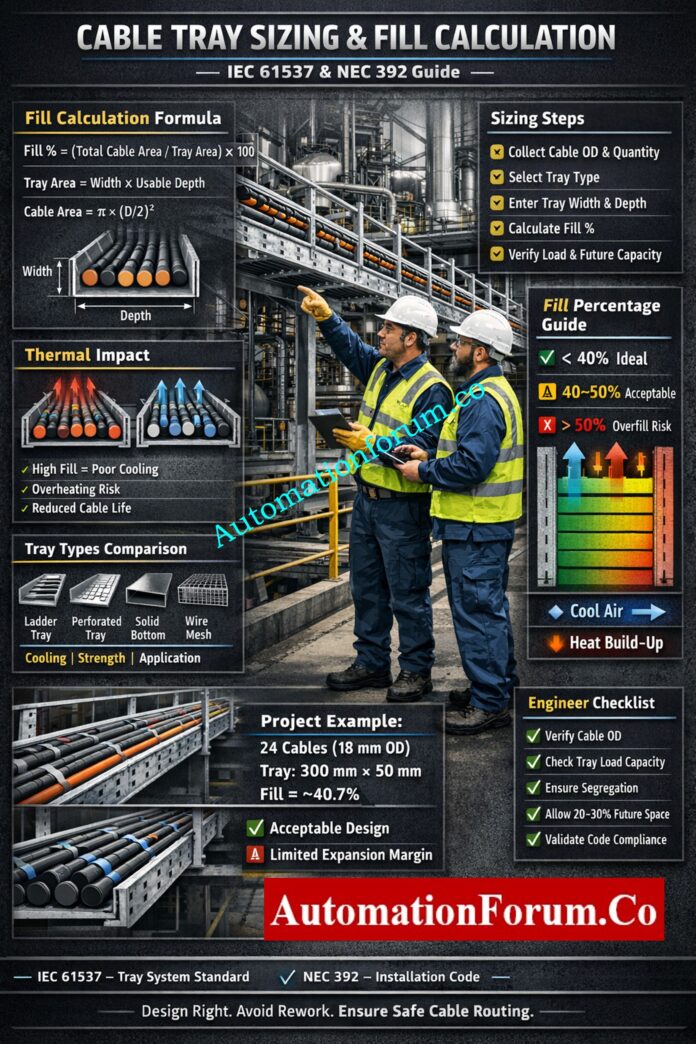
The calculated fill percentage is the key indicator of whether your design is safe and future-ready.

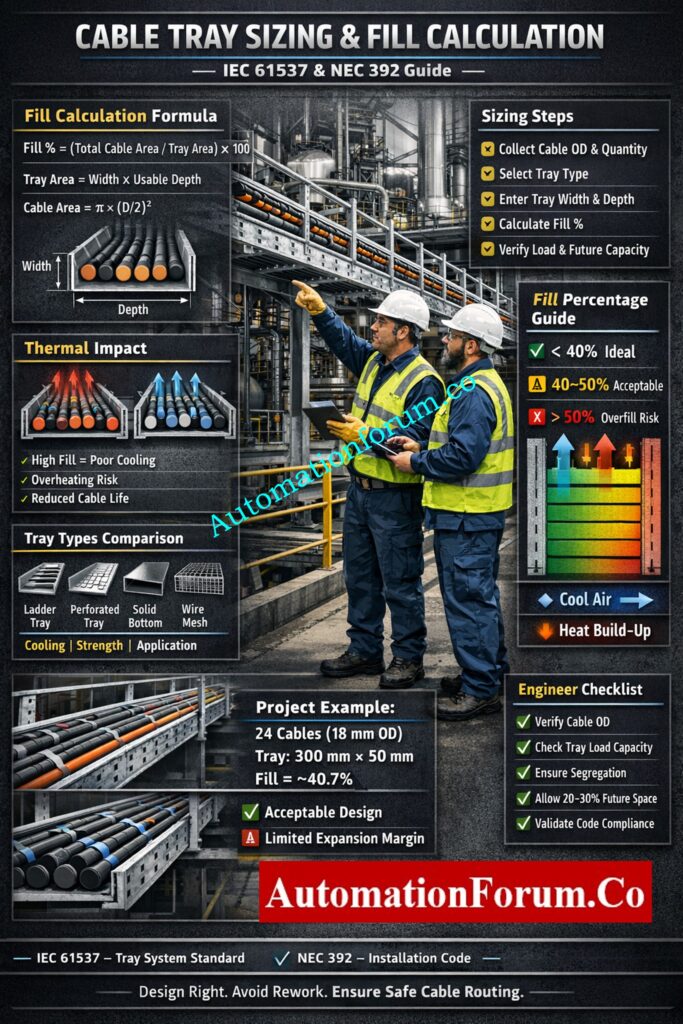
  • Below 40% → Ideal design with proper airflow and expansion space
  • 40% to 50% → Acceptable but limited flexibility
  • Above 50% → Risk of overheating and difficult installation

Engineering practice limits tray fill well below 100% to allow cooling and future additions.

  • Ladder Tray: Up to 50% fill
  • Perforated Tray: Up to 50% fill
  • Solid Bottom Tray: Up to 40% fill
  • Critical Instrumentation Systems: Preferably below 40%

Maintaining lower fill percentages improves ventilation, cable accessibility, and future expansion flexibility.

Quick Method to Determine Correct Tray Size: Cable Tray Size Calculation: Step-by-Step Guide with Formula and Example

Cable Tray Sizing Formula Explained - Cable Tray Sizing Calculator: Complete Engineering Guide for IEC 61537 and NEC 392 Compliance

The basic formulas used in a sizing calculator are straightforward:

Fill % = (Total Cable Area / Tray Area) × 100

Tray Area = Width × Usable Depth

Required Tray Size = Cable Area / Fill Factor

These formulas are the backbone of the calculator, but the engineering judgment comes from choosing the correct fill factor for the tray type and cable arrangement. The fill factor is not just a mathematical number; it is a design limit tied to cooling, installation practicality, and code compliance. Eaton’s cable tray manual states that, for certain installations, the sum of cable cross-sectional areas must be equal to or less than the allowable tray fill area, and it also shows that mixed cable arrangements may require separate tray zones.

Zener vs Galvanic Barriers Explained for IS Circuits: Understanding Zener vs Galvanic Isolation in IS Loops for 4 to 20 mA Systems

For example, a 40% target means only 40% of the tray’s usable cross-sectional space is occupied by cables. A 50% target is less conservative and may be used only where the service type, tray style, and project specification permit it. In practice, lower fill improves airflow, reduces cable crowding, and leaves space for pulls and changes.

Cable tray sizing is not only about fitting cables physically. Heat dissipation plays a critical role in system performance.

  • High fill percentage reduces airflow
  • Increased temperature reduces cable ampacity
  • Overheating can damage insulation and reduce cable life

Professional design includes derating factors based on temperature, cable grouping, and installation conditions. 

Proper spacing and avoiding overfilled trays are essential for maintaining thermal stability.

Complete Pre-Commissioning Checklist for Tray Installation; Instrumentation Cable Tray Installation Checklist and Inspection Procedure

Several engineering factors influence cable tray sizing beyond basic area calculations.

  • Number of cables
  • Cable outer diameter
  • Cable type and voltage level
  • Future expansion requirements
  • Cable grouping and segregation
  • Tray depth and width
  • Ambient temperature
  • Ventilation requirements
  • Tray loading limitations
  • Hazardous area requirements

These factors should always be evaluated before finalizing the tray size.

IEC 61537 is a product and performance standard for cable tray and ladder systems, while NEC Article 392 is the installation code for cable trays. IEC focuses on requirements and tests for the tray system itself, and NEC focuses on how cables may be installed in trays and what installation rules apply.

Industrial Cable Support Systems Explained Clearly: What is Cable Tray and How it is used in Industrial applications?

Types of Cable Trays and Their Impact on Sizing -Cable Tray Sizing Calculator: Complete Engineering Guide for IEC 61537 and NEC 392 Compliance

Ladder trays are the most common choice for power and mixed industrial cable runs because they offer good ventilation and high mechanical strength. They are often preferred where heat dissipation matters and where the cable population is moderate to high. ABB notes ladder and ventilated tray suitability for larger conductors and also highlights their use in instrumentation and control applications depending on rung spacing.

Perforated trays provide some ventilation while giving more support than a pure ladder profile. They are useful for control and instrumentation cables where moderate protection is required.

Solid bottom trays reduce ventilation, so thermal behavior becomes more critical. Eaton’s manual states that solid-bottom trays have more restrictive fill behavior and that allowable fill is reduced compared with ladder or ventilated trays.

Wire mesh trays are well suited to small, light cable bundles and IT or low-current routes. They are convenient for frequent routing changes, but they are not the first choice for heavy industrial power loads.

Selecting Proper Cables for Hazardous Zone Areas;  What Cables to Use in Ex Zones: Complete Guide for Instrumentation & Control Engineers

The most commonly used cable tray widths in industrial projects are:

  • 50 mm
  • 75 mm
  • 100 mm
  • 150 mm
  • 200 mm
  • 300 mm
  • 450 mm
  • 600 mm
  • 750 mm
  • 900 mm

The final tray width should be selected based on cable fill calculations, future expansion requirements, and project specifications.

Cables can be installed in single-layer or multi-layer arrangements depending on project requirements.

  • Single Layer: Better cooling and easier maintenance
  • Multi-Layer: Higher capacity but reduced ventilation

Multi-layer installations require additional derating due to heat accumulation and reduced airflow. 

For critical systems, single-layer installation is always preferred.

Real Reason Shielding Grounded Only One Side: Why the Cable Shield is Grounded Only at the PLC or Control Panel Side

A cable tray should not be designed only for today’s cable list. Leave a 20–30% growth margin where project philosophy and tray loading allow it. In many EPC jobs, the cost of adding capacity later is much higher than selecting the next tray size up today.

Environmental Impact on Cable Tray Design-Cable Tray Sizing Calculator: Complete Engineering Guide for IEC 61537 and NEC 392 Compliance

The installation environment directly affects cable tray performance.

  • High ambient temperature reduces allowable cable capacity
  • Outdoor installations require additional safety margin
  • Confined spaces reduce heat dissipation

Design calculations should include environmental correction factors to prevent overheating and ensure compliance.

Even if a tray “fits” mathematically, it may still fail in the field if cables cannot be laid properly or pulled safely. A design that barely meets fill often causes installation damage, especially at bends and risers.

Segregate power, control, instrumentation, communication, and fiber where required by project standards. IEC 61537 allows cable tray systems to arrange cables into groups, and Eaton’s manual shows that mixed cable installations may require dedicated zones within the tray. In practice, separation can be achieved using different tray runs, barriers, or dedicated tray sections.

In hazardous locations, tray selection, cable type, bonding, and routing philosophy must align with the project’s area classification and electrical design basis. The tray calculator alone is not enough; the surrounding installation rules must also be checked.

Stepwise Procedure for Reliable Cable Termination Work: Method Statement for Instrumentation Cable Termination

Cable Tray Fill Calculation - Cable Tray Sizing Calculator: Complete Engineering Guide for IEC 61537 and NEC 392 Compliance

Scenario: 24 instrumentation cables installed in a 300 mm tray.

Assume:

  • cable outer diameter = 18 mm,
  • cable cross-sectional area per cable = π × (18/2)² = 254.47 mm²,
  • total cable area = 24 × 254.47 = 6107.28 mm²,
  • tray width = 300 mm,
  • usable depth = 50 mm,
  • tray area = 300 × 50 = 15,000 mm².

Fill % = (6107.28 / 15000) × 100 = 40.72%

This tray can be accepted for a compact instrumentation run if:

  • cable grouping is clean,
  • cable bends are manageable,
  • tray load is within manufacturer rating,
  • and future additions are limited.

Why Twisted Pair Improves Industrial Signal Integrity; Twisted Pair Cable in Industrial Signal Transmission: The Essential Guide for 4-20 mA and RS 485 Systems

Cable Tray Sizing Calculator: Complete Engineering Guide for IEC 61537 and NEC 392 Compliance
  • Overfilling the tray and assuming the site team will “make it work.”
  • Ignoring tray load capacity and focusing only on fill area.
  • Choosing the wrong type of tray for routes that are susceptible to heat or have a lot of power.
  • Not leaving any room for alterations to be made later in the project.
  • Putting power and signal lines together without planning how to separate them.
  • Using nominal cable size instead of actual outside diameter for the calculation.

The biggest failure is treating tray fill as a paper exercise. On site, overfilled trays look messy, are harder to terminate, and are more likely to fail inspection. Eaton’s manual specifically shows that tray width selection and allowable fill are not arbitrary; they must be calculated from the cable data and tray rules.

ATEX-Compliant Cable Selection Checklist for Safety Systems: Intrinsically Safe Cables for ATEX Zones – Complete Checklist for EPC Engineers

Incorrect cable tray sizing can create several operational and maintenance problems.

  • Excessive cable heating
  • Reduced cable life expectancy
  • Difficult cable pulling and installation
  • Limited future expansion
  • Inspection failures
  • Increased project rework costs
  • Poor cable segregation
  • Reduced system reliability

Proper tray sizing helps avoid these issues and ensures a safer installation.

NEC Article 392 is the cable tray article in the National Electrical Code. It governs cable tray installations and the permitted use of cable trays as part of electrical wiring systems. Industry manuals and code references use its fill and arrangement rules to determine allowable tray occupancy and cable grouping.

Compliance matters because it protects safety, supports inspection approval, and reduces rework. It also gives the project a defensible design basis during QA/QC, client review, and commissioning. A tray that is “close enough” in the field is often the one that causes punch-list items later.

Choose Right Cable Glands for Hazardous Locations: Cable Gland Selection for Hazardous Area Installations – Complete 2025 Guide

A good calculator helps with:

  • faster design decisions,
  • consistent tray selection,
  • BOQ and estimation accuracy,
  • improved safety and maintainability,
  • better site execution,
  • and fewer redesign loops.

For engineering teams, this is especially valuable because the calculator converts cable schedule data into an auditable tray sizing decision. That saves time in detailed engineering and reduces coordination problems between instrumentation, electrical, and construction teams.

Key Differences Between Safe and Standard Cables: Difference Between Intrinsically Safe (IS) and Non-IS Cables

Engineer’s Checklist Before Finalizing Tray Size -Cable Tray Sizing Calculator: Complete Engineering Guide for IEC 61537 and NEC 392 Compliance
  • Verify actual cable outer diameter.
  • Confirm cable quantity by service group.
  • Check tray type and ventilation.
  • Apply fill target and code rule together.
  • Leave future capacity margin.
  • Confirm tray load rating.
  • Check segregation requirements.
  • Review bends, risers, and route changes.
  • Check against the project specs and the vendor data.
  •  Oil and Gas Plants: Ladder trays are needed for large power and instrumentation cables to get air flow.
  • Data Centers: For high-density cable routing, wire mesh trays with lower fill are used.
  • Chemical Plants: Trays that don’t rust and have a conservative fill design
  • Power Plants: Multi-layer trays with thorough tests for heat and derating

In all industrial applications, the right size tray makes sure that everything is safe, easy to maintain, and may grow in the future.

How to Design Efficient Instrument Tray Routing: Instrument Tray Layout

Cable tray fill percentage is the amount of tray cross-sectional area occupied by cables compared to the total available tray area. It is used to determine whether the tray has sufficient space for safe cable installation.

Most industrial projects maintain 20% to 30% spare capacity to accommodate future cable additions and modifications. The exact value depends on project specifications and tray loading requirements.

Ladder trays provide better ventilation and heat dissipation, making them ideal for power cables. Perforated trays offer greater cable support while still allowing moderate airflow.

Overfilling restricts airflow, increases cable temperature, makes installation difficult, and reduces available space for future expansion. It can also lead to code compliance issues and inspection failures.

Power and signal cables can share the same tray only if proper segregation methods are followed. Many industrial projects use separate trays or barriers to prevent electrical interference.

No. The acceptable fill percentage depends on tray type, cable arrangement, project requirements, and applicable standards. However, 40% is commonly used as a conservative engineering design target.

Download Ready-to-Use Instrument Cable Schedule Format: Instrument Cable Schedule: Template, Example, Format and Complete Guide

A cable tray sizing calculator is not just a convenience tool; it is a practical engineering control for design, estimation, and site execution. When used correctly, it helps you apply the right cable tray fill calculation, choose the proper tray type, maintain thermal margin, and avoid expensive field changes. For EPC and industrial automation projects, the best results come from combining calculator output with code compliance, vendor data, and field experience. Use the calculator during the design phase, not after cables arrive on site, and your tray system will be safer, cleaner, and far easier to commission.
This guide is prepared based on real EPC project experience, industry standards, and manufacturer guidelines to ensure practical and reliable engineering design.

Control Valve Cavitation Troubleshooting Quiz for Instrumentation and Control Engineers

0
Control Valve Cavitation Troubleshooting Quiz for Instrumentation and Control Engineers

One of the worst concerns with process control valves in liquid service is cavitation. When the pressure inside the valve dips below the liquid’s vapor pressure, vapor bubbles emerge. These bubbles burst violently when the pressure rises downstream. 

This collapse sends shock waves that cause erosion, vibration, loud noise, trim damage, and unstable flow behavior. Cavitation in control valves can cause problems in oil and gas, power plants, chemical plants, and refineries. This means that they have to be fixed over and over again, which costs a lot of money and time. A robust control valve cavitation troubleshooting quiz helps engineers figure out what’s wrong and how to fix it before it gets worse.

Control Valve Cavitation Troubleshooting Quiz for Instrumentation and Control Engineers

Advanced Control Valve Cavitation Troubleshooting Quiz - Scenario-based learning for field engineers

These questions are like real-world problems that come up when design assumptions don’t match how things actually work. You will use symptoms, pressure relationships, valve sizing logic, and service circumstances to figure out if cavitation is happening. Expect to make decisions based on real-life situations, use engineering judgment, and solve problems that are similar to those that happen during commissioning, maintenance, and process optimization.

1 / 25

A refinery maintenance engineer wants to distinguish cavitation damage from solid particle erosion during an inspection. Which clue best supports cavitation?
2 / 25

In severe service, why is a multi-stage pressure drop often preferred over a single-stage drop?

3 / 25

A technician suspects cavitation, but the valve noise is absent and only flow instability is observed. Which statement is most correct?

4 / 25

Which action best addresses cavitation without changing the process duty significantly?

5 / 25

During startup, a valve in condensate service begins rattling only when the line warms up. What is the best explanation?
6 / 25

A valve handles 120 m³/h of hot water with a high pressure drop. The engineer notes the cavitation index is low. What does this imply?

7 / 25

A process engineer recommends installing a larger valve to fix cavitation. Why might this not solve the issue?

8 / 25

Which scenario most clearly indicates that the problem is flashing rather than cavitation?
9 / 25

A plant wants to solve recurring cavitation by relocating the valve. Which relocation is most promising?

10 / 25

A maintenance team finds that pitting is localized near the throttling edge of the trim, not evenly distributed through the piping. What is the most likely cause?

11 / 25

A pressure recovery factor FL is being reviewed for a valve in liquid service. Why is FL important?

12 / 25

A valve sees 30 bar upstream pressure and 5 bar downstream pressure. The liquid vapor pressure at operating temperature is 3 bar. Which statement is most defensible?

13 / 25

Which engineering solution is most suitable for severe cavitation in a high-pressure-drop liquid service?

14 / 25

A control valve in a power plant feedwater line is hunting, and loop stability worsens whenever flow demand increases. Mechanical inspection shows pitted trim. What is the best root-cause interpretation?
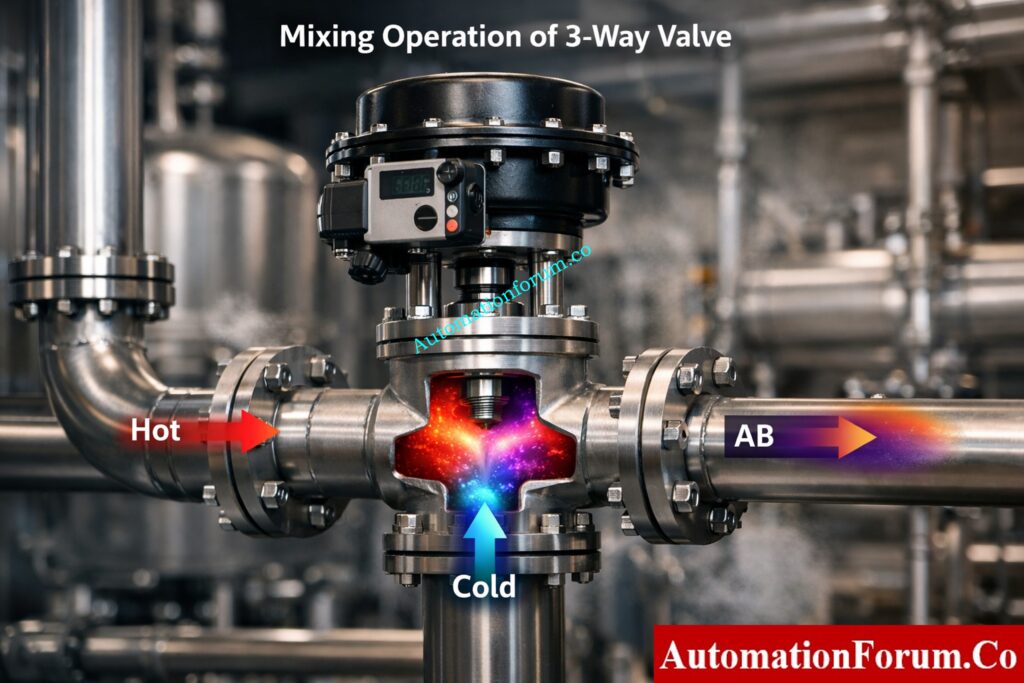
15 / 25

A refiner is confused between cavitation and flashing in hydrocarbon service. The downstream line remains dry of visible vapor, but erosion is severe and noise is intermittent. What points more toward cavitation?
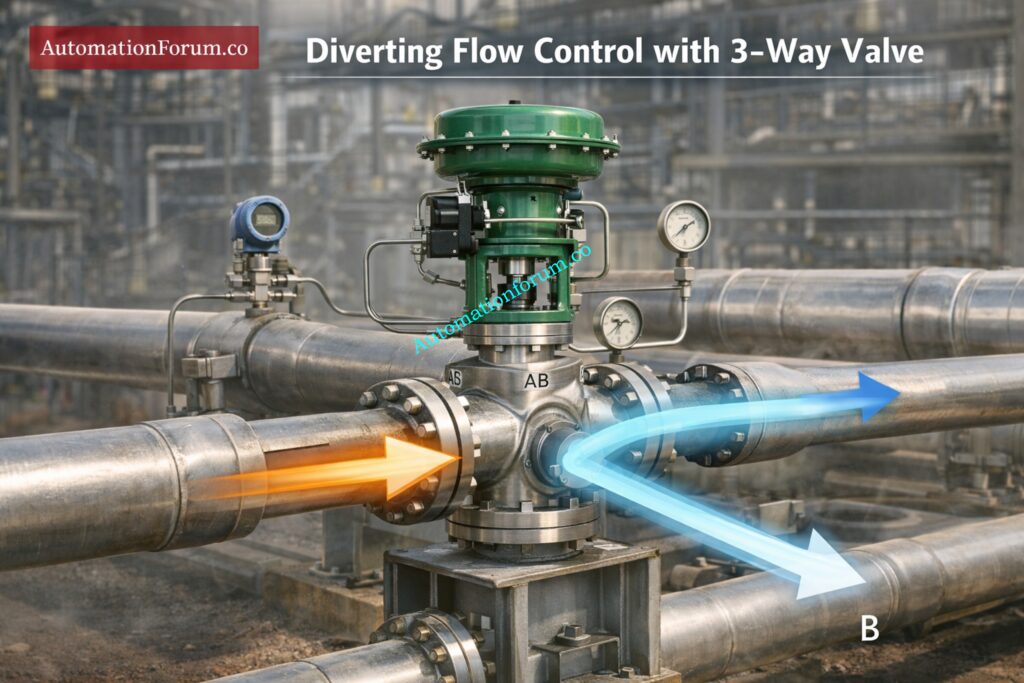
16 / 25

A chemical plant reports that cavitation is occurring even though the valve is not fully closed. Which statement is most accurate?

17 / 25

Which statement best describes the vena contracta in a control valve?

18 / 25

A valve has a rated Cv of 50. The process requires a much higher flow at the same differential pressure, and the valve remains nearly fully open. What is the best engineering conclusion?
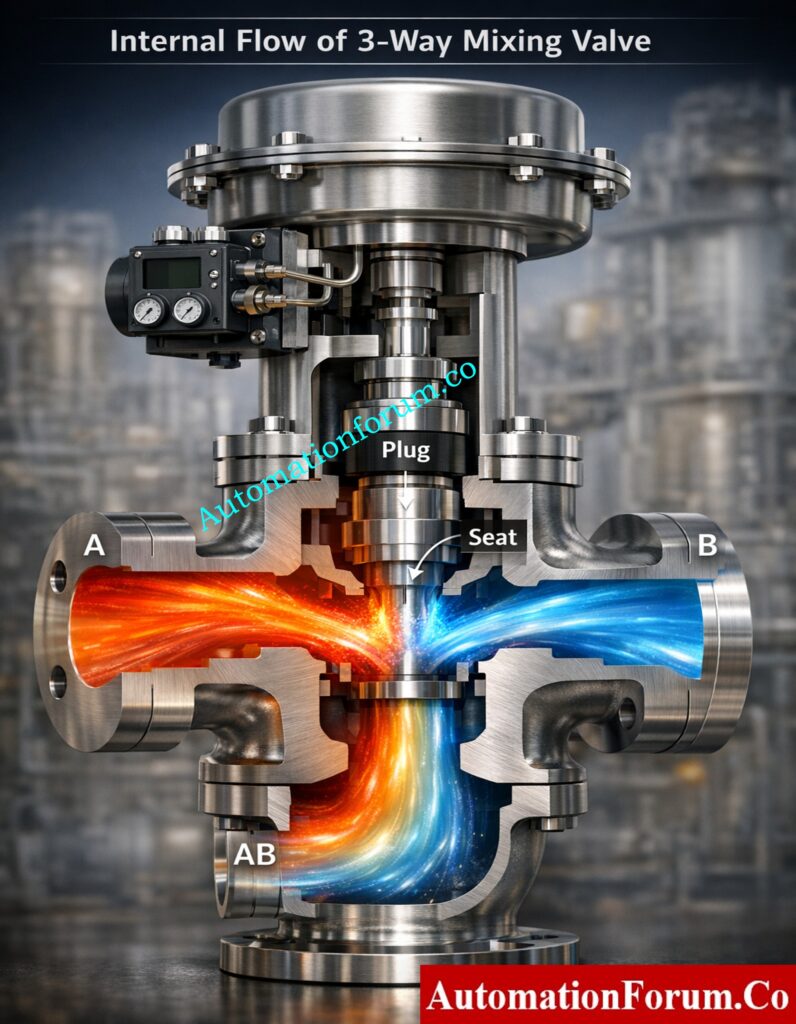
19 / 25

A liquid control valve is sized correctly for normal flow, but during peak operation it runs near full open and cavitates badly. What is the most likely sizing issue?
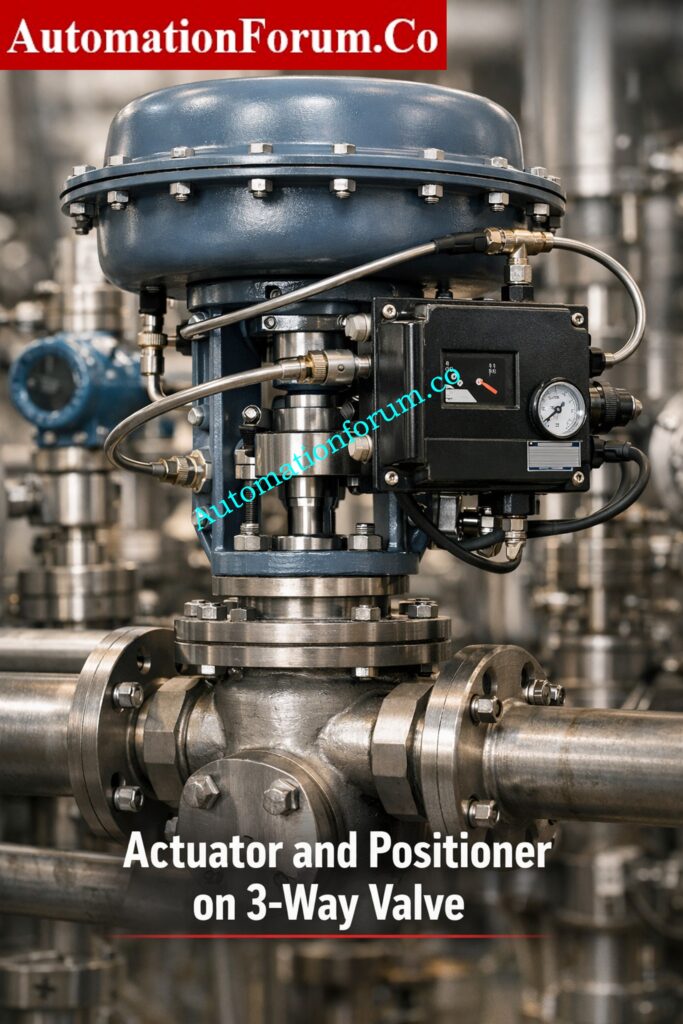
20 / 25

In a process line, the valve noise resembles sand or gravel. Which combination of symptoms most strongly supports cavitation rather than simple turbulence?

21 / 25

A pump discharge valve is partially throttled to control flow. The operator reports severe rattling noise, but when the valve opening is increased slightly, the noise reduces. What is the best explanation?

22 / 25

A maintenance engineer notes that a valve with a ball trim and high-recovery geometry fails repeatedly in a severe liquid pressure-drop application. What design mistake is most likely?

23 / 25

A condensate control valve shows intermittent vibration, unstable flow, and trim pitting. The process engineer suspects cavitation, but the fluid is hot and the downstream pressure is relatively low. What best explains the damage mechanism?

24 / 25

During troubleshooting, you confirm vapor bubbles form inside the valve and remain present in the downstream piping because downstream pressure stays below vapor pressure. Which condition is this?

25 / 25

A globe control valve in boiler feedwater service produces a gravel-like sound, heavy vibration, and rapid seat wear. The downstream pressure is stable, but the upstream-to-downstream pressure drop is very high. What is the most likely issue?

Your score is

The average score is 70%

0%

Access 1000+ MCQs tailored for instrumentation engineers: Instrumentation and Process Control Quiz Hub – 1000+ MCQs for Engineers

#ControlValveCavitationTroubleshootingQuiz #CavitationInControlValves #ValveTroubleshootingMCQ #ProcessControlValveProblems #InstrumentationQuiz #ControlValveCavitation #CavitationTroubleshooting #ValveDamageCauses #ProcessControlIssues #InstrumentationEngineering #ControlValveProblems #IndustrialAutomation #ProcessIndustry #OilAndGasEngineering #PowerPlantEngineering #ChemicalEngineering #RefineryOperations #ValveSizing #CvCalculation #FLFactor #CavitationIndex #ControlValveDesign #MaintenanceEngineering #ProcessControl #EngineeringQuiz

Top 60 Calibration Audit Questions Every ISO Auditor Should Ask in Process Plants

0
Top 60 Calibration Audit Questions Every ISO Auditor Should Ask in Process Plants

Calibration audit questions are very important for making sure that process facilities follow ISO 9001 standards, since the accuracy of measurements has a direct effect on safety, quality, and operational reliability.

In process industries such as oil & gas, pharmaceuticals, power plants, and chemical manufacture, instrument calibration is the backbone of measurement precision and process reliability. A single flow meter or pressure transmitter that isn’t set up correctly might cause problems with product quality, safety, and expensive shutdowns.

Calibration audits aren’t simply ways to make sure you’re following the rules; they’re also very important ways to control risk. ISO auditors look at whether your factory makes sure that measurements are accurate by using traceable, recorded, and controlled calibration procedures.

Calibration, which is based on traceable standards, is the basis of quality assurance and compliance, according to ISO standards.

This guide has 60 real-world calibration audit questions that are in line with ISO 9001 Clause 7.1.5. They are meant for:

  • Instrumentation engineers
  • QA/QC professionals
  • Calibration technicians
  • ISO auditors

Risk-Based Calibration Interval Schedule Guide: Calibration Interval Schedule Procedure for Process Instrumentation Using Risk-Based Method

What Is a Calibration Audit in Process Industry

A calibration audit is a planned check of how an organization handles:

  • Measurement instruments
  • Calibration processes
  • Traceability systems
  • Documentation & records

Make sure that all measurement tools give data that are accurate, trustworthy, and easy to trace.

  • Internal Audit – Conducted by plant QA team
  • External Audit – Conducted by ISO certification bodies

Real Example:

An auditor looks at a flow transmitter in a refinery:

  • Is it calibrated?
  • Is it traceable?
  • Are records maintained?

Complete ISO Instrument Calibration Guide: ISO Standards For Instrumentation Calibration Complete Guide for Industrial Engineers

ISO 9001 Clause 7.1.5 Calibration Requirements Explained

ISO 9001 Clause 7.1.5 focuses on Monitoring and Measuring Resources.

  • At set times, equipment has to be calibrated.
  • Must be able to be traced back to national or international standards
  • Calibration status must be marked on instruments.
  • Equipment needs to be safe from damage.
  • You have to keep records.

ISO makes it clear that businesses must make sure that their measurement tools are appropriate for the job and give accurate results.

  • Defined and followed calibration intervals
  • Set up a chain of traceability
  • Records have the date, the results, and the next due date.
  • Equipment is properly labeled and managed.

Smart Pressure Transmitter Trim Guide: Smart Pressure Transmitter Sensor Trim Guide with Diagrams & Calibration Steps

Calibration Documentation and Procedure Control Audit Questions

The protocol must be an accepted document that clearly states the revision number, scope, technique, and acceptance criteria. It should show the actual processes that technicians took to calibrate, not just be a generic template.
In practice, a pressure transmitter technique must have zero adjustment, span verification, test points, and restrictions on how much error is allowed.

The quality management system of the organization should have a clear calibration policy that spells out the scope, frequency, responsibilities, and compliance requirements. It makes sure that calibration work is done in a planned and regulated way throughout the plant.

Auditors check to see if the policy meets ISO standards for getting accurate and reliable measurement data. 

To make sure that only the most recent version is used, each process must include a revision number, an approval authority, and a change history. This stops people from using old or wrong approaches in the field.

Controlled papers are an important part of ISO that helps keep measuring processes consistent and reliable. 

Calibration procedures should either follow the manufacturer’s instructions or have a different method that is technically sound. Any departure must be substantiated with verified validation.

For instance, not taking the actuator spring range into account while calibrating the control valve can lead to the wrong travel characteristics.

The full instrument register should have the tag number, location, range, calibration interval, and status. This makes sure that all tools are tracked and that no equipment is missing during audits.

Auditors usually choose random instruments from the field and check them against this master list.

Top 15 Costly Calibration Mistakes: Top 15 Common Calibration Mistakes in Industrial Instruments

To make sure that results can be repeated and compared, similar instruments should use the same calibration methodology. Different ways show that there is no control.

For instance, all pressure transmitters should use the same multi-point calibration procedure with set test points.

Calibration methods must be easy to find on site or through digital systems so that technicians can look them up while they are working. Not being able to access something makes people rely on their memory, which raises the danger of making mistakes.

For ISO to work well, it demands documented information to be available at the point of use.

It is important to explicitly specify roles like calibration technician, verifier, and approving authority. This makes sure that everyone is responsible and that there are no problems during audits.

It is thought that separating execution and approval is a useful way to keep quality control.

Essential Instrument Calibration Guidelines: Calibration Guidelines

It is important to explicitly specify roles like calibration technician, verifier, and approving authority. This makes sure that everyone is responsible and that there are no problems during audits.

It is thought that separating execution and approval is a useful way to keep quality control.

There should be a way to make sure that old procedures are thrown away and only the most up-to-date ones are employed. Auditors frequently examine for unregulated printed copies in the field.

Proper document control keeps things consistent and stops people from calibrating things wrong.

Why Calibrating Calibrators Matters Most: Why Calibrating your Calibrators is Critically Important: Accuracy, Compliance and ISO 17025 and NIST Traceability

Based on audit results, changes to equipment, or process enhancements, procedures must be revised from time to time. This makes sure that they stay useful and correct from a technical point of view.

ISO quality systems believe that procedures will always get better.

Calibration Standards and Requirements for Traceability Audits

Calibration must be done with a standard that is more accurate than the device being tested. This makes sure that the measurement findings are accurate and usable.

For instance, field pressure transmitters are calibrated with a certified pressure calibrator.

Measurement results must be traceable to national or international standards via an uninterrupted calibration chain. This gives you faith in the accuracy and constancy.

Traceability makes guarantee that all measurements can be compared across time and space. 

Re-ranging Is Not Calibration: Why Calibration Isn’t the Same as Re-ranging in Process Instrumentation

Reference instruments must themselves be calibrated at defined intervals to maintain their accuracy. If the master is incorrect, all downstream calibrations become invalid.
Auditors always verify the calibration certificates of master equipment.

Calibration should only be performed using standards within their valid calibration period. Expired standards invalidate all measurements taken using them.
ISO requires calibration at specified intervals to maintain measurement reliability. 

Uncertainty must be considered during calibration to define confidence in measurement results. It helps determine whether instrument accuracy meets required tolerance.
Advanced audits look at whether the calibration team has written down and understood any uncertainty.

Weighing System Calibration Procedure: Weighing System Calibration Procedure

Accredited labs should do external calibration to make sure it is accurate and follows the rules. Accreditation makes sure that people follow known calibration standards.

Auditors usually check the extent and validity of external labs’ accreditation.

Calibration certificates must identify the reference standards that were utilized and how they may be traced. This makes sure that the entire measurement chain is well documented.

Missing certificates are a common problem found during audits.

Complete Instrument Calibration Guide: Instrument Calibration in Process Industries – Complete Guide

All measurements must eventually be connected to SI units through accepted standards. This makes sure that things are the same all around the world.
ISO requires traceability to internationally accepted measurement systems.

Reference instruments must be stored in controlled environments to prevent damage or drift. Temperature, humidity, and handling conditions must be controlled.
ISO requires equipment to be protected to maintain its accuracy. 

Types of Calibrators and Procedures: Different types of Calibrators and their Calibration Procedures

Instrument Identification and Calibration Status Control Checklist

Each instrument must have a label showing calibration status, last date, and due date. This allows quick verification during field inspection.
Auditors frequently check tags during plant walkdowns.

The instrument must clearly indicate whether it is calibrated, due, or out of service. This prevents use of unreliable equipment.
Clear identification of status is mandatory for compliance.

Tags must be legible and durable in plant conditions such as heat, dust, or moisture. Faded or damaged tags indicate poor maintenance.
This is commonly raised as a minor audit observation.

Each instrument must have a unique identification number linked to calibration records. This ensures proper traceability and avoids confusion.
Duplicate identification leads to serious record management issues.

There should be a system or visual method to identify overdue instruments. This prevents accidental use of non compliant equipment.
Auditors often request a list of overdue instruments.

Analytical Instrument Calibration Procedures: Analytical Instruments Calibration Procedures

Calibration status must be updated immediately after completion of calibration activity. Delay in updating indicates weak system control.
Modern systems use digital updates to ensure accuracy.

Failed instruments must be clearly identified and removed from service. This prevents incorrect measurements from affecting process quality.
ISO requires control of nonconforming equipment.

Color coding provides quick visual identification of calibration status. It improves operational efficiency and reduces human error.
Many plants adopt standard color systems for easy recognition.

Initial readings must be recorded before any adjustment to assess instrument drift. This helps evaluate long term performance.
Auditors use this data to verify effectiveness of calibration system.

Calibration must be performed under controlled environmental conditions to ensure accuracy. Temperature and humidity variations affect measurement results.
ISO highlights the need to maintain suitable conditions for measurement activities. 

Cleaning ensures that no external contamination affects measurement accuracy. Dirt or residue can distort readings significantly.
This is critical for flow meters and pressure instruments.

Personnel performing calibration must be trained and competent. Competency ensures correct execution and reliable results.
ISO requires organizations to ensure personnel competence for measurement activities. 

Control Valve Stroke Checking Procedure: Control Valve Stroke Checking -Complete Procedure, Errors, Setup, and FAQ

Calibration must strictly follow approved procedures without shortcuts. Any deviation can lead to inaccurate results.
Auditors may witness calibration to verify compliance.

Each instrument must have defined acceptance limits based on process requirements. Without tolerance, calibration result is meaningless.
Example is plus minus accuracy limit defined in datasheet.

Loop calibration verifies the entire signal path including transmitter, wiring, and control system. This ensures overall system accuracy.
Widely used in process plants to validate control loops.

Signal Converter Calibration Procedures: Signal Convertors Calibration Procedures

The instrument must be isolated from process before calibration to avoid interference. This ensures safety and measurement accuracy.
Failure to isolate can lead to wrong readings or hazardous situations.

Safety procedures such as lockout and tagout must be followed during calibration. This protects personnel and equipment.
Auditors consider safety compliance as critical.

Multiple readings must be taken to confirm consistent results. Repeatability indicates stability of the instrument.
Poor repeatability suggests internal instrument issues.

Temperature Calibration Procedure: Temperature Calibration Procedure

Calibration Records, Certificates, and Audit Evidence Requirements

Certificate must include instrument details, method, results, and reference standards. It is the primary evidence during audit.
Auditors verify random certificates for compliance.

Each certificate must clearly state the next calibration due date. This ensures timely scheduling and compliance.
Missing due date indicates weak calibration control system.

Any deviation or adjustment must be documented clearly. This ensures transparency and traceability of actions.
Auditors check whether deviations are properly handled.

Calibration records must be linked to instrument ID and reference standards. This ensures complete traceability.
Traceability is a fundamental ISO requirement.

Records must be stored securely with proper backup systems. This prevents data loss and ensures availability during audits.
Digital systems improve reliability and accessibility.

Calibration certificates must be reviewed and approved by authorized personnel. This ensures correctness of results.
Approval process adds an additional level of quality control.

Past calibration data should be maintained for trend analysis. This helps in predicting drift and optimizing intervals.
Auditors often check historical consistency.

Level Measurement Device Calibration Procedures: Calibration Procedures for Level Measurement Devices

Nonconformance and Corrective Action in Calibration Audits

The instrument must be immediately removed from service and clearly marked. This prevents use of inaccurate equipment.
ISO requires control of nonconforming measuring equipment. 

Previous measurements must be reviewed to assess impact on product quality. This ensures no defective product is released.
ISO requires evaluation of validity of previous results.

Data collected before failure must be analyzed for accuracy. This is critical in regulated industries.
Incorrect measurements may require product revalidation.

Root cause must be identified and corrective action taken. This prevents recurrence of the issue.
Example includes replacing faulty instrument or improving procedure.

Products processed using faulty instruments must be checked for compliance. This ensures quality assurance.
Common requirement in pharmaceutical and food industries.

All non conformities must be recorded in the system. This provides traceability and supports corrective action tracking.
Auditors verify deviation logs during audits.

Root cause analysis must determine why failure occurred. This could be due to drift, damage, or improper handling.
Effective root cause analysis improves system reliability.

Pressure Instrument Calibration Procedures: Calibration Procedures for Various Pressure Measuring Instruments

Calibration frequency should be based on risk and criticality of instrument. Critical instruments require more frequent calibration.
This approach improves efficiency and ensures reliability.

Trend analysis is used to predict instrument performance over time. This helps in proactive maintenance planning.
Advanced plants use statistical tools for calibration optimization.

Instruments affecting safety and product quality are given higher priority. This ensures critical measurements remain accurate.
Examples include safety shutdown systems.

Calibration ensures safety systems operate correctly and prevent hazards. Incorrect calibration can lead to major incidents.
Auditors check linkage between calibration and safety integrity.

Modern instruments provide diagnostic data to detect faults early. This improves maintenance efficiency.
Smart devices reduce manual calibration dependency.

Calibration activities should be integrated with maintenance systems for scheduling and tracking. This ensures timely execution.
Digital integration improves audit readiness and traceability.

ISO Flow Instrument Calibration Procedures: ISO Standard Calibration Procedures for Flow Measuring Instruments

ISO 9001 requires calibration systems to ensure valid, reliable, and traceable measurements across all processes

If your team can confidently answer at this level during audit
you are not just compliant
you are operating at a world class instrumentation standard.

Validation vs Calibration: Key Differences: Differences Between Validation and Calibration

Calibration audits are not just compliance activities they are critical to plant safety, product quality, and operational reliability. ISO 9001 Clause 7.1.5 ensures that all measurement systems are accurate, traceable, and controlled, forming the backbone of any quality management system.

By implementing the 60 audit questions outlined in this guide, process industries can:

  • Eliminate measurement errors
  • Reduce audit risks
  • Improve process efficiency
  • Achieve ISO compliance confidently

Remember: If your instruments are wrong, your decisions are wrong.

Traceability ensures all measurements are linked to national or international standards,  guaranteeing accuracy and consistency across processes.

Calibration frequency depends on instrument criticality, usage, and historical performance, often defined through risk based calibration strategies.

Ultimate ISO Calibration Audit Checklist: Internal Audit Checklist for ISO Process Instrument Calibration in Process Industries

A calibration audit verifies that instruments are accurate, traceable, and compliant with ISO standards ensuring reliable measurement and process control.

Calibration is part of both QA and QC, ensuring measurement accuracy across processes and final product verification. It supports quality assurance by maintaining system reliability and quality control by validating results.

Calibration in auditing is the verification of instruments to ensure they provide accurate and traceable measurements as per standards. Auditors check calibration records, traceability, and compliance with ISO requirements.

Best Calibration Management Software: Best Calibration Management Software

ISO 9001 calibration refers to controlling measuring equipment to ensure accuracy, traceability, and reliability of results. It is defined under Clause 7.1.5 for monitoring and measuring resources.

Yes, ISO 9001 covers calibration under Clause 7.1.5, requiring instruments to be calibrated at defined intervals. It ensures measurement traceability, proper identification, and documented records

Clause 7.3 of ISO 9001 relates to awareness, ensuring employees understand quality policies and their role in achieving objectives. It focuses on competence, communication, and quality responsibility.

ISO 9001 requires instruments to be calibrated at defined intervals, traceable to standards, properly identified, and supported with documented records.

Calibration vs Verification: Hidden Differences: Calibration Vs Verification: Key Differences, Procedures, Examples and Best Practices In Process Industries

Application of 3 – Way Control Valve in Process Control Systems

0
Application of 3 - Way Control Valve in Process Control Systems

A 3-way control valve is a modulating final control element that is used in process industries to control the flow of fluids between three ports. This keeps process variables like temperature, flow, or pressure stable. A control valve is part of a closed loop control system. It gets a signal from a controller and changes its internal position to get the process condition that is wanted.

What Is a 3-Way Control Valve in Process Control Systems and How It Works

A 3-way control valve has three ports: A, B, and AB. This lets you regulate more than one flow stream at the same time, unlike a 2-way valve, which only isolates one flow direction. It can change the flow dynamically, which means it can partially open several ports at once to provide you fine control. It is commonly utilized when process fluids need to be mixed or redirected without stopping the flow of the system.

Mixing Type 3-Way Control Valve Working Principle for Temperature Control Applications

A mixing type 3 way control valve is made to merge two independent inlet streams into one controlled outlet stream. The internal plug movement controls the amount of each incoming flow, which makes sure that the mixing is correct. This kind is often used to manage temperature when hot and cold fluids need to be mixed.

Understanding of engineering. It keeps the output temperature stable by constantly changing the mixing ratio of two fluids.

Diverting Type 3-Way Control Valve Operation for Flow Routing and Bypass Systems

A diverting type 3-way control valve is made to break one flow coming in into two independent flows going out. You can send all of the flow to one exit or split it up in a certain way. People utilize it in load distribution systems, bypass systems, and switching applications.

Engineering knowledge. By sending flow to different pathways without pausing the system, it gives the process more freedom.

Stop PID Hunting Fast Today: Control Valve Hunting Due to PID Controller: Causes, Effects, Root Analysis and Complete Troubleshooting Guide for Industrial Process Control Systems

The valve body is a strong part that can hold a lot of pressure. It has three ports and internal flow tunnels. Depending on the parameters of the process, it can be made from carbon steel, stainless steel, or alloy steel. It is made to deal with fluids that are very hot, very cold, or very corrosive.

Construction and Components of 3-Way Control Valve in Process Industries

The internal trim is the main part that controls the flow and changes its direction. It travels in relation to the seat to control the flow area and figure out the flow features, like linear and equal proportion.

More advanced understanding. Trim design of mixing valves makes sure that the mixing goes smoothly without any turbulence or pressure shock.

The actuator turns a control signal into movement. Pneumatic actuators are the most frequent type in industries because they respond quickly and are reliable. Electric actuators are common in HVAC and automation systems.

How a valve positioner helps a 3-way control valve work better

The valve positioner makes sure that the valve stem is in the right place based on the control signal. It makes up for changes in load, hysteresis, and friction. It makes things more accurate, repeatable, and quick to respond.

The way the inside is made determines how it works. The design of the T port lets you mix and divert. The L port design is mostly utilized for applications that need to redirect.

ESDV vs EBDV: Know Difference: ESDV vs EBDV – Fail Close vs Fail Open | Emergency Shutdown Valve vs Emergency Blowdown Valve

A 3-way control valve works by changing the flow path inside the valve by moving the plug, ball, or disc in response to a signal from the controller. This lets the valve either mix two incoming streams or send one stream in two different ways, depending on what the process needs.

  • A field sensor constantly checks the process variable, like flow, pressure, or temperature, and sends an electrical signal to the control system.
  • The PID controller gets this signal and compares it to the setpoint that was set in advance to find any mistakes or differences.
  • The controller takes care of this inaccuracy and sends out a signal (usually 4–20 mA or a pneumatic signal) that is proportional to the amount of correction needed.
  • The actuator gets this signal and turns it into mechanical movement of the valve stem or rotary shaft, which moves the internal trim into the right position.
  • The flow path inside the valve body changes when the valve position changes, which affects the flow between the three ports.
  • This change in how the flow is distributed has a direct effect on the process variable.

Globe Ball Butterfly: Choose Smart: Globe vs Ball vs Butterfly Control Valves Complete Comparison Guide for Flow Control Selection and Applications in Process Industries

  • Two separate fluid streams enter the valve through ports A and B. These streams usually have different temperatures or other qualities.
  • The valve plug controls the opening of each input port, which lets you manage both incoming flows at the same time.
  • The mixed fluid leaves through port AB, where the final output property (such temperature) is regulated very accurately.
  • The valve enables some flow from both inlets in intermediate positions, which makes blending easier instead of switching suddenly.

The controller tells the valve to slowly close the hot fluid input if the process temperature goes above the setpoint. At the same time, it opens the cold fluid inflow more to keep the temperature steady. If the temperature goes below the setpoint, the opposite happens: the hot flow goes up and the cold flow goes down.

The valve keeps the total flow rate in the system almost constant while only changing the mixing ratio. This is very important in systems like HVAC and heat exchangers. This keeps the pumps running smoothly and stops the pressure in the pipeline from changing.

Fix Non-Responding Control Valve Fast: Field Troubleshooting Guide: Control Valve Not Responding in Process Area

The common port AB lets in a single stream of fluid. The valve changes the position of its inside parts to send the flow to either outlet port A or port B, or to split it evenly between the two. The amount of flow that goes to each outlet is based on how wide the opening is. This lets you manage how the process fluid flows.

When there isn’t much work to do, the valve sends more flow to the bypass line, which takes some of the load off the main machinery. The valve slowly moves flow toward the main process line when there is a lot of demand for the process. This makes sure that there is enough supply to meet operational needs.

When the valve is in the middle position, flow can go via both outlets. This is helpful for keeping the flow at a minimum or for slowly changing the load. Proper installation and precise port identification are very important since wrong piping might change the way the system is supposed to work and make it unstable.

Master Partial Stroke Testing Now: What is Partial Stroke Test (PST)? A Complete Guide for Shutdown and Control Valves

  • A globe type 3 way control valve has a plug or disk that moves in a straight line. This lets you control the flow rate very precisely and throttle it very finely, making it perfect for modulating service.
  • It has a high level of control accuracy and consistent modulation, which is especially important in situations where slight changes in valve position have a big effect on process variables like temperature or pressure.
  • It is best for important control loops like steam management, heat exchangers, and reactor temperature control, where stability and repeatability are very important.
  • It can endure big dips in pressure without losing much control performance, therefore it’s good for tough industrial conditions.
  • A ball type 3 way control valve has a spherical ball that spins and has a hole in it that lines up with the flow route to control or stop flow.
  • It has a small design and responds quickly, making it good for situations when the flow direction needs to change quickly or lines need to be switched.
  • It is often utilized in mild control systems and diverting applications where very fine throttling is not needed.
  • It can shut off tightly and last a long time, especially in systems that cycle or turn on and off often.
  • A plug type 3 way control valve has a rotating cylindrical or tapered plug with an internal passage. This lets the flow go between several ports in a flexible way.
  • It works well with fluids that are abrasive, thick, or corrosive, which can wear out or clog other types of valves.
  • It has a strong build with fewer interior cavities, which lowers the chance of material buildup or blockage.
  • It works well in settings that are tough on equipment and need to switch between multiple ports, including in chemical plants and systems that handle slurry.

Find Why Your Valve Passing: How to Troubleshoot a Control Valve Passing Problem after Overhauling: Complete Root Cause Analysis

  • A pneumatic actuated 3 way valve uses compressed air to move things around, usually with diaphragm or piston actuators.
  • It responds very quickly and produces a lot of force, which makes it great for dynamic process control and emergency shutdown situations.
  • It is commonly utilized in dangerous places like oil and gas or chemical industries because it doesn’t make sparks and is safe by nature.
  • It is very reliable and easy to use, especially in big industrial plants where compressed air is easy to get.
  • An electric actuated 3 way valve uses an electric motor to move the valve stem or rotary element, which lets it be positioned exactly according to the control signal.
  • It works well for tasks that need a lot of accuracy and can be used with automation systems like PLC and DCS.
  • People often utilize it in HVAC systems, water treatment facilities, and building automation, where electrical infrastructure is the most important part.
  • It gives greater feedback and diagnostics, especially when used with smart positioners or digital communication systems.
  • A hydraulic actuated 3-way valve uses pressurized hydraulic fluid to create a lot of force, which lets it work with big valves under high pressure.
  • It can be used in heavy-duty situations like high-pressure pipelines, power plants, and systems that are out at sea.
  • It gives smooth, strong actuation, especially in places where pneumatic systems might not be able to supply enough force.
  • It needs an extra hydraulic power unit and regular maintenance, which makes it less common than pneumatic and electric systems.

When accuracy and stable control are very important, globe-type valves are the best choice. When you need to switch quickly, are tough on fluids, or need to handle them, ball and plug types are best. Pneumatic actuation is the most common type of actuation in process industries because it is fast, safe, and reliable. Electric actuation is better in conditions where automation is important.

When two streams of fluid need to be mixed constantly to get the required process state, a 3-way control valve is employed. It is used to change the direction of flow between two process lines without turning off the system. It is also utilized when bypass control is needed to keep pumps or heat exchangers from getting too low of a flow. It is better when temperature control is really important and needs to be changed all the time instead of just turning it on and off.

Key Control Valve Performance Metrics: Essential Control Valve Performance Parameters

In air handling units, 3-way control valves are used to adjust the temperature of chilled water circuits. They keep the flow steady while changing the temperature. They assist cooling systems run more efficiently when it comes to energy.

Three-way control valves manage the flow of steam to keep the process temperature stable. They are used to stabilize temperature and bypass condensation. They make sure that heat exchangers work smoothly.

In pipeline systems, three-way control valves are used to change the direction of flow and mix fluids. They make sure that fluids are safely routed during maintenance or an emergency.

3-way control valves are used in reactors to mix chemicals in a regulated fashion. They keep the reaction conditions, like the temperature and concentration.

In boiler systems, three-way control valves are used to adjust the temperature of the feedwater. They keep equipment from getting too hot.

Must-Have Control Valve Accessories: Essential Control Valve Accessories for Reliable Process Control

3-Way Control Valve in Heat Exchanger Temperature Control System: Detailed Example

A shell and tube heat exchanger moves heat from one fluid to another without mixing them. This is often done to heat or cool process streams in sectors including oil and gas, power plants, and chemical processing. The fundamental goal is to keep the output temperature steady, even when the flow rate, inlet temperature, or process demand changes.

Changes in upstream process conditions, changes in the production rate, and changes in the temperature of the environment or the season can all cause load variations. If you don’t keep an eye on these changes, they can cause temperature swings, lower efficiency, or damage to equipment because of thermal stress.

A temperature transmitter is put near the heat exchanger’s outlet to keep an eye on the actual process temperature and send the control system real-time feedback. Using proportional, integral, and derivative logic, the PID controller compares the recorded temperature to the setpoint and figures out what needs to be done to fix the problem. The 3-way control valve receives the controller output signal and changes its position to control the flow between the process and bypass lines. The 3-way valve mixes or diverts the flow to keep the exit temperature steady while keeping the flow going in the system.

When demand is low, the system doesn’t need as much heat transfer, and if full flow goes through the exchanger, the system tends to overheat. Instead of going through the heat exchanger, the 3-way valve sends more of the fluid through the bypass line. This lowers the effective heat transmission and helps keep the process fluid from getting too hot, keeps the outlet temperature consistent without rapid changes, and keeps the exchanger tubes from being too hot.

Size Control Valves Like Expert: How to Properly Size Control Valves for Maximum Efficiency?

When the demand for a process goes up, more heat transfer is needed to keep the outlet temperature where it should be. Instead of going through the bypass line, the valve slowly lets additional flow through the heat exchanger channel. This makes sure that the heat exchanger is used to its fullest, that the process fluid is heated or cooled enough, and that the process runs smoothly even when the load varies quickly.

If the pneumatic air supply to the actuator fails, the valve will move to its predetermined fail-safe position, which could be open or closed, depending on how it was designed. Engineers choose the fail position depending on safety criteria for the process.

If the valve is in the improper position, it could cause too much flow through the exchanger, which could cause overheating or thermal damage, or too much bypass, which could lead to not enough heating or cooling and compromise the quality of the product. When you suddenly lose control, the process can become unstable, the equipment can trip or shut down, and safety interlocks can turn on.

In heat exchanger systems, three-way valves are typically used as bypass control valves to control the temperature of the outlet by changing the bypass flow proportion. They assist keep the total flow in the system steady, which is important for protecting the pump and keeping the system running smoothly. To stop temperature swings, valve hunting, and uneven heat transmission, you need to tune the PID correctly and size the valves correctly.

Measure Cv Before Valve Sizing: Why Measuring Control Valve Cv is Essential for Proper Valve Sizing ?

  • Replacing two valves with one unit makes the pipework less complicated.
  • Takes up less space when installing in small plant layouts
  • Fewer places for leaks to happen, which makes the system safer.
  • Offers multiple functions, such as mixing and diverting
  • Keeps a steady flow in a lot of systems
  • Increases the flexibility of process control.

Leak Test Control Valves Correctly: Control Valve Leakage Testing, Types, and Calculation Standards

  • Not as good at changing ranges as dedicated 2-way control valves
  • Needs to be installed carefully to avoid the wrong flow direction.
  • More expensive at first than a single 2-way valve
  • If the pressure conditions aren’t set up right, flow imbalance can happen.
  • Internal design can make maintenance hard.

Understand Cv vs Kv Clearly: Relationship Between Cv and Kv in Control Valves

Parameter3-Way Control Valve2-Way Control Valve
FunctionMixes two inlet streams into one outlet or diverts one inlet stream into two outlets. It supports multi-directional flow control in a single valve body.Controls flow between one inlet and one outlet only. It is mainly used for throttling or on/off control.
ApplicationUsed in heat exchangers, HVAC systems, bypass loops, blending systems, and temperature control applications.Used in basic flow control applications such as water, steam, and utility lines where simple flow regulation is needed.
CostHigher initial cost because of a more complex design and extra ports. It can reduce overall system cost in some applications by replacing multiple valves.Lower cost because of its simple construction and fewer parts. It is more economical for straightforward applications.
ComplexityMore complex due to multiple internal flow paths such as L-port or T-port arrangements. Needs proper installation and correct port selection.Simple design with a single flow path. Easy to install, operate, and understand.
MaintenanceRequires moderate maintenance because of more sealing surfaces and moving parts. Internal leakage or wear may occur over time.Easier to maintain because of fewer internal parts. Lower chance of leakage and simpler servicing.


Choose Right Control Valve Bonnet: How to Choose Right control Valve Bonnet for your Application?

  • Choosing the right flow characteristic
  • Making ensuring that pressure is even across all ports
  • Choosing the right form of mixing or diverting
  • Choosing the right fail-safe action
  • Material that works well with the process fluid

    Troubleshoot Shutdown Valves Like Pro: How to Troubleshoot On-Off / Shutdown Valve
  • Make sure you know which port is which (A, B, AB).
  • Follow the flow direction marking exactly
  • Set the positioner correctly
  • Do loop tweaking to make control stable.
  • Check the fail-safe condition

End Control Valve Hunting Issues: What are the main causes of control valve hunting?

A 2-way control valve only controls flow in one line because it has one intake and one outlet. A 3-way control valve can either combine two streams into one or split one stream into two pathways.

Pneumatic actuators are often employed because they are fast and dependable, however the optimum actuator depends on the job. You can also choose electric or electro-pneumatic actuators for precise control.

The fundamental problem is that it doesn’t work as well for basic high-accuracy throttling as a 2-way valve does. It can also be harder to develop, put together, and balance the flow.

A pressure control valve (PCV) is a part of a system that controls the pressure. Level Control Valve (LCV) is a device that controls the level of liquid in tanks or containers.

You can use a 3-way valve to mix, divert, control a bypass, or control the temperature. It is common in heat exchangers, HVAC systems, and blending operations.

Improper sizing, choosing the wrong actuator, bad tuning, or unequal pressure conditions can all cause instability. Wear and tear on parts, leaks, and improper port connections can also make things run poorly.

Fix Stuck Control Valves Quickly: How to do maintenance on struck control valve?

In process control systems where mixing, diverting, or bypassing are needed, the 3-way control valve is a very useful tool.

Use when you need to alter the temperature, mix things together, or change the flow. Don’t use it if you merely need to control the flow in a simple way. A well-chosen and correctly tuned 3-way control valve makes a big difference in the stability, efficiency, and reliability of a process.

Top Control Valve Tools You Need: Top Essential Control Valve Calculators and Excel Tools for Instrumentation Engineers

Displacer Level Transmitter Calibration Calculator for Dry Calibration Step by Step Guide

0
Displacer Level Transmitter Calibration Calculator for Dry Calibration Step by Step Guide

A displacer type interface level transmitter dry calibration weight calculator is one of the most practical tools for instrumentation engineers who work with separators, vessels, and two phase level measurement systems. The attached calculator is built to estimate zero calibration weight, span calibration weight, displacer volume, actual span, and linearity check weights from the displacer geometry and the specific gravity values of the two liquids involved. It is designed exactly for offline testing and calibration planning where no process fluid is available.

This article explains the working principle, the formulas behind the calculator, the meaning of each input, and the field use of dry calibration of displacer transmitter in a clear engineering format. It is written for instrumentation professionals, EPC engineers, commissioning teams, and control engineers who need a reliable reference before carrying out displacer level transmitter calibration. The calculator uses a cylindrical displacer model and calculates the calibration weights from the buoyancy difference between the lighter and heavier liquid phases.

Displacer level transmitter calibration is performed by calculating buoyancy based weight loss using displacer volume and liquid specific gravity.

Crack Advanced Interface Leveltrol Troubleshooting Quiz: Advanced Interface Leveltrol Troubleshooting Quiz

Displacer Type Interface Level Transmitter Dry Calibration Weight Calculator
AutomationForum.co
Trusted Resource for Instrumentation & Automation Engineers
AutomationForum.co · Free Engineering Calculator

Displacer Type Interface Level Transmitter
Dry Calibration Weight Calculator

Calculate zero & span calibration weights and linearity check weights for displacer-type interface level transmitters — no process fluid required.

⚠ Dry Calibration Estimation: This calculator is intended for dry calibration estimation of displacer-type interface level transmitters. Results provide theoretical calibration weights based on input parameters. Always verify against the manufacturer’s datasheet and apply site-specific corrections before commissioning any instrument in a live process.
Displacer Physical Data
g
Enter a valid positive weight.
Must be greater than buoyancy (V × SG_heavy). Typical: 1500 – 3000 g for industrial displacers
cm
Enter a valid positive diameter.
Common sizes: 2″ (5.08 cm), 3″ (7.62 cm), 4″ (10.16 cm)
cm
Enter a valid positive length.
Typical range lengths: 14″ (35.56 cm) to 48″ (121.92 cm)
Process Liquid Data
SG
Enter a valid specific gravity (SG > 0).
Examples: Crude oil ≈ 0.75 – 0.88, Diesel ≈ 0.82, Naphtha ≈ 0.65
SG
Enter a valid SG greater than lighter liquid SG.
Examples: Fresh water = 1.0, Brine ≈ 1.05 – 1.20, MEG solution ≈ 1.10
Note: The lighter liquid floats on top (upper phase). The heavier liquid is the bottom phase. The displacer travels across the interface of these two liquids.
Primary Calibration Results
Displacer Volume
cm³
Zero Calibration Weight
g
Span Calibration Weight
g
Actual Span (V×SGh − V×SGl)
g
Linearity Calibration Check Weights
% of Span Calibration Weight (g) Step Value (g per 25%)
How It Works — Formulas & Methodology

Step 1 — Displacer Volume (Cylindrical Formula)

The displacer is modelled as a solid cylinder. Volume is calculated as:

V = π × (D / 2)² × L

where D = displacer diameter (cm), L = displacer length (cm). Result in cm³.

Step 2 — Zero Calibration Weight (0%)

When the displacer is fully submerged in the lighter (upper) liquid, the apparent weight is reduced by the buoyant force:

W_zero = W − (V × SG_light)

This is the calibration weight hung on the displacer rod to simulate 0% interface level.

Step 3 — Span Calibration Weight (100%)

When the displacer is fully submerged in the heavier (lower) liquid, the buoyant force is greater, reducing apparent weight further:

W_span = W − (V × SG_heavy)

W_span < W_zero because the heavier liquid exerts more buoyancy. The displacer actual weight W must be greater than V × SG_heavy.

Step 4 — Actual Span & Linearity Check Weights

The actual span is the buoyancy difference between the two liquids:

Actual Span = (V × SG_heavy) − (V × SG_light)
Step per 25% = Actual Span / 4
W_x% = W_zero − (n × Step)   where n = 1, 2, 3, 4

As the interface rises, heavier liquid displaces lighter liquid → more buoyancy → lower apparent (calibration) weight.

About This Interface Level Transmitter Calibration Calculator

This displacer type interface level transmitter dry calibration weight calculator helps instrumentation engineers, control system technicians, and process automation professionals determine the precise test weights required to simulate the buoyancy conditions experienced by a displacer — without needing process fluid in the vessel.

In a displacer-type level transmitter, the displacer is a solid cylindrical float that experiences an upward buoyant force proportional to the specific gravity of the liquid it is submerged in. During dry calibration, calibration weights are hung on the displacer rod to replicate this buoyancy force, allowing engineers to set zero and span of the transmitter offline.

This tool supports interface level applications (two-liquid-phase systems, such as hydrocarbon-water interfaces in separators) and single-fluid level applications. Enter the displacer geometry and liquid specific gravities to instantly obtain the zero calibration weight, span calibration weight, and linearity check weights at 25%, 50%, 75%, and 100% of span.

What is a Displacer Type Level Transmitter?

A displacer type level transmitter is a buoyancy based level instrument used to measure liquid level or interface level in process vessels. It works on Archimedes principle. When the displacer is immersed in liquid, the liquid pushes it upward with a buoyant force equal to the weight of the liquid displaced. Because of this force, the apparent weight of the displacer becomes lower than its actual weight. That change in apparent weight is converted into a level signal by the transmitter mechanism. The calculator attached to page is based on this exact buoyancy principle.

In simple field terms, as the liquid level rises, more of the displacer is surrounded by liquid, so the buoyant force increases. When the buoyant force increases, the effective hanging weight becomes lower. In interface service, the same displacer sees two different liquid phases, usually a lighter upper liquid and a heavier lower liquid. The difference in buoyancy between those two liquids is what makes interface measurement possible. That is why accurate displacer weight calculation is essential for proper calibration.

Master Interface Level Measurement Selection Procedure: Interface Level Measurement Selection Procedure – Complete 2025 Guide for Process Engineers

What is Dry Calibration of Displacer Level Transmitter?

Dry calibration is the process of simulating the operating buoyancy condition of a displacer without using the real process liquid. Instead of placing the transmitter in a vessel, calibration weights are applied to the displacer rod or mechanism to imitate the apparent weight that the instrument would see in service. This  calculator clearly follows this method by computing theoretical calibration weights from weight, diameter, length, and specific gravity inputs.

This method is widely used during shop testing, pre commissioning, turnaround maintenance, and hazardous area work where live fluid testing is not practical or safe. Dry calibration is especially useful in oil and gas, refineries, chemical plants, and water treatment systems. It gives instrumentation teams a fast and repeatable way to verify zero and span settings before the instrument is put online.

The main difference between wet calibration and dry calibration is the presence of process fluid. Wet calibration uses actual liquid and real buoyancy conditions. Dry calibration uses calculated weights to simulate that buoyancy. The attached calculator is made for the dry method, and it even includes a warning note that the results are theoretical and should always be checked against the manufacturer data sheet and site corrections.

Unlock Displacer Interface Calibration Weight Calculator: Displacer type interface level transmitter dry calibration weight calculator

A displacer calibration weight calculator is an instrumentation calibration calculator that helps determine the exact weights needed to simulate level conditions for a displacer transmitter. The calculator on this page is specifically designed for a displacer type interface level transmitter dry calibration weight calculator. It outputs the displacer volume, zero calibration weight, span calibration weight, actual span, and linearity check weights for 25 percent, 50 percent, 75 percent, and 100 percent span.

This tool solves a common field problem. Manual calculations can be slow and can easily lead to mistakes when converting dimensions, checking buoyancy, or applying specific gravity values. A small error in SG or volume can produce the wrong test weight and distort the calibration. For that reason, a calculator like this saves time, improves confidence, and reduces the chance of calibration drift or false zero setting.

Instant DP Interface Level Calculator: Interface level calculator from Differential pressure (DP)

Displacer Level Transmitter Calculator Input Parameters

The attached calculator asks for five main inputs. Each one matters because the output depends on the real geometry of the displacer and the density of the liquids involved. The file shows the exact input fields for displacer weight, diameter, length, lighter liquid specific gravity, and heavier liquid specific gravity.

This is the actual physical weight of the displacer in grams. The calculator uses this value as the starting point and then subtracts the buoyant force created by the liquid. In field practice, the weight must be greater than the buoyancy created by the heavier liquid, otherwise the calculated calibration weight may become invalid. The attached calculator even includes an input validation warning for this condition.

The diameter is required to calculate the cylindrical volume of the displacer. The calculator models the displacer as a solid cylinder, which is a standard and practical approach for many industrial displacer assemblies. The volume is computed from diameter and length, then used to estimate buoyancy.

The length is the axial length of the displacer body. Together with diameter, it defines the total displaced volume. A longer displacer creates a larger buoyant force, so length has a direct effect on the zero and span calibration weights.


Explore Submersible Level Transmitter Benefits: Submersible Level Transmitters: Applications, Working Principles, and Benefits

This is the SG of the upper phase in an interface application. In many process vessels, this may be crude oil, condensate, naphtha, or another lighter hydrocarbon. The calculator uses this value to compute the buoyant force at the lower buoyancy condition. The file uses examples such as crude oil, diesel, and naphtha, which are common lighter phase references.

This is the SG of the lower phase, such as water, brine, or MEG solution. In interface service, this value is normally higher than the upper phase SG. The attached calculator requires the heavy liquid SG to be greater than the light liquid SG, because the span is based on the difference in buoyancy between the two liquids.

Crack Varying Tank DP Interface Calculation: DP calculator for Interface level measurement – Transmitter installed with Varying Tank Level and two Bubble Tubes

Using the calculator is straightforward for a field engineer.

Enter the actual displacer weight in grams.

Enter the displacer diameter and length in centimeters.

Enter the specific gravity of the lighter liquid.

Enter the specific gravity of the heavier liquid.

Click calculate to generate the results.

Read the displacer volume, zero calibration weight, span calibration weight, and actual span.

Use the linearity table to check calibration weights at 25 percent increments across the span.

This workflow matches the actual interface of this calculator, which was built to help engineers calculate dry calibration weights without process fluid.

Master Bubbler Interface Level DP Calculator: DP calculator for bubbler method Interface level measurement – Transmitter installed with Constant Tank Level and single Bubble Tube

Displacer Calibration Calculator Output Results

The output section of the calculator is very useful because it translates the entered physical data into actionable calibration values. The file shows four main result cards and a linearity table below them.

This is the cylindrical volume of the displacer in cubic centimeters. It tells you how much liquid the displacer displaces when fully immersed. Since buoyancy depends on displaced volume, this number is central to the whole calculation.

This is the calibration weight that simulates the displacer in the lighter liquid condition. It is the starting point for the level setting and represents the apparent weight at the zero point of calibration.

This is the calibration weight that simulates the displacer in the heavier liquid condition. Because the heavier liquid creates more buoyancy, the apparent weight becomes lower than the zero calibration condition.

The calculator also generates weights at 25 percent, 50 percent, 75 percent, and 100 percent span. This helps the technician verify that the transmitter response is smooth across the operating range and not only at zero and span. The file explicitly includes this linearly stepped output table.

Crack Constant Level Bubbler Calculation Now: Bubble method Interface level measurement calculation with Constant Tank Level and single Bubble Tube

The attached calculator uses a very practical calculation path. First it computes volume. Then it calculates buoyancy at the light liquid and heavy liquid conditions. Finally it converts that buoyancy into calibration weights.

The displacer is treated as a cylinder.

V = π × (D divided by 2) squared × L

Here D is the diameter and L is the length. This gives the displaced volume in cubic centimeters.

Buoyancy depends on liquid density and displaced volume. That is the reason specific gravity matters so much in displacer level transmitter calibration. The more dense the liquid, the greater the buoyant force. In interface service, a heavy liquid pushes up harder than a light liquid for the same immersed volume.

Zero calibration weight = actual displacer weight minus buoyancy of the light liquid

In the calculator this is shown as W minus V times SG light. This represents the simulated weight when the displacer is in the lighter phase.

Span calibration weight = actual displacer weight minus buoyancy of the heavy liquid

In the calculator this is shown as W minus V times SG heavy. Since the heavy liquid has higher density, the span weight will be lower than the zero weight.

Actual span = V times SG heavy minus V times SG light

This is the buoyancy difference between the two phases. The calculator also divides this by four to produce the 25 percent step value for the linearity table.

Master DP Interface Level Calculator: DP calculator for Interface level measurement

Let us use the same sample values shown in the attached calculator.

Displacer weight = 2400 g
Diameter = 7 cm
Length = 32.42 cm
SG light = 0.7
SG heavy = 1.0

First calculate the volume.

Radius = 7 divided by 2 = 3.5 cm

Volume = 3.1416 × 3.5 × 3.5 × 32.42

Volume = approximately 1248.18 cm³

Now calculate buoyancy in the lighter liquid.

Light buoyancy = 1248.18 × 0.7 = 873.73 g

Zero calibration weight = 2400 minus 873.73 = 1526.27 g

Now calculate buoyancy in the heavier liquid.

Heavy buoyancy = 1248.18 × 1.0 = 1248.18 g

Span calibration weight = 2400 minus 1248.18 = 1151.82 g

Unlock EPC Level Transmitter Selection Checklist: Level Transmitter Selection Checklist for EPC Engineers – Step-by-Step Guide

Actual span = 1248.18 minus 873.73 = 374.45 g

25 percent step = 374.45 divided by 4 = 93.61 g

So the linearity check weights become approximately:

25 percent = 1432.66 g
50 percent = 1339.05 g
75 percent = 1245.44 g
100 percent = 1151.82 g

This example shows how the calculator turns physical dimensions and SG values into practical calibration values for field use. The same calculation flow is embedded in the the dry weight calculation tool.

Unlock Remote Seal DP Level Calculation:Interface level measurement using DP transmitter (Remote sealed)

 Where is Displacer Level Transmitter Calibration Used

This tool is useful in many industries where interface level measurement matters.

  • In oil and gas, it is used for separator vessels, crude oil water interface, and production skids.
  • In refineries, it is used for hydrocarbon and water separation services.
  • In chemical plants, it helps with liquid interface systems and process vessels carrying different density fluids.
  • In power plants, it can be used in condensate and auxiliary systems.
  • In water treatment, it helps with tanks and density based level services where buoyancy instruments are used.
  • The calculator is suitable wherever displacer type interface level transmitter calibration is required and a dry estimation is preferred before actual installation.

Explore Interface Level Measurement Techniques: Interface level measurement techniques

  • This calculator is designed for instrumentation engineers, calibration technicians, EPC engineers, commissioning engineers, and DCS or PLC engineers who need a fast and dependable way to estimate displacer weight calculation values before field calibration. 
  • It is especially helpful for people who handle process level measurement tools and need a practical reference during startup or maintenance.

Master Displacer Level Transmitter Calibration :How to calibrate displacer type level transmitter – Interface liquid application

  • Use this calculator during commissioning when the transmitter is being prepared for startup. 
  • Use it during shutdown maintenance when the instrument is removed and tested offline. 
  • Use it in factory calibration when you want to verify the response before dispatch. 
  • Use it in troubleshooting when the output seems incorrect and you need to confirm the expected zero and span calibration weight values.

This calculator saves time because the weights are produced instantly.

  • It reduces manual calculation error.
  • It improves calibration accuracy.
  • It works without process fluid.
  • It is useful in hazardous areas where wet testing may not be practical.
  • It gives a clear linearity view across the full span.
  • It supports faster decision making for field engineers and commissioning teams. The calculator structure on this page is intentionally built around these practical benefits.

Crack Level Troll Dry Calibration Weight: Dry Calibration of Displacer Level Troll Using Weight Loss Calculator

  • One common mistake is entering the wrong specific gravity values. A small SG error can change the buoyancy result significantly.
  • Another mistake is using incorrect displacer dimensions. If the diameter or length is wrong, the calculated volume will also be wrong.
  • A third mistake is ignoring density variation between actual process conditions and assumed calibration conditions.
  • A fourth mistake is applying improper simulation weights without checking whether the displacer actual weight is sufficient to overcome buoyancy in the heavy liquid case. 
  • The calculator guards against this by warning when the calculated buoyancy exceeds the displacer weight.

Master Hybrid Level Measurement Selection Procedure: Hybrid Level Measurement Selection Procedure for EPC Instrumentation Engineers

  • Always verify specific gravity from a laboratory result, process data sheet, or known operating condition.
  • Always check the manufacturer data sheet for the transmitter and displacer assembly.
  • Always confirm that the displacer weight is greater than the buoyant force created by the heavy liquid.
  • Always use calibrated weights when simulating the zero and span conditions.
  • Always document the final zero calibration weight and span calibration weight for future maintenance reference.
  • These practices help make dry calibration of displacer transmitter more dependable in the field.

Master Wet Leg DP Level Calculation: Wet-Leg Level Calculation for DP Transmitters: Complete Guide for Instrumentation Design

Dry calibration is the offline simulation of process buoyancy using calculated weights instead of actual liquid.

You calculate the displacer volume from its diameter and length, then subtract the buoyant force based on the relevant liquid specific gravity.

Calibrate by simulating buoyancy: apply calculated zero and span weights for dry calibration or use actual liquid levels for wet calibration, then adjust output to 4–20 mA and verify linearity.

Wet calibration uses real process liquid for high accuracy, while dry calibration uses calculated weights to simulate buoyancy and is faster and safer for commissioning and maintenance.

ParameterWet CalibrationDry Calibration
Medium usedActual liquidCalibration weights
AccuracyVery highHigh if inputs are correct
SafetyDepends on fluidSafer
TimeLongerFaster
UsageFinal verificationPre commissioning and maintenance

Specific gravity controls the buoyant force. A higher SG means more buoyancy and a lower apparent weight.

Zero weight represents the lighter liquid condition. Span weight represents the heavier liquid condition.

Yes. The attached calculator is specifically intended for displacer type interface level transmitter dry calibration weight calculation.

Because the buoyant force changes as more or less of the displacer is surrounded by liquid. That change in buoyancy is the basis of level measurement.

The displacer level transmitter calibration calculator on page is a highly useful tool for instrumentation professionals who need a fast and reliable way to estimate dry calibration weights. It makes it easier to figure out the weight of the displacer, helps calibrate the interface level transmitter, and delivers unambiguous results for the zero calibration weight, span calibration weight, real span, and linearity check weights. The calculator follows standard buoyancy logic based on the cylindrical displacer model and specific gravity based liquid displacement, which makes it both practical and technically sound for engineering use.

This kind of instrumentation calibration calculator is useful for EPC teams, commissioning engineers, and field workers since it saves time, cuts down on mistakes, and makes sure that everything is set up correctly before startup. It is very helpful in oil and gas, refineries, chemical plants, power plants, and water treatment systems where process level measurement tools need to work right from the start.


Alarm Setpoint Field Validation Checklist for Process Instruments: Complete Guide for Instrumentation and Control Engineers

0
Alarm Setpoint Field Validation Checklist for Process Instruments: Complete Guide for Instrumentation and Control Engineers
What Is Alarm Setpoint Field Validation in Process Instruments?

Alarm systems are one of the most important protection layers in process industries such as oil and gas, chemical, power generation, pharmaceuticals, and water treatment. A well-designed alarm gives the operator timely and meaningful warning so corrective action can be taken before the process becomes unsafe or unstable.

However, configuring an alarm in a DCS or PLC is only part of the job. It is also important to test the alarm in the field to make that it goes off at the right process value, shows up correctly, and works exactly as planned when it is in use. Even if an alarm is set up correctly, it could fail when it matters most if it isn’t validated in the field.

If the alarms are put up wrong, they can go off when they shouldn’t, miss alarms, flood alarms, confuse operators, and take longer to respond to situations. Many industrial accidents have happened because alarms weren’t managed well, which made the conditions dangerous and the plant less reliable.  That is why alarm validation should never be treated as a one-time commissioning task. It must be part of startup, maintenance, modification, and periodic audit activities.

Plant Maintenance Checklist: Maintenance Checklist

Alarm setpoint field validation helps confirm that alarm limits, priorities, delays, annunciation, and reset behavior are all working correctly.It makes ensuring that alarms are useful, informative, and in line with process safety rules. 

Master PLC Alarm Trip Docs: PLC Alarm and Trip Documentation Procedure – EPC PLC Automation Engineer Guide

Standards like ISA 18.2 and IEC 62682 stress alarm management based on the plant’s lifespan. This means that alarms are designed, put in place, watched, and kept up with throughout the plant’s life.

Alarm setpoint field validation is the process of checking that an alarm set up in the control system goes off at the right process value and works as it should in real or simulated field settings.

In simple terms, it means making sure that the alarm works in real life and not only on paper or in the control logic.

The engineer confirms that during field validation:

  • the alarm triggers at the correct setpoint,
  • the alarm appears correctly in the DCS or HMI,
  • the operator receives the right message and priority,
  • the alarm resets properly after the process returns to normal,
  • the alarm does not chatter or generate nuisance signals.
TypeDescription
Configuration validationChecking alarm logic, setpoints, tags, and priorities inside the DCS or PLC
Field validationTesting alarm behavior using actual or simulated process conditions

The system database may show that the configuration is right, but field validation shows that the real instrument and process response match what was planned.

NFPA 72 Fire Alarm Setup: Method Statement for Addressable Fire Alarm System Installation, Testing and Commissioning as per NFPA 72

Alarm validation has a direct effect on the safety of the process, the performance of the operators, and the reliability of the plant.

The purpose of alarms is to let operators know when anything is wrong and needs to be fixed. If alarms are not validated properly:

  • critical alarms may fail to trigger,
  • operators may miss dangerous conditions,
  • safety incidents may occur,
  • protective actions may be delayed.

Solenoid Valve Selection Guide: Essential Checklist for Selecting the Right Solenoid Valve for Your Application

Poor alarm management can also damage day-to-day operations. Common problems include:

  • alarm flooding that overwhelms the operator,
  • nuisance alarms that reduce confidence in the system,
  • repeated alarms that distract attention,
  • delayed response during real process upsets.

A properly validated alarm system helps operators focus on what matters most and respond correctly when the process moves outside safe limits.

Critical Alarm Trip Setpoint Guide: Alarm & Trip Setpoint List in Instrumentation Engineering: The Most Critical Document for Plant Safety

A structured approach is necessary to perform alarm validation effectively. The goal is not just to see the alarm appear, but to verify that every part of the alarm response is correct.

Slowly change the process variable up or down so that you can see the exact point at which it triggers. It can be hard to check the alarm point correctly when things change quickly.

Make sure the alarm goes off right at the setpoint you set. Any offset could mean that there are problems with scaling, logic, or the instruments.

 Check Alarm Priority and Alarm Classification - Alarm Setpoint Field Validation Checklist for Process Instruments

Check to make sure that the priority is the same as what is written in the alarm rationalization document. In general:

  • High priority is used for alarms that are very vital for safety, 
  • Medium priority is used for alarms that are important for operations,
  • Low priority is used for alarms that are just for information.

Make sure that the following things are correct:

  • tag number,
  • alarm description,
  • engineering units,
  • loop or instrument identification.

An operator can get confused and respond less well if a tag is inaccurate or the description is not clear.

ISO Calibration Audit Checklist: Internal Audit Checklist for ISO Process Instrument Calibration in Process Industries

Check that the alert shows up correctly in:

  • the DCS,
  • the HMI,
  • the alarm banner,
  • the event summary or alarm summary page.

The operator might not see the alarm in time if it isn’t easy to see or understand.

Fire Alarm Battery Sizing Tool: Fire Alarm Battery Size Calculator – Professional Tool for Accurate Backup Power Sizing

Check to see if the alert clears correctly after the procedure goes back to normal. The way the reset works must be the same as the logic that was meant to be used.

Verify Deadband and Hysteresis Settings - Alarm Setpoint Field Validation Checklist for Process Instruments

Deadband stops the alarm from going off and on again and again near the setpoint. If the hysteresis isn’t set up right, the alarm could chatter and make the operator tired for no reason.

Look at the settings for both the on-delay and off-delay.

  • On-delay stops short transients from setting off false alarms.
  • Off-delay helps make the reset procedure more stable.

Make sure the alarm is written down in:

  • the alarm history,
  • event logs,
  • historian or audit records.

This information is useful for figuring out problems, checking performance, and making sure rules are followed.

Detector Coverage Calculator Tool: Fire Alarm Detector Coverage Calculator – Professional Excel Tool for Accurate Detector Placement

Alarm Setpoint Field Validation Checklist for Process Instruments - Alarm Setpoint Field Validation Checklist for Process Instruments

Use the following checklist during field validation to make sure that the alert works as it was meant to.

Sl NoCheck PointDescriptionExpected ResultStatusRemarks
1Tag verificationVerify instrument tag with P&IDExact match
2Instrument identificationConfirm correct field deviceCorrect device linked
3Signal integrityCheck input signal qualityStable signal
4Engineering unitsVerify unit consistencyCorrect units displayed
5Alarm setpointCheck configured valueMatches design
6Alarm typeVerify high, low, HH, LLCorrect classification
7Alarm priorityValidate priorityMatches rationalization
8Alarm messageCheck description clarityClear and actionable
9Alarm trigger pointSimulate PV changeTriggers at correct value
10RepeatabilityTest multiple timesConsistent triggering
11Deadband checkVerify hysteresisNo chattering
12On delayVerify activation delayMatches configuration
13Off delayVerify reset delayMatches configuration
14AnnunciationCheck HMI displayVisible and audible if required
15Alarm bannerVerify alarm listingCorrect display
16AcknowledgmentTest acknowledgmentProper logging
17Reset behaviorReduce PVClears correctly
18Latching logicVerify latch functionWorks as designed
19Alarm shelvingCheck suppressionFunctions correctly
20Interlock logicVerify trip actionInterlock activates
21Cause and effectCross-check logicMatches matrix
22Operator responseValidate operator actionCorrect response
23Alarm loggingCheck event logRecorded correctly
24Historian recordingVerify storageData logged
25Alarm floodingSimulate multiple alarmsNo overload
26Communication delayCheck signal delayAcceptable response time
27Fail-safe conditionSimulate failureAlarm generated
28Sensor faultDisconnect sensorFault alarm generated
29Redundancy checkVerify backup signalsProper switchover
30Power failureSimulate power lossProper behavior
31Alarm inhibitionCheck override logicWorks correctly
32Alarm groupingVerify groupingProper grouping
33Color codingCheck color schemeMatches priority
34Alarm soundVerify audio alertCorrect tone
35Escalation logicCheck escalationWorks correctly
36KPI complianceVerify alarm rateWithin limits
37Rationalization complianceCross-check alarm listOnly valid alarms
38DocumentationVerify recordsUpdated properly
39MOC complianceCheck change controlProper approval
40Final approvalEngineer sign-offApproved

Industrial Alarm Management Mastery: Guide to Industrial Process Alarms in Control Systems: Types, Classifications, and Management Methods

This is the first and one of the most important steps in the validation process. Many alarm issues occur simply because the alarm is linked to the wrong instrument or tag. Always cross-check the alarm with:

  • the P&ID,
  • loop diagrams,
  • the DCS database,
  • instrument drawings and datasheets.

If the tag is wrong, the entire validation process becomes unreliable.

The alarm setpoint must match the approved design basis, including:

  • instrument datasheet,
  • alarm rationalization report,
  • process safety requirements,
  • operating philosophy.

Incorrect setpoints can cause false alarms or missed alarms, both of which are dangerous in process operations.

Alarm priority must reflect the actual risk level of the condition. A safety-critical alarm should not be treated the same way as a routine advisory alarm. Priority assignment should always be based on rationalization and operator action requirements.

Deadband is necessary to prevent chattering around the setpoint. Without deadband, the alarm may repeatedly activate and clear, creating unnecessary noise and reducing operator trust. A properly tuned deadband improves stability and usability.

Alarm delay is often used to avoid nuisance alarms caused by short process fluctuations.

  • On-delay stops the alarm from going off when there are short spikes.
  • Off-delay prevents rapid clearing when the signal is unstable.

The delay must be carefully adjusted so it supports reliability without slowing down real protective response.

The alarm must be easy to see and understand on the operator interface. It should be:

  • visible,
  • properly color coded,
  • clearly labeled,
  • audible if required by site design.

Poor annunciation reduces operator effectiveness and can lead to missed responses.

Interlock and Shutdown Logic Verification -  Alarm Setpoint Field Validation Checklist for Process Instruments

Every important alarm should be recorded for:

  • audit trail,
  • root cause analysis,
  • performance review,
  • regulatory or internal compliance.

Historical records are essential for identifying recurring alarm problems and improving alarm management over time.

An alarm is useful only when the operator knows what action is required. During validation, confirm that the operator response is clearly defined, understood, and aligned with the operating procedure.

Validation should encompass aberrant and failure scenarios, rather than solely typical process modifications. Some examples of test situations are:

  • transmitter open circuit,
  • short circuit,
  • signal loss,
  • communication failure,
  • power interruption.

The design should explicitly spell out how the system is supposed to work, and the validation should make sure it does.

Alarm flooding happens when there are too many alarms in a short amount of time, making it hard for the operator to decide what to do first. During validation, set off several alerts and make sure the system is still easy to use and that important alarms are still visible.

Every alarm should have a clear reason for going off, a specific way for the operator to respond, and a valid priority and setpoint. If the alarm does not meet those criteria, it should not exist in the system.

DCS Alarm Control Checklist: DCS Alarm Management Checklist

A simple practical example helps explain how field validation is performed in real plant conditions.

  • Instrument: Level Transmitter LT-101
  • Range: 0 to 100 percent
  • High alarm setpoint: 80 percent
  • High-high alarm setpoint: 90 percent

Step 1: Simulate level increase

Use process filling or a site-approved simulation approach to slowly raise the level from about 60% to 100%.

Step 2: Monitor the DCS display

Check the trend of the process value and make sure that the level rises steadily and without any scaling problems.

Step 3: Validate the high alarm

The high alert should go off when the level reaches 80%. Check the following:

  • alarm message,
  • alarm priority,
  • visual indication,
  • audible indication if applicable.

Step 4: Validate the high-high alarm

Keep raising the level until it reaches 90%. The high-high alarm should go off and cause the necessary precautionary action, like an interlock or operator escalation.

Step 5: Verify reset behavior

Lower the level below the point where the system resets, and make sure that both alarms go off correctly.

This example shows that:

  • the alarm triggers at the defined setpoint,
  • the operator receives the correct information,
  • the system behaves consistently,
  • the process protection logic works as intended.

FACP Explained Simply: What is an FACP? (Fire Alarm Control Panel)

Common Mistakes in Alarm Setpoint Field Validation - Alarm Setpoint Field Validation Checklist for Process Instruments

Even engineers who have been doing this for a long time sometimes miss key nuances when validating alarms. Here are some common mistakes:

The alarm can go off too early or too late because of mismatched units, scaling mistakes, or wrong technical conversions.

A critical alarm may be assigned low priority, or a minor advisory may be given high priority. Both situations reduce alarm quality.

The alarm may be connected to the wrong instrument or signal source. This is one of the most serious validation failures.

Testing only in the DCS simulation is not enough. Real field testing is necessary to confirm actual instrument behavior.

Without deadband, the alarm can go off near the setpoint and make annoying alarms.

An unclear alert message doesn’t help the operator. Every alarm should provide clear and actionable information.

Alarm Trip Priority Explained: What are alarm, trip point, and alarm priority in DCS & PLC?

Simulation is useful, but real field validation provides the highest level of confidence. It is important to test the alarm in real-world or simulated field settings whenever possible.

Any changes to alarms should follow the rules for formal change control. This helps keep configuration drift from happening without documentation.

Keep records of:

  • test results,
  • engineer name,
  • date and time,
  • remarks,
  • corrective actions.

These records help with audits and fixing problems in the future.

The system should only keep alarms that can be acted on. You should get rid of or make sense of too many or duplicate alarms.

Operators must understand:

  • what the alarm means,
  • what response is expected,
  • when escalation is required.

Fire Alarm System Parts Guide: What are the components involved in a Fire Alarm system?

This checklist is helpful for many jobs in the process industries.

  • Commissioning engineers: Used by commissioning engineers to get ready for startup and do initial validation before the plant starts running.
  • DCS and PLC engineers: Used to verify alarm logic, display behavior, and control system implementation.
  • Instrument technicians: Used during field testing, maintenance, and calibration activities.
  • Safety engineers: Used to verify alarms tied to critical safety functions and compliance requirements.

Field Cross Check Procedure: Process Value Cross Check – Practical Field Procedures for Accurate Transmitter Validation

Alarm validation is not a one-time task. It should be performed at several stages in the plant lifecycle.

  • During Commissioning and Startup: Before startup, after instrument installation, and before process handover.
  • After Instrument Replacement or Re-Ranging Whenever an instrument is replaced, re-ranged, or recalibrated.
  • During Shutdown, Startup, and Safety Audits: To confirm that no configuration drift or logic issue has been introduced.
  • After Maintenance or Calibration: check to make sure that you are still following ISA 18.2 and IEC 62682.

Validation vs Calibration Explained: Differences Between Validation and Calibration

Improved Process Safety: Validated alarms let operators act quickly and lower the risk of dangerous situations.

  • Reduced False Alarms and Nuisance Alarms: arms that create alarm fatigue.
  • Better Operator Response and Decision Making: Clear messages, correct priorities, and reliable trigger points support faster decision-making.
  • Compliance with ISA 18.2 and IEC 62682: Alarm validation follows ISA 18.2 and IEC 62682, which means that it enables lifecycle-based alarm management procedures that are in line with these standards.
  • Improved Plant Reliability and Availability: A solid alarm system cuts down on unnecessary shutdowns and keeps processes running smoothly.

Fire Alarm Panel Working: What is a Fire alarm control panel and how does it work?

Download a professionally created and fully adorned Excel sheet that instrumentation engineers can use to check alarm setpoints in real-world situations. This template is ready to use and helps make things more accurate, cut down on false alarms, and make sure that industry standards are met.

HMI Alarm Basics: Human Machine Interface Alarms (HMI Alarms)

It is the process of checking that an alarm goes off at the right process value and works correctly in real-world settings.

It is the process of reviewing alarms to make sure they are necessary, prioritized correctly, and actionable.

Alarm flooding is a condition where too many alarms occur in a short time, making it difficult for the operator to respond effectively.

Deadband is a small range around the setpoint that prevents chattering and repeated alarm activation.

An alarm setpoint is the preset value of a process variable at which an alarm becomes active and alerts the operator to an abnormal condition. In alarm management, the setpoint is documented along with the alarm type, cause, consequence, and operator action.

An alarm and setpoint list is the master document that records each alarm, its tag, setpoint, priority, and required operator response. It is often used as the authorized reference for alarm rationalization, testing, and maintenance.

In fire alarm terminology, LD1 gives maximum life protection with detectors throughout most of the premises, while LD2 provides additional protection mainly on escape routes and in high-risk rooms. The exact layout can vary by code and building type.

Alarm Management Basics: What is Alarm management?

The five commonly cited mandatory ECDIS alarms are: crossing the safety contour, deviation from route, position/heading/speed source lost, approaching a critical point on the route, and different geodetic datum. These are set out in the IMO ECDIS performance standards

ISA 18.2 and IEC 62682 are the primary standards for alarm management.

Fire Alarm Panel Types: What is Fire Alarm control panel? What is Sub Fire Alarm Control Panel?

Alarm setpoint field validation is a critical engineering activity that directly affects process safety, operational efficiency, and plant reliability. It confirms that alarms trigger at the right time, display the right information, and guide the operator to take the correct action.

A well-structured validation checklist helps engineers verify alarm performance in a disciplined and repeatable way. When combined with alarm rationalization, proper documentation, and lifecycle-based management, it reduces nuisance alarms, prevents alarm flooding, and improves operator effectiveness.

Alarm validation should never be limited to startup or commissioning alone. It must remain an ongoing part of maintenance, change control, audits, and safety reviews.

The core message is simple: a validated alarm is a reliable alarm, and a reliable alarm is essential for safe and stable plant operation.