
- What is Hot Standby in PLC?
- Need for Redundancy in PLC Systems
- Visualizing Hot Standby Architecture
- Requirements for a Successful Switchover of Hot Standby
- Working Mechanism of Hot Standby
- What Can Trigger a Switchover?
- Advantages of using Hot Standby in PLC Systems
- Software and Programming Considerations
- Why Hot Standby is Important
- Frequently Asked Questions on Hot Standby in PLC and Systems
- What is hot standby in PLC?
- What is the hot standby process?
- What is hot standby and cold standby?
- What is the hot standby method?
- What is hot restart in PLC?
- What is the hot standby protocol?
In today’s automated manufacturing processes, system uptime and reliability are not just good to have; they are absolutely necessary. A crushed control system at a chemical factory, pharmaceutical line, power station, or oil refinery can cause expensive downtime, safety issues, and big production losses.
This is where Hot Standby PLC architectures come in. In this article, we’ll talk about what hot standby is, how it works, and why it’s so important for important applications. We’ll also use a clear architecture diagram to show you how a real-world hot standby system works.
What is Hot Standby in PLC?
In a hot standby system, there are two PLC CPUs: one that is active (the primary) and one that is on standby (the backup). The main CPU runs the control logic, talks to field devices, and keeps an eye on process operations. The standby CPU, on the other hand, copies everything the primary CPU does in real time and is always ready to take over right away if something goes wrong.
When the main CPU fails, the standby CPU takes over in milliseconds (usually less than one scan cycle), keeping field control and communication going without stopping. This capability makes hot standby perfect for environments that need to be always available.
Ensure Safety with Fail-Safe Logic: Understanding Fail-Safe Logic in Industrial Automation Systems
Need for Redundancy in PLC Systems
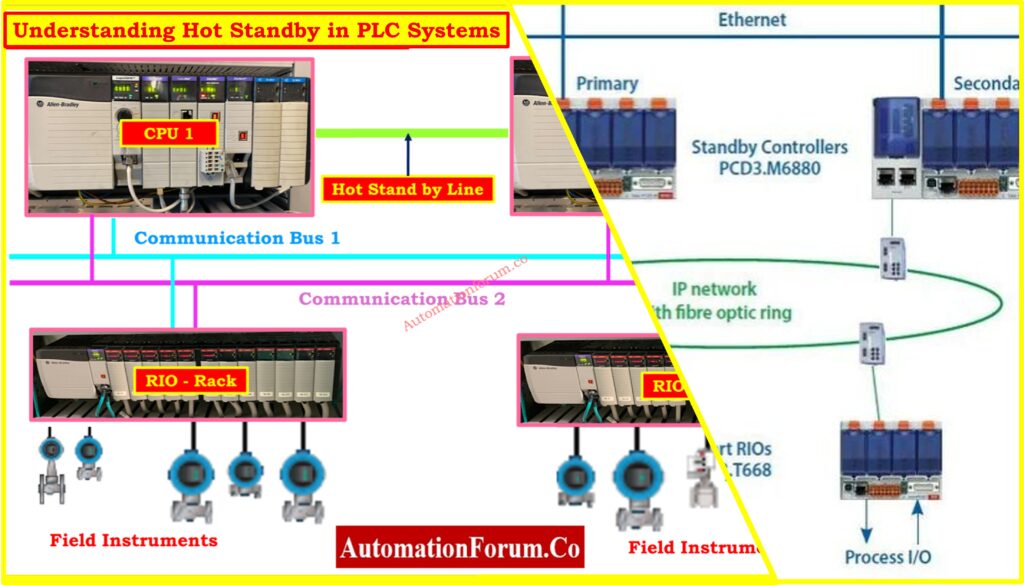
A single CPU or processor used to control an entire factory or process in early automation systems. These systems were easy to set up and run, but they had a big problem: they may fail at any one moment.
If the CPU got down because of a hardware problem, a power outage, or any other system error, the whole plant would stop working. This kind of downtime can be very dangerous, cause production losses, and cost revenue for industrial operations that deal with ongoing or important activities like making chemicals, oil and gas, pharmaceuticals, or running power plants.
To get around this problem, PLC systems added hot standby design, which gives redundancy at the CPU level so that operations can keep going even if the main controller breaks down.
Explore PLC Redundancy Techniques Today: Understanding PLC Redundancy: Cold, Warm & Hot Redundancy
Visualizing Hot Standby Architecture
Explanation of the System Diagram
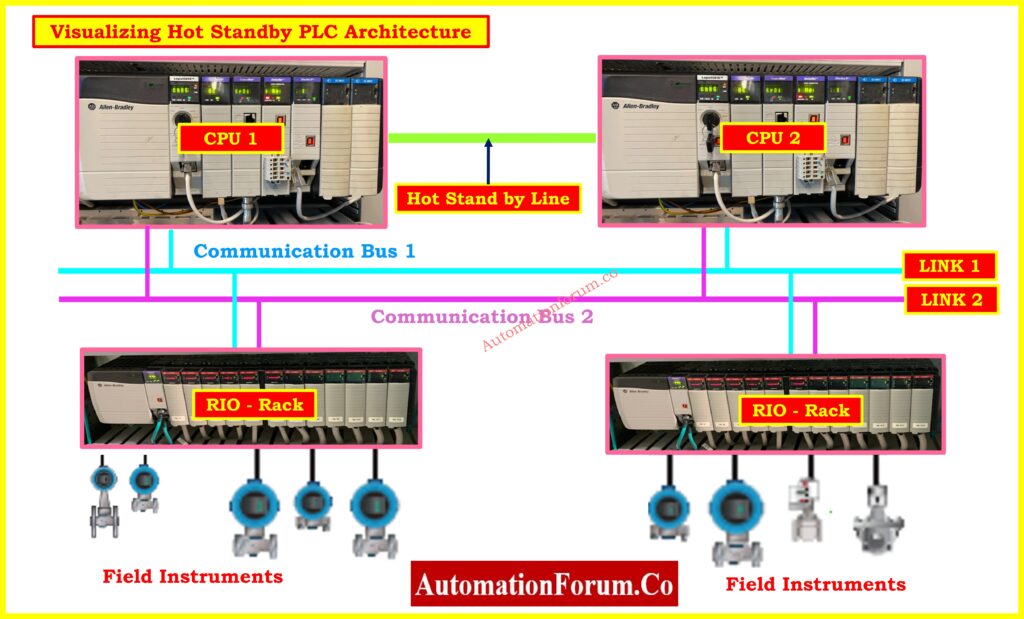
The picture above shows an Allen-Bradley PLC System in Hot Standby mode. It is a backup control system made for industrial automation that needs to be always available and able to handle faults.
CPU 1 & CPU 2 (Redundant Controllers)
These two Allen-Bradley CPUs are connected by a special Hot Standby Link (green line) that lets them sync data in real time.
- CPU 1 is the Primary PLC, actively executing control logic.
- CPU 2 is the Standby PLC, mirroring all operations and ready to take over if CPU 1 fails.
Hot Standby Link
- This special Ethernet link keeps I/O data, status information, and timestamped events between the CPUs in sync all the time.
Know SIS, PLC, and BPCS: Understanding Differences of SIS, PLC, and BPCS in Industrial Automation
Communication Bus 1 & 2 (Redundant Communication Lines)
- If one path fails, two different communication buses make sure that data keeps flowing to the Remote I/O (RIO) racks and field devices.
LINK 1 and LINK 2
- These add extra communication or network redundancy for applications that need to be very reliable.
RIO Racks (Remote I/O Modules)
- These racks are connected to both communication busses for backup and handle signals from field instruments (sensors and actuators).
- They make sure that communication in the field stays open when the CPU is switching.
Simplify Remote I/O in PLCs: Understanding Remote I/O in PLC Control Systems
Field Instruments
- RIO modules send real-time data from pressure, flow, temperature, and level transmitters to the control system.
This architecture enables complete system redundancy, ensuring seamless transition in case of a controller failure.
Control Shutdowns Using Trip Interlocks: Understanding Permissive Logic and Trip Interlocks in Industrial Systems
Requirements for a Successful Switchover of Hot Standby
The following requirements must be met before the system can transition from the main CPU to the backup CPU:
- There must be a healthy and synchronized Hot Standby Ethernet link.
- Both CPUs need to be working and in good shape.
- Every CPU needs to have its own identification, like a different IP address.
- Both CPUs must run the same application or control logic.
- The versions of the firmware must be the same.
- The main CPU needs to send the standby CPU regular updates with information on the system’s state, I/O status, and timestamps.
If any of the mentioned requirements are not met, the switchover will fail or take longer than expected, which defeats the point of having redundancy.
Understand PLC Racks and Chassis: Understanding PLC Racks and Chassis: Types, Differences, and Purposes
Working Mechanism of Hot Standby
The hot standby feature is more than just having a backup controller; it also keeps data in sync, checks the health of the system, and fixes problems.
Continuous Synchronization
After each scan cycle, the main CPU sends the standby CPU real-time data packets that happen in cycles. These data packets have:
- Input/Output status
- Logic scan results
- Internal memory variables
- Alarms and system events
- Timestamps and diagnostic flags
This constant synchronization makes sure that the backup CPU constantly matches the current state of the system and can take over right away without any problems.
Refer the below link for the Choose Sinking or Sourcing Right Sinking and Sourcing: Which Connection is Best for Your PLC?
Real-Time Health Monitoring
The standby CPU doesn’t just sit there; it keeps an eye on a number of important parameters:
- Heartbeat or keep-alive signals from the primary
- CPU state (RUN, STOP, FAULT)
- Communication integrity across the Hot Standby link
- Voltage, temperature, and hardware diagnostics
- The state of the communication busses and I/O modules that are coupled
The standby CPU decides whether to take over if the primary fails to transmit an update or if any other problem is found.
Don’t Miss Your PLC Backup: Programmable Logic Controller (PLC) Program Backup Checklist
Automatic Switchover
The standby CPU starts a hot takeover as soon as a defect is found. This means:
- Instantly promoting itself to Primary CPU
- Activating all output controls and communication roles
- Continuing from the last known I/O state and logic scan
- Maintaining uninterrupted communication with RIOs and field devices
This switch should be so quick (as little as 10–15 milliseconds) that the process doesn’t even notice it. No need to reinitialize or do anything by hand.
Failback Capability (Optional)
Some systems can automatically switch back to the original CPU if it is restored and becomes healthy again. Some let you manually choose when or if the system should go back to its previous state. This makes sure that both safety and flexibility are present for long-term maintenance or replacing hardware.
Protect PLCs with Watchdog Timers: Understanding Watchdog Timers in PLCs
What Can Trigger a Switchover?
To create strong hot standby logic, you need to know what causes a switchover. Here are the things that happen most often:
Primary CPU Failure
The standby CPU takes over if the primary CPU stops responding or goes into an unusual mode (like STOP or HALT). It does this by not receiving heartbeat messages.
Power Supply Issues
If the main CPU or its racks lose power, communication will stop, which will start the switchover.
Hardware or Module Failure
Faulty memory cards, I/O cards, or backplane modules might stop the main CPU or generate internal fault states, which makes the standby take over.
Watchdog Timeout
Watchdog timers make sure that the PLC runs its software within a certain amount of time all the time. A timeout means there is a big problem (such an infinite loop or a CPU hang), and the standby will turn on.
Manual or Software-Based Switch
Using engineering software, operators can start a switchover by themselves. This is very helpful when doing maintenance, upgrading firmware, or testing the machine. But there are safety measures in place to stop unwanted or unplanned changes.
Communication Failure
The standby CPU may take over if the Hot Standby link fails and the CPUs can’t talk to each other anymore. This depends on how the system is set up to handle faults. This is why dual communication paths are recommended.
Mismatched Program or Configuration
If the standby notices any changes in the program logic, tag structures, or firmware, the system will either stop the switchover or go into fault. It is very important to make sure that all CPUs run the same programs.
You can make sure that your switchover logic is automatic, safe, and easy to understand by taking all of these factors into account when you build it.
Get Clarity on Wet Contacts: Understanding Wet Contacts in PLC Wiring
Advantages of using Hot Standby in PLC Systems
There are many benefits to using a hot standby system:
- Zero or Minimal Downtime: The switch happens in milliseconds, thus the operation keeps going without any visible breaks.
- High System Availability: This architecture makes sure that operations can run 24 hours a day, 7 days a week, making it perfect for industries with continuous processes.
- Increased Fault Tolerance: The system can keep working even if there are problems at the controller level, which makes it safer and more reliable.
- Flexibility in Maintenance: Engineers can operate on one CPU (for updates and diagnostics) while the other keeps control, so there is no need to shut down.
- Data and Logic Continuity: The standby CPU gets synchronized data from the primary in real time, which keeps control and logic going during the switch.
Implement Control Algorithms with Confidence: Implementation of Control Algorithms in PLC Programming
Software and Programming Considerations
It’s not as easy as just plugging in a hot standby system. When you build your control logic and software setup, you need to think about redundancy:
- Synchronizing Programs: Many PLC platforms come with capabilities that automatically copy software updates from the main server to the backup server.
- Identifying the CPU’s Role: Use system status bits or flags to see if the CPU is in primary or standby mode.
- Logging of Switchover Events: Keep track of transitions, fault events, and changes in the CPU state for later use in diagnostics.
- Health Checks: Add watchdog timers and diagnostics to your code to keep an eye on the health of the CPU and I/O.
Why Hot Standby is Important
In the area of industrial automation, having backups means being reliable. A hot standby PLC design makes sure that one CPU failure doesn’t stop the process, which is what makes it reliable.
Hot standby PLC systems are the best in the business when it comes to reliability in industrial control. They offer data integrity, quick switchovers, flexible maintenance, and operations that never stop.
If your operation can’t afford unplanned downtime or safety is a must, hot standby isn’t just a nice-to-have. It’s a must.
Frequently Asked Questions on Hot Standby in PLC and Systems
What is hot standby in PLC?
In PLC, “hot standby” means having two Programmable Logic Controllers (PLCs) that are programmed and synchronized the same way and connected to the same Remote I/O network. One is the main controller, and the other is in standby mode. If the main PLC stops working, the standby takes over control without stopping the process. This architecture was first introduced in 1983 with the 584 Hot Standby System.
What is the hot standby process?
In a hot standby setup, two identical systems or data centers are both running and in sync. But only one (the primary) really handles client traffic. The other one (the standby) stays on standby and is ready to take over right away if the primary fails. A load balancer controls traffic routing by sending all requests to the main system unless there is a problem.
What is hot standby and cold standby?
Hot Standby: Both systems are turned on and in sync with one other. If something goes wrong, the standby unit can take over practically right away. It uses more power and may be more likely to fail because of a common reason, yet it doesn’t interrupt service very much.
Cold Standby: The standby unit is off or in a low-power state until it is needed. It uses less energy and makes hardware last longer, but it takes longer to take over when something goes wrong, which means a lengthier service interruption.
What is the hot standby method?
Running two identical systems (hardware or software) at the same time is what hot standby means. The main system does all the work, and the standby system keeps an eye on it and copies its state in real time. If the main system goes down, the backup system takes over right away. This makes sure that services are always available without affecting users.
What is hot restart in PLC?
When there is a power outage, a Hot Restart is a PLC recovery mechanism that lets the controller pick up where it left off. It keeps all the data, memory states, and settings the same as they were when the power went out. A special command, like INITEND, is used in the software to finish the restart process and make sure that everything is set up correctly.
What is the hot standby protocol?
Cisco made the HSRP (Hot Standby Router Protocol) network protocol, which is used for gateway redundancy. It lets several routers work together to make a single virtual default gateway for devices on a LAN. If the active router goes down, a backup router instantly takes over, keeping network connectivity going without any problems. The routers send each other multicast greeting messages to let each other know what’s going on and what their priorities are.
Refer the below link for the Step-by-Step PLC Ladder Logic for Automatic Liquid Mixing Process with Interlocks
