Home Blog Page 4

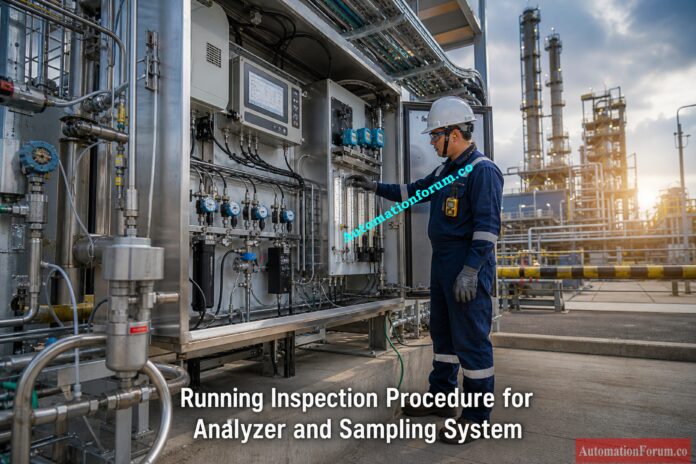
Running Inspection Procedure for Analyzer and Sampling System in Process Industries

0
Running Inspection Procedure for Analyzer and Sampling System in Process Industries
Table of Contents

In today’s process industries, online analyzer systems are quite important. Refineries, petrochemical plants, chemical industries, power plants, pharmaceutical facilities, and oil and gas installations all rely on analyzers to keep an eye on process conditions, product quality, environmental compliance, and safety at work. 

A process analyzer can only give accurate readings if both the analyzer and the sampling mechanism are working properly. Blocked filters, low sample flow, condensation inside tubing, pressure instability, leaking fittings, contaminated sample lines, and inappropriate temperature conditioning are all problems that might cause the analyzer to give false readings and data that aren’t stable. If the analyzer data is wrong, it could lead to bad decisions about process control, lost production, goods that don’t meet specifications, safety issues, and unplanned shutdowns. 

Regular running inspections help find these faults before they get worse. Checking the sample flow, filters, regulators, heat tracing, moisture removal systems, tubing connections, analyzer alarms, and calibration status properly makes sure that process monitoring is accurate and that analyzers are more reliable.

The running inspection approach below is a useful guide for instrumentation engineers, analyzer technicians, maintenance workers, and commissioning engineers that work in industrial process plants. 

A process analyzer is a tool that is used to measure the chemical composition or physical parameters of an industrial process stream continuously live. These analyzers give operators and control systems real-time data that helps keep the process stable and the quality of the product high.

Common analyzers used in process industries include:

  • Oxygen analyzers
  • Gas chromatographs
  • Moisture analyzers
  • pH analyzers
  • Conductivity analyzers
  • Hydrogen sulfide analyzers
  • Infrared analyzers
  • Carbon monoxide analyzers
  • Sulfur analyzers
  • Dew point analyzers

Most analyzers can’t work with raw process conditions directly. Process fluids can have high pressure, high temperature, dust particles, liquid droplets, corrosive chemicals, or other things that can hurt analyzer parts or give wrong data. 

To get around these problems, a system for sampling and conditioning samples is put in place between the process line and the analyzer. 

The sample handling system does a lot of critical things, such as: 

  • Sample extraction from the process line
  • Safe sample transport to the analyzer
  • Pressure reduction
  • Filtration of contaminants
  • Flow regulation
  • Moisture removal
  • Temperature conditioning
  • Safe delivery of representative samples

The major goal of the sample handling system is to make sure that the analyzer gets a clean, representative, stable, and conditioned sample that is good for accurate measurement.

A well-designed sample system makes the analyzer more accurate, faster to respond, and more reliable in its operations. 

Calculate Probe Resistance Before Your Readings Fail: Conductivity Liquid Analyzer Probe Resistance Calculator – Complete Guide for Instrumentation Engineers

While the analyzer system is running under typical plant conditions, running inspection procedures are carried out.

The main goals of a routine running examination are: 

  • Prevent false analyzer readings
  • Avoid unexpected analyzer downtime
  • Detect sample system problems at an early stage
  • Maintain stable sample flow
  • Prevent moisture accumulation and condensation
  • Improve analyzer response time
  • Ensure stable process control
  • Protect analyzer components from contamination
  • Verify analyzer health and communication
  • Ensure safe analyzer operation

Regular checks and preventative maintenance make analyzers much more reliable and plants much more efficient. Maintenance personnel can find problems before they impair process operations by constantly checking the conditions under which samples are handled. 

Crush Your Liquid Analyzer Interview With These Questions: Top 25 Essential MCQ for Liquid Analyzer Instrument Technician Interview in Process Industries

It is very vital to remain safe when inspecting analyzers because they often deal with dangerous, flammable, corrosive, or toxic process gases.

Before starting the inspection, you must take the following steps: 

  • If plant rules say you need one, get a work permit.
  • Put on the right PPE, like gloves, goggles, flame-resistant clothes, and a safety helmet.
  • Check to see if the analyzer shelter’s ventilation system is working.
  • Use authorized gas detectors to look for dangerous gas buildup.
  • If you need to do maintenance work, follow the lockout and tagout rules.
  • Check the sample line pressure before you detach the tubing or filters.
  • Use instruments that are safe by design in dangerous places.
  • Stay away from direct contact with harmful process gasses.
  • Make sure that the calibration gas cylinders are safely stored.
  • Check that the exhaust and vent lines are working properly. 

Analyzer shelters must always have good ventilation since gasses that leak from the operation can make the air dangerous or even explode. 

Get Accurate Nernst mV Output in Minutes: Zirconia Oxygen Analyzer Nernst mV Output Online Calculator – Free Excel Tool

Step by Step Analyzer Running Inspection Procedure
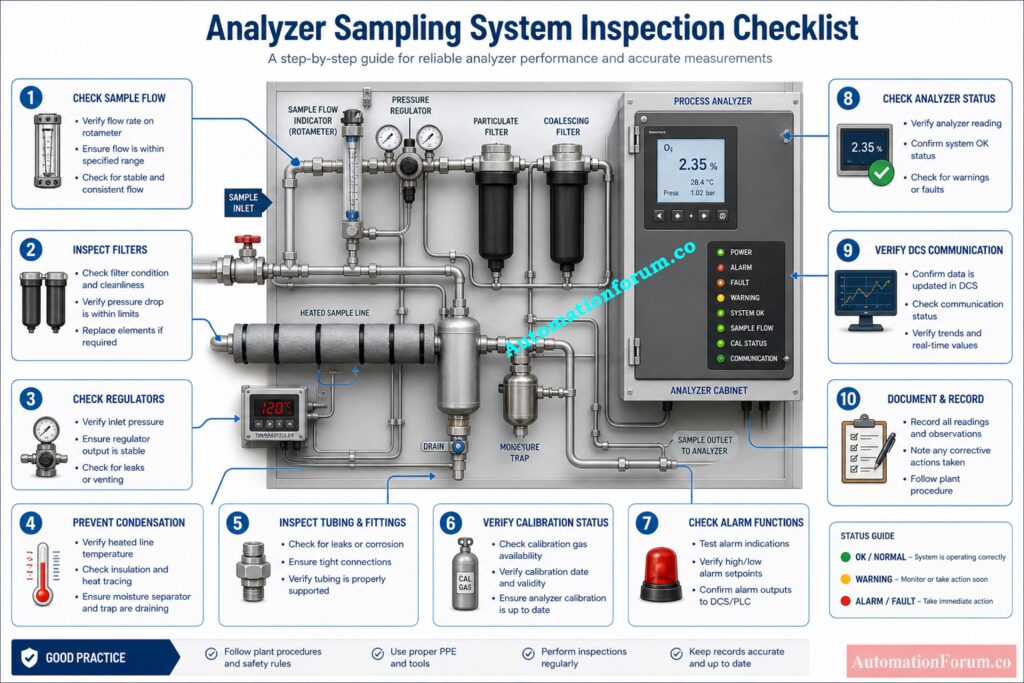
The first thing to do is examine the analyzer’s overall health.

Check the following things very carefully: 

  • Main power supply availability
  • Analyzer display condition
  • Status indications
  • Diagnostic messages
  • Alarm conditions
  • Internal fault indications
  • Communication with DCS or PLC
  • Analyzer warm up condition

Make sure that the analyzer display is working properly and not showing any strange error messages.

Check to see if the analyzer and control system are able to talk to each other. If communication is lost, it could disrupt process monitoring and alert generating.

You should carefully look over diagnostic warnings because they often show early symptoms of problems with the analyzer, like detector faults, poor sample flow, low temperature, or calibration failure. 

Dominate Gas Analyzer Interviews With These MCQs: Top 25 Essential MCQ for Gas Analyzer Instrument Technician Interview
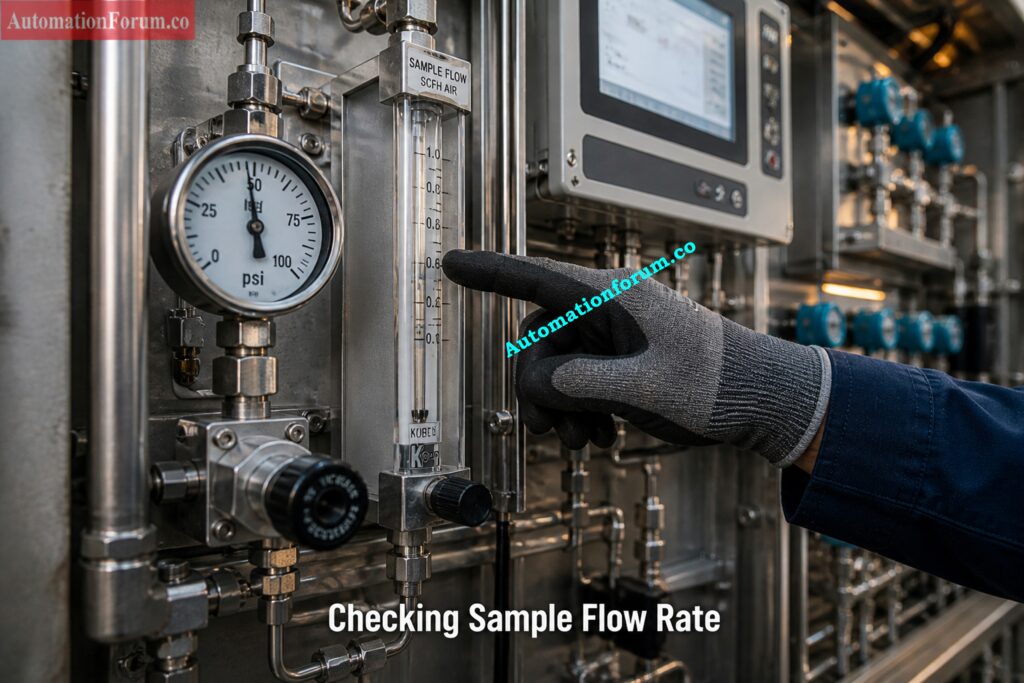
Step by Step Analyzer Running Inspection Procedure Step 2: Check Sample Flow Rate

One of the most critical components of checking an analyzer is checking the sample flow.

During inspection:

  • Verify proper sample flow indication
  • Check for low flow condition
  • Check for excessive flow
  • Inspect bypass flow operation
  • Look for pulsating flow
  • Verify sample return or vent flow
  • Check for blocked tubing or restrictions

If the sample flow is low, the analyzer may take longer to respond and give readings that are not steady.

Too much sample flow could overload the analyzer sensor and make the measurements less accurate.

Abnormal sample flow conditions are commonly caused by blocked tubing, unclean filters, frozen lines, or broken regulators.

In gas analyzer systems, flow instability is a common sign of difficulties with pressure regulation or filters that are only partially blocked. 

Know Oxygen Analyzer Types Before Choosing Wrong: Types of Oxygen Analyzers: Applications and Measurement Methods
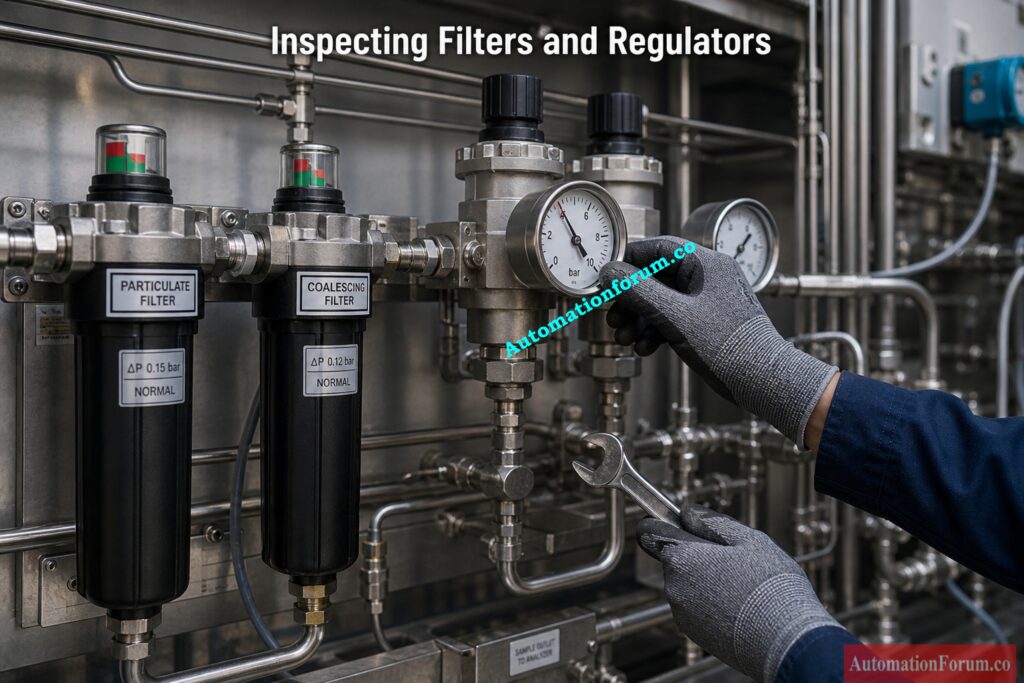
Step by Step Analyzer Running Inspection Procedure Step 3: Inspect Filters and Regulators

Filters and pressure regulators are two important parts of systems that condition samples.

Carefully look at the following parts: 

  • Particulate filters
  • Coalescing filters
  • Moisture separators
  • Pressure regulators
  • Differential pressure indicators
  • Filter drain systems

Look for dirt, discolouration, moisture buildup, or a loss in pressure in the filters.

Dirty filters cause too much pressure loss and make the sample flow unsteady. This makes the analyzer respond slowly and gives wrong readings.

Check the stability of the regulator outlet pressure. When the pressure in the regulator changes, it can make the analyzer measurements unstable and cause problems with process control.

Inspect Zirconia Oxygen Analyzers Before They Fail: Step by Step Preventive Maintenance Procedure for Zirconia Type Oxygen Analyzer with Checklist
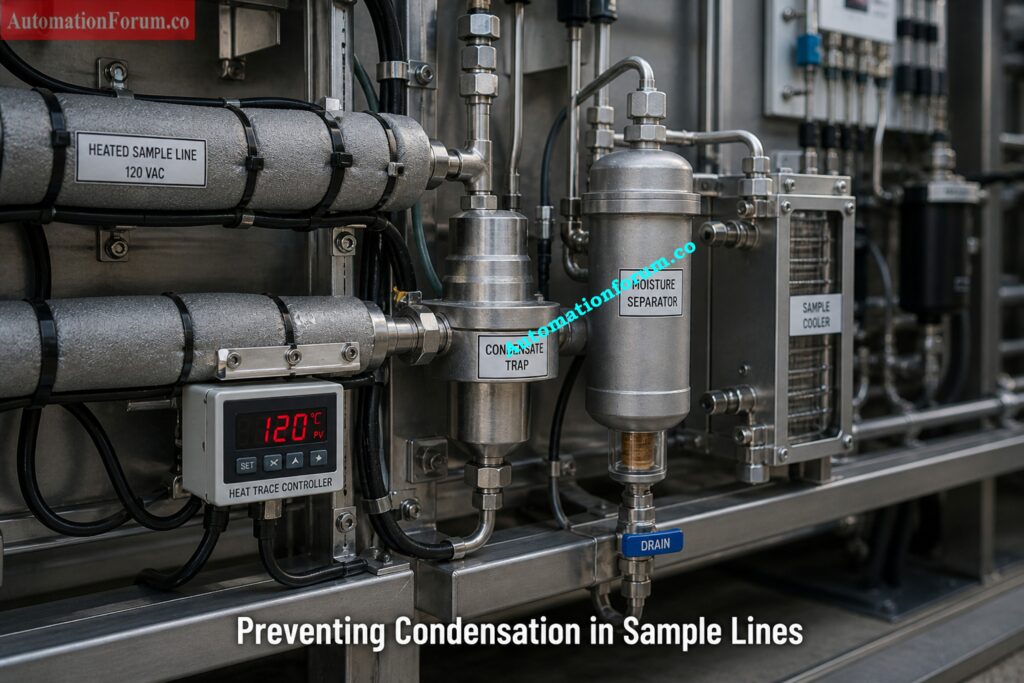
Step by Step Analyzer Running Inspection Procedure Step 4: Verify No Condensation or Moisture

One of the major concerns with analyzer sample systems is condensation.

Moisture inside tubing can dissolve process gases, damage sensors, rust parts, and make analyzers give wrong readings. 

Inspect the following items:

  • Condensate pots
  • Moisture traps
  • Heat traced sample lines
  • Drain systems
  • Sample coolers
  • Heated enclosures
  • Insulated tubing

Look for water that is clearly building up inside the tubing or filter bowls.

Check that heat tracing systems are working correctly because not enough heat can cause vapor to condense inside sample lines.

Check the drain systems to make sure that the condensate removal is working well.

Problems with condensation are very important for gas analyzers, like oxygen analyzers, moisture analyzers, and infrared analyzers. 

Stable values from the analyzer show that the analyzer and sample system are working properly. 

During inspection:

  • Observe analyzer reading stability
  • Check for abnormal fluctuations
  • Compare readings with process conditions
  • Compare against laboratory results if available
  • Confirm analyzer warm up completion

Unstable readings may indicate:

  • Flow instability
  • Sample contamination
  • Sensor degradation
  • Condensation
  • Pressure fluctuations
  • Calibration drift
  • Electronic faults

Understand ORP Analyzer Principles Before Problems Start: Understanding ORP Analyzer: Principles, Measurement, and Applications in Industry

To keep samples that are representative, the integrity of the sample tubing is very important.

Look at the following: 

  • Tube fittings
  • Compression fittings
  • Flexible hoses
  • Valves
  • Tubing supports
  • Corrosion condition
  • Mechanical damage
  • Vibration impact

Use approved leak detection methods to look for leaks.

Sample leaks might let air into the analyzer system or let dangerous gases into the air.

Loose fittings also make it harder for the analyzer to get accurate readings and keep the sample pressure stable.

Make sure that the tubing is appropriately supported and protected from damage caused by vibration. 

Prevent Conductivity Analyzer Failures With This Guide: Conductivity Transmitter / Analyzer Preventive Maintenance Guide & Checklist
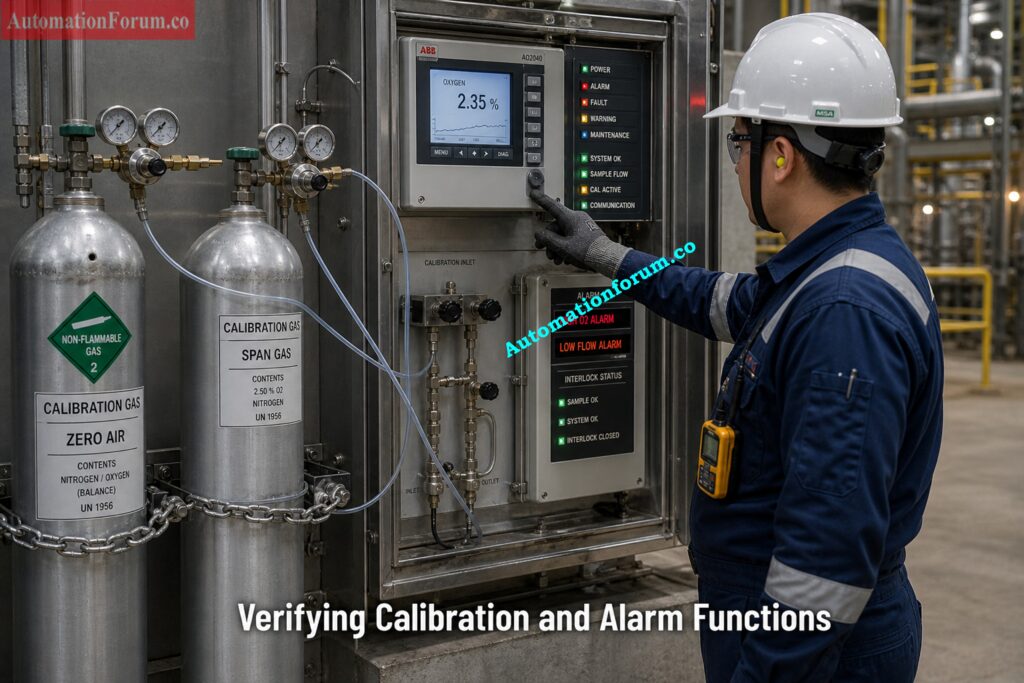
Step by Step Analyzer Running Inspection Procedure  Step 7: Verify Calibration Status

Calibration verification is essential for maintaining analyzer accuracy.

Inspect the following:

Verify that calibration records are updated properly.

Excessive analyzer drift between calibrations may indicate sensor aging, contamination, or internal faults.

Calibration gases must be stored safely and within valid certification periods.

Calibrate Zirconia Oxygen Analyzers Like a Pro: 9 Step Zirconia Oxygen Analyzer Calibration Procedure

Analyzer alarms and interlocks play an important role in process safety.

Verify the following:

  • High alarms
  • Low alarms
  • Analyzer fault alarms
  • Sample flow alarms
  • Shelter gas detection alarms
  • Interlock actions
  • Signal transmission to DCS or PLC

Confirm alarm annunciation and proper control system response.

Faulty analyzer alarms may prevent operators from detecting dangerous process conditions.

Choose the Right Oxygen Analyzer or Regret It: 6 Factors to Consider When Choosing an Oxygen Analyzer for your Application

The following issues are commonly identified during routine analyzer inspections:

  • Low sample flow
  • Blocked filters
  • Condensation in tubing
  • Sample leakage
  • Regulator instability
  • Analyzer drift
  • Rotameter malfunction
  • Heat tracing failure
  • Sensor contamination
  • Unstable analyzer readings
  • Delayed analyzer response
  • Calibration gas leakage
  • Moisture trap overflow
  • Corroded tubing connections

Many analyzer problems originate from poor sample conditioning rather than the analyzer itself.

Fix Paramagnetic Oxygen Analyzer Problems Before Shutdowns: Troubleshooting of Oxygen Analyzer : Paramagnetic Type

Real Field Case Studies of Analyzer and Sampling System Failures

The hydrogen analyzer equipment in a refinery revealed a delayed response when the process changed. The investigation found that the sample flow rate had reduced because the coalescing filter was only partially blocked.

The sample travel time increased because of less flow, which made the analyzer take 3 to 5 minutes longer to respond. This caused the operator to take longer to act when the reactor was disturbed.

The analyzer response went back to normal once the filter was changed and the flow was fixed.

Technical knowledge

The amount of time it takes for a sample to lag depends on the flow speed and the size of the system. Less flow immediately increases lag time, which slows down process monitoring. 

An oxygen analyzer at a gas processing plant began to display readings that were unusually low. The inspection revealed moisture inside the sample line because the heat tracing didn’t work.

The condensed liquid took in some of the gas components, which made the concentration that actually reached the analyzer lower. Because of this, the oxygen measurements were wrong and too low.

Condensation is a big problem for sampling systems since it affects the makeup of the sample and makes the analysis wrong.

The analyzer values stabilized once the heat tracing was restored and the condensate was drained. 

In a continuous emission monitoring system, the values from the analyzer began to change slightly over time. It was determined that filter blockage was the main problem, which caused a drop in pressure and an unsteady sample flow.

In analyzer systems, these kinds of problems happen a lot because of filter clogging and moisture carryover, which cause signal drift and results that aren’t always accurate.

Changing the filter and regulating the pressure got rid of the drift. 

Calibrate Paramagnetic Oxygen Analyzers With Zero Confusion: 10 Step Oxygen Analyzer Calibration Procedure: Paramagnetic Type

ProblemPossible CauseTroubleshooting Action
Low sample flowBlocked filter or tubingReplace filter and inspect tubing
Unstable readingsPressure fluctuationCheck regulator stability
Condensation in linesHeat tracing failureInspect heater and insulation
Analyzer driftSensor agingRecalibrate or replace sensor
Slow analyzer responseExcessive dead volumeReduce tubing length
Rotameter no indicationFloat stickingClean or replace rotameter
Moisture carryoverFaulty moisture separatorDrain and inspect separator
Frequent alarmsFaulty wiring or communicationInspect signal connections
Sample leakageLoose fittingsTighten fittings and leak test
Excessive pressure dropDirty filter elementReplace filter cartridge

Master Cell Constant Before Conductivity Errors Spread: Understanding Cell Constant in Conductivity Analyzers and its Significance

FailureRoot CauseImpact on AnalyzerProcess Risk
Low sample flowBlocked filter or restrictionSlow response timeDelayed control action
Condensation in sample lineHeat tracing failureWrong concentration readingSafety and quality risk
Filter cloggingContaminants in samplePressure drop and instabilityAnalyzer drift
Sample leakageLoose fittingsAir ingress or sample lossFalse readings
Regulator instabilityFaulty regulatorFlow fluctuationUnstable analyzer output
Dead volume in tubingPoor designSample lag and mixingIncorrect measurement
Moisture carryoverFaulty separatorSensor contaminationAnalyzer damage
Heat tracing failurePower loss or heater faultCondensation formationMeasurement error
Excessive pressure dropDirty filtersReduced flowSlow analyzer response

Key engineering insight
Most analyzer failures originate from the sampling system rather than the analyzer itself, often due to poor design or maintenance

Explore Process Analyzers From Setup to Troubleshooting: Exploring Process Analyzers: Principles, Installation, Calibration & Troubleshooting

Inspection ItemCheck DescriptionStatusRemarks
Analyzer power supplyVerify power healthyOK / Not OK
Analyzer displayCheck display and diagnosticsOK / Not OK
Sample flowVerify normal rotameter readingOK / Not OK
FiltersCheck cleanliness and pressure dropOK / Not OK
Pressure regulatorVerify stable outlet pressureOK / Not OK
CondensationConfirm no moisture accumulationOK / Not OK
Heat tracingVerify heater operationOK / Not OK
Moisture trapInspect drain conditionOK / Not OK
Tubing conditionInspect corrosion and damageOK / Not OK
Leak inspectionVerify leak free fittingsOK / Not OK
Analyzer readingsConfirm stable measurementOK / Not OK
Calibration statusVerify calibration validityOK / Not OK
Alarm conditionCheck alarm functionalityOK / Not OK
CommunicationVerify DCS communicationOK / Not OK
Shelter ventilationConfirm proper ventilationOK / Not OK
Exhaust systemVerify vent line operationOK / Not OK


Common parts of industrial inspections are checking the flow of rotameters, the temperature of heat traced tubing, the amount of condensate, analyzer readings, purge systems, and calibration checks. 

Pick the Right pH Analyzer Every Time: Selection Guide for pH Analyzers in Process Applications

The following suggested practices can help make analyzers more reliable and cut down on maintenance issues: 

  • Perform routine preventive maintenance
  • Maintain proper sample flow continuously
  • Replace filters regularly
  • Perform periodic calibration
  • Maintain heat tracing systems properly
  • Minimize dead legs in sample tubing
  • Use representative sample extraction points
  • Keep analyzer shelters clean
  • Maintain stable sample pressure
  • Inspect tubing supports regularly
  • Verify analyzer diagnostics frequently
  • Maintain accurate maintenance records

A well-designed sample system and regular checks make analyzers work better and cut down on false findings. 

Know How Paramagnetic Oxygen Analyzers Really Work: Oxygen Analyzer Working Principle: Paramagnetic Type

Modern process facilities are using more and more advanced diagnostics and predictive monitoring methods to make analyzers more reliable and cut down on unscheduled downtime.
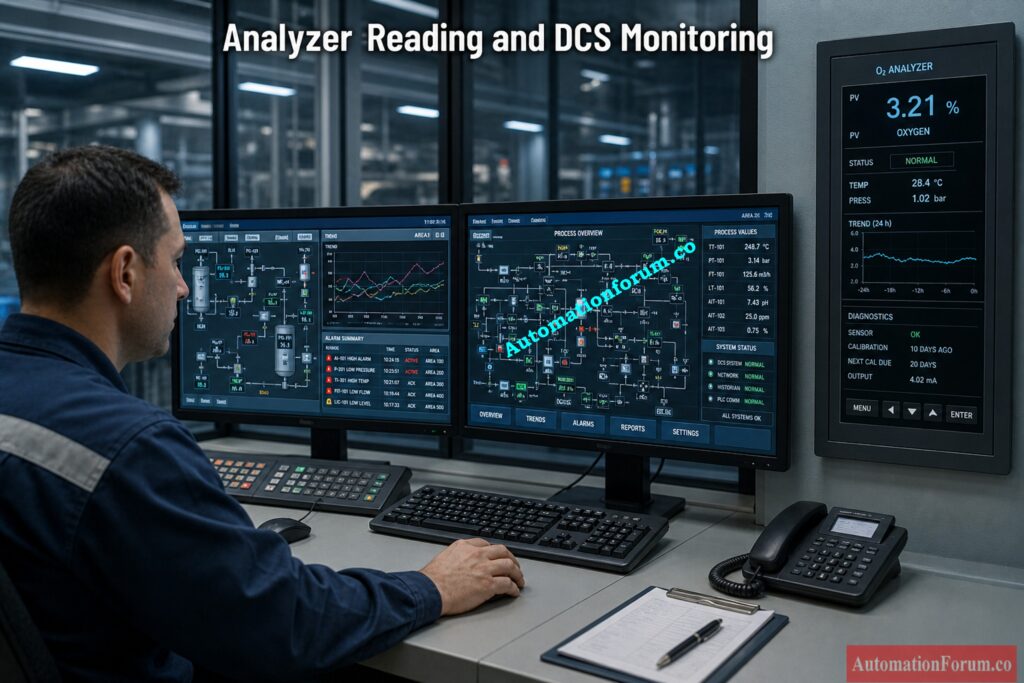
Advanced Diagnostics and Predictive Monitoring for Analyzer Systems

For example:

  • Gradual drift indicates sensor aging or contamination
  • Sudden spikes indicate flow or pressure instability
  • Flat signals indicate sample blockage

Installing differential pressure indicators on filters can help you find clogs before they impair the functioning of the analyzer.

An increase in pressure drop means that contamination is building up, which can slow down the flow of samples and make measurements less stable. 

You can use low flow switches or transmitters to set off warnings when the flow of samples decreases below a certain level.

This stops the analyzer from working when the sample circumstances are not right. 

Modern analyzers provide internal diagnostics such as:

  • Sensor health monitoring
  • Calibration deviation tracking
  • Internal temperature monitoring
  • Flow alarms

These diagnostics help identify issues early before failure occurs.

Periodic comparison of online analyzer readings with laboratory results helps validate analyzer accuracy.

Large deviations indicate:

  • Calibration problems
  • Sample system issues
  • Analyzer malfunction
  • Filter clogging
  • Sensor degradation
  • Moisture breakthrough

This reduces downtime and improves system reliability.

Stop Guessing: Master Oxygen Analyzer Basics Fast: Oxygen Analyzer Basics in Process Industries – Advanced Quiz for Instrumentation Engineers

Running Inspection Checklist for Analyzer and Sampling System in Process Industries Excel Sheet
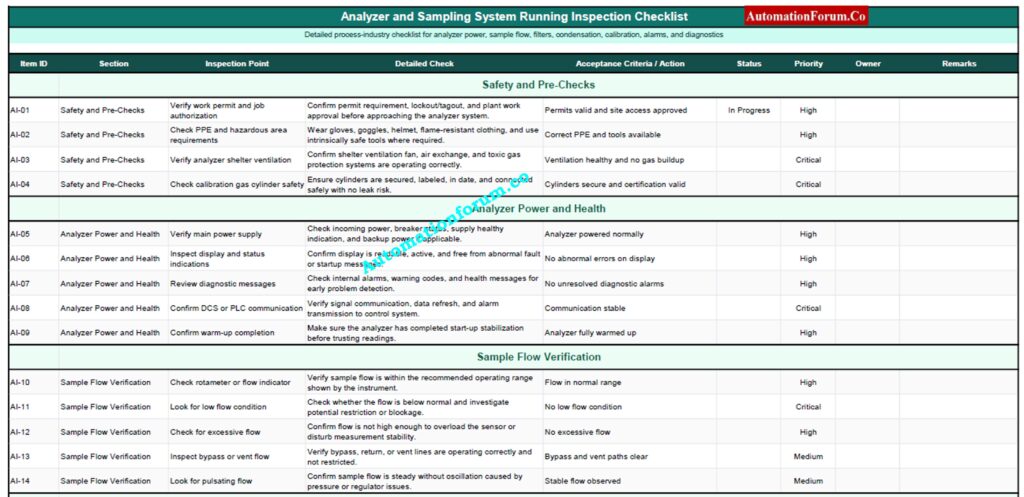
Download this Excel based analyzer inspection checklist to verify sample flow, filters, regulators, tubing, calibration, alarms, and system health, ensuring accurate measurements, reduced downtime, and reliable process operation.

Analyzer and sampling systems are very important parts of keeping an eye on and controlling industrial processes. For accurate analyzer measurements, the analyzer itself and the sample handling system must both be in good shape.

Regular running checks can find problems including low sample flow, dirty filters, pressure instability, moisture buildup, leaking tubing, calibration drift, and unstable analyzer findings before they pose big difficulties with operations.

Regularly checking sample flow systems, filters, regulators, condensation control systems, heat tracing, alarms, calibration systems, and analyzer diagnostics makes analyzers much more reliable, safe, and efficient.

A properly cared for analyzer and sample conditioning system makes sure that process measurements are correct, reduces downtime, stops erroneous readings, and helps the plant run smoothly in tough industrial settings. 

Maintain Paramagnetic O2 Analyzers Without Missing Steps: Step by Step Preventive Maintenance Procedure for O2 Analyzers : Paramagnetic Type

The analyzer sampling system check makes sure that the sample sent is clean, representative, and stable so that measurements are correct and process control is trustworthy. 

For the analyzer to get fresh and representative samples, the sample flow must be correct. If the flow is too low or obstructed, the response time and values may be wrong. 

When the temperature drops or the heat tracing isn’t good, condensation happens. This can change the composition of the sample and give the analyzer wrong readings. 

Analyzer check should be done often while the system is running to find problems early and make sure that measurements and system performance are always accurate. 

Low sample flow, clogged filters, condensation, leaks, and unstable pressure are all common factors that can make analyzers less accurate and reliable. 

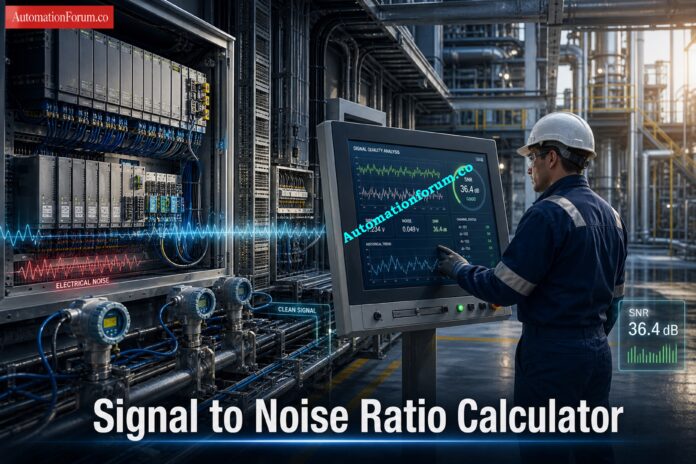
Signal-to-Noise Ratio (SNR) Calculator for Instrumentation and Control Systems
0
Signal-to-Noise Ratio (SNR) Calculator for Instrumentation and Control Systems
Signal-to-Noise Ratio (SNR) Calculator | AutomationForum.co
AutomationForum.co · Free Automation Engineering Calculator

Signal-to-Noise Ratio (SNR) Calculator

This calculator helps instrument engineers assess the integrity of a signal in the presence of noise. It provides Signal-to-Noise Ratio (SNR) calculations based on input parameters, offering insights into signal quality and compliance with common industry standards for reliable measurement and control systems.

Signal Parameters
Noise Parameters
Circuit Impedance
Useful for field documentation and circuit context.

Results

SNR (dB)
0.00
dB
Linear Ratio
0.00
:1
Quality
Not calculated
Enter values
Method
Voltage
20 log₁₀(S / N)
Enter signal and noise values, then click Calculate SNR.
Ω Impedance (R)
50.2 Ω
ⓘ Signal Unit
Volts (V)
ⓘ Noise Unit
Volts (V)
Voltage units: V, mV, µV. Power units: W, mW, µW.

Signal-to-noise ratio, or SNR, is a practical way to measure how clean a signal is when compared with unwanted noise. In instrumentation and control systems, this matters because real plant signals rarely arrive in perfect condition. Transmitters, sensors, PLC inputs, and wireless devices can all pick up interference from nearby equipment, poor grounding, cable routing, vibration, or switching noise. When SNR is poor, the result is unstable readings, lower measurement confidence, false alarms, and poor control loop behavior. When SNR is strong, the signal is easier for the control system to interpret and the measurement becomes more dependable. 

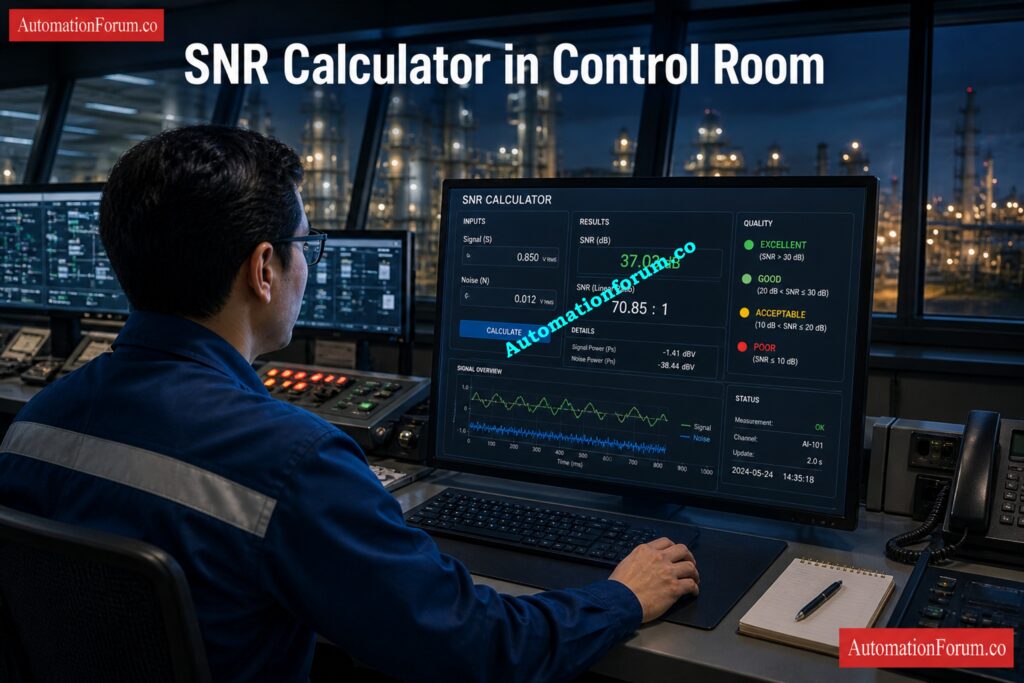
This calculator is designed for real industrial use, helping engineers quickly evaluate signal quality using either voltage-based or power-based inputs, while also showing the linear ratio, quality level, and calculation method.

What Is Signal-to-Noise Ratio (SNR)?

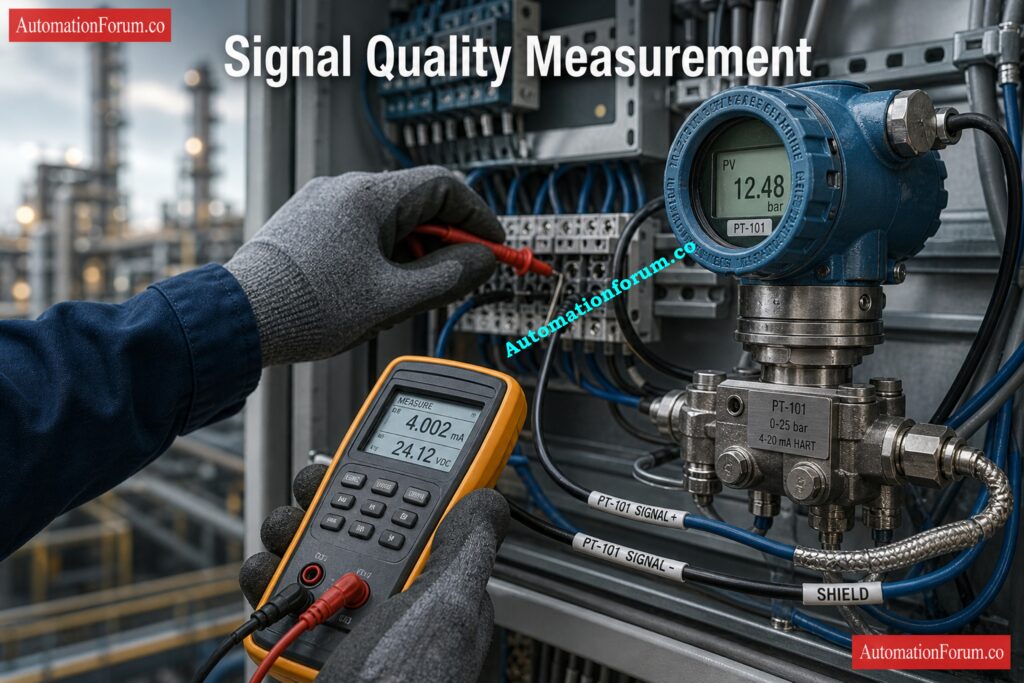
SNR is the ratio of the useful signal to the noise that isn’t useful. In basic engineering terms, it tells you how much stronger the real measurement is than the noise around it. Electrical noise can affect the output of a pressure transmitter, the signal from a thermocouple, the reading from a vibration probe, or an analog feedback signal.

Simulate 4-20 mA Signals Like a Pro: How to simulate 4-20ma signal with Loop Calibrator ?

If the signal is much stronger than the noise, the reading is clear and steady. The measurement can drift, jump, or lose reliability if the noise gets too loud. if the noise gets too loud.If the signal is much stronger than the noise, the reading is clear and steady. The measurement can drift, jump, or lose reliability if the noise gets too loud.

Crack Hard AO Faults with Advanced Checks: Troubleshooting Analog Output Signals in PLC Loops – Advanced Scenario-Based Quiz for Process Industries

In industrial practice, SNR is usually expressed in dB because decibel form makes it easier to compare signal quality across systems and signal ranges. Higher SNR means better clarity. Lower SNR means the measurement is more vulnerable to interference. The calculator also shows the linear ratio so engineers can understand the result in direct signal-to-noise terms, not only in decibels.

Verify Live 4-20 mA Signals Fast: Live Signal Verification 4 to 20 mA Loop Standard Operating Procedure (SOP)

The calculator supports both of the standard SNR relationships used in engineering practice:


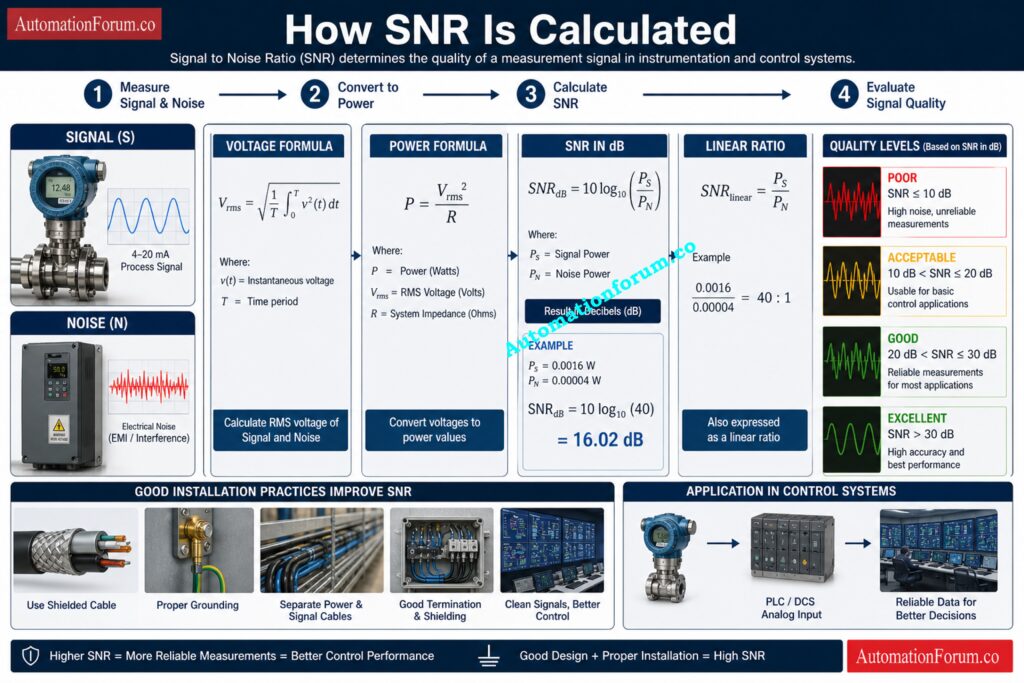
SNR(dB) = 20 × log10(Signal / Noise)

SNR(dB) = 10 × log10(Signal / Noise)

SNR Formula and Engineering Interpretation

The difference matters because voltage and power do not behave the same way. When the input values are voltages such as V, mV, or µV, the calculator uses the voltage method. When the values are power quantities such as W, mW, or µW, it uses the power method. 

That is why the unit family must remain consistent. Mixing voltage with power would produce an invalid comparison, so the calculator prevents that and shows a warning if the families do not match.

Spot Dead Zero Problems Before Shutdown: Beyond Zero: Understanding the Dead Zero Problem in Industrial Analog Signals

This is the useful measurement value you want to evaluate. In practice, it may be the output of a sensor, transmitter, signal conditioner, or process interface. The actual number depends on the application, but the main goal is to judge whether the signal is strong enough compared with the noise. The calculator accepts a numeric value and updates the results immediately once calculation is performed.

The signal unit determines whether the calculation follows the voltage family or the power family. The calculator includes:

  • Volts (V)
  • Millivolts (mV)
  • Microvolts (µV)
  • Watts (W)
  • Milliwatts (mW)
  • Microwatts (µW)

Voltage units are common in instrumentation and analog measurement circuits. Power units are used in systems where power-level comparison is the correct engineering basis. The calculator keeps these separate so the result remains technically valid.

Challenge Your Instrument Signal Type Knowledge: Quiz on Instrumentation Signal Types

Noise is the unwanted disturbance affecting the signal. In field systems, it may come from EMI, grounding problems, poor shielding, electrical switching, VFDs, cable interference, or mechanical vibration. The calculator requires this value to be greater than zero because SNR is a ratio and cannot be calculated against zero noise.

Choose the Right IS Loop Isolation: Understanding Zener vs Galvanic Isolation in IS Loops for 4 to 20 mA Systems

The impedance field is included for circuit context and engineering documentation. It is useful when reviewing a measurement path or reporting the test condition, but it is not required for the ratio calculation itself when the signal and noise are already entered in the same unit family.

Why Engineers Keep Trusting 4-20 mA: Why Engineers Still Trust the 4-20 mA Signal in Automation Systems

The calculator displays four useful outputs: SNR in dB, linear ratio, quality, and method. These are arranged to help engineers move quickly from a mathematical result to a practical decision.

SNR Calculator Output Interpretation

This is the main result. The calculator classifies SNR into practical engineering bands:

  • Below 10 dB: Poor
  • 10 to 20 dB: Acceptable
  • 20 to 30 dB: Good
  • 30 dB and above: Excellent

These ranges are useful during commissioning, troubleshooting, and signal validation because they show whether the signal is likely to perform reliably or whether noise reduction work is needed.

The linear ratio tells you how many times stronger the signal is than the noise. For instance, a value of 100:1 means that the signal is 100 times stronger than the noise.. Engineers often use this form when discussing field conditions with maintenance teams or when documenting test results in a simple and direct way.

This output gives a practical quality judgment instead of leaving the engineer with only a number. It helps answer a simple question: is the signal good enough for plant operation, or does the system need attention? A poor rating often suggests wiring, shielding, or grounding issues. A good or excellent rating usually indicates a stable and usable measurement.

Hunt Loop Faults Faster with Calibrators: 4-20 mA Loop Troubleshooting with Loop Calibrators : A Practical Guide

The method field confirms whether the calculator used the voltage or power formula. This is important because the same signal-to-noise relationship must be interpreted using the correct formula for the selected unit family.

Track Down PLC DO Failures Quickly: Troubleshooting PLC Digital Output Signals – Advanced Industrial Quiz for Automation Engineers

How to Use the SNR Calculator

Use the calculator in this order:

  • Enter the signal value that represents the useful measurement.
  • Select the signal unit so the calculator knows whether it is working with voltage or power.
  • Enter the noise value that is affecting the signal.
  • Select the noise unit and keep it in the same unit family as the signal.
  • Enter the impedance if you want additional circuit context for documentation.
  • Click Calculate SNR.
  • Read the outputs for SNR in dB, linear ratio, quality, and calculation method.

The calculator is designed to be practical for field and engineering use. If the signal or noise value is invalid, or if the units do not belong to the same family, it does not produce a misleading result. Instead, it shows a clear message so the user can correct the input before relying on the output. That makes it useful for troubleshooting, commissioning, and signal validation work.

Test Your DO Troubleshooting Skill Hard: Advanced Quiz on Practical Troubleshooting of DO Signals in PLC for Process Industries

SNR is relevant across many automation and instrumentation applications. It is especially important in:

  • 4–20 mA and analog signal loops
  • PLC and DCS input processing
  • Wireless instrumentation
  • Vibration monitoring
  • RTD and thermocouple circuits
  • Control valve feedback systems

In these systems, a weak signal or excessive noise can reduce measurement confidence, increase instability, and create unnecessary troubleshooting time. In clean installations, a good SNR supports better process visibility and smoother control performance.

Uncover Hidden 24VDC Faults in the Field: Why 24VDC is Not Always 24VDC – Real-World Troubleshooting for Analog and Digital Signals

When to Use This SNR Calculator

You can use this calculator at different points in the life cycle of an instrumentation or control system. Engineers can use it during EPC design to check if a signal will stay strong before it is put in. 

It helps make sure that field signals are stable and not affected by too much electrical noise during commissioning.

The tool is very useful for troubleshooting and validating signals. If the reading from a transmitter changes, a PLC analog input becomes unstable, or a control loop acts in an unexpected way, the calculator can help figure out if the problem is with the process or if it is caused by EMI, grounding issues, or signal interference.

Decode Span, LRV, and URV Values: Transmitter Calibration Span, LRV and URV Value Calculator from Measured 4 to 20 mA

It is also helpful during:

Engineers can quickly decide if the measurement is good for reliable monitoring and control operation because the calculator gives them both SNR in dB and a way to understand signal quality.

Protect 4-20 mA and RS485 Signals: Twisted Pair Cable in Industrial Signal Transmission: The Essential Guide for 4-20 mA and RS 485 Systems 


Signal-to-Noise Ratio (SNR) Calculator for Instrumentation and Control Systems
<!DOCTYPE html>
<html lang="en">
<head>
  <meta charset="UTF-8" />
  <meta name="viewport" content="width=device-width, initial-scale=1.0" />
  <title>Signal-to-Noise Ratio (SNR) Calculator | AutomationForum.co</title>
  <meta name="description" content="Free Signal-to-Noise Ratio (SNR) calculator with signal and noise units, impedance input, and live engineering results." />
  <meta name="keywords" content="SNR calculator, signal to noise ratio calculator, automation engineering calculator, signal unit, noise unit" />
  <meta name="robots" content="index, follow" />
  <meta name="theme-color" content="#ffffff" />

  <style>
    :root{
      --bg:#f6f9ff;
      --card:#ffffff;
      --text:#132238;
      --muted:#5c6b7d;
      --line:#d9e3f2;
      --blue:#2f63e0;
      --blue-dark:#2047a8;
      --orange:#f59e0b;
      --green:#16a34a;
      --purple:#7c3aed;
      --shadow:0 10px 28px rgba(31, 55, 108, .10);
      --radius:12px;
    }

    *{box-sizing:border-box}
    body{
      margin:0;
      background:var(--bg);
      color:var(--text);
      font-family:Arial, Helvetica, sans-serif;
    }

    .wrap{
      width:min(1100px, calc(100% - 30px));
      margin:18px auto 34px;
    }

    .topline{
      display:flex;
      align-items:center;
      gap:10px;
      margin-bottom:4px;
    }

    .brand{
      color:#2b55c8;
      font-size:14px;
      font-weight:700;
      letter-spacing:.01em;
      margin:0 0 8px;
    }

    .title{
      display:flex;
      align-items:center;
      gap:10px;
      margin:0;
      font-size:31px;
      line-height:1.15;
      color:#1f3f92;
      font-weight:800;
      letter-spacing:-0.02em;
    }

    .title-icon{
      width:26px;
      height:26px;
      flex:0 0 auto;
      display:inline-block;
    }

    .rule{
      height:2px;
      background:#2248b5;
      margin:10px 0 8px;
    }

    .intro{
      margin:0;
      color:#2f3a4a;
      font-size:15px;
      line-height:1.65;
    }

    .card{
      background:var(--card);
      border:1px solid var(--line);
      border-radius:var(--radius);
      box-shadow:var(--shadow);
      padding:14px 14px 15px;
      margin-top:18px;
    }

    .section-title{
      margin:0 0 10px;
      color:var(--blue);
      font-size:22px;
      line-height:1.2;
      font-weight:800;
      padding-bottom:10px;
      border-bottom:1px dashed #d8e0ef;
    }

    .grid{
      display:grid;
      grid-template-columns:1fr 1fr;
      gap:16px;
    }

    .field label{
      display:flex;
      align-items:center;
      gap:8px;
      font-size:14px;
      font-weight:700;
      color:#1f2b3a;
      margin-bottom:8px;
    }

    .info{
      width:15px;
      height:15px;
      border-radius:50%;
      background:#2248b5;
      color:#fff;
      display:inline-flex;
      align-items:center;
      justify-content:center;
      font-size:11px;
      font-weight:700;
      cursor:help;
      position:relative;
      flex:0 0 auto;
    }

    .info:hover::after{
      content:attr(data-tip);
      position:absolute;
      left:50%;
      transform:translateX(-50%);
      bottom:130%;
      width:max-content;
      max-width:300px;
      background:#1f2b3a;
      color:#fff;
      padding:8px 10px;
      border-radius:8px;
      font-size:12px;
      line-height:1.45;
      box-shadow:0 8px 18px rgba(0,0,0,.2);
      z-index:10;
      white-space:normal;
    }

    input, select{
      width:100%;
      border:1px solid var(--line);
      border-radius:6px;
      background:#fff;
      color:var(--text);
      font-size:15px;
      padding:12px 12px;
      outline:none;
      transition:.2s ease;
    }

    input:focus, select:focus{
      border-color:#6d8df0;
      box-shadow:0 0 0 3px rgba(47,99,224,.10);
    }

    .help{
      margin-top:6px;
      color:var(--muted);
      font-size:12px;
      line-height:1.45;
    }

    .span-2{grid-column:1 / -1}

    .btn-row{
      display:grid;
      grid-template-columns:1fr 1fr;
      gap:8px;
      margin-top:16px;
    }

    button{
      border:none;
      border-radius:6px;
      padding:14px 14px;
      font-size:15px;
      font-weight:800;
      cursor:pointer;
      transition:.2s ease;
      color:#fff;
      display:flex;
      align-items:center;
      justify-content:center;
      gap:8px;
    }

    .btn-calc{
      background:linear-gradient(180deg, var(--blue-dark), var(--blue));
    }

    .btn-calc:hover{filter:brightness(1.03)}

    .btn-reset{
      background:linear-gradient(180deg, #f3a00b, var(--orange));
    }

    .btn-reset:hover{filter:brightness(1.03)}

    .results{
      margin-top:18px;
      padding-top:12px;
    }

    .results-head{
      display:flex;
      align-items:center;
      gap:10px;
      margin-bottom:12px;
    }

    .results-title{
      margin:0;
      color:#2b55c8;
      font-size:22px;
      font-weight:800;
      line-height:1.2;
    }

    .results-icon{
      width:22px;
      height:22px;
      flex:0 0 auto;
    }

    .results-grid{
      display:grid;
      grid-template-columns:repeat(4, 1fr);
      gap:10px;
    }

    .result-box{
      border:1px solid var(--line);
      border-radius:10px;
      padding:14px 12px 12px;
      background:#fbfdff;
      min-height:154px;
      display:flex;
      flex-direction:column;
      align-items:center;
      justify-content:center;
      text-align:center;
    }

    .result-label{
      font-size:14px;
      font-weight:800;
      margin-bottom:10px;
      color:#1f2b3a;
    }

    .result-icon{
      width:34px;
      height:34px;
      margin-bottom:8px;
    }

    .result-value{
      font-size:34px;
      line-height:1.05;
      font-weight:900;
      color:#1547c6;
      word-break:break-word;
    }

    .result-sub{
      margin-top:6px;
      font-size:14px;
      color:#374151;
      font-weight:700;
    }

    .result-sub.green{color:var(--green)}
    .result-sub.purple{color:var(--purple)}
    .result-sub.blue{color:#1547c6}

    .message{
      margin-top:12px;
      border:1px solid var(--line);
      background:#f7faff;
      border-radius:10px;
      padding:12px 14px;
      font-size:14px;
      line-height:1.55;
      color:#243345;
      display:flex;
      align-items:flex-start;
      gap:10px;
    }

    .message .ok{
      width:22px;
      height:22px;
      flex:0 0 auto;
      margin-top:1px;
    }

    .meta-row{
      margin-top:14px;
      border:1px solid var(--line);
      border-radius:10px;
      overflow:hidden;
      display:grid;
      grid-template-columns:1fr 1fr 1fr;
      background:#fff;
    }

    .meta-item{
      padding:12px 14px;
      text-align:center;
      border-right:1px solid var(--line);
    }

    .meta-item:last-child{border-right:none}

    .meta-top{
      display:flex;
      align-items:center;
      justify-content:center;
      gap:8px;
      font-size:13px;
      color:#334155;
      margin-bottom:6px;
      font-weight:700;
    }

    .meta-val{
      font-size:15px;
      color:#1547c6;
      font-weight:900;
    }

    .footer-note{
      margin-top:12px;
      border:1px solid var(--line);
      border-radius:10px;
      padding:12px 14px;
      background:#f8fbff;
      font-size:14px;
      line-height:1.6;
      color:#24405f;
    }

    .formula-note{
      margin-top:10px;
      font-size:13px;
      color:var(--muted);
    }

    @media (max-width: 900px){
      .results-grid{grid-template-columns:repeat(2, 1fr)}
      .meta-row{grid-template-columns:1fr}
      .meta-item{border-right:none;border-bottom:1px solid var(--line)}
      .meta-item:last-child{border-bottom:none}
    }

    @media (max-width: 720px){
      .grid,
      .btn-row{
        grid-template-columns:1fr;
      }
      .title{
        font-size:24px;
        align-items:flex-start;
      }
      .section-title,
      .results-title{
        font-size:20px;
      }
      .result-box{
        min-height:140px;
      }
      .result-value{
        font-size:30px;
      }
      .wrap{
        width:min(100% - 16px, 1100px);
      }
      .card{
        padding:12px;
      }
    }
  </style>
</head>
<body>
  <div class="wrap">
    <div class="header">
      <div class="brand">AutomationForum.co · Free Automation Engineering Calculator</div>

      <h1 class="title">
        <svg class="title-icon" viewBox="0 0 24 24" fill="none" aria-hidden="true">
          <rect x="2" y="13" width="3" height="9" rx="1.2" fill="#2f63e0"/>
          <rect x="7" y="9" width="3" height="13" rx="1.2" fill="#2f63e0"/>
          <rect x="12" y="5" width="3" height="17" rx="1.2" fill="#2f63e0"/>
          <rect x="17" y="1" width="3" height="21" rx="1.2" fill="#2f63e0"/>
        </svg>
        Signal-to-Noise Ratio (SNR) Calculator
      </h1>

      <div class="rule"></div>
      <p class="intro">
        This calculator helps instrument engineers assess the integrity of a signal in the presence of noise.
        It provides Signal-to-Noise Ratio (SNR) calculations based on input parameters, offering insights into signal quality
        and compliance with common industry standards for reliable measurement and control systems.
      </p>
    </div>

    <div class="card">
      <div class="section-title">Signal Parameters</div>
      <div class="grid">
        <div class="field">
          <label for="signalValue">
            Signal Value
            <span class="info" data-tip="Enter the signal amplitude or power value depending on the selected unit family.">i</span>
          </label>
          <input type="number" id="signalValue" value="1.0" step="any" />
        </div>

        <div class="field">
          <label for="signalUnit">Signal Unit</label>
          <select id="signalUnit">
            <option value="V" selected>Volts (V)</option>
            <option value="mV">Millivolts (mV)</option>
            <option value="uV">Microvolts (µV)</option>
            <option value="W">Watts (W)</option>
            <option value="mW">Milliwatts (mW)</option>
            <option value="uW">Microwatts (µW)</option>
          </select>
        </div>
      </div>
    </div>

    <div class="card">
      <div class="section-title">Noise Parameters</div>
      <div class="grid">
        <div class="field">
          <label for="noiseValue">
            Noise Value
            <span class="info" data-tip="Noise must be greater than zero. Use the same unit family as the signal for correct ratio calculation.">i</span>
          </label>
          <input type="number" id="noiseValue" value="0.001" step="any" />
        </div>

        <div class="field">
          <label for="noiseUnit">Noise Unit</label>
          <select id="noiseUnit">
            <option value="V" selected>Volts (V)</option>
            <option value="mV">Millivolts (mV)</option>
            <option value="uV">Microvolts (µV)</option>
            <option value="W">Watts (W)</option>
            <option value="mW">Milliwatts (mW)</option>
            <option value="uW">Microwatts (µW)</option>
          </select>
        </div>
      </div>
    </div>

    <div class="card">
      <div class="section-title">Circuit Impedance</div>
      <div class="grid">
        <div class="field span-2">
          <label for="impedance">
            Impedance (R)
            <span class="info" data-tip="Reference impedance used for documentation. It is not required for ratio math when signal and noise are in the same unit family.">i</span>
          </label>
          <input type="number" id="impedance" value="50.2" step="any" />
          <div class="help">Useful for field documentation and circuit context.</div>
        </div>
      </div>
    </div>

    <div class="btn-row">
      <button class="btn-calc" type="button" id="calcBtn">
        <span>🧮</span>
        <span>Calculate SNR</span>
      </button>
      <button class="btn-reset" type="button" id="resetBtn">
        <span>🔄</span>
        <span>Reset Form</span>
      </button>
    </div>

    <div class="card results">
      <div class="results-head">
        <svg class="results-icon" viewBox="0 0 24 24" fill="none" aria-hidden="true">
          <rect x="2" y="13" width="3" height="9" rx="1.2" fill="#2f63e0"/>
          <rect x="7" y="9" width="3" height="13" rx="1.2" fill="#2f63e0"/>
          <rect x="12" y="5" width="3" height="17" rx="1.2" fill="#2f63e0"/>
          <rect x="17" y="1" width="3" height="21" rx="1.2" fill="#2f63e0"/>
        </svg>
        <h2 class="results-title">Results</h2>
      </div>

      <div class="results-grid">
        <div class="result-box">
          <div class="result-label">SNR (dB)</div>
          <svg class="result-icon" viewBox="0 0 48 48" fill="none" aria-hidden="true">
            <path d="M7 28h7l5-14 7 24 5-10h10" stroke="#2f63e0" stroke-width="3" stroke-linecap="round" stroke-linejoin="round"/>
          </svg>
          <div class="result-value" id="snrDb">0.00</div>
          <div class="result-sub blue">dB</div>
        </div>

        <div class="result-box">
          <div class="result-label">Linear Ratio</div>
          <svg class="result-icon" viewBox="0 0 48 48" fill="none" aria-hidden="true">
            <rect x="9" y="26" width="5" height="13" rx="1.5" stroke="#16a34a" stroke-width="3"/>
            <rect x="20" y="18" width="5" height="21" rx="1.5" stroke="#16a34a" stroke-width="3"/>
            <rect x="31" y="10" width="5" height="29" rx="1.5" stroke="#16a34a" stroke-width="3"/>
          </svg>
          <div class="result-value" id="linearRatio" style="color:#16a34a;">0.00</div>
          <div class="result-sub green">:1</div>
        </div>

        <div class="result-box">
          <div class="result-label">Quality</div>
          <svg class="result-icon" viewBox="0 0 48 48" fill="none" aria-hidden="true">
            <circle cx="24" cy="17" r="8" stroke="#7c3aed" stroke-width="3"/>
            <path d="M19 30l5 4 5-4v10l-5-3-5 3V30z" stroke="#7c3aed" stroke-width="3" stroke-linejoin="round"/>
            <path d="M24 12l1.8 3.7 4.2.6-3 2.9.7 4.1-3.7-2-3.7 2 .7-4.1-3-2.9 4.2-.6L24 12z" fill="#7c3aed"/>
          </svg>
          <div class="result-value" id="quality" style="color:#7c3aed;">Not calculated</div>
          <div class="result-sub purple" id="qualitySub">Enter values</div>
        </div>

        <div class="result-box">
          <div class="result-label">Method</div>
          <svg class="result-icon" viewBox="0 0 48 48" fill="none" aria-hidden="true">
            <circle cx="24" cy="24" r="18" stroke="#2f63e0" stroke-width="3"/>
            <path d="M8 24h8l3-8 5 16 4-8h12" stroke="#2f63e0" stroke-width="3" stroke-linecap="round" stroke-linejoin="round"/>
          </svg>
          <div class="result-value" id="method" style="color:#1547c6;">Voltage</div>
          <div class="result-sub blue" id="methodSub">20 log₁₀(S / N)</div>
        </div>
      </div>

      <div class="message" id="message">
        <svg class="ok" viewBox="0 0 24 24" fill="none" aria-hidden="true">
          <circle cx="12" cy="12" r="10" fill="#16a34a"/>
          <path d="M7.5 12.5l3 3 6-7" stroke="#fff" stroke-width="2.2" stroke-linecap="round" stroke-linejoin="round"/>
        </svg>
        <div>Enter signal and noise values, then click Calculate SNR.</div>
      </div>

      <div class="meta-row">
        <div class="meta-item">
          <div class="meta-top">Ω Impedance (R)</div>
          <div class="meta-val" id="impedanceOut">50.2 Ω</div>
        </div>
        <div class="meta-item">
          <div class="meta-top">ⓘ Signal Unit</div>
          <div class="meta-val" id="signalUnitOut">Volts (V)</div>
        </div>
        <div class="meta-item">
          <div class="meta-top">ⓘ Noise Unit</div>
          <div class="meta-val" id="noiseUnitOut">Volts (V)</div>
        </div>
      </div>

      <div class="footer-note">
        <strong>Voltage formula:</strong> SNR (dB) = 20 × log₁₀(Signal / Noise)
          |  
        <strong>Power formula:</strong> SNR (dB) = 10 × log₁₀(Signal / Noise)
      </div>

      <div class="formula-note">
        Voltage units: V, mV, µV. Power units: W, mW, µW.
      </div>
    </div>
  </div>

  <script>
    const signalValue = document.getElementById('signalValue');
    const signalUnit = document.getElementById('signalUnit');
    const noiseValue = document.getElementById('noiseValue');
    const noiseUnit = document.getElementById('noiseUnit');
    const impedance = document.getElementById('impedance');

    const snrDb = document.getElementById('snrDb');
    const linearRatio = document.getElementById('linearRatio');
    const quality = document.getElementById('quality');
    const qualitySub = document.getElementById('qualitySub');
    const method = document.getElementById('method');
    const methodSub = document.getElementById('methodSub');
    const message = document.getElementById('message');
    const impedanceOut = document.getElementById('impedanceOut');
    const signalUnitOut = document.getElementById('signalUnitOut');
    const noiseUnitOut = document.getElementById('noiseUnitOut');

    const calcBtn = document.getElementById('calcBtn');
    const resetBtn = document.getElementById('resetBtn');

    function unitFactor(unit) {
      return {
        V: 1,
        mV: 1e-3,
        uV: 1e-6,
        W: 1,
        mW: 1e-3,
        uW: 1e-6
      }[unit] || 1;
    }

    function isVoltageUnit(unit) {
      return ['V', 'mV', 'uV'].includes(unit);
    }

    function isPowerUnit(unit) {
      return ['W', 'mW', 'uW'].includes(unit);
    }

    function unitLabel(unit) {
      const labels = {
        V: 'Volts (V)',
        mV: 'Millivolts (mV)',
        uV: 'Microvolts (µV)',
        W: 'Watts (W)',
        mW: 'Milliwatts (mW)',
        uW: 'Microwatts (µW)'
      };
      return labels[unit] || unit;
    }

    function qualityLabel(db) {
      if (db < 10) return 'Poor';
      if (db < 20) return 'Acceptable';
      if (db < 30) return 'Good';
      return 'Excellent';
    }

    function qualityMessage(db) {
      if (db < 10) return 'The signal quality is poor. Noise dominates the measurement.';
      if (db < 20) return 'The signal quality is acceptable, but noise may still affect performance.';
      if (db < 30) return 'The signal quality is good and suitable for most applications.';
      return 'The signal quality is excellent. The signal is very strong compared to the noise.';
    }

    function methodLabel(unit) {
      return isVoltageUnit(unit) ? 'Voltage' : 'Power';
    }

    function methodFormula(unit) {
      return isVoltageUnit(unit) ? '20 log₁₀(S / N)' : '10 log₁₀(S / N)';
    }

    function calcSNR() {
      const sRaw = parseFloat(signalValue.value);
      const nRaw = parseFloat(noiseValue.value);
      const rRaw = parseFloat(impedance.value);

      signalUnitOut.textContent = unitLabel(signalUnit.value);
      noiseUnitOut.textContent = unitLabel(noiseUnit.value);
      impedanceOut.textContent = isFinite(rRaw) ? `${rRaw.toFixed(1)} Ω` : '—';

      if (!isFinite(sRaw) || !isFinite(nRaw)) {
        return;
      }

      if (sRaw <= 0) {
        message.innerHTML = '<svg class="ok" viewBox="0 0 24 24" fill="none" aria-hidden="true"><circle cx="12" cy="12" r="10" fill="#dc2626"/><path d="M8 8l8 8M16 8l-8 8" stroke="#fff" stroke-width="2.2" stroke-linecap="round"/></svg><div>Signal value must be greater than zero.</div>';
        return;
      }

      if (nRaw <= 0) {
        message.innerHTML = '<svg class="ok" viewBox="0 0 24 24" fill="none" aria-hidden="true"><circle cx="12" cy="12" r="10" fill="#dc2626"/><path d="M8 8l8 8M16 8l-8 8" stroke="#fff" stroke-width="2.2" stroke-linecap="round"/></svg><div>Noise value must be greater than zero.</div>';
        return;
      }

      const sUnit = signalUnit.value;
      const nUnit = noiseUnit.value;

      const sameFamily =
        (isVoltageUnit(sUnit) && isVoltageUnit(nUnit)) ||
        (isPowerUnit(sUnit) && isPowerUnit(nUnit));

      if (!sameFamily) {
        message.innerHTML = '<svg class="ok" viewBox="0 0 24 24" fill="none" aria-hidden="true"><circle cx="12" cy="12" r="10" fill="#dc2626"/><path d="M8 8l8 8M16 8l-8 8" stroke="#fff" stroke-width="2.2" stroke-linecap="round"/></svg><div>Signal and noise units must belong to the same family: voltage with voltage, or power with power.</div>';
        return;
      }

      const sBase = sRaw * unitFactor(sUnit);
      const nBase = nRaw * unitFactor(nUnit);

      if (nBase <= 0) {
        message.innerHTML = '<svg class="ok" viewBox="0 0 24 24" fill="none" aria-hidden="true"><circle cx="12" cy="12" r="10" fill="#dc2626"/><path d="M8 8l8 8M16 8l-8 8" stroke="#fff" stroke-width="2.2" stroke-linecap="round"/></svg><div>Noise value must be greater than zero.</div>';
        return;
      }

      const ratio = sBase / nBase;
      const db = isVoltageUnit(sUnit)
        ? 20 * Math.log10(ratio)
        : 10 * Math.log10(ratio);

      snrDb.textContent = db.toFixed(2);
      linearRatio.textContent = ratio.toFixed(2);
      quality.textContent = qualityLabel(db);
      qualitySub.textContent = db >= 30 ? 'Above 30 dB' : db >= 20 ? '20 to 30 dB' : db >= 10 ? '10 to 20 dB' : 'Below 10 dB';

      method.textContent = methodLabel(sUnit);
      methodSub.textContent = methodFormula(sUnit);

      message.innerHTML = `
        <svg class="ok" viewBox="0 0 24 24" fill="none" aria-hidden="true">
          <circle cx="12" cy="12" r="10" fill="#16a34a"/>
          <path d="M7.5 12.5l3 3 6-7" stroke="#fff" stroke-width="2.2" stroke-linecap="round" stroke-linejoin="round"/>
        </svg>
        <div>${qualityMessage(db)}</div>
      `;
    }

    function resetForm() {
      signalValue.value = '1.0';
      signalUnit.value = 'V';
      noiseValue.value = '0.001';
      noiseUnit.value = 'V';
      impedance.value = '50.2';

      snrDb.textContent = '0.00';
      linearRatio.textContent = '0.00';
      quality.textContent = 'Not calculated';
      qualitySub.textContent = 'Enter values';
      method.textContent = 'Voltage';
      methodSub.textContent = '20 log₁₀(S / N)';
      signalUnitOut.textContent = 'Volts (V)';
      noiseUnitOut.textContent = 'Volts (V)';
      impedanceOut.textContent = '50.2 Ω';

      message.innerHTML = `
        <svg class="ok" viewBox="0 0 24 24" fill="none" aria-hidden="true">
          <circle cx="12" cy="12" r="10" fill="#16a34a"/>
          <path d="M7.5 12.5l3 3 6-7" stroke="#fff" stroke-width="2.2" stroke-linecap="round" stroke-linejoin="round"/>
        </svg>
        <div>Enter signal and noise values, then click Calculate SNR.</div>
      `;

      calcSNR();
    }

    calcBtn.addEventListener('click', calcSNR);

    [signalValue, signalUnit, noiseValue, noiseUnit, impedance].forEach(el => {
      el.addEventListener('input', calcSNR);
      el.addEventListener('change', calcSNR);
    });

    resetBtn.addEventListener('click', resetForm);

    calcSNR();
  </script>
</body>
</html>
Introduction to Signal-to-Noise Ratio in Instrumentation
Signal-to-noise ratio, or SNR, is a practical way to measure how clean a signal is when compared with unwanted noise. In instrumentation and control systems, this matters because real plant signals rarely arrive in perfect condition. Transmitters, sensors, PLC inputs, and wireless devices can all pick up interference from nearby equipment, poor grounding, cable routing, vibration, or switching noise. When SNR is poor, the result is unstable readings, lower measurement confidence, false alarms, and poor control loop behavior. When SNR is strong, the signal is easier for the control system to interpret and the measurement becomes more dependable. 

This calculator is designed for real industrial use, helping engineers quickly evaluate signal quality using either voltage-based or power-based inputs, while also showing the linear ratio, quality level, and calculation method.

What Is Signal-to-Noise Ratio (SNR)?

Signal vs Noise in Industrial Systems
SNR is the ratio of the useful signal to the noise that isn't useful. In basic engineering terms, it tells you how much stronger the real measurement is than the noise around it. Electrical noise can affect the output of a pressure transmitter, the signal from a thermocouple, the reading from a vibration probe, or an analog feedback signal.

Simulate 4-20 mA Signals Like a Pro: How to simulate 4-20ma signal with Loop Calibrator ?

Why Higher SNR Means Better Signal Clarity
If the signal is much stronger than the noise, the reading is clear and steady. The measurement can drift, jump, or lose reliability if the noise gets too loud. if the noise gets too loud.If the signal is much stronger than the noise, the reading is clear and steady. The measurement can drift, jump, or lose reliability if the noise gets too loud.

Crack Hard AO Faults with Advanced Checks: Troubleshooting Analog Output Signals in PLC Loops – Advanced Scenario-Based Quiz for Process Industries

Why SNR Is Expressed in dB
In industrial practice, SNR is usually expressed in dB because decibel form makes it easier to compare signal quality across systems and signal ranges. Higher SNR means better clarity. Lower SNR means the measurement is more vulnerable to interference. The calculator also shows the linear ratio so engineers can understand the result in direct signal-to-noise terms, not only in decibels.

Verify Live 4-20 mA Signals Fast: Live Signal Verification 4 to 20 mA Loop Standard Operating Procedure (SOP)

SNR Formula and Engineering Interpretation
The calculator supports both of the standard SNR relationships used in engineering practice:

Voltage-Based SNR Formula

SNR(dB) = 20 × log10(Signal / Noise)

Power-Based SNR Formula
SNR(dB) = 10 × log10(Signal / Noise)

 When to Use Voltage vs Power Method
The difference matters because voltage and power do not behave the same way. When the input values are voltages such as V, mV, or µV, the calculator uses the voltage method. When the values are power quantities such as W, mW, or µW, it uses the power method. 

Why Signal and Noise Must Belong to the Same Unit Family
That is why the unit family must remain consistent. Mixing voltage with power would produce an invalid comparison, so the calculator prevents that and shows a warning if the families do not match.

Spot Dead Zero Problems Before Shutdown: Beyond Zero: Understanding the Dead Zero Problem in Industrial Analog Signals

SNR Calculator Input Parameters
Signal Value
This is the useful measurement value you want to evaluate. In practice, it may be the output of a sensor, transmitter, signal conditioner, or process interface. The actual number depends on the application, but the main goal is to judge whether the signal is strong enough compared with the noise. The calculator accepts a numeric value and updates the results immediately once calculation is performed.

Signal Unit
The signal unit determines whether the calculation follows the voltage family or the power family. The calculator includes:

Voltage units are common in instrumentation and analog measurement circuits. Power units are used in systems where power-level comparison is the correct engineering basis. The calculator keeps these separate so the result remains technically valid.

Challenge Your Instrument Signal Type Knowledge: Quiz on Instrumentation Signal Types

Noise Value
Noise is the unwanted disturbance affecting the signal. In field systems, it may come from EMI, grounding problems, poor shielding, electrical switching, VFDs, cable interference, or mechanical vibration. The calculator requires this value to be greater than zero because SNR is a ratio and cannot be calculated against zero noise.

Choose the Right IS Loop Isolation: Understanding Zener vs Galvanic Isolation in IS Loops for 4 to 20 mA Systems

Noise Unit
The noise unit must match the same family as the signal unit. That means voltage with voltage or power with power. This is important because a correct SNR calculation depends on comparing like with like. The calculator checks this condition before producing a result.

Refer the below link for How to do troubleshooting of a 4-20mA loop? 

Impedance (R)
The impedance field is included for circuit context and engineering documentation. It is useful when reviewing a measurement path or reporting the test condition, but it is not required for the ratio calculation itself when the signal and noise are already entered in the same unit family.

Why Engineers Keep Trusting 4-20 mA: Why Engineers Still Trust the 4-20 mA Signal in Automation Systems

SNR Calculator Output Interpretation
The calculator displays four useful outputs: SNR in dB, linear ratio, quality, and method. These are arranged to help engineers move quickly from a mathematical result to a practical decision.

SNR in dB
This is the main result. The calculator classifies SNR into practical engineering bands:

These ranges are useful during commissioning, troubleshooting, and signal validation because they show whether the signal is likely to perform reliably or whether noise reduction work is needed.

Linear Ratio
The linear ratio tells you how many times stronger the signal is than the noise. For instance, a value of 100:1 means that the signal is 100 times stronger than the noise.. Engineers often use this form when discussing field conditions with maintenance teams or when documenting test results in a simple and direct way.

Signal Quality Indicator
This output gives a practical quality judgment instead of leaving the engineer with only a number. It helps answer a simple question: is the signal good enough for plant operation, or does the system need attention? A poor rating often suggests wiring, shielding, or grounding issues. A good or excellent rating usually indicates a stable and usable measurement.

Hunt Loop Faults Faster with Calibrators: 4-20 mA Loop Troubleshooting with Loop Calibrators : A Practical Guide

Calculation Method
The method field confirms whether the calculator used the voltage or power formula. This is important because the same signal-to-noise relationship must be interpreted using the correct formula for the selected unit family.

Track Down PLC DO Failures Quickly: Troubleshooting PLC Digital Output Signals – Advanced Industrial Quiz for Automation Engineers

How to Use the SNR Calculator
Use the calculator in this order:

The calculator is designed to be practical for field and engineering use. If the signal or noise value is invalid, or if the units do not belong to the same family, it does not produce a misleading result. Instead, it shows a clear message so the user can correct the input before relying on the output. That makes it useful for troubleshooting, commissioning, and signal validation work.

Test Your DO Troubleshooting Skill Hard: Advanced Quiz on Practical Troubleshooting of DO Signals in PLC for Process Industries

Where SNR Is Used in Industrial Applications
SNR is relevant across many automation and instrumentation applications. It is especially important in:

In these systems, a weak signal or excessive noise can reduce measurement confidence, increase instability, and create unnecessary troubleshooting time. In clean installations, a good SNR supports better process visibility and smoother control performance.

Uncover Hidden 24VDC Faults in the Field: Why 24VDC is Not Always 24VDC – Real-World Troubleshooting for Analog and Digital Signals

When to Use This SNR Calculator

This calculator is useful for:

  • Instrument engineers
  • Control system engineers
  • Commissioning engineers
  • Maintenance engineers
  • System integrators

These users often need a fast and reliable way to judge whether a signal is healthy enough for real plant operation.

Master Live Zero Versus Dead Zero: Understanding the Difference Between Live Zero and Dead Zero in 4 to 20 mA Signals 

Poor SNR usually comes from a few common field problems:

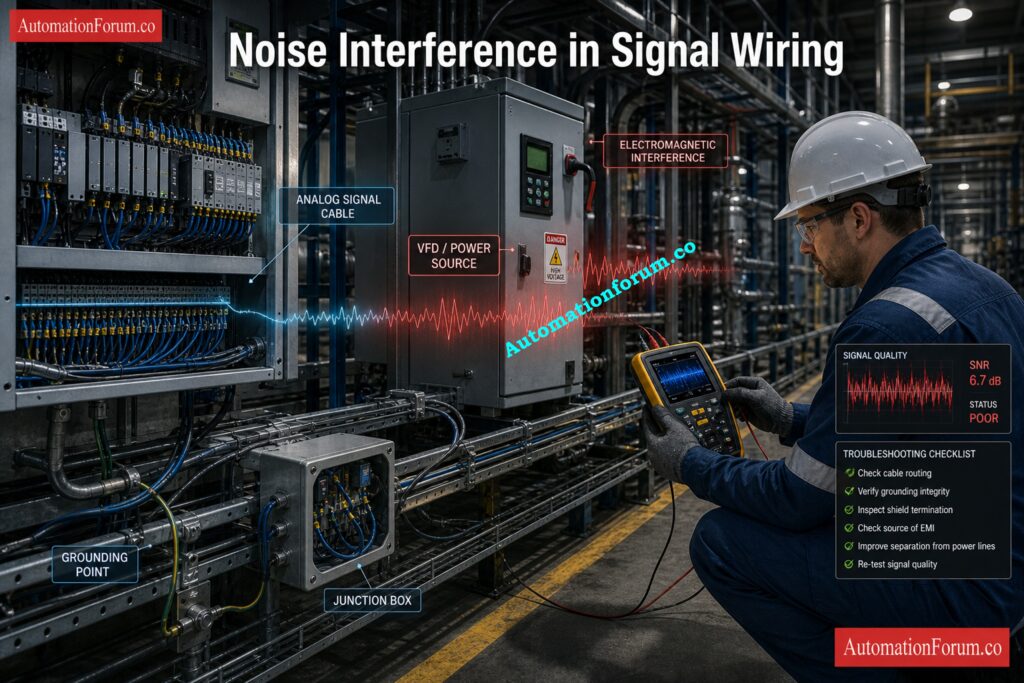
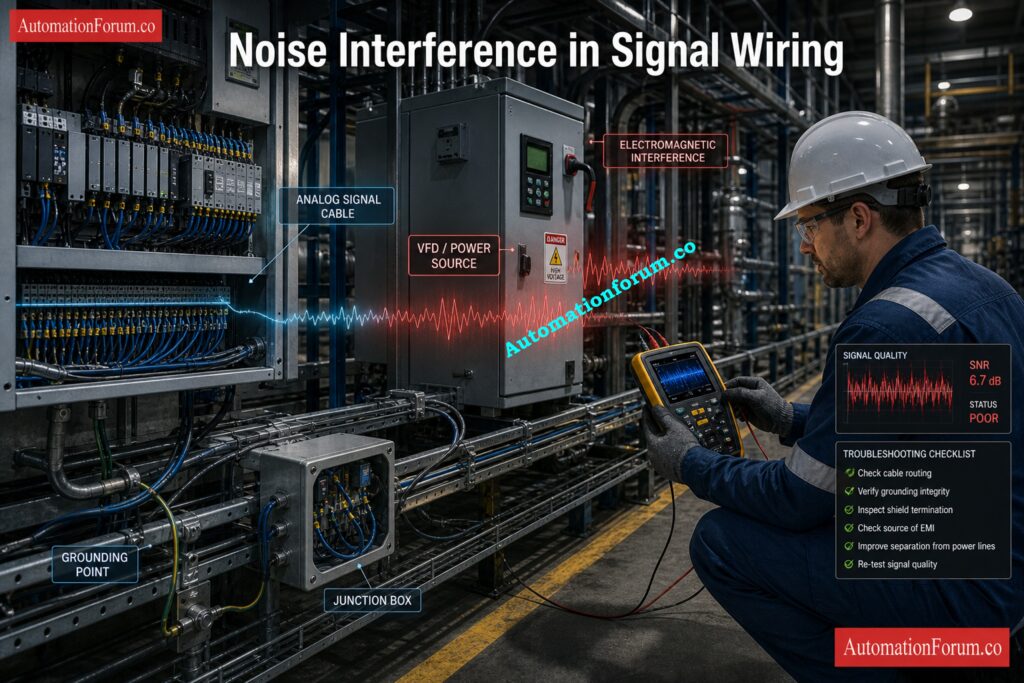
  • Electromagnetic interference from nearby power equipment
  • Weak grounding or improper shield termination
  • Poor cable routing near high-power lines
  • Inadequate filtering
  • Single-ended signal handling in noisy environments

Master 4-20 mA Simulation the Easy Way: How to simulate 4-20ma signal with Loop Calibrator ?

To improve SNR, engineers usually focus on:

  • Shielding the cable correctly
  • Using proper grounding practice
  • Separating signal and power cable routes
  • Applying filtering where appropriate
  • Using differential signals when the environment is noisy

These practices often improve performance more effectively than trying to correct the issue later in software.

Secure Emergency Shutdown Signals with Confidence: Signals for Emergency Valve Shutdown in Critical Processes

Assume the signal value is 1.0 V and the noise value is 0.001 V. Since both values are voltage units, the calculator uses the voltage-based formula:

SNR(dB) = 20 × log10(Signal / Noise)

Signal / Noise = 1.0 / 0.001 = 1000

This means the signal is 1000 times stronger than the noise.

SNR(dB) = 20 × log10(1000)
SNR(dB) = 20 × 3 = 60 dB

  • SNR: 60 dB
  • Linear Ratio: 1000:1
  • Quality: Excellent
  • Method Used: Voltage formula

With an SNR of 60 dB, the signal is very clean and stable, with very little noise interference. This makes it good for monitoring and control applications that need to be reliable.

Calibrate Signal Converters with Precision: Signal Convertors Calibration Procedures

An instrumentation engineer noticed that the output of a pressure transmitter was changing even though the actual process pressure was pretty steady during the commissioning of a process plant. The operator said that the displayed value sometimes changed because the transmitter was connected to the PLC through an analog signal path. At first, the team thought that the process was unstable, but when they looked at the field condition, they saw that the signal cable was running close to a motor power line and that the cable shield was not properly terminated at the panel end. This created electrical interference that was affecting the measurement.

To verify the signal condition, the engineer used the SNR calculator. The noise value was set to 0.001 V and the signal value was set to 1.0 V. The calculator used the voltage formula because both values were in the voltage family. It gave an SNR of 60 dB and a linear ratio of 1000:1. In this case, the result showed that the signal path was strong enough. The unstable reading seen earlier was due to problems with installation and interference, not a weak transmitter output. The calculator’s output helped the team quickly find the source of the problem and focus on fixing the wiring and shielding.

Prove Why 4-20 mA Wins: Why 4-20 mA Current Signal is Preferred Over Voltage Signal in Instrumentation?

  • Rerouted the signal cable away from the power cable
  • Improved shield termination at the panel
  • Verified grounding practice
  • Rechecked the analog input stability after corrections

After the changes, the reading stayed the same and the control loop worked as it should. This case shows how the calculator can help with real troubleshooting by separating problems with the quality of measurements from problems with the process. It is especially helpful during commissioning, SAT, and field maintenance when engineers need to check the engineering quickly before making changes.

Calculate PLC Digital Signals the Smart Way: Collection of PLC Digital Signal Calculators for Industrial Automation

This calculator helps engineers quickly and consistently check the quality of signals without having to do logarithmic calculations by hand. It cuts down on mistakes and saves time during engineering analysis, commissioning, and troubleshooting by automatically figuring out both the SNR in dB and the linear ratio.

Key benefits include:

  • Quick analysis of signal quality for control and instrumentation systems
  • Lessened mistakes made by hand during engineering review
  • Fixing noisy analog and sensor signals faster
  • Better validating of signals during commissioning and loop testing
  • It’s easy to understand when you use quality indicators like Poor, Good, or Excellent.
  • Support for calculations of both voltage and power
  • Choosing an automatic method based on the unit family you pick
  • Helpful for FAT, SAT, and maintenance tasks

The calculator is useful for both technical engineering analysis and clearly explaining signal conditions during plant discussions, maintenance reports, and performance reviews because it shows both decibel values and linear ratio results.

Expose Signal Noise Before It Spreads: Noise and Signal Stability Observation for Running Inspection in Instrumentation and Control Systems

In practice, 20 dB or more is usually acceptable, while 30 dB or more is considered strong. The calculator classifies results accordingly.

Voltage uses the 20 × log10 form, while power uses 10 × log10. The difference reflects the relationship between voltage and power in engineering systems.

No. The calculator requires both signal and noise to belong to the same unit family.

Impedance is useful for documentation and circuit context, especially when reviewing a measurement path in the field.

Convert Instrument Signals Faster with Calculators: Collection of Instrumentation Signal Conversion Calculators

In most industrial applications, 20 dB or more is acceptable, while 30 dB or more is considered strong.
Higher SNR means a cleaner signal and better measurement stability.

Voltage SNR uses 20 × log10(Signal / Noise), while power SNR uses 10 × log10(Signal / Noise).
The calculator applies the correct formula based on the unit family selected.

Good SNR helps controllers read stable and accurate process signals.
Poor SNR can cause false readings, unstable control, and unreliable alarms.

Use proper shielding, grounding, and cable routing to reduce interference.
Filtering and differential signals also help in noisy industrial environments.

Impedance gives circuit context and helps document the test condition.
It is useful for reference, even though the ratio calculation uses signal and noise values.

No, both values must belong to the same unit family.
Voltage must be compared with voltage, and power with power.

The linear ratio shows how many times stronger the signal is than the noise.
For example, 1000:1 means the signal is 1000 times larger than the noise.

Excellent SNR means the signal is much stronger than the noise and is highly reliable.
In the calculator, 30 dB and above is classified as Excellent.


Control Valve Cv Calculation Quiz for Instrumentation Engineers

0
Control Valve Cv Calculation Quiz for Instrumentation Engineers

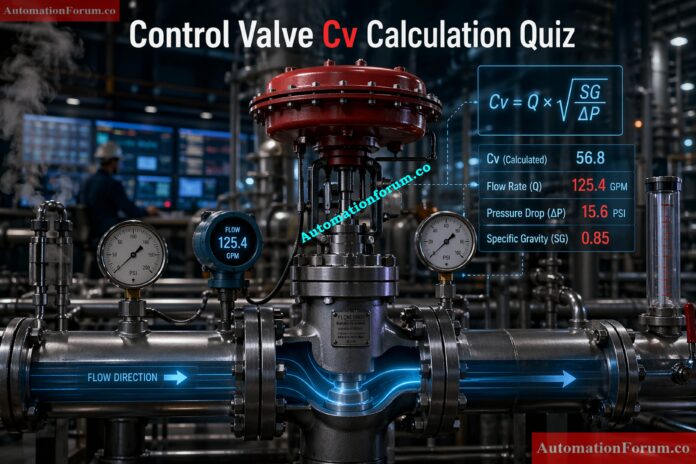
Control valve sizing is a critical activity in process industries where accurate flow control ensures plant stability, safety, and efficiency. The flow coefficient Cv represents the valve capacity and directly influences pressure drop, controllability, and energy losses. Improper Cv selection can lead to cavitation, choked flow, valve hunting, or poor process response. Industry standards such as ISA 75 and IEC 60534 provide structured methods for calculating Cv for liquids, gases, and steam. In real plants, engineers must evaluate operating ranges, specific gravity, and pressure conditions to ensure reliable valve performance. 

This quiz focuses on practical scenarios faced during design, commissioning, and troubleshooting.

Control Valve Cv Calculation Quiz for Instrumentation Engineers

This is an advanced level quiz designed for experienced engineers.
Read each scenario carefully before selecting an answer.
Focus on real plant logic, not memorization.
Use engineering judgment for pressure drop, flow behavior, and valve performance.
Some questions require calculations, others test troubleshooting skills.
Choose the most practical and technically correct answer.

1 / 25

 Design Mistake (Expert Level)

An engineer sizes valve using only maximum flow condition.

What is the risk?

2 / 25

Noise in Gas Valves

Noise mainly caused by:

3 / 25

Valve Selection Philosophy

Best practice for Cv selection:

4 / 25

Low Reynolds Effect

At low Reynolds number:


5 / 25

Cv Meaning Trap

Cv = 100 means:

6 / 25

IEC Standard Role

IEC 60534 provides:

7 / 25

Steam Valve Behavior

Steam flow increases with:

8 / 25

 Hunting Cause

Valve oscillates continuously.

Most likely reason?


9 / 25

 Rangeability Concept

Rangeability refers to:

10 / 25

Numerical Cv Check

Q = 80 GPM, SG = 1, ΔP = 4 psi

Cv = ?


11 / 25

 High ΔP Effect

Very high pressure drop leads to:

12 / 25

Low ΔP Problem

A valve has very low pressure drop.

What happens?

13 / 25

Equal Percentage Selection

Best valve type for wide flow variation?

14 / 25

Installed vs Inherent Characteristic

Why does installed characteristic differ?


15 / 25

Flashing vs Cavitation Trap

Flashing differs from cavitation because:

16 / 25

Cavitation Identification

A valve shows noise, vibration, and trim erosion.

Cause?

17 / 25

Valve Authority Design

Valve ΔP = 3 psi
System ΔP = 12 psi

Authority = ?


18 / 25

Choked Flow Impact

If ΔP increases beyond choked condition:

19 / 25

Choked Flow Condition

For gas, when does choked flow occur?

20 / 25

Gas Flow Behavior

Why is Cv calculation for gas more complex than liquid?

21 / 25

Undersizing Impact

A valve cannot achieve required maximum flow even at 100% opening.

Cause?

22 / 25

Oversizing Real Field Issue

A control valve is always below 10% opening during operation.

What is the real issue?

23 / 25

Specific Gravity Trap

A hydrocarbon fluid (SG = 0.7) replaces water in same system.

What happens to required Cv?

24 / 25

Pressure Drop vs Flow Behavior

If pressure drop across a valve increases from 4 psi to 16 psi, how does flow change?

25 / 25

 Cv Calculation with Engineering Judgment

A process requires 150 GPM water flow. Available pressure drop is 16 psi. SG = 1.

What is required Cv and what does it imply for valve selection?


Your score is

The average score is 63%

0%

Access 1000+ MCQs tailored for instrumentation engineers:Instrumentation and Process Control Quiz Hub – 1000+ MCQs for Engineers

#ControlValveQuiz #CvCalculation #ControlValve #ValveSizing #InstrumentationEngineering #ProcessControl #ProcessAutomation #IndustrialAutomation #AutomationEngineering #PipingAndInstrumentation #PandID #SCADA #PlantEngineering #RefineryEngineering #EngineeringQuiz #TechnicalQuiz #ProcessIndustry #FlowRate #PressureDrop #SpecificGravity #Cavitation #Flashing #ValveAuthority #Instrumentation #AutomationForum

Cloud Based SCADA in Industry: Benefits, Architecture, Security and Real Use Cases

0
Cloud Based SCADA in Industry: Benefits, Architecture, Security, and Real Use Cases

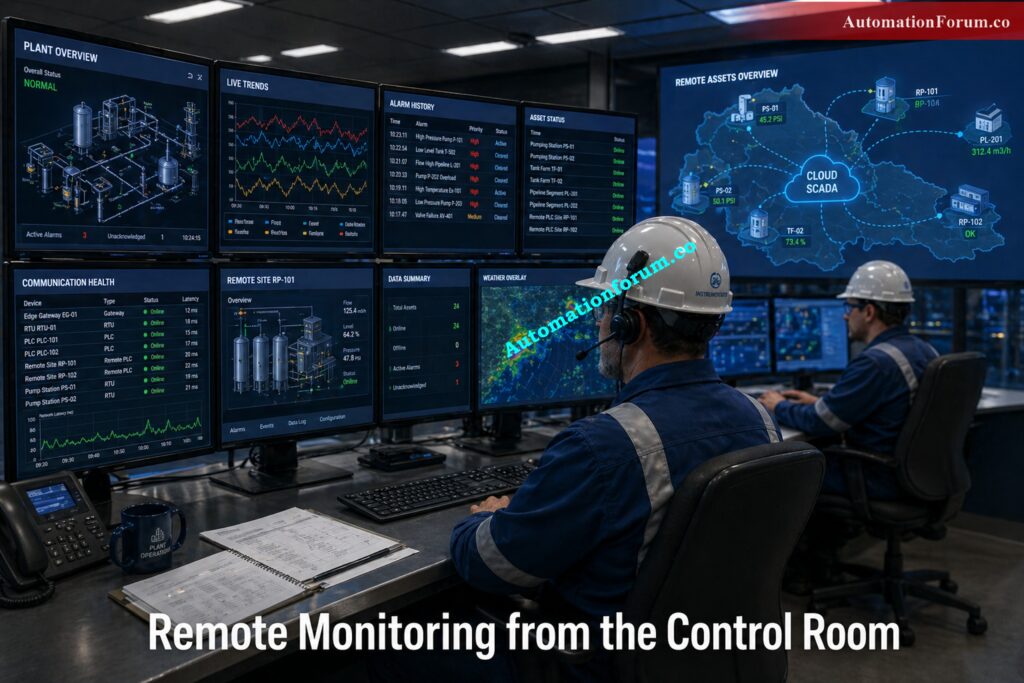
SCADA, or Supervisory Control and Data Acquisition, has been a key aspect of industrial automation for many years. It helps engineers keep an eye on process variables, regulate equipment, gather alarms, and see what’s going on in a plant or distant location. In the early days of automation, SCADA systems were mostly local. They relied on on site servers, proprietary networks, and operator workstations inside the plant boundary. That model worked well when operations were simpler and data volumes were lower.

Industrial operations have changed. Plants are now larger, more connected, and more data driven. A single organization may run multiple production sites, remote utility stations, pipeline assets, treatment plants, or manufacturing lines across different locations. At the same time, operations teams expect faster access to process data, maintenance teams want better fault diagnosis, and management wants better reporting and performance visibility. These expectations have pushed SCADA into a new era.

Cloud based SCADA in industry is one of the most important developments in this evolution. It combines traditional SCADA functions with cloud computing, industrial IoT, advanced analytics, and remote access. Instead of keeping all data inside a local server room, a cloud SCADA platform can collect process information from PLCs, RTUs, and edge gateways, then store, visualize, and analyze it in a secure cloud environment. This allows industries to move beyond basic monitoring and use their operational data in a far more strategic way.

A simple definition is useful here. Cloud based SCADA in industry is a system that connects field devices and control equipment to a secure cloud platform so that process data can be monitored, analyzed, reported, and shared from anywhere. It does not remove the need for local control. In most industrial applications, fast control still happens at the PLC or RTU level. The cloud extends SCADA rather than replacing it.

HART Configuration Mistakes That Break Your DCS: Best Practices for Configuring HART Parameters in DCS Software

Cloud based SCADA keeps that foundation, but adds another layer of intelligence and accessibility. Field data is collected in the plant, sent through secure industrial communication channels, and then made available on a cloud platform. That platform may include dashboards, historians, alarm management tools, analytics engines, mobile access, and enterprise integrations.

 In many plants, an edge gateway sits between the control network and the cloud. It gathers data, translates protocols, filters unnecessary traffic, and protects the control system from direct exposure.

This is why cloud SCADA should be viewed as an architecture, not just a product. It connects the field layer, the edge layer, the cloud layer, and the enterprise layer into one information flow. The result is better visibility, better reporting, and better decision making.

30+ SCADA Security Mistakes You Must Eliminate: SCADA Security Checklist: 30+ Essential Tips for Securing Critical Infrastructure

When you look at how plants really work, you can see what cloud-based SCADA does in industry. 

Real Time Remote Access to Process Data - Cloud Based SCADA in Industry | Benefits & Architecture

Second, it improves real time data accessibility. A plant manager, maintenance engineer, or process specialist does not always need to be physically present at the site to understand what is happening. If a level transmitter starts drifting, if a pump trips, or if a compressor shows unusual vibration, the relevant data can be reviewed from a remote location. This is especially valuable for unmanned stations, distributed utilities, and multi shift operations. It also supports faster response during abnormal events.

Modbus vs Profinet: Choose Wrong, Pay Later: Modbus TCP/IP vs Profinet: Which Protocol Suits your Industrial Network Best?

Fourth, it helps decision making move from reactive to proactive. Traditional SCADA often tells you what happened. Cloud SCADA can help explain why it happened and what may happen next. That change is extremely important for maintenance planning, energy optimization, quality control, and production efficiency.

SCADA vs. HMI: Stop Confusing These Systems: SCADA vs. HMI: Complete Guide to Differences, Functions and Applications

For instrumentation and control engineers, cloud based SCADA offers practical benefits that go far beyond convenience.

One major benefit is reduced infrastructure burden. Local servers, database storage, backup hardware, patch management, and regular upgrades are all things that traditional SCADA systems need. That means higher capital cost and ongoing maintenance work. With cloud based SCADA, some of that burden shifts away from the plant. The organization no longer needs to build and maintain a large on site server setup for every remote application. This can reduce costs and simplify long term support.

SCADA Interview Questions That Will Test You: Top 15 SCADA interview Questions

Another benefit is scalability. Industrial locations don’t stay the same for long. As demand rises, new manufacturing lines are introduced, remote assets are put into service, and utilities grow. It is easier to scale a cloud SCADA platform than a fixed local design. When new equipment is added, data points and dashboards can often be extended with less disruption. This is especially useful for companies growing across multiple sites.

Cloud SCADA also improves maintenance planning. When systems continuously collect data over time, they create the basis for predictive maintenance. A motor that slowly draws more current, a valve that begins to respond sluggishly, or a transmitter that shows repeated drift can be identified before a serious failure occurs. This is where cloud analytics becomes very powerful. Engineers can move from emergency repair to planned intervention. That saves time, reduces downtime, and improves reliability.

Reporting and historian functions are also improved. Local SCADA systems may store only limited historical data because of storage and server constraints. Cloud platforms can retain much larger data sets and make them available for dashboards, compliance reports, energy audits, production studies, and asset performance analysis. This gives engineers better evidence when solving recurring problems or presenting recommendations to management.

Test Your OT Security Before Attackers Do: ICS/SCADA OT Cybersecurity Self-Assessment: NIST-Based Procedure for Critical Infrastructure

Cloud Based SCADA Architecture Explained -Cloud Based SCADA in Industry | Benefits & Architecture

A clear architecture is essential when designing a cloud based SCADA system.

The field layer contains the process instruments and control devices. Some of them are temperature sensors, pressure transmitters, flow meters, level instruments, actuators, analyzers, PLCs, RTUs, motor starters, and variable speed drives. This layer is closest to the process and is in charge of measuring and controlling things locally.

The edge layer is in the middle of the field devices and the cloud. It could have industrial gateways, communication servers, protocol converters, and computers on the edge. This layer gathers information from industrial protocols like Modbus, OPC UA, Profibus, Ethernet-based systems, and other device networks. It can filter data, do basic logic, store data when the network goes down, and get data ready to be sent to the cloud. 

DCS, PLC, SCADA: Know the Real Differences: DIFFERENCE BETWEEN DCS ,PLC AND SCADA

The system gets stronger in the cloud layer. It keeps track of process data, shows dashboards, handles alarms, lets people access it from afar, and does analytics. It might also have tools for historians, reporting engines, mobile apps, and machine learning. For many fields, this layer is where data from plants turns into business intelligence.

In practice, the cloud SCADA architecture may be used in open loop or closed loop form. In an open loop arrangement, the cloud receives data, analyzes it, and provides visibility and recommendations, but control remains local. This is the safer and more common approach for most industrial applications.

In a closed loop arrangement, cloud intelligence may influence control decisions more directly. This can work in certain optimized applications, but it must be handled carefully because cloud communication introduces latency and dependency on network availability. For critical process control, local control remains the best choice. The cloud should support supervision, analytics, and optimization, not replace safety or fast control functions.

FAT for SCADA: Catch Failures Before Startup: Factory Acceptance Test (FAT) Activities for SCADA System: Step-by-Step Checklist

Cloud based SCADA plays a major role in Industry 4.0 because it connects physical systems with digital intelligence. Industrial IoT devices generate data continuously from machines, utilities, process lines, and field assets. A cloud platform can collect this data from many sites and present it in a unified way.

This matters because modern industry depends on data driven operation. Engineers no longer want only alarms and current values. They want trend behavior, equipment health indicators, consumption patterns, and cross site comparisons. Cloud SCADA supports that requirement well.

It also enables machine learning and advanced analytics. A system can learn normal operating patterns and flag deviations. It can help identify unusual energy use, detect drifting instruments, or predict component wear. In a power plant, cloud analytics may help monitor turbine efficiency. In a manufacturing plant, it may reveal which line has the highest downtime. In a water treatment system, it may show when chemical dosing is becoming unstable.

SCADA Applications Running Critical Industries Today: Applications of SCADA

This is one reason traditional SCADA often struggles in modern digital environments. It was designed mainly for local visibility and control. Cloud SCADA is designed for scale, data sharing, and long term analytics. That makes it a better fit for the digital transformation strategies many industries are now pursuing.

Think You Know SCADA? Prove It Now: Advanced SCADA Systems Quiz

Industrial Use Cases of Cloud Based SCADA - Cloud Based SCADA in Industry | Benefits & Architecture

In oil and gas operations, cloud based SCADA is often used for remote pipeline monitoring. Long pipelines may include pumping stations, pressure points, valve stations, and unmanned locations. Cloud visibility helps operators track pressure, flow, and equipment status from a central control center. The staff can swiftly look into a pressure drop or an irregular valve. This makes things safer, speeds up response times, and helps keep an eye on assets in faraway areas. 

Cloud SCADA in Water Treatment Plants - Cloud Based SCADA in Industry | Benefits & Architecture

Wrong Network Switch Can Break Your SCADA System: Network Switches requirements in “SCADA” and “DCS” Architecture 

In manufacturing, cloud SCADA is often used to build multi plant dashboards. A company can compare machine utilization, downtime, production rate, alarm frequency, and energy consumption across different facilities. That gives management a clearer picture of how the whole operation is performing. It also supports benchmark based improvement because plant performance can be compared in a consistent way.

Choose the Right SCADA Architecture or Regret Later: Different Types of SCADA System Architecture

A municipal water utility operated five water pumping stations and one central treatment plant spread across different locations. Each station had local PLC based control, but the monitoring system was limited to each site. Operators often didn’t find out about a pump failure at a remote station until a customer complained or someone went to the site. 

The utility wanted to be able to keep an eye on all of its stations from one place, cut down on downtime, and make planning for maintenance easier. They chose a cloud-based SCADA solution to connect all of the facilities into one dashboard. 

Before the upgrade, the utility had these problems: 

  • Not one view of all the pumping stations
  • Alarm response was slow during pump trips.
  • Going to the site often by hand to fix problems
  • Not enough historical data to analyze
  • It’s hard to compare how well stations are doing. 

For instance, one pump station started drawing more current than usual for a few weeks. The problem wasn’t found early since the data wasn’t easy to find. The pump finally tripped during high demand, which caused low pressure in several parts of the network.

The utility put in industrial gateways at each location to get data from PLCs and transmitters. These gateways relayed real-time data to a secure cloud-based SCADA platform.

The cloud system kept an eye on: 

  • Pump run status
  • Motor current
  • Tank level
  • Flow rate
  • Pressure
  • Alarm history
  • Energy consumption

Now, engineers and supervisors could connect in securely from the head office or from anywhere else and see the whole network on one dashboard. 

DCS Components Breakdown Every Engineer Should Know: Understanding the Difference Between DCS Components: ES, OS, and AS

One important improvement was early fault detection. The cloud SCADA trend showed that one pump at Station 3 was slowly consuming more current and running hotter than normal. Maintenance staff inspected the unit and found partial wear in the bearing assembly. The pump was repaired during planned maintenance instead of failing unexpectedly.

Within a few months, the utility reported the following improvements:

  • Faster alarm response
  • Fewer emergency site visits
  • Better pump maintenance planning
  • Improved water supply continuity
  • Better visibility across all stations
  • Easier reporting for management

This case shows how cloud based SCADA is useful when assets are spread across multiple locations. It gives engineers centralized monitoring, better data analysis, and faster decision making without changing the local control logic at each station.

Cloud SCADA Security Challenges and Best Practices - Cloud Based SCADA in Industry | Benefits & Architecture

Cloud connectivity adds powerful capabilities, but it also adds risk. Cybersecurity must therefore be part of the design from the beginning.

The first concern is network dependency. A plant must not rely on the cloud for critical control or protective functions. If the communication path goes down, the process should still continue safely at the local level. That is why PLCs and RTUs must keep control logic locally. Cloud services should support monitoring and analytics, not replace local protection.

PLC vs DCS vs SCADA: Stop Guessing: Comparison between PLC, DCS, and SCADA

The second concern is latency. Some industrial actions require very fast response. Cloud communication is not suitable for every control loop. Engineers must decide carefully which signals can travel to the cloud and which should remain inside the control network.

The third concern is exposure to external threats. Once a system is connected beyond the plant boundary, the security design must be much stronger. Access control, encryption, authentication, segmentation, logging, and secure remote access become essential. 

ISA IEC 62443 is highly important here since it presents an organized way to think about industrial cybersecurity zones, conduits, and how to construct secure systems. 

Duplicate Modbus Address That Shut Down Plant: Duplicate Modbus Address in Temperature Multiplexers Causes Plant Shutdown – Real Incident & Root Cause

It’s also crucial to protect your data and follow the rules. Businesses need to know where their data is, who can get to it, and how it is safe. Legacy integration can be another challenge because older systems may not support modern protocols or secure communication methods easily.

A safe cloud SCADA setup should have an industrial DMZ, limited access rights, robust identity control, encrypted communication, backup plans, and a clear plan on how to respond to incidents. Security is not an optional extra; it is a design requirement. 

SCADA Simulator: Practice Without Risking Real Systems: What is a SCADA simulator?

Best Practices for Cloud Based SCADA Implementation - Cloud Based SCADA in Industry | Benefits & Architecture

Successful cloud SCADA projects start with a proper engineering assessment. The first step is to define the process needs clearly. Not every signal belongs in the cloud. Engineers should decide what is needed for monitoring, what is needed for reporting, and what must stay local.

A cybersecurity risk assessment should be performed before deployment. This helps identify critical assets, communication paths, and vulnerabilities. The architecture should then be built around segmentation and secure access. An industrial DMZ can protect the plant network from direct exposure.

Data ownership and access control must be clearly defined. Operations, maintenance, engineering, and management may all need the data, but they don’t necessarily need the same level of access. Clear regulations keep things from getting confusing and make things safer. 

12 Free SCADA Tools Engineers Actually Use: Best 12 Free SCADA Software for Industrial Automation (2026 Guide)

More and more SCADA systems will be powered by AI. These systems will not only provide data, but they will also find unusual patterns, offer possible causes, and suggest what to do next. This will help engineers get things done faster and more correctly. 

The hybrid edge and cloud architecture will also keep getting bigger. Critical functions will stay near the plant, while cloud services handle analytics, reporting, and fleet level visibility. This balanced model is practical and safer for industrial use.

Ethernet-APL Explained for Modern Process Automation:Ethernet-APL (Advanced Physical Layer): Practical Guide for EPC Instrumentation & Process Automation Engineers

Digital twin integration will become more important as industries seek better simulation and optimization. A digital twin can use live plant data to model process behavior and help teams test changes before they are applied in the field.

5G-enabled industrial connectivity could also make it easier to monitor and transfer data from a distance, especially for mobile and scattered assets. It will be easier to use cloud-based monitoring in more places as transmission speeds up and becomes more dependable. 

Third-Party Integration Mistakes That Break DCS Systems: Integrating Third-Party Systems with a Distributed Control System (DCS): Checklist

Yes, it can be safe when designed properly. Critical control should stay local, and the cloud should be used for monitoring, reporting, analytics, and supervised functions. Strong cybersecurity architecture is essential.

In most industrial plants, it does not fully replace traditional SCADA. It extends it. Local control still remains necessary, while the cloud adds remote access and data intelligence.

The main benefits are remote visibility, better reporting, easier scaling, reduced infrastructure burden, predictive maintenance support, and improved decision making.

It is extremely valuable for businesses that have assets that are spread out or far away, such oil and gas, water treatment, power generating, manufacturing, utilities, and any other business. 

DCS Cybersecurity Risks You Cannot Afford Ignoring: DCS Cybersecurity: Mitigating Risks in Industrial Automation

In industry, cloud-based SCADA is more than just an improvement to the technology. This is a useful step toward making industrial operations smarter, more connected, and more efficient. Industries get better visibility, stronger reporting, faster troubleshooting, and more informed decision making when they combine traditional SCADA with cloud computing, IIoT, and analytics.

It’s evident to instrumentation and control engineers what the benefit is. Cloud SCADA makes infrastructure less of a burden, enables predictive maintenance, makes remote assistance better, and lets companies run their operations across numerous sites.  It also creates a stronger foundation for Industry 4.0 transformation.

At the same time, the system must be designed with care. Security, latency, architecture, and local control strategy all matter. The best implementations don’t migrate everything to the cloud; instead, they employ the cloud where it really helps and maintain important control functions local and stable.

Cloud-based SCADA is becoming more than just a tool for monitoring; it’s becoming a strategic advantage for modern factories. It gives the plant more information, more flexibility, and more long-term efficiency. 


Anti-Surge Control Valve Selection and Sizing – Complete Engineering Guide

0
Anti-Surge Control Valve Selection and Sizing - Complete Engineering Guide

Compressor surge is one of the most critical and damaging phenomena in process industries. It occurs when the compressor operates below its minimum stable flow limit, resulting in flow reversal, pressure fluctuations, and severe mechanical stress. Within a very short duration, this instability can lead to vibration, overheating, seal damage, and even catastrophic compressor failure.

What is Compressor Surge?

The anti surge control system is designed to prevent this condition, and at the center of this system lies the anti surge control valve. This valve is responsible for maintaining minimum flow through the compressor by recycling gas from discharge back to suction. While the control logic detects surge conditions, it is the valve that physically executes the protection action.

Because surge develops extremely fast, the valve must respond with high speed and precision. In many industrial applications, the valve is expected to move from closed to fully open within one to two seconds. This makes the selection of the anti surge valve a highly critical engineering task rather than a routine valve sizing exercise.

A properly selected anti surge valve ensures compressor safety, operational stability, and long equipment life. A poorly selected valve, however, can result in repeated surge events, energy losses, and increased maintenance costs.

Crush Surge Failures Before They Damage Equipment: What is an anti-surge valve and what are their functions?

What is an Anti-Surge Control Valve?

An anti surge control valve is installed in the compressor recycle line between discharge and suction.

Its function is to

  • Maintain minimum flow through the compressor
  • Prevent operation near the surge line
  • Stabilize compressor operation

When flow drops toward the surge region, the valve opens and recycles gas back to suction, ensuring continuous forward flow.

Surge itself is a complete breakdown of stable flow, often accompanied by pressure pulsations, vibration, and even reverse flow.

Start Pumps Cleanly Without Dangerous Pressure Shock: Anti-Surge Pump Start Control Valve

Anti surge valve selection is not a normal control valve sizing exercise. It is a safety critical design decision.

  • Compressor protection from mechanical failure
  • Prevention of flow reversal and vibration
  • Maintaining process continuity
  • Reducing energy losses due to excessive recycle
  • Avoiding frequent shutdowns and maintenance

If the valve is undersized, it cannot pass sufficient flow.
If oversized, it becomes unstable and difficult to control.

Both cases can lead to compressor surge.

Pick the Correct Valve Action Every Time: When to Choose Forward and Reverse Acting Control Valves for Design Engineer

Below is the practical explanation of each checklist parameter used in real EPC and commissioning projects.

The foundation of anti surge valve selection begins with accurate process data. The engineer must establish a complete understanding of operating conditions, including maximum and minimum flow rates, suction and discharge pressures, temperature ranges, and gas composition.

Cv Calculation for Recycle Flow = Anti-Surge Control Valve Selection and Sizing - Complete Engineering Guide

Gas properties play a significant role in valve sizing and performance. Parameters such as molecular weight, compressibility, and density directly influence flow behavior and Cv calculations. Any inaccuracies in process data will propagate through the design and lead to incorrect valve selection.

It is also essential to consider all operating scenarios, including startup, shutdown, normal operation, and emergency conditions. The valve must be capable of performing effectively under each of these situations.

Choose Wet Part Materials That Won’t Fail: How to Select the Right Wet Part Materials of Sensors in Process Industries

Understanding compressor performance is essential for selecting the correct anti surge valve. The compressor performance curve provides critical information such as the surge line and operating envelope.

The surge line represents the boundary beyond which the compressor becomes unstable. Operating near this line is risky, and therefore a control line is established with a safety margin above the surge line. This margin typically ranges from ten to twenty percent, depending on system design and vendor recommendations.

The anti surge valve must be sized and configured to ensure that the compressor operating point never crosses into the surge region. This requires coordination between the control system and the valve response.

The Cv value of the anti surge valve determines its ability to pass the required recycle flow. Cv calculation must be based on the worst case operating condition, typically when maximum recycle flow is required at the lowest pressure differential.

A key engineering principle in anti surge valve sizing is maintaining a capacity margin. The valve capacity should be approximately 1.8 to 2.2 times the minimum required surge protection flow. This margin ensures that the valve can respond effectively during sudden disturbances without being undersized.

At the same time, excessive oversizing must be avoided. An oversized valve may lead to poor controllability at low openings, resulting in instability and oscillations during normal operation. Therefore, the objective is to achieve a balance between sufficient capacity and stable control.

The selected valve capacity should also be checked against the compressor maximum flow limit to ensure that the recycle valve does not exceed the compressor stonewall flow region, which can create additional instability.

Understand Rangeability Before Making Bad Selections: Rangeability vs. Turndown Ratio and their Implications for Pressure Transmitter Selection

Anti surge valve sizing should not be based only on the maximum emergency recycle case. In real plant operation, the valve operates under multiple conditions such as startup, normal recycle, shutdown, and upset conditions. Each of these operating modes imposes different requirements on valve performance.

During emergency conditions, the valve must pass maximum recycle flow to protect the compressor. However, during normal operation, the valve may remain partially open for extended periods to maintain minimum flow. If the valve is sized only for the maximum flow case, it may operate at extremely low openings during normal conditions.

This creates poor controllability, instability, and internal damage risk. Therefore, the valve must be sized by evaluating all operating modes together rather than a single worst case.

The choice of valve type has a direct impact on performance, reliability, and response characteristics. Globe valves are commonly used in anti surge applications due to their excellent control accuracy and ability to handle a wide range of operating conditions.

In applications involving very high flow rates or significant pressure drops, angle valves may be preferred. These valves provide better flow handling and reduce stress on internal components. For high performance or specialized applications, axial flow valves may be selected due to their fast response and streamlined flow path.

The selection of valve type should consider not only flow capacity but also dynamic behavior, maintenance requirements, and compatibility with the process conditions.

In many compressor systems, the anti surge valve operates at very low opening during normal recycle conditions. If the valve is oversized, it may operate at less than five percent opening for long durations.

At such low openings, flow becomes unstable and can create high velocity jets inside the valve. This leads to trim vibration, erosion, noise, and eventual mechanical damage. The valve may also lose controllability, causing oscillations in the anti surge loop.

A well engineered valve should operate in a stable range even during low flow conditions. In practical design, maintaining a minimum opening of around eight to ten percent during normal recycle operation improves valve life and control stability.

Challenge Your Flowmeter Knowledge With Advanced MCQs: Advanced Flowmeter Selection Quiz for EPC Engineers in Process Industries

Flow characteristic determines how the flow rate changes with valve position. In anti surge applications, the flow characteristic must support stable and predictable control under dynamic conditions.

Linear flow characteristic is often preferred because it provides a direct relationship between valve opening and flow. This simplifies control tuning and improves stability during rapid response situations.

In certain cases, equal percentage characteristic may be used when the operating range is wide and nonlinear behavior is required. However, the final selection should be based on system dynamics and control requirements rather than general preference.

Test Your RTD and Thermocouple Selection Skills: Quiz on RTD and Thermocouple Selection for Instrumentation Design Engineers

Actuator Type and Speed Requirements - Anti-Surge Control Valve Selection and Sizing - Complete Engineering Guide

The actuator plays a crucial role in determining how quickly and accurately the valve responds to control signals. In anti surge service, pneumatic piston actuators are widely used due to their ability to deliver high force and rapid movement.

Double acting actuators are typically preferred because they provide faster response in both opening and closing directions. This is particularly important in systems where rapid correction is required to prevent surge.

The actuator must also be supported by appropriate accessories such as volume boosters and quick exhaust valves. These components enhance the speed of air movement, allowing the valve to achieve the required stroking time.

For high performance applications, actuator sizing should consider not only thrust but also air delivery capacity. Oversized actuators combined with volume boosters and high capacity positioners significantly improve dynamic response. The objective is to ensure that the valve follows the control signal without lag under all operating conditions.

Response time is one of the most critical parameters in anti surge valve selection. The valve must react quickly enough to prevent the compressor from entering the surge region.

In most applications, the valve is required to achieve full or near full opening within one to two seconds. This requirement is based on the dynamic behavior of the compressor and the time available to prevent surge.

Achieving this response time requires careful selection of actuator, accessories, and control system tuning. Any delay in signal transmission, actuator movement, or valve travel can compromise the effectiveness of the protection system.

Measure Interface Level the Right Way, First Time: Interface Level Measurement Selection Procedure – Complete 2025 Guide for Process Engineers

Fail safe action defines the position the valve takes in the event of power or instrument air failure. In anti surge applications, the valve must be configured to fail open.

This ensures that even if the control system fails, the valve will open and allow recycle flow, protecting the compressor from surge. Fail open configuration is considered mandatory for compressor protection systems.

The reliability of this function depends on proper actuator design, air supply integrity, and periodic testing to ensure correct operation under failure conditions.

Accessories play a vital role in achieving the required performance of the anti surge valve. Components such as volume boosters increase the speed of actuator response by providing additional air capacity.

Quick exhaust valves allow rapid release of air, improving the speed of valve movement. High performance positioners ensure accurate tracking of control signals and stable valve positioning.

Solenoid valves are often included to enable fast shutdown or emergency action. These accessories must be selected and integrated carefully to ensure that the valve meets its dynamic performance requirements.

Advanced anti surge applications may require diagnostic positioners and characterized trims to improve performance. Smart positioners provide feedback on valve travel, response time, and health condition, which helps in predictive maintenance and reliability improvement.

Stop Misjudging Flow Meter Turndown Ratios: Why Turndown Ratio is Important when Selecting a Flow Meter ?

Anti surge valves often operate under high pressure drop conditions, which can lead to noise and vibration issues. These effects can cause damage to valve internals and surrounding equipment if not properly managed.

To address these challenges, special trim designs such as multi stage or anti cavitation trim may be used. These designs help distribute pressure drop and reduce flow velocity, minimizing noise and vibration.

Proper design and selection of trim not only improve performance but also extend the service life of the valve.

Use a Better Level Transmitter Selection Method: Level Transmitter Selection Checklist for EPC Engineers – Step-by-Step Guide

Installation Location and Piping Considerations - Anti-Surge Control Valve Selection and Sizing - Complete Engineering Guide

The location of the anti surge valve within the system has a significant impact on its effectiveness. The valve should be installed as close as possible to the compressor discharge to minimize dead volume and response delay.

Long piping runs and large volumes of gas between the valve and compressor can introduce lag in the system, reducing the effectiveness of the protection mechanism. Therefore, careful attention must be given to piping layout and valve placement.

The design should aim to reduce system delays and ensure that valve action translates quickly into changes in compressor flow.

Master Honeywell Turbomachinery Redundancy Like a Pro: Virtual Redundant Transmitter (VRT) in Honeywell Turbomachinery Control Systems

Anti surge valve design must account for both high flow emergency conditions and low flow normal operation. The valve must remain stable at low openings while being capable of passing large volumes of gas during surge conditions.

This dual requirement presents a challenge in design and selection. The valve must be robust enough to handle high flow without damage, yet precise enough to control small flow changes during normal operation.

Balancing these requirements requires careful evaluation of valve size, actuator performance, and control strategy.

In some complex compressor systems, a single valve may not be sufficient to handle both high flow emergency conditions and low flow stable control. In such cases, a dual valve arrangement may be considered, where one valve is designed for high capacity emergency recycle and another smaller valve is used for precise low flow control. This approach improves stability, reduces valve wear, and enhances overall system reliability.

Get the Process Industry Valve Reference Fast: Valves: Resource for Professionals in the Process Industry

  • Several common mistakes can compromise the performance of anti surge valves. Oversizing the valve is a frequent issue that leads to poor controllability. Selecting a slow actuator can result in delayed response and inadequate protection.
  • Incorrect flow characteristic can cause instability, while improper installation location can introduce delays in system response. Ignoring low flow conditions can also lead to valve instability during normal operation.
  • Avoiding these mistakes requires a comprehensive approach that considers both steady state and dynamic performance.

Select the Right Valve Body Without Guesswork: Control Valve Body Material Selection Guide for EPC Design Instrumentation Engineers

Consider a compressor system with a flow range of 5000 to 15000 Nm3 per hour. Based on process data, the required Cv is calculated as 1200. To ensure sufficient margin, a valve with Cv of 2200 is selected.

The valve is equipped with a pneumatic piston actuator and volume booster, achieving a response time of approximately one second. The installation is carried out close to the compressor discharge to minimize lag.

During commissioning, the system demonstrates stable operation even near the surge control line. The valve responds quickly to disturbances, and no surge events are observed. This example highlights the importance of proper sizing, actuator selection, and installation.

Test Your Flow Measurement Skills Under Pressure: Advanced Flow Measurement Selection MCQs for EPC Instrumentation Design Engineers

ParameterDetailed RequirementEngineering ReasonTypical Range or ValueVerification MethodRemarks
Compressor serviceDefine whether the valve is for centrifugal compressor recycle duty, axial compressor protection, or a special high performance compression system.The compressor type directly affects surge behavior, response demand, and valve sizing philosophy.Centrifugal service is most common.Review compressor datasheet and vendor performance curve.This is the first selection point.
Process flow rangeIdentify minimum normal flow, maximum normal flow, startup flow, shutdown flow, and recycle flow requirement.The valve must handle both normal control and emergency recycle duty.Full operating envelope must be available.Study process data sheet and operating cases.Do not size only for one operating case.
Surge lineObtain the compressor surge line from the OEM curve.The valve must keep the operating point safely away from surge.Vendor specific.Review compressor curve and OEM technical documents.This is mandatory for selection.
Control lineDefine the control line with proper safety margin above the surge line.The anti surge system must open before the compressor enters unstable operation.Usually 10 to 20 percent above surge line, depending on project philosophy.Compare with compressor vendor recommendation.Margin should be based on dynamic study.
Gas compositionRecord full gas analysis including molecular weight, density, compressibility, and contaminants.Gas properties affect Cv, trim selection, erosion risk, and dynamic response.Project specific.Review process simulation and gas analysis report.Accuracy is very important.
Operating pressureDefine suction pressure, discharge pressure, and maximum differential pressure across the valve.Differential pressure controls valve sizing, noise, and actuator force requirement.Wide variation possible.Use worst case operating condition.High differential pressure service needs careful review.
Operating temperatureIdentify minimum, normal, and maximum gas temperature.Temperature affects material selection, sealing, and gas density.Project specific.Check process conditions and upset scenarios.High temperature may require special materials.
Valve capacity marginSelect a valve capacity that provides enough recycle flow with safety margin.Undersized valves cannot protect the compressor during surge events.Typically 1.8 to 2.2 times the surge flow requirement.Compare calculated Cv with required recycle flow.Do not oversize without analysis.
Cv calculation basisPerform Cv calculation using the worst credible recycling condition, not just normal operation.Anti surge duty is dynamic and worst case based sizing prevents failure in upset conditions.Based on maximum recycle demand and pressure drop.Use valve sizing software or engineering calculation.This is a core design step.
Valve typeChoose the valve body style based on capacity, speed, and pressure drop.Different valve types provide different controllability and flow capacity.Globe valve, angle valve, or axial flow valve.Review project conditions and OEM recommendation.Globe is common for general use.
Globe valve suitabilityUse globe valve where good throttling and stable control are required.Globe valves provide reliable modulation and good controllability.Standard choice in many compressor systems.Evaluate required flow range and response.Common in many anti surge applications.
Angle valve suitabilityUse angle valve where high flow and severe pressure drop are expected.Angle valves can handle flow more efficiently and reduce some stress conditions.Large flow and severe service cases.Review pressure drop and velocity.Useful in demanding recycle services.
Axial flow valve suitabilityUse axial flow design for high performance applications requiring very fast response and high capacity.Axial designs can provide excellent aerodynamic performance and fast stroking.Specialized compressor systems.Check OEM or specialist valve vendor data.Often used in advanced compressor trains.
Flow characteristicSelect the valve characteristic that matches the compressor control strategy.Characteristic affects controllability, loop stability, and response quality.Linear often preferred, equal percentage in some cases.Review control philosophy and tuning study.Characteristic should suit dynamic response.
Linear characteristicPrefer linear characteristic when predictable valve travel to flow response is needed.It provides stable behavior and simplifies control tuning.Frequently used in anti surge service.Compare against loop dynamics.Very common in compressor recycle duty.
Equal percentage characteristicUse equal percentage only when system dynamics justify it.It can provide better control over a wide operating range in some services.Case dependent.Check with control engineer and OEM.Not always the first choice.
Actuator typeSelect actuator based on required thrust and response speed.Anti surge valves need powerful and fast actuators.Pneumatic piston actuator is common.Check sizing calculations and travel requirement.Actuator selection is critical.
Actuator actionDetermine whether single acting or double acting design is needed.Double acting designs often provide better speed and stronger movement control.Double acting preferred in many systems.Review opening and closing speed requirements.High performance service often needs double acting.
Response timeDefine the total valve response time from signal to full useful opening.Surge can develop within seconds, so delay can destroy protection.Often 1 to 2 seconds or faster, depending on project.Dynamic testing and stroke timing.This is one of the most important criteria.
Stroking speedCheck how fast the valve moves through the full travel range.Fast stroking improves ability to arrest surge quickly.About 0.5 to 2 seconds in many applications.Perform stroke time test.Must match compressor dynamics.
Fail safe actionEnsure the valve fails open on air or power loss.Compressor protection must remain active during failure conditions.Fail open is standard practice.Verify spring or air failure action.Mandatory for protection duty.
Volume boosterProvide a volume booster where rapid air delivery is needed.Boosters improve opening and closing speed.Common accessory in fast acting valves.Check actuator air demand and flow rate.Strongly recommended for fast loop response.
Quick exhaust valveInclude quick exhaust capability where fast air release is required.It helps the valve move faster during sudden action.Used in high speed service.Review actuator pneumatic circuit.Helps reduce delay in motion.
Positioner typeUse a high performance positioner suitable for fast dynamic control.Accurate signal tracking is essential for surge protection.Smart or digital high response positioner.Test step response and positioning accuracy.Basic slow positioners may not be suitable.
Solenoid valveProvide solenoid valve for trip and shutdown functions.Required for safety logic and emergency operation.Project dependent, but usually required.Check shutdown philosophy and cause and effect.Important for trip integration.
Noise controlEvaluate noise generation caused by high pressure drop and high velocity gas.Excessive noise indicates severe energy loss and possible trim damage.Severe service may need special trim.Perform acoustic or velocity review.Noise is often high in recycle duty.
Vibration controlCheck vibration risk in trim, piping, and supports.Vibration can damage valve internals and surrounding equipment.Depends on flow and pressure drop.Review piping stress and dynamic analysis if needed.Ignore only at high risk.
Anti cavitation trimUse special trim when service conditions demand energy dissipation and damage control.It reduces erosion and protects internal parts.Needed in severe pressure drop service.Review vendor trim recommendation.More common in difficult services.
Multi stage trimConsider multi stage trim for high differential pressure and noisy service.It distributes pressure drop and reduces velocity.Severe service application.Check pressure recovery and vendor data.Improves reliability in harsh conditions.
Installation locationInstall the valve as close as possible to compressor discharge.Shorter distance reduces dead time and improves system response.Close coupled installation preferred.Review plot plan and piping layout.Long recycle lines reduce protection speed.
Recycle line volumeMinimize trapped volume between valve and compressor.Excess volume delays the effect of valve movement.As low as practical.Review line size, length, and routing.Important for response performance.
Piping arrangementAvoid unnecessary elbows, restrictions, and dead legs in the recycle line.Bad piping increases pressure loss and response lag.Smooth, direct routing preferred.Check piping isometric and layout.Often ignored during construction.
Leakage classSelect proper leakage class for shutoff performance and operating stability.Excess leakage can reduce efficiency and affect control.Class IV or better in many cases.Verify seat leakage specification.Depends on project requirement.Installation Location and Piping Consideration
Body materialChoose body material based on gas chemistry, pressure, and temperature.Wrong material causes corrosion, cracking, and early failure.Carbon steel, stainless steel, or alloy material.Review metallurgy specification.Material choice must match service.
Trim materialSelect trim material for erosion, corrosion, and wear resistance.The trim sees the most severe fluid velocity and pressure drop.Special alloy if needed.Review process severity and vendor recommendation.Very important for long life.
Maintenance accessibilityEnsure the valve can be inspected, removed, and repaired easily.Anti surge valves are critical equipment and must be maintainable.Project dependent.Check access space and maintenance plan.Good access reduces downtime.
Dynamic testingVerify valve performance by stroking test and response test during commissioning.Selection is not complete unless the real response meets the design target.Test required before startup.Commissioning test and loop validation.Final proof of performance.
Control loop tuningTune the anti surge controller to match valve response and compressor dynamics.Even a good valve will not protect properly if the loop is poorly tuned.Project specific.Perform loop tuning and disturbance test.Valve and controller must work as one system.
Vendor coordinationConfirm all final selections with compressor vendor and control valve vendor.Compressor protection requires coordination between equipment suppliers.Always required.Review datasheets and dynamic studies.Never rely on one document alone.

Compare Valve Types and Choose the Best One: Globe vs Ball vs Butterfly Control Valves Complete Comparison Guide for Flow Control Selection and Applications in Process Industries 

Anti-Surge Control Valve Checklist - Key Takeaways for Engineers
  • The anti surge control valve is one of the most critical components in compressor protection systems. Its selection requires a detailed understanding of process conditions, compressor behavior, and control system dynamics.
  • Each parameter, from Cv sizing to actuator response, plays a vital role in ensuring reliable performance. The valve must be capable of fast response, stable control, and safe operation under all conditions.
  • A structured and well engineered selection approach ensures that the compressor remains protected, the process remains stable, and the plant operates efficiently.

Lock In the Correct Level Measurement Strategy: Hybrid Level Measurement Selection Procedure for EPC Instrumentation Engineers

Anti-Surge Control Valve Checklist (Download)

Get a professionally structured, engineering-grade Excel checklist designed from real project requirements, covering sizing, selection, actuator performance, installation, and commissioning validation in one place.

Choose Solenoid Valves That Actually Perform: Essential Checklist for Selecting the Right Solenoid Valve for Your Application

Anti-surge valves are sized based on maximum recycle flow at worst-case conditions with a capacity margin of about 1.8–2.2 times required flow.

An anti-surge control valve is a fast-acting recycle valve that prevents compressor surge by maintaining minimum flow through the compressor. 

Control valve selection depends on flow capacity (Cv), pressure drop, response time, valve type, actuator performance, and process conditions.

Select Temperature Transmitters That Survive Real Plants: How to Select the Right Temperature Transmitter: A Practical Guide for Industrial Applications

It opens rapidly to recycle gas from discharge to suction, preventing flow reversal and protecting the compressor from damage. 

ATO (Air-To-Open) valves open with air pressure, while ATC (Air-To-Close) valves close with air pressure; anti-surge valves are typically fail-open.

A surge control valve is another name for an anti-surge valve used to maintain stable compressor operation and avoid surge conditions.

Anti-surge refers to preventing unstable flow conditions in compressors that can cause vibration, pressure oscillations, and equipment damage.  

Profibus Segment Calculator for DP and PA Network Design

0
Profibus Segment Calculator for DP and PA Network Design
Profibus DP/PA Segment Calculator

Profibus DP/PA Segment Calculator

Design and verify Profibus segments for DP, PA, and hybrid DP/PA installations. This calculator checks baud-rate cable limits, device loading, stub limits, repeaters, coupler range, and a simple compliance summary.

Input Parameters

IEC / EN style checks
Choose the network family you want to check.
Higher baud rates reduce maximum cable length.
Includes the master. Standard limit is 32 per segment.
Maximum network total is 126 devices.
Length of the main bus backbone.
Drop cables from trunk to devices.
Used to estimate total stub length.
Useful for PA voltage-drop screening.

Profibus Segment Calculation Results

Topology, checks, and recommendations.
Awaiting calculation

Network Topology Diagram

Master: Red | Devices: Blue | Repeaters: Orange | Terminators: Green

Segment Analysis & Compliance Verification

IEC 61158 / EN 50170 Compliance & Recommendations

Export Segment Design

Powered by automationforum.co
Your trusted source for automation tools and calculators
Table of Contents

Profibus is one of the most trusted communication standards in industrial automation because it allows reliable data exchange between controllers, remote I O, transmitters, analyzers, actuators, and distributed field devices. It is widely used in process industries and manufacturing because it supports efficient communication, strong interoperability, and stable operation in demanding plant environments.

Difference Between Profibus DP and Profibus PA

In real engineering projects, Profibus is usually discussed in two main forms. Profibus DP is used for fast automation communication, remote I O, and machine control. Profibus PA is used for process instrumentation, especially where field devices need communication and power over the same cable. 

What is a Hybrid Profibus Network Architecture

A hybrid Profibus system combines both approaches using a DP backbone and a PA segment through a coupler or segment coupler.

The key point is simple. Profibus is not only about connecting devices. It is about designing a stable segment that works reliably under real field conditions. That is why Profibus segment calculation is so important. 

Top PROFIBUS MCQs Every Engineer Must Know: PROFIBUS Quiz: Top 25 Advanced Interview MCQs with Answers for Automation Professionals

A poor design can create communication dropouts, intermittent faults, signal reflections, unstable device behavior, and repeated maintenance calls.

Your calculator is built for this exact purpose. It helps engineers check whether a Profibus network is within acceptable design limits before installation, during commissioning, or during troubleshooting. It is a practical fieldbus design calculator for design engineers, maintenance engineers, and instrumentation teams.

Avoid Explosive Area Errors Before They Start: IEC 60079-14 Explained: Complete Guide to Hazardous Area Installation for Instrumentation and Control Systems

Profibus may look simple in a block diagram, but the real plant environment makes design decisions much more sensitive. Cable length, baud rate, device loading, stub length, termination, grounding, shielding, and environment all affect network stability.

One of the most important factors is baud rate. A higher baud rate gives faster communication, but it reduces maximum cable length. That means a network running at a high speed cannot be wired the same way as a low speed network. This is one of the most common reasons why Profibus DP cable length must be checked carefully.

Impact of Baud Rate on Profibus Cable Length 

Another major issue is device count. Even if the cable is within length limit, too many devices on one segment can create loading problems and make troubleshooting difficult. Stub lines can also create reflections and signal degradation. In plant conditions, these issues may not appear immediately during startup, but later they can create unstable operation.

Pick the Right Protocol With Confidence: Difference Between Fieldbus and HART Communication Protocols: Complete Comparison Guide for Process Automation Engineers

This is why Profibus segment calculation is useful in three critical stages.

During design, the engineer confirms that the selected cable, baud rate, and segment layout are suitable for the intended plant application. This avoids unnecessary redesign later.

During commissioning, the engineer verifies that the installed network matches the original design assumptions. If the segment is outside limits, corrections can be made before handover.

The calculator helps figure out if the problem is with the cable length, the device loading, the stub lines, or the coupler choices while troubleshooting. This is quite helpful when the plant is already running and the team has to check the engineering quickly.

This calculator is valuable in new projects, plant modifications, and troubleshooting work. It is especially useful in EPC design engineering, panel design, fieldbus layout planning, and revamp projects.

It is used in control system design offices when engineers are preparing the Profibus architecture. 

It is also used during panel engineering when network devices, cabinet layout, and segment segmentation are being finalized. 

In revamp projects, it helps figure out if the current network can handle more devices or if a new segment needs to be added.

It should be used before installation so that the network can be validated early. It is also useful during FAT and SAT because it provides a quick check before the system is handed over. During troubleshooting, it becomes a practical tool for identifying the root cause of communication instability.

This is one of the strongest reasons to use a fieldbus design calculator in plant engineering. It reduces guesswork and supports better decision making.

Protect Analog Signals From Noise Fast: Twisted Pair Cable in Industrial Signal Transmission: The Essential Guide for 4-20 mA and RS 485 Systems

The calculator follows the engineering logic commonly associated with IEC 61158 and EN 50170 based Profibus design rules. These standards define the physical and communication framework for the network, including cable type, segment length, device limits, and signal characteristics.

In practice, the allowable cable length depends on baud rate. Lower speeds allow longer cable runs, while higher speeds require shorter distances. Typical guidance includes around 1200 meter for low speed operation, around 400 meter at 500 kbit/s, around 200 meter at 1.5 Mbit/s, and around 100 meter at higher speeds.

For Profibus PA, standard design can reach around 1900 meter with a standard coupler, while an extended coupler can push the range toward 3000 meter depending on the installation conditions. These are the kinds of values engineers need during actual network design.

Master PROFIBUS Applications in Minutes, Not Days: What is Profibus and what is its application in Instrumentation?

The strength of your calculator is that it uses practical engineering inputs instead of abstract theory. Every field on the form has a clear purpose and helps the engineer reach a reliable design decision.

The first input is Profibus type. This can be DP, PA, or hybrid DP with PA coupler.

Profibus DP is the preferred choice for fast communication and remote I O. Profibus PA is the preferred choice for process instrumentation in plants where devices are distributed over long distances. Hybrid architecture is useful when a DP backbone feeds PA field segments.

Application type matters because each industry creates different installation challenges. A manufacturing plant, a refinery, a power plant, and a hazardous area do not have the same noise level, cable routing, or maintenance conditions.

Commission Field Devices Without Rookie Mistakes: Step-by-Step Guide for Installing and Commissioning HART and WirelessHART Devices for Engineers and Technicians

Baud rate is one of the most important values in Profibus DP cable length calculation. Higher speed means shorter allowed length. Lower speed means longer segment reach. This trade off is central to Profibus design.

Cable type affects signal quality and segment length. Your calculator includes Type A and Type B selection, which is useful because different cable families have different electrical behavior and distance capability.

This field checks the device loading on a segment. A segment with too many devices may still be connected electrically, but performance and reliability can suffer.

This is important for larger networks where multiple segments exist. Even if one segment looks fine, the total device population must still remain within the network limit.

Trunk length is the main backbone length of the segment. This is the primary value that determines whether repeaters or segmentation are needed.

Stub lines are a frequent source of communication issues. Long stubs increase the chance of reflections and waveform distortion. Your calculator checks both the number of stubs and the average stub length, which is very practical for field use.

In Profibus PA, power loading matters because the same line carries both communication and supply. Excessive current demand can lead to voltage drop and segment instability.

The coupler type determines how far the PA segment can be extended. A standard coupler and an extended range coupler do not provide the same design capability.

The environment input is very useful because industrial noise, outdoor exposure, and hazardous area conditions influence cable routing, shielding, grounding, and fault risk.

Beat The Interview With PROFIBUS Confidence: Profibus Interview Questions and Answers – Part 1

The output section is designed for fast engineering decisions. It translates input values into practical results that can be used in design review or troubleshooting.

This output shows whether the selected baud rate and cable type can support the planned installation. It is one of the most important outputs for Profibus segment calculation.

If the trunk length or device layout exceeds the normal limit, repeaters may be needed. Repeaters help extend a segment by regenerating the signal and restoring communication quality.

This output helps the engineer control branch length and minimize signal reflections. It is especially useful in high speed Profibus DP networks.

The compliance value gives a fast pass, caution, or fail style result. This is useful for design verification and quick field checks.

A topology preview helps the engineer visualize the actual layout. In many cases, this is the easiest way to spot poor segmentation or excessive branching.

The recommendation section is useful because it does not only show the problem. It also suggests how to correct the design. That makes the calculator useful for both experienced engineers and junior users.

Second Round PROFIBUS Questions, Sharper Than Ever: Profibus Interview Questions and Answers  – Part 2

The calculator works by comparing the selected design values against practical Profibus limits. It validates cable length against baud rate, checks device count, evaluates stub length, estimates repeater needs, and screens the PA coupler range.

This is the same basic logic applied by experienced instrumentation engineers during network review. It helps prevent problems such as signal reflection, incorrect termination, loading issues, and overextended segments. In other words, the calculator gives a fast engineering judgment before the issue becomes a field failure.

Clear the Protocol Confusion in Minutes Flat: Difference between profibus and foundation field bus

Field instruments are generally spread out over large areas in refineries, like pipe racks, tank farms, and processing units. The actual cable routing is usually much longer than the layout drawing due to structural routing and safety constraints.

Profibus PA is commonly used in these cases because it supports long distance communication with power over the same cable. However, the segment must be carefully validated for trunk length, coupler type, and total device loading.

If these are not checked, the network may work initially but later show instability during plant operation. The calculator helps confirm whether the selected design is within acceptable limits before installation.

Manufacturing systems require fast and consistent communication for machines, drives, and remote I O. Profibus DP is preferred because it supports high speed data exchange.

However, a key design mistake is selecting a high baud rate without checking the actual cable length. As speed increases, the allowable cable distance reduces. If this relationship is ignored, the network may experience communication errors during peak operation or electrical noise conditions.

The calculator ensures that the selected baud rate, cable type, and trunk length are aligned, and it also indicates if repeaters are required for stable operation.

In hazardous areas, network design must consider not only communication but also installation conditions. Cable routing, shielding, grounding, and environmental exposure all affect network reliability.

Profibus PA is widely used in these zones, but engineers must also verify segment length, device power consumption, and coupler limits. Excessive load or long cable runs can lead to voltage drop and unstable device communication.

The calculator supports this by checking PA power loading, trunk length, and coupler range, making it useful during both design and site validation.

Best Practices That Save Fieldbus Projects:Foundation Fieldbus Installation and Best Practices – Complete Guide for EPC and Maintenance Engineers

Troubleshooting Intermittent Profibus Communication

Intermittent faults are one of the most difficult problems in industrial networks. Devices may drop out randomly, communication may become unstable, or faults may appear only under certain operating conditions.

A lot of the time, the main cause has to do with physical design problems like too many devices, too long cables, or long stub lines instead of software concerns.

The calculator makes it easy for engineers to immediately compare the actual installation to the design restrictions. This makes it easier to figure out if the problem has to do with segment design and cuts down on the time it takes to fix it.

Stop SCADA Downtime Before It Spreads: SCADA Communication Problems and How to Fix Them 

Common Profibus Design Mistakes and How to Avoid Them
  • Exceeding Cable Length Limits:  One of the most typical blunders is going over the maximum cable length for a certain baud rate. 
  • Overloading Devices per Segment: Another frequent issue is placing too many devices on a single segment, which increases communication load and reduces stability.
  • Long Stub Lines Causing Signal Reflection: Putting too many devices on one segment is another common problem that makes communication harder and less stable.
  • Improper Termination Issues: In addition, missing or incorrect termination can cause serious communication issues that are difficult to trace.
  • Missing Repeaters in Long Networks: Another common mistake is not taking into account the need for repeaters in long networks, which makes the signal weaker across the segment.

The calculator prevents these issues by validating all key parameters together. It checks cable length, device count, stub limits, and repeater needs in a single step. This gives the engineer a clear indication of whether the design is safe, requires attention, or needs correction.

Choose an HMI That Won’t Let You Down: How to Choose the Right HMI Display for Industrial Automation

  • Selecting Correct Profibus Cable Type:  Always choose the right type of cable according to the rules and the needs of the application. 
  • Proper Shielding and Grounding Techniques: To cut down on noise interference, make sure your shielding and grounding are in good shape. 
  •  Importance of Correct Termination: Make sure that termination is done correctly at both ends of the segment.
  •  Minimizing Stub Length: To avoid problems with signal reflection, keep stub lines as short as you can.
  • Choosing the Right Baud Rate: Choose the baud rate depending on the actual layout of the cable, not only the performance needs. 
  • Optimizing Network with Repeaters: Use repeaters when you need to, but don’t make the network too complicated.

A well designed and simple network is easier to maintain, troubleshoot, and expand in the future.

Design Intrinsic Safety Loops Without Guesswork: IS Barrier Earth Fault Current Calculator | Intrinsic Safety Loop Design Tool

For maintenance engineers, this calculator is a practical tool for validating existing networks and diagnosing communication issues. It helps confirm whether the current segment still meets design limits, especially after plant modifications or expansions.

It is also helpful when making plans for improvements like adding new devices or expanding the network. Engineers can check the effect before putting it into action instead of making guesses.

Don’t Waste Time on the Wrong Protocol: Modbus TCP/IP vs Profinet: Which Protocol Suits your Industrial Network Best?

The calculator gives you a methodical technique to find likely root causes while you are troubleshooting. This cuts down on trial and error, speeds up discovering problems, and helps keep crucial plant processes running smoothly.

Decode Field Device Warnings Like a Pro: HART Transmitter Diagnostics: What Your Field Device is Telling You

Calculating Profibus segments is necessary for dependable industrial automation. Whether the system uses DP, PA, or hybrid architecture, the engineer must consider cable length, baud rate, device count, stub lines, power loading, coupler type, and environment.

Your calculator brings all of these checks together in a single practical tool. It helps design engineers, commissioning engineers, and maintenance engineers by making network review easier and more reliable. In plants where uptime matters, this kind of tool saves time, reduces troubleshooting effort, and helps prevent avoidable communication failures.

Find Modbus Address Conflicts Before Failure Hits: Duplicate Modbus Address in Temperature Multiplexers Causes Plant Shutdown – Real Incident & Root Cause

Profibus DP and PA Segment Calculator Guide for Industrial Automation Engineers

A PROFIBUS segment is a section of the network cable where devices are connected without repeaters, limited by cable length and signal strength.

A maximum of 32 nodes (including master and slaves) can be connected in one PROFIBUS segment without using repeaters.

PROFIBUS DP (Decentralized Peripherals) is used for high-speed automation, while PROFIBUS PA (Process Automation) is used for field instruments with power and communication on the same cable.

Tighten HART Settings for Better Control: Best Practices for Configuring HART Parameters in DCS Software

A PROFIBUS network can support up to 126 nodes (addresses) using repeaters and multiple segments.

Profibus segment calculation is the process of checking whether a Profibus network meets the practical limits for cable length, device count, stub length, baud rate, and topology so that communication remains stable.

Profibus DP cable length is important because higher baud rates reduce the maximum possible distance. If the cable is too long for the selected speed, communication instability can occur.

Profibus DP is mainly used for fast communication in automation and remote I O, while Profibus PA is used for process instruments and can carry both power and communication over the same cable.

Use it during design, before installation, during FAT and SAT, and whenever you are troubleshooting a communication issue or planning a network change.

Common causes include excessive cable length, too many devices, long stub lines, poor termination, wrong cable type, and incorrect repeater selection.

Yes. It checks PA segment range, coupler type, device power, and trunk length, which are all important in Profibus PA design.

SmartBlue vs HART Communicator: Which Is Better for Instrumentation Engineers?

0
SmartBlue vs HART Communicator: Which Is Better for Instrumentation Engineers?
Table of Contents

In modern process industries, field instrumentation is no longer limited to wired communication and manual configuration. With the rise of digitalization, wireless diagnostics, and mobile-based tools, instrumentation engineers now have multiple options for configuring and maintaining smart field devices.

In process plants, the difference between a fast fix and a long delay often comes down to the tool used in the field. That is why SmartBlue vs HART Communicator is such an important topic for instrumentation engineers, calibration technicians, maintenance teams, and plant operators.

Both tools are useful, but they solve different problems.

  • SmartBlue app is built for modern smart devices with Bluetooth communication
  • HART communicator is a proven field tool for HART enabled instruments
  • SmartBlue helps with wireless access, faster setup, and simple diagnostics
  • HART communicator remains the safer choice for legacy systems and calibration work

If you work in a refinery, chemical plant, power plant, EPC project, or water treatment plant, knowing which tool to use can improve productivity and reduce downtime.

Stop HART Failures Before They Damage Your Plant: HART Transmitter Diagnostics: What Your Field Device is Telling You

What Is SmartBlue? -   SmartBlue vs HART Communicator

SmartBlue is a mobile based application used for smart transmitter configuration, diagnostics, and wireless communication through Bluetooth.

  • Connecting to supported field devices without using physical cables or opening wiring terminals
  • Reading live process values such as pressure, level, temperature, or flow directly from the field instrument
  • Checking alarms, warnings, and diagnostic messages during routine maintenance or troubleshooting
  • Performing Bluetooth enabled commissioning on new smart devices during plant startup
  • Making parameter changes quickly when the device is installed in an elevated, confined, or difficult location
  • Supporting maintenance teams that want faster access to modern instruments with less manual effort
  • It saves time during commissioning because communication starts wirelessly
  • It reduces physical interaction with the instrument, which can improve safety in some situations
  • It is easier for many technicians to learn because it feels like a regular mobile app
  • It helps engineers move faster during plant rounds, especially when many supported instruments must be checked
  • It fits well into digital maintenance workflows where quick diagnostics are more important than wired access
  • New projects where smart transmitters are being installed for the first time
  • Plants that have adopted Bluetooth enabled field instruments
  • Maintenance rounds where quick checks are needed without carrying extra tools
  • Locations where access is difficult and opening enclosures is inconvenient

4-20 mA, Fieldbus, and HART Compared for Engineers: Comparison between Conventional (4-20ma) connection, Foundation-Fieldbus, and HART?

  • A radar level transmitter mounted on a tank can be configured without opening the transmitter housing
  • A pressure transmitter in a running unit can be checked during a routine round
  • A technician can quickly verify diagnostics during a shutdown without carrying extra hardware

SmartBlue is especially useful where speed, convenience, and mobile access matter.

HART vs Fieldbus: The Comparison Engineers Need Now: Difference Between Fieldbus and HART Communication Protocols: Complete Comparison Guide for Process Automation Engineers

What is a HART Communicator -   SmartBlue vs HART Communicator

A HART communicator is a handheld device used for HART protocol device setup, calibration, configuration, and troubleshooting.

  • Calibrating transmitters and performing trim functions with reliable wired access
  • Setting up valve positioners and other HART enabled field devices
  • Conducting loop checks during commissioning and startup activities
  • Reading instrument diagnostics, configuration data, and device status
  • Troubleshooting field instruments in older plants where wireless tools may not be supported
  • Supporting maintenance teams that need one tool for many different HART devices

What HART Protocol Really Means for Instrument Engineers: What is HART Protocol?

  • It works with a very wide range of HART enabled instruments
  • It is trusted in harsh industrial environments where reliability matters most
  • It is still the preferred tool for many calibration and maintenance jobs
  • It supports both legacy devices and many modern instruments
  • It is familiar to most experienced instrumentation engineers and technicians
Where HART communicator is the better choice  -   SmartBlue vs HART Communicator
  • Shutdown maintenance where many instruments must be checked
  • Brownfield plants with a mix of old and new devices
  • Calibration jobs that require stable communication and accurate setup
  • Hazardous area work where an approved communicator is the safer choice

Twisted Pair Cable Tips for Clean Industrial Signals: Twisted Pair Cable in Industrial Signal Transmission: The Essential Guide for 4-20 mA and RS 485 Systems

  • A pressure transmitter in a power plant needs calibration during outage work
  • A valve positioner in a chemical plant needs quick setup
  • An older flow transmitter in a refinery must be checked during maintenance

The HART communicator remains a reliable and universal field maintenance tool.

Configure HART Parameters Correctly and Avoid Major Errors: Best Practices for Configuring HART Parameters in DCS Software

SmartBlue vs HART Communicator Comparison -   SmartBlue vs HART Communicator

SmartBlue

  • Very easy to use because the interface is designed like a modern mobile application
  • Helps new technicians understand menus more quickly
  • Reduces the chance of mistakes during routine setup because the screen flow is simple
  • Works well when fast access is needed and the user does not want to spend time navigating complex menus

HART communicator

  • More technical and menu driven, which can slow down beginners
  • Requires experience with HART device structure and parameter locations
  • Better suited for technicians who already understand instrument configuration logic
  • Strong choice when detailed calibration or more advanced device work is required

SmartBlue

  • Runs on a smartphone or tablet, which makes it very convenient in the field
  • Does not require carrying a separate dedicated communicator
  • Fits easily into a pocket or small pouch
  • Saves space in the toolbox and reduces the weight of field gear

HART communicator

  • A separate handheld device that must be carried and charged
  • More rugged and purpose built for industrial use
  • Slightly less convenient than a phone based app, but still practical
  • Often preferred when a dedicated maintenance device is needed for plant work

Set Modbus Baud Rate Right and Prevent Failures: Key Factors to Consider When Setting Baud Rate in Modbus Networks

SmartBlue

  • Works only with supported Bluetooth enabled devices
  • Best suited for newer smart transmitters and digital field instruments
  • Limited value in plants that still rely heavily on older devices
  • Very useful when the entire asset base is moving toward modern communication methods

HART communicator

  • Supports a very wide range of HART enabled field devices
  • Useful in plants that have equipment from different vendors
  • Excellent for legacy systems that have been running for many years
  • Often the safest choice when compatibility is more important than convenience

SmartBlue

  • Uses wireless Bluetooth communication
  • No physical connection is needed to access the device
  • Makes quick checks easier during routine maintenance
  • Reduces the time spent connecting leads or opening enclosures

HART communicator

  • Uses the wired 4 to 20 mA loop for communication
  • Offers stable and dependable access to the field device
  • Less affected by wireless interference or pairing issues
  • Better for critical plant work where communication stability matters

SmartBlue

  • Shows diagnostics in a clear and visual format
  • Makes it easier to identify alarms, warnings, and device health issues quickly
  • Helps maintenance teams decide whether a device needs immediate attention
  • Works well for rapid inspections and routine plant checks

HART communicator

  • Delivers useful diagnostic data in a practical field format
  • Not as visual as a mobile app, but still highly dependable
  • Valuable when deep troubleshooting is required
  • Often used when engineers need to confirm whether the issue is in the device, the loop, or the installation

SmartBlue

  • Usually faster for supported devices because the connection is wireless
  • Reduces time spent on physical setup steps
  • Helps startup teams move quickly during commissioning
  • Very useful when many instruments must be configured in a short time

HART communicator

  • Slower because it requires a physical connection and manual handling
  • Still dependable when exact setup is important
  • Often chosen when commissioning must be done carefully and consistently
  • Best when plant reliability is more important than speed

SmartBlue

  • Very convenient for routine plant maintenance
  • Helps technicians access data without opening panels unnecessarily
  • Useful for high mounted or hard to reach devices
  • Reduces effort during quick inspection rounds

HART communicator

  • Requires more physical access to the device
  • Less convenient for quick spot checks
  • Still strong for detailed maintenance and calibration tasks
  • Preferred in plant areas where stable wired access is needed

SmartBlue

  • Easy for new technicians to pick up quickly
  • Requires minimal training compared to traditional communicators
  • Helps teams become productive faster
  • Reduces the learning curve for modern maintenance workflows

HART communicator

  • Requires more technical knowledge and field experience
  • Users must understand HART menus and device logic
  • Better suited for experienced instrumentation staff
  • Often used by teams that have worked with HART instruments for many years

SmartBlue

  • Often less expensive because it can use existing mobile devices
  • Reduces the need for extra dedicated hardware in some cases
  • Good value for plants moving toward digital maintenance
  • More economical for supported instruments and fast field checks

HART communicator

  • Higher upfront cost because it is a dedicated industrial tool
  • Still cost effective because it covers a very wide range of devices
  • Good long term investment for plants with mixed instrument populations
  • Worth the cost where universal compatibility is needed

SmartBlue

  • Very useful, but depends on Bluetooth support and device compatibility
  • Performance can vary based on environment and field conditions
  • Best in plants that have already adopted the right instruments and workflow
  • Excellent when convenience is needed and the setup is supported

HART communicator

  • Highly reliable in difficult plant environments
  • Works consistently even when wireless tools may struggle
  • Trusted for critical maintenance jobs
  • A better fit when reliability cannot be compromised

SmartBlue

  • May be restricted depending on plant policy and mobile device approval
  • Requires careful checking before use in classified areas
  • Not always the first choice for hazardous zone work
  • More suitable where Bluetooth use is specifically approved

HART communicator

  • Often available in intrinsically safe versions
  • Widely accepted in hazardous environments
  • Strong choice for field work in classified areas
  • More established for direct instrument communication in plant safety systems

SmartBlue

  • Designed for modern smart transmitters and newer device families
  • Works well with digital plant environments
  • Often preferred in plants upgrading to smart instrumentation

HART communicator

  • Works with both older devices and many newer HART instruments
  • Helps bridge the gap between legacy and modern systems
  • Still essential in plants with long equipment life cycles
  • Remains one of the most practical plant maintenance tools available

Install HART and WirelessHART Devices the Right Way: Step-by-Step Guide for Installing and Commissioning HART and WirelessHART Devices for Engineers and Technicians

SmartBlue vs HART Communicator Comparison Table
FeatureSmartBlue AppHART Communicator
CommunicationBluetooth wirelessWired loop
CompatibilitySupported Bluetooth devicesWide HART support
Ease of useVery easyModerate
PortabilityVery highHigh but dedicated
DiagnosticsClear and visualReliable and practical
Commissioning speedFastModerate
Calibration useLimited by supportVery strong
Hazardous area useDepends on policyWidely established
Best forModern smart devicesLegacy and mixed plants

Troubleshoot Control Valves Faster with Smart Diagnostics: Closed-Loop Control Valve Troubleshooting: HART, Fieldbus and Diagnostics Skills Quiz

Real World Use Cases  -   SmartBlue vs HART Communicator
  • HART communicator is usually the better choice
  • It provides stable access during calibration and trim work
  • It supports the kind of accuracy required for field verification
  • It works well across a wide range of process instruments
  • SmartBlue is often the better choice
  • It speeds up setup and parameter entry
  • It reduces physical handling during startup
  • It is especially useful in EPC projects and new installations
  • SmartBlue is helpful for supported instruments when fast access is needed
  • HART communicator is better when the plant includes mixed or older devices
  • The best choice depends on the exact instrument and the issue being investigated
  • HART communicator remains a strong choice
  • It is widely compatible with many positioners used in process plants
  • It is dependable for adjustment, testing, and confirmation of response
  • HART communicator is usually better for broad plant coverage
  • SmartBlue is useful when supported devices are present
  • Many shutdown teams use both tools depending on the asset list
  • SmartBlue is excellent for instant checks
  • It helps technicians verify alarms and device health quickly
  • Very useful for walk rounds and short maintenance visits

Why the 250-Ohm Resistor Is Non-Negotiable for HART: Why is a 250-Ohm Resistor Important for HART Communication?

  • Wireless access saves time
  • Easy to learn and easy to use
  • Good for modern smart transmitter configuration
  • Reduces physical handling and cable work
  • Helps with fast diagnostics and maintenance rounds
  • Limited to supported devices
  • Bluetooth range may restrict use
  • Not suitable for every hazardous area situation
  • Cannot replace wired tools for all calibration work

Challenge Your HART Skills with Advanced MCQs Today: Advanced HART Protocol Quiz: 25 MCQs with Detailed Explanations

  • Works with many HART devices
  • Excellent reliability in plant conditions
  • Strong for calibration and troubleshooting
  • Trusted in hazardous areas
  • Useful in both legacy and mixed plants
  • Requires physical connection
  • Slower than wireless tools
  • Less convenient for fast checks
  • Higher cost as a dedicated device

Pressure Transmitter Calibration Wiring Made Simple with HART: Wiring Diagram for Pressure Transmitter Calibration in Workbench using HART

The practical answer depends on your plant and devices.

  • The instrument supports Bluetooth
  • You want faster commissioning
  • You need quick diagnostics
  • Your plant is using newer smart devices
  • Mobility matters in your workflow
  • You work on legacy instruments
  • You need calibration and trim support
  • You operate in hazardous zones
  • You require universal compatibility
  • You want a proven maintenance tool
  • Use SmartBlue for speed and convenience
  • Use HART communicator for reliability and broader support
  • In real plants, both tools complement each other well

WirelessHART Interview Questions Every Engineer Should Master: Understanding Wireless HART: A Comprehensive interview Questions & Answers 

Instrumentation work is becoming more mobile and more connected.

  • More smart transmitters now support Bluetooth
  • More plants are adopting digital asset management
  • More maintenance teams are using mobile apps
  • Wireless device communication is becoming more common
  • Diagnostics are becoming faster and easier to read
  • Less time spent wiring communicators
  • Faster commissioning of modern instruments
  • Better access to live device status
  • Improved maintenance productivity
  • More efficient field work in new and existing plants
  • Legacy plants will continue to use HART
  • Mixed instrument fleets are still common
  • Calibration jobs still need stable communication
  • It remains a trusted plant maintenance tool

Understand PV, SV, TV, and QV Without Confusion: Explained: The Four Main Process Variables (PV, SV, TV, QV) in HART Transmitters – Complete Guide for Instrument Engineers

SmartBlue is usually faster for supported devices because it connects wirelessly and has simpler navigation. HART communicator is more stable, but usually slower. 

Use the Endress+Hauser SmartBlue app to connect via Bluetooth to a supported transmitter, then view live values, diagnostics, and parameters directly on your mobile.

Modify settings, perform basic configuration, and monitor device status wirelessly without opening the instrument or using cables. 

SmartBlue is useful for daily checks on modern devices, diagnostics, and quick adjustments. But it cannot cover every instrument in a plant. 

HART communicator is usually better for calibration work because it gives stable wired communication. It is more reliable for trim and setup tasks. 

No, SmartBlue cannot fully replace HART communicator. Many devices still need HART support for complete field work. 

It may work depending on certification, site rules, and device approval. It is not always the first choice in hazardous areas. 

Engineers still use them because they are reliable, widely compatible, and trusted in industrial plants. They work well for both old and mixed devices. 

SmartBlue is often better for new Bluetooth-enabled smart transmitters. It is faster and easier for commissioning. 

In a mixed plant, carrying both tools is the best option. SmartBlue helps with modern devices, while HART communicator covers legacy and calibration work. 

Follow the Right HART Calibration Procedure Every Time: HART transmitter calibration procedure – For pressure transmitter

The SmartBlue vs HART Communicator comparison is not about choosing a winner for every situation. It is about choosing the right tool for the right field job.

SmartBlue is better for

HART communicator is better for

  • calibration
  • legacy devices
  • hazardous areas
  • mixed instrument environments
  • universal field support

For instrumentation engineers, the best practice is clear.

  • Use SmartBlue where supported
  • Use HART communicator where reliability and compatibility matter more

That is the most practical answer for real process industry work.

Advanced Process Control (APC) Basics in Process Industries: Expert MCQ Quiz

0
Advanced Process Control (APC) Basics in Process Industries: Expert MCQ Quiz

Advanced Process Control makes plant operation better than just conventional PID control. It employs process models, real-time data, and multivariable logic to guess what will happen and change setpoints before issues get worse. It helps plants run more steadily and efficiently.

APC is valuable in industries with tight quality limits and interacting process variables. It improves throughput, reduces energy use, and helps maintain product quality while keeping the plant closer to safe operating limits.

APC works above regulatory control in the control hierarchy. PID loops handle basic stability, while APC coordinates those loops to meet plantwide goals such as optimization, constraint handling, and better control performance.

Advanced process control (APC) has become a core layer in modern process industries, bridging regulatory control and plant wide optimization. Unlike basic PID loops, an APC system uses process models, real-time data, and multivariable control logic to keep operations near economic and safety limits while maintaining stability. In refineries, chemical plants, power stations, and pharmaceutical units, APC improves throughput, reduces energy use, and tightens quality control. This quiz is for engineers who work with DCS, PLC, SCADA, and optimization layers. Each question is based on how a genuine plant works, how model predictive control makes decisions, and how to fix problems in real life for interviews and performance reviews.

Advanced Process Control (APC) Basics in Process Industries: Expert MCQ Quiz

Begin the quiz to test how APC layers sit above regulatory control, how MPC manages interactions and constraints, and why optimization beats isolated PID tuning. The questions are scenario based, so read each plant case carefully before choosing the best answer. Expect practical logic around DCS, PLC integration, soft sensors, and production improvement decisions in real plants and interviews alike.

1 / 25

An EPC team is designing a new process unit and wants the plant to be APC-ready from day one. What is the best early design choice?

2 / 25

Which issue most often limits APC performance during the lifecycle after commissioning?

3 / 25

A multivariable APC study shows a loop pairing issue where changing one valve strongly affects a different output. What does this usually indicate?

4 / 25

A disturbance is measured upstream, but its effect on quality appears only after a delay. What is the strongest APC strategy?

5 / 25

A distillation column analyzer is slow, but tray temperatures respond quickly. Which APC practice is most practical?

6 / 25

A power plant wants to reduce fuel consumption while maintaining steam demand and emission compliance. What APC application is most likely?

7 / 25

When selecting a controlled variable for an APC project, what is the most important engineering criterion?

8 / 25

A long pipeline creates a large transport delay between feed injection and downstream composition response. Which control approach is most suitable?

9 / 25

Which KPI is the best evidence that an APC system is improving control loop performance?

10 / 25

A plant has two manipulated variables that frequently hit their actuator limits. The APC optimizer keeps requesting moves that cannot be executed. What is the best interpretation?

11 / 25

A reactor product quality can only be tested in a lab every four hours, but the APC system needs near-real-time control. What is the best approach?

12 / 25

In MPC terminology, why is the control horizon usually shorter than the prediction horizon?

13 / 25

A CSTR has a runaway risk if temperature rises too quickly, but higher feed rate improves yield. Which APC capability is most valuable?

14 / 25

A plant uses SCADA for supervision, PLCs for local equipment control, and a DCS for process loops. Where should APC primarily reside?

15 / 25

A distillation column APC system is producing erratic move requests, and operators report that some analyzer and flow tags are occasionally flatlining. What is the first likely engineering issue?

16 / 25

An MPC model was tuned well at startup, but six months later the controller performance has degraded due to catalyst aging and feed changes. What is the best response?

17 / 25

A chemical plant wants to increase throughput without violating product quality or safety limits. Which APC benefit is most directly being targeted?

18 / 25

How should an APC system typically interact with a DCS and PLC environment in a process plant?

19 / 25

A pharma plant does not have a fast online analyzer for blend uniformity, but it has temperatures, pressures, agitation speed, and feed rates. What APC element is most useful?

20 / 25

A furnace has a measured fuel gas flow disturbance before the oxygen trim loop responds. Which APC philosophy best handles this situation?

21 / 25

A plant already has an APC system running. Once every 30 minutes, a separate optimizer calculates the most profitable targets for energy, quality, and throughput. What is this upper-layer system doing?

22 / 25

A polymer reactor has strong interaction between coolant flow and feed rate. Changing one variable always disturbs the other loop. What is the best APC strategy?

23 / 25

In MPC design for a reactor with a 5-minute dead time and a 20-minute dominant settling response, which horizon choice is most reasonable?

24 / 25

What is the clearest technical difference between basic regulatory PID control and an APC system?

25 / 25

A refinery distillation column is running with stable PID loops, yet throughput cannot be increased because overhead pressure, tray temperature, and reboiler duty keep pushing into limits. What APC action is most appropriate?

Your score is

The average score is 76%

0%

Access 1000+ MCQs tailored for instrumentation engineers: Instrumentation and Process Control Quiz Hub – 1000+ MCQs for Engineers

#AdvancedProcessControl #APC #ProcessControl #ProcessAutomation #IndustrialAutomation #ControlSystems #Instrumentation #AutomationEngineering #ProcessEngineering #IndustrialControl #ModelPredictiveControl #MPC #MultivariableControl #ControlLoopPerformance #PIDControl #DCS #PLC #SCADA #ProcessOptimization #RealTimeOptimization #ProcessIndustries #OilAndGas #ChemicalEngineering #PowerPlant #PharmaIndustry #Manufacturing #EngineeringQuiz #TechQuiz #EngineerLife #LearnEngineering #UpskillEngineers #EngineeringKnowledge #InterviewPrep #AutomationExperts #CareerGrowth #Industry40 #SmartManufacturing #EngineeringCommunity #KnowledgeSharing #TechTrends

Single Point vs Multiple Point Grounding in Instrumentation Systems: Complete Guide for Engineers

0
Single Point vs Multiple Point Grounding in Instrumentation Systems: Complete Guide for Engineers
Table of Contents

Grounding is not just a safety requirement. It is a key factor that determines signal quality, system stability, and communication reliability. Even when all the instruments are set up correctly, a system that isn’t well grounded can act in strange ways.

  • 4 to 20 mA signals keep changing even when the process parameters stay the same.
  • Analog input values in a PLC or DCS that fluctuate randomly without any changes in the field
  • Intermittent loss of connection in Ethernet, Modbus, or fieldbus networks
  • Control valves are hunting because the feedback signals are not reliable.
  • False alarms or trips caused by loud signals
  • Instruments act differently at night and during the day because of load changes.
  • Noise only happens when motors or VFDs start up
  • Signal distortion in lengthy cable runs caused by wrong return pathways
  • Sensitive electrical modules fail because of changes in ground potential.

Grounding has a direct effect on how well a system works because it gives all electrical signals a reference point and a way to get back. You can’t trust any measurement if you don’t have a steady reference. 

Stop Shield Noise Fast With This Calculator: Shield Grounding Noise Calculator for Instrumentation: A Practical Engineer Guide

What is Grounding in Instrumentation Systems and Why It Is Critical

Grounding in instrumentation systems is setting a reference potential (zero volts) and making a low-resistance conduit for unwanted current to flow safely.

  • Gives measurement signals a steady reference voltage
  • Makes ensuring that signal currents have the right return path
  • Lessens noise and electromagnetic interference
  • Keeps equipment safe from electrical problems and spikes
  • Keeps the signal strong over long distances
  • Stops static charge from building up in equipment
  • Helps safety devices work properly when there are problems
  • Makes ensuring that PLC and DCS systems work the same way every time.

Grounding makes sure that the system is safe and works well.

  • Keeps people from getting shocked by electricity
  • Gives a way for fault current to flow
  • Linked to the plant’s ground grid
  • Needed for all electrical devices
  • Made to carry a lot of current safely
  • Usually connected with wires that have low resistance
  • Gives a reference for measurement signals
  • Used in both digital and analog systems
  • Must be free of noise and dirt
  • Often cut off from grounding power
  • Important for PLC, DCS, and transmitter signals
  • Needs careful planning to avoid problems

Noise is generated when unwanted current flows through signal circuits.

  • Ground impedance makes the voltage go down.
  • Multiple grounding paths create circulating currents
  • Cables get voltage from electromagnetic fields.
  • Long grounding paths make inductance go up.
  • High-frequency signals make grounding problems worse.
  • Bad shielding turns cables into antennas.

A good grounding system cuts down on EMI by giving undesired signals a controlled way to go through.

Understand Electrical Grounding Types Without Confusion: What is grounding in electricity and Types of grounding

  • The ground voltages in different parts of the plant are variable.
  • Because of different load currents and resistance in the ground
  • A little variation in voltage can make current flow.
  • This current goes through signal circuitry.
  • Causes inaccuracies in measurement and instability
  • Worse in big factories with systems that are spread out

Ground Cable Screens Correctly And Eliminate Noise: Cable screen, Grounding cable screen

What is Single Point Grounding in Instrumentation Systems

Single point grounding indicates that all of the grounding connections in a system are connected to one common reference point. This way, the whole installation has one zero volt reference. In simple plant terms, it is a grounding method where all sensitive instruments, signal shields, and reference returns are tied to one approved grounding node instead of being connected at several different locations.

This method is widely used in instrumentation because low level signals are very sensitive to noise, ground potential differences, and circulating currents. When more than one grounding path exists, unwanted current can travel through the signal system and disturb measurement accuracy. Single point grounding avoids this problem by forcing all returns to follow one defined path.

This method is extremely useful for analog systems in process plants, like 4 to 20 mA loops, transmitter signals, and other low-level measurements where even a small amount of electrical noise can change the value.

Calculate IS Earth Faults Before Field Disaster: IS Barrier Earth Fault Current Calculator | Intrinsic Safety Loop Design Tool

  • One central grounding node is used for the entire circuit or signal group.
  • All equipment and signal references are connected to the same grounding point.
  • No parallel return paths are allowed, which helps prevent unwanted current circulation.
  • The layout is normally set up in a star shape, with each device going back to one main point.
  • A grounding bus bar or earth bus is often employed as the point of reference.
  • All signals that are coupled stay at the same potential.
  • The system is easier to control because the grounding structure is simple and clearly defined.
  • It is generally preferred for sensitive instrumentation and low frequency signal circuits.
  • When done right, it gets rid of ground loops totally.
  • It stops current from flowing between devices, which is one of the main reasons for signal noise.
  • It gives measurement signals a stable reference voltage.
  • It makes analog measurements like pressure, flow, level, and temperature more accurate.
  • It cuts down on noise pickup in low-level communications and shielded cable systems.
  • It simplifies grounding design, installation, and documentation for EPC and maintenance teams.
  • It makes troubleshooting easier because the grounding path is clear and easy to inspect.
  • It helps reduce signal distortion in circuits that measure things very carefully.
  • It is ideal for low frequency systems where signal stability is more important than very short grounding paths.

In practical terms, single point grounding gives instrumentation engineers a controlled and predictable reference. That is why it is typically used in panels, marshalling cabinets, and transmitter circuits where accuracy is very important.

Single point grounding minimizes noise by eliminating multiple current paths, which reduces the chance of unwanted signal interference.

Check Earthing Resistance Before It Fails: Instrument Earthing Resistance Calculator for Process Industries Complete Engineering Guide

  • Long grounding paths can make things less effective and more resistant.
  • More noise can get into the signal if the grounding path has a higher impedance.
  • Voltage drop may occur in long cable runs, especially in large plants.
  • It is not suitable for high frequency systems because inductive effects become significant.
  • At higher frequencies, grounding conductors can behave less like a simple wire and more like an impedance path.
  • It can be difficult to implement in large plants with widely distributed equipment.
  • Careful layout planning is required to make sure the single reference point is practical and effective.

The main weakness of single point grounding is that it works best only when the grounding path remains short and the system frequency is low. If the system becomes too large or too fast, the single path may no longer provide the best noise control.

Build Reliable Instrument Earthing The Right Way: Instrument Earthing Systems

  • Pressure transmitters
  • Temperature transmitters
  • Flow transmitters
  • Analyzer systems
  • Analog input modules
  • Intrinsically safe systems
  • Laboratory instruments

Decode Earthing Drawings Without Costly Mistakes: Earthing Drawing

In the field, single point grounding is usually applied where the signal must remain clean and stable. For example, a transmitter sending a 4 to 20 mA signal to a PLC analog input should not have its shield grounded at both ends unless the design specifically requires it. If both ends are grounded, the system can develop a loop and create noise.

This method is especially useful when:

  • the signal is low level,
  • the cable run is moderate,
  • the equipment is sensitive,
  • and the process requires accurate measurement.

A good single point grounding system gives the engineer a clean reference and reduces the chance of mysterious signal fluctuations during operation.

Check Home Earthing Properly Before Trouble Starts: How to check if the earthing is properly done in our home?

What is Multiple Point Grounding in Industrial Systems

Multiple point grounding means equipment is connected to earth at several different locations instead of one single reference point. In this method, the grounding system is distributed across the plant, panel, or installation so that each section has its own local grounding connection.

People often utilize this method when there are high-frequency communications, circuits that switch quickly, or big distributed systems. In these kinds of systems, a single long grounding line may cause too much impedance. To keep the return path short and effective, it’s better to use more than one grounding point.

  • Multiple grounding connections are provided across the system instead of one central point.
  • A ground grid or mesh structure is commonly employed to help spread out the return current.
  • Grounding paths are kept short to reduce impedance and inductive effects.
  • The system is designed as a distributed grounding arrangement.
  • Parallel return paths are allowed, which helps high frequency currents return more efficiently.
  • A ground plane notion is a common feature of control panels, electronic systems, and communication cabinets.
  • The method supports wide installations where devices are physically spread out.
  • It is generally used where low impedance matters more than avoiding every possible loop.

Stop Shield Noise Fast With This Calculator: Shield Grounding Noise Calculator for Instrumentation: A Practical Engineer Guide

  • It reduces grounding impedance significantly by providing several low resistance paths.
  • It provides shorter current return paths, which is very important in high frequency environments.
  • It improves high frequency performance because the grounding path remains short and effective.
  • It makes EMI suppression better by giving noise a better way to get to the ground.
  • It is suitable for digital systems where fast signal transitions are common.
  • It works well in switching environments such as VFDs, servo drives, and power electronics.
  • It reduces inductive effects in grounding conductors, especially when compared with long single return paths.
  • It works well for big installations that are spread out and can’t have a central ground point.
  • It makes the system more reliable by spreading the grounding network over many sites.

Multipoint grounding lowers impedance and makes it easier to deal with high-frequency noise.

Understand Instrument Earth Before Signal Problems Spread: Understanding Instrument Earth (IE) in Industrial Automation – Complete Guide for Engineers

  • If the system isn’t constructed well, it could cause ground loops.
  • There can be circulating currents between distinct ground points.
  • If shields and references aren’t correctly terminated, noise can get into signal circuits.
  • Troubleshooting becomes difficult because multiple grounding paths make fault tracing more complex.
  • The system design is more complicated than single point grounding.
  • It requires strict grounding discipline during installation and maintenance.
  • Ground potential differences become very important and can create unexpected noise problems.
  • If not properly planned, the system may work well in one area and fail in another.

Typical Applications

  • VFD systems
  • Motor control centers
  • PLC communication networks
  • Ethernet systems
  • High speed digital systems
  • Power electronics

Spot Noise And Signal Drift Before Shutdowns: Noise and Signal Stability Observation for Running Inspection in Instrumentation and Control Systems

Multiple point grounding is mainly used when the system has fast switching activity or high frequency noise. In these cases, a long single grounding path can behave like an unwanted impedance and make noise problems worse. By grounding at several locations, the system gives noise a short return route and reduces interference.

This method is especially useful in:

  • large panels with many electronic devices,
  • systems with fast digital communication,
  • and installations where VFDs or other switching devices generate strong electrical noise.

For example, in a VFD panel, the switching frequency can create strong electromagnetic interference. A multiple point grounding method works better than a long single path to keep this noise in check. Similarly, in Ethernet or digital communication systems, low impedance grounding improves stability and performance.

However, engineers must be careful. Multiple point grounding is not the right choice for every signal type. If it is used in low level analog loops without proper design, it may introduce noise instead of removing it.

Practical Field Note: 

Master IEC 60079-14 Before Hazardous Area Mistakes: IEC 60079-14 Explained: Complete Guide to Hazardous Area Installation for Instrumentation and Control Systems

Single Point vs Multiple Point Grounding: Key Differences Explained
ParameterSingle Point GroundingMultiple Point Grounding
Ground PathUses one common centralized grounding point for the entire system. All returns are brought back to the same reference node.Uses several grounding points distributed across the system. Equipment is grounded locally at different locations.
Frequency SuitabilityBest suited for low frequency and sensitive analog circuits where signal stability is important.Best suited for high frequency and fast switching systems where short return paths are required.
Ground Loop RiskVery low, because there is only one return path and no circulating current path is created.Higher, because multiple paths can create circulating current if not designed carefully.
Signal TypeCommonly used for analog signals such as 4 to 20 mA loops, transmitters, and low level measurements.Commonly used for digital systems, communication networks, and high speed control circuits.
ImpedanceUsually higher because the grounding path may be longer and less direct.Usually lower because the grounding path is shorter and more direct.
TroubleshootingEasier to inspect, trace, and maintain because the system has one clear grounding reference.More complex to troubleshoot because multiple grounding points can make fault tracing difficult.
  • Single point grounding is preferred where signal accuracy is more important than speed.
  • Multiple point grounding is preferred where noise control at high frequency is more important.

Get JB Grouping Right Before Installation Chaos: JB Grouping in Industrial Automation and Instrumentation – Complete Practical Guide

Ground loop is one of the most serious and most misunderstood problems in instrumentation systems. It happens when unwanted current starts flowing through a loop formed by multiple ground paths. In a healthy instrumentation system, ground should act only as a reference and a safe discharge path. When more than one ground path exists between the same points, the system can behave like an unintended circuit, and that creates noise, instability, and measurement errors.

This issue becomes especially important in process plants where sensitive analog signals, shielded cables, PLC inputs, and communication networks all coexist in the same area. Even a small ground loop can cause large practical problems in a running plant.

How Ground Loop Occurs in Industrial Plants
  • Equipment is grounded at more than one location
  • Ground potentials at those locations are not exactly equal
  • A closed loop path gets formed through the grounding network
  • Current starts flowing through that loop
  • That current interferes with the intended signal path

Troubleshoot PLC Analog Outputs Like A Pro: Troubleshooting Analog Output Signals in PLC Loops – Advanced Scenario-Based Quiz for Process Industries

  • A voltage difference between ground points drives the unwanted current
  • The current does not stay only in the earth conductor
  • It may travel through cable shields, signal commons, or instrument reference lines
  • Noise gets superimposed on the measurement signal
  • The transmitter or input module starts seeing an unstable reference
  • The system begins to show drifting or jumping values

Ground loops introduce unwanted electrical noise into systems and reduce measurement reliability.

Verify 4-20 mA Signals With Zero Guesswork: Live Signal Verification 4 to 20 mA Loop Standard Operating Procedure (SOP)

  • Analog readings become unstable
  • The process value fluctuates even when the process is steady
  • PLC analog inputs show random variation
  • False alarms appear in the control room
  • Signals drift slowly or suddenly without process reason
  • Noise becomes worse when motors or drives start
  • Control loops become difficult to tune properly
  • Signal remains unstable even after instrument calibration
  • Noise appears only when nearby equipment is energized
  • The problem seems random and intermittent
  • Replacing the transmitter does not solve the issue
  • The same fault returns after maintenance
  • Shield or grounding changes temporarily improve the signal

Ground Cable Shields At One End Only: Why the Cable Shield is Grounded Only at the PLC or Control Panel Side

A flow transmitter shows fluctuating output in the control room even though the process flow is steady.

What happens

  • The signal cable shield is grounded at both ends
  • A ground loop is formed through the shield and earth system
  • Noise from nearby electrical equipment enters the loop
  • The analog signal becomes unstable

Result

  • The DCS shows random variation
  • Operators assume the transmitter is faulty
  • Calibration checks do not reveal any actual transmitter problem

Solution

  • Ground the shield at one end only
  • Follow the approved single point grounding philosophy
  • Ensure the grounding reference is clean and stable

Grounding both ends of the shield creates loop current and noise pickup.

What happens

  • Ethernet or communication cable shield is grounded at multiple points
  • Different ground potentials exist across the panel and field
  • Corrupted signals appear in the communication path
  • Data packets become unstable

Result

  • Intermittent communication failure
  • Occasional loss of remote I O data
  • Random communication alarms
  • Hard to reproduce field issue

Solution

  • Apply proper shield termination according to the system design
  • Avoid unnecessary grounding at multiple points
  • Ensure grounding philosophy is consistent across the network

Instruments nearby begin showing noisy readings when a VFD starts running.

What happens

  • VFDs generate strong high frequency switching noise
  • The grounding system is not designed for that frequency range
  • Noise couples into nearby instrument cables
  • Sensitive signals become disturbed

Result

  • Measurement spikes
  • Instability in analog inputs
  • Distorted readings during drive operation

Solution

  • Use multiple point grounding where appropriate
  • Install a proper grounding grid
  • Keep power and signal systems separated
  • Follow shielding and cable routing rules carefully
  • Analog systems usually need single point grounding
  • High frequency systems usually need multiple point grounding
  • Wrong grounding method creates noise problems
  • Good grounding is not only about earthing resistance, but also about signal behavior
  • Most grounding failures are not visible at first sight
  • Many plant noise issues are actually grounding issues in disguise

Single point grounding should be used in systems where signal accuracy is more important than speed or high frequency noise handling.

  • Analog signal loops
  • Temperature transmitters
  • Pressure transmitters
  • Flow transmitters
  • Intrinsically safe systems
  • Low level measurement circuits
  • Analyzer signals
  • Eliminates ground loop formation
  • Maintains stable signal reference
  • Reduces low frequency noise
  • Improves measurement accuracy
  • Makes troubleshooting easier
  • Works well for sensitive process signals
  • Best for low level analog environments
  • Best when signal cables are longer but not exposed to heavy switching noise
  • Best when one clean reference point can be maintained
  • Best in marshalling cabinets, transmitter circuits, and analog input wiring

Multiple point grounding should be used in systems where high frequency behavior and low impedance paths are more important than a single reference point.

  • VFD systems
  • Ethernet networks
  • PLC communication systems
  • Digital control systems
  • High speed data transmission
  • Power electronics
  • Motor control centers
  • Provides a low impedance return path
  • Reduces high frequency interference
  • Improves EMI performance
  • Supports fast switching systems
  • Works better in distributed systems
  • Helps high frequency noise return quickly to ground
  • Best for panels with multiple electronic devices
  • Best in systems where switching noise is expected
  • Best when equipment is physically spread across a plant
  • Best when short grounding paths are more effective than one long path

Terminate Instrument Cables Without Expensive Errors: Method Statement for Instrumentation Cable Termination

Hybrid grounding combines both grounding methods to get the benefits of each one while reducing their weaknesses.

  • Works like single point grounding at low frequency
  • Works like multiple point grounding at high frequency
  • Uses capacitors or inductive elements in some designs
  • Helps balance noise control and loop prevention
  • Common in modern industrial systems with mixed signal types
  • Shield grounded at one end directly
  • Other end connected through a capacitor in some designs
  • Blocks unwanted DC current
  • Allows high frequency noise to be dissipated
  • Helps avoid continuous circulating current while still controlling EMI
  • DCS systems
  • Analyzer panels
  • Communication networks
  • Mixed signal systems
  • Modern control cabinets with both analog and digital devices

Practical Value

  • Helps in plants where one grounding style alone is not enough
  • Useful in systems that contain both sensitive analog loops and noisy digital drives
  • Often chosen by design engineers when they must protect signal quality and maintain EMC performance

Select Cable Glands For Hazardous Areas Safely: Cable Gland Selection for Hazardous Area Installations

  • Follow plant grounding philosophy strictly
  • Avoid multiple grounding in analog loops
  • Maintain proper shielding practices
  • Separate power and signal cables
  • Use dedicated grounding busbars
  • Ensure equipotential bonding
  • Maintain low earth resistance
  • Verify grounding during commissioning
  • Inspect grounding regularly
  • Document grounding system properly
  • Keep grounding connections short and neat
  • Use proper lugs and terminals
  • Avoid loose or corroded connections
  • Do not assume structure steel is always a good signal ground
  • During loop checks, examine the shield termination.
  • Check the technicalities of grounding during FAT and SAT
  • Check the grounding again after doing repair work.
  • Connecting both ends of the signal wire to the ground
  • Combining power and signal grounding
  • Not paying attention to shield termination
  • Using random places of grounding
  • Resistance to the earth is low
  • Routing cables incorrectly
  • Not checking for grounding
  • They make current paths that aren’t wanted.
  • They make noise pick up more.
  • They mess up signals that measure things
  • They make it hard to figure out what’s wrong.
  • They make the whole plant less reliable.
Grounding Troubleshooting Checklist for Field Engineers
  • Check the grounding connection
  • Check the resistance of the ground
  • Find more than one grounding point
  • Check the cable shields
  • Check to see if the panel is grounded.
  • Check the grounding of the VFD
  • Put power and signal cords in different places.
  • Use tools to measure noise
  • Look at the signal before and after the grounding changes.
  • Check to see if noise only happens when the motor starts.
  • Check to see if the shield termination is always the same.
  • Check the grounding of the marshalling cabinet and the field junction box.
  • Before replacing the wiring, read the vendor’s instructions on how to ground it.

It is not about choosing one strategy for all situations when it comes to single point vs. multiple point grounding. It depends on the kind of system, the frequency of the signal, and the surroundings of the plant..

Single point grounding is ideal for analog systems where signal stability is critical. Multiple point grounding is required for high-frequency systems where low impedance paths are necessary.

Most plant issues arise due to improper grounding implementation rather than incorrect selection. A well-designed grounding system ensures stable operation, accurate measurement, and reliable communication.

Proper grounding is the foundation of a reliable instrumentation system.


ON OFF Control Valve Type Selection Procedure for EPC Engineering

0
ON OFF Control Valve Type Selection Procedure for EPC Engineering
Table of Contents

In EPC engineering, ON OFF valve selection is not a minor equipment decision. It directly affects plant safety, shutdown response, operability, maintenance, and long term reliability. These valves are commonly used where the process needs a definite open or closed position rather than continuous throttling. In practice, they are used for isolation, emergency shutdown, line switching, and interlock driven actions. The selection has to match the plant philosophy because the wrong valve can cause leakage, slow closing, pressure loss, or even failure during a trip condition.

Many field problems start at the design stage. A valve may be chosen only by line size or price, while actual fluid condition, shutoff requirement, and fail safe logic are ignored. That approach leads to poor performance in operation. In EPC work, the valve must support the process, the safety system, and the maintenance team. For that reason, valve selection should always be done with a structured engineering procedure.

An ON OFF valve is intended to isolate or switch flow. A control valve is intended to regulate flow continuously. This difference is very important because an ON OFF valve is expected to provide tight shutoff and quick action, while a control valve is expected to provide stable throttling. Using one in place of the other creates poor performance and unnecessary wear. ON OFF valves are primarily used for isolation and switching service.

Stop Valve Passing Problems Fast: Root Cause: How to Troubleshoot a Control Valve Passing Problem after Overhauling: Complete Root Cause Analysis

ON OFF Valve Versus Control Valve -  ON OFF Control Valve Type Selection Procedure for EPC Engineering

The ON OFF valve works in two positions only. It is either fully open or fully closed. The control valve, on the other hand, can stay at any position between open and closed based on the control signal.

ON OFF valves are common in shutdown systems, emergency isolation, utilities, and batch transfer lines. Control valves are common in temperature, pressure, flow, and level control loops where smooth process regulation is required.

For ON OFF valves, the main expectation is fast movement and dependable shutoff. For control valves, the expectation is accurate positioning and stable modulation. ON OFF valves require tight shutoff and minimal pressure drop in service, while control valves are designed for process regulation.

Master ON Delay and OFF Delay Timers: Understanding ON Delay and OFF Delay Timers in PLC Programming

ParameterON OFF ValveControl Valve
Main functionIsolation and switchingModulation and regulation
MovementFully open or fully closedAny intermediate position
ShutoffVery importantDepends on duty
AccuracyNot critical for controlVery important
ResponseFast actionSmooth and proportional
Typical typesBall, gate, butterfly, plug, diaphragmGlobe, segmented ball, butterfly control type

Control Valve Datasheets Done Right, Step by Step: How to Prepare Control Valve Datasheets: A Step-by-Step Procedure for EPC Instrumentation Engineers

Types of ON OFF Valves Used in EPC Projects - ON OFF Control Valve Type Selection Procedure for EPC Engineering

Ball valves are widely used in process plants because they provide fast quarter turn operation, strong shutoff performance, and low pressure drop in fully open position. They are ideal for gas, clean liquid, hydrocarbon, and utility service. In shutdown duty, they are often the first choice when quick closure is needed.

Gate valves are suitable for full open or full close service where low pressure drop is important. They are not ideal for frequent cycling, but they are useful in high pressure lines and larger diameter lines where open flow restriction must be minimal.

Butterfly valves are compact, economical, and suitable for large line sizes. They are commonly used in water, air, cooling systems, and other utility services. Their main advantage is lower cost and lower weight compared to some other valve types.
Codes and Standards That Control Valve Selection: Codes and Standards for Control Valve Selection in Industrial Applications

Plug valves are useful when fast operation and moderate resistance to difficult service are required. They are sometimes selected for hydrocarbon, chemical, and dirty service where a quarter turn action is beneficial.

Diaphragm valves are preferred in corrosive or contaminated service because the process fluid is isolated from the operating parts. This makes them suitable for chemical service where chemical resistance is more important than compact cost. Diaphragm valves are often selected where fluid properties influence valve type selection strongly.

Step by Step ON OFF Valve Selection Procedure

The first engineering step is to identify the actual duty of the valve. Ask whether it is required for isolation, shutdown, interlock, emergency action, or switching between lines. Also confirm whether the process is batch or continuous. Batch processes often need repeated cycling, while continuous plants may require the valve to remain stable in one position for long periods.

Level Transmitter Selection Checklist That Prevents Failure: Level Transmitter Selection Checklist for EPC Engineers – Step-by-Step Guide

The next step is to understand the fluid. Is it clean, corrosive, viscous, abrasive, or slurry containing solids? Fluid condition has a major influence on valve selection. Dirty service can damage seats, while corrosive service can attack the body and trim. This is why process fluid analysis must come before final valve selection.

What is the fluid composition?
Is there suspended solids content?
Will the fluid polymerize, scale, or crystallize?
Is the service toxic, flammable, or hazardous?
Is the fluid prone to erosion or chemical attack?

You must gather design pressure, operating pressure, design temperature, normal temperature, and maximum possible excursions. The selected valve must be suitable for the most severe condition expected in service. This includes pressure class, actuator force, seat design, and sealing materials.

The shutoff demand must be clear in the datasheet. Some services need zero visible leakage, while others can accept a basic isolation level. Soft seat valves provide better shutoff, while metal seat valves are better for severe temperature or abrasive conditions. Leakage class should be fixed early so the vendor does not make assumptions.

This is the core decision. The valve type should be selected based on speed, pressure drop, seat tightness, and maintenance needs. A ball valve is preferred for quick shutdown and tight shutoff. A gate valve is suitable when open flow resistance must be low. A diaphragm valve is better for corrosive fluids. A butterfly valve is practical for large line sizes. The final choice should not be based only on habit.

The actuator must match process utility and required motion time.

  • Pneumatic actuator: Most common in process plants. Fast, reliable, simple to integrate with solenoid valves and limit switches.
  • Electric actuator: Useful where instrument air is not available or where electrical actuation is preferred for remote duty.
  • Hydraulic actuator: Used where large force or heavy duty operation is needed.
 Decide fail safe position - ON OFF Control Valve Type Selection Procedure for EPC Engineering

Every ON OFF valve must have a defined safe state. It may fail open, fail close, or fail last. This decision must be tied to the plant safety philosophy and cause and effect logic. Fail safe behavior is a critical design point in engineering.

Fail close: Used when flow must stop during loss of air or power.

Fail open: Used when loss of utility must keep the process safe or prevent overpressure.

Fail last: Used in some special cases where the valve should remain in its last valid position.

Even ON OFF valves need sizing review. The valve should not be oversized because oversizing can cause poor seat loading, unstable action, and excessive wear. A basic Cv check and pressure drop review are essential. The selected valve should pass the required flow without creating unnecessary pressure loss.

Level Measurement Selection Guide That Cuts Errors: Interface Level Measurement Selection Procedure – Complete 2025 Guide for Process Engineers

The body, trim, seat, packing, and seals must suit the actual service. Think about things like corrosion, erosion, chloride content, sour service, and temperature range. If the metallurgy doesn’t match the fluid, a valve that looks good on paper might not work for long.

The location itself is important. The valve should be accessible for maintenance, inspection, and operation. Space for actuator removal, tubing, manual override, and access to limit switches must be checked. Putting the valve in the right place makes it work better and safer.

Must-Have Control Valve Accessories That Actually Work: Essential Control Valve Accessories for Reliable Process Control

  • P and ID stage: The P and ID usually give the first choice input. The valve tag, service, and function are identified here.
  • Datasheet preparation: The instrument engineer prepares the valve datasheet with process conditions, material selection, actuator details, fail position, accessories, and special requirements.
  • Vendor enquiry: The datasheet is issued to vendors during technical bidding. This is where compliance, deviations, and other options are looked at.
  • Technical bid evaluation: The EPC team checks to see if the vendor’s offer meets the service conditions, shutoff class, response time, and project specifications during the technical evaluation.
  • FAT and SAT: The factory acceptance test checks that the device works correctly and performs its functions. The site acceptance test checks to see how the system works in the real world.
ApplicationRecommended Valve TypeReason
Clean fluidBall valveTight shutoff
SlurryKnife gate or ballHandles solids
Corrosive serviceDiaphragm valveChemical resistance
High pressure serviceGate valveStrength and low pressure drop
Fast shutdownBall valveQuick action

Size Control Valves Correctly and Save Efficiency: How to Properly Size Control Valves for Maximum Efficiency?

  • Using a control valve instead of ON OFF valve: This makes it hard to shut off and weakens isolation.
  • Oversizing the valve: Valves that are too big can make the system work less reliably and the seat work less well.
  • Ignoring fail safe logic: If the fail-safe position isn’t set up right, the valve could move in the wrong direction while you’re on a trip.
  • Not checking cavitation and flashing: Trim and seats can be damaged by bad flow conditions, even when the service is on and off.
  • Ignoring installation space: During design review, it’s easy to forget about field access and actuator clearance.

Control Valve Leakage Testing Standards Made Simple: Control Valve Leakage Testing, Types, and Calculation Standards

Real Industrial Case Study on ON OFF Valve Selection - ON OFF Control Valve Type Selection Procedure for EPC Engineering

A batch reactor feed line in a chemical plant requires an isolation valve. The valve must close immediately during a high level trip and must prevent reverse leakage into the reactor.

The valve must provide tight shutoff, quick closure, and resistance to moderately corrosive fluid. It must integrate with the trip logic and support safe shutdown.

The team reviews the fluid condition, pressure, temperature, and trip requirement. Since the service is corrosive, they evaluate diaphragm valve and lined ball valve options. Because the line needs quick response and strong shutoff, a fail close pneumatic ball valve with suitable lining becomes a strong candidate.

The final choice is based on shutoff performance, chemical compatibility, actuator response, and maintenance access. This is a practical EPC example of applying the valve selection procedure rather than selecting by habit alone.

Fix Industrial Control Valve Actuator Problems Fast: Common Challenges and Solutions for Industrial Control Valve Actuators

ParameterCheckedRemarks
Fluid typeYes or No
Pressure ratingYes or No
TemperatureYes or No
Shutoff classYes or No
Actuator typeYes or No
Fail positionYes or No

Additional checklist items: You should also verify line size, valve class, body material, seat material, limit switches, solenoid valve, manual override, response time, and maintenance space.

Do not begin with the valve catalog. Begin with the process safe state. First define what must happen during normal operation, trip, and utility failure. Then choose valve type, actuator, and fail position. This sequence reduces rework and improves reliability.

Pick the Right Valve Bonnet Without Guessing: How to Choose Right control Valve Bonnet for your Application?

Engineering Checklist for ON OFF Valve Selection

ON OFF valves are for isolation and switching, while control valves are for modulating flow.

Troubleshoot Shutdown Valves Before They Fail Again: How to Troubleshoot On-Off / Shutdown Valve

A ball valve is often the best choice for fast shutdown because it gives quick quarter turn action and tight shutoff.

Repair Stuck Control Valves Before Production Suffers: How to do maintenance on struck control valve?

Use a diaphragm valve in corrosive, contaminated, or chemically aggressive service where isolation from moving parts is helpful.

Globe, Ball, Butterfly: Pick the Best Valve: Globe vs Ball vs Butterfly Control Valves Complete Comparison Guide for Flow Control Selection

Fail safe position defines what the valve does on loss of air, power, or signal. It must match the plant safe state.

Choose Better Body Materials for Tough Service: Control Valve Body Material Selection Guide for EPC Design Instrumentation Engineers

Good location improves access, safety, maintainability, and overall valve performance during operation and shutdown.

Flow Measurement MCQs That Separate Experts Fast: Advanced Flow Measurement Selection MCQs for EPC Instrumentation Design Engineers

A proper ON OFF control valve selection procedure is a core EPC engineering task, not a routine procurement step. The best result comes from a systematic review of process duty, fluid nature, operating conditions, shutoff class, valve type, actuator logic, fail safe position, materials, and installation layout. When these factors are evaluated together, the valve becomes reliable in service and consistent with the plant safety philosophy. That is the real value of disciplined instrumentation design. In EPC execution, good valve selection protects production, improves shutdown reliability, and reduces future maintenance risk. It is one of the simplest ways to improve plant integrity at the design stage.

Advanced Flowmeter Selection Quiz for Real Engineers: Advanced Flowmeter Selection Quiz for EPC Engineers in Process Industries

Download: Checklist for ON OFF Control Valve Type Selection Procedure for EPC Engineer

A ON OFF control valve selection checklist for EPC engineering, designed to help instrumentation and process engineers evaluate process duty, fluid condition, shutoff class, actuator type, fail-safe position, material selection, installation access, and vendor compliance in a clear and structured format.