
- Why You Need a PLC Power Supply Calculator?
- Understanding PLC Power Consumption Calculation
- Key Features of the PLC Power Supply Calculator
- How to Use the PLC Power Supply Calculator
- Who Should Use This Automation Power Calculator ?
- Typical Applications of PLC Power Sizing in Industrial Projects
- Example: PLC Power Consumption Calculation and PSU Selection
- Best Practices for Reliable 24VDC Power Supply Design
- Advantages of Using This PLC Cabinet Load Calculation Tool
- Frequently Asked Questions (FAQs) on PLC Power Supply
- Test Your Knowledge on Practical Troubleshooting of DO Signals in PLC
📊 PLC Power Supply Calculator
Calculate and export power requirements for industrial automation systems
| Module Type | Number of Modules | Current per Module (A) | Total Current (A) | Action |
|---|
⚠️ Important Notes:
- Always verify module current specifications from manufacturer datasheets
- Standard PSU ratings typically come in 50W increments (50W, 100W, 150W, etc.)
- Consider future expansion when selecting power supply rating
- Ensure proper ventilation and thermal management for power supplies
- Battery capacity may need adjustment based on battery chemistry and temperature
Reliable power is the key to consistent control in all industrial automation systems. A properly sized 24VDC power supply keeps PLC modules, I/O cards, and communication devices working without voltage drops or system resets that happen at random times.
But people sometimes forget to size the power or only do it crudely, which might cause problems when the system is put into service.
We made a PLC Power Supply Calculator, a professional-grade, web-based application for precise PLC power sizing and 24VDC load calculation, to make this important design stage easier.
This article demonstrates you how to use the tool, who should use it, and how to read the findings to make strong automation panels.
Stop PLC Downtime Fast: Proactive Maintenance Strategies for PLC I/O Modules: Reduce Downtime & Improve Reliability
Why You Need a PLC Power Supply Calculator?
The modules in a PLC control system, such as CPUs, I/O cards, backplanes, and external devices, all use power. Using datasheets to do calculations by hand can take a long time and be full of errors.
The PLC Power Supply Calculator takes away this guesswork by automatically calculating the following:
- Total PLC power use depends on how the modules are set up
- Power supply efficiency and safety margins for dependable operation
- Recommended PSU rating (rounded to the normal wattages used in industry)
- Battery backup capacity for a steady power supply
This helps to make sure that your choice of control panel PSU is technically sound and satisfies the needs of real-world performance.
Top PLCs Revealed: Which PLC is Mostly used in the Automation Industry?
Understanding PLC Power Consumption Calculation
It is important to know how PLC power sizing works before you use the calculator. A typical PLC system gets its power from a 24VDC source and spreads it out among different parts:
| Component | Typical Function | Power Demand |
| CPU Module | Controls logic and communication | 0.4–1.0 A |
| Digital I/O Modules | Field signal interface | 0.1–0.3 A each |
| Analog I/O Modules | Sensor and actuator control | 0.15–0.25 A each |
| Communication Cards | Ethernet, Profibus, Modbus links | 0.2–0.4 A |
| Expansion Racks | Bus power for extra modules | 0.1–0.3 A |
| External Devices | Transmitters, solenoids, relays | Variable |
The total current in the system is the sum of all the module currents, the external loads, and the expansion currents.
When you multiply that by 24V and add in safety and efficiency margins, you get the minimum PSU power needed.
The PLC Power Supply Calculator does this calculation automatically, making sure it is accurate and follows industrial design requirements.
Boost PLC Speed Instantly: How to Increase PLC Speed: 7 Optimization Tips + Advanced Programming Guide
Key Features of the PLC Power Supply Calculator
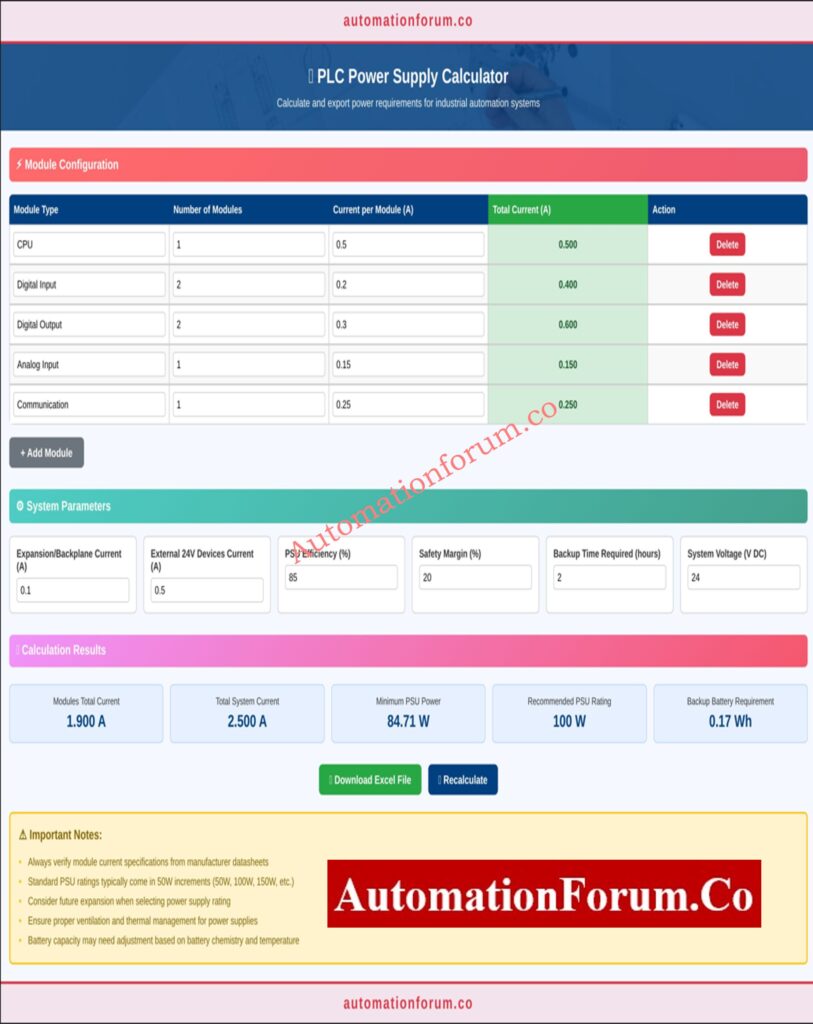
This online application was made just for automation and instrumentation specialists that need findings that are accurate and easy to document.
1. Dynamic PLC Module Configuration
Adding or removing PLC modules like CPUs, digital inputs, digital outputs, analog inputs, or communication modules is easy. The calculator changes the total current and PSU power rating right away.
2. Real-Time Power Calculation
The tool shows you live results as you make changes to your entries, such as:
- Module-wise and total current
- Total system current
- Minimum PSU power
- Recommended power supply wattage
- Estimated battery backup capacity
Why PLCs Use 24V: Why is 24 Volts Mostly used in Industrial PLC Systems?
3. Built-In Safety Margin and Efficiency Adjustment
You can change the safety margin (10–30%) and efficiency (80–90%) settings to make them more realistic for the design and future growth of the system.
4. Excel Export Functionality
When the calculations are done, export a professional Excel report that summarizes all the modules, parameters, and results. This is great for EPC submissions, FAT documentation, or maintenance records.
5. Optimized Interface for Engineers
Designed with a clear interface that works well on mobile devices and is good for usage on-site, in design meetings, or while commissioning projects. You don’t need to download or install anything.
Never Stop Your PLC: Hot Standby in PLC Systems: Architecture, Working, and Benefits
How to Use the PLC Power Supply Calculator
To use the calculator well, follow these steps:
Step 1: Add PLC Modules
Step 2: Enter Current Values
Look at the manufacturer’s datasheet to find out how many Amperes each module can handle. Fill in the fields with the number of modules and the current per module.
Step 3: Input System Parameters
To get an accurate estimation of PLC power usage, please give the following values:
- Expansion/Backplane current (A)
- External 24V device current (A)
- Power supply efficiency (%)
- Safety margin (%)
- Required backup time (hours)
- System voltage (usually 24VDC)
Scale PLC Signals Easily: Scaling Analog Values in Industrial Automation (PLC)
Step 4: Review Instant Results
The calculator immediately shows:
- Total module current
- Total system current
- Minimum PSU power (Watts)
- Recommended PSU rating (rounded to standard ratings like 50W, 100W, 150W)
- Backup battery energy requirement (Wh)
Step 5: Export to Excel
You can download your report with just one click for record-keeping, project documentation, or technical verification.
Stop PLC Voltage Drops: How to Calculate and Minimize Voltage Drop in PLC Wiring?
Who Should Use This Automation Power Calculator ?
This online application is useful for a wide range of specialists in the fields of instrumentation, electrical design, and industrial automation.
1. Instrumentation & Control Engineers
To check the load on the control panel and make sure the right PSU is chosen during design.
2. Project & EPC Engineers
To write down the correct PLC power sizing in design deliverables and commissioning reports.
3. Panel Design Engineers
They choose the PSU for the control panel and make sure there is enough space, ventilation, and cable gauge sizing.
4. Maintenance & Reliability Teams
Maintenance and Reliability Teams for doing PLC cabinet load calculations during audits, fixing problems, and upgrading systems.
5. Students and Technical Trainers
As a useful way to learn about PLC energy management and 24VDC power supply architecture.
Master PLC Documentation Now: PLC System Documentation Guide: Essential Records for Industrial Automation Success
Typical Applications of PLC Power Sizing in Industrial Projects
This tool can be used in many different fields, including:
- designing PLC and DCS cabinets in the manufacturing and process industries
- Retrofit projects when the number of modules or their layout changes
- Adding new I/O racks or communication cards to the system
- Maintenance checks for verifying PSU loading and battery health
- Academic use for teaching automation power calculator concepts
The idea of calculation stays the same, no matter if you use Siemens, Allen-Bradley, Schneider, Mitsubishi, or Delta PLCs.
Refer the below link for the Collection of PLC Digital Signal Calculators for Industrial Automation
Example: PLC Power Consumption Calculation and PSU Selection
| Parameter | Description | Example Value |
| Total PLC Modules | CPU + I/O + Communication | 6 |
| Total Module Current | Sum of all module currents | 2.2 A |
| Expansion/External Current | Total additional current | 0.5 A |
| Power Supply Efficiency | Conversion efficiency | 85% |
| Safety Margin | Recommended overhead | 20% |
| Total System Current | Combined load | 2.7 A |
| Minimum PSU Power | 24 × 2.7 ÷ 0.85 × 1.2 | 91.2 W |
| Recommended PSU | Rounded up | 100 W |
| Battery Backup (2h) | Required energy | 182 Wh |
Result: For a power failure that lasts 2 hours, a 100W PSU and a battery backup of at least 182Wh are suggested. This keeps the PLC running smoothly and the voltage steady even when the load changes.
Best Practices for Reliable 24VDC Power Supply Design
More than simply math is needed to design a PLC power system that works well and is reliable. To make things more reliable, follow these best practices:
- Always Use Datasheet Values
Don’t make assumptions. For exact current values, see the manufacturer’s specs. - Apply Adequate Safety Margin
Add at least 20 to 25 percent more space for future growth or changes in load. - Consider PSU Efficiency
High-efficiency PSUs (≥90%) create less heat and work better in closed spaces. - Plan for Voltage Drop
To lower voltage loss, choose the right wire gauge and keep the cable length as short as possible. - Ensure Proper Heat Management
To keep DIN-rail-mounted power supply from derating, make sure they have space or airflow. - Size the Backup Battery Wisely
Take into account the state of the environment, how well the system works, and how long it needs to run. - Recheck During Modifications
Whenever you add or replace modules, you need to recalculate the load.
These measures make sure that your PLC power sizing stays correct for the whole life of the project.
PLC Hardware Explained Fast: PLC Hardware: Modules,Types, Functions, and Applications
Advantages of Using This PLC Cabinet Load Calculation Tool
- Instant and correct estimation of PLC power use
- Saves engineers time and gets rid of mistakes in spreadsheets.
- Gives you documentation that you can export for project handover
- Works with both simple and complicated PLC setups
- No installation needed; works on any browser and device.
This calculator is a must-have digital engineering tool for professionals that work on more than one project at a time.
In industrial automation, a stable power supply means a reliable system. The PLC Power Supply Calculator makes the complicated task of sizing power into a simple, accurate, and professional process that is ready for documentation.
This program makes sure that any project, from simple panels to complicated control systems, goes smoothly and safely by automating your PLC power usage estimates and making clear Excel reports.
This calculator gives you the clarity and accuracy you need to make confident power design decisions, whether you are a control engineer, panel designer, or maintenance worker.
Frequently Asked Questions (FAQs) on PLC Power Supply
What is the voltage of a PLC power supply?
Most of the time, Programmable Logic Controllers (PLCs) run on 24V DC. Some variants can take in 120V or 240V AC and change it to 24V DC within. Always check the voltage requirements for your individual PLC model.
How to check PSU wattage?
To find out how many watts your Power Supply Unit (PSU) has:
- Label Inspection: Look at the PSU label; it generally tells you how many watts it can use at once.
- Model Number: The wattage is sometimes included in the model number.
- Online Specifications: If you can’t get to the label, look up the PSU model to get its specs.
Software tools can’t always tell how many watts a PSU uses.
How to calculate power supply load?
To figure out how much power a power supply can handle:
- Nominal Load: Add up the power needs (in watts) of all the gadgets that are connected in.
- Inrush Load: Take into account the initial starting currents, which can be higher than the operating currents.
To avoid overloads, make sure the power supply can manage both nominal and inrush loads.
What is the formula for load in kW?
To find out how much electricity is being used in kilowatts (kW):
kW = (Volts × Amps × Power Factor) / 1000
Where:
- Volts = Voltage supplied
- Amps = Current drawn
- Power Factor = Efficiency factor of the load (0 to 1)
This formula helps in sizing power supplies and ensuring efficient energy use.
What is an ATX 3.1 power supply?
ATX 3.1 is the most recent standard for desktop power supply. It offers:
- Better Power Delivery: Better support for parts that work well
- New Connectors: Has a 12V-2×6 connection for newer GPUs
- Better safety and efficiency: Can handle power spikes and makes the system more stable.
It is especially helpful for systems that need a lot of power, including gaming PCs and workstations.
Test Your Knowledge on Practical Troubleshooting of DO Signals in PLC
Refer the below link for testing your knowledge on Practical Troubleshooting of DO Signals in PLC for Process Industries
