Home Blog Page 15

HART Transmitter Diagnostics: What Your Field Device is Telling You

0
HART Transmitter Diagnostics

In the world of process automation, measurement reliability is everything. When a pressure, level, or temperature reading drifts or fails, it doesn’t just disrupt production it can compromise safety, product quality, and plant uptime.

That’s why modern HART-enabled field instruments have become more than transmitters of process variables they’re intelligent sensors with built-in self-diagnostics that reveal the real health of your measurement loop.

Whether it’s a Rosemount 3051S, a HART temperature transmitter, or a smart flow meter, today’s devices continuously analyze their internal electronics, process conditions, and communication loops to tell you much more than a simple process variable.
Why HART Diagnostics Are Essential in Process Automation

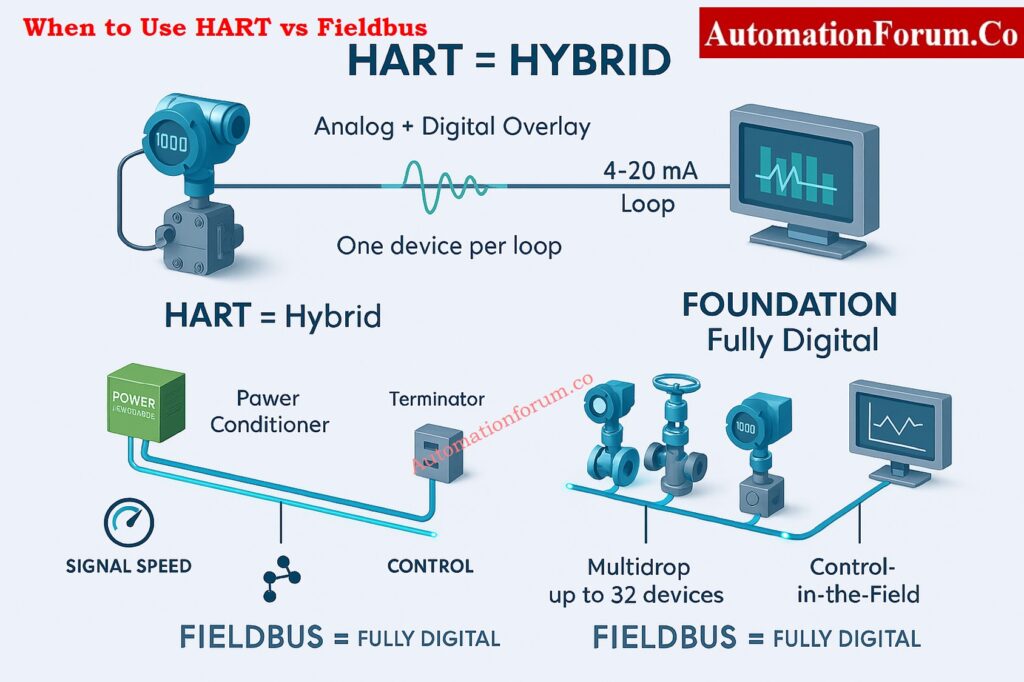
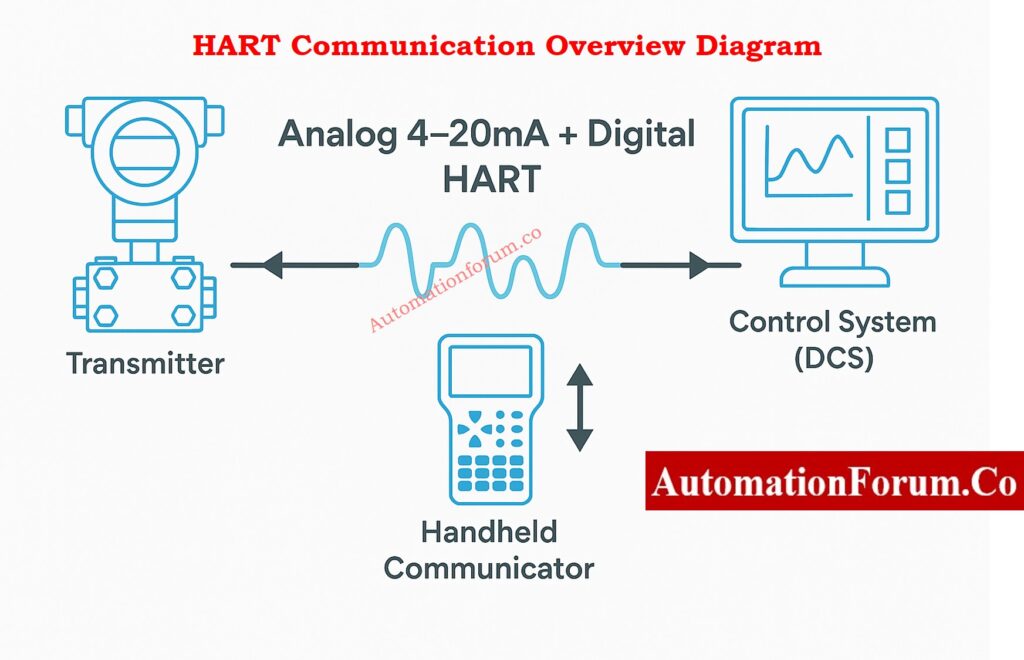
The Highway Addressable Remote Transducer (HART) protocol has existed since the 1980s. Initially, it was just a digital signal superimposed on the 4–20 mA loop to configure transmitters and read variables. But over the years, HART evolved into a powerful predictive maintenance tool.

Through its status bytes and command responses, a HART instrument can communicate:

  • Whether its process variable is trustworthy,
  • Whether it needs maintenance,
  • And even whether a loop wiring or grounding fault exists.

When integrated into a DCS or asset management system (AMS), HART diagnostics help maintenance teams move from reactive to predictive maintenance anticipating failures before they affect production.
Get a complete overview from: What is HART Protocol?
Key Insights from HART Device Diagnostics

Modern HART devices generate a wealth of information beyond process values. Here’s what engineers can learn instantly:

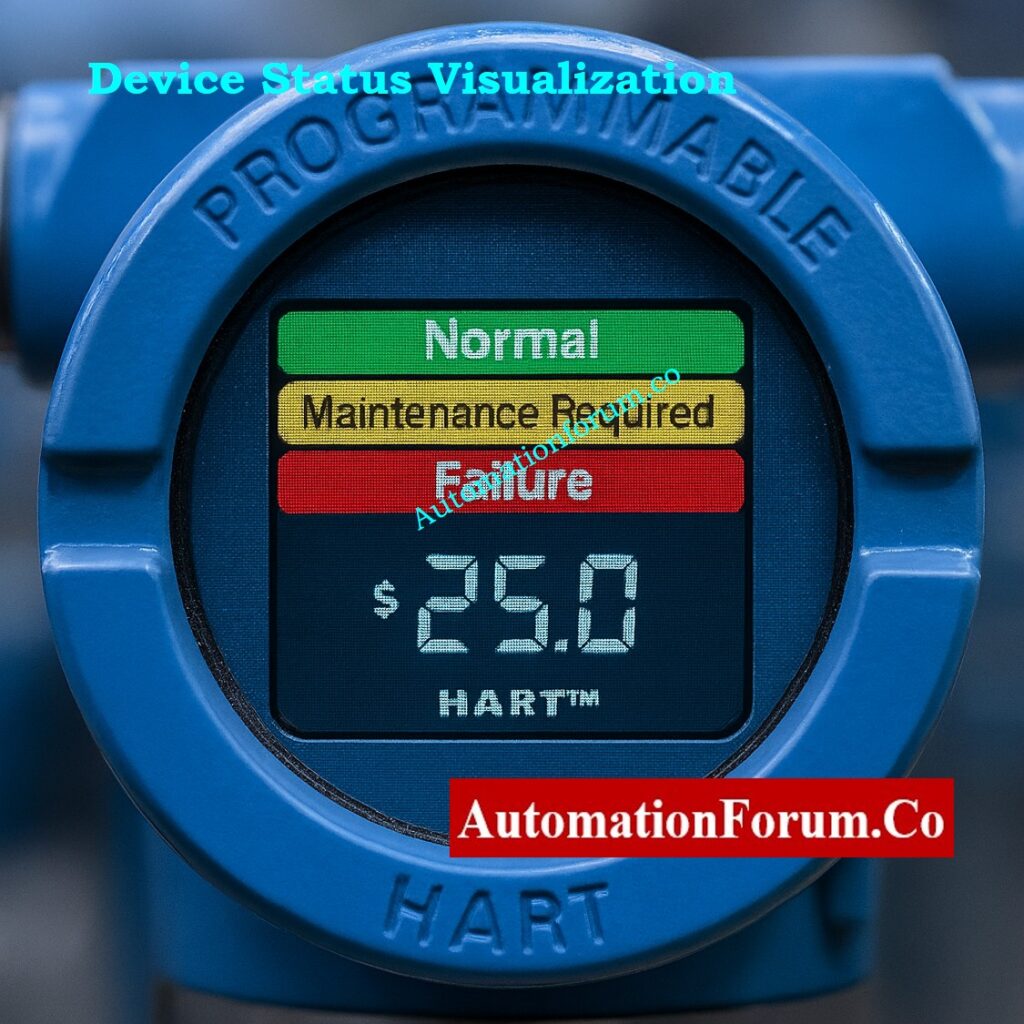
Each HART response includes a device status byte that tells whether the instrument is:

  • Operating normally
  • Needs maintenance
  • Or has failed

This immediate visibility helps determine whether you can trust the process variable or if action is required.

Continuous monitoring is done on internal factors such signal integrity, power supply voltage, and temperature. These tests can find problems with electronics, power, or grounding long before the instrument stops working.

Many transmitters keep track of the number of service hours, the last time they were calibrated, and the number of times they were turned on. This information helps in planning maintenance and proof-testing schedules in safety loops.

Advanced devices detect plugged impulse lines, diaphragm wear, sensor drift, or process medium buildup. This ensures process readings reflect reality rather than mechanical or environmental problems.

HART keeps an eye on the loop current, reaction time, and quality of digital communication all the time. The diagnostic data can show if there is noise, loose connections, or unreliable power.

Together, these insights form the backbone of a condition-based maintenance program that reduces unplanned downtime.
View the complete setup diagram in: Wiring Diagram for Pressure Transmitter Calibration in Workbench using HART

Power Advisory Diagnostics – Monitoring Loop Integrity - hart diagnostics
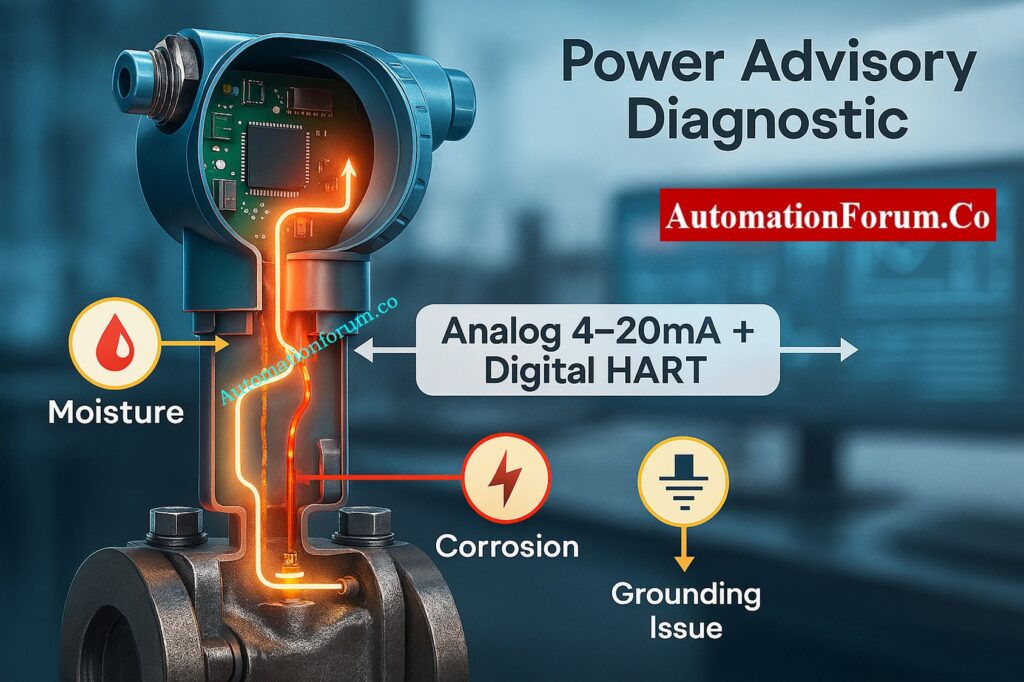
Electrical loop problems like corrosion, moisture ingress, or poor grounding are among the most common causes of transmitter failure.

The Rosemount 3051S Power Advisory Diagnostic uses real-time voltage monitoring to detect:

  • Corroded terminals
  • Water in terminal compartments
  • Grounding or shielding issues
  • Unstable power supplies
Statistical Process Monitoring (SPM) – Seeing Beyond the Process Variable - hart
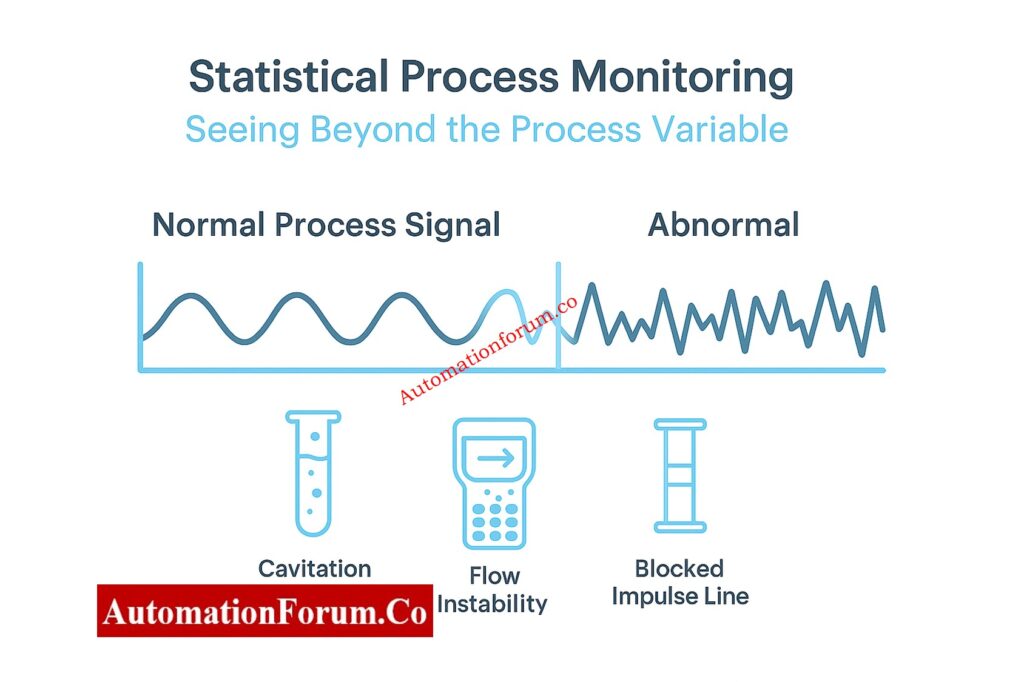
Statistical Process Monitoring (SPM): Looking Beyond the Process Variable

Standard alarms can only identify aberrant process conditions that Statistical Process Monitoring (SPM) can find by looking at noise patterns in the signal.

Common Issues Detected by SPM

SPM finds a lot of difficulties, such as:

  • Flashing or cavitation in control valves
  • Flooding of columns in distillation systems
  • Blocked impulse lines or leaks in the process
  • Loss of agitation in reactors
  • Air or flame instability that becomes trapped
How SPM Turns a Transmitter into a Process Analyzer
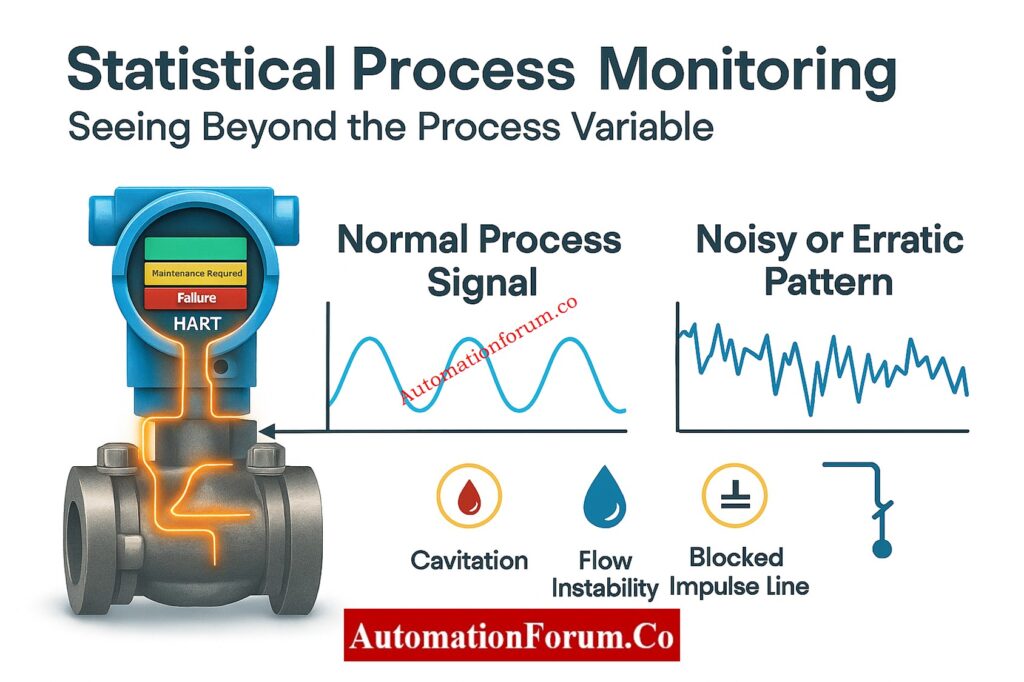
SPM can tell operators about hidden problems like vibration, turbulence, or phase changes by comparing real-time signal patterns to baseline data.

This changes a simple transmitter into a process analyzer that helps engineers find ways to make things run more smoothly and keep quality high.

Perform accurate calibration using: HART transmitter calibration procedure – For pressure transmitter

In Safety Instrumented Systems (SIS), each transmitter must be checked on a regular basis to make sure it works as IEC 61511 says it should.

Transmitters equipped with safety-certified diagnostics, like the Rosemount 3051S, increase diagnostic coverage by continuously verifying their sensing elements, electronics, and communication loops.

This greater Safe Failure Fraction (SFF) lets:

  • Longer proof-test intervals
  • Reduced maintenance workload
  • Lower lifecycle cost

Operators can keep SIL compliance while cutting down on downtime when a transmitter can find problems on its own, like pressure spikes, loss of echo, or electrical drift.
Challenge your expertise through: Advanced HART Protocol Quiz: 25 MCQs with Detailed Explanations

Every HART message includes two status bytes that form the foundation of its diagnostic capability.

Indicates whether communication was successful.

  • 0x00 means “OK.”
  • Other codes indicate to problems with processing commands or sending messages.

Reflects the operational condition of the field device.
It shows whether the transmitter is functioning correctly, in warning, or in failure.

Earlier HART versions treated these codes differently, but HART 7 standardized them so that every transmitter reports status consistently.

For example, a device status value of 0x90 (0x80 + 0x10) means the process variable is unreliable due to a process problem like a loss of echo.

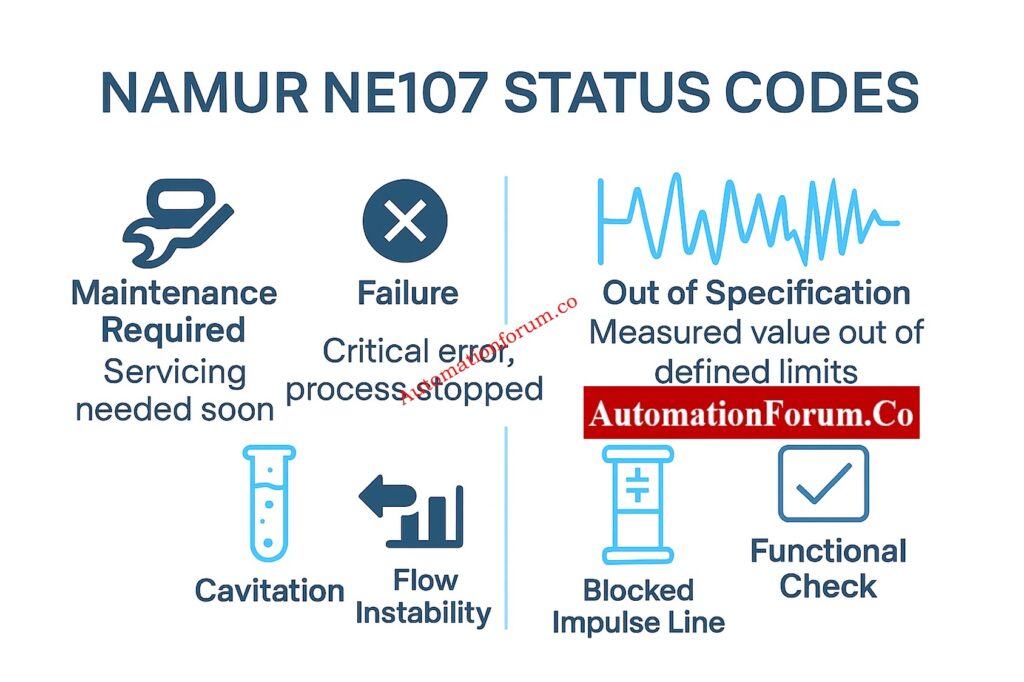
To simplify maintenance interpretation, modern transmitters use NAMUR NE107 condensed status codes.

BitMeaningTypical Interpretation
0Maintenance requiredDevice is healthy but needs service
1Device variable alertA variable is in warning/alarm
2Critical power failurePower supply unstable
3FailureInternal malfunction detected
4Out of specificationProcess or sensor beyond limits
5Functional checkDevice under test/simulation

This universal coding means that whether you’re using a pressure, level, or temperature transmitter, the DCS will interpret diagnostic messages consistently.

Each process variable in a HART device (like PV, SV, TV, or QV) has its own Device Variable Status.

  • Good: Reading is valid.
  • Bad: Fault or failure in measurement chain.
  • Uncertain: Variable not guaranteed may be under test or simulation.

In short, before acting on a value, the control system can automatically decide whether that reading is trustworthy. This feature improves control loop integrity and prevents the use of corrupted process data.

Different types of transmitters pressure, flow, level, or temperature use specific Device Family Status bits. These map diagnostics to process-specific meanings. For instance:

HART Command 48 gets 25 more bytes of diagnostic data for deeper troubleshooting, with each bit linked to a distinct internal problem code. These correspond to the same messages displayed on the transmitter’s LCD screen.

With this level of detail, specialists can figure out if the problem is with the sensor hardware, the process interface, or the electronics.
Follow the best configuration methods in: Best Practices for Configuring HART Parameters in DCS Software

How HART Commands Carry Diagnostic Data
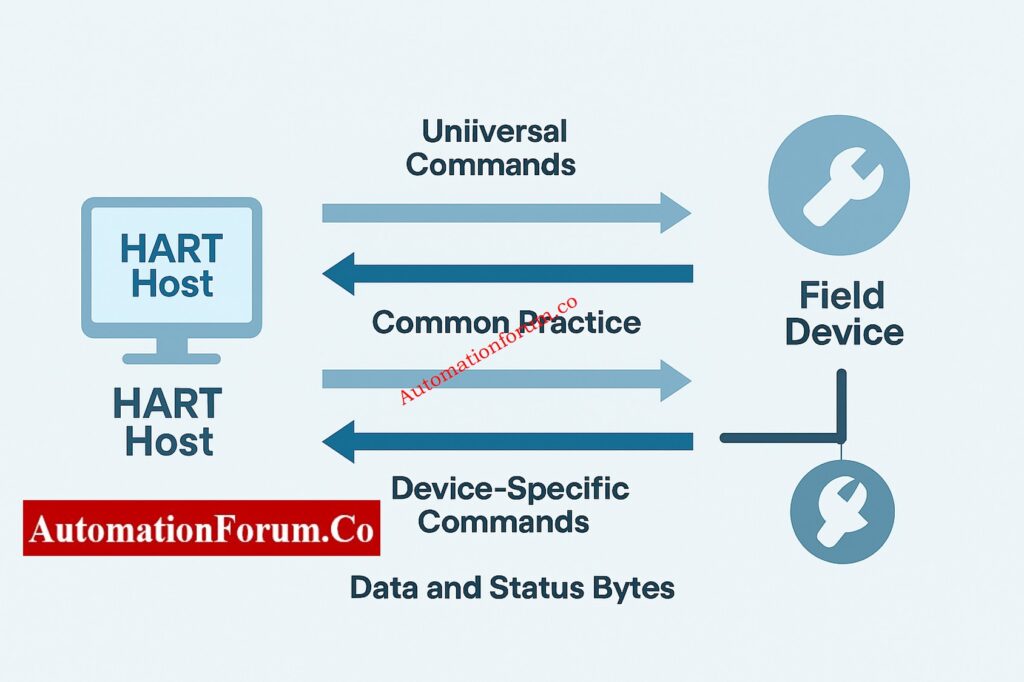
The HART protocol operates on a query–response model. The host delivers a command, and the device sends back data and information about its status.

There are three types of HART commands:

  1. Universal Commands (0–30, 38, 48):
    All HART devices support this, which lets you read PVs, device info, and extended status.
  2. Common Practice Commands (32–121):
    These are used by all device families for trimming, damping, or resetting.
  3. Device-Specific Commands (128–253):
    These are set by the makers for their own diagnostic purposes.

HART Commands  Diagnostic Data flow

All responses include the two status bytes described earlier, meaning every command is both a data exchange and a health report.

Understand signal conditioning in: Why is a 250-Ohm Resistor Important for HART Communication?

For decades, HART diagnostics remained hidden inside the device, accessible only through handheld communicators. Now, smart I/O cards and AMS software display this information directly in the control system.

This visibility answers crucial questions instantly:

  • Can I trust the process variable?
  • Is the transmitter in good health?
  • Is this a problem with the process or the electricity?

Plants may make better decisions faster by using this diagnostic intelligence. This cuts down on troubleshooting time and increases uptime.

HART - Integration with Asset Management Systems (AMS)

When you connect HART diagnostics to Emerson AMS Device Manager, Yokogawa PRM, or Honeywell FDM, they are immediately recorded, tracked, and trended.

This makes it possible:

  • Dashboards for the health of all devices in one place
  • Automatic notifications when things start to go wrong
  • Maintenance documents that are ready for an audit

Engineers get alerts that they can act on, like “sensor drift increasing” or “loop voltage fluctuation detected,” instead of having to wait for an instrument to fail.

Imaging a differential pressure transmitter on a column for distillation. The impulse line starts to get clogged over time.

The HART transmitter sees a pattern of pressure changes that isn’t usual and sends out a “plugged line” signal.
Before any control deviation or trip occurs, maintenance isolates and cleans the line preventing an unplanned shutdown.

That’s predictive maintenance in action, enabled by HART diagnostics.

Self-checking all the time makes sure that only valid data gets into your control loops.

Early detection of problems such sensor drift, unstable power, or process blockage.

Finding faults faster cuts down on the time it takes to fix them and get back to normal.

Better Safety Diagnostics that are safety-certified lower the number of proof tests needed while still meeting safety standards.

HART diagnostics pay for themselves many times over by extending maintenance intervals and stopping unexpected breakdowns.

By learning HART diagnostics, you will be able to: 

HART diagnostics turn your field equipment from silent data sources into smart protectors of process health.

Transmitters like the Rosemount 3051S make it possible to have a predictive, data-driven maintenance culture by checking the integrity of loops, monitoring statistical processes, and having safety-certified self-diagnostics.You get more than just numbers when you decode the rich diagnostic data that HART gives you. You can trust every loop, feel sure about every measurement, and make clear decisions about maintenance.

Test your troubleshooting knowledge with: Closed-Loop Control Valve Troubleshooting: HART, Fieldbus and Diagnostics Skills Quiz

HART communication mixes analog 4–20 mA signals with digital data. This lets you set up devices, troubleshoot them, and calibrate them from a distance. It improves accuracy, cuts down on maintenance time, and works with current wiring, making upgrades simple and cheap.

The basic purpose of HART is to provide two-way digital communication over typical 4-20 mA loops. This lets users get process, configuration, and diagnostic data from smart field equipment without stopping work.

One of the best things about using the HART protocol is that it lets you access instrument data and health diagnostics from a distance without having to run extra wires. This combines the durability of analog signals with the intelligence of digital signals to make plants run more efficiently.

In process industries, HART is used to set up, keep an eye on, and fix problems with transmitters and smart instruments. It works with software used in oil and gas, power, chemicals, and water treatment industries.


Gas Turbine Start Interlocks Quiz – 25 Advanced MCQs for Engineers

0
Gas Turbine Start Interlocks Quiz | Advanced MCQs for Engineers

Gas turbine start interlocks are essential for safe and reliable turbine operation in both power generating and industrial processes. These interlocks serve as safeguards, ensuring each vital subsystem is in the positive state. They check lubricant oil, hydraulic pressure, the position of the IGV, purge conditions, fuel readiness, and vibration health. Only then does the unit move from permissive checks to the firing sequence. These systems are designed to prevent catastrophic breakdowns, misfires, and abnormal speeds.

In actual industrial settings, the initiation of permissible actions needs to be consistent with the original equipment manufacturer’s (OEM) logic, the guidelines provided by the application programming interface (API), and the safety protocols unique to each plant. This question tests your grasp of high-integrity start sequences, dynamic shutdown conditions, and the intricate field situations that senior engineers often encounter. 

Gas Turbine Start Interlocks

Gas Turbine Start Interlocks Quiz – 25 Advanced MCQs for Engineers

Gas turbine start interlocks serve a crucial function: they ensure every essential system is primed before the turbine can even think about cranking up. This includes checking lubrication oil pressure, hydraulic control, purge airflow, IGV positioning, vibration monitoring, and fuel delivery. Only when all these elements are confirmed as ready does the system allow the crank and ignition sequence to begin. These measures are in place to avoid misfires, heat shocks, and mechanical breakdowns. This exam tests your skill in understanding complex permissives, interlocks, and shutdown logic as they apply to turbine start sequences at actual plants.

1 / 26

A turbine start is blocked due to “Servo Oil Temperature Low.” Why is this critical?

2 / 26

“Vibration System Not OK” blocks start. What condition typically triggers it?

3 / 26

Turbine trips during firing on “Flame-Out.” Most probable root cause?

4 / 26

“Auto Purge Valve Not Closed” prevents start. Which condition causes this?

5 / 26

Turbine fails on “Fuel Stop Ratio Valve Mismatch.” What is the best explanation?

6 / 26

“Bearing Metal Temperature High” appears but start continues. Why is it not a start interlock?

7 / 26

Fuel gas compressor trips, but turbine remains in purge. Why?

8 / 26

“Trip Oil Pressure Low” forces an immediate shutdown. What does this interlock protect?

9 / 26

Turbine does not proceed to acceleration after ignition. Most likely reason?

10 / 26

“Compressor Discharge Pressure Low for Firing” appears during crank. Common cause?

11 / 26

The turbine refuses to start because “Emergency Stop Loop Not Healthy.” Which situation fits?

12 / 26

“Exhaust Temperature Spread High” aborts startup post-ignition. Probable cause?

13 / 26

A unit fails to complete purge due to “Airflow Low.” What explains this condition?

14 / 26

“Fuel Forwarding Not Ready” blocks ignition. Most likely cause?

15 / 26

IGV fails to reach the commanded pre-start position. Which subsystem is directly implicated?

16 / 26

The unit trips on “Differential Vibration High” during crank. Probable root cause?

17 / 26

“Vent Fan Not Running” blocks purge. What hazard does this interlock mitigate?

18 / 26

“Vent Fan Not Running” blocks purge. What hazard does this interlock mitigate?

19 / 26

The turbine aborts start because the turning gear does not disengage. Probable cause?

20 / 26

Turbine overspeed test cannot initiate. Which permissive is primarily required?

21 / 26

A turbine enters firing but aborts immediately on “Ignition Failure.” What condition is most realistic?

22 / 26

Fuel gas valve fails to move to “Purge Position.” What interlock usually stops it?

23 / 26

The turbine does not advance to ignition because the flame detector permissive is false. Which scenario explains this?

24 / 26

During crank, the unit trips on “Hydraulic Pressure Low.” Which failure is most probable?

25 / 26

A gas turbine fails to enter purge mode. Which interlock most commonly inhibits the purge sequence?

26 / 26

During a turbine start attempt, the Lube Oil Pressure Low permissive remains false. Which condition most likely prevents the start?

Your score is

The average score is 60%

0%

Access 1000+ MCQs tailored for instrumentation engineers: Instrumentation and Process Control Quiz Hub – 1000+ MCQs for Engineers

Why Siphon Tubes are Essential for Pressure Gauges in High-Temperature Steam Systems

0
Why Siphon Tubes are Essential for Pressure Gauges in High-Temperature Steam Systems

Pressure gauges used in steam lines, boilers, high-pressure heaters, thermal fluid systems, and high-temperature process lines are often subjected to intense working conditions. Steam and superheated vapors can reach temperatures that surpass the maximum limits of gauge components, especially the Bourdon tube. In addition to high temperatures, these systems often endure quick changes in pressure and pulsations. These combined factors can lead to incorrect measurements, early equipment failures, and unsafe working conditions. 

A siphon tube is a key component in many pressure gauges. It’s essentially a tube, often U-shaped, that connects the pressure source to the gauge itself. The purpose of this tube is to protect the gauge from high temperatures and potentially damaging fluids. When the pressure is applied, the liquid inside the siphon tube absorbs the heat, preventing it from reaching the gauge mechanism. This helps ensure the gauge provides accurate readings and extends its lifespan.
A siphon tube is a fundamental, straightforward, and inexpensive tool for safeguarding pressure gauges in these situations. This comprehensive book offers a straightforward, in-depth, and exceptionally useful explanation, designed for instrumentation engineers, plant specialists, maintenance crews, and EPC project professionals. 

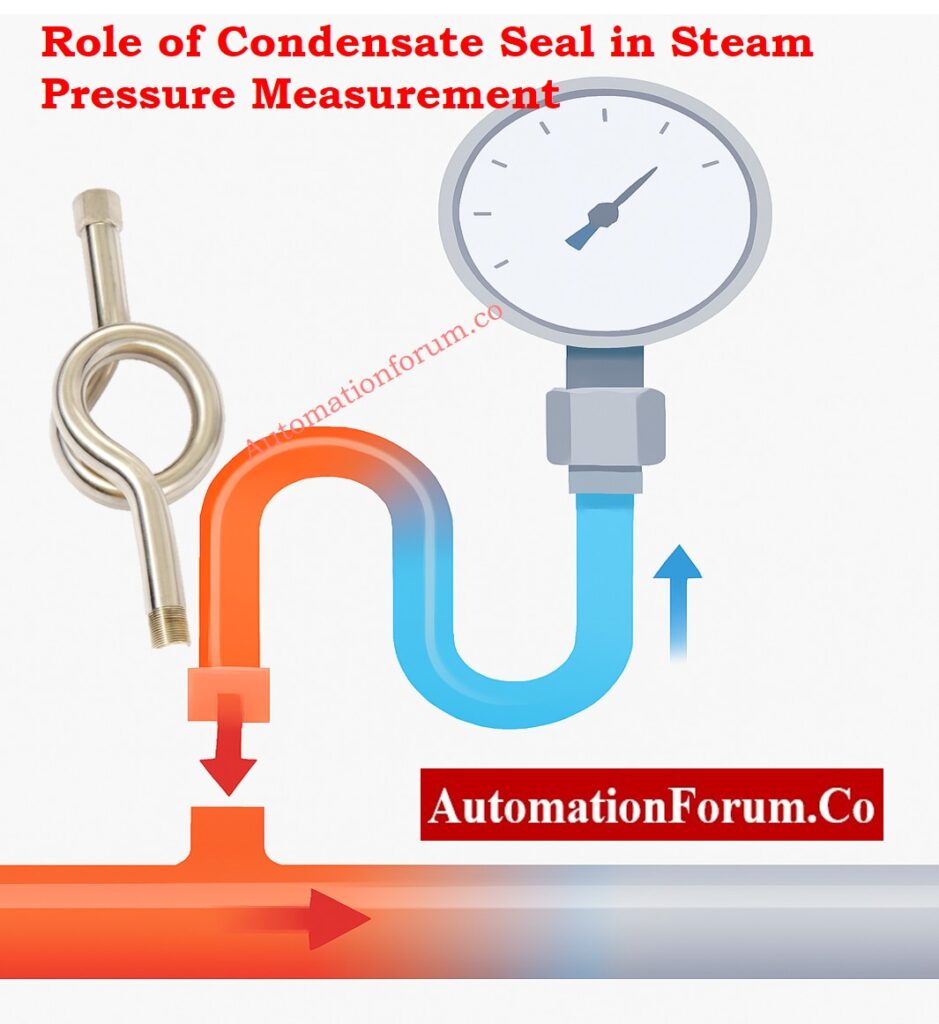
Role of Condensate Seal in Steam Pressure Measurement -  Siphon Tube in a Pressure Gauge?

A siphon tube, a metal tube bent into a certain shape, connects the pressure gauge to the steam or high-temperature process line. It typically appears in U-shaped, pigtail, straight, or coil forms. The main job of a siphon tube is to create a barrier of condensed liquid, specifically water, within the tube. This barrier prevents hot steam from reaching the gauge, yet it allows the actual line pressure to be measured.

The siphon tube’s design, which keeps steam from directly touching the gauge’s inner workings, is key to its reliable operation, steady performance, and long-lasting nature.
Why Pressure Gauges Fail – Top Causes & Fixes: Pressure Gauge Failure: Causes, Solutions & Troubleshooting Guide

When a pressure gauge is directly exposed to steam, the Bourdon tube quickly heats up because of the high temperatures. This results in: 

  • The Bourdon tube is substantially more likely to experience metal fatigue due to the continual expansion and contraction caused by temperature changes.
  • The Bourdon tube is likely to permanently deform and lose its elasticity, which leads to drift and inaccuracies.
  • Unreliable and variable readings are caused by a rapid loss of gauge calibration.
  • The process line is likely to experience constant pointer vibration, which is produced by both pulsation and thermal shock.
  • In extreme situations, there’s a chance of the pressure gauge failing completely, possibly leading to a rupture or explosion.
  • The pressure gauge’s lifespan is generally shortened, which leads to frequent replacements and increased maintenance expenses for the facility.

A siphon tube helps to prevent these problems by acting as a heat barrier and reducing pressure changes.
Absolute Pressure Transmitter Calibration Steps: Step-by-Step Procedure to Calibrate an Absolute Pressure Transmitter

A siphon tube works by using two protective features: thermal isolation and the reduction of pressure changes. 

How a Siphon Tube Works in Pressure Measurement - Thermal Protection Through Condensate Barrier

When steam enters the siphon tube:

  • As steam moves through the siphon tube, it cools down since the tube’s surface temperature is the same as the surrounding environment.
  • As the steam cools, it turns back into water inside the U-bend or coil.
  • The water stays in the siphon tube’s lower section, where it stays there.
  • The water seal works as a thermal barrier, preventing hot steam from reaching the pressure gauge.
  • The pressure energy moves upward toward the gauge, and there’s no considerable heat transfer. 
  • This design keeps the gauge functioning within its safe temperature range, which is crucial for both precision and its continued performance over time. 

The need for siphon tubes is mainly due to this particular process, which is why they are required in systems that handle steam or gasses at high temperatures.
Pressure Instrument Calibration – Complete Guide: Calibration Procedures for Various Pressure Measuring Instruments

Steam lines, boiler outlets, and heat-exchanger return lines sometimes experience significant pulsations. 

The siphon tube helps by:

  • The siphon tube has a purpose: it mitigates sudden pressure spikes before they impact the gauge.
  • Mechanical shocks, which can be caused by things like steam flashing or rapid valve movements, are absorbed.
  • Reducing the size of the pulsation waves that induce pointer flutter is a key goal.
  • To make the gauge readings easier to understand, the pointer’s movement needs to be stabilized, resulting in smoother and more consistent readings.
  • To prevent the Bourdon tube from experiencing early fatigue due to repeated cycles of stress. 

Once the siphon tube is correctly positioned, the gauge’s readings become more consistent, and its lifespan is considerably extended.
Pressure & Leak Testing Method Statement: Method Statement for Pressure Test and leak Test for Instrument Tubing and Impulse line

  • The pressure gauge is protected from heat by a permanent condensate barrier, which prevents high-temperature steam from reaching it.
  • Preventing the Bourdon tube from overheating minimizes the chance of distortion, drift, and unexpected failure.
  • Maintains reliable and precise pressure readings, even under the rigors of steam service.
  • Reduces the effects of pulsation and vibration, which in turn enables the pointer to traverse smoothly, hence enhancing readability.
  • Significantly prolongs the operational lifespan of pressure gauges, hence reducing both upkeep and replacement expenses.
  • This method improves plant safety by reducing failures in gauges that are caused by thermal shock or pressure fluctuations.
  • Provides dependable separation between the process line and delicate instrumentation elements. 

How to Select the Right Impulse Tube Size: Choosing the Right Impulse Tube Size for Reliable Pressure Measurement & System Efficiency

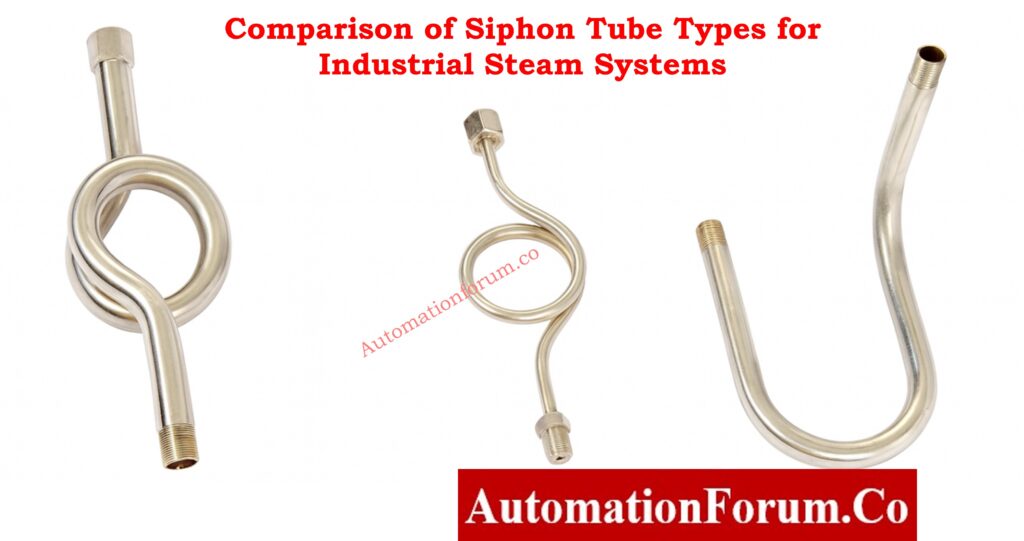
Siphon tube designs vary, depending on the application, temperature, and how they are installed.

Comparison of Siphon Tube Types for Industrial Steam Systems
Type of Siphon TubeShapeBest Use CaseAdvantages
U-Type (Pigtail)U-shaped loopVertical steam linesGood condensate retention, common type
Coil-TypeSpiral/HelicalHigh temp steam, pulsation-heavy systemsSuperior cooling, excellent dampening
Straight TypeStraight pipeHorizontal or compact spacesSimple installation, space-saving

Common Pressure Gauge Errors You Must Avoid: Errors Involved in Pressure Gauge Measurement

The material used for a siphon tube must be able to withstand temperature changes and corrosion. This depends on the fluid being moved, the pressure it’s under, and the location where the siphon is installed. 

MaterialTemperature RangeCorrosion ResistanceTypical Application
Carbon SteelMediumLowStandard steam service
SS304HighMediumIndustrial steam, mild chemicals
SS316Very HighHighCorrosive environments, refineries
Chrome-Moly SteelExtremely HighMediumHigh-pressure boilers
Copper AlloysLowMediumLow temp fluids

How to Select the Right Pressure Gauge: Selection of a pressure gauge

Siphon tubes are often used in industrial settings, especially in systems that operate at high temperatures. 

  • Siphon tubes are widely utilized in many industries that handle steam or gasses at high temperatures.
  • In power plants, the constant monitoring of high-temperature vapor is crucial for the safe operation of boiler systems, steam drums, and steam headers.
  • Steam distribution networks in refineries are crucial for supplying thermal energy to various crude oil and product processing units.
  • Chemical and petrochemical plants use steam to heat reactors, distillation columns, and other process equipment.
  • Industries that use steam for sterilization and pasteurization in food and beverage production.
  • Desalination plants that use steam to power multiple-effect evaporators.
  • Heat exchangers and reboilers that use steam circulation for energy transfer.
  • Steam jackets, dryers, and industrial heaters require careful control of pressure.
  • HVAC systems, district heating networks, and industrial utility steam supply lines. 
Selection FactorWhat to CheckBest Choice / When to UseNotes for EPC & Instrumentation Engineers
Temperature Rating and Material CompatibilityMaximum steam temperature, corrosion level, and process fluid typeCS for standard steam; SS304/SS316 for corrosive or high-temp lines; Chrome-Moly for high-pressure boilersMaterial must match both temperature and corrosion severity to prevent tube thinning and failure
Pressure Rating and Steam Line ConditionsOperating pressure, pressure surges, pulsation severityUse coil-type for high pressure and heavy pulsations; U-type for normal steam pressureHigher pressure requires stronger tubing and better pulsation absorption
Orientation, Space, and Installation ConstraintsVertical vs horizontal mounting, available space, accessibilityU-type for vertical lines; straight type for tight spaces; coil-type where long cooling path is neededCheck if the siphon can retain condensate properly based on orientation
Choosing Between Pigtail vs Coil vs Straight SiphonCooling requirement, pulsation level, installation layoutPigtail (U-type): general steam service; Coil: high temp + pulsation; Straight: compact areasSelection must ensure both thermal isolation and stable pressure transmission

How to Calibrate a Pressure Gauge (Step-by-Step): Pressure Gauge Calibration – Step-by-Step Procedure and Standards

To ensure the siphon tube works properly, correct installation is essential. 

  • Before you start, always fill the siphon tube with clean water. This creates an immediate condensate barrier, which is essential.
  • U-type siphons are preferable for vertical applications because they are better at retaining condensate in upright systems.
  • Coil-type siphons are the better choice for high-temperature steam lines, especially when you need improved cooling and to minimize pulsations. To prevent leaks, always use PTFE tape or a compatible sealing compound on threaded connections.
  • To facilitate safe gauge removal and isolation, install a gauge cock or needle valve between the siphon and the gauge.
  • Don’t put the siphon at low points where scale, sludge, or debris could build up inside it.
  • Mount the pressure gauge upright. This ensures it responds accurately and functions correctly. 
  • Ensure unobstructed movement within the tube, allowing condensate to form as intended, without any hindrance.

If the siphon tube is installed incorrectly, it might lead to false readings and impair its ability to safeguard the system.

Consistent checks and proactive upkeep are key to sustained performance.

  • Regularly check siphon tubes for any indications of exterior corrosion, pitting, or thinning of the walls.
  • Verify that the condensate is at the right level to keep the thermal barrier working.
  • Inspect for any obstructions caused by scale, sludge, or rust that could impede the movement of fluids.
  • Ensure that every fitting, union, and seal is properly tightened and secure.
  • Replace any siphon tube exhibiting distortion, dents, or any type of mechanical damage.
  • Regular calibration of the attached pressure gauge is essential to ensure it remains accurate.
  • If deposits are suspected, clean the internal passageways during shutdowns.
  • A properly cared-for siphon tube boosts dependability and cuts down on interruptions. 

Without a siphon tube, the pressure gauge will be directly exposed to steam, which might cause several issues: 

  • Immediate heating of the Bourdon tube causes the metal to weaken and fail more quickly.
  • The continuous vibrating of the pointer, caused by pulsations, makes it difficult to get stable and clear readings from the gauge. 
  • Thermal expansion can generate significant calibration drift, which leads to incorrect pressure readings.
  • The Bourdon tube is likely to deform or burst when exposed to heat. 
  • The shorter lifespan of the instruments led to frequent replacements, which therefore caused operational inefficiencies.
  • Safety issues are increasing, notably in boilers and equipment that uses high-pressure steam.

For any steam service, a siphon tube is required for precision and safety.
Best Damping Techniques for Stable Gauge Readings: Damping methods of pressure gauge

A siphon tube, a basic but crucial safety device, is used in steam and high-temperature systems. Its main job is to protect pressure gauges from heat, pressure changes, and physical stress. By creating a lasting condensate barrier and buffering pressure surges, it provides: 

  • Accurate and reliable pressure measurement is essential.
  • Extended lifespan for pressure gauges.
  • Improving the safety of process systems is a crucial goal in many industries.

  • Ensuring the dependable functioning of instrumentation networks. 

Instrumentation specialists bear a critical responsibility: the correct selection, installation, and ongoing maintenance of siphon tubes.
Pressure Switch Troubleshooting Made Easy: Pressure Switch Troubleshooting and Maintenance in Industrial Process Areas

A siphon tube’s design retains condensate within its loop. This prevents high-temperature steam from reaching the pressure gauge. This method protects the Bourdon tube from heat, which lessens the impact of pressure fluctuations.

The goal is to protect the pressure gauge from heat, which will stabilize its readings and avoid both overheating and mechanical damage. 

The siphon tube, with its bent design, has a dual purpose: it cools the steam as it arrives and creates a water seal. The water seal has a dual purpose: it blocks hot steam from contacting the Bourdon tube, yet still permits pressure to be communicated. 

It cools the steam, creating a condensate seal, and guarantees that only pressure energy gets to the gauge. This design protects the gauge and guarantees precise pressure readings in steam systems. 

A layer of water circulates within the loop, soaking up heat. This setup stops steam from hitting the Bourdon tube directly, which in turn lessens the chances of thermal shock and metal fatigue. 

The steam moves into the curved loop, where it cools and then changes into water. This water seal transmits pressure while also protecting the gauge from heat and vibrations. 

U-type siphons, often known as pigtail siphons, are suitable for most steam lines. Coil-type siphons are better suited for situations with very high temperatures or strong, repeating pressure changes. Straight kinds are used exclusively when space is limited. 

Yes. A siphon tube is essential for any steam service. It stops the gauge from overheating, keeps the pointer steady, and helps prevent early breakdowns. Accurate and safe measuring is a need. 

Testing a Thermocouple With a Multimeter: A Complete Field Guide for Instrumentation Engineers

0
Testing a Thermocouple With a Multimeter: A Complete Field Guide for Instrumentation Engineers

Thermocouples are among the most widely used temperature sensing elements in industrial and domestic heating systems. Their reliability, simplicity, and ability to function in harsh environments make them essential components in burners, pilot assemblies, furnaces, boilers, ovens, and several other process heating applications. Yet thermocouple failures are also one of the most common causes of pilot outages and burner shutdowns.

Why Thermocouple Testing Matters in Industrial and Domestic Heating Systems

Instrumentation technicians frequently encounter thermocouples while troubleshooting pilot flame instability, poor burner efficiency, or repeated equipment trips. In many of these cases, a multimeter can quickly determine whether the thermocouple is healthy or failing.

This comprehensive guide explains, in practical and field-focused detail, how thermocouples work, why they fail, and how to test them using three proven diagnostic methods. The procedures comprise the resistance test, the open circuit millivolt test, and the closed circuit load test. The piece offers practical engineering perspectives, highlights frequent issues, and shares troubleshooting advice, A dedicated FAQ section is included for easy access to information.

Safety Requirements Before Testing a Thermocouple

Thermocouple testing is simple, but it must be performed under strictly controlled and safe conditions. Testing must always be done in a workshop or safe test area, not in a hazardous zone or where flammable gases, vapors, or energized equipment are present.

Some tests require using a lighter or small torch, and some require temporarily bypassing or removing components. This means the workbench must be clean, stable, well ventilated, and equipped with appropriate fire suppression tools.

All technicians must adhere to the following precautions:

  • Wear your personal protective gear: safety glasses and heat-resistant gloves are a must. Before you take out a thermocouple from any device, make sure the gas supply is turned off.
  • Turn off electrical circuits as needed.
  • Adhere to plant work permits, lockout/tagout protocols, and safe isolation methods.
  • Avoid heating or testing a thermocouple in proximity to anything that could catch fire. 

A careful and secure methodology guarantees precise measurements, while also safeguarding both the equipment and the testing environment from potential hazards like ignition or damage. 

Follow This 8-Step Thermocouple Calibration Procedure Like a Pro: 8 Steps Calibration Procedure for Thermocouple

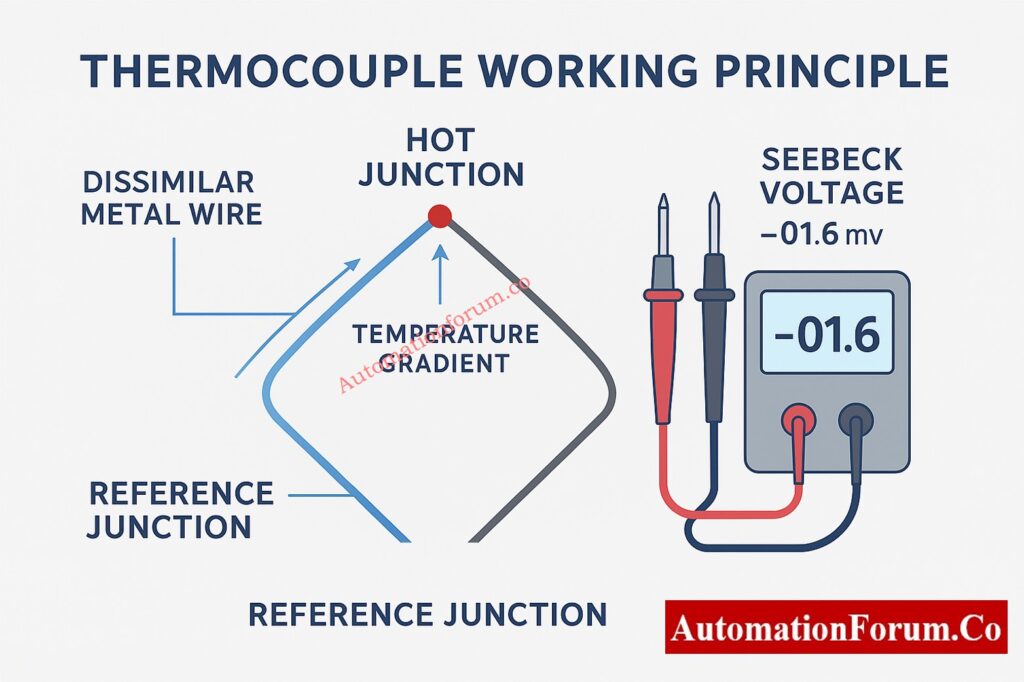
A thermocouple consists of two dissimilar metal wires joined at one end, forming the hot junction. The opposite ends are connected to an instrumentation device or control valve and act as the reference junction.

When the hot junction is exposed to heat, a temperature gradient develops between the two junctions, generating a small direct current voltage known as the Seebeck voltage. This output is measured in millivolts and is proportional to temperature.

In domestic and light industrial gas appliances, this millivolt signal energizes a small electromagnet inside the gas valve. As long as this voltage stays above a certain threshold, the valve remains open and the burner stays operational. If the thermocouple health deteriorates, its output drops and the valve closes, shutting down the flame.

Typical operating values for standard appliance thermocouples include:

  • Open circuit millivolt output of approximately 25 to 30 mV when exposed to a stable flame
  • Closed circuit output of about 12 to 15 mV when connected to the valve under normal load

Understanding these values is critical because different tests detect different failure modes.

Understand the Full Procedure to Calibrate a Thermocouple Transmitter: How to calibrate Thermocouple Transmitter?

Thermocouples operate under heat, vibration, and combustion exposure. Over time, several failure mechanisms reduce output, increase resistance, or cause intermittent performance. The most typical ways that things fail include: 

  • The collection of soot, charcoal, or dirt at the junction reduces how well heat is transferred.
  • A pilot flame that’s either too weak or not properly positioned might not fully cover the detecting tip.
  • Oxidation or corrosion might happen because of high temperatures and the gasses produced during burning. 
  •  Mechanical fatigue from continuous heating and cooling cycles.
  •  Internal conductor breakage caused by vibration or bending.
  •  Insulation deterioration or shorts between conductors and the outer sheath.
  • Voltage drops under load can be caused by loose connections or damaged connectors. 

Understanding these principles helps technicians choose the best diagnostic approach and interpret the data appropriately.

Learn How to Select the Right Thermocouple for Any Application: How to Select the Right Thermocouple for Temperature Measurement Applications?

A field technician, when doing thermocouple tests, often relies on a handful of essential instruments. 

  • A good digital multimeter, one that can accurately measure millivolts DC and low resistance.
  • Crocodile clips, or perhaps some other reliable way to connect probes.
  • A tiny flame or lighter is handy for heating purposes when doing open circuit tests. 
  • A thermocouple test adapter for closed circuit load measurement.
  • A clean workbench away from hazardous atmospheres.
  • Standard hand tools for installation or removal.
  • Safety goggles and gloves that can withstand heat. 

After the equipment is ready and the work space is secure, you can test the thermocouple. This can be done using one or more of the diagnostic methods outlined below.

Accurate Thermocouple Testing

The continuity test checks the thermocouple’s internal connections, looking for any breaks, and also checks the resistance at the connection points. It’s particularly useful for pinpointing internal faults or subpar mechanical linkages. 

  1. Detach the thermocouple from the appliance. If it’s difficult to remove, keep it in place, but make absolutely certain the gas supply is completely shut off.
  2. Examine the area visually, looking for any signs of smashed portions, kinks, corrosion, or insulation that’s been compromised.
  3. Switch the multimeter to continuity mode, or the lowest ohm setting.
  4. Attach one meter lead to the tip of the thermocouple, and the other to the connection end. 
  5. Record the resistance measurement. 
  • A properly functioning thermocouple usually shows a resistance of only a few ohms.
  • A value in the tens of ohms, or an open circuit, indicates a damaged conductor or significant corrosion.
  • If the connectors are showing significant resistance, try cleaning or tightening them before retesting. 

A continuity test alone is not enough to evaluate the condition of a connection. Even if a thermocouple has perfect electrical continuity, its millivolt output can still be affected by oxidation or contamination. An open reading, though, inevitably suggests substitution. In industrial settings, internal wire failures often happen because of too much vibration or poor installation. When installing a new thermocouple, be sure to steer clear of any parts that vibrate or move. 

Compare Thermocouples vs RTDs in This Practical Temperature Guide: Choosing Between Thermocouples and RTDs: A Practical Guide for Temperature Sensing

The quality of the thermocouple connection is evaluated by measuring the millivolt output when there’s no electrical load. Thermocouple health is often indicated by this. 

  1. Switch the multimeter to the mV DC setting.
  2. Attach the multimeter leads directly to the thermocouple terminals. Use clips to ensure a secure connection.
  3. Expose the thermocouple tip to a controlled flame for a duration of roughly 20 to 30 seconds.
  4. Once the flame settles, have a look at the multimeter’s reading. 
  5. Record the maximum steady millivolt output.
  • A healthy thermocouple should produce between 25 and 30 mV.
  • A weak thermocouple may generate between 20 and 25 mV.
  • Less than 20 mV indicates severe deterioration or junction oxidation.

A thermocouple with low open circuit output will not hold a valve open, even if continuity is good. If your readings vary or drop unexpectedly, look for loose probe contacts, unsteady heating, or unclean terminals.

Technicians commonly compare the reading to a known good thermocouple, using the same heating settings for both. This method works particularly well during maintenance shutdowns, when spare thermocouples are easily available.

Follow This Step-by-Step Thermocouple Troubleshooting Checklist: Check List: How to Troubleshoot a Thermocouple?

The closed circuit test measures the thermocouple output while it is connected to the gas valve or electromagnet coil. This test replicates real operational conditions and exposes voltage drops caused by internal resistance or poor contacts.

  1. Install or leave the thermocouple connected to the valve.
  2. Use a thermocouple test adapter or meter probes to measure millivolt output across the valve terminals.
  3. Heat the pilot flame and allow the thermocouple to reach normal operating temperature.
  4. Document the millivolt reading when the valve coil is powered. 
  5. If needed, press and hold the appliance control knob to simulate start-up conditions.

Master Thermocouple Troubleshooting with This Advanced Process-Area Quiz: Advanced Quiz on Thermocouple Troubleshooting in Process Area

  • Normal closed circuit output ranges from 12 to 15 mV.
  • Marginal output ranges from 10 to 12 mV and may cause intermittent valve operation.
  • Any value below 10 mV indicates failure under load.

This method is the most realistic because it tests the thermocouple in the exact conditions it must operate. A thermocouple might pass an open circuit test, but it could fail when the circuit is closed because of high internal resistance. In some situations, the gas valve can draw too much current in a loop controller, which therefore reduces the output. If the closed circuit output stays low, even while a working thermocouple is in place, the gas valve coil might be the culprit in a closed loop circuit.

Download the Complete Thermocouple Commissioning Checklist: Thermocouple Commissioning Checklist

  • Always ensure the pilot flame properly envelops the thermocouple tip. A misaligned flame dramatically reduces millivolt output. 
  • Remove carbon deposits with gentle abrasive cleaning. 
  • Avoid removing material from the junction itself. 
  • Replace thermocouples that are old or physically damaged; repairs are not advisable. 
  • Avoid sharp bends when installing to prevent the internal conductor from becoming fatigued. 
  • Ensure electrical connections are clean and free from corrosion to maintain a consistent millivolt output. 
  • Document test values at each maintenance cycle to track patterns across time.
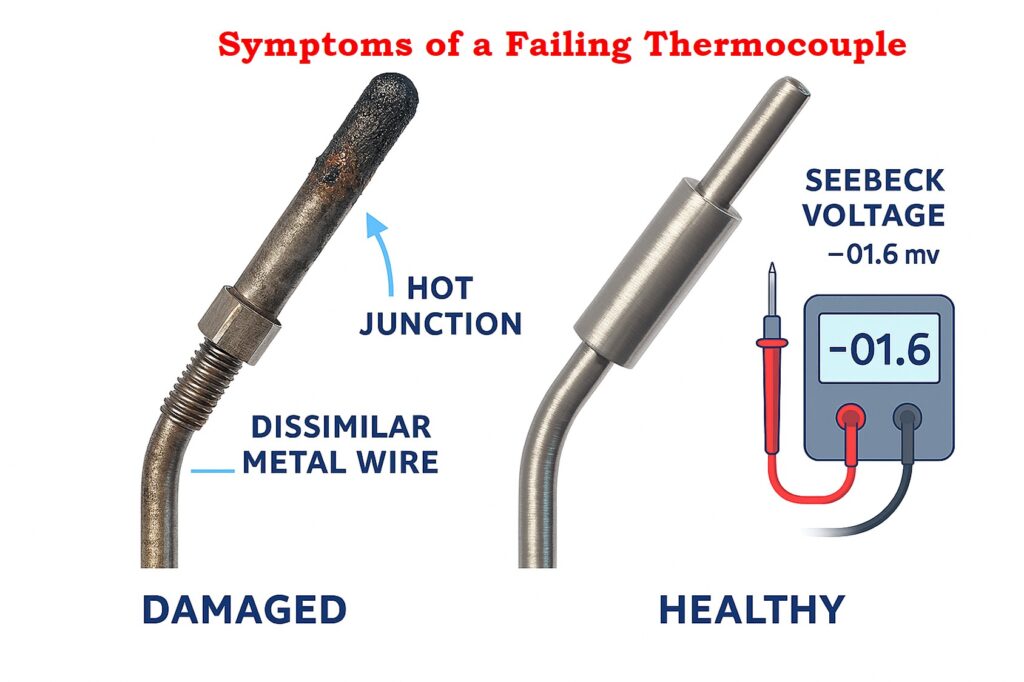
Symptoms of a Failing Thermocouple

Appliances often show clear signs when a thermocouple begins to fail. Commonly reported symptoms include: 

  • The pilot flame goes out almost immediately when you let go of the control knob.
  • The burner either won’t stay lit or extinguishes itself without warning.
  • The pilot flame flickers or seems feeble.
  • The thermocouple’s sensing tip shows signs of corrosion or burning.
  • Discoloration and carbon buildup were observed surrounding the pilot assembly.
  • Frequent, unexplained shutdowns are a persistent problem.

Ignoring these signs can lead to less effective heating and possible safety problems. 

Learn How to Convert Thermocouple mV to Temperature Step by Step: How to Convert Thermocouple Millivolts to Temperature: A Step-by-Step Guide

  • Thermocouples produce low millivolt readings because of many mechanical and thermal factors.
  • The flame can be too low, or the angle at which it touches the surface could be wrong. 
  • Excessive soot or combustion by-products covering the sensing tip.  
  • Oxidation of the hot junction. Stretched, bent, or vibrated conductors. 
  • Loose terminal connections might introduce extra resistance. 
  • High resistance can also be a result of age or prolonged use.

Explore Practical Methods to Convert Thermocouple mV to Temperature: Converting Thermocouple Millivolts to Temperature: Methods and Examples

A thermocouple should be replaced when:

  • Continuity test indicates open circuit.  
  • Open circuit millivolt output is below 20 mV.
  • The closed circuit millivolt output is less than 12 mV.
  • Severe corrosion, burnt tip, or physical damage is observed.  
  • Pilot outages continue to occur, despite efforts to clean and align the equipment.
  • Thermocouples are inexpensive components. 
  • Replacing a suspect unit is often faster and more reliable than attempting continued troubleshooting.
  • The work area has been verified as safe and segregated.
  • The visual inspection was completed.
  • Maintaining continuity within reasonable boundaries.
  • Open circuit output between 25 and 30 mV. 
  • Closed circuit output between 12 and 15 mV. 
  • All connectors cleaned and tightened.
  • If any test fails, a replacement will be conducted.

Thermocouples are essential for the safe operation of gas appliances and industrial heating systems. The modest millivolt output directly influences how the valve works, making correct testing vital for safe and reliable functioning. With a digital multimeter and the three essential tests outlined here, technicians can accurately assess the state of any thermocouple. 

Switch the multimeter to read mV DC. Then, apply a little flame to the thermocouple’s tip and record the millivolt output. A healthy unit should produce approximately 25 to 30 mV open circuit. You can also check continuity or perform a closed circuit load test.

A thermocouple should read only a few ohms. High resistance or an open reading indicates a broken conductor or damaged connector.

Low millivolt output, open circuit resistance, unstable flame holding, frequent pilot shutdowns, or visible corrosion are common indicators of a bad thermocouple.

Type J uses iron and constantan and usually has a black and white color code. Type K uses chromel and alumel and typically has yellow and red leads. The insulation color and cable markings are the most reliable identifiers.

Use a multimeter capable of thermocouple input or check the mV output against standard type K temperature tables. You can also identify it by its yellow and red leads according to IEC color code.

A thermocouple typically lasts one to five years in appliance use. Industrial high temperature applications may require more frequent replacement depending on thermal cycling, vibration, and environmental exposure.

Electromagnetic Flow Meter Inspection and Test Plan (ITP): Complete EPC Guide

0
Electromagnetic Flow Meter Inspection and Test Plan (ITP): Complete EPC Guide

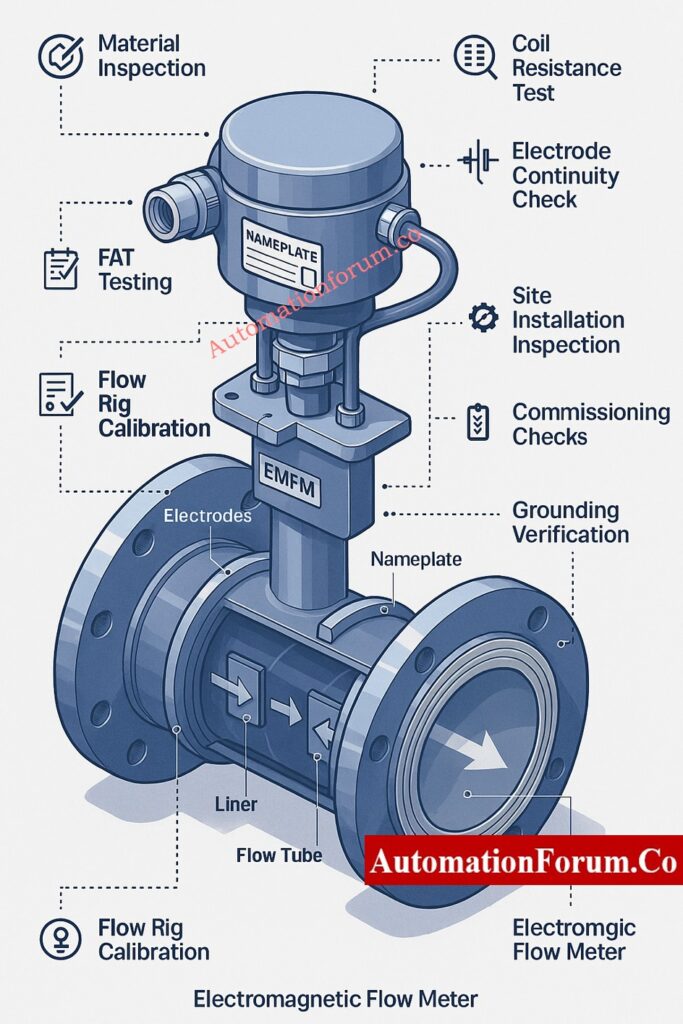
Electromagnetic flow meters (EMFMs) are widely used for measuring flow in many industries, including oil and gas, petrochemicals, water treatment, desalination, wastewater management, food and beverage production, and power generation. Given the importance of these meters in measuring key processes, the Electromagnetic Flow Meter Inspection and Test Plan is a crucial deliverable for any EPC project. It’s essential for guaranteeing quality, dependability, and the meter’s continued performance throughout time.

This guide offers a complete EMFM inspection and test plan. It covers everything from material inspections and Factory Acceptance Testing (FAT) to site installation checks, commissioning processes, and acceptance criteria. You’ll also find documentation requirements and a detailed EPC-style Inspection and Test Plan (ITP) table.

Don’t Guess — Calculate: Electro Magnetic Flow Meter Installation Calculator: Minimum Length for Reducing Joint

In engineering, procurement, and construction (EPC) projects, EMFMs are considered crucial instruments because: 

  • Problems with these components could negatively affect how much a plant produces, its safety, or the quality of the final output.
  • Shutdowns are necessary for replacements.
  • The quality of installation is a major factor in how well anything performs.
  • Adhering to OEM specs and industry standards is non-negotiable. 

A well-defined Electromagnetic Flow Meter ITP guarantees: 

  • Tracking the origins of materials.
  • Assessing the accuracy of OEM performance assertions.
  • Adhering to established standards, including IEC, ISO, API, AWWA, and NEMA.
  • Preventing problems with linings, electrodes, coil insulation, or grounding is essential.
  • Finalizing QA/QC documentation and ensuring traceability for project closeout. 

This ITP covers all EMFM sensors and transmitters provided for EPC projects throughout: 

  • Oil and gas facilities, both upstream and downstream.
  • Chemical and petrochemical factories are essential to modern industrial processes.
  • Power generating and utility systems are essential for modern society.
  • Water and wastewater systems.
  • The food and beverage sectors. 

Stop Overthinking It: Streamlining Your Flowmeter Selection Process: Tips and Insights

  • IEC 60041, IEC 61010, IEC 61326 (EMC & electrical safety)
  • ISO 4064, ISO 6817 (electromagnetic flow measurement)
  • AWWA C715 (water utility flow meters)
  • API 5.1 / API Q1 (quality systems)
  • NEMA 4/4X/6/6P (enclosure ratings)
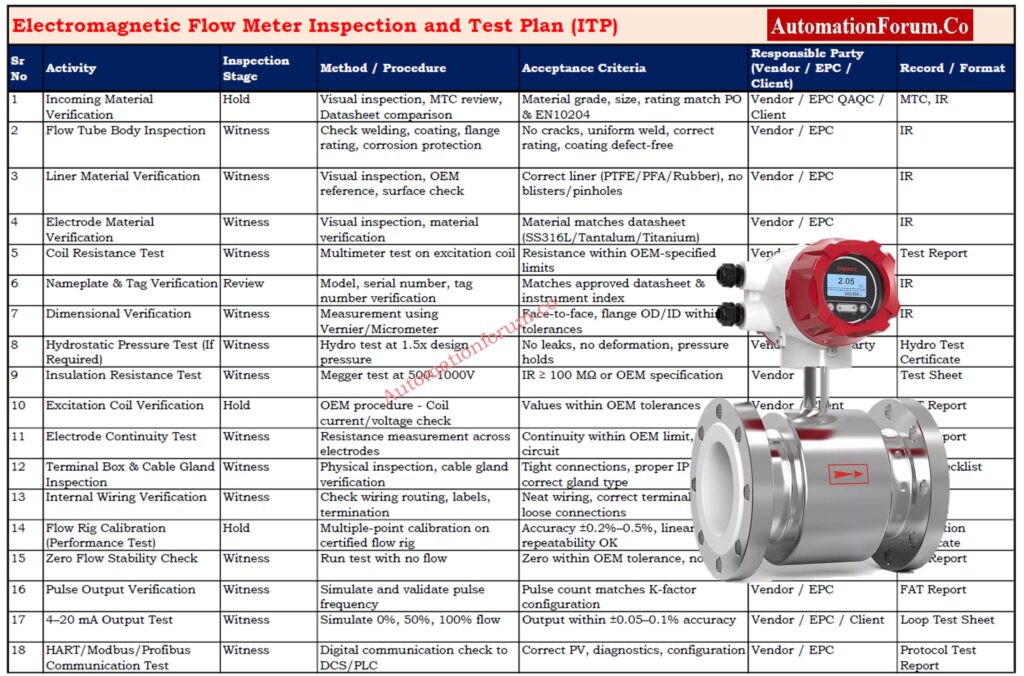
Electromagnetic Flow Meter Inspection and Test Plan (ITP): Complete EPC Guide
ActivityInspection StageMethod / ProcedureAcceptance CriteriaResponsible PartyRecord / Format
Material incoming inspectionHoldVisual, MTC reviewMaterial as per datasheet & EN 10204Vendor / EPC QAQC / ClientMTC, IR
Liner & electrode verificationWitnessVisual, OEM referenceCorrect material, defect-freeVendor / EPCIR
Coil resistance testWitnessMultimeter measurementWithin OEM limitsVendor / EPCTest report
Nameplate verificationReviewVisualTag, serial, rating correctEPC / ClientIR
Dimensional checkWitnessMeasurement as per GAWithin toleranceVendor / EPCIR
Hydro test (if applicable)WitnessPressurizationNo leakage, holds pressureVendor / 3rd PartyHydro test report
Insulation resistance testWitnessMegger @ 500–1000 V≥ 100 MΩ or OEM requirementVendorIR/test sheet
Coil excitation checkHoldOEM procedureValues within toleranceVendor / ClientFAT report
Electrode continuityWitnessResistance checkContinuity within OEM limitVendorFAT report
Terminal box & wiring checkWitnessPhysical inspectionTight, clean, correctVendor / EPCFAT checklist
Flow rig performance testHoldCalibration on rigOEM accuracy (±0.2%–0.5%)Vendor / ClientCalibration certificate
Site installation inspectionWitnessChecklistOrientation, earthing, cable routing OKEPC / ClientSIT report
Pre-commissioning checksWitnessPower-up, loop checksStable signals, no errorsEPC / ClientPre-commissioning sheet
Commissioning & loop testHold4–20 mA, pulse, protocol tests±0.05–0.1% output accuracyEPC / ClientCommissioning report
Final documentationReviewCompilation checkAs per project MDREPC / ClientDossier / MDR

Make the Right Choice: Magnetic Flowmeter vs. Turbine Flowmeter – Complete 2025 Comparison Guide

  • Confirm that the flow tube’s composition aligns precisely with the material grade described in the datasheet—be it stainless steel, carbon steel, or coated steel. This is crucial for guaranteeing both corrosion resistance and the tube’s fitness for the specific process fluid it will handle.
  • Verify flange ratings—ANSI, EN, or JIS—along with the pressure class, bolt-hole pattern, and face type. This ensures everything will fit with the existing piping on-site.
  • Examine weld seams closely. Look for consistent appearance, and check for any signs of porosity, cracks, or undercuts. This is essential to confirm the weld’s mechanical soundness.
  • Assess the surface coating or paint for thickness, adherence, and uniformity of application. This is crucial for ensuring the material’s durability when exposed to external conditions or corrosive elements. 
  • Verify that the lining material—PTFE, PFA, hard rubber, or polyurethane—matches the specifications provided in the purchase order and datasheet. Any deviation from the approved liner could lead to premature failure.
  • Examine the liner’s interior for a smooth finish. It should be devoid of blisters, pinholes, wrinkles, or any deformation that could compromise the precision of the measurements.
  • Inspect the liner’s adhesion to the tube, when relevant, looking for any signs of separation or gaps. 
  • The electrode material, whether it’s SS316L, Hastelloy, Titanium, or Tantalum, must be compatible with the chemicals used in the process.
  • Examine electrode surfaces to ensure they’re clean, well positioned, and free from any scratches or pitting.
  • Ensure the electrodes are securely in place; any looseness could lead to erratic measurements. 
  • Using a calibrated multimeter, measure the resistance of the excitation coil. Then, compare your findings to the specifications provided by the original equipment manufacturer.
  • Confirm that the resistance measurements align with the defined ohmic tolerance. This ensures the coils are functioning properly, free from shorted turns or any signs of partial burnout.
  • Verify that the resistance levels of both coils are equal in dual-coil designs.
  • Confirm that the model number, serial number, and tag number precisely correspond to what’s documented in the project files and the instrument index.
  • Verify operating specifications: maximum flow capacity, pressure tolerances, temperature thresholds, and electrical requirements to ensure adherence.
  • The flow direction arrow must be prominently displayed and firmly affixed. 
  • Calibration must be conducted in a laboratory accredited to ISO/IEC 17025 standards, with traceability to national or worldwide benchmarks.
  • Examine test points, error curves, and uncertainty statements to confirm they meet the project’s accuracy standards.
  • The certificate must include the instrument’s serial number, the date of the calibration, the ambient conditions throughout the process, and the technician’s signature. 

Before Using Any EMFM, Know This: Electromagnetic Flowmeter Working Principle, Types Applications

  • Verify all meter body measurements. This includes checking the face-to-face length, flange thickness, bolt-hole diameter, and internal diameter. The goal is to ensure everything matches the General Arrangement (GA) drawing. 
  • Check that the gasket surfaces are smooth, flat, and unmarred by any scratches or pitting. This is essential for a leak-free seal. 
  • Verify the test pressure, which is usually 1.5 times the design pressure. Hold this pressure for the required time, ensuring there are no visible leaks.
  • To assess integrity, document the pressure, temperature, and any observed pressure drop.
  • Employ safety measures and ensure gauges are properly calibrated. 
  • Conduct a Megger test, applying 500–1000 V between the coil windings and the meter body. This will help assess the condition of the insulation.
  • Unless the original equipment manufacturer (OEM) indicates otherwise, the minimum allowable insulation resistance should be at least 100 MΩ.
  • Document readings to ensure traceability and for future use. 
  • Under operational settings, measure the coil’s current and voltage to verify that its performance aligns with the original equipment manufacturer’s requirements.
  • Verify that the magnetizing current remains steady and falls within the specified design limits, which confirms the coils are functioning as intended.
  • Examine the lining’s whole inside surface. Ensure the thickness is consistent and that there are no surface flaws.
  • Inspect the liner’s bond to the metal body; look for any evidence of separation.
  • Verify that the liner material is suitable for the chemicals used in the project. 
  • Check the resistance across the electrode terminals to ensure there’s no excessive resistance or breaks in the circuit.
  • Ensure the electrodes are securely fastened and properly positioned to prevent any signal disruptions. 
  • Examine the interior wiring. Ensure it’s neatly arranged, correctly labeled, and that all terminal connections are secure.
  • Ensure cable glands are the right size, made from the correct material, and have the appropriate IP rating to keep moisture out.
  • Make sure the earthing termination is there, properly sized, and free of any corrosion.
  • Simulate a 4–20 mA output and verify the signal’s linearity and accuracy at 0%, 50%, and 100% flow rates.
  • Check the pulse output to ensure it’s working correctly, and then verify that the pulse rate aligns with the K-factor setting. 
  • Check digital communication (HART/Modbus/Profibus) for for accurate process variable readings, device health checks, and seamless data exchange. 
  • During Factory Acceptance Testing (FAT), the meter should be calibrated using a certified flow rig. This calibration process involves testing the meter at several flow rates, usually at 20%, 50%, 80%, and 100% of its maximum capacity.
  • Confirm that the measurements align with the original equipment manufacturer’s specifications, ensuring accuracy, linearity, repeatability, and a lack of hysteresis.
  • Verify that the system maintains zero-flow stability and that there’s no drift in the measurements. 
  • Install the meter where the pipe stays full of fluid while it’s running. This prevents any inaccuracies in the measurements.
  • Inspect the upstream straight-run lengths, ensuring they span 5D to 10D without any interruptions. This means no valves, tees, or reducers should be present.
  • Confirm the downstream straight-run lengths of 3D–5D to maintain a consistent flow profile. 
  • Verify that a dedicated grounding conductor has been installed, running from the flow meter to either the earth pit or the grounding grid.
  • Ensure bonding jumpers are in place across flanges. This is essential for maintaining electrical continuity, which in turn is critical for accurate signal detection.
  • Verify that the grounding resistance aligns with the original equipment manufacturer’s specifications. 
  • Grounding rings are necessary when installing in non-conductive pipes, such as PVC, HDPE, or FRP.
  • Confirm that the grounding rings are suitable for the process fluid. 
  • Verify that the grounding electrode is installed and connected correctly, following the original equipment manufacturer’s guidelines. 
  • To prevent signal loss or electromagnetic interference, stick with the cable type specified by the original equipment manufacturer.
  • Ensure the cable’s maximum length, often between 50 and 100 meters, isn’t surpassed.
  • To avoid ground loops, make sure the cable shielding is grounded solely at the transmitter end. 
  • Twisted pair shielded cable is indeed employed for signal wiring, a choice made to reduce interference.
  • To prevent electromagnetic interference, signal cables should be routed away from high-voltage and variable frequency drive (VFD) cables.
  • Verify cable tray segregation according to project specifications. 
  • When setting up systems for slurry and wastewater, several important factors must be considered.
  • Keep the electrodes fully immersed; any contact with air can lead to erratic measurements.
  • For slurry or applications involving heavy solids, installations are best suited for vertical pipes that flow upwards. 
  • Verify sensor and transmitter enclosures meet required IP rating (IP65/67/68 based on location).
  • Inspect cable glands, gaskets, and covers for proper sealing against dust or moisture ingress.
  • Confirm sunshade or weather shielding is provided when required.

Think You’re Interview-Ready? Advanced Electromagnetic Flowmeter Interview Quiz for Instrumentation Professionals

  • Check that the sensor and transmitter enclosures are compliant with the necessary IP ratings – IP65, IP67, or IP68, depending on where they’re situated.
  • Check cable glands, gaskets, and covers to ensure they’re sealing correctly, keeping out dust and moisture.
  • Confirm that sunshade or weather screening is available when needed.
  • Pre-commissioning and commissioning tests for EMFMs. 
  • Program flow units, engineering units, and decimal points should be specified according to the datasheet.
  • Check the K-factor, calibration constants, and identify the tube size. 
  • Implement sophisticated features such as low-flow cutoff and filtration, tailored to the specific needs of each process. 
  • Simulate an empty-pipe scenario and confirm that the meter triggers the correct alarm or fault notification.
  • Output must proceed to fail-safe state as programmed.
  • Examine the DCS alarm annunciation to ensure it’s correctly mapped. 
  • Zero the system with the pipe full, ensuring a certified no-flow state.
  • Maintain zero drift within the specified tolerance.
  • Document the zeroing results for further use. 

a) Analog Output (4–20 mA)

  • Analog output, specifically in the 4–20 mA range, is a common method for transmitting signals.
  • Simulate flow values at 0%, 50%, and 100%, and then check the signal for both correctness and stability.

b) Pulse Output

  • Verify that the pulse frequency, pulse width, and polarity align with the specifications given in the system interface. 

c) Digital Protocol (HART/Modbus/Profibus)

  • Read process variable (PV), setpoint (SV), diagnostics, and device parameters from the Distributed Control System (DCS).
  • Confirm the correct identification of devices and the accuracy of their communication pathways. 
  • Simulate interlocks for both low-flow and high-flow scenarios, then confirm that the desired trip or control response occurs.
  • Make sure alarms are sent to the DCS system properly, and that their priority are accurately reflected.
  • Confirm the accuracy of time stamps and, when relevant, the chronology of events.
  • When project specifications call for it, compare EMFM readings with those from a portable reference meter or an ultrasonic clamp-on flow meter.
  • Confirm that the observed difference falls within the established acceptable range, which is usually ±1–2%. 

Stop the Failures Now: Electromagnetic Flowmeter Troubleshooting: Identifying and Resolving Issues

  • Maintain accuracy within OEM specifications (usually ±0.2% to ±0.5% of reading).
  • Ensure repeatability is within ±0.1% of full scale.
  • Under stable flow conditions, the analog output should be between ±0.02 mA.
  • Digital communication must give consistent, noise-free PV values.
  • Insulation resistance must be at least 100 MΩ, with greater values desirable in humid situations.
  • Record and verify the pattern of readings across multiple terminals.
  • The output must match test input values within ±0.05% of the measured range.
  • The transmitter display must accurately display flow, totalizer, and status messages.
  • DCS must read the appropriate PV, alarm status, device metadata, and diagnostics.

Don’t Install Before You Read This: Electromagnetic Flow Meter Installation – Step-by-Step Guide and Checklist for Accurate Measurements

  • Inspection Reports (IR)
  • FAT & SAT reports
  • OEM Calibration Certificates
  • Material Test Certificates (MTC)
  • As-built drawings
  • Approved datasheets
  • ITP sign-off sheets
  • Configuration back-up files
  • O&M manuals
  • Manufacturer data report (MDR)

This thorough Electromagnetic Flow Meter Inspection and Test Plan (ITP) offers EPC instrumentation engineers, QA/QC inspectors, and project managers a complete, realistic, and implementation-ready reference.

This article provides full EPC-style coverage, from inbound material checks to FAT, installation inspections, commissioning verification, and final documentation, allowing for consistent flow measurement performance across all industrial situations.

Downloadable Excel Sheet: Electromagnetic Flow Meter Inspection and Test Plan (ITP)

An Inspection Test Plan (ITP) is essentially a roadmap. It details the specific checks to be performed, the timing of those checks, and the individuals responsible for carrying them out, all within the context of manufacturing or installation processes. This process ensures that all standards are met.

To put an electromagnetic flow meter through its paces, you’ll need to: 

  • Inspect the casing, the inner lining, and the electrodes.
  • Coil and insulation resistance should be measured.
  • Perform loop checks (4–20 mA, pulse, digital).
  • Calibrate the flow rig.
  • Perform on-site installation checks.
  • Perform commissioning tests, including zero calibration and functional assessments. 

An ITP inspection point represents a mandatory inspection stage.

Examples encompass Hold, Witness, Review, and Surveillance points. 

To get an ITP ready: 

  1. List all activities
  2. Decide what needs to be inspected
  3. Set acceptance criteria
  4. Assign responsibilities
  5. Choose inspection methods
  6. List required records (reports, certificates)
  7. Put all items into a table

The 7 simple steps are:

  1. Plan the inspection
  2. Define criteria
  3. Check visually
  4. Do detailed tests
  5. Record results
  6. Accept or reject
  7. Submit report

The ITP process is the step-by-step procedure for following the ITP during a project. This involves conducting inspections, observing tests, documenting outcomes, and confirming compliance with quality standards. 

Open Tank Level Transmitter Calculator – Complete Guide for EPC Instrumentation Engineers

0
Open Tank Level Transmitter Calculator Complete Guide for EPC Instrumentation Engineers
Open Tank Level Transmitter Calculator – 4-20mA Calibration Tool
automationforum.co

🔧 Open Tank Level Transmitter Calculator

Professional 4-20mA Calibration Tool for Process Instrumentation

🎯 Tank Visualization

50.00%
500.00 mm
800.0mm
Y = 200.0mm
LT-101
12.00 mA

Input Parameters

mm
mm
g/cm³
%
Adjust Level 50.00%

📊 Current Readings

Level Height: 500.00 mm
Pressure Input: 480.00 mmH₂O
Output Signal: 12.00 mA
Span
640.00 mmH₂O
HW, MIN
160.00 mmH₂O
HW, MAX
800.00 mmH₂O
Range
160.00-800.00

Calibration Data

% Level (mm) Input (mmH₂O) Output (mA)

⚙️ Technical Specifications

Signal Type: 4-20 mA DC
Accuracy: ±0.25% FS
Process Connection: 1/2″ NPT
Power Supply: 24V DC

📐 Calculation Formulas

Span: (X – Y) × GL
Current Level: Y + ((X – Y) × %/100)
Output: 4 + (16 × %/100) mA

📋 Important Notes

  • HW = Equivalent Head of Water
  • GL = Specific gravity of tank liquid
  • HW, MIN = HW at minimum liquid level (Y × GL)
  • HW, MAX = HW at maximum liquid level (X × GL)
  • Span = (X – Y) × GL in mmH₂O
  • Standard output: 4-20 mA for 0-100% measurement range
  • Enter precise values with decimals for accurate calculations
  • Use slider or input box to simulate different tank levels
automationforum.co
Powered by automationforum.co
Your trusted source for automation tools and calculators

The open tank level transmitter calibration process is one of the most frequently performed tasks in the field of industrial instrumentation. EPC instrumentation design engineers are in charge of choosing and sizing transmitters, making sure that the range settings are correct, the 4 to 20 mA mapping is appropriate, and the tank measuring points are set up correctly. The Open Tank Level Transmitter Calculator above was made to make this engineering process easier and provide you correct results right away. This article talks about the engineering ideas underlying the calculator and how it helps EPC engineering, commissioning, operations, and maintenance.

Open Tank Level Transmitter Calculator - Complete Guide for EPC Instrumentation Engineers 1

Almost all industrial processes require precise level measurement.

Open tanks are widely used in chemical plants, refineries, utility systems, water treatment units, and storage applications. Whether it is a dosing tank, a sump, a separator, or a process vessel open to atmosphere, an accurate level transmitter configuration is mandatory.

When designing level measurement systems for EPC projects, instrumentation engineers encounter a number of difficulties. Identifying the acceptable measurement range, computing the lower and upper range values, accurately mapping the 4 to 20 mA output, and modifying the transmitter scaling in accordance with the liquid specific gravity are a few of the typical needs.

The definition of maximum measurable level X and minimum measurable level Y is one of the calculator’s most important inputs. The tank’s useable measurement span is determined by these two parameters. Many engineers use the wrong LRV and URV because they mistakenly think of the entire tank height as the measurement span.

The transmitter should measure Maximum Level X, which is the highest usable liquid level. It does not necessarily refer to the tank’s actual height. A number of variables, such as tank freeboard, overflow margin, and nozzle placement, affect X.

Typical EPC examples include

  1. Tanks where the top 50 mm is left unused due to turbulence.
  2. Tanks where structural supports limit sensor placement.

Minimum Level Y is the lowest point from where the transmitter begins measurement. Dead zones, tank bottom shape, nozzle height, and mechanical constraints all have a role.

Typical EPC examples include

  1. Nozzle located 200 mm above the tank bottom.
  2. Displacer and float based systems requiring bottom clearance.

Using X and Y instead of tank height improves transmitter accuracy and avoids calibration mismatches during commissioning.

The pressure head produced by the liquid column is measured using level transmitters mounted on open tanks. The specific gravity of the liquid is closely correlated with this pressure. The transmitter range will be incorrect and the DCS scaling will display incorrect level values if the particular gravity is not applied appropriately.

The calculator uses the formula

Accordingly, water at SG 1.0 produces a head that is level.

Water has a higher head than oil at SG 0.80.

Higher head at SG 1.30 is caused by caustic

Tank operating conditions, temperature-dependent density variations, and process fluid changes must all be taken into account by EPC engineers. The calculator calculates pressure equivalents for lowest level, maximum level, and span automatically using specific gravity.
Boiler Drum DP Level Explained Clearly: Understanding Boiler Drum Level Transmitters: Accurate DP Measurement Explained

Most industrial level transmitters use a 4 to 20 mA output signal. The mapping from level percent to current output follows a linear relationship.

4 to 20 mA Output Mapping in Level Transmitters - formula

Based on this logic
0 percent equals 4 mA
50 percent equals 12 mA
100 percent equals 20 mA

The calibration table inside the tool generates a complete listing for 0, 25, 50, 75, and 100 percent. EPC engineers can directly use this table for loop checking, DCS input scaling, FAT records, and commissioning check sheets.
Expert Guide to GWR Troubleshooting & Maintenance: Guided Wave Radar Level Transmitters: Complete Troubleshooting & Maintenance Guide

The tank visualization is a key feature of the calculator. The graphical representation helps engineers understand level movement, transmitter location, and output signal changes in real time.

  1. Confirms that X and Y levels have been entered correctly
  2. Shows how transmitter output responds to level movement
  3. Helps verify nozzle elevation and mounting position
  4. Facilitates discussion during HAZOP, model review, and design validation
  5. Assists commissioning teams in understanding the calibration logic

Visualization also supports error prevention, especially when engineers are working with limited tank drawings or incomplete vendor documents.
Quick DP Calculator for Open Tank Levels: DP calculator for open tank level measurements

Instrumentation engineers prepare OR review several documents during the EPC lifecycle. The calculator helps in generating values for the following:

Transmitter Lower Range Value LRV
Transmitter Upper Range Value URV
Span
Specific gravity corrected pressure equivalents

Scaled engineering units
4 to 20 mA mapping
Measuring range limits

Engineering units
Zero and span
Input scaling
Alarm limits

Quick reference table for calibration
Troubleshooting documentation

All values are automatically computed and displayed in the results section for direct usage.
Ultimate Level Transmitter Selection Checklist: Level Transmitter Selection Checklist for EPC Engineers – Step-by-Step Guide

Instrumentation engineers frequently make certain mistakes when manually calculating transmitter ranges. The tool avoids these issues.

Tank height is not equal to measurement range. Only X minus Y defines the actual span.

If a transmitter is calibrated with wrong specific gravity, the displayed level will always be incorrect.

Incorrect mapping leads to wrong DCS indication and alarms triggering at incorrect levels.

Many commissioning teams calibrate transmitters with water even when the process liquid has SG less than one. This results in incorrect level indication.

The calculator highlights all these issues and provides precise values to eliminate calibration errors.
Top 15+ Level Measurement Calculators Pack: 15+ Collection of Level Measurement Calculators for Industrial Instrumentation

All phases of EPC engineering and commissioning benefit greatly from the tool.

aids in determining the appropriate instrument type and range

aids in the creation of the I O list and instrument index during detail

aids in determining the appropriate instrument type and range

aids in the creation of the I O list and instrument index during detail

provides a cross-checking calibration table.

supports functional testing and loop checks.

aids in verifying alarm configurations

allows technicians to compare the transmitter’s output to the tank’s real level.

aids in identifying installation problems

guarantees that control systems display levels accurately.
Instant Zero-Suppression DP Calculator: DP calculator for Zero suppression – open tank level measurement

Maintaining process stability, avoiding tank overflow, safeguarding pumps, and guaranteeing seamless operations all depend on accurate level measurement. Unexpected plant shutdowns, trip failures, and hazardous circumstances might result from improper configuration.

With its accurate pressure equivalents, this calculator streamlines the entire process for EPC engineers.

Correct mapping from 4 to 20 mA

Accurate range computations

Automated visualization

Table of calibration references

The technology guarantees consistency throughout all project phases, lowers field errors, and enhances engineering quality.

For instrumentation and EPC design engineers, the Open Tank Level Transmitter Calculator is a vital technical tool. It improves level transmitter configuration by adding precision, lucidity, and uniformity. The calculator reduces human error and improves the caliber of EPC outputs by fusing accurate engineering formulas, real-time visualization, and an intelligent calibration table.

This guide provides an in depth understanding of how the calculator works and how engineers can use it throughout design, commissioning, and operations. It is a must have tool for any engineer working with open tank level measurement and 4 to 20 mA signal configuration.
Master DP Calculations for Open & Closed Tanks: Open and Closed Tank DP Level Calculations

The standard formula for open tank level measurement is based on hydrostatic pressure.
Since the tank is open to atmosphere, the transmitter measures only the liquid head.

Formula
Level = Pressure Head ÷ Specific Gravity

Where
Pressure Head is in mmH₂O
Specific Gravity is dimensionless

Example
If the measured head is 480 mmH₂O and SG = 0.8
Level = 480 ÷ 0.8 = 600 mm

For an open tank, level is determined using the liquid column and density relationship.

Formula
Measured Pressure = Level × Specific Gravity

Therefore
Level = Measured Pressure ÷ Specific Gravity

This formula is used when the transmitter output is in mmH₂O or kPa and you want to convert it to actual liquid height.

Tank level can be calculated in two ways depending on the available data:

1. Using Hydrostatic Pressure

Level = Pressure Head ÷ Specific Gravity

2. Using Percentage from a 4 to 20 mA Signal

Level = LRV_Level + (Percentage × Span_Level)

Percentage = (mA − 4) ÷ 16

This allows engineers to convert transmitter output into actual tank level.

For an open tank, URV and LRV are calculated based on the minimum and maximum measurable liquid heights.

LRV (Lower Range Value)
LRV = Minimum Level × Specific Gravity

URV (Upper Range Value)
URV = Maximum Level × Specific Gravity

Span
Span = URV − LRV

Example
Minimum Level (Y) = 200 mm
Maximum Level (X) = 800 mm
Specific Gravity = 0.8

LRV = 200 × 0.8 = 160 mmH₂O
URV = 800 × 0.8 = 640 mmH₂O
Span = 480 mmH₂O

These values become the calibration range for the transmitter.

The LRV value represents the transmitter output at the minimum measurable level.

Formula
LRV = Minimum Level (Y) × Specific Gravity

LRV is always pressure-based for hydrostatic level transmitters.
For example, if Y = 150 mm and SG = 1.0
LRV = 150 mmH₂O

This becomes the input pressure that corresponds to 4.00 mA.

URV and LRV are calibration endpoints of a level transmitter.

LRV (Lower Range Value)

This is the pressure or head when the tank is at minimum measurable level.
LRV corresponds to 4.00 mA output.

URV (Upper Range Value)

This is the pressure or head when the tank is at maximum measurable level.
URV corresponds to 20.00 mA output.

For open tanks
LRV = Y × SG
URV = X × SG

Where X and Y are maximum and minimum levels.

Complete Calibration Procedures for Level Devices: Calibration Procedures for Level Measurement Devices

Advanced Interface Leveltrol Troubleshooting Quiz

0
Advanced Leveltrol Interface Troubleshooting Quiz

Displacer-based Leveltrol devices are very important for keeping stable interface levels in complex process units, especially in oil-water separators and three-phase containers. When something goes wrong, such forming an emulsion, swinging SG, flashing, building up within, or drifting the torque tube, the results might be very bad. This advanced exam about breakdowns puts you in real-life situations that are typical in refineries, upstream separation trains, and condensate-handling systems. Each question puts you in a real failure situation and has you look at symptoms, how instruments work, and mechanical problems. If you work with interface measurements, this quiz will help you get better at diagnosing problems and becoming ready for real-world process problems.

Advanced Leveltrol Interface Troubleshooting Quiz

Advanced Leveltrol Interface Troubleshooting Quiz
This advanced quiz puts you in real-life situations where you have to measure the Displacer/Leveltrol interface in oil-water and three-phase separators. You will have to deal with difficult problems such SG shifts, thickening of the emulsion, mechanical binding, flooding of the chamber, and an imbalance in the torque tube. Each question is based on a real-life plant problem, which helps you improve your practical troubleshooting skills before you have to deal with these problems in a real process environment.

1 / 25

After blowing impulse lines with air, the LT shows abnormal high readings. Why?

2 / 25

When steam coil heats the vessel, the LT suddenly spikes high. Why?

3 / 25

After shutdown, the Leveltrol shows intermittent jumps. Field technicians suspect mechanical interference. What is the cause?

4 / 25

LT indicates low level even though displacer is fully submerged. Why?

5 / 25

LT shows high interface although sampling confirms low water content. Why?

6 / 25

Level freezes exactly at 52% and does not move. What is the likely cause?

7 / 25

Level suddenly drops to zero after opening chamber drain. What happened?

8 / 25

During startup, the Leveltrol shows random spikes between 0–100%. Why?

9 / 25

After a rainwater intrusion event, the Leveltrol reading jumps high. Why?

10 / 25

The Leveltrol rises slowly over time even though water draw-off is steady. Why?

11 / 25

While switching bypass valves on the Level Chamber, the LT reading suddenly jumps 20%. Most likely cause?

12 / 25

Maintenance replaced the displacer with a heavier version. Now the level continuously shows low. Why?

13 / 25

During vessel depressurization, the Leveltrol suddenly reads 100%. Why?

14 / 25

Leveltrol output oscillates ±10% every few seconds during stable conditions. What is the reason?

15 / 25

When steam tracing around the chamber is activated, the Leveltrol reading suddenly decreases. Why?

16 / 25

After a plant restart, the Leveltrol output flatlines at a fixed value. What caused this?

17 / 25

Leveltrol slowly drifts upward over several days, though separator conditions are stable. Why?

18 / 25

Interface level appears extremely high even though vessel sampling indicates water carryunder. What is the most likely cause?

19 / 25

During a separation upset, the Leveltrol shows delayed response. Readings take several minutes to settle. Why?

20 / 25

After maintenance, the transmitter now gives a reversed reading: high level shows as low and low as high. What happened?

21 / 25

After a shutdown, the Leveltrol output remains at 100% even though the chamber is partially filled. What is the likely cause?

22 / 25

During pump startup, the Leveltrol reading becomes extremely noisy, oscillating between 30% and 80%. What is most likely?

23 / 25

The Leveltrol shows a constant mid-scale reading during heavy emulsion formation in a three-phase separator. What is the cause?

24 / 25

After switching to a lighter crude (API increases from 30 to 42), the interface reading increases sharply despite vessel samples showing no real change. Why?

25 / 25

During normal operation, the Leveltrol suddenly drops to 0% even though the separator chamber is visibly full. What is the most likely cause?

Your score is

The average score is 42%

0%

Access 1000+ MCQs tailored for instrumentation engineers: Instrumentation and Process Control Quiz Hub – 1000+ MCQs for Engineers

Running Inspection Checklist of PLC Components in Control Panels

0
Running Inspection Checklist of PLC Components in Control Panels

A PLC control panel running inspection is a very important part of preventive maintenance that must be done while the system is on and working. The main goal is to make sure that the system is reliable, that faults are found early, and that the plant’s safety and instrumentation standards are met, all without stopping production.

Running inspections are different from pre-commissioning or dead testing because they don’t require power isolation and are done in real time. They focus on checking the wiring health, temperature and humidity, LED diagnostics, and ventilation performance inside control cabinets.

Running Inspection Checklist of PLC Components in Control Panels - block diagram plc control panel

This proactive approach lets maintenance teams keep the plant running 24 hours a day, seven days a week, while also finding early signs of problems like rising module temperatures, fan failures, or LED indicator issues that aren’t normal. These problems can be fixed later during planned maintenance windows using SAP or CMMS notifications.

In important places like refineries, petrochemical plants, power stations, and process automation units, running checks are usually done every three or six months.

Inspection PointWhat to Check / ObserveAcceptable ConditionAction / Remarks
Panel identificationVerify the tag number, nameplate, and area classification (e.g., MCC-PLC-01).Matches P&ID drawings and asset register.Confirm match with DCS/PLC tag list.
Access and housekeepingEnsure panel surroundings are clean, dry, and free from obstruction or stored materials.Minimum 1 m clear access on all sides.Escalate to area maintenance if violated.
Door condition and interlockCheck door hinges, latches, and interlock switch operation.Smooth opening/closing, interlock intact.Lubricate during shutdown if friction noted.
Safety signageVerify “Danger 230/415 V”, “Authorized Personnel Only”, “Earth Symbol” labels.Clearly visible, reflective type preferred.Replace damaged or faded stickers.
Earthing continuityVisually check earthing straps and bonding wires.Tight, corrosion-free, no loose bolts.If rust observed, plan replacement.
Deviation checkIdentify any mechanical damage, missing nameplate, or modification without documentation.None acceptable.Record deviation and raise SAP notification.

Tip: To make sure you cover all of the mounting parts in a systematic way, always start your inspection from the top and work your way down and to the right.
Find out why 24VDC is standard in PLC systems and how it enhances safety, reliability, and noise immunity: Why is 24 Volts Mostly used in Industrial PLC Systems?

Running Inspection Checklist of PLC Components in Control Panels - Power Supply and AC Function in Panel
Inspection PointObservation CriteriaAcceptable ConditionAction / Remarks
Incoming AC supply indicationVerify phase lamps and power ON indicators.All phase indicators ON and balanced.Replace faulty pilot lamps if not glowing.
Voltage levelMeasure L–N, L–L using calibrated multimeter.Within ±5% of rated voltage.If deviation noted, inform electrical maintenance.
Power supply health (24 V DC)Observe redundant PSU LEDs or diagnostics.Both PSUs healthy, no alarm LEDs lit.Replace PSU if voltage fluctuates under load.
Power supply temperatureMeasure PSU casing temperature with IR thermometer.< 50 °C (typical manufacturer spec).Plan replacement if temp > 55 °C.
UPS / SMPS fan noiseListen for abnormal sound or vibration.Smooth airflow, no rattling.Replace fan during next shutdown.
Any sign of heating or smellCheck for insulation discoloration or burnt odor.No signs of overheating or smell.Log deviation immediately.

Safety Note: Do not try to tighten live terminals. For safe temperature checks, always use thermal imaging cameras or laser guns.
Diffrentiate clearly between SIS, PLC, and BPCS systems used in safety and control architectures: Understanding Differences of SIS, PLC, and BPCS in Industrial Automation

Running Inspection Checklist of PLC Components in Control Panels - PLC CPU, I/O, and Diagnostic Modules
Inspection PointWhat to ObserveNormal Indication / ReadingRemarks
CPU module LEDsObserve RUN, ERROR, COMM indicators.RUN – steady ON, ERROR – OFF, COMM – blinking.CPU healthy and communicating.
Diagnostic modulesVerify Health and Fault LEDs.Green ON, Red OFF, Communication flashing.Cross-check with PLC diagnostics screen.
I/O module LEDsCompare input/output indications with process condition.Logical match between field status and LEDs.Helps identify field loop mismatch.
Redundancy modulesObserve Active/Standby LED switching.Only one active; smooth switchover when tested.Log event in redundancy diagnostics.
Module temperatureMeasure casing temperature.≤ 45 °C or per OEM limit.Rising trend suggests poor ventilation.
Module mountingCheck alignment and rail fixation.Firm, no looseness or gap.Do not reseat under power.
Deviation checkObserve abnormal blinking, OFF status, or hot spot.None acceptable.Raise SAP notification if detected.
Running Inspection Checklist of PLC Components in Control Panels - Communication and Networking Modules
Inspection PointWhat to Check / ObserveAcceptable ConditionRemarks
Ethernet/Industrial linksObserve link/activity LEDs on switches and PLC ports.Green steady link, amber blinking data.No packet loss on HMI diagnostics.
Redundant communicationCheck switchover logs (RSTP, PRP, or MRP).Seamless switchover; no comm drop.Review logs in engineering station.
Profibus/Fieldbus connectorsInspect connectors, terminators, and LED status.Firmly seated; no “Bus Fault” LEDs.Clean with isopropyl alcohol if dust observed.
Communication temperatureMeasure surface temperature.< 45 °C.Overheating may affect transmission speed.
Network cable routingVerify segregation from power cables.≥ 100 mm separation.Follow cable management standards.
Deviation / loose connectorsLook for vibration, slack, or dark LEDs.None.Tighten/replace during shutdown.

Network Tip: Ping PLC nodes every so often and check the number of communication errors. A slow rise could mean that there are problems with the cable or switch.
Understand why cable shielding is grounded only at the PLC end to eliminate noise and ensure reliable signal integrity: Why the Cable Shield is Grounded Only at the PLC or Control Panel Side

Running Inspection Checklist of PLC Components in Control Panels - Environmental and Cooling System
Inspection PointObservation DetailsAcceptable ConditionRemarks
Ventilation fansCheck airflow, direction, and sound.Continuous airflow, smooth operation.Replace fan if weak airflow or noise noted.
Air filtersVisually inspect inlet/outlet filters.Clean, no dust blockage.Schedule cleaning if clogged.
Panel heater (cold regions)Verify heater operation during low ambient.ON below 15 °C ambient.Prevents condensation.
Panel AC unitCheck cooling and condensate drain.Proper cooling, dry base area.Clean condenser fins periodically.
Internal temperatureRecord internal panel temperature.30–40 °C typical.Rising temp may shorten component life.
Humidity levelObserve hygrometer or condensation marks.< 60 % RH.High humidity causes corrosion.
DeviationAny sign of heat or moisture.None acceptable.Raise SAP notification if found.
Running Inspection Checklist of PLC Components in Control Panels - Environmental and Cooling System 1

Use our PLC Power Supply Calculator to correctly size and design reliable PLC power systems: PLC Power Supply Calculator – Complete Guide for Accurate PLC Power Sizing

Wiring Arrangement, Dressing, and Glands  - plc control panel
Inspection PointObservation DetailsAcceptable ConditionAction / Remarks
Wiring arrangementInspect internal routing and terminations.Neat, segregated per voltage level.Re-route during shutdown if needed.
Trunking and ductsCheck for cracks, missing covers, or debris.Covers intact, no loose wires.Replace damaged sections.
Cable ties and dressingObserve tie condition and spacing.No strain, no over-tight ties.Replace brittle or broken ties.
Cable glandsCheck for tightness and sealing.No dust or oil ingress.Re-torque during shutdown.
Ferrule and label visibilityEnsure all wire IDs match drawings.All legible, matching I/O list.Reprint faded ferrules.
Deviation checkIdentify non-standard routing or open ducts.None acceptable.Raise SAP notification.

Caution: Don’t try to make mechanical changes while the machine is running. All physical fixes must be scheduled for the next time maintenance is due.
Challenge your knowledge with the Advanced PLC DO Troubleshooting Quiz designed for experienced process engineers: Advanced Quiz on Practical Troubleshooting of DO Signals in PLC for Process Industries

Inspection PointObservation CriteriaAcceptable ConditionRemarks
Panel lights / indicatorsToggle operation check.Working; correct color.Replace faulty lamp.
Control pushbuttonsCheck for mechanical wear or cracks.Smooth, firm return spring.Replace sticky buttons.
Alarm buzzerVerify logic-based operation.Activates correctly.Confirm silencing circuit functional.
Door limit switchVerify input change on HMI/PLC.Changes state when door opens.Replace faulty sensor.
Internal 230 V socketsVisual check only.Cover intact; no loose pins.Do not use during inspection.

Extra Check: Check the insulation and look for signs of overloading on the 24V maintenance sockets and internal illumination.
Clarify your concepts on NO vs NC contacts in PLC programming to improve ladder logic accuracy: Understanding NO vs NC Contacts is key for Logic Writing in PLC Programming

Inspection PointActivityExpected OutputRemarks
Cross-check as-built drawingMatch wiring and terminal layout.As-built verified.Helps detect unauthorized modifications.
Record temperature readingsLog PSU, CPU, I/O, and internal temp.Within permissible limits.Record in Excel sheet.
Record humidity levelMeasure RH using hygrometer.< 60%.Monitor for condensation.
LED status snapshotCapture CPU/I/O module photo.Clear, timestamped record.Use for trending and audit.
Deviation managementLog all abnormal findings.SAP notification created.Track till closure.
Follow-up planDefine correction during next shutdown.Action plan approved.Include responsible department.
  • For safety, always do inspections in pairs, with one person watching and one person recording.
  • Don’t ever touch or move a live module, terminal, or fuse.
  • Keep an eye on the temperatures of the trend module and PSU. If they get too hot, it could signify an overload or a blocked vent.
  • Record LED snapshots of communications for future reference.
  • Keep the humidity in the panel below 60% RH at all times.
  • If anything goes wrong, raise SAP Notifications and keep track of when the planned shutdown is over.
  • Make sure that every visual observation matches up with the most recent as-built drawings and I/O listings.

Follow this PLC system documentation guide to maintain accurate project records and ensure audit readiness: PLC System Documentation Guide: Essential Records for Industrial Automation Success

Running Inspection Checklist of PLC Components in Control Panels - Inspection Reporting and SAP Integration Fo PLC Maintenance

The PLC Panel Running Inspection Excel Checklist must include all of the results.
Each record should include:

  • Panel Tag Number
  • Inspection Date
  • Component/Module Observed
  • Measured Temperature & Humidity
  • LED Status Summary
  • Deviation (Yes/No)
  • SAP Notification Number
  • Corrective Action Plan
  • Inspector’s Name & Signature

Master the step-by-step PLC solenoid valve troubleshooting procedure to quickly resolve output loop issues: Step-by-Step Procedure to Troubleshooting Solenoid Valves in PLC Digital Output Loops

Regular testing and checking make sure that PLC panels will work for a long time. Regular maintenance, firmware updates, and audits of documentation may keep systems running and make them safer.

Reliability engineers can do trend analysis, Mean Time Between Failures (MTBF) evaluations, and improve preventative maintenance plans by keeping previous inspection data.
Learn the key differences between PLC and DCS systems to decide the best control strategy for your plant: PLC vs DCS – Which One Should you Choose for your Automation System?

Running Inspection Checklist of PLC Components in Control Panels - Download: Detailed Running Inspection Checklist

An editable Excel format is available for easy field data entry, SAP reference, and performance tracking. Refer the below link to download

Discover proven ways to increase PLC scan speed and performance through efficient coding and optimization: How to Increase PLC Speed: 7 Optimization Tips + Advanced Programming Guide

Running Inspection Checklist of PLC Components in Control Panels -parts of a PLC control panel

A PLC control panel includes:

  • Power supply (AC/DC converters or UPS)
  • PLC system (CPU, I/O, communication modules)
  • Terminal blocks and fuses
  • Network devices (switches, fieldbus modules)
  • Indicators and alarms
  • Cooling/heating units
  • Wiring ducts and glands

Check:

  1. Visuals – Wiring, labels, and fuses.
  2. Power supply – Verify AC/DC voltages.
  3. CPU & I/O LEDs – RUN steady, ERROR off.
  4. I/O test – Simulate inputs and outputs.
  5. Network – Ensure stable communication.
  6. Temperature & humidity – Within safe range.

Typical seven parts are:

  1. Power supply
  2. Processor (CPU)
  3. Memory
  4. Input module
  5. Output module
  6. Communication interface
  7. Programming device

Core four parts:

  1. Power supply
  2. CPU
  3. Input section
  4. Output section
  1. Input scanning
  2. Program execution
  3. Output updating
  4. Self-diagnostics
  5. Communication and monitoring

The CPU (Central Processing Unit) runs the PLC’s operating system and executes control logic cycles.

Verify:

  • Power & status LEDs (RUN ON, ERROR OFF)
  • I/O indication matches process signals
  • Communication active on HMI or DCS
  • CPU online via programming software

Perform:

  • Visual check for dust, loose wires, or damage
  • Verify earthing and cable glands
  • Measure voltage and temperature
  • Ensure fan, filter, and heater function
  • Record findings and raise maintenance if needed

Explore the logic behind using RTO instead of TON timers in PLC programs for retaining accumulated time during power loss: Why is RTO Used in Place of TON Timer in PLC Program?


Difference Between Fieldbus and HART Communication Protocols: Complete Comparison Guide for Process Automation Engineers

0
Difference Between Fieldbus and HART Communication Protocols: Complete Comparison Guide for Process Automation Engineers

Communication between field instruments and control systems is very important in modern process automation. Over the years, HART (Highway Addressable Remote Transducer) and FOUNDATION Fieldbus (FF) have become two of the most prominent digital communication protocols in the instrumentation world.

Both platforms let you talk to field devices in an intelligent way, but their structures, data handling methods, and control capabilities are very different. For instrumentation and control engineers, especially those managing industrial networks in refineries, chemical plants, or power stations, understanding these differences is essential for effective design, commissioning, and maintenance.

There are more than 10 million HART devices in use globally, making it the backbone of many legacy and brownfield plants.

  • HART superimposes a 1,200 bps digital signal (using FSK modulation) on the 4–20 mA analog loop.
  • The analog signal still shows the main process variable (PV), and the digital layer conveys data about configuration, diagnostics, and subsidiary variables.
  • HART works in a master/slave paradigm, which usually means that there is one main master (DCS/PLC) and one secondary master (handheld communicator or asset management software).

Learn about the four key process variables (PV, SV, TV, QV) in HART transmitters: Explained: The Four Main Process Variables (PV, SV, TV, QV) in HART Transmitters – Complete Guide for Instrument Engineers

Most HART systems are point-to-point, which means that each device has its own pair of cables. HART also has a multidrop mode, which lets up to 15 devices share a single loop. However, only 3–4 devices are utilized in practice because the speed is too slow.

  • Works with current 4–20 mA systems
  • Technology that is easy to understand
  • Handheld communicators are easy to set up and fix.
  • Great for small updates in brownfield projects
  • All major DCS/PLC vendors support it.

Explore the complete installation and commissioning guide for HART and WirelessHART devices: Step-by-Step Guide for Installing and Commissioning HART and WirelessHART Devices for Engineers and Technicians

FOUNDATION Fieldbus (FF) is a fully digital, two-way communication protocol that was first used in the late 1990s. It was made just for process automation. Fieldbus does away with the need for analog signals altogether. All data transfer, control, and diagnostics happen digitally over a single cable pair.

There are more than 10,000 systems in the globe that use Fieldbus devices.

Fieldbus has a real multidrop architecture, which means that more than one device can use the same wire segment. It sends power and digital signals over the same pair of wires, and each segment can accommodate up to 32 devices.

Fieldbus is over 25 times quicker than HART since it can send data at 31.25 kbps. This greater bandwidth makes it possible to control things in real time and talk to each other at the same time.

  • Digital connectivity and the ability to control things in the field (CIF)
  • Support for several variables and devices on one pair
  • Time synchronization and event time-stamping at the device level
  • Advanced diagnostics and predictive maintenance
  • Vendor independence and interoperability
  • Updates to firmware and settings online
HART vs FOUNDATION Fieldbus: Detailed Technical Comparison
FeatureHARTFOUNDATION Fieldbus
TypeHybrid (Analog + Digital)Fully Digital
Communication Speed1,200 bps31,250 bps
TopologyPoint-to-point or limited multidropTrue multidrop (up to 32 devices)
Control TypeCentralized in DCSDistributed (control-in-the-field)
Signal Carrier4–20 mA loopPowered bus segment

Interpretation for engineers:
Engineers should know that HART is great for gradually updating old analog systems, while Fieldbus is better for new digital control designs where many instruments share a single network.

Understand why the 250-ohm resistor is critical in HART communication loops: Why is a 250-Ohm Resistor Important for HART Communication?

HART devices can use about 35 mW of power, which is enough for basic diagnostics and sending parameters.

Fieldbus, on the other hand, can handle up to 2 A at 12–32 V, which gives modern processors and multivariable sensors a lot more power, even when they are in intrinsically safe (IS) mode.

With this increased power budget, the gadget can do more complicated things like statistical monitoring or valve signature analysis.

Difference Between Fieldbus and HART Communication Protocols: Complete Comparison Guide for Process Automation Engineers
  • HART: The modest baud rate causes delays when polling hundreds of instruments because each one has to be asked one at a time.
  • Fieldbus is a deterministic, planned communication structure (based on the publisher-subscriber paradigm) that makes sure updates happen quickly and in sync among devices.

Fieldbus lets network engineers use buses better and regulate loops in real time out in the field, which makes them less dependent on DCS scan rates.

HART can diagnose problems with devices, including whether a transmitter has to be calibrated or has an internal issue.

Fieldbus, on the other hand, lets devices talk to each other, which makes it possible to monitor the health of the whole plant, diagnose valve problems, and do predictive analytics.

Advanced diagnostics running at 20–100 Hz in Fieldbus devices can detect subtle process or equipment issues that HART’s slower polling might miss.

Example:
A HART transmitter might report an intermittent fault that disappears before the system polls it. A Fieldbus device would push a timestamped event instantly to the host, ensuring no diagnostic data is lost.
Discover the essential Foundation Fieldbus installation and wiring best practices: Foundation Fieldbus Installation and Best Practices – Complete Guide for EPC and Maintenance Engineers

This is a major differentiator.

  • HART: Acts as a data layer; all control happens in the DCS using 4–20 mA loops.
  • Fieldbus: Supports PID, logic, and arithmetic function blocks directly within field devices.

Control in the field reduces latency, improves reliability, and allows distributed control architectures  a key design advantage for future-ready plants.

HART configuration typically requires a handheld communicator or DCS with HART-enabled I/O modules.
Fieldbus, on the other hand, supports automatic device recognition, online configuration, and firmware upgrades directly through the network.

Engineers can replace or upgrade a device without rewiring or recalibrating the loop  dramatically cutting commissioning time.

While HART supports multiple variables (in digital mode only), Fieldbus devices can natively transmit several process parameters (e.g., flow, temperature, pressure) simultaneously and in real-time.

For instance, a single FF transmitter can potentially report level, density, and temperature on the same line, reducing the number of instruments and signal conditioners required.
Challenge yourself with this advanced Foundation Fieldbus communication quiz: Test your Knowledge on Foundation Fieldbus Communication Protocol: Advanced Quiz for Instrumentation Engineers

Commissioning a HART-based loop requires physical verification, manual signal sourcing, and time-consuming calibration — typically up to 4 hours per loop.
Fieldbus commissioning, when engineered per FF AG-181 guidelines, can be up to six times faster because multiple devices are configured over the same segment, often in minutes.

This digital commissioning also integrates directly into asset management systems, simplifying documentation and maintenance scheduling.

Currently, HART remains the practical choice for Safety Instrumented Systems, as FF-SIS adoption is still limited.
The Fieldbus Foundation has set standards for FF-SIF (Safety Instrumented Function) integration, which makes it possible for fully digital safety loops.

  • HART: Because of ASIC-based design, firmware upgrades need the electronics module to be replaced in person.
  • Fieldbus: You can download firmware over the bus from a distance, which means you can add new features in the future without changing the hardware.

This feature makes Fieldbus a great long-term investment for plants that are going through a digital transition.
Understand the FISCO model for intrinsically safe Foundation Fieldbus H1 and Profibus PA systems: Fieldbus Intrinsically Safe Concept (FISCO) Model for Foundation Fieldbus H1 and Profibus PA

When to Use HART and When to Choose Fieldbus

HART for Brownfield Projects (Plants that are Already There)

For incremental upgrading of old process facilities, HART communication is still the best and most affordable option. It works perfectly with the old 4–20 mA analog infrastructure, so factories may get the benefits of digital data without having to replace their existing wiring, junction boxes, or I/O cards.

HART helps maintenance teams enhance dependability and cut down on manual calibration work by supporting SIS (Safety Instrumented System) upgrades, device diagnostics, and remote configuration. Most plant technicians already know how to use HART portable communicators, so there is no need for a lot of retraining or software changes.

In brief, HART provides a low-risk modernization path that delivers enhanced insights while keeping proven analog reliability. 

  • Upgrading and retrofitting instruments and systems
  • Changes to brownfields and small-scale plant expansions
  • Updating SIS and combining device diagnostics
  • Facilities that already have 4–20 mA infrastructure

For new installations and automation methods that put digital first, FOUNDATION Fieldbus is a good investment for the long term. As a totally digital, two-way communication protocol, it cuts down on the need for wire, control cabinet space, and marshalling hardware by a lot. This can save up to 40% on installation expenses.

Fieldbus lets you operate things in the field, so smart transmitters and positioners can run control loops locally. This reduces the strain on the DCS and speeds up the system’s reaction. It also allows condition-based maintenance and has built-in predictive diagnostics. This cuts down on unplanned downtime and maintenance expenses.

From design to commissioning, Fieldbus simplifies loop documentation, device calibration, and troubleshooting. It is ideal for plants that want integrated digital communication across the entire control hierarchy—forming the foundation for smart plants, Industry 4.0, and IIoT (Industrial Internet of Things) architectures.

  • Greenfield process units and new control systems
  • Digital transformation and smart plant projects
  • Facilities targeting reduced lifecycle cost and improved uptime
  • Complex automation networks with advanced diagnostics and control.

Check out the detailed HART pressure transmitter calibration wiring diagram: Wiring Diagram for Pressure Transmitter Calibration in Workbench using HART

AspectHARTFOUNDATION Fieldbus
Communication TypeHybrid (Analog + Digital)Fully Digital
Speed1.2 kbps31.25 kbps
TopologyPoint-to-pointTrue Multidrop
Control CapabilityDCS-based onlyControl in the field
Power Budget~35 mWUp to 2A shared segment
DiagnosticsDevice-levelNetwork-wide advanced
Commissioning TimeSlower6× faster
Firmware UpgradePhysicalOnline
Multivariable SupportLimitedFull native support
Future ReadinessModerateHigh

Follow this step-by-step guide on how to calibrate Foundation Fieldbus transmitters: How to calibrate Fieldbus transmitters?

While Fieldbus offers impressive benefits, it’s technically complex. Engineers require training in digital network design, power conditioning, and function block configuration.
Initial setup issues, software bugs, and interoperability mismatches can occur if engineering practices or device testing are inadequate.

However, as device interoperability standards and engineering tools (like EDDL and FDI) have matured, FF adoption has become significantly easier and more reliable in recent years.
Get a clear explanation of the HART communication protocol basics: What is HART Protocol?

ParameterHART CommunicationFOUNDATION Fieldbus
Communication TypeHybrid (Analog 4–20 mA with digital overlay)Fully digital, bi-directional communication
Signal TransmissionAnalog + digital signal superimposedPure digital signal over twisted pair cable
Control ArchitectureCentralized control (in DCS/PLC)Distributed control (control-in-the-field)
Device AddressingPoint-to-pointMulti-drop network with multiple devices per segment
Data HandlingLimited digital data (process variable + diagnostics)Complete data exchange including control parameters, diagnostics, and configuration
Power and CommunicationSeparate power and signalPower and communication combined on the same pair
Wiring RequirementsIndividual cable per device (analog loop)Shared bus cable for multiple field devices
Installation CostLower initial cost for small upgradesHigher upfront cost but lower lifecycle cost
MaintenanceFamiliar tools, simple troubleshootingRequires trained staff and digital configuration tools
Diagnostics CapabilityBasic device diagnosticsAdvanced, predictive diagnostics and asset management
Response TimeFast for individual loopsDeterministic but slightly slower due to bus scheduling
CompatibilityBackward compatible with analog systemsRequires Fieldbus-compatible instruments and DCS
Typical ApplicationsBrownfield retrofits, simple loops, SIS upgradesGreenfield plants, smart plants, large digital automation projects
Lifecycle AdvantageEasy integration with legacy systemsHigh scalability, long-term efficiency and cost savings

Prepare with our top 25 advanced Foundation Fieldbus MCQs for instrumentation pros: Foundation Fieldbus Network Protocol: Top 25 Advanced MCQ

For maximum benefit, both HART and Fieldbus should integrate into a Plant Asset Management (PAM) system.

  • HART is best for keeping track of basic calibration data and the status of devices.
  • Fieldbus lets you keep an eye on conditions all the time, do predictive maintenance analytics, and back up your configurations automatically.

Using OPC servers or native DCS interfaces to connect different systems makes sure that maintenance and reliability teams have access to real-time field intelligence.
Learn the fundamentals of Foundation Fieldbus H1 technology and communication layers: Foundation Fieldbus H1 Technology

For specialists who work in process automation, both HART and FOUNDATION Fieldbus is very important for industrial networking:

  • HART remains the workhorse for legacy systems and incremental upgrades.
  • Fieldbus is the basis for the next generation of digital plants. It provides real-time, coordinated, and power-efficient control from the field level up.

Digital technology is definitely the future of process automation. HART will be around for a long time, but Fieldbus technology has the scalability, diagnostic depth, and control flexibility that smart, connected, and efficient industrial operations need.
Start with the essential Foundation Fieldbus protocol basics explained clearly: Foundation Fieldbus Protocol Basics

HART sends an analog 4–20 mA signal with a digital overlay for limited data. Fieldbus, on the other hand, is a fully digital network that lets devices talk to and control each other.

Fieldbus is a digital control network that works in real time and lets computers talk to each other. Modbus is a simplified master-slave protocol that is mostly used to send data.

Fieldbus has a lot of different types, and PROFIBUS is one of them. Fieldbus is the name for a group of industrial digital networks that includes PROFIBUS, Foundation Fieldbus, and others.

Fieldbus is made for deterministic, real-time control in automating processes. Ethernet is a universal data network that has been changed for use in industry with variants like PROFINET and EtherNet/IP.

Differential Pressure to Flow Calculator – Complete Interactive Tool for Process Engineers

0
Differential Pressure to Flow Calculator – Complete Interactive Tool for Process Engineers
Differential Pressure to Flow Calculator

AUTOMATIONFORUM.CO

Your Trusted Source for Automation Power Tools & Solutions

Differential Pressure to Flow Calculator

* This calculator is a quick reference, it might have some errors.

⚡ Live DP Transmitter Visualization ⚡
0.00
FLOW RATE
H
L
DP
0.00
kPa
4.00
mA OUTPUT

📊 Calculating flow based on values of differential pressure

The following calculator assumes that the flow is in linear with the output mA signal and non-linear with differential pressure. The results are in the same units as is your data input in the following fields.

Lower Range Value (LRV):
Upper Range Value (URV):
Lower Range Value (LRV):
Upper Range Value (URV):
mA at 0%:
mA at 100%:
0% 25% 50% 75% 100%
⚡ mA 4.00 8.00 12.00 16.00 20.00
💧 Flow 0.00 50.00 70.71 86.60 100.00
📉 Differential Pressure 0.00 25.00 50.00 75.00 100.00

📈 Flow vs Differential Pressure Relationship

RESULT:
0.00

AUTOMATIONFORUM.CO

Your Trusted Source for Automation Power Tools & Solutions

A basic role in industrial automation is to measure and control flow. Differential Pressure (DP) flow measurement is one of the best technologies since it is simple, reliable, and can be used with almost any type of liquid, gas, or steam.

AutomationForum.co’s Differential Pressure to Flow Calculator is a cutting-edge interactive application that quickly changes DP values into real flow rates. It works with any unit, material, and range, thus it’s a universal tool for instrumentation engineers who are designing, commissioning, or fixing DP transmitters.
Step-by-Step Guide: Commissioning Procedure for Differential Pressure Transmitters in Pressurized Boiler Steam Drums

Understanding Differential Pressure Flow Measurement

Bernoulli’s principle says that as a fluid moves faster through a limitation, its static pressure goes down. This is the basis for differential pressure flow measurement. The square of the flow rate is directly connected to the difference in pressure across that limitation (the differential pressure).

Q=K×√ΔP​

Where:

  • Q = Flow rate (e.g., L/min, m³/h, SCFM)
  • ΔP = Differential pressure (e.g., kPa, inH₂O, bar)
  • K = Flow coefficient (depends on orifice size, geometry, density, etc.)

The flow rate goes up in a non-linear way as the differential pressure goes up because of this square root relationship. So, a transmitter needs to either have square-root extraction built in or depend on the control system (PLC or DCS) to do it digitally.
Complete Checklist: Differential Pressure Transmitter Commissioning Checklist for Flow Measurement Applications

DP Flow Calculator

This online calculator uses animated graphics, numbers, and dynamic charts to show how DP-to-flow conversion works in real life. It’s not simply a tool for doing math; it’s also a way for every instrumentation professional to learn, check their work, and find problems.

You can set three primary groups of parameters:

  • Differential Pressure Range (LRV-URV) is the range of pressures that the transmitter can send, such as 0–100 kPa or 0–400 inH₂O. Flow Range (LRV-URV) is the range of flow rates that the process can handle, such as 0–100 m³/h or 0–500 SCFM.
  • The range of analog output is normally 4 to 20 mA, although it can be changed for unique circumstances.

You can use the calculator for steam, water, oil, air, or gas systems without changing the algorithm because it works with any engineering unit.
Smart Tool: Interface level calculator from Differential pressure (DP)

An animated pipeline system at the top of the calculator shows how flow creates a pressure difference over a limitation.

  • You can see the high-pressure (H) and low-pressure (L) sides.
  • The DP transmitter in the middle always shows changing differential pressure readings, as well as flow and mA signals that go along with them.
  • The speed of the flow animation changes in real time with the DP %.

The Chart that is all together.The JavaScript graph shows a real-time curve that shows how the square root of the difference between pressure and flow changes.

The curve clearly shows that flow grows quickly toward the upper range when DP is between 0 and 100%. This helps engineers understand how sensitive a control loop is and how accurate scaling is.
Calibration Steps: Step by Step Calibration Procedure for Differential Pressure Transmitter

After you put in the right numbers, the calculator makes a table that shows the calculated results for important percentages (0%, 25%, 50%, 75%, 100%) for

  • Differential Pressure (DP)
  • Flow Rate
  • Analog Signal (mA)

The quick table lets engineers check transmitter calibration, DCS scaling, or control valve characterization in seconds, so they don’t have to do square-root calculations by hand or use spreadsheet templates.
Advanced Insight: How Conditioning Orifice Plates Improve Flow Measurement in Tight Spaces ?

This tool can do six two-way conversions, which is different from most calculators that can only do one.

ModeDescription
Flow from mAFind the flow rate for any given transmitter output current
mA from FlowDetermine the 4 20 mA value for a given flow
Flow from DPConvert differential pressure to flow rate
DP from FlowCalculate expected DP for a given flow
mA from DPCompute current output based on DP reading
DP from mAEstimate DP from analog signal value

This flexibility is very important for figuring out what’s wrong with loops or checking the output of a transmitter against process indications.
Design Rule Explained: Orifice Beta Ratio: Why It Falls Between 0.3 and 0.7 for Optimal Flow Measurement

The way the calculator is made makes it useful for almost all process industries that need to quantify flow.

IndustryMedium / ServicePrimary ElementTypical DP Range
Power PlantsBoiler feedwater / steamOrifice or Venturi tube0 – 250 kPa
Oil & GasNatural gas / condensateCone meter or Annubar0 – 500 mbar
PetrochemicalHydrocarbon liquidsOrifice plate0 – 200 kPa
Water TreatmentClean or raw waterOrifice / Flow nozzle0 – 100 kPa
HVAC & UtilitiesAir and chilled waterPitot tube / Orifice0 – 50 mmH₂O

You can simulate any of these applications and compare the transmitter output to the projected flow performance by adjusting the units and ranges.
Must-Read: Why Drain and Vent Holes are Essential for Efficient Orifice Plate Operation?

DP flow transmitters are still one of the most extensively used technologies in 2025. Here’s why engineers still believe in them:

  1. Proven Accuracy: When properly calibrated and installed, DP systems can be accurate to within 1% of the span.
  2. Works for gas, liquid, or steam at high pressures and temperatures, making it very useful.
  3. Affordable: Less expensive to buy and keep up than Coriolis or ultrasonic meters.
  4. Standard 4-20 mA/HART output works well with PLCs, DCS, or SCADA systems.
  5. How easy it is to keep up: quick to create, quick to recalibrate, and needs very few spare parts.

The AutomationForum.co DP Flow Calculator makes this established technology even better by making the math easier and the visualization better. It’s great for both field engineers and students.
Field Tip: Why Restriction Orifice is Some Distance from Blowdown Valve?

Field technicians can use this tool to quickly find faults in DP-based flow loops:

  • Step 1: Use a multimeter or the control panel to measure the transmitter’s mA output.
  • Step 2: To find the predicted flow, type that mA number into the calculator.
  • Step 3: Check against the DCS or field flow indication.

If the readings don’t match, there could be a problem with the impulse line being blocked, the square root extraction being wrong, or the transmitter calibration drifting.
So, the calculator acts as a digital diagnostic tool to check the functioning of the transmitter on site.

Tips for Engineers Using DP Flow Transmitters
  1. Keep the impulse lines balanced by making sure that both the high and low sides are the same length. This will help you avoid making mistakes while measuring.
  2. Don’t use air or condensate traps. Use the right seals and purge valves to get accurate differential pressure measurements.
  3. Do Zero Checks Often: Before putting pressure on either side, always equalize them.
  4. Scaling by the square root: Check to see if your DCS or transmitter does square-root extraction to avoid having to fix things twice.
  5. Simulate Flow Points: You may use this calculator to check loops easily by simulating mA outputs at 25%, 50%, and 75% flow.

This calculator and other digital verification tools make measurements far more reliable when they are properly maintained.
Inspection Ready: Orifice Plate Commissioning Checklist

Engineering schools and instrumentation training centers can use this calculator in their labs to show:

  • The mathematical link between flow and DP
  • The notion of 4-20 mA linear and nonlinear scaling
  • How changes in the range of the transmitter affect the output of the process

The animated DP transmitter part shows in a visual way what textbooks explain mathematically, making it a great interactive teaching tool.

Quickly change DP to Flow

A visual example of the square-root principle

Works for any kind of fluid or unit

Simple scaling of 4–20 mA

Great for design, calibration, and fixing problems

You can go to it from any device, including a desktop, tablet, or phone.

The calculator’s simple interface makes it a good alternative to complicated spreadsheets or hand-drawn tables, yet it can provide technical documentation with professional-level accuracy.
Free Tool: Restriction Orifice plate Sizing Excel Tool

Let’s take a simple example:

  • DP range = 0-100 kPa
  • Flow range = 0-200 m³/h
  • Output = 4-20 mA

If the transmitter output reads 12 mA, what is the actual flow?

  1. Convert mA to % of range:
    (12−4)/(20−4)=0.5=50
  2. Flow = QLRV​+(QURV​−QLRV​)×√0.5

→ 0+(200×0.7071)=141.4m3/h

The calculator does this calculation right away, updating both the chart and the animated pipeline to show engineers exactly what that 12 mA implies in terms of flow.

Engineering Resource: Orifice Plate Sizing and Pressure Drop Calculation – Free Excel Tool

  • Design Phase: Figure out the DP range you need for the goal flow and make sure your main element is the right size.
  • Commissioning: Check that the transmitter scaling and DCS display are in line.
  • Use for daily calibration checks and process improvement.
  • Training: Show teams how DP, mA, and flow are related in a graphic way.

The program works well with any instrumentation procedure since it combines theoretical and pictorial output.

AutomationForum.co’s Differential Pressure to Flow Calculator is more than simply an online tool; it’s an engineering friend that turns theory into interactive understanding.

This calculator gives you both technical accuracy and visual clarity, whether you’re making a new measurement loop, fixing a transmitter, or teaching the basics of instrumentation.

It can work with any DP range, flow unit, or process medium, making it truly ubiquitous for instrumentation engineers in the oil and gas, power, chemical, or utility industries.
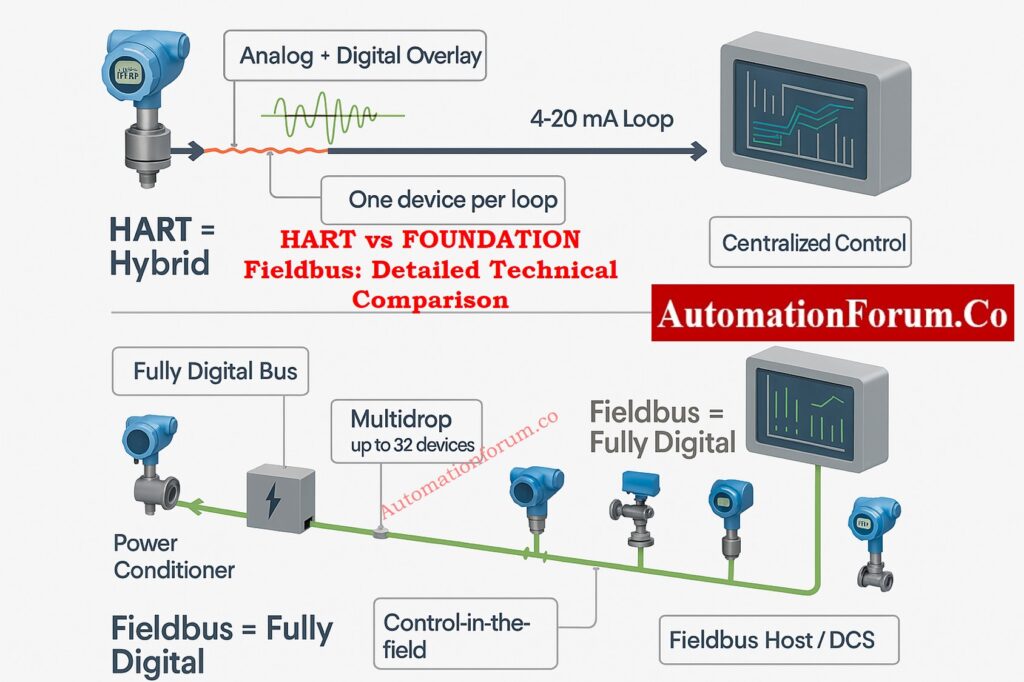
It changes the way professionals see differential pressure measurement by adding real-time animation, charting, and multi-mode calculation.

Yes. Differential pressure flow measurement works for both liquids and gases because the flow rate is always the same, no matter what the medium is.

Yes. The flow–DP relationship does not depend on the unit. The answer will still be correct if you choose any consistent units, like kPa, bar, psi, or inH₂O.

The calculator uses the square root relationship between flow and differential pressure:

Q=K×√ΔP​

where Q is the flow rate, K is a constant, and ΔP is the differential pressure.

Yes. It helps check the scaling of transmitters by giving expected DP, flow, or mA values for known situations that are perfect for calibration checks and loop validation.

It mixes DP-flow theory with real-time, interactive visualization. You may use any units, process medium, or range with it, so engineers can use it to both learn and do math.