
- What Is PLC Code Conversion?
- Why Automation Engineers Need PLC Conversion Tools
- Popular PLC Conversion Tools From Major Vendors
- PLC Conversion Tools Comparison
- Industrial PLC Conversion Example
- PLC Conversion Example With I/O Calculation
- What PLC Conversion Tools Cannot Do Automatically
- Common Problems During PLC Conversion
- PLC Conversion Validation Checklist
- Best Practices for PLC Conversion Projects
- Frequently Asked Questions About PLC Conversion Tools
- PLC Conversion Best Practices for Industrial Automation
This is where PLC conversion tools and PLC migration tools can reduce repetitive engineering work. Depending on the vendor and supported migration path, these tools can translate PLC instructions, application structures, variables, configuration data and project information. However, PLC code conversion does not guarantee functional equivalence.
For automation engineers, the real objective is not simply to produce a converted PLC program. The objective is to prove that the new PLC performs the required process functions correctly and safely through engineering review, testing, FAT, SAT and controlled commissioning.
What Is PLC Code Conversion?
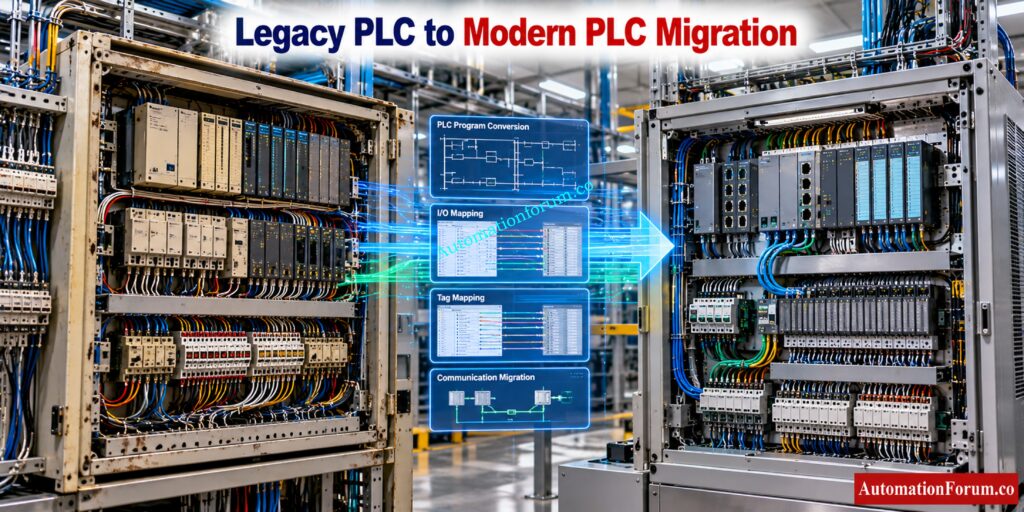
PLC Code Conversion
PLC code conversion is the process of translating an existing PLC application into a format that can be used by another PLC platform or a newer generation of the same PLC family.
PLC Migration
PLC migration is broader. It can include hardware replacement, I/O migration, program conversion, communication changes and commissioning.
PLC Modernization
PLC modernization usually means upgrading an obsolete control system to current hardware, software, networking and cybersecurity capabilities.
PLC Replacement
PLC replacement means changing the controller itself, while program conversion focuses on transferring the control application.
For example, Siemens provides an S5 to S7 conversion path using its S5/S7 Converter, while Rockwell Automation provides a translation tool for converting PLC 5 and SLC 500 programs for ControlLogix.
PLC Program Translation and PLC Hardware Migration
PLC program translation focuses on software logic, while PLC migration considers the complete control system and its engineering requirements.
Plan WirelessHART Networks Before Installation Problems Become Expensive: WirelessHART Network Planning Tool for Automation Engineers
Why Automation Engineers Need PLC Conversion Tools
PLC conversion becomes important when a plant has obsolete controllers, discontinued spare parts, unsupported engineering software or increasing maintenance costs.
Typical situations include:
- Replacement of obsolete PLC hardware
- Plant control system modernization
- Replacement of discontinued controller families
- Vendor standardization
- Availability problems for legacy spare parts
- Cybersecurity driven modernization
- Expansion of an existing plant
- Integration with modern SCADA and DCS systems
The main benefit is not eliminating engineering work. The real benefit is reducing repetitive programming work so engineers can spend more time validating the process behavior.
Refer the below link for the Advanced HART Loop Calculator for Reliable 4 to 20 mA and HART Communication
Popular PLC Conversion Tools From Major Vendors
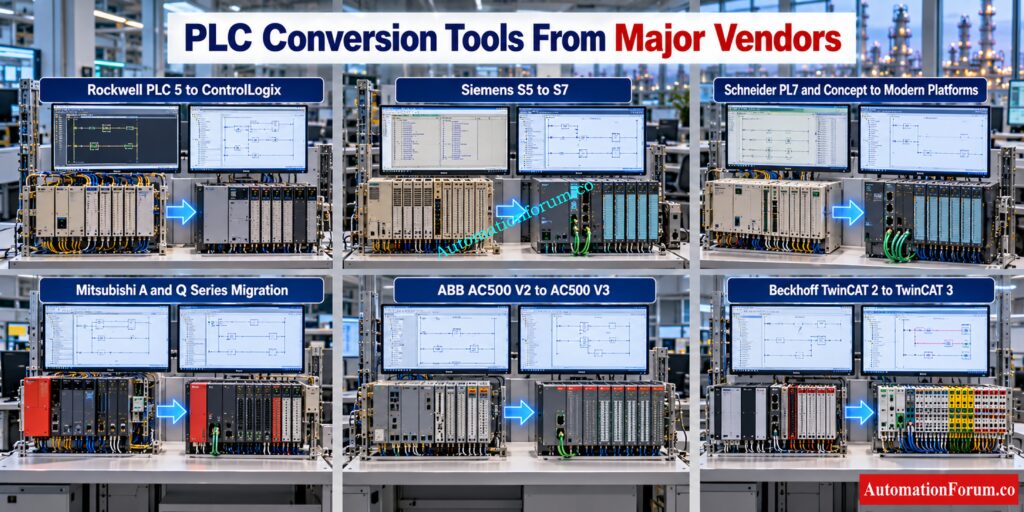
Rockwell Automation PLC 5 and SLC 500 Migration Tools
Rockwell Automation provides migration resources for moving PLC 5 and SLC 500 applications toward ControlLogix and CompactLogix platforms. Its Logix Designer environment includes a PLC 5 and SLC translation capability, while Rockwell also provides migration resources for controller and I O replacement.
- Source platform: PLC 5, SLC 500 and supported MicroLogix projects depending on the migration path.
- Target platform: ControlLogix or CompactLogix.
- Programming environment: Studio 5000 Logix Designer.
- Conversion type: Program translation and controller migration.
- I O capability: Rockwell provides dedicated I O migration and wiring conversion solutions, but physical I O architecture still requires engineering review.
- Project capability: The translator creates information that can be imported into a Logix project.
- Manual engineering: Required for unsupported instructions, architecture changes, communication, special modules and application specific logic.
Rockwell itself warns that the architectures are different and that converted programs require inspection and testing even when the project verifies successfully.
Best application: Brownfield PLC 5 or SLC 500 modernization where the plant wants to retain
proven control logic while moving to Logix controllers.
Rockwell Automation PLC Migration Resources: https://www.rockwellautomation.com/en-in/capabilities/industrial-maintenance-support/modernization.html
Measure Signal Quality Before Noise Damages Instrument Accuracy: Signal-to-Noise Ratio (SNR) Calculator for Instrumentation and Control Systems
Siemens S5 to S7 Conversion
Siemens provides the S5 to S7 migration path using the S5/S7 converter supplied with STEP 7 V5.x. Siemens recommends a staged migration from STEP 5 to STEP 7 V5.5 and then migration of the resulting STEP 7 project into TIA Portal.
- Source platform: SIMATIC S5 and STEP 5.
- Target platform: STEP 7 and subsequently supported TIA Portal platforms.
- Programming environment: STEP 7 and TIA Portal.
- Conversion type: PLC program conversion followed by project migration.
- Program capability: The converter translates supported STEP 5 program structures into STEP 7.
- Tag capability: Assignment information can be used where the appropriate STEP 5 symbol information is available.
- I O capability: Hardware and addressing require engineering verification.
- Project capability: The migration is staged rather than being a single unrestricted conversion.
- Manual engineering: Required for special instructions, system blocks, data types and constructs that do not exist in the target environment.
Siemens specifically identifies special instructions and system blocks that may be commented out during conversion and require manual engineering.
Best application: Modernization of older SIMATIC S5 installations toward newer Siemens control platforms.
Siemens S5 to S7 Migration Guide: https://cache.industry.siemens.com/dl/files/251/105106251/att_848073/v1/105106251_Migration_guide_S5_S7_en.pdf?
Design Profibus Segments Correctly Before Network Failures Strike: Profibus Segment Calculator for DP and PA Network Design
Schneider Electric PL7 and Concept Conversion
Schneider Electric provides application conversion capabilities for legacy PL7 and Concept applications into Unity Pro, now associated with the EcoStruxure Control Expert engineering environment.
A PL7 application can be exported and opened for conversion, with a conversion report identifying issues requiring engineering attention.
Concept applications can also be converted into Unity Pro applications through the supported conversion process. Schneider states that the converted application must be tested and debugged because conversion does not guarantee correct real time operation.
- Source platform: PL7 and Concept.
- Target platform: Unity Pro and its successor Control Expert environment.
- Programming environment: PL7, Unity Pro and Control Expert.
- Conversion type: Application conversion.
- Program capability: Supported application structures can be converted.
- Tag capability: Project information can be transferred where supported.
- I O capability: Hardware configuration requires review against the target controller and I O system.
- Project capability: Application conversion is supported. Check target architecture.
- Manual engineering: Required for unsupported functionalities and hardware variations.
- Best application: Modernization of older Schneider Electric PLC installations.
Schneider Electric PL7 Conversion Guidance: https://www.se.com/in/en/faqs/FA289143/?
Convert PLC Raw Counts Accurately Before Scaling Errors Spread: PLC Raw Count Calculator: Comparison with PLC Internal Scaling Blocks, Real-World Use Cases and Practical Benefits
Mitsubishi Electric A and Q Series Migration Tools
Mitsubishi Electric provides migration tools for older PLC platforms. Its official migration documentation describes PLC Type Change functionality for converting supported A and QnA programs into Q programs, with additional conversion support tools for identifying differences between original and converted programs.
- Source platform: Supported A and QnA series applications.
- Target platform: Q series.
- Programming environment: GX Developer and GX Works2 depending on the migration path.
- Conversion type: PLC program conversion.
- Program capability: Supported application logic can be automatically converted.
- Tag capability: Existing program information can be retained where supported.
- I O capability: Hardware and wiring require separate migration engineering.
- Project capability: Program conversion is supported, but the complete control system must be reviewed.
- Manual engineering: Needed for hardware differences and unsupported instructions.
- Best application: Migration of older Mitsubishi PLC installations toward newer supported architectures.
Mitsubishi Electric PLC Migration Guide: https://dl.mitsubishielectric.com/dl/fa/document/catalog/renewals/k-abd-kk4a-01/k-abd-kk4b-01_1603.pdf?
Calculate PLC Scan Time Before Performance Becomes Critical: PLC Scan Time Calculator
Refer the below link for the Best PID Controller Tuning Simulation Tool for Engineers
ABB AC500 V2 to AC500 V3 Conversion
ABB provides project conversion capability for migration from AC500 V2 to AC500 V3 through Automation Builder. ABB documentation identifies automatic conversion of some standard libraries while customer libraries may require manual conversion.
- Source platform: AC500 V2.
- Target platform: AC500 V3.
- Programming environment: Automation Builder.
- Conversion type: Project and application migration.
- Program capability: Supported project components can be converted.
- Tag capability: Application variables can be retained subject to compatibility.
- I O capability: Target hardware configuration requires verification.
- Manual engineering: Customer libraries and unsupported components may require manual work.
- Best application: Modernization of existing ABB AC500 systems.
Beckhoff TwinCAT 2 to TwinCAT 3 Converter
Beckhoff provides a built in conversion path for TwinCAT 2 projects into TwinCAT 3. Existing TwinCAT 2 PLC projects can be imported into a TwinCAT 3 project, where the converter processes supported PLC project structures and library references.
- Source platform: TwinCAT 2.
- Target platform: TwinCAT 3.
- Programming environment: TwinCAT XAE.
- Conversion type: PLC project and system configuration migration.
- Program capability: Supported PLC code and syntax can be converted.
- Tag capability: PLC variables are migrated subject to project compatibility.
- I O capability: System Manager configuration can also be migrated, but device mappings require verification.
- Project capability: TwinCAT 2 project files and system configuration can be imported.
- Manual engineering: Required for library differences, unsupported devices, motion functions and application specific dependencies.
Beckhoff states that the original TwinCAT 2 project should compile successfully before conversion and identifies restrictions associated with syntax and libraries.
Best application: Modernization of existing TwinCAT 2 machine and plant control systems.
Beckhoff TwinCAT Migration Documentation: https://infosys.beckhoff.com/english.php?content=../content/1033/tc3_plc_intro/2526152075.html&id=
Master PLC Data Types Before Programming Errors Become Costly: PLC Data Types Every Automation Engineer Must Know to Avoid Costly Programming Errors
PLC Conversion Tools Comparison
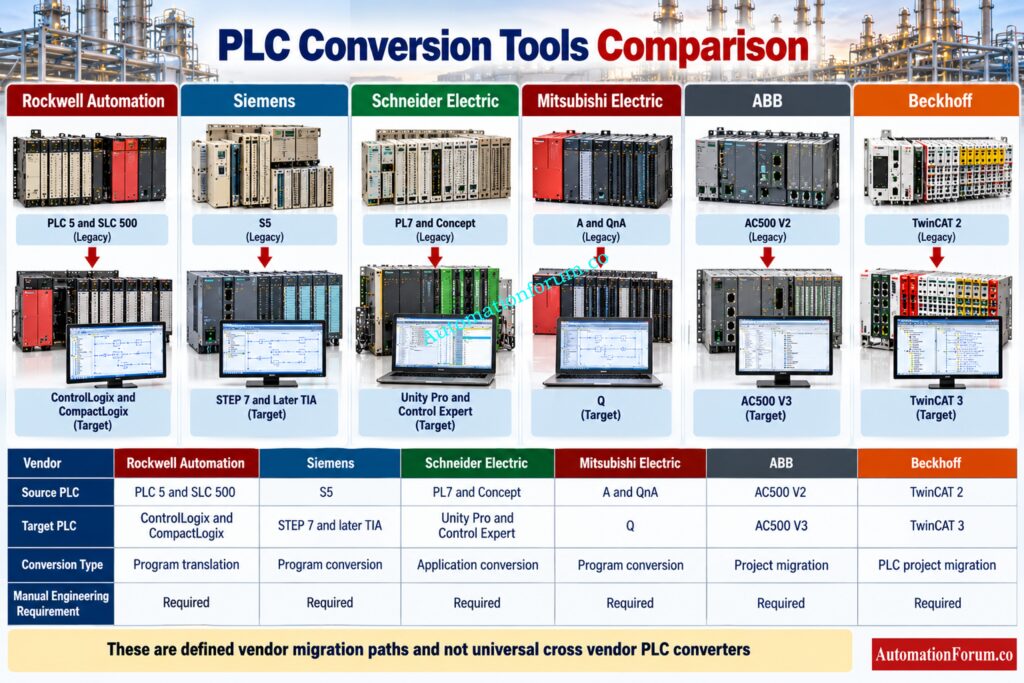
| Vendor | Tool | Source PLC | Target PLC | Conversion type | Main capability | Manual work required | Typical application |
| Rockwell Automation | Logix translation tools | PLC 5, SLC 500 | ControlLogix, CompactLogix | Program translation | Logic conversion | High | Legacy Rockwell modernization |
| Siemens | S5 and S7 converter | S5 | STEP 7 and later TIA migration | Program conversion | STEP 5 conversion | High | S5 modernization |
| Schneider Electric | Application converters | PL7, Concept | Unity Pro and Control Expert | Application conversion | Program conversion | High | Legacy Schneider migration |
| Mitsubishi Electric | PLC Type Change | A, QnA | Q | Program conversion | Logic conversion | Medium to high | Mitsubishi modernization |
| ABB | Automation Builder conversion | AC500 V2 | AC500 V3 | Project migration | Project conversion | Medium | AC500 modernization |
| Beckhoff | TwinCAT converter | TwinCAT 2 | TwinCAT 3 | Project migration | PLC and system migration | Medium | Machine modernization |
These tools should not be interpreted as universal cross vendor PLC converters. Official vendor solutions generally support defined source and target platforms within their own ecosystems.
Understand PLC Resolution Before Measurement Accuracy Starts Suffering: Resolution in PLCs – The Complete Guide for Automation & Instrumentation Engineers
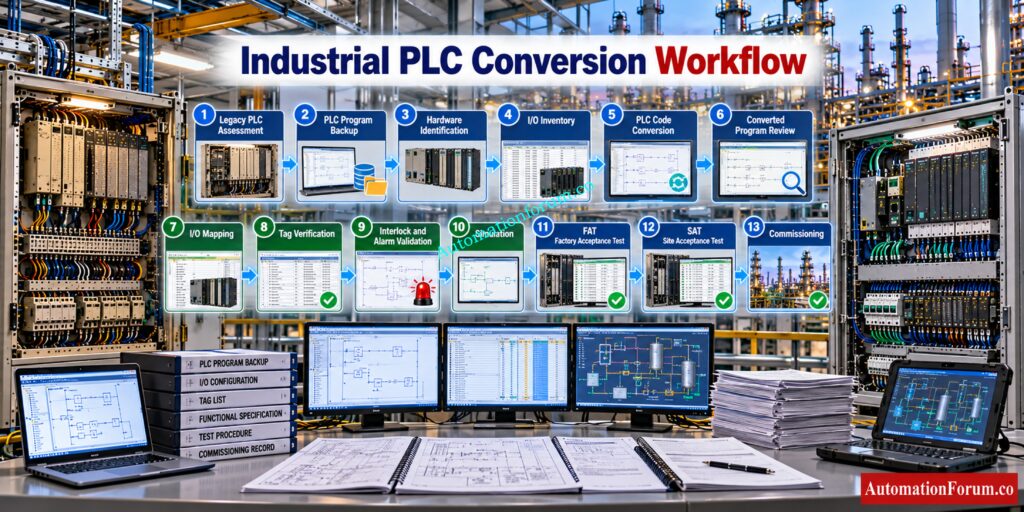
Industrial PLC Conversion Example
Consider a refinery unit using an obsolete PLC 5 system.
- First, engineers document the existing hardware, application version, I O modules, communication networks and field wiring.
- The original program is backed up and archived before any conversion begins.
- Next, the engineering team prepares an I O mapping document and identifies every physical signal, address, tag, alarm, interlock and control function.
- The appropriate vendor migration tool is then selected. The program is converted and imported into the target environment.
- After conversion, engineers review every routine and unsupported instruction. Interlocks, permissives, sequences, alarms, analog scaling, PID loops and communication blocks are tested independently.
- The converted application then progresses through simulation, FAT, SAT, loop checks and commissioning.
- The final project documentation must represent the actual commissioned system rather than simply the converted software.
Prevent PLC Input Problems With Proper Pull Up Selection: Easy Pull-Up Resistor Calculator for PLC Inputs in Discrete Sensor Applications
PLC Conversion Example With I/O Calculation
Assume the existing PLC contains:
| I/O type | Existing quantity |
| Digital inputs | 96 |
| Digital outputs | 64 |
| Analog inputs | 24 |
| Analog outputs | 16 |
| Total I/O | 200 |
The existing application therefore requires 200 I/O points.
The total installed I O is:
96 + 64 + 24 + 16 = 200 I O points
If the project requires 20 percent spare capacity:
200 × 20 percent = 40 spare points
Therefore the planned I O capacity should be:
200 + 40 = 240 I O points
The actual module selection must still consider channel type, voltage, current, isolation, hazardous area requirements, redundancy and future expansion.
Master Essential PLC Digital Signals With These Calculators:Collection of PLC Digital Signal Calculators for Industrial Automation
What PLC Conversion Tools Cannot Do Automatically
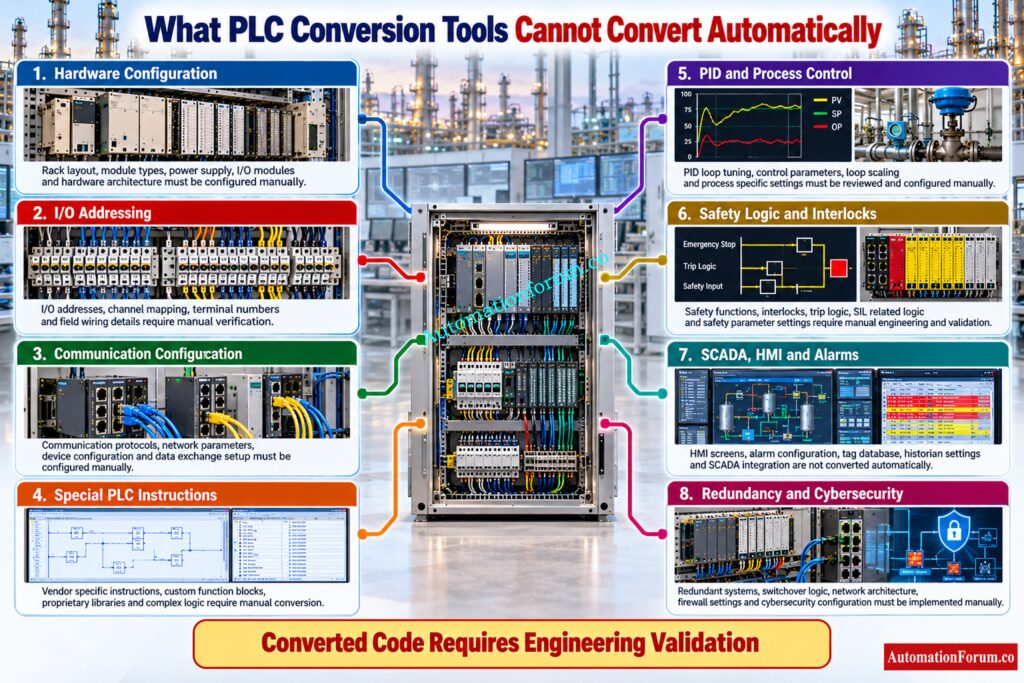
Automatic conversion has clear boundaries.
- PLC Hardware Configuration: Direct reproduction of hardware configuration is not always possible as the target controller may use different modules and addressing.
- I/O Addressing and Mapping: Engineering has to check network settings.
- Special PLC Instructions: Special instructions may not have corresponding target instructions. Detailed manual review is often required in motion control applications.
- PID and Process Control Loops: PID loops need to be checked out, because the execution behavior, scaling and tuning structures can be different.
- Safety Logic and Interlocks: The safety logic must be independently validated , and should not be assumed to be correct just because the converted project compiles .
- SCADA, HMI and Alarm Configuration: Extensive technical evaluation is required for SCADA integration, alarm configuration, interlocks, bespoke function blocks, communication protocols and redundancy architecture.
- Redundancy and Cybersecurity Configuration: Cybersecurity configuration is likewise a modernization duty and should be architected for the goal architecture.
Make Your PLC Faster Without Sacrificing Program Reliability: How to Increase PLC Speed: 7 Optimization Tips + Advanced Programming Guide
Common Problems During PLC Conversion
| Problem | Engineering response |
| Unsupported instruction | Identify the original function and recreate it |
| Address mismatch | Verify every I/O address against the new hardware |
| Data type difference | Check conversion and numerical behavior |
| Timer difference | Compare timing resolution and execution behavior |
| Analog scaling error | Recalculate engineering units and raw values |
| Communication failure | Rebuild and test the communication configuration |
| PID behavior change | Compare tuning, execution and scaling |
| HMI tag mismatch | Cross check every referenced tag |
| Interlock mismatch | Test each permissive and trip independently |
| Safety incompatibility | Perform dedicated safety engineering review |
Document PLC Alarms And Trips Before Commissioning Problems: PLC Alarm and Trip Documentation Procedure – EPC PLC Automation Engineer Guide
PLC Conversion Validation Checklist
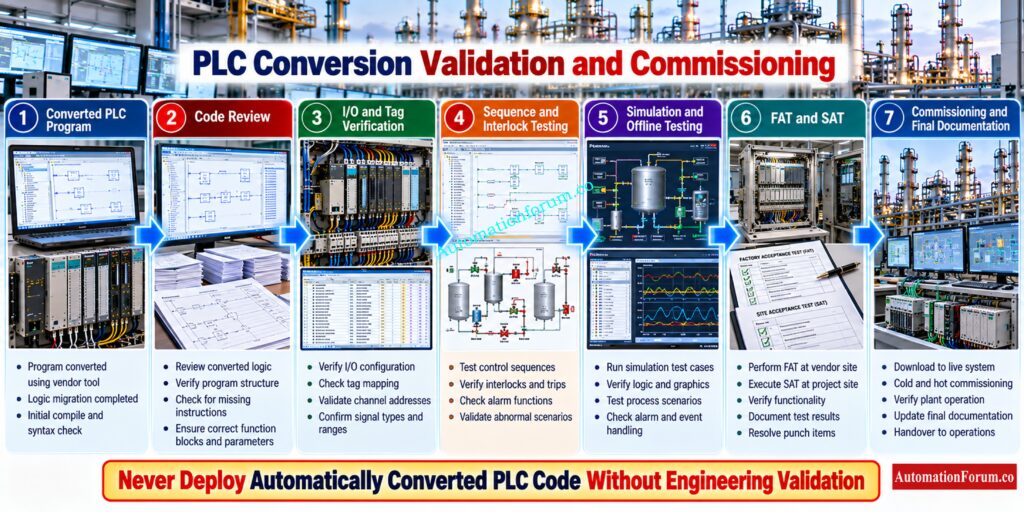
- Verify PLC hardware and I/O
- Check digital and analog signals
- Check timers and counters
- Validate sequences and interlocks
- Test permissives, alarms and trips
- Verify PID loops
- Test communication and HMI
- Check SCADA and historian references
- Verify drives and remote I/O
- Test redundancy and diagnostics
- Complete FAT and SAT
- Maintain commissioning and rollback records
Discover Which PLC Brands Dominate Industrial Automation Today: Which PLC is Mostly used in the Automation Industry?
Best Practices for PLC Conversion Projects
- Always preserve the original PLC program before conversion.
- Create a complete I/O cross reference and tag mapping document before modifying the converted application.
- Do not assume that equivalent looking instructions behave identically. Review unsupported functions and validate critical process sequences independently.
- Perform FAT before site installation and maintain a rollback strategy.
- Version control should be applied to the original application, converted application and final commissioned application.
- The safest approach is to treat automatic conversion as an engineering accelerator rather than an automatic commissioning solution.
Inspect Critical PLC Components Before Panel Failures Occur: Running Inspection Checklist of PLC Components in Control Panels
Frequently Asked Questions About PLC Conversion Tools
What is a PLC conversion tool?
A PLC conversion tool translates supported PLC programs, instructions, configuration or application data between compatible platforms.
The converted application still requires engineering review, testing and validation before commissioning.
What is the difference between PLC conversion and PLC migration?
PLC conversion mainly focuses on translating PLC programs, instructions or application data.
PLC migration is broader and can include hardware, I/O, networks, software, testing and commissioning.
Can PLC code be automatically converted between manufacturers?
Some vendors provide conversion tools for specific PLC migration paths and supported platforms.
There is no universal converter that can reliably translate every PLC program between different manufacturers.
Scale PLC Analog Signals Correctly Without Measurement Errors: Scaling Analog Values in Industrial Automation (PLC)
Which PLC conversion tools are commonly used?
Common examples include Rockwell translation tools, Siemens conversion tools and Schneider Electric UMAC.
Mitsubishi Electric, Honeywell and Beckhoff also provide specific PLC migration or conversion solutions.
Can Siemens PLC code be converted to Rockwell PLC?
A universal automatic Siemens to Rockwell conversion should not be assumed for industrial applications.
The program normally requires detailed analysis, logic mapping, manual conversion and functional validation.
Master PLC Contact Logic Before Programming Mistakes Cause Trips: Understanding NO vs NC Contacts is key for Logic Writing in PLC Programming
Can Rockwell PLC code be converted to Siemens PLC?
A universal automatic Rockwell to Siemens conversion is generally not available for all applications.
Engineers normally analyze the original logic and recreate or translate it for the Siemens architecture.
Does PLC conversion automatically convert I/O?
Some migration tools can assist with I/O configuration or mapping when the migration path is supported.
Engineers must still verify module types, channel assignments, addresses, wiring and signal scaling.
What needs to be checked after PLC conversion?
How should converted PLC code be tested?
Converted PLC code should undergo code review, offline testing, simulation where available, FAT, loop checks and functional testing.
Critical trips, permissives, interlocks, sequences and control loops require dedicated validation.
Build Complete PLC Documentation Before Projects Reach Commissioning: PLC System Documentation Guide: Essential Records for Industrial Automation
What are the risks of PLC code conversion?
Common risks include unsupported instructions, addressing errors, data type differences, communication problems and changed execution behavior.
A successfully converted program does not automatically prove functional or safe plant operation.
What is the best PLC migration tool?
The best PLC migration tool depends on the source PLC, target PLC, programming language and supported vendor migration path.
Engineers should select a tool based on documented compatibility, conversion capability and the amount of manual engineering required.
What are some common PLC software tools?
Common PLC software tools include Siemens TIA Portal, Rockwell Studio 5000, Schneider EcoStruxure Control Expert and Mitsubishi GX Works.
These environments support PLC programming, configuration, diagnostics and commissioning, while some also provide migration functions.
Understand PLC Redundancy Before A Single Failure Stops Production: Understanding PLC Redundancy: Cold, Warm & Hot Redundancy
Which PLC is mostly used in industry?
There is no single PLC that dominates every industry because selection depends on region, application, plant standards and existing infrastructure.
Rockwell, Siemens, Schneider Electric, Mitsubishi Electric, Omron and other major vendors have significant industrial installations.
What are the four types of PLCs?
PLCs are commonly categorized as compact PLCs, modular PLCs, rack based PLCs and distributed PLC systems.
The appropriate type depends on I/O requirements, processing capacity, communication needs and system expansion.
What are the major PLC brands in India?
Major PLC brands used in India include Siemens, Rockwell Automation, Schneider Electric, Mitsubishi Electric, Omron, ABB and Delta.
The preferred brand often depends on industry standards, EPC specifications, installed systems, engineering support and spare availability.
Calculate PLC Wiring Voltage Drop Before Signals Become Unstable: How to Calculate and Minimize Voltage Drop in PLC Wiring?
PLC Conversion Best Practices for Industrial Automation
Vendor supplied PLC conversion tools can significantly reduce engineering effort during PLC modernization, but they should never replace engineering judgment.
Rockwell Automation, Siemens, Schneider Electric, Mitsubishi Electric, ABB and Beckhoff provide defined migration or conversion paths for supported legacy platforms. Their tools can accelerate program translation and project migration, but hardware differences, unsupported instructions, communications, safety functions, control loops and process specific logic still require experienced engineering review.
For a successful PLC migration, the correct approach is to use the conversion tool as an engineering accelerator, then validate the resulting system through simulation, FAT, SAT, loop checks and controlled commissioning.
Refer the below link for the PLC Power Supply Calculator – Complete Guide for Accurate PLC Power Sizing
