
- Introduction to Galvanic Isolator Troubleshooting
- Understanding a Typical 4 to 20 mA Analog Input Loop
- Common Symptoms of Galvanic Isolator Problems
- Step by Step Galvanic Isolator Troubleshooting Procedure
- Industrial Troubleshooting Case Study: Incorrect DCS Pressure Reading
- Safety Precautions for Galvanic Isolator Troubleshooting
- Galvanic Isolator Selection and Maintenance Best Practices
- Frequently Asked Questions About Galvanic Isolator Troubleshooting
- Conclusion: Effective Galvanic Isolator Troubleshooting in Process Plants
Introduction to Galvanic Isolator Troubleshooting
Galvanic isolators are commonly employed in industrial equipment to transport analog signals between electrically isolated circuits. They help to eliminate unnecessary conducting routes, reduce ground loop problems and safeguard connected equipment from electrical interference.
However, a defective isolator, poor wiring, insufficient power supply or inappropriate DCS design might cause loss of signal, fluctuating readings and incorrect process values. Replacing the isolator without testing the complete loop can waste maintenance time and leave the actual problem unresolved.
This galvanic isolator troubleshooting procedure explains how to identify the fault systematically using practical measurements and controlled loop testing.
Understanding a Typical 4 to 20 mA Analog Input Loop

A typical signal path is:
- Field transmitter to galvanic isolator input to isolated output to PLC or DCS analog input card to HMI or SCADA display.
- The transmitter converts a process variable into a 4 to 20 mA signal. The isolator transfers that signal across an isolation barrier, and the analog input card converts the received signal into an engineering value.
- Active isolators generally require operating power, while passive isolators may derive operating energy from the signal circuit. The actual arrangement depends on the device design. Always verify the manufacturer’s wiring diagram before testing.
- An ordinary galvanic isolator is not necessarily an intrinsically safe barrier. Verify that equipment is certified and meets circuit standards for hazardous regions.
Refer the below link for the Why not use 0-20mA & 0-15psi instead of 4-20mA & 3-15psi?
Common Symptoms of Galvanic Isolator Problems
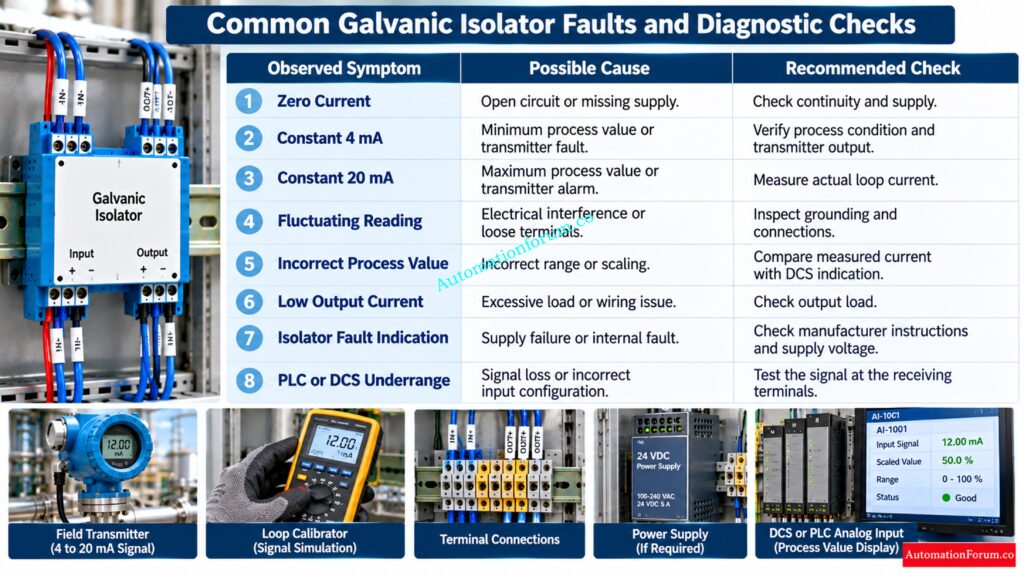
| Observed symptom | Possible cause | Recommended check |
| Zero current | Open circuit, missing supply or loose wiring | Check continuity and supply |
| Constant 4 mA | Minimum process value, transmitter fault or incorrect configuration | Verify process condition and transmitter output |
| Constant 20 mA | Maximum process value, transmitter alarm or incorrect scaling | Measure actual loop current |
| Fluctuating reading | Electrical interference, loose terminals or unstable supply | Inspect grounding, shielding and connections |
| Incorrect process value | Incorrect range or engineering unit scaling | Compare measured current with DCS indication |
| Low output current | Excessive load or incorrect wiring | Check output load and terminal connections |
| Isolator fault indication | Supply failure or internal device fault | Check the manual and supply voltage |
| PLC or DCS underrange | Signal loss, incorrect input configuration or wiring fault | Test the signal at the receiving terminals |
Protect Instrument Signals With Correct Grounding And Bonding Practices: Grounding and Bonding in Instrumentation and Control Systems
Step by Step Galvanic Isolator Troubleshooting Procedure
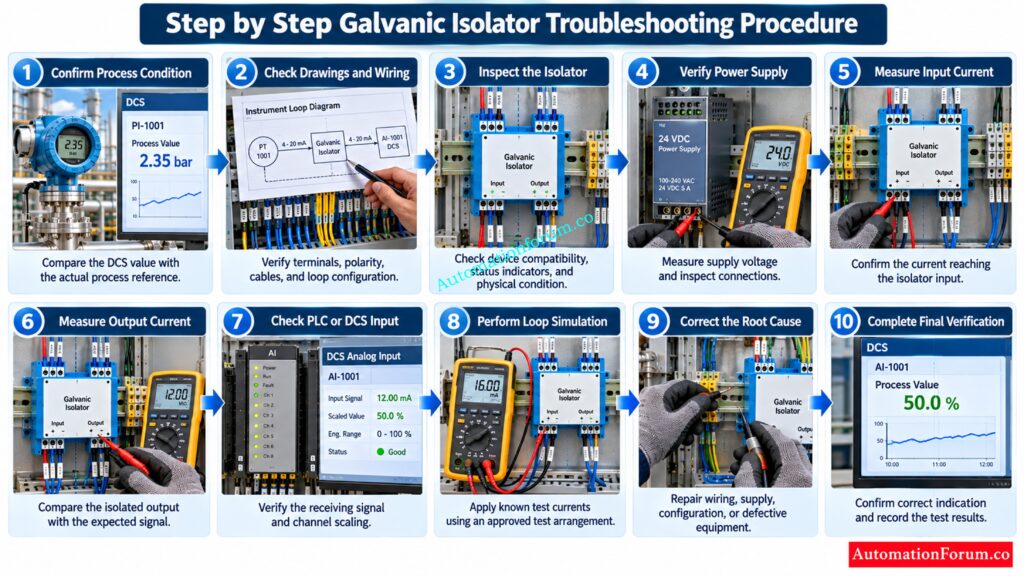
Step 1: Confirm the Actual Process Condition
Compare the DCS or PLC reading with the local transmitter display, an independent measurement or some other credible process check. Determine if the anomalous reading is caused by a real process change or a measurement loop problem.
Step 2: Check Instrument Loop Drawings and Wiring Connections
Stop Grounding Mistakes From Creating Expensive Instrumentation Problems: Single Point vs Multiple Point Grounding in Instrumentation Systems: Complete Guide for Engineers
Step 3: Inspect the Galvanic Isolator
Verify the isolator model number, input and output signal ranges, supply requirements, channel configuration and status indicators. Check for loose connections, overheating, physical damage or mis-wiring. Make sure that the chosen isolator is compatible with the field transmitter and the receiving PLC or DCS analog input card.
Master Loop Calibrator Techniques Before Your Next Commissioning Test: How to simulate 4-20ma signal with Loop Calibrator ?
Step 4: Verify the Galvanic Isolator Power Supply
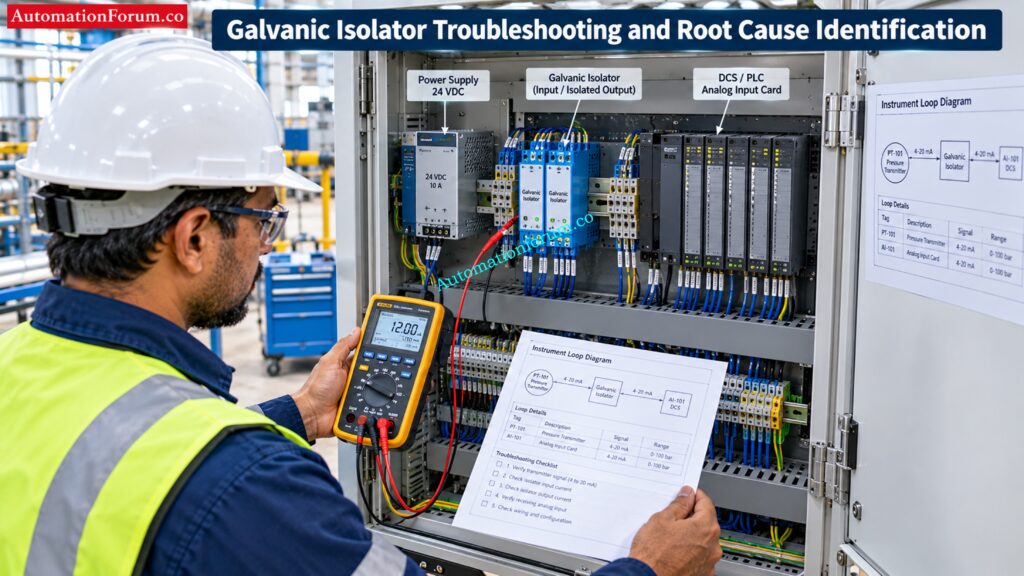
Measure the supply voltage on the terminals provided and compare with the operational range given by the manufacturer. Check fuse, terminal tightness, supply polarity if applicable and any voltage drop that could impair operation.
Note that some isolators need an external power supply, others are loop powered. Follow the wiring diagram instead of presuming that every isolator is supplied by an external 24 VDC supply.
Prevent Hazardous Area Cable Mistakes During EPC Design: Intrinsically Safe Cables for ATEX Zones – Complete Checklist for EPC Engineers
Step 5: Measure the Galvanic Isolator Input Current
Measure the current that is going to the isolator input with a calibrated loop calibrator or appropriate multimeter. If a series measurement is required, separate the circuit as needed and place the meter in series with the current path according an approved test technique.
Compare the measured current with the transmitter output and the process value. If the input current is wrong already, look at the transmitter, loop wiring and power supply before blaming the isolator.
Never connect a voltmeter straight across a current meter.
Convert Transmitter Current Into Accurate Process Values Instantly: 4 to 20 mA Transmitter Output Process Value Calculator
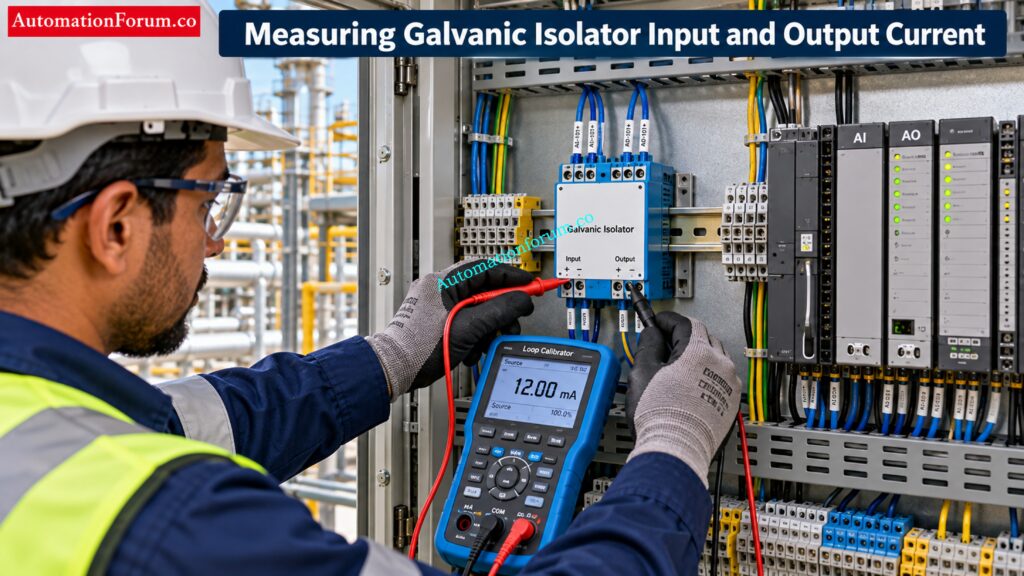
Step 6: Measure the Galvanic Isolator Output Current
Measure the isolated output current using the manufacturer’s specified test set-up. Compare the input and output readings, considering the configured signal transmission, output loading, stipulated accuracy and fault reaction.
If input current is correct but output is wrong, examine isolator supply, settings, wiring and associated load. Only replace the isolator if these checks suggest a possible internal malfunction.
Refer the below link for Understanding Zener vs Galvanic Isolation in IS Loops for 4 to 20 mA Systems
Step 7: Check the PLC or DCS Analog Input Card
Measure the current at the receiving analog input terminals, then compare it with the isolator output. Check the channel setup, the signal type selected, the input range, the engineering units, the scaling factors, and the channel diagnostic status.
If the right current is getting to the input card but the process value shown is still wrong, check the control system settings before changing field equipment.

Step 8: Perform a Controlled 4 to 20 mA Loop Simulation
Where site procedures permit, separate the field transmitter from the test configuration and inject known current values with an appropriate loop calibrator.
Test at 4mA, 8mA, 12mA, 16mA, 20mA. At each test point, record the isolator output and accompanying indication on PLC or DCS. Compare the results with the predicted values to detect signal transfer mistakes, scaling problems or flaws of the analog input.
Investigate Unexpected High Current Before Replacing Your Transmitter: Why Is My Pressure Transmitter Showing 22 mA? Complete Troubleshooting Guide for Instrument Engineers
Step 9: Identify and Correct the Root Cause
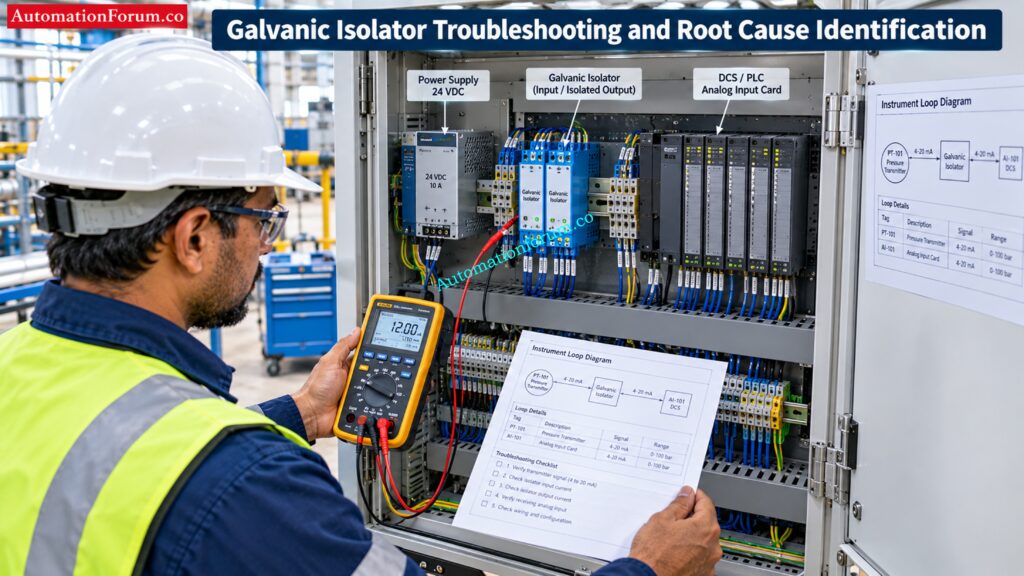
Check all the recorded measurements to see where the signal first goes wrong. Correct wiring mistakes, restore power supply, patch loose connections, correct configuration settings or replace broken equipment.
Don’t replace the isolator just because the control system is indicating a strange value. Possible sources of the issue include the transmitter, cable, power supply, analog input card or DCS scaling.
Validate Intrinsic Safety Parameters Before Approving Field Devices: Intrinsic Safety Entity Parameter Calculator for Reliable Hazardous Area Loop Design
Step 10: Complete Final Instrument Loop Verification
After the problem has been corrected conduct the necessary loop tests and check for agreement between the transmitter signal, isolator output and control system indicator over the appropriate operating range. Check pertinent alarms and diagnostic signals, return the circuit to its approved operational condition and remove temporary test connections.
Document the initial readings, root cause found, corrective action taken, final test findings and any configuration modifications in the maintenance or commissioning paperwork.
Find The Real Cause Behind Unexpected PLC Input Failures: Top Causes of PLC Input Signal Failure in Plants
Industrial Troubleshooting Case Study: Incorrect DCS Pressure Reading
For example, in an oil and gas facility, the pressure transmitter transmits a constant 4 to 20 mA signal to the DCS through a galvanic isolator. When in operation the field transmitter is showing the expected pressure but the DCS is showing a different value. It seems the trouble is between the field instrument and the control system and the maintenance engineer is of the opinion that there is a malfunctioning galvanic isolator.
Understand Why Zero Current Can Hide Dangerous Faults: Understanding the Difference Between Live Zero and Dead Zero in 4 to 20 mA
Verify the Pressure Transmitter Output Signal
The engineer reads the indication on the transmitter display, then measures the output current with a calibrated loop measurement device. We see that the transmitter is outputting what it should for a 50 percent measurement in a properly designed linear range a stable 12 mA.
Identify Dangerous Earth Fault Currents Before They Escalate: IS Barrier Earth Fault Current Calculator | Intrinsic Safety Loop Design Tool
Check the Galvanic Isolator Input and Output
The current is measured at the input terminals of the isolator using an approved test set-up. The measured value is 12 mA, which confirms that the transmitter signal is correctly transferred to the isolator.
The engineer tests the isolated output, and it reads 12 mA as well. The result is in accordance with the intended one to one signal transfer setup. Thus the isolator is not the source of the observed disparity under the tested conditions.
Prevent Cable Noise From Destroying Critical Instrument Signals: Twisted Pair Cable in Industrial Signal Transmission: The Essential Guide
Verify the DCS Analog Input Signal
The engineer checks the current at the DCS analog input terminals and verifies that 12 mA is flowing to the input card. That is, there is no signal loss from the isolator output to the receiving input terminals during the test.
Identify and Correct the DCS Scaling Error
The engineer checks the analog input channel arrangement and finds that the engineering range is different from the pressure transmitter range. The scaling settings used to convert the input signal to a pressure value are wrong.
Eliminate Transmitter Calibration Errors Before They Spread Further: Transmitter Calibration Calculator: How to Calculate Span, LRV, URV, and 4 to 20 mA
Complete Final Pressure Transmitter Loop Testing
The engineer checks the transmitter signal, isolator output, DCS indicator and the necessary alarm settings. The test results and correction of settings have been reported in the maintenance record.
Key engineering lesson: A wrong DCS Pressure readout does not conclusively prove that the galvanic isolator has failed. Measurement of the signal at each stage of the loop can be used by instrumentation engineers to determine the true defect, minimize wasteful replacement of equipment and restore the correct indication of the process.
Resolve Startup Loop Check Failures Before Production Begins: Common Instrument Loop Check Problems During Startup
Safety Precautions for Galvanic Isolator Troubleshooting
- Follow site permit to work and isolation procedures.
- Use correctly rated and calibrated test equipment.
- Avoid short circuits between signal terminals and power supplies.
- Preserve intrinsic safety requirements in hazardous areas.
- Follow manufacturer instructions for current measurement and signal injection.
- Never bypass alarms, interlocks, or safety instrumented functions without an approved procedure.
- Apply management of change requirements to permanent wiring or configuration modifications.
Additional precautions are necessary when the loop belongs to a safety instrumented system.
Avoid Costly Barrier Selection Mistakes In Hazardous Areas: Intrinsic Safety Barrier Selection Procedure for Instrumentation Engineers
Galvanic Isolator Selection and Maintenance Best Practices
- Select isolators based on the required input and output ranges, channel isolation, accuracy, response time, load capability, supply requirements, environmental conditions, and necessary safety approvals.
- Maintain accurate loop drawings and terminal schedules. Inspect connections periodically, use suitable shielded instrumentation cables, and follow the site’s grounding practices.
- Keep compatible spare isolators available and document all fault findings, corrective actions, and final loop test results.
Frequently Asked Questions About Galvanic Isolator Troubleshooting
How do you troubleshoot a galvanic isolator in a 4 to 20 mA loop?
Check power supply and wiring connections. Measure isolator input and output currents. Check the PLC or DCS settings to find where the signal is wrong.
How can you check whether a galvanic isolator is faulty?
Apply a known input signal and compare the output with the predicted value as per manufacturer specs. Check the supply, the wiring, the setup and the output load before replacing the device.
Why is the DCS reading incorrect when the transmitter output is correct?
The culprit could be wrong isolator output, wiring error, an analog input card fault or wrong DCS scaling. Measure the signal at each stage to find the real source of the problem.
Fix Persistent Current Loop Faults With Proper Testing: 4-20 mA Loop Troubleshooting with Loop Calibrators : A Practical Guide
Can a galvanic isolator cause a 4 to 20 mA signal loss?
Yes, a faulty isolator, absent power source, wrong wiring or unsuitable arrangement may interfere with the signal. Check the input and output currents to see where the signal is lost.
What is the difference between a galvanic isolator and an intrinsic safety barrier?
A galvanic isolator isolates electrical circuits and an intrinsic safety barrier confines electrical energy to assist avoid ignition in dangerous areas. Some devices combine both functions and need suitable certification.
How do you connect a galvanic isolator?
Wire the transmitter, isolator supply and the PLC or DCS input, according to the manufacturer’s wiring schematic. Check terminal polarity, input and output signal types, active or passive loop requirements before applying power to the circuit.
What is the purpose of a 4 to 20 mA signal isolator?
A 4 to 20 mA signal isolator transmits an analog measurement from one electrically isolated circuit to another. Helps in cutting down ground loop interference & enables reliable signal transfer between control systems & field instrumentation.
Stop Guessing HART Loop Problems Before Commissioning Starts: Advanced HART Loop Calculator for Reliable 4 to 20 mA and HART Communication
What is the working principle of an isolator?
An isolator transfers a signal across an electrical isolation barrier using a suitable internal coupling method. The output reproduces or converts the input signal according to the device design and configured signal range.
What is the maximum distance a 4 to 20 mA loop can be connected to?
Not a maximum distance for every 4 to 20 mA loop is determined by the cable resistance, transmitter supply voltage and the overall circuit load. Verify permissible distance with loop voltage budget and cable specs.
Verify Live Signals Before Small Errors Become Major Problems: Live Signal Verification 4 to 20 mA Loop Standard Operating Procedure (SOP)
Conclusion: Effective Galvanic Isolator Troubleshooting in Process Plants
Troubleshooting a good galvanic isolator includes examining the process condition, verifying the transmitter signal, measuring the isolator input and output current, verifying the supply and wiring and reviewing the PLC or DCS input setup.
Instrumentation and maintenance engineers are better off with systematic measurement than with replacing equipment based on symptoms only. Document root cause, corrective action and final loop verification for improved maintenance quality and commissioning reliability.
Refere the below link for the Cold and Hot Loop Checking in Automation: Key Differences and Step-by-Step Procedures
