
WirelessHART network planning requires more than counting wireless field devices. In a process plant, device location, spacing, RF environment, steel structures, gateway connectivity, update rate, redundancy, reliability requirements, and power source can all influence the preliminary network design.
WirelessHART Network Planning Tool
WirelessHART Network Architecture
WirelessHART Network Planning Inputs
WirelessHART Network Planning Results
Network Health & Performance Assessment
Network Topology Visualization
Step by Step Network Planning
| Parameter | Calculated Value |
|---|
WirelessHART Engineering Rules
RF Path Loss & Fresnel Screening
WirelessHART Network Components
The WirelessHART Network Planning Tool helps instrumentation and automation engineers perform this initial engineering assessment. The calculator evaluates device quantity, site dimensions, RF conditions, device spacing, gateway requirements, mesh neighbor availability, link margin, reliability, latency, and battery life screening. The results provide a practical starting point before detailed site validation and vendor engineering.
The calculator is intended for preliminary planning rather than certified RF network design.
What is a WirelessHART Network Planning Tool?
How Does a WirelessHART Network Planning Tool Work?
A WirelessHART Network Planning Tool is used to estimate whether a proposed wireless instrumentation network has suitable preliminary coverage, gateway capacity, mesh connectivity, and redundancy.
The calculator considers the number of WirelessHART devices, site dimensions, device density, RF environment, required update rate, power source, reliability target, redundancy level, major RF obstacles, and average device spacing.
Why Use a WirelessHART Network Calculator for Network Planning?
This approach is more useful than estimating gateway requirements from device count alone because two plants with the same number of devices can have very different RF conditions and network requirements.
Discover which configuration approach fits your instrumentation workflow: SmartBlue vs HART Communicator: Which Is Better for Instrumentation Engineers?
Why WirelessHART Network Planning Is Important in Process Plants

WirelessHART networks are commonly considered for oil and gas, chemical and petrochemical plants, power generation, water treatment, manufacturing, and other process automation applications.
How Process Plant Structures Affect WirelessHART Communication
Process plants contain vessels, pipe racks, equipment, buildings, steel structures, and other obstructions that can influence wireless communication. A device that appears close to another device on a drawing may not have an equally suitable RF communication path in the actual plant.
Mesh routing provides alternative communication paths between field devices and the gateway. Therefore, engineers need to consider device distribution and neighboring devices during preliminary network planning.
Uncover hidden transmitter diagnostics before failures reach production: HART Transmitter Diagnostics: What Your Field Device is Telling You
WirelessHART Network Planning Inputs

The calculator provides several inputs that influence the planning result.
- Total WirelessHART devices: This is the number of field devices and wireless adapters in the preliminary network.
- Device density: The network is planned for multiple device density scenarios (low, medium and high).
- Site length and width: These variables determine the region under consideration and influence the initial coverage evaluation.
- RF environment: The calculator can be set from open areas with few obstructions to massive concrete and steel constructions.
- Required update rate: There are options from one second to sixty seconds. Increased communication schedule and power demand can be needed for faster update needs.
- Primary power source: The calculator takes into account devices with batteries, devices with external power supply and mixed installations.
- Network reliability target: The possible planning targets are 99.0%, 99.5% and 99.9%.
- Redundancy level: The calculator lets engineers look at two to five alternate approaches.
- Major RF obstacles: Engineers can define conditions from no major obstacles to major impediments or moving equipment.
- Average device spacing: Device spacing is important because greater separation can increase path loss and reduce the number of suitable neighboring devices.
These inputs are directly represented in the calculator interface.
Refer the below link for the HART Communicator Unable to Detect Instrument: Complete Troubleshooting Guide (No Device Found Error)
How the WirelessHART Network Planning Calculation Works
The calculator combines several preliminary engineering factors to estimate network requirements.
Site dimensions are used for coverage screening. Device quantity is used for gateway load assessment. Redundancy requirements influence gateway planning, while device spacing and RF environment influence neighbor availability and RF path loss.
The calculation also screens direct gateway links, estimated neighboring devices, link margin, reliability, latency, and battery life.
The calculator therefore provides a broader planning assessment instead of producing a gateway count from device quantity alone.
See exactly how these industrial communication protocols differ: Difference Between Fieldbus and HART Communication Protocols: Complete Comparison Guide for Process Automation Engineers
WirelessHART Rule of 5 and Rule of 3
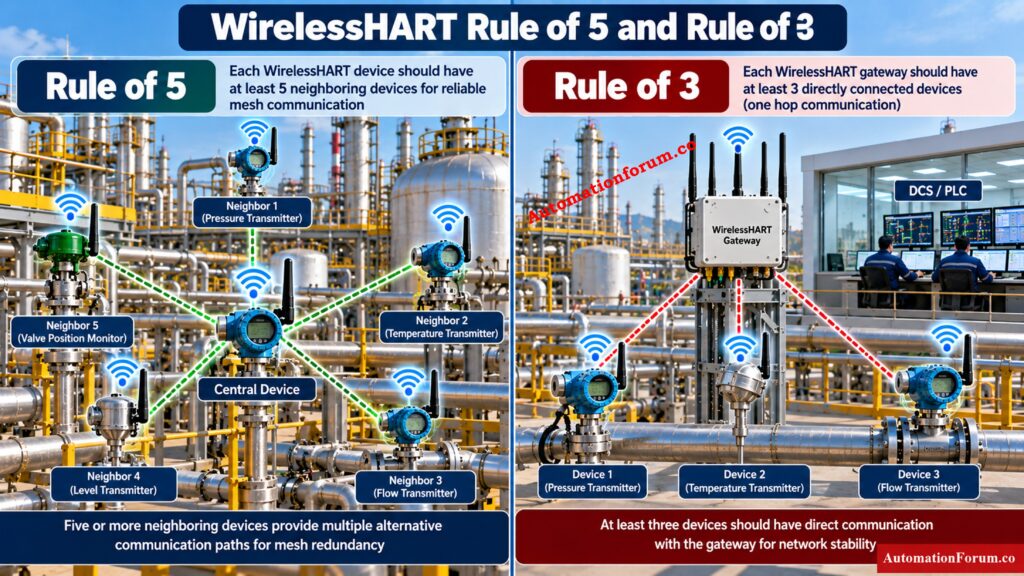
Two important planning concepts represented by the calculator are the Rule of 5 and Rule of 3.
What Is the WirelessHART Rule of 5?
According to the Rule of 5, each device should have at least five other wireless devices within range. This gives other paths via the mesh should one communication path break.
Master pressure transmitter HART calibration wiring before testing: Wiring Diagram for Pressure Transmitter Calibration in Workbench using HART
What Is the WirelessHART Rule of 3?
The Rule of 3 indicates that at least three devices should have a direct one hop communication path to the gateway. This helps reduce dependence on a single gateway path.
Why WirelessHART Mesh Neighbor Redundancy Matters
For example, if a group of transmitters is installed around a process vessel and several devices can communicate only with one neighboring device, the network has less routing diversity. Increasing suitable device distribution can improve the available routing alternatives.
The calculator explicitly presents these two rules as engineering planning checks.
Configure DCS HART parameters correctly and avoid costly mistakes: Best Practices for Configuring HART Parameters in DCS Software
WirelessHART RF Path Loss and Link Margin
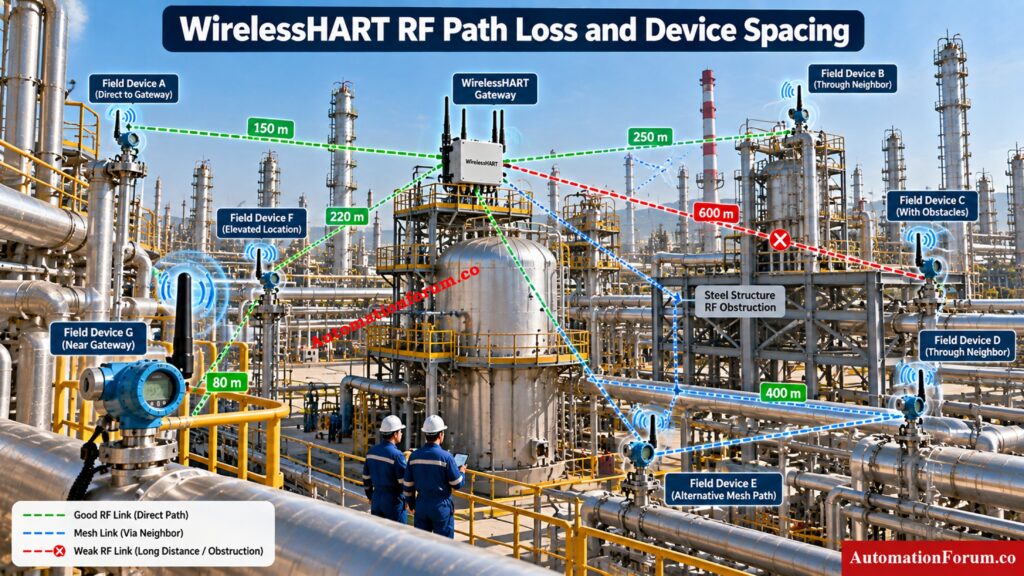
What Is WirelessHART RF Path Loss?
RF path loss represents the reduction in signal strength as the distance between communicating devices increases.
WirelessHART Path Loss Calculation
The calculator uses the following screening relationship:
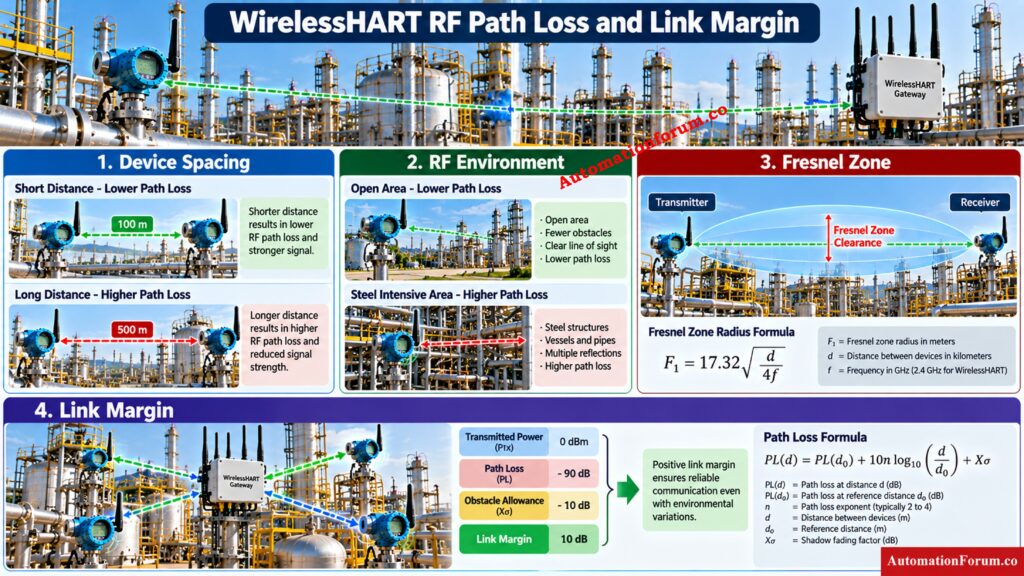
PL(d) = PL(d₀) + 10n log₁₀(d/d₀) + Xσ
WirelessHART Path Loss Exponent
The path loss exponent represents the RF environment. Open areas have a lower assumed value, while steel intensive and heavy concrete environments use higher values.
Understand the critical resistor requirement behind reliable HART communication: Why is a 250-Ohm Resistor Important for HART Communication?
WirelessHART Fresnel Zone Screening
The calculator also includes Fresnel zone screening:
F₁ = 17.32 √(d / 4f)
These calculations help engineers understand how device spacing and the surrounding environment can influence preliminary RF performance.
The calculator presents these calculations as screening methods and not as a replacement for detailed RF engineering.
Master every HART process variable engineers need to understand: Explained: The Four Main Process Variables (PV, SV, TV, QV) in HART Transmitters – Complete Guide for Instrument Engineers
Understanding the WirelessHART Network Planning Results
The tool calculates and outputs a number of key results.
- Recommended gateway count: This is the initial required for gateways depending on the load of devices, coverage of the site and redundancy.
- Direct gateway links: This shows the estimated number of devices that have direct communication links with the gateway.
- Estimated neighbors: This provides a preliminary indication of mesh neighbor diversity.
- Link margin: Link margin provides an indication of the available RF communication margin under the calculator assumptions.
- Reliability assessment: The tool compares estimated planning reliability with the selected reliability target.
- Mesh redundancy: This evaluates the estimated neighbor diversity against the planning target.
- Network latency: The calculator provides an estimated planning latency based on update rate and network loading.
- Battery life screening: For battery powered installations, the calculator provides a preliminary battery life estimate. Actual battery performance depends on the specific device and vendor configuration.
The calculator can return planning states such as PLANNING TARGET MET, REVIEW REQUIRED, or HIGH RISK LAYOUT. These should be treated as screening indications rather than formal project acceptance criteria.
Refer the below link for the Instrument Range Calculator | Calculate Span, Rangeability, Turndown Ratio & Calibration Range

Practical WirelessHART Network Planning Example
Consider a process area containing approximately 30 WirelessHART devices distributed across a 500 metre by 300 metre plant area.
- An engineer would first enter the device count and site dimensions. The next review would cover the RF environment, average device spacing, major obstacles, update rate, reliability target, and required redundancy.
- If devices are installed around vessels and pipe racks, the engineer should examine whether sufficient neighboring devices exist to support alternative routes.
- The engineer then needs to review the determined gateway count, direct gateway links, predicted neighbors, path loss, obstacle allowance, link margin, reliability, latency, and battery screening.
- Before installation, if the neighbor count is low, device placement should be evaluated. If the link margin is low, the engineer should evaluate spacing, elevation, antenna installation and physical impediments.
This process allows EPC and commissioning engineers to identify potential network concerns during engineering rather than discovering every issue during commissioning.
Stop grounding problems before they disrupt instrument signals: Where Should You Terminate Cable Shields in Instrumentation and Control Systems?
WirelessHART Network Components
- A typical WirelessHART architecture includes field devices, wireless adapters, a gateway, a Network Manager, and a Security Manager.
- Wireless field devices and adapters provide measurement and control connectivity.
- The gateway connects the wireless network with host systems such as a DCS or PLC.
- The Network Manager oversees routing, timetables, communication channels and network optimization.
- The Security Manager handles authentication, join keys, session keys, and security policies.
Diagnose PROFIBUS failures systematically before replacing expensive hardware: PROFIBUS Communication Failure Step by Step Diagnosis
WirelessHART TSMP and Network Reliability
WirelessHART uses Time Synchronized Mesh Protocol for coordinated wireless communication. The calculator describes scheduled 10 millisecond communication slots and frequency hopping across 15 channels.
Scheduled communication, mesh routing, alternative paths, and frequency hopping support reliable industrial wireless communication.
These mechanisms do not mean that every RF problem is eliminated. Actual network performance still depends on device installation, RF conditions, physical structures, interference, antenna characteristics, and project requirements.
Strengthen industrial systems by identifying cybersecurity threats early: Top Cybersecurity Threat Identification Methods Every Security Professional Should Know
WirelessHART Network Planning Best Practices
- Maintain adequate neighboring devices around important wireless instruments.
- Provide multiple communication paths wherever practical.
- Check gateway location before confirming field device locations.
- Take into account the height of the device, antenna direction and installation conditions.
- Steer clear of areas where large steel constructions entirely block useful RF pathways.
- Consider impact of vessels, pipe racks, buildings and moving equipment.
- Battery powered gadgets should be chosen considering the desired update rate.
- Verify the appropriate reliability goal and redundancy level.
- Conduct an RF site survey prior to final deployment.
- Employ the appropriate vendor planning tools to validate the initial design.
- Check actual equipment specs, antenna characteristics, hazardous area regulations and project needs.
- Integrate WirelessHART planning into the entire DCS, PLC, SIS and plant communication architecture.
Resolve PROFIBUS PA communication issues before they escalate: Profibus PA Communication Problems: Causes, Symptoms and Troubleshooting Guide
Common WirelessHART Network Planning Problems and Troubleshooting
- Low number of neighboring devices: Check spacing, elevation, physical impediments and suggested instrument positions of the devices.
- Poor link margin: Check RF environment, space, antenna placement and large structures between connecting devices.
- Insufficient gateway connectivity: Review gateway position and determine if other devices can provide direct communication pathways.
- Excessive device spacing: Consider if devices may be redistributed for better mesh connectivity.
- Heavy steel obstruction; Review if vessels, pipe racks, structures or equipment are blocking viable communication lines.
- High communication latency: Review the chosen update rate, gateway loading, number of devices and network design.
- Unexpected battery consumption: Check communication activities, device configuration, review update rate, RF circumstances and the actual device specs.
- Reliability below the target: Review neighbor availability, link margin, redundancy, gateway connectivity, and RF obstacles.
Restore remote IO communication without unnecessary PLC downtime: PLC Troubleshooting Remote IO Rack Communication Failure Complete Troubleshooting Guide for Industrial Automation Engineers
Limitations of the WirelessHART Network Planning Calculator
- The WirelessHART Network Planning Tool is a preliminary engineering screening tool. It should not be treated as a replacement for detailed RF engineering or vendor validation.
- Final deployment should consider an RF site survey, actual antenna characteristics, installation height, antenna orientation, transmit power, receiver sensitivity, cable and antenna losses where applicable, RF interference, physical plant structures, hazardous area requirements, project specifications, vendor planning software, and commissioning measurements.
- The calculator itself clearly states that it is not a substitute for RF site surveys, vendor planning software, actual antenna installation data, interference testing, certified device specifications, or project requirements.
Install WirelessHART devices correctly from field setup through commissioning: Step-by-Step Guide for Installing and Commissioning HART and WirelessHART Devices for Engineers and Technicians
Frequently Asked Questions About WirelessHART
How does WirelessHART work?
WirelessHART uses a secure wireless mesh network where field devices communicate with neighboring devices and a gateway.
The network uses scheduled communication, frequency hopping, and multiple communication paths for reliable industrial communication.
Calibrate pressure transmitters correctly using proven HART procedures: HART transmitter calibration procedure – For pressure transmitter
What is HART full form?
HART stands for Highway Addressable Remote Transducer.
It is a communication protocol used to exchange digital information with intelligent field instruments.
Master HART fundamentals before troubleshooting complex instrumentation networks: What is HART Protocol?
What is the architecture of a wireless mesh network?
A wireless mesh network provides several channels of communication amongst field devices instead of a single direct link.
WirelessHART uses this mesh approach to provide alternative routes between field devices and the gateway.
Can you explain the HART protocol?
HART is a hybrid communication protocol that allows digital communication to operate with traditional analog instrumentation signals.
It is commonly used for configuration, diagnostics, measurement data and device information.
What is the difference between 4/20mA and HART?
A 4 to 20 mA signal primarily represents the process measurement using an analog current signal.
HART adds digital communication over the same wiring, allowing additional instrument information and diagnostics.
What are the disadvantages of HART?
HART communication has limited data speed compared with many modern digital industrial communication protocols.
Its performance can also depend on loop wiring, signal conditions, device compatibility, and proper installation.
What is the difference between HART and Modbus?
HART commonly operates with field instrumentation and can use a 4 to 20 mA signal with digital communication.
Modbus is a digital communication protocol commonly used for communication between industrial devices and control systems.
Why do you need a 250 ohm resistor in HART protocol?
A 250 ohm resistor provides the required load resistance for developing the HART communication voltage across the current loop.
It is commonly used in a HART loop so the digital signal can be properly coupled to the instrumentation circuit.
What is a WirelessHART Network Planning Tool?
It is a preliminary engineering calculator used to assess WirelessHART device distribution, gateway requirements, RF conditions, mesh connectivity, redundancy, and network performance.
It allows engineers to detect potential network planning issues before detailed site inspection and deployment.
How many devices can a WirelessHART gateway support?
The calculator does a preliminary screening of the gateway load by the number of devices and the network planning conditions selected.
Actual gateway capacity depends on vendor, specs of the gateway and design of the project.
What is the Rule of 5 in WirelessHART?
The Rule of 5 says that any wireless device must have at least five surrounding devices within communication range.
This enables alternative mesh pathways in case the communication lines are unavailable.
What is the Rule of 3 in WirelessHART?
The Rule of 3 means there should be at least three devices that have a direct one hop communication channel to the gateway.
This minimizes the dependency on a unique communication path to the gateway.
How does device spacing affect WirelessHART communication?
Larger device spacing can increase RF path loss and restrict the number of surrounding devices that can be used.
Proper spacing ensures alternate pathways for communication and maintains mesh connectivity.
How do RF obstacles affect WirelessHART planning?
Vessels, pipe racks, steel structures, buildings and moving machinery can affect the RF connection between wireless devices.
These obstacles should be considered during preliminary planning and verified during site specific RF assessment.
Why is link margin important in WirelessHART?
Link margin indicates the available RF communication margin under the selected planning assumptions.
A suitable margin provides greater tolerance against signal loss and changing RF conditions.
Can the calculator replace a WirelessHART RF site survey?
No, the calculator is intended for preliminary network planning and engineering screening.
Final deployment should include site specific RF validation, vendor planning, installation review, and commissioning measurements.
Test your control valve troubleshooting knowledge with real scenarios: Closed-Loop Control Valve Troubleshooting: HART, Fieldbus and Diagnostics Skills Quiz
Conclusion: WirelessHART Network Planning for Process Automation
The WirelessHART Network Planning Tool provides instrumentation and automation engineers with a practical way to evaluate a proposed wireless network before detailed deployment.
By considering device quantity, site dimensions, RF environment, device spacing, gateway requirements, mesh redundancy, reliability, link margin, update rate, latency, and battery requirements, engineers can identify potential planning concerns early.
The calculator should be used as an engineering screening aid, followed by site specific RF assessment, vendor validation, actual installation review, and commissioning measurements.
Refer the below link for the Advanced HART Loop Calculator for Reliable 4 to 20 mA and HART Communication
