
- What Is a PLC Interface Converter?
- What Is a PLC Protocol Converter?
- What Is an Industrial Communication Gateway?
- PLC Interface Converter vs Protocol Converter vs Gateway: Key Differences
- Industrial Applications of PLC Communication Converters
- Modbus RTU Transmission Time Calculation for PLC Communication
- How to Select the Right PLC Communication Converter
- PLC Communication Troubleshooting During Commissioning
- Process Safety and Cybersecurity Considerations for Industrial Gateways
- Frequently Asked Questions About PLC Communication Converters
- Conclusion: Choosing the Right PLC Interface Converter, Protocol Converter or Gateway
Industrial automation systems often include equipment from several different manufacturers, installed at different dates, and employing a variety of communication methods. In a plant upgrade project, you may have an existing PLC that still communicates on an RS485 serial interface and a new SCADA system that needs to interact on Ethernet. In some other cases a variable frequency drive may be using Modbus RTU but expecting Modbus TCP from the control system.
You don’t always need to replace the entire control system. The problem can be solved with a suitable PLC interface converter, industrial protocol converter or industrial communication gateway, as long as the selected device supports the required interfaces and communication protocols.
They are sometimes referred to using similar nomenclature, although the functions are different . Knowing the difference between a PLC interface converter vs protocol converter vs gateway helps instrumentation engineers, PLC programmers, EPC engineers, commissioning teams and maintenance experts choose the right solution.
What Is a PLC Interface Converter?
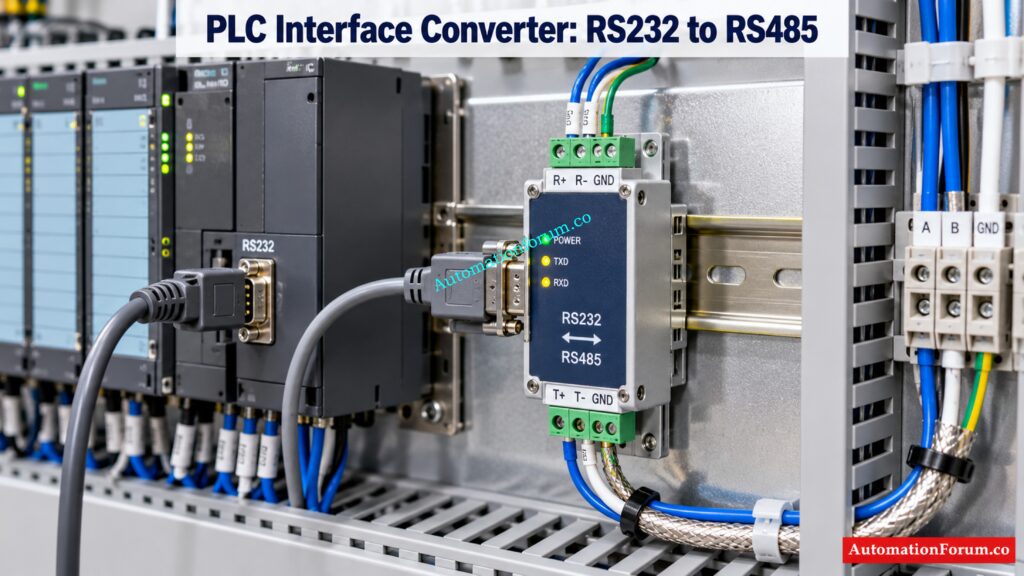
A PLC interface converter adapts the electrical interface or physical communication medium between two devices. It does not necessarily translate the communication protocol used by those devices.
For example, an RS232 to RS485 converter will allow equipment with an RS232 interface to interact via an RS485 interface, if their communication requirements are suitable. Similarly an Ethernet to fiber optic media converter alters the physical transmission medium but does not instantly translate the industrial protocol.
Typical applications include interfacing legacy PLCs, engineering access to serial devices and extending communication links in electrically loud production environments.
Advantages: Easy installation, compatibility with existing equipment, less interface replacement .
Limitations: A simple interface converter cannot fix incompatible application protocols, wrong register mapping or data representation.
Before installation, engineers should evaluate interface compatibility, transmission distance, electrical isolation, grounding, and shielding and termination requirements.
Refer the below link for the WirelessHART Network Planning Tool for Automation Engineers
What Is a PLC Protocol Converter?
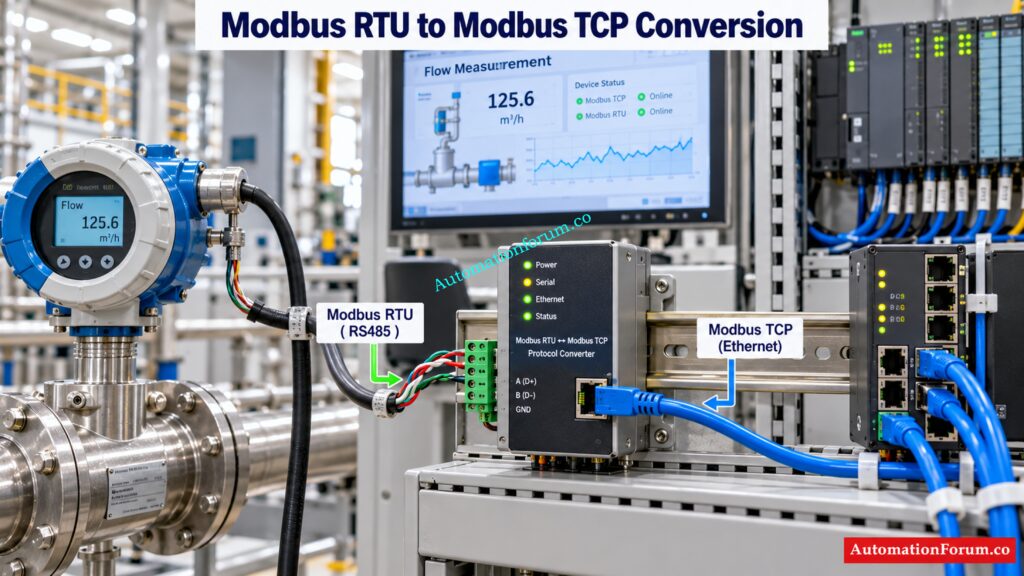
An n protocol converter is an industrial protocol converter that can translate communication between two supported protocols or protocol implementations. It may also understand the incoming message and display the information in the way the receiving system understands. It is not only a simple interface converter.
For example, a Modbus RTU to Modbus TCP converter can connect a serial Modbus device to an Ethernet based system. The converter must support the required communication roles and provide the necessary message handling and data access.
Industrial communication protocols commonly encountered in plants include Modbus RTU, Modbus TCP, PROFIBUS DP, PROFINET, EtherNet/IP, CANopen, and OPC UA where supported by the selected equipment.
Depending on the product, protocol conversion may include address mapping, data type handling, register mapping, and conversion between supported communication services. Not every converter supports every protocol combination or bidirectional data exchange.
Modbus RTU to Modbus TCP Converter Example
Consider a flow meter connected to a PLC through RS485 using Modbus RTU. A new SCADA application needs to retrieve the flow measurement through Modbus TCP.
The protocol converter can take serial requests (or poll the flow meter depending on the configuration) and return the required data over ethernet. Engineers have to define device addresses, register mapping, communication responsibilities, function codes, and data representation.
The exact configuration depends on whether the converter is a Modbus TCP server, Modbus RTU master or other supported combinations.
A protocol converter is appropriate when the main problem is communication incompatibility rather than a physical connection alone.
Fix Persistent Field Device Communication Issues With Proven Checks: Profibus PA Communication Problems: Causes, Symptoms and Troubleshooting Guide
What Is an Industrial Communication Gateway?
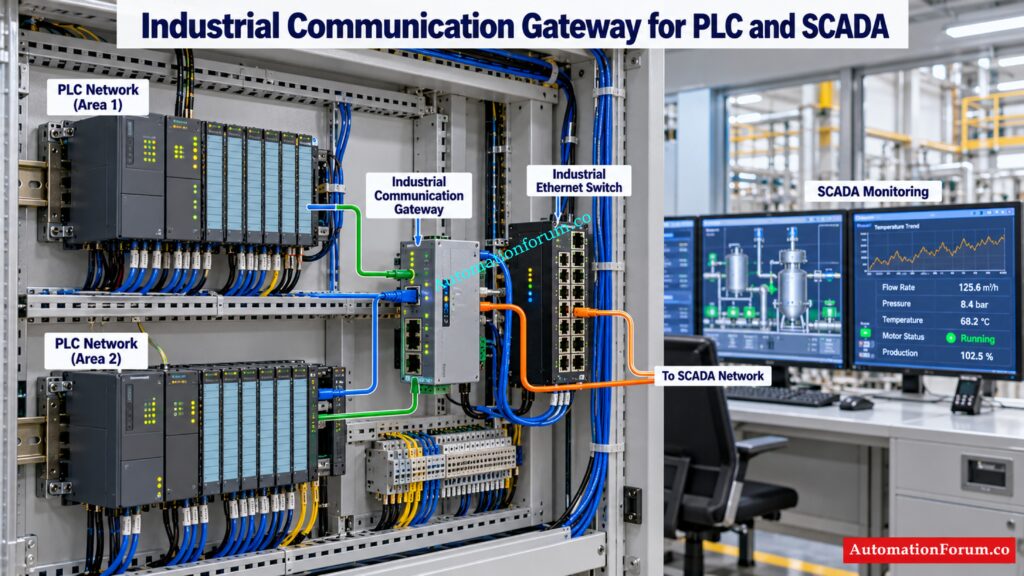
An industrial communication gateway connects devices, networks, automation systems, or higher level applications. Protocol translation may be one of its functions, but some gateways also support data aggregation, data normalization, buffering, diagnostics, and connectivity to industrial data platforms.
For example, a gateway may collect selected operating data from several PLCs and publish it to a monitoring application using OPC UA or MQTT, where supported.
In a plant modernization project, this can help deliver production information to a supervisory or industrial data system without replacing every existing PLC.
However, gateway capabilities vary considerably. Some devices provide simply a minimal protocol bridge, others support numerous interfaces, data processing, remote setup or other security controls.
Engineers need to verify supported protocols, device capacity, update rates, buffering behavior, control of access, and compliance with the intended SCADA or DCS architecture before making a selection.
Discover Which Field Communication Method Best Fits Your Application: Difference Between Fieldbus and HART Communication Protocols: Complete Comparison Guide for Process Automation Engineers
PLC Interface Converter vs Protocol Converter vs Gateway: Key Differences
| Comparison criteria | Interface converter | Protocol converter | Industrial gateway |
| Primary function | Adapts physical connections | Translates supported protocols | Integrates devices and systems |
| Physical interface conversion | Common | Product dependent | Product dependent |
| Protocol translation | Not normally | Main function | Often supported |
| Data mapping | Usually limited | Product dependent | May support advanced mapping |
| Different PLC brands | Only if interfaces and protocols already match | If protocols are compatible | If the required integration is supported |
| Multiple devices | Depends on interface design | Depends on product | Often supports broader integration |
| SCADA and DCS integration | Limited to compatible connections | Suitable for supported protocols | Suitable for broader data integration |
| Industrial IoT connectivity | Not normally | Product dependent | May support OPC UA or MQTT |
| Configuration complexity | Usually low | Moderate | Can be higher |
| Typical application | Serial or media adaptation | Protocol incompatibility | Network integration and data collection |
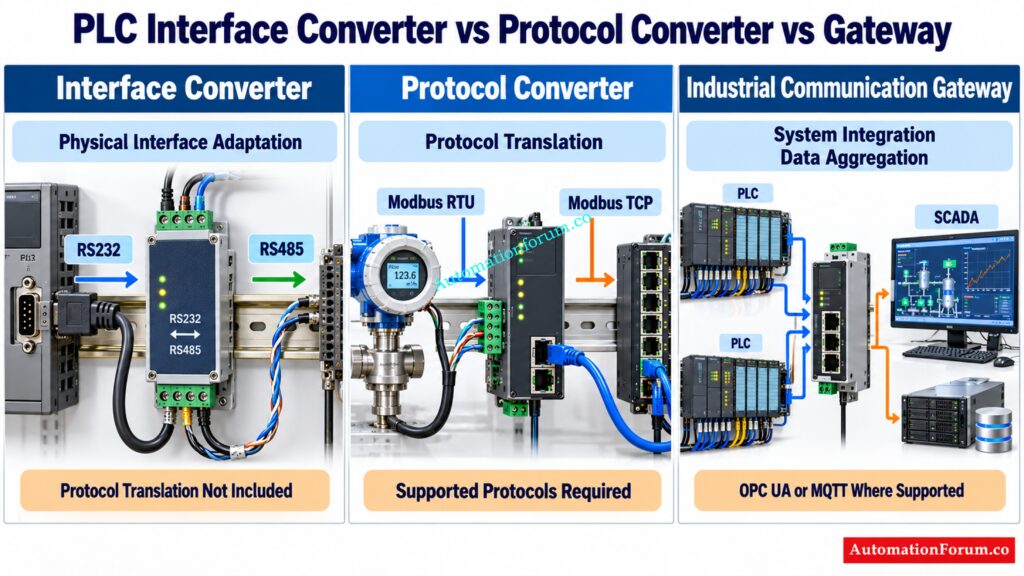
An interface converter adapts the physical or electrical link. A protocol converter transforms communications between supported protocols. An industrial gateway is a device used to connect devices or systems and may include protocol translation, data aggregation, or other integration capabilities. These capabilities will depend on the individual product and the three categories may overlap.
Prepare for Tough Industrial Networking Questions With Expert Answers: Industrial Communication Protocol Interview Questions and Answers
Industrial Applications of PLC Communication Converters
Legacy PLC Communication Using RS485
Problem: PLC is communicating with an instrument over RS485 and Modbus RTU.
Suitable solution: If only the electrical interface has to be adapted and both sides already provide compatible communication, use an interface converter. If the system you are receiving data on requires Modbus TCP, use a Modbus RTU to Modbus TCP converter.
Engineering checks: Serial parameters, Device address, Supported function codes, Register map, Master or Server role.
Master the Communication Technologies Driving Modern Industrial Automation Systems: Connecting the Industrial World: An Exploration of Communication Protocols in Automation and Instrumentation
PLC to SCADA Communication Integration
Problem: The legacy PLC is not able to communicate directly with the new SCADA system.
Solution: Choose a protocol converter or gateway that supports the two communication modalities you need.
Communication path: PLC to converter or gateway to SCADA .
Engineering checks: Poll intervals, IP addressing, register scaling, data quality indication, connection timeout management. A gateway can provide integration without changing the PLC software, however that is dependent on the existing PLC interface and the data access required.
Avoid Costly HART Communication Failures With This Critical Resistor Insight: Why is a 250-Ohm Resistor Important for HART Communication?
PROFIBUS to PROFINET Gateway Integration
Problem: There is a current PROFIBUS DP network that needs to be connected to a PROFINET automation system.
Recommended solution Use a compatible gateway or proxy device or a dedicated network interface.
Engineering checks: Check supported device profiles, network configuration, device description files, engineering software compatibility and the requisite cyclic or acyclic data interchange.
This is a protocol integration task, not simply an electrical conversion. Siemens documents the use of proxy functionality to integrate existing fieldbus systems into PROFINET.
Choose the Right Serial Interface Before Communication Problems Escalate: Difference between RS 232 & RS 485 Communication Protocol
Industrial Gateway for PLC Data Collection and Industrial IoT
Problem: The plant wants to collect motor current, operating hours, temperature, and production counts for a monitoring platform.
Suitable solution: Use a gateway which supports the PLC protocol and the needed output protocol like OPC UA or MQTT.
Explore Essential Industrial Networks Every Automation Engineer Must Understand: Industrial communication protocols
Modbus RTU Transmission Time Calculation for PLC Communication
Assume a PLC communicates with a field instrument using Modbus RTU with the following settings.
| Parameter | Value |
| Baud rate | 9600 bits per second |
| Data bits | 8 |
| Parity | None |
| Stop bits | 1 |
| Total transmitted data | 25 bytes |
Step 1: Calculate Bits Per Character
For the serial format 8 data bits, no parity, and 1 stop bit, each byte requires 10 transmitted bits, including the start bit.
Total bits per byte = 1 start bit + 8 data bits + 0 parity bits + 1 stop bit = 10 bits.
Step 2: Calculate Total Transmitted Bits
Assume the combined request and response contain 25 bytes.
Total transmitted bits = 25 × 10 = 250 bits.
Step 3: Calculate Serial Communication Transmission Time
Transmission time = Total transmitted bits ÷ Baud rate
Transmission time = 250 ÷ 9600 = 0.02604 seconds.
Convert seconds into milliseconds:
Transmission time = 0.02604 × 1000 = 26.04 milliseconds.
Result: The approximate transmission time for 25 bytes at 9600 bits per second is 26.04 milliseconds.
The computation is solely for the assumed time of serial transmission. Device processing, turnaround delays, inter frame timing and communication retries may increase the overall Modbus RTU transaction time. The actual size of the request and response must be computed based on the function code used and the message structure.
Important engineering note: 25 bytes is an illustrative assumption for the combined request and response. The real length of Modbus RTU messages depends on the function code, number of registers, addressing and message structure. Use the actual sizes of requests and responses when evaluating polling cycle time for a real PLC or gateway application.
Refer the below link for the SCADA Communication Problems and How to Fix Them – A Complete Troubleshooting Guide
How to Select the Right PLC Communication Converter
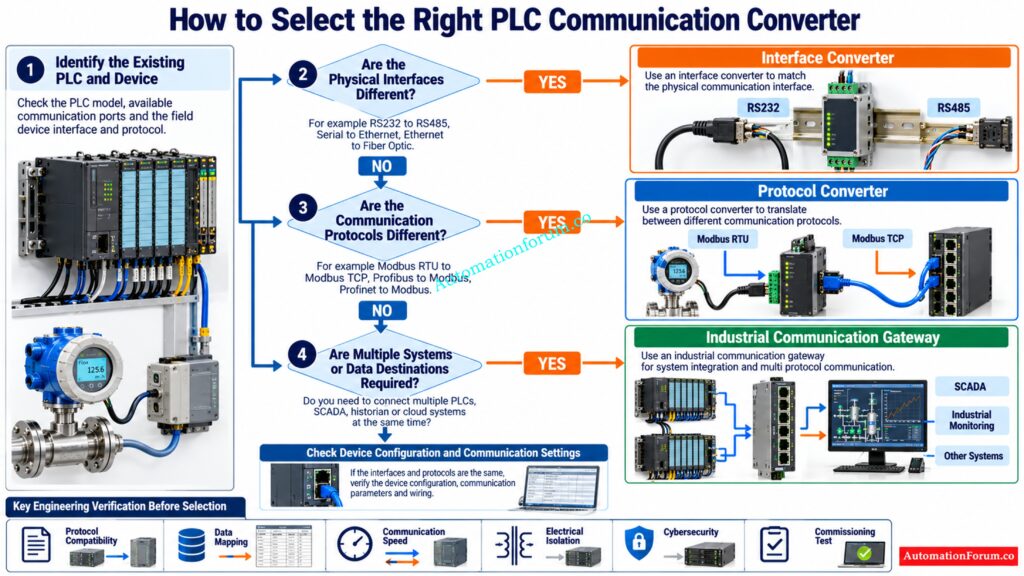
Before engineers select a PLC communication converter, it’s important to identify the actual communication problem, check for compatibility of the devices, and comprehend the data exchange necessary. Below are some procedures that can help you select the right solution for your industrial automation applications.
Identify Existing PLC Interfaces and Equipment
Determine the PLC, field instrument, variable frequency drive, SCADA system, or DCS. Check the manufacturer, model number, accessible communication modules and current network setup.
Identify the Communication Methods Powering Reliable SCADA Data Exchange: SCADA communication protocol
Verify Industrial Communication Protocols
Now look at the interfaces accessible on each of the two devices, be they RS232, RS485, Ethernet or fiber optic. If the protocols are already compatible but the physical connections are different, then an interface converter may be required.
Determine Interface Conversion or Protocol Translation Requirements
Identify the protocols supported by both devices such as Modbus RTU, Modbus TCP, PROFIBUS DP, PROFINET, or EtherNet/IP. Remember that just because two devices use the same physical interface, they cannot necessarily directly communicate with each other.
Select an interface converter for adapting the physical connection, a protocol converter to enable communication between supported protocols, or an industrial gateway for more system integration and data collecting.
Check Communication Roles and Data Mapping
Check master/slave or client/server roles as appropriate. Also verify register addresses, data types, byte order, word order, scaling factors and engineering units to ensure that the data is interpreted appropriately by the receiving system.
Simplify PLC Migration and Avoid Expensive Automation Upgrade Mistakes: PLC Conversion Tools: Popular PLC Migration Tools for Automation Engineers
Evaluate Communication Speed and Data Update Rates
Take into account the number of connected devices, data points, communication speed, timing of polling, and required update rates. Verify that the selected converter or gateway can handle the volume of communication anticipated.
Verify Electrical and Environmental Requirements
Check the power supply, electrical isolation, grounding, shielding, electromagnetic compatibility, operating temperature and enclosure protection. Follow manufacturer’s installation guidelines; especially in electrically loud factory areas.
Eliminate Startup Delays by Solving Critical Loop Check Issues: Common Instrument Loop Check Problems During Startup
Check Cybersecurity and Manufacturer Support
Network integration: Check access control, network segmentation, firmware support, and configuration backup options. Check whether the manufacturer supports the desired protocol combination and has the relevant technical documentation.
Test PLC Communication Before Commissioning
Test communication compatibility, accuracy of data, update rate, timeout handling and recovery after interruption of communication. Document the final setup to facilitate future maintenance and troubleshooting.
Practical recommendation: Choose the device according to the real communication requirement and not by its product name. Check the entire communication channel prior to commissioning, and check the manufacturer’s specs.
Protect Industrial Control Networks Against Emerging Cybersecurity Threats: Top Companies in Industrial Cyber Security: Best OT Security Vendors for Industrial Automation
PLC Communication Troubleshooting During Commissioning
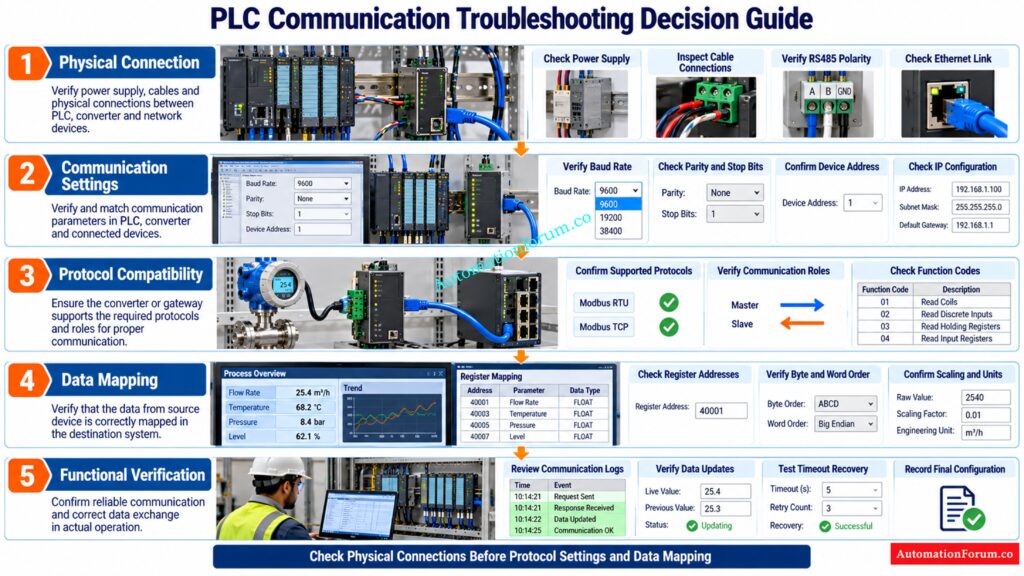
| Symptom | Likely cause | Recommended action |
| No serial communication | Incorrect baud rate, parity, stop bits, or device address | Verify serial settings at both ends |
| Intermittent RS485 communication | Incorrect polarity, termination, shielding, or grounding | Inspect wiring and termination according to the device manual |
| Ethernet connection fails | Incorrect IP address or subnet | Check network settings and link indicators |
| Device responds with errors | Unsupported function code or communication role mismatch | Verify protocol support and client or server configuration |
| Values are incorrect | Wrong register mapping, byte order, word order, or scaling | Compare raw data against the instrument documentation |
| SCADA values stop updating | Excessive polling, timeout, gateway disconnection, or device failure | Review communication logs, diagnostics, and polling intervals |
| Communication fails intermittently | Power supply problems or electromagnetic interference | Check supply voltage, cable routing, shielding, and grounding |
Start with physical connection checks, then verify protocol configuration, and finally investigate data mapping. Use communication status indicators, diagnostic logs, configuration files, and network captures where appropriate. Change one parameter at a time and record the result.
Decode Modbus Data Storage Before Register Mapping Errors Occur: Understanding the Four Types of Registers in Modbus Protocol
Process Safety and Cybersecurity Considerations for Industrial Gateways
A converter or gateway can introduce another dependency into the control system. Loss of communications, old data, unexpected write orders or delayed updates might impact plant operation.
For important applications check the needed reaction time, the failure behavior, the system architecture and the repercussions of communication loss. A general purpose gateway must not be assumed suitable for a safety instrumented function without appropriate certification and engineering against the applicable safety requirements.
Use network segmentation, least privilege access, controlled remote access, configuration backups, and formal change management. Test the complete communication path before commissioning.
Restore HART Device Detection With These Practical Diagnostic Checks: HART Communicator Unable to Detect Instrument: Complete Troubleshooting Guide (No Device Found Error)
Frequently Asked Questions About PLC Communication Converters
What is another name for a protocol converter?
A protocol converter is also called a protocol translator or industrial communication converter. It enables devices using different supported communication protocols to exchange data.
What is the difference between an interface and a protocol?
An interface describes how devices are connected physically or electrically, while a protocol describes how data is exchanged. For example, RS485 is an electrical interface while Modbus RTU is a communication protocol.
Discover the Essential Hardware Behind Reliable Remote Plant Connectivity: Understanding the Devices Used in Remote Industrial Networking in Process Industries
What are the different types of converters?
Some of the common industrial converters include interface converter, serial converter, media converter and protocol converter. The right kind depends on whether the demand is about physical connections, transmission media or communication protocols.
What are the different types of communication protocols used in PLC?
Some of the common PLC communication protocols are Modbus RTU, Modbus TCP, PROFINET, PROFIBUS DP, EtherNet/IP and CANopen. Supported protocols depend on PLC type, installed configuration and communication modules.
What are the four types of protocols?
There is no universally accepted classification of industrial communication protocols into exactly four types. Common PLC communication protocols include Modbus RTU, Modbus TCP, PROFIBUS DP, PROFINET, and EtherNet/IP, depending on the application.
Can an RS485 converter change Modbus RTU into Modbus TCP?
A basic RS485 converter cannot do this translation because it simply modifies the physical interface. You require a converter specifically developed for Modbus RTU to Modbus TCP communication.
Can a protocol converter connect Siemens and Allen Bradley PLCs?
Yes, if the converter supports the communication protocols, data mapping, and communication roles required by the two PLCs. Always check that it is compatible with the exact PLC models and their settings.
Prevent Network Architecture Mistakes That Threaten SCADA and DCS Reliability: Network Switches requirements in “SCADA” and “DCS” Architecture
When is an industrial gateway better than a protocol converter?
An industrial gateway is often the better choice when there is a need to integrate more than one device or network, aggregated data, or link to SCADA and industrial IoT platforms. The selected gateway must have the essential features.
Can a gateway connect a PLC to SCADA without modifying the PLC program?
Yes, some use cases where the gateway can access the current PLC data and expose it via a protocol supported by SCADA. The result depends on the available communication interfaces, data access rights and system setup.
Does a protocol converter introduce communication delay?
Yes, protocol conversion, message processing, polling and buffering might add additional communication time. The real delay depends on device, protocol setup, load on network and attached equipment.
What information is required before selecting a PLC communication converter?
Define physical interfaces, communication protocols, device roles, data points, update rates and environmental conditions Check data mapping, electrical isolation, cybersecurity requirements and manufacturer compatibility documents.
Can one gateway communicate with multiple PLCs using different protocols?
Yes, some industrial gateways support numerous PLCs with various communication protocols. – Check supported protocol combinations, connection restrictions, data capacity and desired communication performance before selecting.
Find the Real Causes Behind Unexpected PLC Input Failures: Top Causes of PLC Input Signal Failure in Plants
Conclusion: Choosing the Right PLC Interface Converter, Protocol Converter or Gateway
To find the right solution for a PLC interface converter vs. protocol converter vs. gateway application, you must first understand the real communication problem. Physical interface mismatch has a different solution than incompatible protocols or demand to collect data from numerous automation systems.
The right device can help you integrate legacy equipment, improve interoperability, avoid wasteful hardware replacement, and promote plant modernization without costly system modifications.
The ideal strategy for instrumentation and automation engineers is to review the manufacturer documentation, establish protocol and interface compatibility, calculate communication requirements, consider safety and cybersecurity implications and test the whole setup prior to commissioning.
Refer the below link for the PLC Troubleshooting Remote IO Rack Communication Failure Complete Troubleshooting Guide for Industrial Automation Engineers
