
- Introduction to Control Valve Hunting in AUTO Mode
- Why Control Valve Hunts Only in AUTO Mode
- Common Causes of Control Valve Hunting in AUTO Mode
- How to Troubleshoot a Control Valve That Hunts in AUTO
- Diagnostic Signature of Control Valve Hunting
- Practical Field Tips for Diagnosing Control Valve Hunting
- Best Practices to Prevent Control Valve Hunting
- Control Valve Hunting Troubleshooting Table
- Final Thoughts on Control Valve Hunting and Loop Stability
- Frequently Asked Questions About Control Valve Hunting
- What causes a control valve to hunt?
- What is hunting in control valves?
- Which valve works automatically?
- What are the failure modes of control valves?
- How to know if a control valve is bad?
- What are the three types of control valves?
- Why does a control valve hunt only in AUTO mode?
- How can I identify valve stiction?
- Can incorrect PID tuning damage a control valve?
- How do I check if the actuator is causing hunting?
- Should I retune the PID controller before inspecting the valve?
Introduction to Control Valve Hunting in AUTO Mode
Why This Problem Is Common in Process Industries
A control valve that works smoothly in Manual mode but starts hunting after switching to Automatic mode is a common problem in process industries. Many engineers immediately suspect the valve, but in most cases the real issue lies in the complete control loop. Automatic operation results from the interaction of the controller, process dynamics, valve performance and instrumentation.
Discover Hidden Reasons Behind Persistent Control Valve Instability Today: What are the main causes of control valve hunting?
Why the Entire Control Loop Should Be Investigated
In Manual mode operator changes the valve position directly. Many loop faults are invisible as the PID controller does not continuously fix. In the AUTO mode the controller takes over, and even small errors can cause repeated valve movement, unstable process values and poor loop performance.
Understanding why Control Valve Hunts in AUTO but Runs Smoothly in MANUAL helps maintenance and instrumentation engineers solve the root cause instead of replacing healthy equipment unnecessarily.
Challenge Your Skills With Real World Valve Hunting Questions: Control Valve Hunting Troubleshooting – Advanced MCQ Quiz
Why Control Valve Hunts Only in AUTO Mode
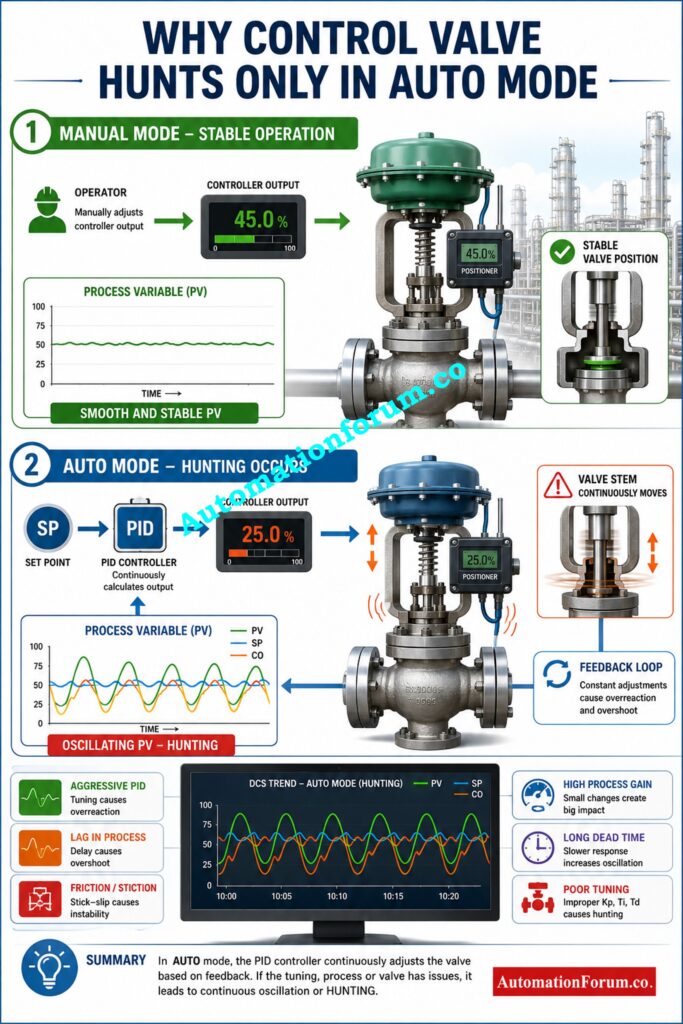
Difference Between MANUAL and AUTO Control
Manual and Automatic operation are fundamentally different.
In Manual mode, the operator changes the controller output only when needed. The valve will move to the required position and hold there until moved again. There are no automatic continuos corrections and the process often appears stable.
Master Critical Safety Concepts Every Process Engineer Must Understand: Process Safety vs Functional Safety: Key Differences, SIS, SIF, SIL & IEC 61511 Guide
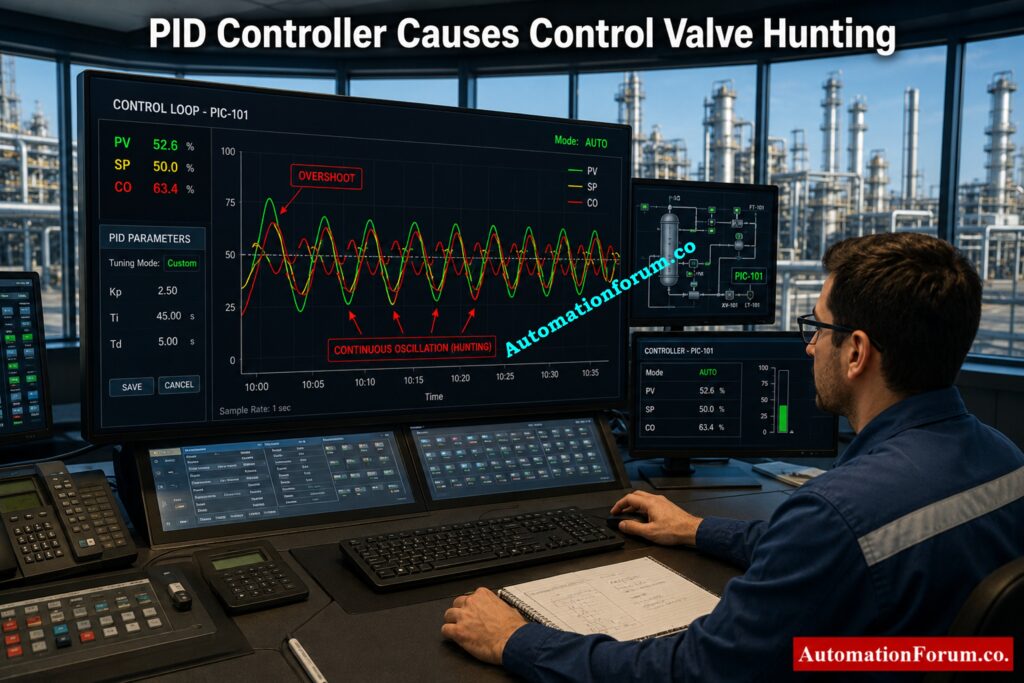
How PID Control Exposes Hidden Loop Problems
In Automatic mode the PID controller is continually comparing the Process Variable (PV) to the Set Point (SP). In case of any deviation, the output of the controller is varied to minimize the error. These constant corrections cause hunting and are unstable if the control loop has tuning problems, valve friction, excessive dead time, or mechanical faults.
This is why a valve which is excellent in Manual mode could start oscillating as soon as you go to AUTO.
Refer the below link for the Control Valve Hunting Due to PID Controller: Causes, Effects, Root Analysis and Complete Troubleshooting
https://automationforum.co/control-valve-hunting-due-to-pid-controller/
Common Causes of Control Valve Hunting in AUTO Mode
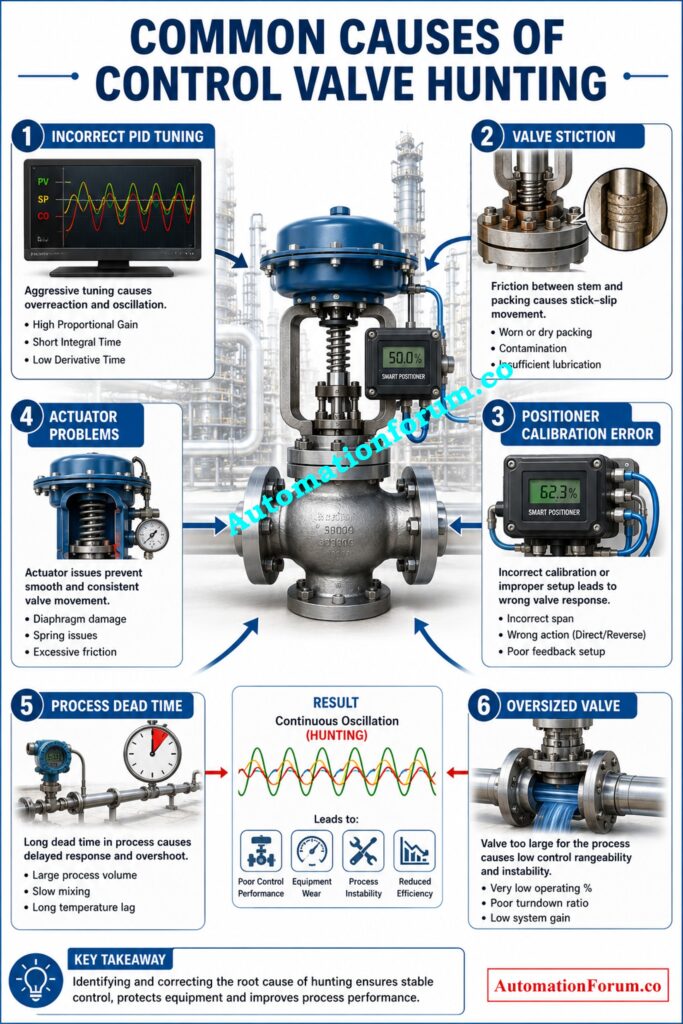
Incorrect PID Tuning Causes Continuous Oscillation
- If the proportional gain is set too high, the controller will respond strongly to modest process failures. The process is not changed smoothly but changes rapidly, causing continuous movement of the valves.
- If the integral action is too large, the problem may get worse. The controller continues to apply correction until the process reacts. When the delayed response arrives, the controller has already passed the set point, creating oscillations about the set point.
- Sometimes the derivative action is configured wrongly and the process noise can affect the controller output.
- A well tuned PID controller provides smooth corrections without excessive movement.
Avoid These Common Instrument Failures That Trigger Plant Shutdowns: What Causes 80% of Instrument Failures in Industry? Top 10 Causes and Prevention Methods
Control Valve Stiction and Stick Slip Behavior
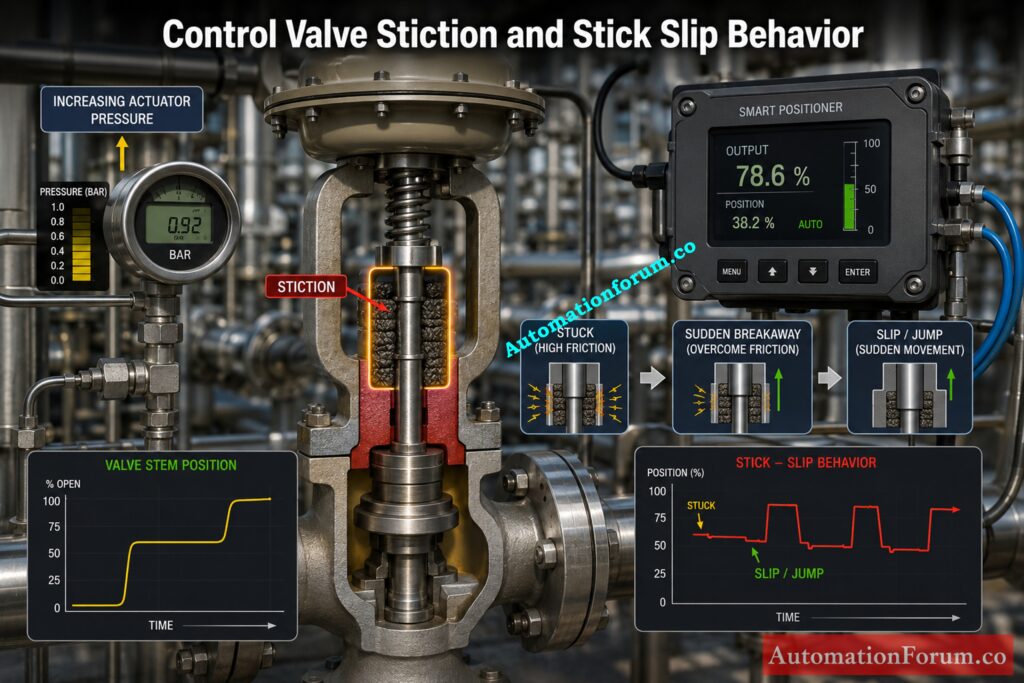
- Valve stiction is another major cause of hunting.
- Stiction occurs when internal parts or the valve packing itself creates sufficient friction to prohibit free movement. The controller output progressively increases, yet the valve does not move instantly . When the force reaches a certain level, the valve snaps abruptly to a new position.
- This repetitive sticking and sudden motion is known as stick slip behavior.
- In Automatic mode the controller is always trying to fix little faults and thus makes stiction more apparent. The valve keeps sticking, jumping and overshooting the desired position, causing continuous oscillations.
- Stiction is caused by mechanical wear, tight packing, worn valve components or insufficient lubri-cation.
Find Hidden Leakage Before It Causes Major Production Losses: Control Valve Passing Even When Fully Closed: Causes, Symptoms, Troubleshooting and Solutions
Positioner and Actuator Problems That Cause Hunting
- Mechanical faults in the valve assembly may also cause unstable control.
- If a positioner is not calibrated correctly, it may not position the valve correctly. With wrong feedback the controller keeps on doing unneeded corrections.
- Low instrument air pressure results in degraded actuator performance and sluggish reaction of the valve.
- Backlash and movement errors due to worn connections.
- Because of deadband and hysteresis, the valve does not respond consistently to tiny changes in controller output.
- Faulty feedback systems confusing the positioner can also cause erratic valve travel.
- Even if the PID tuning is correct, these mechanical issues can still produce hunting during Automatic operation.
Refer the below link for the Control Valve Hunting due to Valve Positioner: Troubleshooting
Process Dynamics and Dead Time Effects
- Sometimes the valve is healthy and the controller is properly tuned, but the process itself creates instability.
- Processes with long dead time respond slowly after valve movement. The controller continues making corrections before the process has time to react.
- Different tuning parameters may be required at different operating conditions due to changes in process gain.
- extremely little changes in valve position cause extremely large variations in flow in large control valves, therefore making precise control impossible.
- Nonlinear valve features can potentially cause unstable control, especially near totally closed or fully open valve states.
- Changing production rates, varying loads on processes, and changing operating conditions further contribute to loop instability.
Simplify Complex Split Range Configurations With Accurate Engineering Calculations: Split Range Calculator for Control Valves in PLC and DCS Systems
How to Troubleshoot a Control Valve That Hunts in AUTO
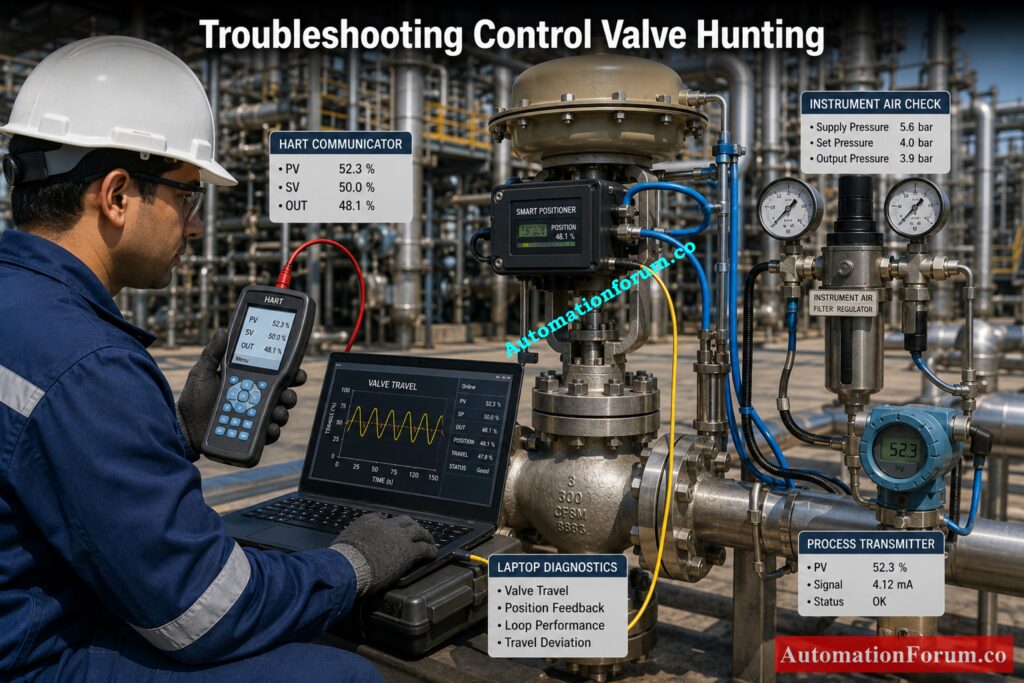
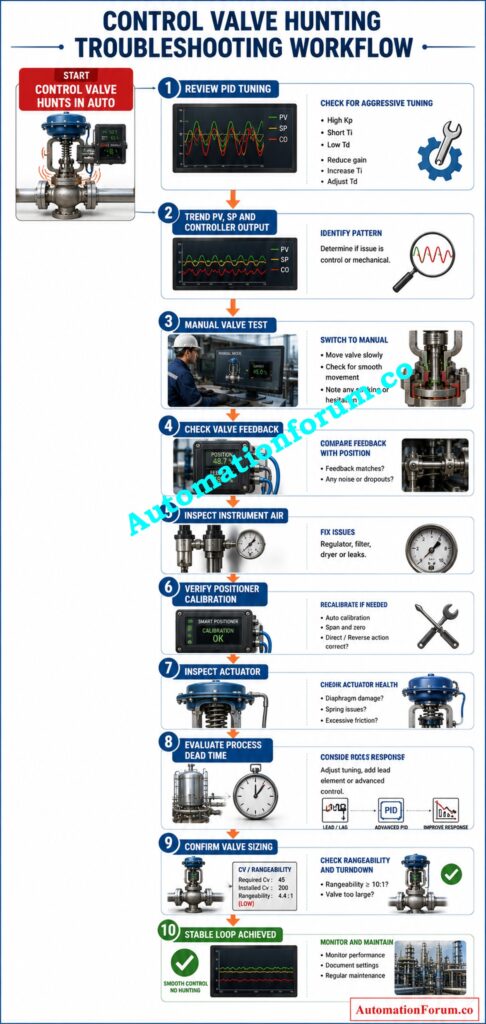
Try the following simple troubleshooting measures before changing any controller settings.
- Check your current PID tuning parameters.
- Simultaneously trend the process variable, the set point and the controller output.
- Manually operate the valve with small changes in output.
- Check to see if the valve moves easily or if it sticks before moving.
- Feedback accuracy of check valve travel.
- Check of instrument air pressure, it is stable.
- Verify positioner calibration.
- Check the actuator for wear, leakage or mechanical damage.
- Assess process dead time and overall process response.
- Make sure the control valve is sized properly for the application..
Systematic troubleshooting normally will discover the real cause more faster than trial and error PID changes.
Eliminate Remote IO Failures Before They Shut Down Operations: PLC Troubleshooting Remote IO Rack Communication Failure Complete Guide for Industrial Automation Engineers
Diagnostic Signature of Control Valve Hunting
- By analysing trends you might often find useful information.
- It is not bad PID tuning if the controller output has a sawtooth pattern with a square wave like Process Variable, but valve stiction.
- The controller output is progressively increasing, but the valve is stuck. When enough force builds up , the valve snaps over , and the process value jumps . Then the cycle repeats.
- Recognizing this pattern helps engineers distinguish between mechanical valve problems and controller tuning issues.
Practical Field Tips for Diagnosing Control Valve Hunting
- Place the loop in Manual mode and make several small output changes, such as one or two percent at a time.
- A healthy valve responds immediately and smoothly to every change.
- If the valve lags, jumps suddenly, or requires several output changes to move, the problem is probably stiction, packing friction, actuator wear, or positioner problems.
- This simple field test often saves many hours of unnecessary PID tuning.
Compare Industry Leading Valve Sizing Tools Before Making Decisions: Top 10 Control Valve Sizing Software Used in Process Industries
Best Practices to Prevent Control Valve Hunting
- Routine maintenance greatly reduces hunting problems.
- Check valve packing periodically and adjust as necessary.
- Ensure you have clean, stable instrument air pressure.
- Calibrate valve positioners as part of routine maintenance.
- Diagnostics of track valves to detect increasing friction before performance degradation.
- Review PID tuning when large process changes are made
- Check valve sizing during project design and during plant modifications.
- Trend key control loops on a regular basis to identify developing problems before they impact production.
Control Valve Hunting Troubleshooting Table
| Symptom | Possible Cause | Recommended Action |
| Hunting only in AUTO | Incorrect PID tuning | Review and optimize PID parameters |
| Slow valve response | Valve stiction | Inspect packing and internal valve friction |
| Valve jumps suddenly | Stick slip behavior | Repair or service the valve assembly |
| Unstable valve position | Positioner calibration error | Recalibrate the valve positioner |
| Poor actuator movement | Low instrument air pressure | Restore proper air supply pressure |
| Continuous oscillation | Long process dead time | Retune the controller considering process dynamics |
| Large flow changes | Oversized control valve | Review valve sizing and control characteristics |
Can You Solve These Expert Level Valve Hunting Problems?: Advanced Control Valve Hunting Troubleshooting Quiz – Test Your Control Loop Expertise
Final Thoughts on Control Valve Hunting and Loop Stability
If a Control Valve is Hunting in AUTO but Runs Smoothly in MANUAL, it is not always the valve that is the major problem. In Automatic, it shows the inter-relationship between PID controller, valve mechanics, actuator, positioner and process dynamics that is not visible in Manual operation.
Always check for stiction, actuator difficulties, positioner calibration and instrument air problems on the valve, before changing PID tuning. After mechanical problems are fixed, tune the controller settings to match the actual process behavior. This systematic method leads to improved loop stability, longer valve life, and reliable process control.
Frequently Asked Questions About Control Valve Hunting
What causes a control valve to hunt?
Control valve hunting is often caused by improper PID tuning, valve stiction, actuator or positioner issues or process dead time. These factors cause the valve to overcorrect constantly and not find a stable position.
What is hunting in control valves?
Hunting is the repeated oscillation of a control valve around its required position instead of remaining steady. It results in unstable process control and unnecessary valve movement.
Which valve works automatically?
A control valve is built to operate automatically, responding to inputs from a PID controller, PLC or DCS. It constantly alters the process flow, pressure, level or temperature in order to maintain the specified set point.
What are the failure modes of control valves?
Typical failure modes of control valves are fail open, fail closed and fail in situ with the failure mode depending on the design of the actuator and safety standards. Other typical failure conditions include mechanical wear, stiction, air supply failure and positioner failures.
How to know if a control valve is bad?
A bad control valve might cause hunting, sluggish response, leaking, too much vibration, sticking or not reaching the desired position. Valve checks, travel feedback, and manual stroke testing can help confirm the problem.
What are the three types of control valves?
The three most common types of control valves are: globe valves, butterfly valves and ball valves. Each type is chosen depending on process conditions, required control accuracy, pressure drop and flow characteristics.
Why does a control valve hunt only in AUTO mode?
When in AUTO mode, the PID controller modulates the valve position to maintain the setpoint. Repeated oscillations might be observed due to any tuning error, valve friction or process delay.
How can I identify valve stiction?
Valve stiction is typically identified by a lag in valve movement followed by abrupt jumps. Trend data often exhibits a sawtooth controller output and a square wave like Process Variable.
Can incorrect PID tuning damage a control valve?
Poorly tuned control valves can generate excessive valve movement, which in turn increases wear on the actuator, packing, and internal parts of the valve and reduces control performance.
How do I check if the actuator is causing hunting?
Set loop to Manual mode, and make small output adjustments. Slow, jerky or inconsistent movement usually indicates problems with actuators or mechanical problems.
Should I retune the PID controller before inspecting the valve?
Nope. Always check valve condition, positioner calibration, actuator performance and instrument air supply first. Do not change the PID parameters until any mechanical problems have been corrected.
Refer the below link for the Control Valve Flow Characteristic Calculator: Linear, Equal Percentage, and Quick Opening Guide
