
- Introduction to Signal-to-Noise Ratio in Instrumentation
- What Is Signal-to-Noise Ratio (SNR)?
- SNR Formula and Engineering Interpretation
- SNR Calculator Input Parameters
- SNR Calculator Output Interpretation
- How to Use the SNR Calculator
- Where SNR Is Used in Industrial Applications
- When to Use This SNR Calculator
- Who Uses This SNR Calculation Tool
- Practical Ways to Improve Signal to Noise Ratio
- Example SNR Calculation with Explanation
- Case Study Noisy Signal in Control Loop
- Benefits of Using SNR Calculator
- Frequently Asked Questions About SNR Calculator
Signal-to-Noise Ratio (SNR) Calculator
This calculator helps instrument engineers assess the integrity of a signal in the presence of noise. It provides Signal-to-Noise Ratio (SNR) calculations based on input parameters, offering insights into signal quality and compliance with common industry standards for reliable measurement and control systems.
Results
Introduction to Signal-to-Noise Ratio in Instrumentation
Signal-to-noise ratio, or SNR, is a practical way to measure how clean a signal is when compared with unwanted noise. In instrumentation and control systems, this matters because real plant signals rarely arrive in perfect condition. Transmitters, sensors, PLC inputs, and wireless devices can all pick up interference from nearby equipment, poor grounding, cable routing, vibration, or switching noise. When SNR is poor, the result is unstable readings, lower measurement confidence, false alarms, and poor control loop behavior. When SNR is strong, the signal is easier for the control system to interpret and the measurement becomes more dependable.
This calculator is designed for real industrial use, helping engineers quickly evaluate signal quality using either voltage-based or power-based inputs, while also showing the linear ratio, quality level, and calculation method.
What Is Signal-to-Noise Ratio (SNR)?
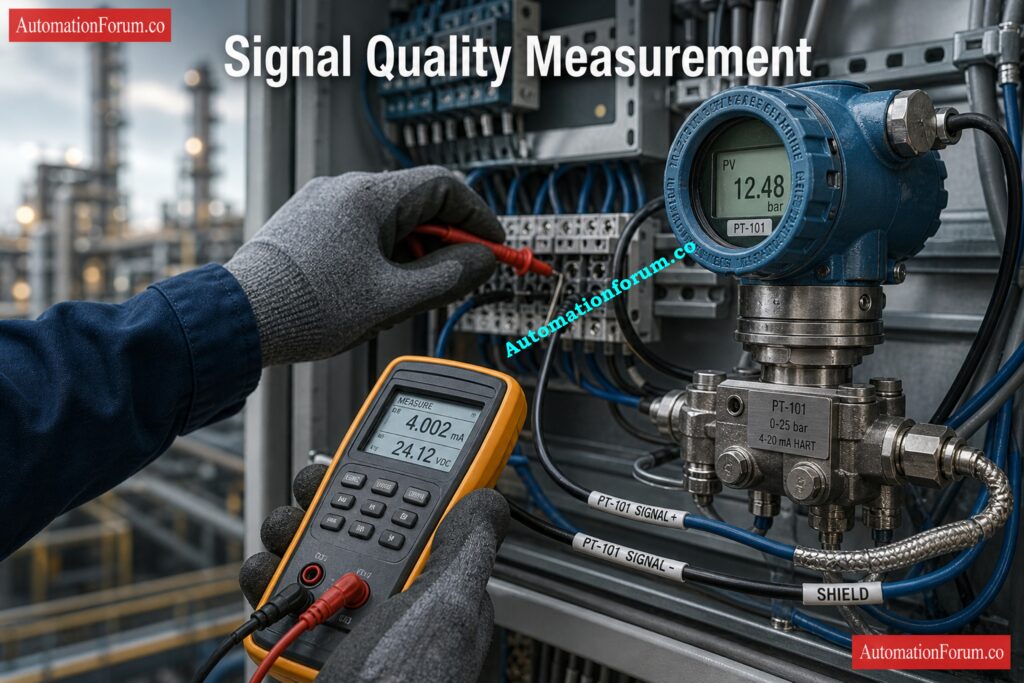
Signal vs Noise in Industrial Systems
SNR is the ratio of the useful signal to the noise that isn’t useful. In basic engineering terms, it tells you how much stronger the real measurement is than the noise around it. Electrical noise can affect the output of a pressure transmitter, the signal from a thermocouple, the reading from a vibration probe, or an analog feedback signal.
Simulate 4-20 mA Signals Like a Pro: How to simulate 4-20ma signal with Loop Calibrator ?
Why Higher SNR Means Better Signal Clarity
If the signal is much stronger than the noise, the reading is clear and steady. The measurement can drift, jump, or lose reliability if the noise gets too loud. if the noise gets too loud.If the signal is much stronger than the noise, the reading is clear and steady. The measurement can drift, jump, or lose reliability if the noise gets too loud.
Crack Hard AO Faults with Advanced Checks: Troubleshooting Analog Output Signals in PLC Loops – Advanced Scenario-Based Quiz for Process Industries
Why SNR Is Expressed in dB
In industrial practice, SNR is usually expressed in dB because decibel form makes it easier to compare signal quality across systems and signal ranges. Higher SNR means better clarity. Lower SNR means the measurement is more vulnerable to interference. The calculator also shows the linear ratio so engineers can understand the result in direct signal-to-noise terms, not only in decibels.
Verify Live 4-20 mA Signals Fast: Live Signal Verification 4 to 20 mA Loop Standard Operating Procedure (SOP)
SNR Formula and Engineering Interpretation
The calculator supports both of the standard SNR relationships used in engineering practice:
Voltage-Based SNR Formula
SNR(dB) = 20 × log10(Signal / Noise)
Power-Based SNR Formula
SNR(dB) = 10 × log10(Signal / Noise)
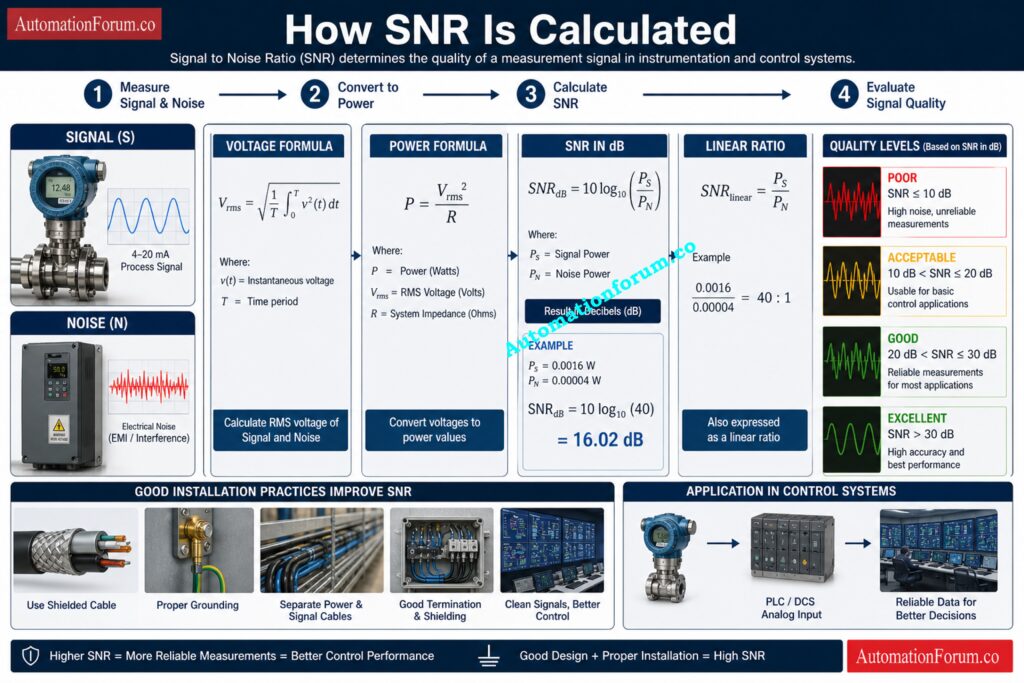
When to Use Voltage vs Power Method
The difference matters because voltage and power do not behave the same way. When the input values are voltages such as V, mV, or µV, the calculator uses the voltage method. When the values are power quantities such as W, mW, or µW, it uses the power method.
Why Signal and Noise Must Belong to the Same Unit Family
That is why the unit family must remain consistent. Mixing voltage with power would produce an invalid comparison, so the calculator prevents that and shows a warning if the families do not match.
Spot Dead Zero Problems Before Shutdown: Beyond Zero: Understanding the Dead Zero Problem in Industrial Analog Signals
SNR Calculator Input Parameters
Signal Value
This is the useful measurement value you want to evaluate. In practice, it may be the output of a sensor, transmitter, signal conditioner, or process interface. The actual number depends on the application, but the main goal is to judge whether the signal is strong enough compared with the noise. The calculator accepts a numeric value and updates the results immediately once calculation is performed.
Signal Unit
The signal unit determines whether the calculation follows the voltage family or the power family. The calculator includes:
- Volts (V)
- Millivolts (mV)
- Microvolts (µV)
- Watts (W)
- Milliwatts (mW)
- Microwatts (µW)
Voltage units are common in instrumentation and analog measurement circuits. Power units are used in systems where power-level comparison is the correct engineering basis. The calculator keeps these separate so the result remains technically valid.
Challenge Your Instrument Signal Type Knowledge: Quiz on Instrumentation Signal Types
Noise Value
Noise is the unwanted disturbance affecting the signal. In field systems, it may come from EMI, grounding problems, poor shielding, electrical switching, VFDs, cable interference, or mechanical vibration. The calculator requires this value to be greater than zero because SNR is a ratio and cannot be calculated against zero noise.
Choose the Right IS Loop Isolation: Understanding Zener vs Galvanic Isolation in IS Loops for 4 to 20 mA Systems
Noise Unit
The noise unit must match the same family as the signal unit. That means voltage with voltage or power with power. This is important because a correct SNR calculation depends on comparing like with like. The calculator checks this condition before producing a result.
Refer the below link for How to do troubleshooting of a 4-20mA loop?
Impedance (R)
The impedance field is included for circuit context and engineering documentation. It is useful when reviewing a measurement path or reporting the test condition, but it is not required for the ratio calculation itself when the signal and noise are already entered in the same unit family.
Why Engineers Keep Trusting 4-20 mA: Why Engineers Still Trust the 4-20 mA Signal in Automation Systems
SNR Calculator Output Interpretation
The calculator displays four useful outputs: SNR in dB, linear ratio, quality, and method. These are arranged to help engineers move quickly from a mathematical result to a practical decision.
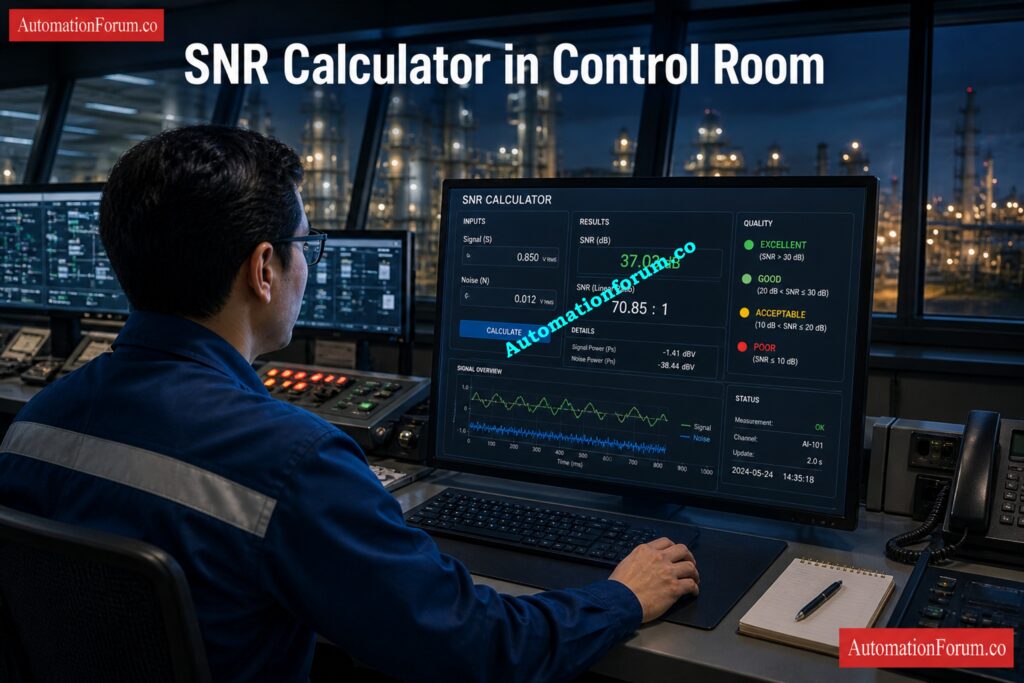
SNR in dB
This is the main result. The calculator classifies SNR into practical engineering bands:
- Below 10 dB: Poor
- 10 to 20 dB: Acceptable
- 20 to 30 dB: Good
- 30 dB and above: Excellent
These ranges are useful during commissioning, troubleshooting, and signal validation because they show whether the signal is likely to perform reliably or whether noise reduction work is needed.
Linear Ratio
The linear ratio tells you how many times stronger the signal is than the noise. For instance, a value of 100:1 means that the signal is 100 times stronger than the noise.. Engineers often use this form when discussing field conditions with maintenance teams or when documenting test results in a simple and direct way.
Signal Quality Indicator
This output gives a practical quality judgment instead of leaving the engineer with only a number. It helps answer a simple question: is the signal good enough for plant operation, or does the system need attention? A poor rating often suggests wiring, shielding, or grounding issues. A good or excellent rating usually indicates a stable and usable measurement.
Hunt Loop Faults Faster with Calibrators: 4-20 mA Loop Troubleshooting with Loop Calibrators : A Practical Guide
Calculation Method
The method field confirms whether the calculator used the voltage or power formula. This is important because the same signal-to-noise relationship must be interpreted using the correct formula for the selected unit family.
Track Down PLC DO Failures Quickly: Troubleshooting PLC Digital Output Signals – Advanced Industrial Quiz for Automation Engineers
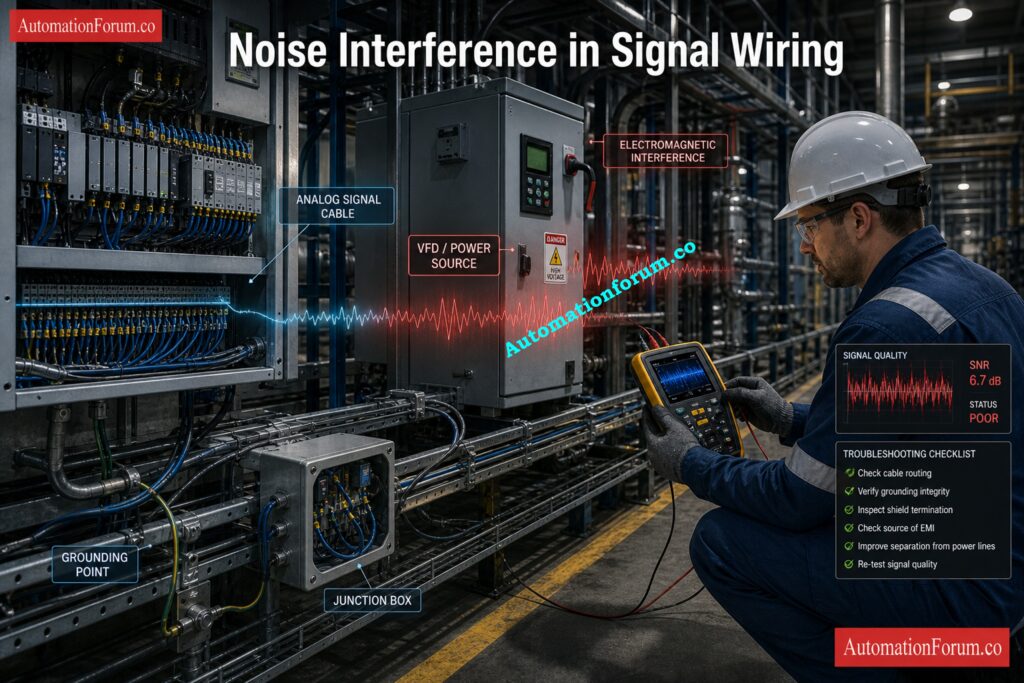
How to Use the SNR Calculator
Use the calculator in this order:
- Enter the signal value that represents the useful measurement.
- Select the signal unit so the calculator knows whether it is working with voltage or power.
- Enter the noise value that is affecting the signal.
- Select the noise unit and keep it in the same unit family as the signal.
- Enter the impedance if you want additional circuit context for documentation.
- Click Calculate SNR.
- Read the outputs for SNR in dB, linear ratio, quality, and calculation method.
The calculator is designed to be practical for field and engineering use. If the signal or noise value is invalid, or if the units do not belong to the same family, it does not produce a misleading result. Instead, it shows a clear message so the user can correct the input before relying on the output. That makes it useful for troubleshooting, commissioning, and signal validation work.
Test Your DO Troubleshooting Skill Hard: Advanced Quiz on Practical Troubleshooting of DO Signals in PLC for Process Industries
Where SNR Is Used in Industrial Applications
SNR is relevant across many automation and instrumentation applications. It is especially important in:
- 4–20 mA and analog signal loops
- PLC and DCS input processing
- Wireless instrumentation
- Vibration monitoring
- RTD and thermocouple circuits
- Control valve feedback systems
In these systems, a weak signal or excessive noise can reduce measurement confidence, increase instability, and create unnecessary troubleshooting time. In clean installations, a good SNR supports better process visibility and smoother control performance.
When to Use This SNR Calculator
During EPC Design
You can use this calculator at different points in the life cycle of an instrumentation or control system. Engineers can use it during EPC design to check if a signal will stay strong before it is put in.
During Commissioning
It helps make sure that field signals are stable and not affected by too much electrical noise during commissioning.
During Signal Validation
The tool is very useful for troubleshooting and validating signals. If the reading from a transmitter changes, a PLC analog input becomes unstable, or a control loop acts in an unexpected way, the calculator can help figure out if the problem is with the process or if it is caused by EMI, grounding issues, or signal interference.
Decode Span, LRV, and URV Values: Transmitter Calibration Span, LRV and URV Value Calculator from Measured 4 to 20 mA
During FAT and SAT
It is also helpful during:
- Factory Acceptance Testing (FAT) to make sure the signal is strong before shipping
- Site Acceptance Testing (SAT) to make sure the installation in the field is correct
- Things to do when fixing noisy measurement loops
- Upgrades or changes to the system that require a new check of signal quality
Engineers can quickly decide if the measurement is good for reliable monitoring and control operation because the calculator gives them both SNR in dB and a way to understand signal quality.
Protect 4-20 mA and RS485 Signals: Twisted Pair Cable in Industrial Signal Transmission: The Essential Guide for 4-20 mA and RS 485 Systems
![Signal-to-Noise Ratio (SNR) Calculator for Instrumentation and Control Systems
<!DOCTYPE html>
<html lang="en">
<head>
<meta charset="UTF-8" />
<meta name="viewport" content="width=device-width, initial-scale=1.0" />
<title>Signal-to-Noise Ratio (SNR) Calculator | AutomationForum.co</title>
<meta name="description" content="Free Signal-to-Noise Ratio (SNR) calculator with signal and noise units, impedance input, and live engineering results." />
<meta name="keywords" content="SNR calculator, signal to noise ratio calculator, automation engineering calculator, signal unit, noise unit" />
<meta name="robots" content="index, follow" />
<meta name="theme-color" content="#ffffff" />
<style>
:root{
--bg:#f6f9ff;
--card:#ffffff;
--text:#132238;
--muted:#5c6b7d;
--line:#d9e3f2;
--blue:#2f63e0;
--blue-dark:#2047a8;
--orange:#f59e0b;
--green:#16a34a;
--purple:#7c3aed;
--shadow:0 10px 28px rgba(31, 55, 108, .10);
--radius:12px;
}
*{box-sizing:border-box}
body{
margin:0;
background:var(--bg);
color:var(--text);
font-family:Arial, Helvetica, sans-serif;
}
.wrap{
width:min(1100px, calc(100% - 30px));
margin:18px auto 34px;
}
.topline{
display:flex;
align-items:center;
gap:10px;
margin-bottom:4px;
}
.brand{
color:#2b55c8;
font-size:14px;
font-weight:700;
letter-spacing:.01em;
margin:0 0 8px;
}
.title{
display:flex;
align-items:center;
gap:10px;
margin:0;
font-size:31px;
line-height:1.15;
color:#1f3f92;
font-weight:800;
letter-spacing:-0.02em;
}
.title-icon{
width:26px;
height:26px;
flex:0 0 auto;
display:inline-block;
}
.rule{
height:2px;
background:#2248b5;
margin:10px 0 8px;
}
.intro{
margin:0;
color:#2f3a4a;
font-size:15px;
line-height:1.65;
}
.card{
background:var(--card);
border:1px solid var(--line);
border-radius:var(--radius);
box-shadow:var(--shadow);
padding:14px 14px 15px;
margin-top:18px;
}
.section-title{
margin:0 0 10px;
color:var(--blue);
font-size:22px;
line-height:1.2;
font-weight:800;
padding-bottom:10px;
border-bottom:1px dashed #d8e0ef;
}
.grid{
display:grid;
grid-template-columns:1fr 1fr;
gap:16px;
}
.field label{
display:flex;
align-items:center;
gap:8px;
font-size:14px;
font-weight:700;
color:#1f2b3a;
margin-bottom:8px;
}
.info{
width:15px;
height:15px;
border-radius:50%;
background:#2248b5;
color:#fff;
display:inline-flex;
align-items:center;
justify-content:center;
font-size:11px;
font-weight:700;
cursor:help;
position:relative;
flex:0 0 auto;
}
.info:hover::after{
content:attr(data-tip);
position:absolute;
left:50%;
transform:translateX(-50%);
bottom:130%;
width:max-content;
max-width:300px;
background:#1f2b3a;
color:#fff;
padding:8px 10px;
border-radius:8px;
font-size:12px;
line-height:1.45;
box-shadow:0 8px 18px rgba(0,0,0,.2);
z-index:10;
white-space:normal;
}
input, select{
width:100%;
border:1px solid var(--line);
border-radius:6px;
background:#fff;
color:var(--text);
font-size:15px;
padding:12px 12px;
outline:none;
transition:.2s ease;
}
input:focus, select:focus{
border-color:#6d8df0;
box-shadow:0 0 0 3px rgba(47,99,224,.10);
}
.help{
margin-top:6px;
color:var(--muted);
font-size:12px;
line-height:1.45;
}
.span-2{grid-column:1 / -1}
.btn-row{
display:grid;
grid-template-columns:1fr 1fr;
gap:8px;
margin-top:16px;
}
button{
border:none;
border-radius:6px;
padding:14px 14px;
font-size:15px;
font-weight:800;
cursor:pointer;
transition:.2s ease;
color:#fff;
display:flex;
align-items:center;
justify-content:center;
gap:8px;
}
.btn-calc{
background:linear-gradient(180deg, var(--blue-dark), var(--blue));
}
.btn-calc:hover{filter:brightness(1.03)}
.btn-reset{
background:linear-gradient(180deg, #f3a00b, var(--orange));
}
.btn-reset:hover{filter:brightness(1.03)}
.results{
margin-top:18px;
padding-top:12px;
}
.results-head{
display:flex;
align-items:center;
gap:10px;
margin-bottom:12px;
}
.results-title{
margin:0;
color:#2b55c8;
font-size:22px;
font-weight:800;
line-height:1.2;
}
.results-icon{
width:22px;
height:22px;
flex:0 0 auto;
}
.results-grid{
display:grid;
grid-template-columns:repeat(4, 1fr);
gap:10px;
}
.result-box{
border:1px solid var(--line);
border-radius:10px;
padding:14px 12px 12px;
background:#fbfdff;
min-height:154px;
display:flex;
flex-direction:column;
align-items:center;
justify-content:center;
text-align:center;
}
.result-label{
font-size:14px;
font-weight:800;
margin-bottom:10px;
color:#1f2b3a;
}
.result-icon{
width:34px;
height:34px;
margin-bottom:8px;
}
.result-value{
font-size:34px;
line-height:1.05;
font-weight:900;
color:#1547c6;
word-break:break-word;
}
.result-sub{
margin-top:6px;
font-size:14px;
color:#374151;
font-weight:700;
}
.result-sub.green{color:var(--green)}
.result-sub.purple{color:var(--purple)}
.result-sub.blue{color:#1547c6}
.message{
margin-top:12px;
border:1px solid var(--line);
background:#f7faff;
border-radius:10px;
padding:12px 14px;
font-size:14px;
line-height:1.55;
color:#243345;
display:flex;
align-items:flex-start;
gap:10px;
}
.message .ok{
width:22px;
height:22px;
flex:0 0 auto;
margin-top:1px;
}
.meta-row{
margin-top:14px;
border:1px solid var(--line);
border-radius:10px;
overflow:hidden;
display:grid;
grid-template-columns:1fr 1fr 1fr;
background:#fff;
}
.meta-item{
padding:12px 14px;
text-align:center;
border-right:1px solid var(--line);
}
.meta-item:last-child{border-right:none}
.meta-top{
display:flex;
align-items:center;
justify-content:center;
gap:8px;
font-size:13px;
color:#334155;
margin-bottom:6px;
font-weight:700;
}
.meta-val{
font-size:15px;
color:#1547c6;
font-weight:900;
}
.footer-note{
margin-top:12px;
border:1px solid var(--line);
border-radius:10px;
padding:12px 14px;
background:#f8fbff;
font-size:14px;
line-height:1.6;
color:#24405f;
}
.formula-note{
margin-top:10px;
font-size:13px;
color:var(--muted);
}
@media (max-width: 900px){
.results-grid{grid-template-columns:repeat(2, 1fr)}
.meta-row{grid-template-columns:1fr}
.meta-item{border-right:none;border-bottom:1px solid var(--line)}
.meta-item:last-child{border-bottom:none}
}
@media (max-width: 720px){
.grid,
.btn-row{
grid-template-columns:1fr;
}
.title{
font-size:24px;
align-items:flex-start;
}
.section-title,
.results-title{
font-size:20px;
}
.result-box{
min-height:140px;
}
.result-value{
font-size:30px;
}
.wrap{
width:min(100% - 16px, 1100px);
}
.card{
padding:12px;
}
}
</style>
</head>
<body>
<div class="wrap">
<div class="header">
<div class="brand">AutomationForum.co · Free Automation Engineering Calculator</div>
<h1 class="title">
<svg class="title-icon" viewBox="0 0 24 24" fill="none" aria-hidden="true">
<rect x="2" y="13" width="3" height="9" rx="1.2" fill="#2f63e0"/>
<rect x="7" y="9" width="3" height="13" rx="1.2" fill="#2f63e0"/>
<rect x="12" y="5" width="3" height="17" rx="1.2" fill="#2f63e0"/>
<rect x="17" y="1" width="3" height="21" rx="1.2" fill="#2f63e0"/>
</svg>
Signal-to-Noise Ratio (SNR) Calculator
</h1>
<div class="rule"></div>
<p class="intro">
This calculator helps instrument engineers assess the integrity of a signal in the presence of noise.
It provides Signal-to-Noise Ratio (SNR) calculations based on input parameters, offering insights into signal quality
and compliance with common industry standards for reliable measurement and control systems.
</p>
</div>
<div class="card">
<div class="section-title">Signal Parameters</div>
<div class="grid">
<div class="field">
<label for="signalValue">
Signal Value
<span class="info" data-tip="Enter the signal amplitude or power value depending on the selected unit family.">i</span>
</label>
<input type="number" id="signalValue" value="1.0" step="any" />
</div>
<div class="field">
<label for="signalUnit">Signal Unit</label>
<select id="signalUnit">
<option value="V" selected>Volts (V)</option>
<option value="mV">Millivolts (mV)</option>
<option value="uV">Microvolts (µV)</option>
<option value="W">Watts (W)</option>
<option value="mW">Milliwatts (mW)</option>
<option value="uW">Microwatts (µW)</option>
</select>
</div>
</div>
</div>
<div class="card">
<div class="section-title">Noise Parameters</div>
<div class="grid">
<div class="field">
<label for="noiseValue">
Noise Value
<span class="info" data-tip="Noise must be greater than zero. Use the same unit family as the signal for correct ratio calculation.">i</span>
</label>
<input type="number" id="noiseValue" value="0.001" step="any" />
</div>
<div class="field">
<label for="noiseUnit">Noise Unit</label>
<select id="noiseUnit">
<option value="V" selected>Volts (V)</option>
<option value="mV">Millivolts (mV)</option>
<option value="uV">Microvolts (µV)</option>
<option value="W">Watts (W)</option>
<option value="mW">Milliwatts (mW)</option>
<option value="uW">Microwatts (µW)</option>
</select>
</div>
</div>
</div>
<div class="card">
<div class="section-title">Circuit Impedance</div>
<div class="grid">
<div class="field span-2">
<label for="impedance">
Impedance (R)
<span class="info" data-tip="Reference impedance used for documentation. It is not required for ratio math when signal and noise are in the same unit family.">i</span>
</label>
<input type="number" id="impedance" value="50.2" step="any" />
<div class="help">Useful for field documentation and circuit context.</div>
</div>
</div>
</div>
<div class="btn-row">
<button class="btn-calc" type="button" id="calcBtn">
<span>🧮</span>
<span>Calculate SNR</span>
</button>
<button class="btn-reset" type="button" id="resetBtn">
<span>🔄</span>
<span>Reset Form</span>
</button>
</div>
<div class="card results">
<div class="results-head">
<svg class="results-icon" viewBox="0 0 24 24" fill="none" aria-hidden="true">
<rect x="2" y="13" width="3" height="9" rx="1.2" fill="#2f63e0"/>
<rect x="7" y="9" width="3" height="13" rx="1.2" fill="#2f63e0"/>
<rect x="12" y="5" width="3" height="17" rx="1.2" fill="#2f63e0"/>
<rect x="17" y="1" width="3" height="21" rx="1.2" fill="#2f63e0"/>
</svg>
<h2 class="results-title">Results</h2>
</div>
<div class="results-grid">
<div class="result-box">
<div class="result-label">SNR (dB)</div>
<svg class="result-icon" viewBox="0 0 48 48" fill="none" aria-hidden="true">
<path d="M7 28h7l5-14 7 24 5-10h10" stroke="#2f63e0" stroke-width="3" stroke-linecap="round" stroke-linejoin="round"/>
</svg>
<div class="result-value" id="snrDb">0.00</div>
<div class="result-sub blue">dB</div>
</div>
<div class="result-box">
<div class="result-label">Linear Ratio</div>
<svg class="result-icon" viewBox="0 0 48 48" fill="none" aria-hidden="true">
<rect x="9" y="26" width="5" height="13" rx="1.5" stroke="#16a34a" stroke-width="3"/>
<rect x="20" y="18" width="5" height="21" rx="1.5" stroke="#16a34a" stroke-width="3"/>
<rect x="31" y="10" width="5" height="29" rx="1.5" stroke="#16a34a" stroke-width="3"/>
</svg>
<div class="result-value" id="linearRatio" style="color:#16a34a;">0.00</div>
<div class="result-sub green">:1</div>
</div>
<div class="result-box">
<div class="result-label">Quality</div>
<svg class="result-icon" viewBox="0 0 48 48" fill="none" aria-hidden="true">
<circle cx="24" cy="17" r="8" stroke="#7c3aed" stroke-width="3"/>
<path d="M19 30l5 4 5-4v10l-5-3-5 3V30z" stroke="#7c3aed" stroke-width="3" stroke-linejoin="round"/>
<path d="M24 12l1.8 3.7 4.2.6-3 2.9.7 4.1-3.7-2-3.7 2 .7-4.1-3-2.9 4.2-.6L24 12z" fill="#7c3aed"/>
</svg>
<div class="result-value" id="quality" style="color:#7c3aed;">Not calculated</div>
<div class="result-sub purple" id="qualitySub">Enter values</div>
</div>
<div class="result-box">
<div class="result-label">Method</div>
<svg class="result-icon" viewBox="0 0 48 48" fill="none" aria-hidden="true">
<circle cx="24" cy="24" r="18" stroke="#2f63e0" stroke-width="3"/>
<path d="M8 24h8l3-8 5 16 4-8h12" stroke="#2f63e0" stroke-width="3" stroke-linecap="round" stroke-linejoin="round"/>
</svg>
<div class="result-value" id="method" style="color:#1547c6;">Voltage</div>
<div class="result-sub blue" id="methodSub">20 log₁₀(S / N)</div>
</div>
</div>
<div class="message" id="message">
<svg class="ok" viewBox="0 0 24 24" fill="none" aria-hidden="true">
<circle cx="12" cy="12" r="10" fill="#16a34a"/>
<path d="M7.5 12.5l3 3 6-7" stroke="#fff" stroke-width="2.2" stroke-linecap="round" stroke-linejoin="round"/>
</svg>
<div>Enter signal and noise values, then click Calculate SNR.</div>
</div>
<div class="meta-row">
<div class="meta-item">
<div class="meta-top">Ω Impedance (R)</div>
<div class="meta-val" id="impedanceOut">50.2 Ω</div>
</div>
<div class="meta-item">
<div class="meta-top">ⓘ Signal Unit</div>
<div class="meta-val" id="signalUnitOut">Volts (V)</div>
</div>
<div class="meta-item">
<div class="meta-top">ⓘ Noise Unit</div>
<div class="meta-val" id="noiseUnitOut">Volts (V)</div>
</div>
</div>
<div class="footer-note">
<strong>Voltage formula:</strong> SNR (dB) = 20 × log₁₀(Signal / Noise)
|
<strong>Power formula:</strong> SNR (dB) = 10 × log₁₀(Signal / Noise)
</div>
<div class="formula-note">
Voltage units: V, mV, µV. Power units: W, mW, µW.
</div>
</div>
</div>
<script>
const signalValue = document.getElementById('signalValue');
const signalUnit = document.getElementById('signalUnit');
const noiseValue = document.getElementById('noiseValue');
const noiseUnit = document.getElementById('noiseUnit');
const impedance = document.getElementById('impedance');
const snrDb = document.getElementById('snrDb');
const linearRatio = document.getElementById('linearRatio');
const quality = document.getElementById('quality');
const qualitySub = document.getElementById('qualitySub');
const method = document.getElementById('method');
const methodSub = document.getElementById('methodSub');
const message = document.getElementById('message');
const impedanceOut = document.getElementById('impedanceOut');
const signalUnitOut = document.getElementById('signalUnitOut');
const noiseUnitOut = document.getElementById('noiseUnitOut');
const calcBtn = document.getElementById('calcBtn');
const resetBtn = document.getElementById('resetBtn');
function unitFactor(unit) {
return {
V: 1,
mV: 1e-3,
uV: 1e-6,
W: 1,
mW: 1e-3,
uW: 1e-6
}[unit] || 1;
}
function isVoltageUnit(unit) {
return ['V', 'mV', 'uV'].includes(unit);
}
function isPowerUnit(unit) {
return ['W', 'mW', 'uW'].includes(unit);
}
function unitLabel(unit) {
const labels = {
V: 'Volts (V)',
mV: 'Millivolts (mV)',
uV: 'Microvolts (µV)',
W: 'Watts (W)',
mW: 'Milliwatts (mW)',
uW: 'Microwatts (µW)'
};
return labels[unit] || unit;
}
function qualityLabel(db) {
if (db < 10) return 'Poor';
if (db < 20) return 'Acceptable';
if (db < 30) return 'Good';
return 'Excellent';
}
function qualityMessage(db) {
if (db < 10) return 'The signal quality is poor. Noise dominates the measurement.';
if (db < 20) return 'The signal quality is acceptable, but noise may still affect performance.';
if (db < 30) return 'The signal quality is good and suitable for most applications.';
return 'The signal quality is excellent. The signal is very strong compared to the noise.';
}
function methodLabel(unit) {
return isVoltageUnit(unit) ? 'Voltage' : 'Power';
}
function methodFormula(unit) {
return isVoltageUnit(unit) ? '20 log₁₀(S / N)' : '10 log₁₀(S / N)';
}
function calcSNR() {
const sRaw = parseFloat(signalValue.value);
const nRaw = parseFloat(noiseValue.value);
const rRaw = parseFloat(impedance.value);
signalUnitOut.textContent = unitLabel(signalUnit.value);
noiseUnitOut.textContent = unitLabel(noiseUnit.value);
impedanceOut.textContent = isFinite(rRaw) ? `${rRaw.toFixed(1)} Ω` : '—';
if (!isFinite(sRaw) || !isFinite(nRaw)) {
return;
}
if (sRaw <= 0) {
message.innerHTML = '<svg class="ok" viewBox="0 0 24 24" fill="none" aria-hidden="true"><circle cx="12" cy="12" r="10" fill="#dc2626"/><path d="M8 8l8 8M16 8l-8 8" stroke="#fff" stroke-width="2.2" stroke-linecap="round"/></svg><div>Signal value must be greater than zero.</div>';
return;
}
if (nRaw <= 0) {
message.innerHTML = '<svg class="ok" viewBox="0 0 24 24" fill="none" aria-hidden="true"><circle cx="12" cy="12" r="10" fill="#dc2626"/><path d="M8 8l8 8M16 8l-8 8" stroke="#fff" stroke-width="2.2" stroke-linecap="round"/></svg><div>Noise value must be greater than zero.</div>';
return;
}
const sUnit = signalUnit.value;
const nUnit = noiseUnit.value;
const sameFamily =
(isVoltageUnit(sUnit) && isVoltageUnit(nUnit)) ||
(isPowerUnit(sUnit) && isPowerUnit(nUnit));
if (!sameFamily) {
message.innerHTML = '<svg class="ok" viewBox="0 0 24 24" fill="none" aria-hidden="true"><circle cx="12" cy="12" r="10" fill="#dc2626"/><path d="M8 8l8 8M16 8l-8 8" stroke="#fff" stroke-width="2.2" stroke-linecap="round"/></svg><div>Signal and noise units must belong to the same family: voltage with voltage, or power with power.</div>';
return;
}
const sBase = sRaw * unitFactor(sUnit);
const nBase = nRaw * unitFactor(nUnit);
if (nBase <= 0) {
message.innerHTML = '<svg class="ok" viewBox="0 0 24 24" fill="none" aria-hidden="true"><circle cx="12" cy="12" r="10" fill="#dc2626"/><path d="M8 8l8 8M16 8l-8 8" stroke="#fff" stroke-width="2.2" stroke-linecap="round"/></svg><div>Noise value must be greater than zero.</div>';
return;
}
const ratio = sBase / nBase;
const db = isVoltageUnit(sUnit)
? 20 * Math.log10(ratio)
: 10 * Math.log10(ratio);
snrDb.textContent = db.toFixed(2);
linearRatio.textContent = ratio.toFixed(2);
quality.textContent = qualityLabel(db);
qualitySub.textContent = db >= 30 ? 'Above 30 dB' : db >= 20 ? '20 to 30 dB' : db >= 10 ? '10 to 20 dB' : 'Below 10 dB';
method.textContent = methodLabel(sUnit);
methodSub.textContent = methodFormula(sUnit);
message.innerHTML = `
<svg class="ok" viewBox="0 0 24 24" fill="none" aria-hidden="true">
<circle cx="12" cy="12" r="10" fill="#16a34a"/>
<path d="M7.5 12.5l3 3 6-7" stroke="#fff" stroke-width="2.2" stroke-linecap="round" stroke-linejoin="round"/>
</svg>
<div>${qualityMessage(db)}</div>
`;
}
function resetForm() {
signalValue.value = '1.0';
signalUnit.value = 'V';
noiseValue.value = '0.001';
noiseUnit.value = 'V';
impedance.value = '50.2';
snrDb.textContent = '0.00';
linearRatio.textContent = '0.00';
quality.textContent = 'Not calculated';
qualitySub.textContent = 'Enter values';
method.textContent = 'Voltage';
methodSub.textContent = '20 log₁₀(S / N)';
signalUnitOut.textContent = 'Volts (V)';
noiseUnitOut.textContent = 'Volts (V)';
impedanceOut.textContent = '50.2 Ω';
message.innerHTML = `
<svg class="ok" viewBox="0 0 24 24" fill="none" aria-hidden="true">
<circle cx="12" cy="12" r="10" fill="#16a34a"/>
<path d="M7.5 12.5l3 3 6-7" stroke="#fff" stroke-width="2.2" stroke-linecap="round" stroke-linejoin="round"/>
</svg>
<div>Enter signal and noise values, then click Calculate SNR.</div>
`;
calcSNR();
}
calcBtn.addEventListener('click', calcSNR);
[signalValue, signalUnit, noiseValue, noiseUnit, impedance].forEach(el => {
el.addEventListener('input', calcSNR);
el.addEventListener('change', calcSNR);
});
resetBtn.addEventListener('click', resetForm);
calcSNR();
</script>
</body>
</html>
Introduction to Signal-to-Noise Ratio in Instrumentation
Signal-to-noise ratio, or SNR, is a practical way to measure how clean a signal is when compared with unwanted noise. In instrumentation and control systems, this matters because real plant signals rarely arrive in perfect condition. Transmitters, sensors, PLC inputs, and wireless devices can all pick up interference from nearby equipment, poor grounding, cable routing, vibration, or switching noise. When SNR is poor, the result is unstable readings, lower measurement confidence, false alarms, and poor control loop behavior. When SNR is strong, the signal is easier for the control system to interpret and the measurement becomes more dependable.
This calculator is designed for real industrial use, helping engineers quickly evaluate signal quality using either voltage-based or power-based inputs, while also showing the linear ratio, quality level, and calculation method.
What Is Signal-to-Noise Ratio (SNR)?
Signal vs Noise in Industrial Systems
SNR is the ratio of the useful signal to the noise that isn't useful. In basic engineering terms, it tells you how much stronger the real measurement is than the noise around it. Electrical noise can affect the output of a pressure transmitter, the signal from a thermocouple, the reading from a vibration probe, or an analog feedback signal.
Simulate 4-20 mA Signals Like a Pro: How to simulate 4-20ma signal with Loop Calibrator ?
Why Higher SNR Means Better Signal Clarity
If the signal is much stronger than the noise, the reading is clear and steady. The measurement can drift, jump, or lose reliability if the noise gets too loud. if the noise gets too loud.If the signal is much stronger than the noise, the reading is clear and steady. The measurement can drift, jump, or lose reliability if the noise gets too loud.
Crack Hard AO Faults with Advanced Checks: Troubleshooting Analog Output Signals in PLC Loops – Advanced Scenario-Based Quiz for Process Industries
Why SNR Is Expressed in dB
In industrial practice, SNR is usually expressed in dB because decibel form makes it easier to compare signal quality across systems and signal ranges. Higher SNR means better clarity. Lower SNR means the measurement is more vulnerable to interference. The calculator also shows the linear ratio so engineers can understand the result in direct signal-to-noise terms, not only in decibels.
Verify Live 4-20 mA Signals Fast: Live Signal Verification 4 to 20 mA Loop Standard Operating Procedure (SOP)
SNR Formula and Engineering Interpretation
The calculator supports both of the standard SNR relationships used in engineering practice:
Voltage-Based SNR Formula
SNR(dB) = 20 × log10(Signal / Noise)
Power-Based SNR Formula
SNR(dB) = 10 × log10(Signal / Noise)
When to Use Voltage vs Power Method
The difference matters because voltage and power do not behave the same way. When the input values are voltages such as V, mV, or µV, the calculator uses the voltage method. When the values are power quantities such as W, mW, or µW, it uses the power method.
Why Signal and Noise Must Belong to the Same Unit Family
That is why the unit family must remain consistent. Mixing voltage with power would produce an invalid comparison, so the calculator prevents that and shows a warning if the families do not match.
Spot Dead Zero Problems Before Shutdown: Beyond Zero: Understanding the Dead Zero Problem in Industrial Analog Signals
SNR Calculator Input Parameters
Signal Value
This is the useful measurement value you want to evaluate. In practice, it may be the output of a sensor, transmitter, signal conditioner, or process interface. The actual number depends on the application, but the main goal is to judge whether the signal is strong enough compared with the noise. The calculator accepts a numeric value and updates the results immediately once calculation is performed.
Signal Unit
The signal unit determines whether the calculation follows the voltage family or the power family. The calculator includes:
Voltage units are common in instrumentation and analog measurement circuits. Power units are used in systems where power-level comparison is the correct engineering basis. The calculator keeps these separate so the result remains technically valid.
Challenge Your Instrument Signal Type Knowledge: Quiz on Instrumentation Signal Types
Noise Value
Noise is the unwanted disturbance affecting the signal. In field systems, it may come from EMI, grounding problems, poor shielding, electrical switching, VFDs, cable interference, or mechanical vibration. The calculator requires this value to be greater than zero because SNR is a ratio and cannot be calculated against zero noise.
Choose the Right IS Loop Isolation: Understanding Zener vs Galvanic Isolation in IS Loops for 4 to 20 mA Systems
Noise Unit
The noise unit must match the same family as the signal unit. That means voltage with voltage or power with power. This is important because a correct SNR calculation depends on comparing like with like. The calculator checks this condition before producing a result.
Refer the below link for How to do troubleshooting of a 4-20mA loop?
Impedance (R)
The impedance field is included for circuit context and engineering documentation. It is useful when reviewing a measurement path or reporting the test condition, but it is not required for the ratio calculation itself when the signal and noise are already entered in the same unit family.
Why Engineers Keep Trusting 4-20 mA: Why Engineers Still Trust the 4-20 mA Signal in Automation Systems
SNR Calculator Output Interpretation
The calculator displays four useful outputs: SNR in dB, linear ratio, quality, and method. These are arranged to help engineers move quickly from a mathematical result to a practical decision.
SNR in dB
This is the main result. The calculator classifies SNR into practical engineering bands:
These ranges are useful during commissioning, troubleshooting, and signal validation because they show whether the signal is likely to perform reliably or whether noise reduction work is needed.
Linear Ratio
The linear ratio tells you how many times stronger the signal is than the noise. For instance, a value of 100:1 means that the signal is 100 times stronger than the noise.. Engineers often use this form when discussing field conditions with maintenance teams or when documenting test results in a simple and direct way.
Signal Quality Indicator
This output gives a practical quality judgment instead of leaving the engineer with only a number. It helps answer a simple question: is the signal good enough for plant operation, or does the system need attention? A poor rating often suggests wiring, shielding, or grounding issues. A good or excellent rating usually indicates a stable and usable measurement.
Hunt Loop Faults Faster with Calibrators: 4-20 mA Loop Troubleshooting with Loop Calibrators : A Practical Guide
Calculation Method
The method field confirms whether the calculator used the voltage or power formula. This is important because the same signal-to-noise relationship must be interpreted using the correct formula for the selected unit family.
Track Down PLC DO Failures Quickly: Troubleshooting PLC Digital Output Signals – Advanced Industrial Quiz for Automation Engineers
How to Use the SNR Calculator
Use the calculator in this order:
The calculator is designed to be practical for field and engineering use. If the signal or noise value is invalid, or if the units do not belong to the same family, it does not produce a misleading result. Instead, it shows a clear message so the user can correct the input before relying on the output. That makes it useful for troubleshooting, commissioning, and signal validation work.
Test Your DO Troubleshooting Skill Hard: Advanced Quiz on Practical Troubleshooting of DO Signals in PLC for Process Industries
Where SNR Is Used in Industrial Applications
SNR is relevant across many automation and instrumentation applications. It is especially important in:
In these systems, a weak signal or excessive noise can reduce measurement confidence, increase instability, and create unnecessary troubleshooting time. In clean installations, a good SNR supports better process visibility and smoother control performance.
Uncover Hidden 24VDC Faults in the Field: Why 24VDC is Not Always 24VDC – Real-World Troubleshooting for Analog and Digital Signals
When to Use This SNR Calculator](https://cdn.automationforum.co/uploads/2026/05/Signal-to-Noise-Ratio-SNR-Calculator-5-1024x683.jpg)
Who Uses This SNR Calculation Tool
This calculator is useful for:
- Instrument engineers
- Control system engineers
- Commissioning engineers
- Maintenance engineers
- System integrators
These users often need a fast and reliable way to judge whether a signal is healthy enough for real plant operation.
Master Live Zero Versus Dead Zero: Understanding the Difference Between Live Zero and Dead Zero in 4 to 20 mA Signals
Practical Ways to Improve Signal to Noise Ratio
Common Causes of Poor SNR
Poor SNR usually comes from a few common field problems:
- Electromagnetic interference from nearby power equipment
- Weak grounding or improper shield termination
- Poor cable routing near high-power lines
- Inadequate filtering
- Single-ended signal handling in noisy environments
Master 4-20 mA Simulation the Easy Way: How to simulate 4-20ma signal with Loop Calibrator ?
How to Improve SNR
To improve SNR, engineers usually focus on:
- Shielding the cable correctly
- Using proper grounding practice
- Separating signal and power cable routes
- Applying filtering where appropriate
- Using differential signals when the environment is noisy
These practices often improve performance more effectively than trying to correct the issue later in software.
Secure Emergency Shutdown Signals with Confidence: Signals for Emergency Valve Shutdown in Critical Processes
Example SNR Calculation with Explanation
Given Signal and Noise Values
Assume the signal value is 1.0 V and the noise value is 0.001 V. Since both values are voltage units, the calculator uses the voltage-based formula:
SNR(dB) = 20 × log10(Signal / Noise)
Linear Ratio Calculation
Signal / Noise = 1.0 / 0.001 = 1000
This means the signal is 1000 times stronger than the noise.
SNR in dB Calculation
SNR(dB) = 20 × log10(1000)
SNR(dB) = 20 × 3 = 60 dB
Final Interpretation
- SNR: 60 dB
- Linear Ratio: 1000:1
- Quality: Excellent
- Method Used: Voltage formula
With an SNR of 60 dB, the signal is very clean and stable, with very little noise interference. This makes it good for monitoring and control applications that need to be reliable.
Calibrate Signal Converters with Precision: Signal Convertors Calibration Procedures
Case Study Noisy Signal in Control Loop
Problem Identification
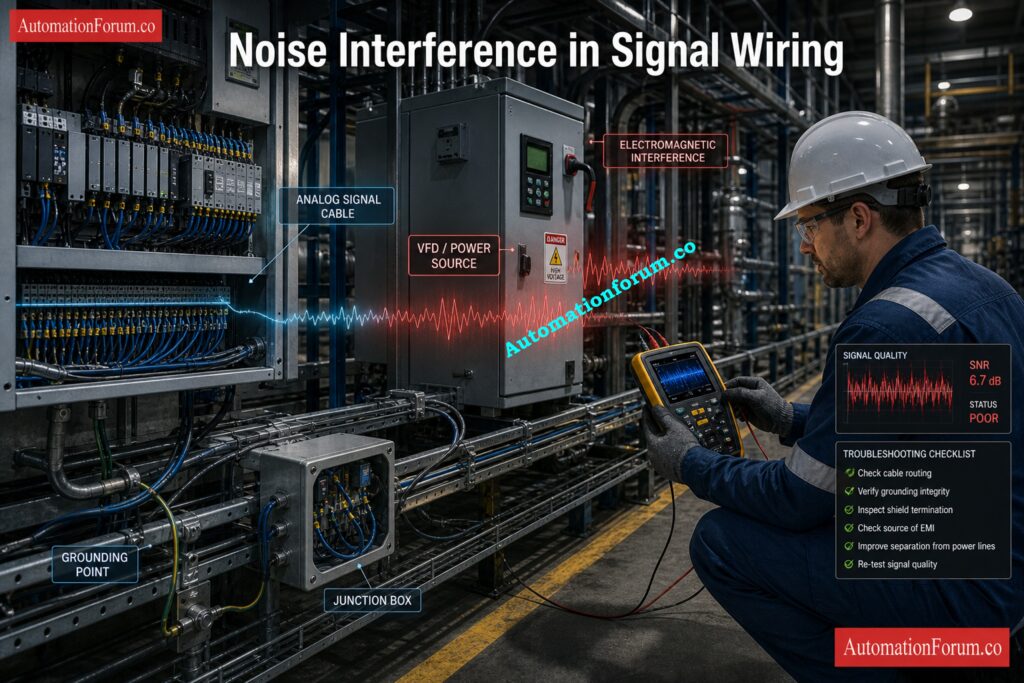
An instrumentation engineer noticed that the output of a pressure transmitter was changing even though the actual process pressure was pretty steady during the commissioning of a process plant. The operator said that the displayed value sometimes changed because the transmitter was connected to the PLC through an analog signal path. At first, the team thought that the process was unstable, but when they looked at the field condition, they saw that the signal cable was running close to a motor power line and that the cable shield was not properly terminated at the panel end. This created electrical interference that was affecting the measurement.
SNR Calculation Used in Diagnosis
To verify the signal condition, the engineer used the SNR calculator. The noise value was set to 0.001 V and the signal value was set to 1.0 V. The calculator used the voltage formula because both values were in the voltage family. It gave an SNR of 60 dB and a linear ratio of 1000:1. In this case, the result showed that the signal path was strong enough. The unstable reading seen earlier was due to problems with installation and interference, not a weak transmitter output. The calculator’s output helped the team quickly find the source of the problem and focus on fixing the wiring and shielding.
Prove Why 4-20 mA Wins: Why 4-20 mA Current Signal is Preferred Over Voltage Signal in Instrumentation?
Corrective Action Taken
- Rerouted the signal cable away from the power cable
- Improved shield termination at the panel
- Verified grounding practice
- Rechecked the analog input stability after corrections
Final Result and Lesson Learned
After the changes, the reading stayed the same and the control loop worked as it should. This case shows how the calculator can help with real troubleshooting by separating problems with the quality of measurements from problems with the process. It is especially helpful during commissioning, SAT, and field maintenance when engineers need to check the engineering quickly before making changes.
Calculate PLC Digital Signals the Smart Way: Collection of PLC Digital Signal Calculators for Industrial Automation
Benefits of Using SNR Calculator
This calculator helps engineers quickly and consistently check the quality of signals without having to do logarithmic calculations by hand. It cuts down on mistakes and saves time during engineering analysis, commissioning, and troubleshooting by automatically figuring out both the SNR in dB and the linear ratio.
Key benefits include:
- Quick analysis of signal quality for control and instrumentation systems
- Lessened mistakes made by hand during engineering review
- Fixing noisy analog and sensor signals faster
- Better validating of signals during commissioning and loop testing
- It’s easy to understand when you use quality indicators like Poor, Good, or Excellent.
- Support for calculations of both voltage and power
- Choosing an automatic method based on the unit family you pick
- Helpful for FAT, SAT, and maintenance tasks
The calculator is useful for both technical engineering analysis and clearly explaining signal conditions during plant discussions, maintenance reports, and performance reviews because it shows both decibel values and linear ratio results.
Expose Signal Noise Before It Spreads: Noise and Signal Stability Observation for Running Inspection in Instrumentation and Control Systems
Frequently Asked Questions About SNR Calculator
What is a good SNR value in instrumentation?
In practice, 20 dB or more is usually acceptable, while 30 dB or more is considered strong. The calculator classifies results accordingly.
Why are voltage and power formulas different?
Voltage uses the 20 × log10 form, while power uses 10 × log10. The difference reflects the relationship between voltage and power in engineering systems.
Can I mix voltage and power units?
No. The calculator requires both signal and noise to belong to the same unit family.
Why does the calculator include impedance?
Impedance is useful for documentation and circuit context, especially when reviewing a measurement path in the field.
Convert Instrument Signals Faster with Calculators: Collection of Instrumentation Signal Conversion Calculators
What Is a Good SNR Value in Instrumentation?
In most industrial applications, 20 dB or more is acceptable, while 30 dB or more is considered strong.
Higher SNR means a cleaner signal and better measurement stability.
What Is the Difference Between Voltage and Power SNR?
Voltage SNR uses 20 × log10(Signal / Noise), while power SNR uses 10 × log10(Signal / Noise).
The calculator applies the correct formula based on the unit family selected.
Why Is SNR Important in Control Systems?
Good SNR helps controllers read stable and accurate process signals.
Poor SNR can cause false readings, unstable control, and unreliable alarms.
How Can SNR Be Improved in Field Instruments?
Use proper shielding, grounding, and cable routing to reduce interference.
Filtering and differential signals also help in noisy industrial environments.
Why Does the Calculator Ask for Impedance?
Impedance gives circuit context and helps document the test condition.
It is useful for reference, even though the ratio calculation uses signal and noise values.
Can Voltage and Power Units Be Mixed?
No, both values must belong to the same unit family.
Voltage must be compared with voltage, and power with power.
What Does the Linear Ratio Mean?
The linear ratio shows how many times stronger the signal is than the noise.
For example, 1000:1 means the signal is 1000 times larger than the noise.
What Does Excellent SNR Mean?
Excellent SNR means the signal is much stronger than the noise and is highly reliable.
In the calculator, 30 dB and above is classified as Excellent.
Signal-to-noise ratio is a simple but very important indicator of measurement quality in industrial automation. It helps engineers judge whether a signal is clean enough for stable control, accurate monitoring, and reliable diagnostics. This calculator makes the task practical by handling voltage and power inputs, checking unit consistency, showing the linear ratio, and classifying the result into useful quality levels. For instrumentation, control, commissioning, and maintenance work, it is a fast way to turn signal quality into an engineering decision.
Refer the below link for the Why not use 0-20mA & 0-15psi instead of 4-20mA & 3-15psi?
