
- Why SCADA and HMI are often confused?
- What is SCADA?
- What is HMI?
- Key Differences Between SCADA and HMI
- SCADA vs HMI Comparison Table
- Similarities Between SCADA and HMI
- Applications in Industrial Automation
- Why SCADA and HMI are essential in modern automation systems
- Frequently Asked Questions (FAQ) on Difference between SCADA and HMI
- Test Your Knowledge with Advanced SCADA Systems Quiz
Why SCADA and HMI are often confused?
SCADA (Supervisory Control and Data Acquisition) and HMI (Human-Machine Interface) are two terminologies that can confuse engineers, technicians, and even managers in the realm of industrial automation.
These systems are quite similar and are often used together, but they are not the same. Each one has a specific job to do when it comes to keeping an eye on, controlling, and improving industrial operations. It’s crucial to know the differences between them in order to develop efficient plants, fix control problems, and keep things running smoothly in industries like oil and gas, power generation, water treatment, and manufacturing.
This guide tells you what SCADA and HMI are, how they are different, where they are used, and why they are both important for modern automation.
What is SCADA?
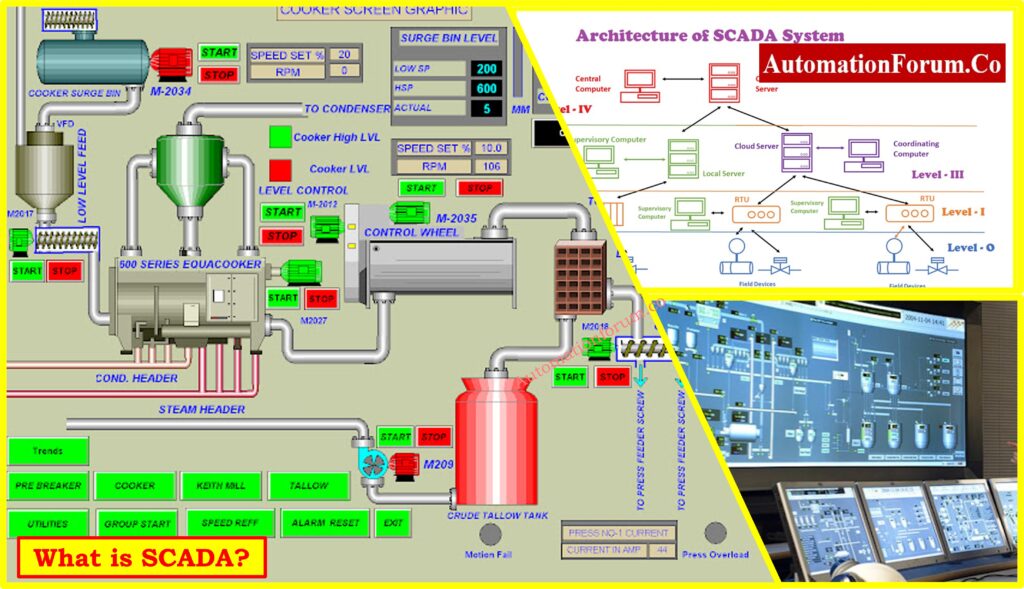
SCADA, or Supervisory Control and Data Acquisition, is a software-based system that collects, processes, and analyzes real-time data from industrial equipment and processes. It is usually deployed on computers, servers, or workstations and serves as a central place to monitor and control a plant or facility.
Key Features of SCADA
- SCADA is a centralized monitoring platform that lets operators and managers see how different operations are doing at all of a plant’s locations or at remote sites. This helps those who make decisions see the system’s performance in a bigger way.
- It allows people operate operations from afar, so they can modify setpoints, start or stop equipment, or change process parameters without having to be at the machine.
- SCADA collects data from several sources, including as PLCs, RTUs, sensors, and field devices, so that all important information is in one location.
- One of the best things about SCADA is that it can save historical data. It can record a lot of data and make reports, charts, and trends that can be used to improve performance and follow the rules.
- SCADA has built-in tools for managing events and alarms. The technology can find problems like dips in pressure, motor failures, or temperature changes and let operators know before the problem gets worse.
- SCADA works well with higher-level corporate systems like ERP and MES, which lets businesses make decisions based on data. It can also work with cloud-based systems for IIoT and Industry 4.0 apps.
- Modern SCADA systems also include extensive security mechanisms that keep people from getting in who shouldn’t, which keeps important infrastructure safe.
Refer the below link for the SCADA Security Checklist for Protecting Industrial Systems
Examples of SCADA Applications
- SCADA keeps an eye on water levels, chemical dosing, and pumping stations at several sites in water treatment plants.
- SCADA is used in power generation and distribution to keep an eye on turbines, regulate substations, and keep the grid stable.
- SCADA keeps an eye on and regulates pipelines, compressor stations, and refining processes in the oil and gas industry.
- SCADA keeps an eye on whole production lines, tracks efficiency, and looks at downtime in factories.
- SCADA manages the HVAC, lighting, and security systems in a building at the level of the whole building.
SCADA is like the brain of industrial automation since it gives you a full picture and enhanced control over large-scale activities.
Real-World Applications of SCADA in Industry: Applications of SCADA
What is HMI?
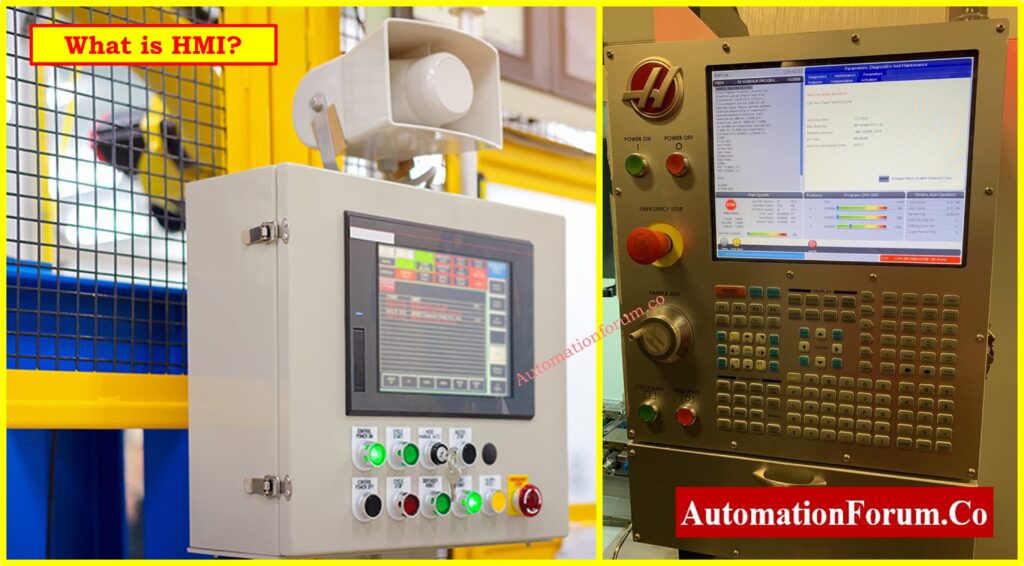
HMI (Human-Machine Interface) is a localized user interface that lets operators talk to machines and processes directly. You can usually get HMIs as touch panels, control panels, or standalone hardware. However, newer HMIs can also be software-based and accessed through PCs, tablets, or browsers.
Key Features of HMI
- HMI has an easy-to-use graphical interface that shows operators real-time process data including temperature, pressure, flow, and the status of the machine.
- It allows operators do things like starting and halting motors, opening and closing valves, or changing a setpoint right from the screen.
- Alarm notifications are common in modern HMIs. This lets operators rapidly see when a parameter goes out of range or a piece of equipment breaks down.
- A lot of HMIs now let you access them from a distance using secure connections. This means that supervisors may check on the status of machines from their laptops, tablets, or cellphones.
- HMI systems are frequently easier and faster to set up than SCADA systems since they often come with pre-made templates that cut down on development time.
Network Switch Requirements for SCADA and DCS Architecture: Network Switches requirements in “SCADA” and “DCS” Architecture
Examples of HMI Applications
- An HMI screen on a packaging machine lets operators change the speed, check for jams, and reset alerts.
- An HMI panel can be used by an HVAC system to regulate fans, dampers, and temperature setpoints in a specific region.
- HMIs can be used in production lines so that operators can see how healthy the machines are in real time and make quick fixes.
- HMIs are the principal way to operate and troubleshoot tiny, independent devices.
HMI is the face of automation because it lets people and machines talk to each other directly.
Key Differences Between SCADA and HMI
Both SCADA and HMI are parts of industrial control systems, but they are different in terms of their goals, levels of complexity, and areas of focus.
- SCADA covers a lot more ground than HMI. It keeps an eye on a number of processes or facilities, while HMI only looks at certain machines or subsystems.
- SCADA is good at getting and analyzing a lot of data at once. It gathers and stores a lot of data from equipment that is spread out, while HMI mostly works with real-time data from sensors and controllers that are close by.
- SCADA has powerful historical features that let you store, analyze, and report data over lengthy periods of time. HMIs frequently can’t save a lot of historical data or any at all.
- SCADA lets you customize and make things more complicated by using scripting, data integration, and multi-level control schemes. HMI is easier to use and was made for quick, easy interaction.
- SCADA is utilized in big businesses including oil refineries, water utilities, and power grids. HMI is employed in smaller or more specific settings, including HVAC systems, packing equipment, or assembly lines.
- SCADA systems are made to work with enterprise-level systems like MES and ERP. HMIs, on the other hand, usually work as separate interfaces.
- SCADA systems have better alarm management, security features, and networking choices than HMI systems do.
One way to think about it is that HMI is the operator’s window into the machine, whereas SCADA is the control tower that watches over the whole facility.
Top Free SCADA Software Tools for Engineers: Best 12 free SCADA software
SCADA vs HMI Comparison Table
| Feature | SCADA | HMI |
| Platform | Put on computers, servers, or systems in the cloud | Found in touch panels or local hardware and software |
| Scope | Monitoring and controlling across many sites or the whole plant | Monitoring of machines or processes at a certain location |
| Data Handling | Able to handle big data collection and historian storage | Limited ability to show and log data |
| Control | Offers advanced control and remote monitoring | Gives control at the local operator level |
| Integration | Works with ERP, MES, DCS, and cloud-based applications | Usually stand-alone with little integration |
| Alarms | Advanced alerts for events and alarms that use more than one communication protocol | Basic handling of alarms and notifications |
| Security | Has extensive features for security and access control | Limited options for security settings |
| Deployment Scale | Used in industries that deal with a lot of power, oil and gas, and utilities | Used for smaller machines, containers, or systems that are only in one place |
HMI Basics and ASM Standards in Human-Machine Interfaces: What is HMI and How ASM standards are used in HMI?
Similarities Between SCADA and HMI
SCADA and HMI are different in many ways, yet they also have a lot in common.
- Both SCADA and HMI have graphical user interfaces that let operators see data in charts, trends, and animations.
- Both technologies let operators see what’s going on with the process in real time, so they always have the most up-to-date information.
- Both can send alarms and alerts to let operators know when equipment is working outside of safe limits.
- Newer versions of both SCADA and HMI let people access them from afar, which gives supervisors and operators the freedom to keep an eye on systems from different places utilizing secure connections.
Best HMI Software Platforms for Industrial Automation: Top HMI Software in Industrial Automation
Applications in Industrial Automation
When you look at real-world examples, it’s easier to understand what SCADA and HMI do.
- SCADA keeps an eye on turbines, substations, and the grid in power plants. HMIs show the status of specific pieces of equipment, like the temperature of the boiler or the speed of the turbine.
- SCADA keeps track of chemical dosage, water levels, and pumping at different water treatment plants, while HMIs let local operators manage individual pumps or valves.
- SCADA keeps an eye on how well production is going, keeps track of downtime, and works with ERP systems. HMIs make it easier for operators to control conveyors, robots, or packaging lines.
- In the oil and gas industry, SCADA keeps an eye on all the pipelines and compressor stations from a distance, while HMIs let specialists on the ground make changes right away.
Different Levels of HMI Screens in Process Plants: Various levels of HMI screens involved in a process plant?
Why SCADA and HMI are essential in modern automation systems
SCADA and HMI are both very important aspects of industrial automation.
HMI gives operators a localized, easy-to-use interface to talk to machines directly. It’s easy to use, quick, and made for controlling machines.
SCADA, on the other hand, lets you monitor and control a whole plant from one place. It can handle huge volumes of data, do deep analytics, and optimize the whole facility.
When used together, SCADA and HMI systems work well together to make sure that industries like oil and gas, power, water treatment, and manufacturing run safely, efficiently, and reliably.
Knowing the difference between the two helps engineers and incharges make better choices when they create or improve automation systems.
Refer the below link for the Types of SCADA System Architecture in Modern Automation
Frequently Asked Questions (FAQ) on Difference between SCADA and HMI
What is the main difference between SCADA and HMI?
The major difference is that SCADA is a central system for monitoring and controlling huge areas, whereas HMI is a local interface that lets operators talk to machines. SCADA gathers and analyzes data from many places or processes, while HMI focuses on giving users a graphical interface for operating specific pieces of equipment.
Understanding HMI Alarms in Industrial Automation: Human Machine Interface Alarms (HMI Alarms)
Can HMI work without SCADA?
Yes, HMI can work on its own, without SCADA. An HMI can link directly to a PLC or controller so that operators can see real-time data and control equipment from where they are. But without SCADA, you can’t see the whole plant, store data for a long time, or do complex analytics.
What is an HMI in SCADA?
The HMI in SCADA is the part of the system that operators see and utilize to talk to the SCADA system. SCADA collects, analyzes, and monitors data from afar, while the HMI gives operators graphical dashboards, screens, and controls that make it easier for them to keep an eye on processes.
What’s the difference between PLC and HMI?
A PLC, or Programmable Logic Controller, is the brain that runs automation logic and directly controls field devices. The HMI (Human-Machine Interface) is the screen or panel that lets operators see the PLC’s data and send commands. The PLC controls the process, and the HMI shows it and lets people interact with it.
What are the three types of HMI?
There are three main types of HMI:
- Data Handling HMIs give operators the ability to see data, set off alarms, and control things.
- Overseer HMIs are advanced HMIs that work with SCADA or enterprise systems to monitor more things.
Can I use HMI without PLC?
An HMI needs a PLC or controller to work most of the time since it needs a device to get process data and run control logic. Some modern HMIs may have limited built-in control features, but they can’t take the place of a PLC in complicated automation systems.
How many tools are there in HMI?
HMI tools are different for each platform, however they usually include:
- Tools for designing screens that show graphics
- Tools for setting alarms, limitations, and notifications
- Tools for seeing how data changes over time, like trend and reporting tools
- Tools for communicating with different controllers
These tools are included in the development environments of most recent HMI software packages, like AVEVA Edge, Siemens WinCC, and Rockwell FactoryTalk.
Can SCADA work without PLC?
No, SCADA won’t work well without PLCs, RTUs, or other controllers. These devices help SCADA get real-time data from sensors, actuators, and machines. SCADA wouldn’t be able to show, log, or analyze field data without PLCs or RTUs.
Is HMI a software or hardware?
A human-machine interface (HMI) can be both hardware and software. The hardware is usually a touchscreen panel, an industrial PC, or a control station. The software gives the user a graphical interface and lets them talk to the PLC. You can also run modern HMIs as software programs on your PC, tablet, or browser.
Test Your Knowledge with Advanced SCADA Systems Quiz
Refer the below link to test your knowledge with Advanced SCADA Systems Quiz
