
- What is a temperature controller?
- How Does a Temperature Controller Work?
- Inaccurate process Temperature Readings
- Process Temperature Fluctuations
- Malfunctioning Control Settings
- Common problems in temperature controller
- Symptoms of Temperature Controller Failure
- Temperature Controller Troubleshooting Flowchart
- Thermocouple and RTD Sensor Troubleshooting
- Frequently Asked Questions (FAQ) on Temperature Controller Troubleshooting
What is a temperature controller?
- Temperature controllers are crucial instruments used to regulate and maintain accurate temperatures in a variety of industries and applications.
- They are very important in maintaining product quality, optimizing energy use, and avoiding equipment damage.
- But temperature controllers can have issues that affect their accuracy and functionality, just like any other electronic device.
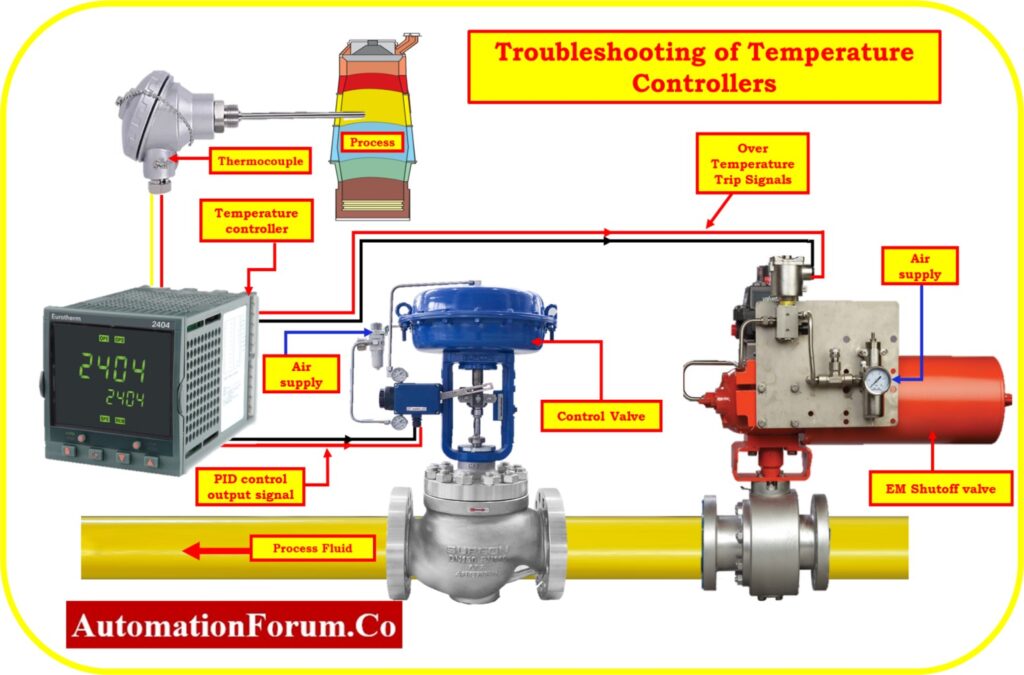
- In order to maintain the intended temperature setpoint, temperature controllers are made to measure the temperature of a system or environment and regulate the heating or cooling elements as necessary.
- They are made up of an output relay or switching mechanism, a control unit, and a temperature sensor.
- The control unit compares the temperature to the setpoint while the sensor continually monitors it.
- The output relay turns on or off the heating or cooling elements depending on the comparison in order to control the temperature.
How Does a Temperature Controller Work?
A temperature controller operates in a closed-loop control system to maintain a desired temperature setpoint. The controller continuously compares the measured temperature from a sensor with the user-defined setpoint and adjusts the heating or cooling output accordingly. Typical temperature control systems consist of a temperature sensor (RTD or thermocouple), a controller, an output device such as a relay or SSR, and the final control element such as a heater or cooling valve. Proper controller configuration, sensor placement, and PID tuning are essential for stable and accurate temperature control. Temperature controllers are widely used in furnaces, ovens, reactors, heat exchangers, HVAC systems, and process industries.
Inaccurate process Temperature Readings
| Aspect | Cause | Solution |
|---|---|---|
| Temperature Sensor Calibration | Over time and due to various factors, temperature sensors may undergo calibration drift, resulting in inaccurate readings | Initiate a recalibration process for the temperature sensor, adhering closely to the manufacturer’s stipulated guidelines. This may encompass modifying offset or gain settings to restore precise readings. |
| Sensor Placement | Incorrect sensor placement or inadequate contact with the monitored surface can lead to erroneous temperature readings. | Meticulously position the temperature sensor in the intended area, ensuring proper contact with the surface. This involves steering clear of heat sources, drafts, or any elements that might compromise accuracy. |
| Sensor Degradation | Over an extended period, temperature sensors can degrade, leading to a decline in accuracy. | Contemplate replacing aged or deteriorated sensors with new, calibrated alternatives to reinstate accurate temperature measurements. |
| Electrical Interference | Electromagnetic interference or electrical noise can disrupt the sensor’s signals, resulting in imprecise readings. | Safeguard sensor cables against sources of electromagnetic interference and confirm adequate grounding. If feasible, deploy shielded cables for enhanced signal integrity. |
| Temperature Fluctuations | Swift temperature fluctuations or irregular heating/cooling patterns can yield momentary inaccuracies. | Verify the optimal function of the heating or cooling system to ensure it maintains stable temperature levels. Minimize abrupt temperature transitions. |
| Controller Issue | Malfunctions or damage to temperature controller components can contribute to erroneous readings. | Scrutinize the controller’s settings, connections, and display for any anomalies. If a hardware malfunction is evident, undertake repairs or consider a replacement. |
| Calibration Drift | Even sensors that have been well-maintained can undergo calibration drift because of things like aging and harsh environments. | Implement repeated calibration evaluations and adjustments to maintain accuracy. Some controllers have capability for automated or remote calibration. |
| Environmental Factors | Changes in ambient temperature, humidity, or pressure can impact sensor precision. | Endeavor to stabilize the sensor environment whenever possible. Alternatively, opt for sensors designed to counteract the effects of environmental variations. |
| User Error | Misconfigured settings or incorrect operation by users can lead to inaccuracies. | Thoroughly consult the controller’s user manual, instrument data sheet ensuring adherence to correct usage protocols. Double-check settings and make necessary adjustments as required. |
| Software or Firmware Issues | Glitches or outdated software/firmware versions can trigger incorrect readings or display discrepancies. | Routinely inspect for updates to the controller’s software or firmware. Apply available updates and, if issues persist, seek support from the manufacturer. |
Process Temperature Fluctuations
| Aspect | Cause | Solution |
|---|---|---|
| Rapid Heating/Cooling Cycles | Frequent and abrupt changes in heating or cooling can result in temperature fluctuations that the controller struggles to manage. | Adjust the controller’s settings to minimize the frequency of heating or cooling cycles. Use gradual temperature changes to maintain stability. |
| Controller Tuning | Improperly tuned controller parameters, such as proportional-integral-derivative (PID) values, can lead to overshooting and undershooting temperature targets. | Review and fine-tune the controller’s PID parameters to optimize its response and minimize oscillations. This might involve adjusting proportional, integral, and derivative gains. |
| Sensor Response Time | Slow sensor response time can result in delayed temperature adjustments, leading to oscillations around the setpoint. | Opt for sensors with faster response times or implement control algorithms that consider the sensor’s dynamics to prevent overshooting and oscillations |
| Sensor Drift | Sensor drift, where the sensor’s accuracy changes over time, can contribute to temperature fluctuations. | Regularly calibrate and replace sensors as needed to ensure accurate readings and minimize fluctuations. |
| Environmental Changes | Changes in ambient conditions, such as drafts or temperature differentials in the controlled space, can lead to rapid fluctuations. | Address environmental factors that cause temperature variations. Isolate the controlled area from external influences and maintain a stable environment. |
| Insufficient Insulation | Poor insulation can lead to heat loss or gain, causing temperature swings that the controller struggles to manage. | Enhance insulation around the controlled space(process equipment) to reduce temperature fluctuations caused by external thermal influences. |
| System Lag | Delay in the response of the heating/cooling system to controller commands can result in overshooting or undershooting. | Minimize system lag by ensuring efficient communication between the controller and the heating/cooling equipment. |
| PID Auto-Tuning | Lack of PID auto-tuning can lead to suboptimal controller performance and temperature fluctuations. | Implement PID auto-tuning features provided by some controllers to automatically adjust control parameters based on system behavior. |
| Maintenance and Calibration | Irregular maintenance and calibration of the temperature controller and associated equipment can result in deteriorating performance. | Schedule regular maintenance and calibration of both the controller and sensors to ensure accurate and stable temperature control. |
| Sensor Placement | Incorrect placement of the temperature sensor can expose it to uneven temperature zones, leading to fluctuating readings. | Reevaluate the sensor’s position to ensure it’s accurately capturing the average temperature of the controlled environment. When positioning the sensor, try to keep it away from drafts and sources of heat. |
Malfunctioning Control Settings
| Aspect | Cause | Solution |
|---|---|---|
| Incorrect PID Tuning | Poorly tuned proportional-integral-derivative (PID) control settings can result in overshooting, undershooting, and oscillations around the desired temperature. | Reevaluate and adjust the PID control parameters, such as proportional, integral, and derivative gains, to optimize the controller’s response and reduce temperature fluctuations. |
| Setpoint Oscillations | Rapid changes in the setpoint can lead to the controller struggling to maintain the target temperature, causing fluctuations. | Gradually adjust the setpoint to minimize abrupt changes, allowing the controller to respond more smoothly. |
| Control Deadband Issues | A narrow control deadband (hysteresis) can trigger frequent and unnecessary heating/cooling cycles, leading to fluctuations. | Broaden the control deadband to prevent rapid switching between heating and cooling, promoting stability. |
| Improper Anti-Windup Settings | Inadequate anti-windup settings can lead to integrator windup, where the integral action accumulates error and causes overshooting. | Configure anti-windup settings to prevent integrator windup by limiting the integrator action during saturation conditions. |
| Sensor Filtering and Delay | Over-filtered or delayed sensor readings can introduce delays in the control loop, leading to oscillations. | Optimize sensor filtering and response time settings to strike a balance between noise reduction and real-time control. |
| Lack of Derivative Action | Absence or inadequate use of derivative action can result in sluggish response to changing conditions, causing temperature fluctuations. | Introduce appropriate derivative action to anticipate and counteract sudden changes in temperature, enhancing control stability |
| Cycle Time Mismatch | Mismatched cycle times between the controller and the heating/cooling system can lead to inconsistent temperature adjustments. | Align the cycle times of the controller and the system to ensure synchronized and accurate temperature control. |
| Inadequate Overshoot Compensation | Incomplete compensation for overshooting during the initial heating phase can lead to temperature fluctuations. | Implement overshoot compensation strategies, such as lowering the setpoint after reaching a certain temperature, to mitigate temperature swings. |
Common problems in temperature controller
| Aspect | Cause | Solution |
|---|---|---|
| Power Supply Issues | Insufficient or unstable power supply can lead to erratic controller behavior or failure to operate. | Ensure the controller is connected to a stable and appropriate power source. Use surge protectors to guard against power spikes or surges |
| Wiring Problems | Poorly connected or damaged wiring can result in intermittent or inaccurate temperature control. | Inspect and secure all wiring connections. Replace damaged wires and use proper cable management techniques to prevent interference. |
| Grounding and Interference | Inadequate grounding can introduce electrical noise, causing unstable readings or malfunction. | Implement proper grounding practices. Use shielded cables to minimize electromagnetic interference from external sources. |
| Display Errors | Display anomalies, such as incorrect readings or a blank display, can stem from internal or external factors. | Check for loose connections, damaged display components, or incorrect settings. If necessary, reset the controller according to the manufacturer’s instructions. |
| Sensor Failures | Temperature sensors can fail due to wear, damage, or sensor-specific issues. | Regularly inspect and maintain sensors. Replace faulty sensors promptly, following manufacturer guidelines. |
| Communication Problems | Communication errors between the controller and other devices can disrupt data exchange. | Verify communication settings, connections, and protocols. Update firmware if applicable and ensure compatibility between devices. |
| Overheating of electronic components inside the controller | Inadequate ventilation or high ambient temperatures can lead to the controller overheating. | Ensure the controller is placed in a well-ventilated area. Install fans if required to dissipate excess heat. |
Symptoms of Temperature Controller Failure
The following symptoms often indicate temperature controller problems:
- Incorrect temperature readings
- Temperature overshooting the setpoint
- Temperature undershooting the setpoint
- Continuous temperature oscillations
- Sensor failure alarms
- Controller output not switching
- Heating element not responding
- Display errors or blank screen
- Communication failures with PLC or DCS
- Frequent process temperature fluctuations
Identifying the symptoms early helps maintenance personnel diagnose the root cause before production quality is affected.
Temperature Controller Troubleshooting Flowchart
Follow this troubleshooting sequence whenever a temperature controller problem occurs:
Step 1: Verify Power Supply
- Check incoming voltage.
- Inspect fuses and terminals.
- Verify controller power indication.
Step 2: Check Sensor Input
- Verify RTD or thermocouple wiring.
- Check sensor continuity.
- Confirm correct sensor type selection.
Step 3: Inspect Wiring and Grounding
- Tighten loose terminals.
- Check shield grounding.
- Eliminate electrical interference sources.
Step 4: Verify Controller Configuration
- Check setpoint values.
- Verify PID parameters.
- Confirm input scaling and output configuration.
Step 5: Check Output Devices
- Inspect SSRs.
- Test relays.
- Verify heater contactors.
Step 6: Perform Calibration Check
- Compare with a certified temperature source.
- Adjust calibration if necessary.
Step 7: Evaluate PID Tuning
- Check proportional, integral, and derivative settings.
- Run auto-tuning if available.
This systematic approach helps isolate faults quickly and minimizes unnecessary component replacement.
Thermocouple and RTD Sensor Troubleshooting
Common Thermocouple Problems
| Problem | Cause | Solution |
| Open Circuit | Broken sensor wire | Replace thermocouple |
| Reversed Polarity | Incorrect wiring | Correct polarity |
| Wrong Thermocouple Type | Configuration mismatch | Select correct sensor type |
| Electrical Noise | EMI interference | Use shielded cables |
Common RTD Problems
| Problem | Cause | Solution |
| Open Circuit | Broken element | Replace RTD |
| Short Circuit | Damaged insulation | Replace sensor |
| Lead Resistance Error | Long cable runs | Use 3-wire or 4-wire RTD |
| Calibration Drift | Aging sensor | Recalibrate or replace |
Thermocouple and RTD failures are among the most common causes of inaccurate temperature measurements in industrial processes.
Frequently Asked Questions (FAQ) on Temperature Controller Troubleshooting
Why is my temperature controller showing the wrong temperature?
Incorrect readings are commonly caused by sensor calibration drift, damaged thermocouples, RTDs, electrical interference, or incorrect sensor configuration.
Why does my temperature controller overshoot the setpoint?
Overshoot usually occurs because of improper PID tuning, excessive heater capacity, or slow sensor response.
How often should temperature controllers be calibrated?
Most industrial applications require calibration every 6 to 12 months depending on process criticality.
What causes temperature fluctuations in a control loop?
Temperature fluctuations are commonly caused by poor PID tuning, unstable heating systems, improper sensor placement, or environmental disturbances.
What is the most common failure in a temperature controller?
Sensor failures, wiring issues, PID tuning errors, relay failures, and calibration drift are among the most frequently encountered temperature controller problems.
