
- 1. Optimize PLC Code Structure: Reduce Unnecessary Loops
- 2. Use Interrupts Wisely: A “Fast Lane” for Critical Events
- 3. Optimize Data Types: Choose the Right Variables
- 4. Use Timers Appropriately: Avoid “Time Lag Syndrome”
- 5. Optimize Communication: Reduce Data Transfer Delays
- 6. Improve Comments and Documentation
- 7. Consider PLC Hardware Upgrade Scenarios
- Advanced Ways to Boost PLC Speed and Productivity
- 1. Leveraging Subroutines and Structured Text
- 2. Implementing Parallel Processing
- 3. Enabling Predictive Maintenance within PLC Code
- 4. Improving Operator Interface (HMI) Design
- 5. Strengthening System Integration
- 6. Adding Remote Monitoring and Control
- Before vs. After Optimization: PLC Performance Comparison
- Final Thoughts
- Download: PLC Optimization Checklist (Excel)
- Frequently Asked Questions (FAQ) on Increasing PLC Speed
Programmable Logic Controllers (PLCs) are the most important part of industrial automation. They regulate processes, machines, and communication amongst plant equipment. But one of the most typical complaints from engineers and technicians is that the PLC feels slow because of long scan cycles, delayed answers, or slow operator feedback.
The good news is that you don’t always need to buy a new controller if you’ve ever wondered, “Why is my PLC slow?” You may greatly speed up your PLC scans and reaction times by improving your PLC programming methods, communication setup, and resource use.
This guide gives you 7 useful PLC optimization methods and advanced programming techniques that will speed up your controller from turtle speed to lightning speed.
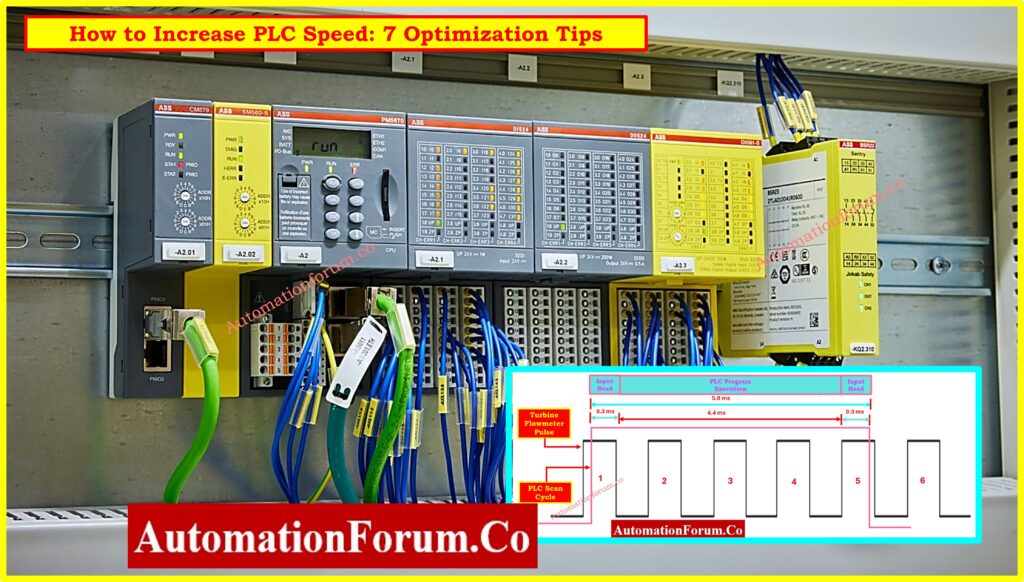
1. Optimize PLC Code Structure: Reduce Unnecessary Loops
The way the logic is set up has a big effect on how fast a PLC can run. Using too many loops, layered logic, or repeated calculations during scan cycles is one of the worst things you can do.
- Don’t use deeply nested IF statements; they make scans take longer than they need to.
- Split up big programs into smaller parts. This makes them easier to interpret and puts less strain on the processor.
- Get rid of redundant instructions. The less instructions there are, the shorter the scan cycles will be.
The less stuff you have on your desk, the easier it will be to find what you need. The same is true for PLC execution: less logic means a faster response.
2. Use Interrupts Wisely: A “Fast Lane” for Critical Events
Interrupts in a PLC program are like emergency lanes on the road. When set up correctly, they let important jobs skip the line and run right away.
For example:
- A safety interlock may need instant response.
- Using interruptions instead of waiting for the next scan helps speed up the processing of a high-speed counter input.
But using interrupts wrong can cause problems. Putting too many interruptions on your system can make it unstable and cause things to happen in a random way. Always save interrupts for tasks that need to be done right now.
3. Optimize Data Types: Choose the Right Variables
Every computation uses CPU resources, and the type of data you use is vitally important.
- Whenever you can, use whole numbers instead of floating-point numbers. It takes less memory and is faster to process integers.
- Strings are slow and use a lot of memory, so only use them if you have to.
- Make sure that variable lengths are the same so that memory is used efficiently.
A simple comparison: it’s faster and cheaper to deliver a letter in a small car than in a big truck. The same rule applies to choosing variables in PLC programming.
SIS vs. PLC vs. BPCS: Understanding Differences of SIS, PLC, and BPCS in Industrial Automation
4. Use Timers Appropriately: Avoid “Time Lag Syndrome”
Timers are important in almost every PLC program, but if you don’t use them right, they can slow down your program.
- Don’t use extra timers for delays that could be handled with simple conditions.
- Instead of running a lot of timers at once, space them out in a way that makes sense.
- Make scan times as short as possible based on timer resolution.
Putting too many timers in your program is like setting 20 alarms on your phone for the same task. It doesn’t make things more efficient; it makes them more confusing. To keep PLC execution fast, you need to manage your timers correctly.
5. Optimize Communication: Reduce Data Transfer Delays
Ways to make communication faster:
- Instead of slower serial connections, use faster protocols like Ethernet/IP, Profinet, or Modbus TCP/IP.
- Reduce the amount of data that is being polled that isn’t needed.
- Use buffering techniques to cut down on constant requests.
- Plan your communication tasks carefully so that scan time isn’t interrupted.
Think about how much slower everything would be if you sent 100 unnecessary emails every day. Optimized communication makes sure that your PLC data transfer is quick and dependable.
Refer the below link: How to Optimize PLC Scan Time for Better Automation ?
6. Improve Comments and Documentation
This may not sound like a performance trick, but having well-documented code can actually speed up optimization.
- It’s easier to find duplicate logic when comments are clear.
- Structured documentation lets new engineers optimize without having to start over with new code.
- Labeling things correctly keeps things clear and cuts down on the time it takes to fix problems.
Think of documentation as a map for your PLC program; without it, you’ll waste time going in circles.
PLC Documentation Best Practices: PLC System Documentation Guide: Essential Records for Industrial Automation Success
7. Consider PLC Hardware Upgrade Scenarios
Sometimes, even the best programming improvements can’t make up for hardware problems. Older PLCs have processors that are slower, less memory, and fewer ways to communicate.
When you should think about upgrading your hardware:
- Even after optimizing the code, scan times are still longer than what the process needs.
- The old PLC doesn’t support the new communication protocols (Ethernet/IP, OPC UA, MQTT), so we need them.
- Memory limits stop you from adding diagnostics, predictive maintenance, or other advanced features.
- Long-term maintenance is risky because spare parts are no longer available.
Modern PLCs have faster CPUs, more memory, and built-in networking, which can make them work better right away without having to do complicated programming workarounds.
Hot Standby PLC Explained: Hot Standby in PLC Systems: Architecture, Working, and Benefits
Advanced Ways to Boost PLC Speed and Productivity
The six tips above are about optimizing scan cycles, but in the real world, manufacturing often needs more than just faster execution speed when programming PLCs. Let’s look at some other methods that all engineers should think about.
1. Leveraging Subroutines and Structured Text
Not only does breaking up programs into smaller parts make them easier to manage, but it also lets the PLC skip over parts of the code that aren’t being used.
Also, using structured text (ST) instead of long ladder logic for complicated math often makes things run faster.
2. Implementing Parallel Processing
Some advanced PLC platforms let you run multiple tasks at the same time. You don’t have to wait for one task to finish before starting another. You can let them all run at the same time.
For example:
- One task monitors machine safety.
- Another one takes care of controlling motion.
- A third keeps track of the data.
This makes the PLC more responsive overall and speeds up the process.
Scaling Analog Signals in PLCs: Scaling Analog Values in Industrial Automation (PLC)
3. Enabling Predictive Maintenance within PLC Code
A slow PLC is often bogged down with too many diagnostics that aren’t needed. Instead of polling all the time, make smart predictive maintenance routines that only run when they are needed.
Examples include:
- Monitoring motor current to detect overloads early.
- Keeping track of cycle times to guess how much wear will happen.
- Setting limits for how much sensors can deviate.
This keeps the PLC slim while still giving useful information about maintenance.
4. Improving Operator Interface (HMI) Design
The HMI can feel slow at times, which operators think is a delay in the PLC. Improving the design of the HMI makes it seem less slow.
- Only show important information on the main screens.
- Use colors and graphics to make things easy to find.
- Give access based on roles to avoid polling in the background that isn’t needed.
An effective HMI makes sure the PLC doesn’t have to spend as much time responding to requests that aren’t necessary.
Allen-Bradley PLC Datasheet Guide: How to Read the PLC Datasheet: Allen-Bradley 1762 Model Step-by-Step Guide
5. Strengthening System Integration
A PLC can’t work by itself; it needs to talk to ERP, MES, and SCADA systems. Integration that isn’t well-structured can slow down performance.
Best practices include:
- Using standard industrial protocols for seamless connectivity.
- Using event-driven data transfers instead of polling all the time.
This keeps the PLC from getting bogged down in data traffic that isn’t needed.
6. Adding Remote Monitoring and Control
Modern manufacturing needs remote access to PLCs, but bad implementation can slow down the controller. Some safe and effective ways to monitor from afar are:
- Allowing read-only access for most remote users.
- Limiting changes to setpoints to certain roles.
- Setting up backups to happen when the load is low.
- Using firewalls and VPNs to protect your computer.
If done right, remote PLC programming can make things more responsive by getting rid of delays caused by having to go to the site.
Ladder Logic Programming Rules: Top 6 Important Rules for PLC Ladder Diagram Programming
Before vs. After Optimization: PLC Performance Comparison
| Category | Before Optimization (Turtle Speed) | After Optimization (Lightning Speed) |
| Scan Cycle Time | 120 ms average – process reacts slowly to inputs | 40 ms average – faster reaction, smoother control |
| Event Handling | Critical alarms take 2-3 scans to trigger | Interrupts configured – alarms trigger instantly |
| Logic Structure | Nested IF/THEN with redundant loops | Streamlined logic with subroutines – leaner execution |
| Data Handling | Heavy floating-point math, memory usage high | Integers used where possible – 25-30% faster calculations |
| Timers Usage | 50+ active timers overlapping, causing delays | Only essential timers – balanced and predictable timing |
| Communication | Slow Modbus serial polling every 500 ms | Ethernet/IP with optimized polling – <100 ms updates |
| Diagnostics | No predictive checks, reactive maintenance | Predictive routines log trends – early fault detection |
| Documentation | Poorly commented, hard to troubleshoot | Clear labels & comments – quick debugging & optimization |
| Hardware Impact | Legacy CPU at 80-90% utilization | Modern CPU at 30-40% utilization – room for growth |
Final Thoughts
Getting faster PLCs doesn’t always mean buying new hardware. You can cut scan time by a huge amount, make communication better, and make it easier for operators to work together with the right optimization techniques.
To summarize:
- Clean up and optimize code.
- Use interrupts wisely.
- Select efficient data types.
- Avoid overloading timers.
- Optimize communication protocols.
- Document everything for clarity.
- Enhance HMI, predictive maintenance, and integration practices.
A few careful tweaks can turn a slow PLC into a powerful automation powerhouse, just like tuning an engine. You can make your automation systems faster, smarter, and more reliable by following these tips.
Download: PLC Optimization Checklist (Excel)
Need a quick way to check that your PLC is running at lightning speed? You can download and use our PLC Optimization Checklist (in Excel format) for your projects.
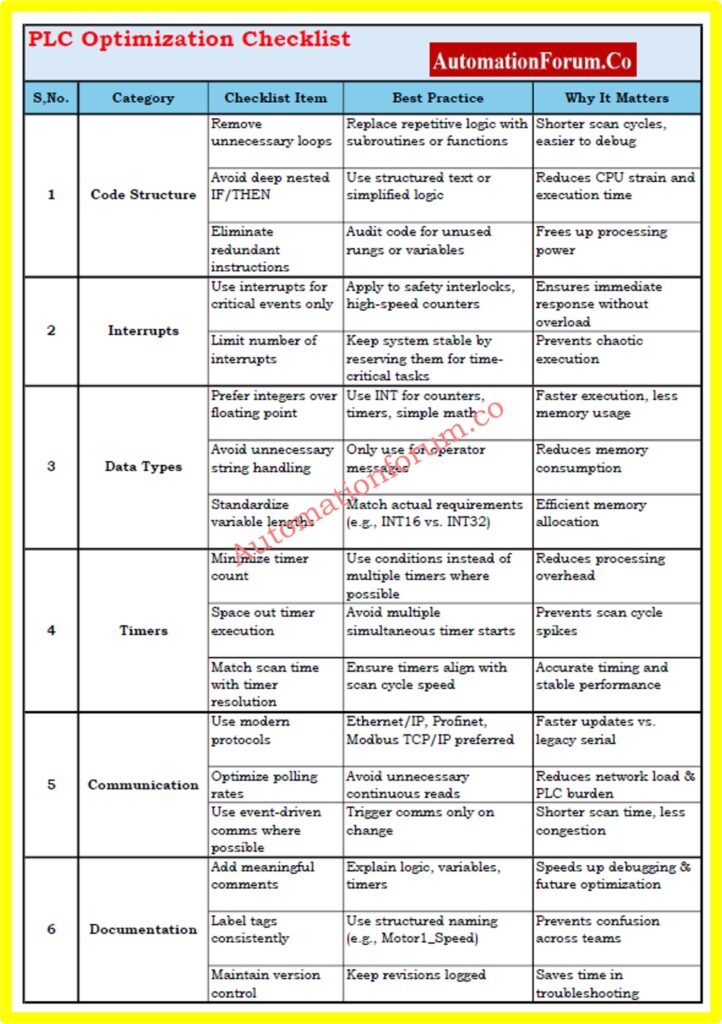
This checklist includes:
- Steps for optimizing code (loops, subroutines, and data types)
- How to tune your communication
- Best practices for managing timers and interrupts
- Things to think about when upgrading hardware
- Important parts of documentation and troubleshooting
Frequently Asked Questions (FAQ) on Increasing PLC Speed
1. What slows down a PLC?
A PLC can slow down if the programming isn’t done well, there are too many loops and timers, the floating-point calculations are too complicated, the communication setup isn’t good, or the hardware is old. Scan cycle times can also go up if HMIs are overloaded or polling is done too often.
2. Does PLC hardware affect speed?
Yes. The hardware of a PLC has a direct effect on scan time and performance. Older PLCs usually have slower processors, less memory, and ports for communication that are no longer used. You can greatly speed up execution by upgrading to modern PLCs with faster CPUs and more memory.
3. How can I reduce PLC scan cycle time?
You can reduce scan cycle time by:
- Simplifying logic and removing redundant loops.
- Using structured text and subroutines to do complicated tasks.
- Choosing the right data types, like integers instead of floats.
- Improving timers and interrupts.
- Changing communication protocols to faster ones, like Ethernet/IP.
4. How to reduce PLC cycle time?
To cut down on PLC cycle time, you need to optimize both the software and the hardware. If you reach your limits, think about upgrading to a faster PLC processor. Clean up ladder logic, cut down on unnecessary instructions, and improve communication.
Basic Ladder Diagram Parts: Understanding Basic Parts of Ladder Diagram (LD) in PLC Programming
5. What is high-speed input in PLC?
A high-speed input (HSI) in a PLC is a special input channel that is made to pick up very fast signals, like pulses from sensors, encoders, or counters. HSIs can handle frequencies in the kHz range, which makes them necessary for motion control and fast counting applications.
6. How to improve PLC scan time?
Improving scan time involves:
- Code optimization (removing unnecessary instructions).
- Using interrupts for events that need to happen right away.
- Setting up communication in a way that works better (less polling, more event-based transfers).
- When the current CPU is almost full, hardware upgrades are needed.
Refer the below link: Free access to PLC Scan Time Calculator
7. What is the fastest PLC scan time?
The model and brand of the PLC determine how fast it can scan. Modern high-performance PLCs can scan small programs in less than a millisecond (<1 ms). Most industrial PLCs scan between 1 and 10 ms, but older systems may take longer, up to 50 or 100 ms, depending on how complicated they are.
