
Thermocouple Voltage ↔ Temperature Calculator
Calculation Results
How the Calculator Works
This calculator uses NIST ITS-90 polynomial equations to accurately convert between thermocouple voltages and temperatures. The conversion process involves:
- Voltage to Temperature: Applies inverse polynomial equations to convert EMF in millivolts to temperature
- Temperature to Voltage: Uses direct polynomial equations to calculate the expected thermocouple EMF
- Cold Junction Compensation (CJC): Automatically adjusts for reference junction temperature
Supported Thermocouple Types
| Type | Materials | Temperature Range | Applications |
|---|---|---|---|
| K | Chromel-Alumel | -270°C to 1372°C | General purpose |
| J | Iron-Constantan | -210°C to 1200°C | Reducing atmospheres |
| T | Copper-Constantan | -270°C to 400°C | Low temperature |
| E | Chromel-Constantan | -270°C to 1000°C | Highest EMF |
| N | Nicrosil-Nisil | -270°C to 1300°C | Improved K-type |
| S | Pt10%Rh-Pt | -50°C to 1768°C | High temperature, noble metal |
| R | Pt13%Rh-Pt | -50°C to 1768°C | High temperature, noble metal |
| B | Pt30%Rh-Pt6%Rh | 0°C to 1820°C | Highest temperature, stable |
Engineers and technicians that work with temperature sensors in industrial automation can use the Thermocouple Calculator, which is an online tool of professional quality. You can use this calculator to change thermocouple voltage (mV) to temperature (°C/°F) and temperature (°C) to thermocouple voltage (mV) in both directions.
It uses the official NIST ITS-90 standard polynomial equations, which give it very high accuracy for all main thermocouple types, including K, J, T, E, N, S, R, and B. The built-in Cold Junction Compensation (CJC) tool makes sure that your results are accurate and take into account the temperature of the air around you.
This tool gives you accurate and traceable thermocouple conversions right away, whether you’re fixing temperature transmitters, checking field readings, or calibrating PLC and DCS input channels.
What Is a Thermocouple Calculator?
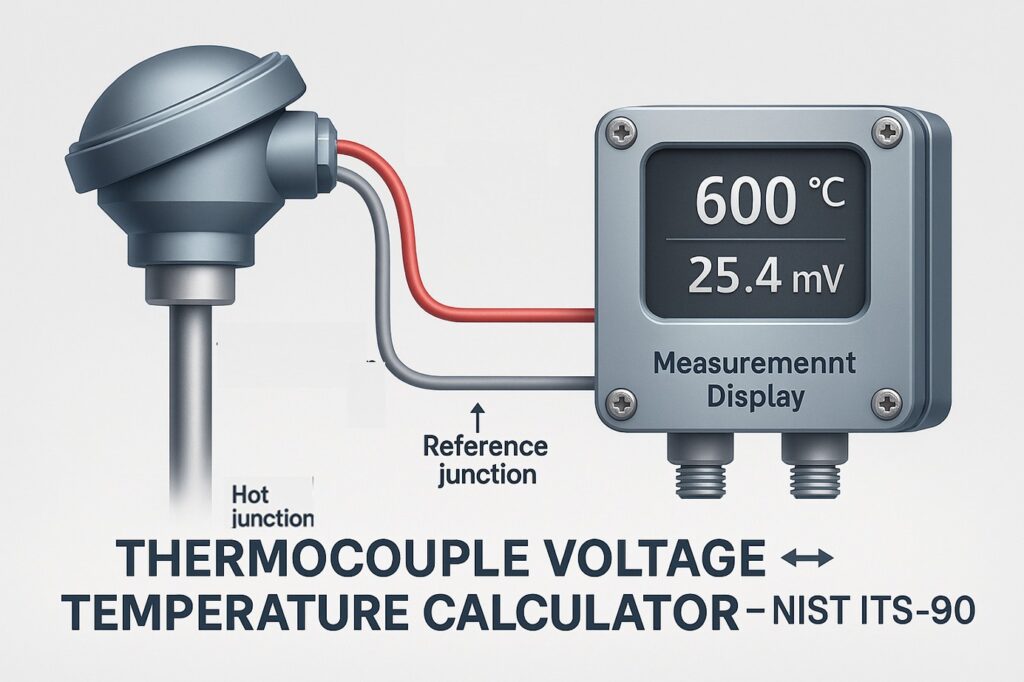
A thermocouple calculator is a computerized instrument that makes it easier to figure out the temperature that goes with the little voltage (millivolts) that a thermocouple makes. The metal pair composition of each type of thermocouple determines its own unique relationship between voltage and temperature.
The National Institute of Standards and Technology (NIST) published the ITS-90 (International Temperature Scale of 1990) as a set of established conversion formulas that the calculator employs to make sure it is accurate and can be traced.
Dual-Direction Conversion
This calculator is different from others since it can work in both directions:
- Voltage to Temperature (to interpret sensor output or monitor process readings)
- Temperature to voltage (for testing, calibrating, or setting up a transmitter)
This two-way conversion makes it useful for every step of temperature instrumentation, from design to maintenance.
Interactive Thermocouple Voltage ↔ Temperature Calculator (NIST ITS-90)
This interactive thermocouple calculator makes it easy to switch between voltage (mV) and temperature (°C or °F) for all typical thermocouple kinds, including K, J, T, E, N, S, R, and B. The tool can convert in both directions, so you can use the same interface to change voltage to temperature and temperature to voltage.
It automatically uses Cold Junction Compensation (CJC) to make sure the results are realistic and accurate in the field. This is quite helpful when your reference junction isn’t at 0°C, which is common in industrial settings. Using the NIST ITS-90 standard, which sets the formal link between thermocouple voltage and temperature for each type, all computations are done.
This calculator makes sure that the results are accurate and can be traced back to the ITS-90 equations. You can use it to check processes, calibrate transmitters, or do rapid tests when troubleshooting in automation systems and instrumentation loops.
Learn the exact method to convert millivolts into temperature using NIST tables and formulas in this detailed guide: How to Convert Thermocouple Millivolts to Temperature: A Step-by-Step Guide
Supported Thermocouple Types
The calculator works with the eight most common types of thermocouples used in process industries:
- Type K (Chromel–Alumel) – This is a general-purpose type that works in oxidizing environments and has a temperature range of −270°C to +1372°C.
- Type J (Iron–Constantan) is cheap and works well in low-oxygen settings. It can work in temperatures from −210°C to +1200°C.
- Type T (Copper–Constantan) is great for cryogenic and low-temperature uses, with a range of −270°C to +400°C.
- Type E (Chromel–Constantan) is a thermocouple with a high sensitivity and a range of −270°C to +1000°C.
- Type N (Nicrosil–Nisil) is more stable at high temperatures than Type K. It works from −270°C to +1300°C.
- Type S (Platinum–Rhodium 10%) is a sensor that may be used in a lab or furnace and has a range of −50°C to +1768°C.
- Type R (Platinum–Rhodium 13%) is like Type S but has a little bit more output.
- Type B (Platinum–Rhodium 30/6%) is made for places with very high temperatures, up to +1820°C.
Understand the core conversion techniques and see worked examples for real process instrumentation scenarios: Converting Thermocouple Millivolts to Temperature: Methods and Examples
How the Calculator Works

This calculator is based on the Seebeck phenomenon, which says that when two metals that are not the same are heated up at their junctions, they create a voltage (EMF).
To make sure everything is correct, the calculator does these things inside:
Cold Junction Compensation (CJC):
First, it uses the chosen thermocouple polynomial to figure out the EMF at the cold junction (reference temperature, usually 25°C).
Total EMF Calculation:
To convert Voltage to Temperature, it adds or subtracts the cold junction EMF from the observed EMF to get the corresponding EMF at 0°C.
Temperature Conversion:
The inverse NIST polynomial is used to turn the total EMF into temperature.
Temperature → Voltage Conversion:
When you do it the other way around, the process temperature you input is first changed to EMF (mV) at 0°C reference, and then the cold junction temperature is taken into account.
The final outcome is a precise temperature or voltage measurement, adjusted for cold-junction effects and compliant with NIST ITS-90 requirements.
Follow this 8-step thermocouple calibration procedure to ensure accurate process temperature measurement: 8 Steps Calibration Procedure for Thermocouple
Importance of the ITS-90 Standard in Thermocouple Conversion
The International Temperature Scale of 1990 (ITS-90) is the standard that everyone uses for precise temperature measurement and calibration. It tells you how the voltage (EMF in millivolts) of a thermocouple changes with temperature for different types of thermocouples. The National Institute of Standards and Technology (NIST) and metrology labs throughout the world created and maintain ITS-90. It makes sure that all temperature readings can be traced, are consistent, and can be compared around the world.
When this thermocouple calculator changes voltage to temperature or temperature to voltage, it uses the ITS-90 polynomial coefficients that NIST set. This makes sure that every result is in line with calibration data that is accepted around the world. Using the ITS-90 standard is very important for keeping measurements accurate, processes reliable, and following the rules in industrial automation. This makes sure that all readings from transmitters, DCS inputs, or calibration devices use the same temperature scale.
Compare thermocouples vs RTDs with this practical selection guide for process engineers: Choosing Between Thermocouples and RTDs: A Practical Guide for Temperature Sensing
Step-by-Step Guide to Using the Calculator
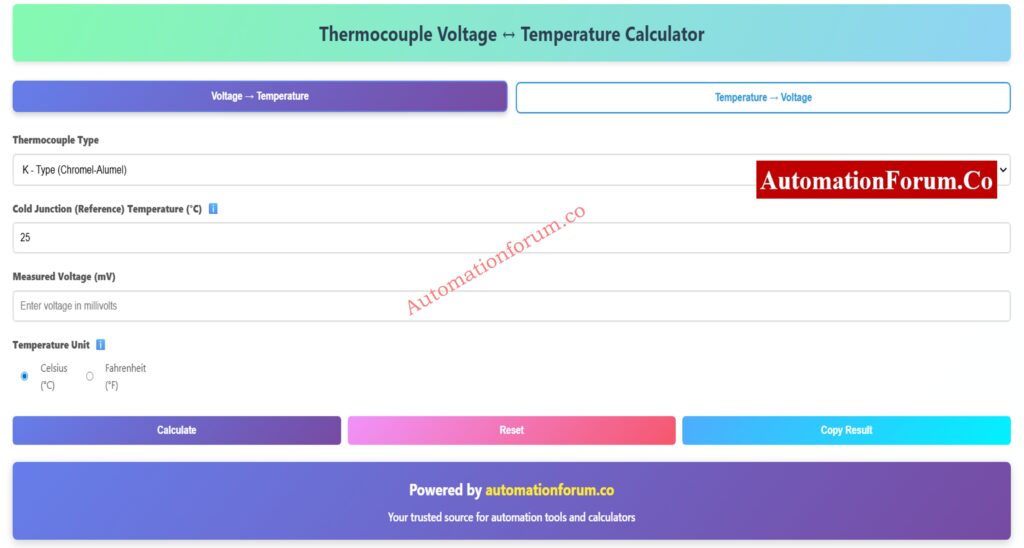
It’s easy to use the calculator, whether you’re changing from mV to °C or °C to mV.
To Convert Voltage to Temperature:
- Choose the Type of Thermocouple: Pick the type of thermocouple you want to use (for example, Type K).
- Enter the Cold Junction Temperature, which is the temperature of the air around you or the reference temperature (25°C by default).
- Choose Conversion Mode and then “Voltage to Temperature.”
- Type in the thermocouple voltage in millivolts in the box for “Input Measured Voltage.”
- Click “Calculate,” and the calculator will show you the corrected temperature in both °C and °F right away.
To Convert Temperature to Voltage:
- Choose the Type of Thermocouple You Need.
- Enter the Cold Junction Temperature, which is your reference temperature (25°C by default).
- Choose a conversion mode by clicking “Temperature to Voltage.”
- Input Process Temperature: Type in the process temperature in °C.
- Click Calculate, and you’ll see the right EMF in mV, taking into account cold-junction correction.
This capacity to work in both directions is perfect for both field verification and calibration simulations.
Download or review the complete thermocouple commissioning checklist for installation and calibration accuracy: Thermocouple Commissioning Checklist
Features and Highlights
- Dual-Mode Conversion: Use one tool to change voltage to temperature and temperature to voltage.
- Cold Junction Compensation: Changes the readings automatically based on the reference temperature you entered.
- NIST ITS-90 Accuracy: For high accuracy, it uses official polynomial coefficients.
- Celsius and Fahrenheit Output: Shows the temperature in both units for ease of use.
- 8 Different Kinds of Thermocouples It works with K, J, T, E, N, S, R, and B.
- Mobile-Friendly Interface: Works perfectly on PCs, tablets, and smartphones.
- Range Validation: Makes sure that all inputs stay within the NIST-defined boundaries.
- Quick Calculation: You don’t need to look up tables to get the results right away.
Step-by-step procedure for calibrating thermocouple transmitters with precision instruments: How to calibrate Thermocouple Transmitter?
Why Cold Junction Compensation Is Important
In real-world thermocouple systems, one junction (the “hot” junction) measures the temperature of the process, and the other junction (the “cold” or reference junction) is at the instrument terminals. The reading changes if the cold junction isn’t kept at a steady 0°C.
Cold Junction Compensation (CJC) fixes this mistake by adding or subtracting the EMF equivalent of the cold junction’s temperature.
Without CJC, your process temperature could change a lot, especially when the weather changes. This calculator has a built-in CJC function that makes sure your readings show the real process temperature, even if your reference junction is at room temperature or higher.
Refer the below link for the Why Thermocouple Reference Junction Compensation(CJC) is Essential for Accurate Temperature Measurement ?
Accuracy and Compliance with Standards

The NIST ITS-90 thermocouple tables are used to figure out the voltage-temperature relationships for each type of thermocouple. These polynomials come from a lot of lab calibrations and are the world standard for calibrating thermocouples.
For instance:
- Type K: −270°C to +1372°C (−6.458 mV to +54.886 mV)
- Type J: −210°C to +1200°C (−8.095 mV to +69.723 mV)
- Type T: −270°C to +400°C (−5.603 mV to +20.872 mV)
The calculator verifies your input against these ranges and lets you know if the voltage or temperature you provided is too high or too low. This makes sure that the results are accurate and consistent.
Discover how to choose the correct thermocouple type, sheath material, and junction for your process environment: How to Select the Right Thermocouple for Temperature Measurement Applications?
Industrial Applications of the Thermocouple Calculator
This tool is meant to be used for a variety of engineering and field operations in many different industries:
- Calibration and Simulation: Use the Temperature → Voltage mode to mimic a thermocouple signal while calibrating the transmitter.
- Field Troubleshooting: If the thermocouple signal doesn’t appear right, use the Voltage → Temperature mode to check if the wiring or sensor is broken.
- PLC/DCS Configuration: Engineers can use the calculator’s output to double-check scaling and input ranges when they set up analog input channels.
- Maintenance Documentation: Change voltages obtained in the field into temps so they can be added to calibration or maintenance reports.
- Training and Education: A great way to learn about how thermocouples work, the Seebeck effect, and how to fix cold junctions.
Troubleshooting and Common Issues
Even when the math is right, mistakes can happen in the field. Here are some useful tips:
- No Reading or Wrong Value: Check the polarity of the thermocouple; if the wires are switched, the measurements will be wrong.
- Unstable Output: To lessen electrical noise interference, make sure the shielding and grounding are done well.
- Incorrect Temperature: Make sure the calculator has the right cold junction temperature set.
- Drifting Signal: Replace thermocouples that are old or have corroded; using them for a long time at high temperatures changes how they work.
- Out-of-Range Warning: The input might be outside the NIST polynomial range. Please select a different type of thermocouple.
Learn to simulate temperature sensors with multifunction calibrators for DCS/PLC loop testing: How to simulate RTDs and Thermocouples using Multifunction calibrator?
Benefits of Using This Online Calculator
- Saves Time: Instant conversion instead of looking up charts by hand.
- Improves Accuracy: It uses precise polynomial coefficients instead of estimates.
- Portable and Free: You don’t have to install any software to use it on any device.
- Comprehensive: Allows you to change both voltage and temperature in one place.
- Educational: Helps you learn how thermocouples work and how to use compensating procedures.
This makes it an essential tool for engineers, students, and technicians who need quick access to accurate, standards-based thermocouple data.
The Thermocouple Calculator is a flexible, professional, and simple online tool that can convert voltage to temperature and temperature to voltage using the NIST ITS-90 standard.
It automatically compensates for cold junctions, works with eight different types of thermocouples, and gives you findings right away that are accurate and can be traced. This calculator makes your work easier and more accurate, whether you’re setting up transmitters, checking process temperatures, or studying how thermocouples function.
Go to automationforum.co for more industrial automation tools, calibration checklists, and extensive tutorials on how to use instruments. This is your go-to place for useful engineering solutions.
Follow this step-by-step troubleshooting checklist to identify open circuits, polarity errors, and drift issues: Check List: How to Troubleshoot a Thermocouple?
Frequently Asked Questions (FAQ)
1. What is the formula for thermocouple?
The Seebeck effect makes a thermocouple work. This happens when two distinct metals are at different temperatures.
The basic formula looks like this:
E = S × (Tₕ − T𝚌)
Here:
- E = voltage (mV)
- S = Seebeck coefficient
- Tₕ = hot junction temperature
- T𝚌 = cold junction temperature
ITS-90 equations are used by each type of thermocouple (K, J, T, etc.) to get the voltage and temperature right.
2. How to determine thermocouple size?
The size of a thermocouple depends on the thickness of the wire (gauge) and the diameter of the sheath.
- Small size (0.2–0.5 mm): fast response, less durable.
- Large size (1–3 mm): slower response, more durable.
choose the size based on where you live, how hot or cold it gets, and how much space you have to place it. For the right size, always look at standards like IEC 60584.
3. How to calculate mV to temperature?
Use the NIST ITS-90 polynomial equation or a thermocouple calculator to change millivolt (mV) to temperature (°C).
In simple terms:
- Take the thermocouple voltage (mV).
- Use cold junction compensation.
- To get the correct temperature, use the ITS-90 conversion chart or an online calculator.
4. How to calculate thermocouple accuracy?
The tolerance class of a thermocouple (IEC 60584 or ANSI MC96.1) tells you how accurate it is.
Example for Type K, Class 1:
±1.5°C or ±0.4% of reading (whichever is higher).
So, at 600°C:
0.4% × 600 = ±2.4°C error.
Always check your thermocouple’s class and range for the correct tolerance.
5. How do you calculate RTD temperature?
RTDs measure temperature by how the resistance changes with temperature.
For a Pt100 RTD:
Rₜ = 100 × (1 + 0.00385 × t)
Where:
- Rₜ = resistance at temperature t (°C)
- 0.00385 = temperature coefficient.
You can use this simple formula or an RTD calculator to find temperature from resistance.
Test your thermocouple expertise with this advanced quiz
Refer the below link to test your thermocouple expertise with this advanced quiz covering principles, types, and field applications
 ↔ temperature (°C/°F) with cold junction compensation. Accurate, bi-directional results for engineers, technicians, and calibration experts.)