
- Importance of Timer Functionality in PLCs
- What are TON and RTO Timers?
- PLC Timers – The Building Blocks
- Ladder Logic Implementation in EcoStruxure Machine Expert
- Live Simulation and Runtime Monitoring
- Scenario Analysis: Normal Operation
- Scenario Analysis: Stop Button Activation
- TON Timer Response to Stop Activation
- RTO Timer Response to Stop Activation
- Practical Manufacturing Impact
- Application Selection Guidelines
- Why Engineers Prefer RTO in Real Applications
- Common Pitfalls with RTO
- Best Practices for Engineers
- TON vs RTO – Side by Side Comparison
- Choosing the Right Timer for Your PLC Application
- Test your knowledge with our PLC Timers Quiz
Importance of Timer Functionality in PLCs
Programmable logic controllers are used by industrial automation engineers, therefore they need to know how timers work. In Schneider EcoStruxure Machine Expert, choosing between TON (Timer On-Delay) and RTO (Retentive Timer On-Delay) can have a big effect on how well the system works, how reliable it is, and how much maintenance it needs.
One of the first things we notice when we enter the world of industrial automation is how important timing is. Try to picture running a conveyor system, a packaging line, or a chemical mixing tank without knowing how long it will take. Motors would start up suddenly, pumps would hit one other, alarms would go off at random times, and the whole thing would feel like a mess.
This detailed article looks at both types of timers by showing how to use them in a real-world conveyor motor control system, showing how they work in real life and how they affect industrial processes.
Learn How Watchdog Timers Ensure PLC System Reliability: Understanding Watchdog Timers in PLCs
What are TON and RTO Timers?
Timer instructions are the most important part of sequential control systems in industrial automation. They give machines accurate time-based actions that are necessary for coordinating them, following safety rules, and keeping processes consistent.
TON (Timer On-Delay)
The standard timing function in most PLC applications is TON (Timer On-Delay). The timer starts counting up to its preset value when the input condition is met. The output becomes active once it reaches the desired level. The most important thing about TON timers is that they don’t keep track of time. If the input signal is interrupted, the accumulated time goes back to zero right away.
RTO (Retentive Timer On-Delay)
RTO (Retentive Timer On-Delay) is a more advanced feature since it keeps track of time even when the input conditions change or the power goes out. Because they can keep time even when the process is interrupted, RTO timers are great for applications that need timing to stay consistent.
Master RTO Timers in PLC Programming for Process Continuity: Retentive Timer On (RTO) in PLC Programming
PLC Timers – The Building Blocks
You can think of timers as the PLC’s built-in clock. They assist us:
- Delay operations, such waiting five seconds before turning on a fan.
- Extend outputs, such keeping a buzzer going for 10 seconds after an alarm goes off.
- Limit actions, such just running an engine for 30 seconds before turning it off.
Without timers, developers would have to use external hardware relays or do things by hand. Timers included into the PLC give us accuracy, reproducibility, and flexibility.
Most PLC systems have three types of timers that are common:
- TON (On-Delay Timer) waits for a predetermined amount of time after input turns ON before turning on output.
- TOF, or Off-Delay Timer, keeps the output on for a defined amount of time even after the input goes off.
- RTO (Retentive On-Delay Timer) works like TON, but it keeps track of how long has passed even if the input shuts off or the power goes out.
Complete Guide to ON Delay and OFF Delay Timers: Understanding ON Delay and OFF Delay Timers in PLC Programming
Ladder Logic Implementation in EcoStruxure Machine Expert

The practical implementation shows two conveyor systems that run at the same time but use different types of timers. This side-by-side comparison shows that TON and RTO clocks work in quite different ways.
Rung 0: TON Timer Configuration
The first rung uses the TON timer to add a typical delay to the start of the conveyor:
- Input Logic: START_PB_1 (%I0.0) sends the signal to start.
- Safety Interlock: STOP_PB_1 (%I0.1) makes a normally closed stop control for the safety interlock.
- Timer Block: %TM0 configured as TON with 10-second preset
- Output Control: Timer Q output directly energizes MOTOR_1_START (%Q0.0)
The series connection makes sure that both starting and stopping the timer are necessary for it to work.
Rung 1: RTO Timer Configuration
The second rung is like the first, except it has a retentive time feature:
- Input Logic: START_PB_2 (%I0.2) mirrors the start function
- Safety Interlock: STOP_PB_2 (%I0.3) provides identical stop control
- Timer Block: %TM1 configured with retentive capability enabled
- Output Control: Timer Q output controls MOTOR_2_START (%Q0.1)
The same circuit configuration makes it possible to fairly compare how timers work..
System Configuration and I/O Mapping
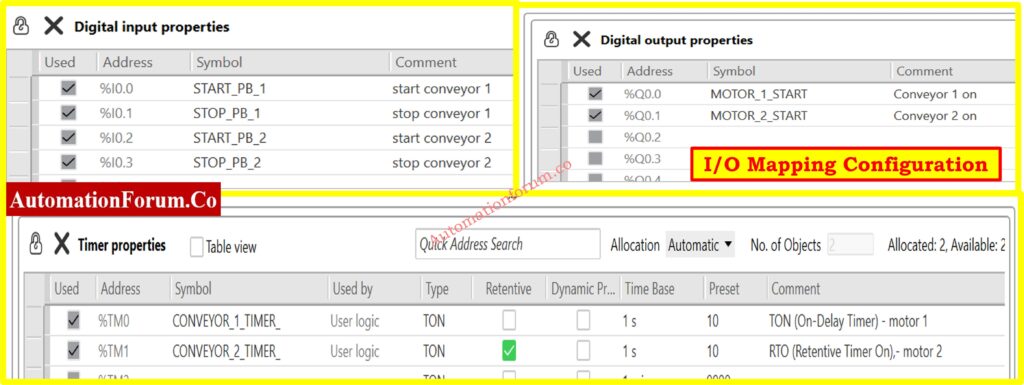
Addressing and property settings in the right system setup show the important distinctions between timer implementations.
I/O Address Assignment
The organized I/O allocation makes it easy to find and fix problems:
Digital Inputs:
Digital Outputs:
- %Q0.0 (MOTOR_1_START): Conveyor 1 motor starter
- %Q0.1 (MOTOR_2_START): Conveyor 2 motor starter
Timer Properties Configuration
The timer configuration table shows the main difference between the two implementations:
- %TM0 (CONVEYOR_1_TIMER): Standard TON configuration, non-retentive
- %TM1 (CONVEYOR_2_TIMER): TON with retentive checkbox enabled
The retentive checkbox changes the way ordinary TON works into RTO functionality, which makes the system behave very differently when there is an interruption.
PLC Learning Series: Deep Dive into PLC Timers Explained: PLC learning Series 10: PLC timers
Live Simulation and Runtime Monitoring
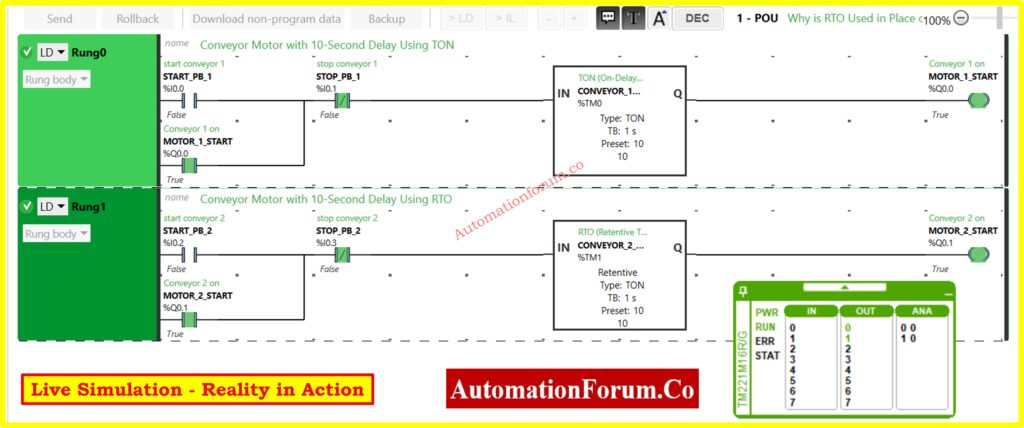
The simulation environment gives engineers real-time access to the condition of the system and the functioning of the timer. This lets them see how behavior changes in different operational situations.
Simulation Capabilities
The runtime display has a lot of monitoring options:
- Timer Values: The total time for both timer instances is shown in real time.
- I/O Status: Shows the live input/output condition with true/false values
- System Diagnostics: PWR, RUN, ERR, and STAT status indicators
- Timer Details: Preset values, elapsed time, and completion status
This level of visibility makes it easy to check for discrepancies in timer behavior right away and fix operational problems.
Practical PLC Example: Motor Control with Timers and Switch: PLC Programming Example: Using Timers to Control Motors with a Single Switch
Scenario Analysis: Normal Operation
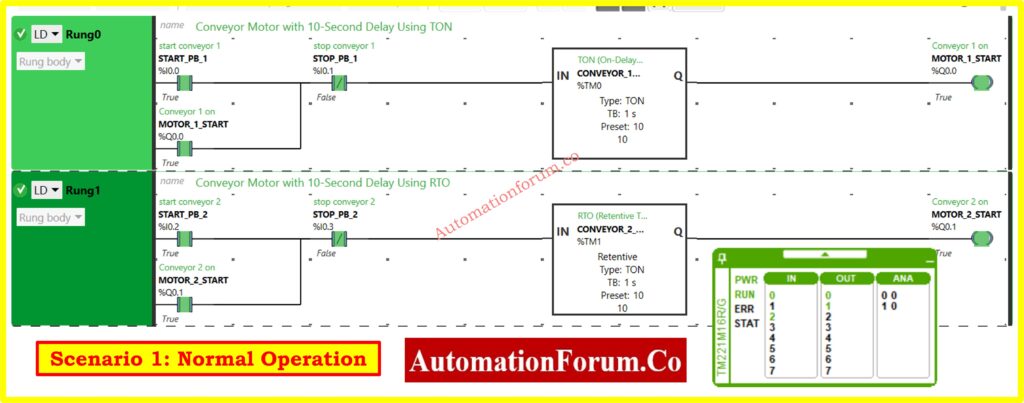
When everything is normal and there are no interruptions, both the TON and RTO timers work in the same way, which makes their main distinctions less clear.
Operational Sequence
The regular order of operations goes like this:
- Timing Phase: Both timers start counting from zero up to the 10-second setting.
- Completion Phase: After 10 seconds, the timer outputs turn on at the same time.
- Motor Operation: Both conveyor motors start at the same time.
Status Indication
The simulation display confirms normal operation through status indicators:
- Both clocks reach the predetermined value of 10 seconds.
- Both motor outputs turn on to True condition.
his instance shows that choosing a timer type doesn’t matter while things are running smoothly.
Explore PLC Timer Blocks and Ladder Logic Applications: Understanding Different types of Timer blocks used in a PLC ladder logic
Scenario Analysis: Stop Button Activation
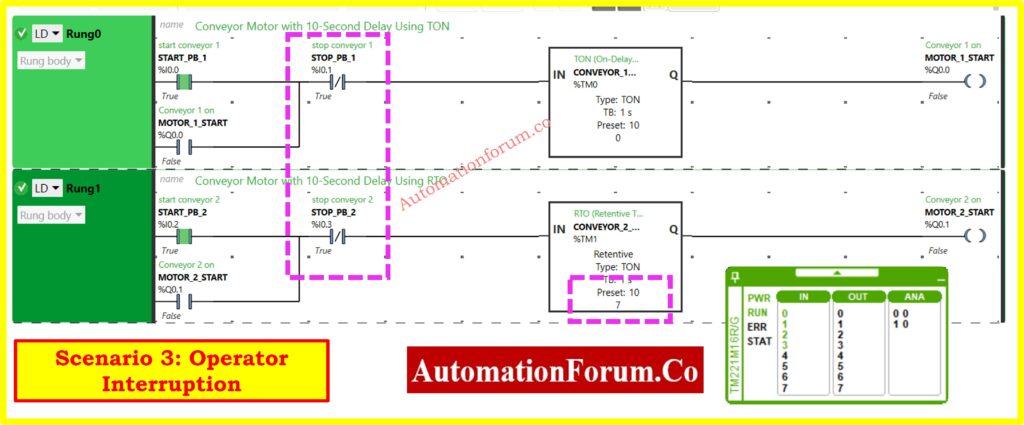
Visual Analysis of Stop Button Impact
The simulation clearly depicts how the two groups reacted differently:
- Both motor outputs go to False state, which means the motors have stopped.
- The way timers respond is very different between TON and RTO implementations.
TON Timer Response to Stop Activation
When STOP_PB_1 activates during the timing sequence:
- Immediate Reset: Timer accumulated time resets to zero
- Output Deactivation: Motor output immediately goes false
- Memory Loss: All timing progress is lost
- Restart Requirement: Full 10-second cycle needed on restart
RTO Timer Response to Stop Activation
When STOP_PB_2 activates during the timing sequence:
- Time Preservation: Accumulated time remains stored
- Output Deactivation: Motor output goes false (motor stops)
- Memory Retention: Timing progress preserved for resume operation
- Resume Capability: Timing continues from stored value on restart
Refer the below link for the PLC Motor Starter Program with Low-Level Switch Interlock
Practical Manufacturing Impact
Production Efficiency Considerations
The changes in how the timers work have big effects on how manufacturing works:
TON Timer Characteristics:
- Production delays that keep adding up because operators have to step in often
- Behavior that you can count on with a fresh start promise
- Easier programming that doesn’t need to manage resets
RTO Timer Advantages:
- Getting rid of production delays that aren’t needed
- Kept the time of the process correct
- Less downtime over time in circumstances with a lot of intervention
Quantifying Production Impact
Think about a production situation where operators have to step in often:
- Daily conveyor starts: 50 cycles
- Average timing progress lost: 6 seconds per intervention
- Daily time penalty with TON: 10 × 6 = 60 seconds
- Annual production time lost: 60 seconds × 250 days = 15,000 seconds = 4.2 hours
This calculation shows how using an RTO timer in high-intervention settings can improve production in real ways.
Boost PLC Performance with 7 Expert Optimization Programming Tips: How to Increase PLC Speed: 7 Optimization Tips + Advanced Programming Guide
Application Selection Guidelines
TON Timer Optimal Applications
TON timers work best in these situations:
Safety-Critical Systems: Applications that need to be able to start over from scratch after any interruption make sure that the execution is delayed until all safety checks are done.
Simple Process Delays:Delays in starting up basic equipment where timed restart is okay or preferred.
Cost-Sensitive Implementations: Systems that put a high value on using as little memory as possible and making programming easy.
Regulatory Compliance: When safety regulations say that full timing cycles must be used.
Understand Hot Standby PLC Systems: Architecture, Working, Benefits: Hot Standby in PLC Systems: Architecture, Working, and Benefits
RTO Timer Essential Applications
RTO timers are very important in tough operational settings:
Continuous Production Lines: Manufacturing systems where timing breaks have a direct effect on throughput and efficiency.
High-Frequency Operations: Processes that need time continuity because they start and stop a lot.
Material Handling Systems: Coordinating conveyors that need to be timed just right with each other.
Quality Control Processes:situations when the accuracy of timing has a direct impact on the quality and consistency of the product.
Refer the below link for the PLC Documentation Guide for Reliable Industrial Automation Systems
Why Engineers Prefer RTO in Real Applications
Let’s pretend to be a plant engineer now. Why would you choose an RTO over a TON?
Process Continuity
You want your conveyors, pumps, or mixers to start up again without any problems if the power goes off. When you start everything anew, it can cause backlogs, jams, or wasted goods.
Time and Energy Savings
In high-speed manufacturing, every second matters. RTO saves energy and time by minimizing delays that aren’t necessary.
Improved Safety
In some systems, it might not be safe to restart a timer from zero. If heaters or ovens start a full cycle again for no reason, they could overheat materials or break equipment.
Compliance in Regulated Industries
Accuracy is important in the pharmaceutical, chemical, and food industries. You can’t afford to mix a batch for an extra 10 seconds after a flicker if it needs exactly 10 seconds of mixing. RTO makes sure that things are always the same.
Common Pitfalls with RTO
Forgetting the Reset Instruction
- You have to reset RTOs on purpose for them to clear. If you forget, timers could keep old values forever.
Incorrect Reset Logic
- Reset connected to the wrong input? The timer never clears, which makes things act strangely.
Using RTO Everywhere
- Some apps don’t need RAM that can be kept. RTO makes logic more complicated than it needs to be.
Overlooking Documentation
- Because RTO works differently, engineers need to make sure that the purpose of the timer is obvious in the program comments.
Best Practices for Engineers
Here is a short list of things to remember while utilizing timers:
- Use TON for simple jobs like delays, buzzers, alarms, lighting, or things that aren’t very important.
- Use RTO when you need to keep things going.
- During commissioning, pretend that the power goes out. Don’t wait for the plant to deal with it in person.
- Give unambiguous tag names, such %TM1 = Conveyor_Start_RTO, instead than just %TM1.
- Teach operators why one conveyor starts up quickly and the other takes longer to do so.
TON vs RTO – Side by Side Comparison
Here’s a quick comparison recap:
| Feature | TON Timer | RTO Timer |
| Accumulator Behavior | Resets to 0 on input OFF/power loss | Retains elapsed time until reset |
| Power Loss Recovery | Always restarts from 0 | Resumes from last stored value |
| Reset Required? | No | Yes (explicit rung) |
| Best Suited For | Simple delays, alarms, interlocks | Critical processes needing continuity |
| Example Application | Motor start delay, buzzer alarms | Conveyor sequencing, batch processing |
Choosing the Right Timer for Your PLC Application
A side-by-side comparison of TON and RTO timers using a real conveyor shows that they work in quite different ways, which has a big effect on how efficient and reliable the system is.
Choose TON timers for applications that need guaranteed fresh start behavior, simple delay actions where a restart is okay, and implementations that are sensitive to cost and want programming to be as easy as possible.
Choose RTO timers for applications that are crucial to production and need timing continuity, high-frequency start/stop operations, and manufacturing environments where delays in production have a direct effect on operational efficiency.
Engineers may make smart choices that improve both system dependability and production performance in industrial automation applications when they know these basic differences. Choosing the right timer and following the right configuration and maintenance procedures will make sure that it works reliably while also fulfilling the needs of the application and the priorities of the operation.
Test your knowledge with our PLC Timers Quiz
Refer the below link to Test your knowledge with our PLC Timers Quiz
