
- What is network equipment?
- How Does Network Equipment Operate?
- What Is Networking Equipment Used For?
- Why Is Network Equipment Important?
- Types of Network Equipment
- Categories of Network Equipment
- What Is a Network Equipment List?
- What Details Should Be Included in a Network Equipment List?
- Advantages of Maintaining a Network Equipment List
- Network Equipment List Management Tools
- Network Equipment List Template
- Best Practices for Maintaining a Network Equipment List
- How to Create and Manage a Network Equipment List
- Additional Fields to Consider in a Network Equipment List
- Storage Formats for Network Equipment Lists
- Advanced Best Practices for Network Equipment List Management
- Creating a Future-Ready Network Equipment List
- Classification of Network Equipment
- Hub vs Switch vs Router Comparison
Network equipment refers to physical hardware devices such as routers, switches, firewalls, hubs, and gateways that enable communication, data routing, security, and management within computer and telecommunications networks.
What is network equipment?
Information packets may be combined, divided, switched, boosted, or directed along a computer or telecommunications network with the use of specialized hardware known as network equipment.
Among the products in this category are firewalls, hubs, switches, routers, bridges, and gateways.
In addition to the device type, the protocol and port or interface type are used to describe the equipment used in a network.
Modern IT infrastructure depends heavily on reliable and well-documented network equipment. From small office LANs to enterprise-scale data centers, networking devices play a critical role in data transmission, security, performance, and scalability.
This guide provides a complete overview of network equipment, including its operation, types, classification, and the importance of maintaining a structured network equipment list. It also covers best practices, templates, tools, and comparisons to help network engineers and IT administrators manage infrastructure efficiently.
How Does Network Equipment Operate?
Networking equipment integrates devices in order for data to be transferred between them. The layout or topology of these linked devices defines the architecture or structure of the network. Computer network topologies include bus, ring, star, tree, and mesh. There are also hybrid topologies.
Devices communicate using radio waves without the need for physical connections in wireless networks. Cables are utilised in wired networks. These cables have connectors for a certain port or kind of interface. For instance, network transceivers include a 15-pin receptacle that may be mated with attachment unit interface (AUI) cables’ 15-pin connections.
The handling of data on computer networks is governed by protocols, which are the basic procedures underlying network communications. Network protocols define the software characteristics of data transmission, such as the format of packets and the data they hold.
Network protocols define the software characteristics of data transmission, such as the format of packets and the data they hold. Blocks, cells, frames, or segments may be the names given to packets depending on the kind of network. Network protocols may also tell the hardware on which they run how to work, either in whole or in part.
What Is Networking Equipment Used For?
Networking hardware, also called network equipment or computer networking devices, is made up of electronic devices that allow devices on a computer network to talk to each other and work together. In particular, they help data move through a computer network.
Why Is Network Equipment Important?
Network hardware is a set of physical or network devices that are needed for hardware units on a computer network to work together and talk to each other. These are dedicated hardware parts that connect to each other and make a network work well and efficiently.
A network with several kinds of equipment is shown in this figure.

Types of Network Equipment

Categories of Network Equipment
Hubs provide a centralized point at which cables may be attached to individual workstations. Hubs are classified into two types: active and passive. Devices on a twisted-pair network are connected by it. A hub just regenerates signals; it does not conduct any other functions.


Routers are devices that connect sub-networks or divide a large network into smaller networks based on the protocols they use. Facilitates the linking of several networks. A router decides where to send data based on the network address that is set up in software.

Repeaters use regeneration and retiming to send signals clearly throughout all network segments.

Bridges are used to link local and distant networks. Network administration is centralised. Separates networks to decrease network traffic. By reading the MAC address, a bridge permits or prohibits data from traveling across it.

Gateways could link networks using incompatible communication protocols. Performs the translation from one data format to another. Gateways may be based on either hardware or software. Any device that transforms data types is referred to as a gateway.
Multiplexers are devices that combine many different signal inputs into a single output.
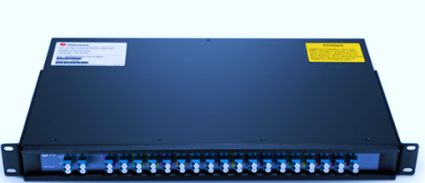
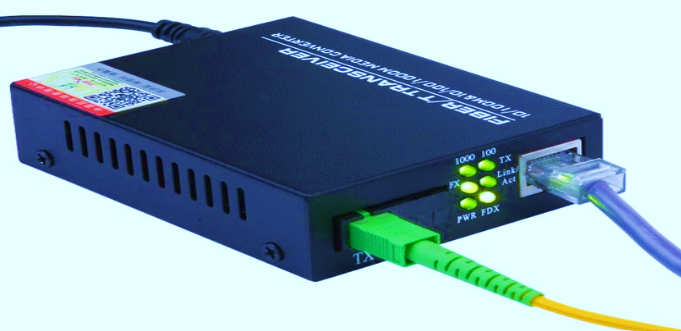
Transceivers transmit and receive signals and link nodes. They are sometimes referred to as medium access units (MAU). Transceiver Converts between different media types, such as UTP to fiber. A device that operates as both a transmitter and receiver of analogue or digital signals.
Firewalls protect networks against illegal access. Provides secure data transfer across networks. Firewalls are an integral component of a network’s security strategy and may be hardware or software based.
The CSU/DSU is responsible for converting digital signals from the local area network (LAN) to the wide area network (WAN). CSU/DSU capability is sometimes integrated into other devices, such as a router with WAN connectivity.

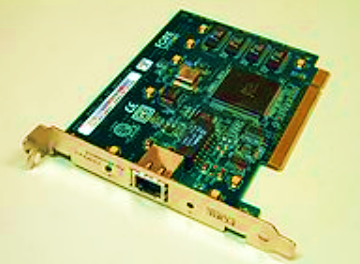
Network cards Allows systems to connect to the network. Network interfaces can be add-in cards, PCMCIA cards, or interfaces that are built into the computer.
ISDN terminal adapter Connects devices to ISDN lines. ISDN is a digital WAN technology that is often used instead of modem links, which are slower. ISDN terminal adapters are needed to change the format of data so it can be sent over ISDN links.

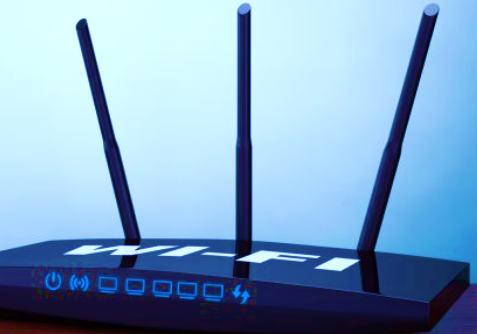
WAP Provides wireless network devices with network functionality. A WAP is often used to connect to a wired network, connecting the wired and wireless parts of the network.

MODEM provides serial communication capabilities across phone line. At the sending end, modems change the digital signal into an analogue one, and at the receiving end, they do the opposite’
What Is a Network Equipment List?
A network equipment list (NEL) is a document that provides an inventory of all the network equipment and devices that are part of a particular network infrastructure. This list typically includes details such as the make and model of the equipment, its location within the network, its IP address or other identifying information, and any additional configuration or setup information that is relevant to its operation.
A typical NEL might include a wide range of different network equipment, such as routers, switches, firewalls, servers, wireless access points, and other network devices. The list may be organized by location, such as building or floor, or by function, such as core network equipment or edge devices.
Maintaining an up-to-date NEL is an important part of network management, as it can help network administrators keep track of all the devices on the network and ensure that they are properly configured and secured. It can also be used to help with capacity planning, troubleshooting, and other network management tasks.
What Details Should Be Included in a Network Equipment List?
A network equipment list (NEL) should include the following details for each piece of network equipment:
Device name: The name or hostname of the device.
Device type: The type of device (e.g. router, switch, firewall, server, access point, etc.).
Manufacturer and model number: The manufacturer and model number of the device.
Serial number: The serial number of the device.
IP address: The IP address assigned to the device.
MAC address: The MAC address of the device.
Physical location: The physical location of the device (e.g. building, floor, room, etc.).
Rack or cabinet location: The location of the device within a rack or cabinet.
Power source: The power source for the device (e.g. AC or DC power supply).
Power consumption: The power consumption of the device.
Network port information: The number and type of network ports on the device, as well as any VLAN or other configuration information.
Software version: The software version and patch level installed on the device.
Maintenance and warranty information: Information about any maintenance contracts or warranties that apply to the device.
Other notes: Any other relevant information about the device, such as configuration details, firmware version, or special features.
Advantages of Maintaining a Network Equipment List
There are several advantages of maintaining a network equipment list (NEL):
Inventory management: A NEL allows network administrators to keep track of all the network equipment and devices that are part of a particular network infrastructure, ensuring that nothing is lost or forgotten.
Network optimization: A NEL can help network administrators identify areas where the network infrastructure can be optimized or improved, such as identifying devices that are underutilized or approaching capacity limits.
Faster troubleshooting: By maintaining an up-to-date NEL, network administrators can quickly locate and identify specific devices on the network, making it easier to troubleshoot issues and resolve problems faster.
Planning for upgrades: A NEL can help network administrators plan for future network expansions or upgrades by providing a clear picture of the existing network infrastructure and identifying areas where additional capacity or functionality may be needed.
Security management: A NEL can help network administrators ensure that all devices on the network are properly configured and secured, by providing a central point of reference for security policies and settings.
Compliance reporting: Many industry and government regulations require organizations to maintain an up-to-date inventory of their network assets, which can be facilitated by a NEL.
Network Equipment List Management Tools
There are several free online tools available for creating and managing a network equipment list (NEL). Here are a few options:
Device42: Device42 offers a free version of its network discovery and asset management software, which includes features for creating and managing a NEL. The free version supports up to 25 devices.
RackTables: RackTables is an open-source data center asset management system that includes features for creating and managing a NEL. It is available for free download and can be installed on a local server.
NetBox: NetBox is an open-source web application for data center infrastructure management and includes features for creating and managing a NEL. It can be downloaded and installed on a local server.
LibreNMS: LibreNMS is an open-source network monitoring and management platform that includes features for creating and managing a NEL. It can be downloaded and installed on a local server.
Spiceworks: Spiceworks offers a free network monitoring and management tool that includes features for creating and managing a NEL. It is a cloud-based solution that can be accessed through a web browser.
The example Network equipment list template is shown below

Network Equipment List Template
The below link is used to download the template for Network equipment list preparation
Best Practices for Maintaining a Network Equipment List
- To make sure that all of the documentation is consistent, use the same naming conventions for all devices.
- Regular audits should be done to check that physical presence, IP addresses, and configuration are all correct.
- As soon as there are any changes, including firmware upgrades, port allocations, or role changes, update the list.
- For improved planning and visualization, connect the equipment list to the most recent network topology diagrams.
- Use version control to keep track of modifications that have been made over time, including who made them and why.
- Limit who can see the list to only those with the right roles to keep anyone from making changes or leaking data.
- To make people more responsible, give each asset on the list to a person or device.
How to Create and Manage a Network Equipment List
- Use auto-discovery tools or network scans (such SNMP-based ones) to find all the devices that are currently on your network.
- Export data from monitoring or asset management tools and put it together in a systematic way.
- Store and maintain the list on centralized systems like CMDBs or network inventory tools.
- Set up regular checks to make sure that your physical inventory matches the data you have on file.
- Use APIs or connections with network monitoring services to automate updates when you can.
Additional Fields to Consider in a Network Equipment List
- Version of firmware and date of release
- Status of end-of-life (EOL) and end-of-support (EOS)
- Assigned IT support contact or owner
- Where to get the backup configuration file
- Keeping track of uptime and reboot history
- Tag for compliance (such PCI, HIPAA, or ISO 27001)
Storage Formats for Network Equipment Lists
- Excel or CSV files for tracking by hand and moving around
- SQL databases for structured data and query support
- Use YAML or JSON to connect infrastructure as code.
- Documentation in an internal wiki or HTML format that everyone on the team can access
Advanced Best Practices for Network Equipment List Management
Keeping an accurate and complete list of network equipment isn’t simply for keeping track of inventories. It is very important for compliance, automation, and cybersecurity. Here are some advanced best practices:
- Network Diagrams and Configuration Files: Put together your list of network equipment with network topology diagrams and configuration sources. This gives you more information and speeds up the process of finding problems.
- Version Control and Audit Trails: Use technologies that help with version control to keep track of who changed the list and when. This makes sure that people are responsible and follows ITIL asset management best practices.
- Use APIs to make changes on the fly: Advanced network management systems can combine with monitoring tools to automatically update your list of network devices as they go online or offline or when their settings change.
- Backup and Restore Metadata: For planning disaster recovery, make sure that each item on the network equipment list has connections to where backups are kept and how to restore them.
Creating a Future-Ready Network Equipment List
To make sure your list of network equipment is good for the future:
- Add fields for things like the Assigned Technician, the Warranty Expiry Date, the Linked Support Contracts, and the Software/Firmware History.
- If you use Infrastructure-as-Code or DevOps to manage your network, use formats like JSON or YAML.
- For business continuity, set up frequent exports and offsite storage of your list of network equipment.
Classification of Network Equipment
To organize your list of network devices in a useful way, group them by their main function and the OSI model layer they belong to:
| Category | Example Devices | OSI Layer |
| Access Devices | Hub, Repeater, Bridge | Layer 1-2 (Physical/Data Link) |
| Switching Devices | Layer 2 Switch, Layer 3 Switch | Layer 2-3 |
| Routing Devices | Router, Gateway | Layer 3-7 |
| Security Devices | Firewall, Gateway | Layer 3-7 |
| Transmission Devices | Modem, Media Converter, CSU/DSU | Layer 1 |
Adding this category makes it easier to understand and helps network personnel find equipment by function.
Hub vs Switch vs Router Comparison
To help you quickly find and tell the difference between network devices, add the following table to the network equipment list documentation:
| Feature | Hub | Switch | Router |
| OSI Layer | Layer 1 (Physical) | Layer 2 (Data Link) | Layer 3 (Network) |
| Operation Mode | Broadcast | Unicast / Multicast / Broadcast | Unicast (based on IP routing) |
| Address Used | None | MAC Address | IP Address |
| Intelligence | No filtering | Learns MAC addresses | Maintains routing tables |
| Speed | Slow | Fast | Very fast |
| Cost | Lowest | Moderate | Highest |
| Use Case | Simple LAN setups | Efficient LAN traffic control | Interconnecting networks |
When upgrading or auditing the network equipment list, this comparison might help you make a decision, especially when you have both old and new devices on the same network.
Network equipment forms the backbone of modern digital communication systems. Understanding different types of networking devices, maintaining an accurate network equipment list, and following best management practices ensures secure, scalable, and high-performance networks. A well-maintained inventory not only simplifies troubleshooting and audits but also prepares organizations for future growth and cybersecurity challenges.
Network equipment is the foundation of every IT network. Learn types of networking devices, how to maintain a network equipment list, and best practices for secure infrastructure management.
This guide is widely used by network engineers, system administrators, and IT infrastructure professionals for understanding and managing enterprise network equipment effectively.
